
MAC-VRF Routing Instance Type Overview
Use the MAC-VRF routing instance type to configure multiple customer-specific EVPN
instances (EVIs), each of which can support a different EVPN service type. You configure
a MAC-VRF instance with the mac-vrf statement at the
[edit routing-instances mac-vrf-instance-name
                instance-type]
hierarchy. With this configuration, you can create
customer-specific virtual routing and forwarding (VRF) tables.
Benefits of the MAC-VRF Routing Instance Type
- Customer-specific VRF tables
- Consistent configuration across supported router and switch platforms within an EVPN-VXLAN network or an EVPN-MPLS network.
- Configuration alignment with RFC 7432
MAC-VRF Instances Enable Customer-Specific VRF Tables
When you configure a MAC-VRF routing instance, you can isolate or group routing and forwarding traffic by customer. In fact, you can manage MAC-VRF instances around multiple schemes within an organization, including by department, division, or geographic location. The traffic belonging to any one MAC-VRF instance cannot interact with traffic from any other MAC-VRF instances.
MAC-VRF Instance Service Types
MAC-VRF instances follow the EVPN instance design in RFC
7432, which includes the three service types in Table 1. When you create a MAC-VRF instance, you must configure one of the supported
service types using the service-type statement at the
[edit routing-instances
                        mac-vrf-instance-name
] hierarchy level.
Some configuration changes can be what we call catastrophic if you perform the changes in an operating network, which means you might see significant disruption in network operation and services. The network disruption can include loss of connectivity among the network devices, and traffic loss while the devices reconverge on changes to network information. When you want to change options in an EVPN routing instance, the change has the potential to impact traffic flow for EVPN as well as other services in the network. As a result, when you change EVPN instance (EVI) parameters, make sure you use the following procedure to avoid network disruption and traffic loss:
When you want to change a traffic impacting option under a routing instance, use the following procedure.
Deactivate the routing instance configuration.
Change the traffic impacting option.
Reactivate the updated routing instance configuration.
For example, follow this procedure if you need to change settings such as:
-
The
service-typein a MAC-VRF routing instance—When you change the service type of a running instance, the device might incorrectly change the VLAN ID if it is not deactivated before making the change. -
The
vlan-idin an EVPN routing instance—Changing thevlan-idwithout first deactivating the associated EVPN routing instance would be catastrophic.
| Service Type Option | Description |
|---|---|
|
|
You can configure the MAC-VRF EVPN instance to correspond to a single VLAN and corresponding bridging table. Note:
If the VLAN maps to different VLAN IDs per Ethernet segment, then you must configure each device in the EVPN fabric to perform VLAN ID translation on packets destined for the Ethernet segment. |
|
|
You can configure the MAC-VRF EVPN instance to correspond to one or more VLANs. The MAC-VRF instance maintains one bridging table per VLAN. Note:
By default in EVPN-VXLAN MAC-VRF instances with this service type, the device extends all VXLAN network identifiers (VNIs) in the instance. You don't need to explicitly configure the extended-vni-all statement. You can configure the extended-vni-list statement if you want to extend only a subset of the VNIs in the instance. (See Extended VNI List Behavior.) |
|
|
You can configure the MAC-VRF EVPN instance to correspond to multiple VLANs that share the same bridging table. MAC addresses must be unique across all VLANs in the instance. This service type also doesn't support VLAN translation (you can configure each VLAN with one unique VLAN ID). Note:
If all VLANs for a port are part of the same VLAN bundle service, the service is called a port-based service. |
Flexible Configuration Options at Layer 2 and Layer 3
With MAC-VRF instances, you have more flexible configuration options for customers at both Layer 2 (L2) and Layer 3 (L3):
-
At L2: You can configure different service types in different MAC-VRF instances on the same device.
-
At L3: You can configure a VRF instance that corresponds to the VLAN or VLANs in a single MAC-VRF instance. You can also configure a VRF instance that spans the VLANs in multiple MAC-VRF instances.
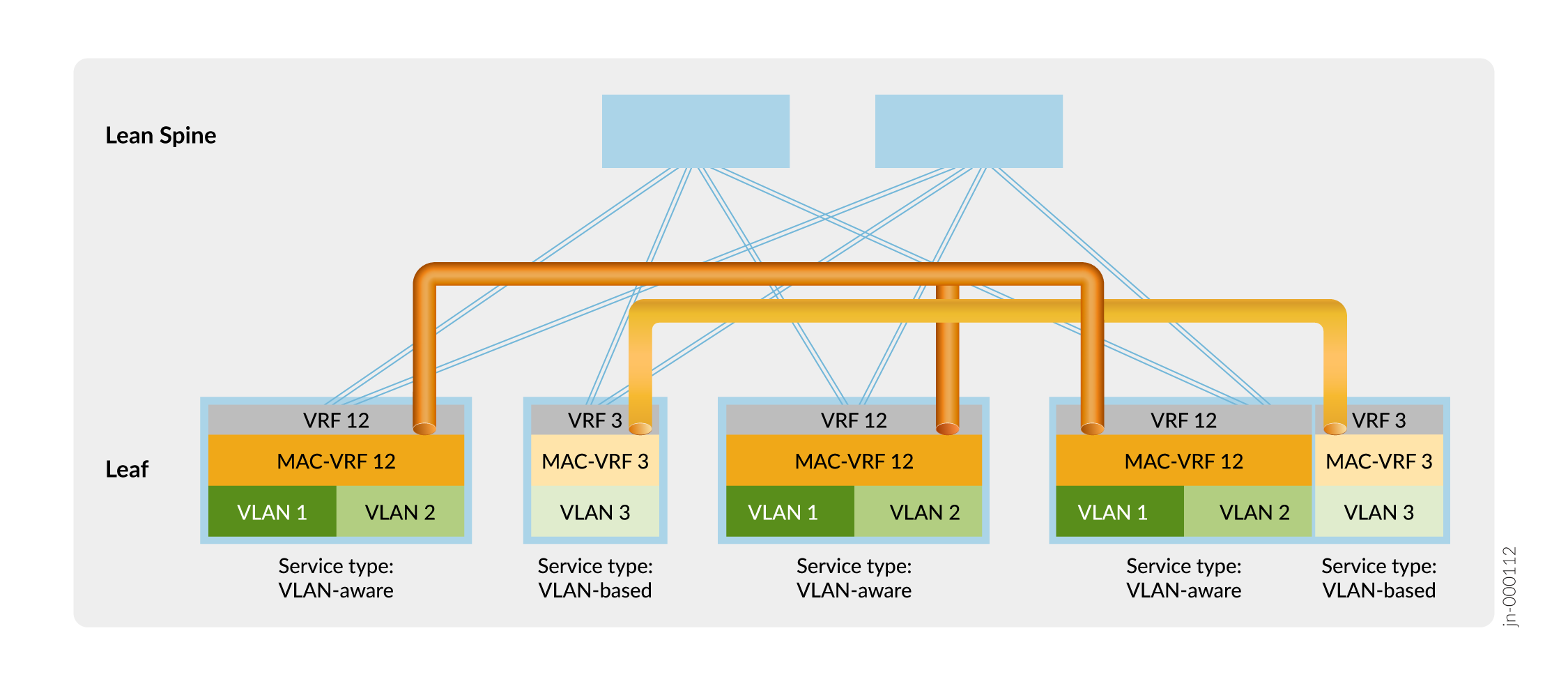
For example, the following figure shows an edge-routed bridging (ERB) EVPN-VXLAN fabric. The leaf devices establish VXLAN tunnels that maintain L2 and L3 separation between a customer on VLAN 1 and VLAN 2, and a customer on VLAN 3. MAC-VRF 12 and MAC-VRF 3 separate the customers at L2. VRF 12 and VRF 3 separate the customers at L3. The figure also shows that you can configure multiple MAC-VRF instances on the same device with different service types.
MAC-VRF Instances Enable More Common EVPN Configurations across Platforms
On devices that support EVPN configurations, the configuration methods vary from platform to platform. For example:
-
On MX Series routers, before MAC-VRF instance support, you could configure EVPN instances using instances of type
virtual-switchwith statements in the following hierarchies:bridge-domainsrouting-instances
MX Series routers also support EVPN instances configured using the
evpninstance type. -
On QFX Series switches, before MAC-VRF instance support, you could configure EVPN instances using the default switch instance with statements in the following hierarchies:
ethernet-switchingrouting-instances
Some QFX Series switches also support EVPN instances of type
virtual-switch.
This disparity can be confusing and lead to errors configuring EVPN across different platforms.
We introduced the mac-vrf routing instance type to create a common
EVPN configuration on all supported platforms. The common configuration hierarchy
across routing and switching platforms also brings our implementation of MAC-VRF
into compliance with RFC
7432. RFC compliance enables our MAC-VRF implementation to work well in
data center, service provider, and public cloud environments.
On some platforms, such as Junos OS Evolved ACX Series, QFX Series, and PTX series platforms, we support only MAC-VRF EVPN instances. See Feature Explorer for the platforms and releases in which we support MAC-VRF instances for EVPN features.
Platforms that support MAC-VRF instances as well as other instance types to configure EVPN instances can have different instance configurations coexist in an active network. EVPN fabrics can comprise a combination of devices that support MAC-VRF instances and devices that use other instance types for EVPN.
MAC-VRF Instance EVPN-VXLAN Sample Configurations
Here we include some simple mac-vrf instance EVPN-VXLAN
configurations. See Usage and Behavior Notes
for more on platform-specific parameters and behaviors to note when you configure
MAC-VRF instances.
You can also find links to other complete MAC-VRF instance EVPN-VXLAN configurations in More MAC-VRF Instance EVPN-VXLAN Use Case Configurations.
- VLAN-Based Service Type Configuration
- VLAN-Aware Service Type Configuration
- VLAN-Aware Service Type Configuration (Bridge Domains)
- VLAN-Bundle Service Type Configuration
- More MAC-VRF Instance EVPN-VXLAN Use Case Configurations
VLAN-Based Service Type Configuration
This VLAN-based service type configuration includes a
bridge-domains configuration stanza to associate the VLANs
with the MAC-VRF instance.
The bridge-domains stanza:
-
Is applicable on some platforms such as MX Series routers.
-
Uses the
routing-interfacestatement to associate an L3 logical interface (an integrated routing and bridging [IRB] interface) with the VLAN.
On other platforms that don't support the bridge-domains stanza,
use the vlans stanza like the vlans v100
configuration in VLAN-Aware Service Type Configuration. Instead of the routing-interface statement, the
vlans statement hierarchy uses the
l3-interface statement to associate an IRB interface with
the VLAN.
This configuration also optionally includes a static MAC address assigned to the
interface associated with the VLAN in the instance, which you set at the
[edit routing-instances macvrf-instance-name
                        vlans vlan-name switch-options interface
                            interface-name]
hierarchy level.
routing-instances {
  MACVRF-1 {
    protocols {
      evpn {
        encapsulation vxlan;
      }
    }
    instance-type mac-vrf;
    service-type vlan-based;
    interface xe-0/0/1.100;
    vtep-source-interface lo0.0;
    route-distinguisher 3.3.3.3:1;
    vrf-target target:1:100;
    bridge-domains {
      v100 {
        vlan-id 100;
        interface xe-0/0/1.100;
        routing-interface irb.100;
        switch-options {
          interface xe-0/0/1.100 {
            static-mac 00:03:03:00:00:00;
          }
        }
      }
      vxlan {
        vni 1100;
      }
    }
  }
}
VLAN-Aware Service Type Configuration
The VLAN-aware service type is also sometimes called a VLAN-aware bundle (not to
be confused with the vlan-bundle service type). The sample
configuration here is applicable on switching and routing platforms that use the
vlans configuration stanza instead of the
bridge-domains stanza to associate VLANs with a routing
instance. This configuration associates VLANs 100 and 101 (and the corresponding
L2 and L3 logical interfaces) with the EVPN-VXLAN instance MACVRF-1.
The sample here also includes:
-
The
default-gateway
                                do-not-advertise
statement to prevent the device from advertising the default gateway IRB MAC address. See Example: Configuring an EVPN-VXLAN Edge-Routed Bridging Fabric with an Anycast Gateway for more information on when and why you should include this option. -
The
extended-vni-liststatement, although in this case the statement isn't required because thevlan-awareservice type automatically extends all VNIs in the instance. See Extended VNI List Behavior for more on using theextended-vni-liststatement in MAC-VRF instances. -
(Optional) A static MAC address assigned to the interface associated with VLAN 100 in the instance, which you set at the
[edit
                                routing-instances macvrf-instance-name vlans
                                    vlan-name switch-options interface
                                    interface-name]
hierarchy level.
routing-instances {
  MACVRF-1 {
    protocols {
      evpn {
        encapsulation vxlan;
        default-gateway do-not-advertise;
        extended-vni-list [1100 1101];
      }
    }
    instance-type mac-vrf;
    service-type vlan-aware;
    vtep-source-interface lo0.0;
    route-distinguisher 3.3.3.3:1;
    vrf-target target:1:100;
    vlans {
      v100 {
        vlan-id 100;
        interface xe-0/0/1.100;
        l3-interface irb.100;
        switch-options {
          interface xe-0/0/1.100 {
            static-mac 00:03:03:00:00:00;
          }
        }
        vxlan {
          vni 1100;
        }
      }
      v101 {
        vlan-id 101;
        interface xe-0/0/1.101;
        l3-interface irb.101;
        vxlan {
          vni 1101;
        }
      }
    }
  }
}
VLAN-Aware Service Type Configuration (Bridge Domains)
This VLAN-aware configuration is applicable on routing platforms that use the
bridge-domains configuration statement to associate VLANs
100 and 101 (and the corresponding L2 and L3 logical interfaces) with an EVPN
instance MACVRF-1.
The sample here also includes the extended-vni-list statement,
although in this case the statement isn't required because the
vlan-aware service type automatically extends all VNIs in
the instance. See Extended VNI List Behavior for more on using the extended-vni-list statement in MAC-VRF
instances.
routing-instances {
  MACVRF-1 {
    protocols {
      evpn {
        extended-vni-list [1100 1101];
        encapsulation vxlan;
      }
    }
    instance-type mac-vrf;
    service-type vlan-aware;
    vtep-source-interface lo0.0;
    route-distinguisher 3.3.3.3:1;
    vrf-target target:1:100;
    bridge-domains {
      v100 {
        vlan-id 100;
        interface xe-0/0/1.100;
        routing-interface irb.100;
        vxlan {
          vni 1100;
        }
      }
      v101 {
        vlan-id 101;
        interface xe-0/0/1.101;
        routing-interface irb.101;
        vxlan {
          vni 1101;
        }
      }
    }
  }
}
VLAN-Bundle Service Type Configuration
This VLAN-bundle service type configuration includes the corresponding
interfaces statements associating a VLAN ID list with an
aggregated Ethernet logical interface ae1 in the EVPN instance MACVRF-1.
Also, with a MAC-VRF vlan-bundle EVPN-VXLAN service, the device
maintains the inner VLAN ID through the VXLAN tunnel by default. You don't need
to configure options such as encapsulate-inner-vlan and decapsulate-accept-inner-vlan as you
might, for example, for a similar service using a default switch EVPN instance
configuration.
interfaces ae1 {
  unit 100 {
    encapsulation vlan-bridge;
    vlan-id-list 100-101;
}
routing-instances {
  MACVRF-1 {
    protocols {
      evpn {
        encapsulation vxlan;
      }
    }
    instance-type mac-vrf;
    service-type vlan-bundle;
    vtep-source-interface lo0.0;
    route-distinguisher 3.3.3.3:1;
    vrf-target target:1:100;
    interface ae1.100;
    vlans {
      v100 {
        vxlan {
          vni 1100;
        }
        interface ae1.100;
      }
    }
  }
}
More MAC-VRF Instance EVPN-VXLAN Use Case Configurations
Here are some references to other more complex and complete EVPN-VXLAN use case configurations that include MAC-VRF instances:
MAC-VRF Instance Show Commands and Aliases
Some mac-vrf show commands apply only to specific platforms. For
example, the MAC-VRF command show mac-vrf mac-table age (and the
corresponding show bridge mac-table age command) applies only to MX
Series routers. If you issue the show mac-vrf mac-table age command
on a QFX Series switch, the output is blank without any error indication.
See Table 2 and Table 3 for references to the commands that provide information about EVPN instances. The common MAC-VRF forms of these commands are aliases for the platform-specific commands. Use the listed commands as follows:
-
You can use the MAC-VRF versions of these commands in the first column to display EVPN instance information on any platforms with MAC-VRF EVPN configurations.
-
Use the MAC-VRF commands in the first column on ACX Series, QFX Series, and PTX series platforms running Junos OS Evolved, which support EVPN only with MAC-VRF instance configurations.
-
Use the commands in the second column on MX Series routers and the EX9200 line of switches running Junos OS, for example, when you configure EVPN instances using instance type
virtual-switch. -
Use the commands in the third column on QFX Series and EX Series switches running Junos OS, for example, when you configure EVPN instances using the default switch instance.
| MAC-VRF Command | MX Series Routers and the EX9200 Line of Switches | QFX Series and EX Series Switches |
|---|---|---|
show
mac-vrf forwarding flood |
show bridge flood |
show ethernet-switching flood |
show mac-vrf forwarding flood-group |
show l2-learning flood-group |
show ethernet-switching flood-group |
show mac-vrf forwarding
global-information |
show l2-learning global-information |
show ethernet-switching
global-information |
show mac-vrf forwarding
global-mac-count |
show l2-learning global-mac-count |
show ethernet-switching global-mac-count |
show mac-vrf forwarding
global-mac-ip-count |
show l2-learning global-mac-ip-count |
show ethernet-switching
global-mac-ip-count |
show
mac-vrf forwarding instance |
show l2-learning instance |
show ethernet-switching instance |
show mac-vrf forwarding
instance-mapping |
– | – |
show mac-vrf forwarding interface |
show l2-learning interface |
show ethernet-switching interface |
show mac-vrf forwarding
mac-ip-table |
show bridge mac-ip-table |
show ethernet-switching mac-ip-table |
show mac-vrf forwarding mac-table |
show bridge mac-table |
show ethernet-switching table |
show mac-vrf forwarding mgrp-policy |
show l2-learning mgrp-policy |
show ethernet-switching mgrp-policy |
show mac-vrf forwarding statistics |
|
show ethernet-switching |
show
mac-vrf forwarding vlans |
show bridge domains |
show ethernet-switching vlans |
show mac-vrf forwarding vxlan-tunnel-endpoint
esi |
show l2-learning vxlan-tunnel-end-point
esi |
show ethernet-switching vxlan-tunnel-end-point
esi |
show mac-vrf forwarding vxlan-tunnel-endpoint
remote |
show l2-learning vxlan-tunnel-end-point
remote |
show ethernet-switching vxlan-tunnel-end-point
remote |
show mac-vrf forwarding vxlan-tunnel-endpoint
svlbnh |
show l2-learning vxlan-tunnel-end-point
svlbnh |
show ethernet-switching vxlan-tunnel-end-point
svlbnh |
| MAC-VRF Command | Equivalent show evpn Commands |
|---|---|
show mac-vrf routing
database |
show evpn
database |
show mac-vrf routing igmp-snooping
database |
show
evpn igmp-snooping database |
show mac-vrf routing instance |
show evpn
instance |
show mac-vrf routing mld-snooping
database |
show
evpn mld-snooping database |
show mac-vrf routing multicast-snooping
status |
show evpn multicast-snooping status |
show mac-vrf routing p2mp |
show evpn
p2mp |
We have integrated the syntax of the commands from the show mac-vrf
routing hierarchy into the existing show evpn
command documentation. The links in Table 3
lead to the existing show evpn commands.
Usage and Behavior Notes
Read the following notes to know more about using MAC-VRF routing instances and the observed behaviors of those MAC-VRF routing instances.
- MAC-VRF Instance Type Support Limitations
- Shared VTEP Tunnels in EVPN-VXLAN Fabrics with Multiple MAC-VRF Routing Instances
- VLANs, Forwarding Instances, and Overlapping VLANs with MAC-VRF Routing Instances
- Extended VNI List Behavior
MAC-VRF Instance Type Support Limitations
Note the following support limitations for MAC-VRF instances:
-
We support the MAC-VRF instance type for configuring EVPN instances with EVPN-MPLS on MX Series routers only with Advanced Forwarding Tookit (AFT)-based line cards.
-
We don't support changing the
encapsulationsetting at the[edit routing-instances <instance-name> protocols evpn]hierarchy on ACX Series routers. If you need to configure a different encapsulation for your EVPN routing instance, then you must delete the current routing instance and create a new routing instance with the desired encapsulation.
VLANs, Forwarding Instances, and Overlapping VLANs with MAC-VRF Routing Instances
Each supported platform has its own support framework for VLANs and forwarding instances, and how VLANs can overlap.
-
EX4400, QFX5100, QFX5110, QFX5120, QFX5200, QFX5130-32CD, and QFX5700 switches, and PTX10001-36MR, PTX10004, PTX10008, PTX10016 routers
These devices support only one forwarding instance (
default-switch). You can't configure overlapping VLANs within a single MAC-VRF routing instance or across different MAC-VRF routing instances.However, on some of these platforms, you can alternatively use VLAN translation to support overlapping VLANs. See vlan-rewrite and Overlapping VLAN Support Using VLAN Translation in EVPN-VXLAN Networks.
-
ACX7100-32C and ACX7100-48L routers, and the QFX10000 line of switches
The QFX10000 line of switches supports multiple forwarding instances using the forwarding-instance option at the
[edit routing-instances
                                    mac-vrf-instance-name]
hierarchy. This statement maps a MAC-VRF instance to a forwarding instance corresponding to the configured identifier. Starting in Junos OS Evolved Release 22.3R1, ACX7100-32C and ACX7100-48L routers also support multiple routing instances using theforwarding-instance identifieroption.On these platforms, you can configure overlapping VLANs across multiple MAC-VRF routing instances if you've mapped each routing instance to a unique forwarding instance. You can also configure multiple MAC-VRF routing instances to use one forwarding instance. You can't configure overlapping VLANs within a single MAC-VRF routing instance or across routing instances each of which maps to the same forwarding instance. If you don't configure the forwarding instance, the MAC-VRF routing instance uses the default forwarding instance (
default-switch).ACX7100-32C and ACX7100-48L routers alternatively support overlapping VLANs using explicit or implicit VLAN normalization. You can also use VLAN normalization to support overlapping VLANs on these routers in releases before Junos OS Evolved Release 22.3R1. See Overlapping VLAN Support Using Multiple Forwarding Instances or VLAN Normalization.
-
MX Series routers and the EX9200 line of switches
You can configure overlapping VLANs across multiple MAC-VRF routing instances. You cannot configure overlapping VLANs within a single MAC-VRF routing instance.
On these platforms, each MAC-VRF routing instance that you configure automatically maps to its own forwarding instance. We don't support the
forwarding-instanceoption.
In the default configuration, devices include a default VLAN with a VLAN ID value of 1 associated with the default forwarding instance. Because VLAN IDs must be unique in a forwarding instance, if you want to configure a VLAN with VLAN ID 1 in a MAC-VRF instance that uses the default forwarding instance, you must reassign the VLAN ID of the default VLAN to a value other than 1. For example:
set vlans default vlan-id 4094
set routing-instances mac-vrf-instance-name vlans vlan-name vlan-id 1
Extended VNI List Behavior
You can configure extended virtual network identifier (VNI) lists within any
MAC-VRF routing instance at the edit routing-instances mac-vrf
routing instance name protocols evpn hierarchy level.
The extended-vni-list keyword is an optional configuration
element. By default, the device extends all VNIs (whether in a VNI list or not)
within the MAC-VRF routing instance. If you configure a specific VNI list, then
you can extend only those VNIs that are in the list.