
WAN Assurance Configuration Overview
After you've completed the prerequisite tasks and designed your WAN, use this information to guide the configuration process.
Configuration Workflow
The configuration process consists of a set of inter-related tasks.
Figure 1: WAN Configuration Workflow
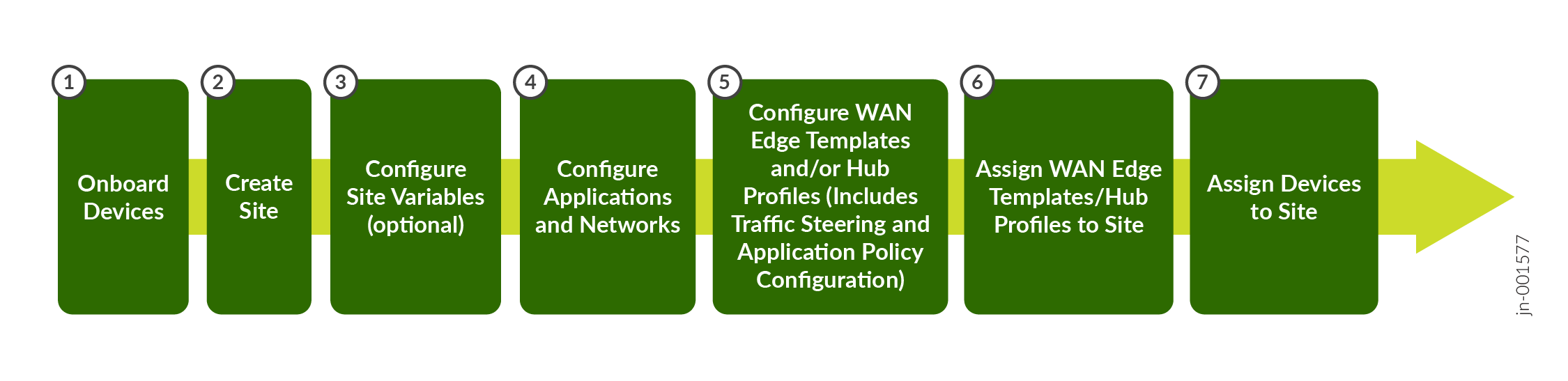
| Task | Description | More Information |
|---|---|---|
| Create variables to use in your configurations. | If you haven't already done so, add your sites to your organization. Then, to streamline the setup process, define site variables for each site. You use these variables later in the templates for WAN Edge devices and the hub profile. | Define Site Variables |
| Define your applications and network. | Define Applications and Networks | |
| Create application policies. | Application policies determine which networks or users can access which applications, and according to which traffic steering policy. | Application Policies |
| Create WAN Edge templates. | Create WAN Edge templates to streamline and standardize device configuration across your sites. | Configure WAN Edge Templates |
| Create hub profiles. | Create hub profiles for standalone or clustered devices to automate overlay path creation. | Configure Hub Profiles |
| Configure any standalone devices. | If you are managing a device without a hub profile or WAN Edge template, going to WAN Edge > WAN Edge, select the device, and enter the settings. | Configuration Reference chapter of this guide |
| Assign devices, templates, and hub profiles to sites. | Onboard your devices by assigning them to a site. Complete the onboarding by attaching hub profiles and spoke templates to the respective hub sites and spoke sites. This final step brings the topology together. | Assign Sites |
Optional Configuration Tasks
You can perform the following tasks on your devices for providing additional security measures:
-
Set Up Secure Edge Connectors—Perform traffic inspection by Secure Edge for the WAN Edge devices managed by Juniper Mist Cloud portal. To get started, see Juniper Mist Secure Edge Connector Overview.
- Configure IDP-Based Threat Detection—Monitor the events occurring on your network and proactively stop attacks and prevent future attacks. See Intrusion Detection and Prevention.
Upgrade software on your device to take advantage of new enhancements.
- Upgrade Software—Upgrade the software on your device through the Juniper Mist portal in a few simple steps. See Upgrade WAN Edge Device.