
Juniper Mist Secure Edge Connector Overview
Before integrating Secure Service Edge (SSE), get familiar with key concepts, deployment options, and the high-level workflow.
Juniper Mist provides pre-built connectors specifically designed for SRX Series Firewalls and Session Smart Routers deployed as WAN Edge devices. These connectors facilitate seamless integration with Secure Service Edge (SSE) deployments.
In this solution, you use the Mist portal to configure a Secure Edge Connector (SEC). An IPsec tunnel is configured between the WAN Edge device and the SSE using that SEC configuration. With this, your WAN Edge devices establish connections to the SSE using IPsec or GRE protocols.
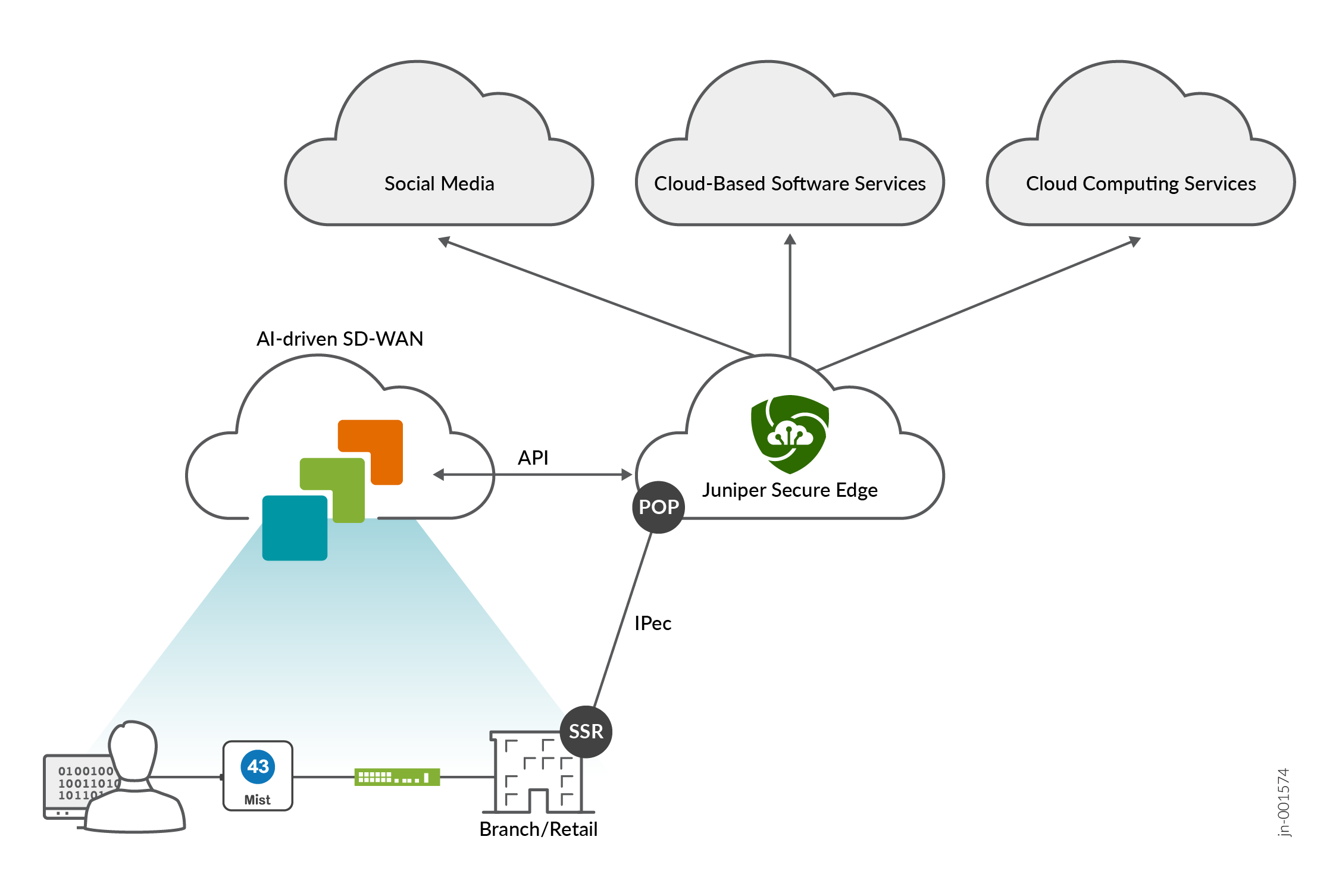
Additionally, for SEC types such as Prisma Access and Custom, a BGP over IPsec connection can be configured to dynamically learn routing destinations from the SSE device.
Juniper Mist supports the following SEC providers:
- Juniper Secure Edge (manual provisioning and auto provisioning)
- Palo Alto Prisma Access (auto provisioning)
- Zscaler (manual provisioning and auto provisioning)
- Custom
High-Level Overview of Configuring Secure Edge Connectors in Mist
Below is the high-level workflow for setting up secure edge connectors with the Mist supported Secure Edge Connector types to offload traffic from your WAN Edge device:
Create and deploy a basic branch template for device connectivity.
Optionally configure a remote network in SSE. This step defines a remote source for inbound connectivity through the tunnel.
Configure an SEC and SSE provider in the device template. This step creates a custom IPsec tunnel to the remote location and define encryption parameters.
Optionally configure a BGP peer to learn routes dynamically.
Configure an application that allows traffic steering toward the IPsec tunnel. This application will be used in an application policy to allow client networks to access the BGP learned routes.
Configure a traffic steering policy that steers the Internet-bound traffic from the LAN side of a spoke or hub device to the SEC.
Configure an application policy and assign the appropriate application and traffic steering to the policy.
Application Policies for SEC
An application policy defines which networks and users (traffic source) can access which applications (traffic destination). You also can use Traffic Steering to define which path to use, and then assign that traffic steering rule to the application policy.
To set up these policies, you need to create networks, applications, and traffic-steering profiles.
-
For outbound traffic—Include the SEC in the traffic steering profile.
-
For inbound traffic through the SEC—Include the remote network in the SEC, and define an application policy that allows inbound access. With this feature, you can securely connect to cloud-hosted services that initiate inbound traffic to a site.
Traffic Steering Profiles for Secure Edge Connector
Traffic steering is required for SEC on both SRX Series Firewalls and Session Smart Routers before Juniper Mist creates the tunnels.
This requirement remains unless:
- A remote network is assigned to an SEC
- A BGP peer is assigned to an SEC
Dynamic Routing for SEC
You can configure BGP peering over your SEC. This configuration leverages BGP for dynamic routing and uses BGP path selection to install routes in the route table.
-
Palo Alto Prisma Access (auto provisioning)
-
Custom
JSE and Zscaler do not support BGP over IPsec for dynamic routing.
High-Level steps to configure dynamic routing for SEC:
Verify that your SEC is established and is configured using the Custom or Prisma Access Secure Edge provider.
Configure BGP import and export policies.
Configure BGP neighbor options.
Select the SEC for this BGP neighbor.
Assign import and export policies.
Verify that the BGP peers are exchanging routes over the tunnel interface.