Proxy Server Configuration
Many enterprise sites can only reach the public internet through a corporate web proxy — typically locations served by MPLS or other private circuits where direct outbound access is unavailable or prohibited by policy. The SSR can be configured to route its outbound management traffic through a non-transparent (explicit) HTTP/HTTPS proxy so it can reach the services it depends on: the Mist cloud for ZTP and telemetry, software and signature feeds from Juniper, Sophos, Websense, and similar providers.
Anti-Virus does not work through a proxy server. If a proxy is enabled, do not rely on Anti-Virus.
How It Works
When management-proxy is enabled, the SSR:
- Obtains one or more candidate proxy addresses, either from configuration (static) or from DHCP on the WAN (learned).
- Validates each candidate (valid IPv4 address, TCP port
1–65535) and selects the active proxy by the rule described in Active Proxy Selection. - Health-checks the active proxy and exposes its state through
show management-proxy, raising an alarm if it stops responding (see Health Checking and Alarms). - Transparently forwards the SSR's own management-plane HTTP/HTTPS traffic through the active proxy (see Transparent Forwarding).
In an HA pair the two nodes share what they learn and apply the same selection rule, so they always converge on the same active proxy without explicit coordination.
Configuration
management-proxy is configured under authority > router > management-proxy and supports three modes of operation:
| Mode | Behavior |
|---|---|
disabled | No upstream proxy is used. Default. |
static | One or more proxy address/port pairs are configured explicitly. |
learned | Proxy addresses are discovered from DHCP on the SSR's WAN network-interfaces. |
Static
Use static when the proxy address is fixed and known ahead of time:
config authority router router management-proxy mode   static
config authority router router management-proxy proxy 10.0.0.1 address  10.0.0.1
config authority router router management-proxy proxy 10.0.0.1 port     5000
Only one proxy entry is allowed in static mode. In learned mode, the SSR may discover multiple candidates through DHCP; the active one is chosen as described in Active Proxy Selection.
To put a static proxy in effect before the router is onboarded to a conductor (for example, during ZTP itself), supply the same address and port through onboarding-config.json. See Onboarding Configuration.
Learned
learned mode is the typical choice for Mist-managed deployments where the customer's DHCP infrastructure already advertises the proxy:
config authority router router management-proxy enable
config authority router router management-proxy mode  learned
The SSR then runs a vendor-specific DHCP exchange on every eligible WAN interface — see DHCP Discovery for the wire-level details and a working DHCP server snippet.
By default every DHCP-enabled WAN network-interface is eligible. To exclude an interface — for instance, a circuit intended for direct internet breakout — disable proxy discovery on it:
config authority router router node node device-interface <name> network-interface <name> enable-proxy-discovery false
DHCP Discovery
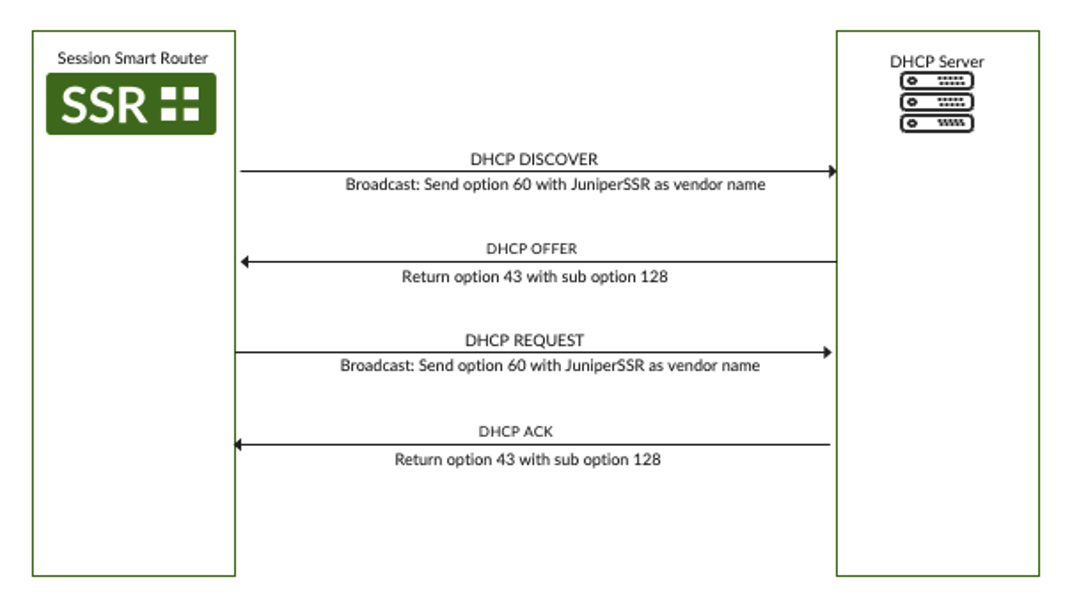
The SSR sends DISCOVER with Option 60 (vendor-class identifier) set to JuniperSSR and requests Option 43:
08:34:24.685760 IP (tos 0x0, ttl 128, id 0, offset 0, flags [none], proto UDP (17), length 306)
    0.0.0.0.bootpc > 255.255.255.255.bootps: [udp sum ok] BOOTP/DHCP, Request from fa:16:3e:14:db:05, length 278
	  Vendor-rfc1048 Extensions
	    DHCP-Message Option 53, length 1: Discover
	    Parameter-Request Option 55, length 4:
	      Subnet-Mask, Default-Gateway, Domain-Name-Server, Vendor-Option
	    Vendor-Class Option 60, length 10: "JuniperSSR
For discovery to succeed the DHCP server must reply with Option 43 containing sub-option 128, and the value of that sub-option must be the proxy in address:port form:
08:34:25.687329 IP (tos 0x10, ttl 128, id 0, offset 0, flags [none], proto UDP (17), length 337)
    linux-router.bootps > 10.73.3.50.bootpc: [udp sum ok] BOOTP/DHCP, Reply, length 309
	  Vendor-rfc1048 Extensions
	    DHCP-Message Option 53, length 1: Offer
	    Vendor-Option Option 43, length 17: 10.92.53.8:3128
The exchange repeats for REQUEST/ACK, so the proxy is refreshed on every lease renewal.
A working DHCP server snippet that advertises a proxy to SSRs:
option space vendor1;
option vendor1.custom-proxy-url code 128 = string;
option vendor-class-identifier code 60 = string;

class "Juniper-001" {
    match if option vendor-class-identifier = "JuniperSSR";
    vendor-option-space vendor1;
}

subnet 172.16.1.0 netmask 255.255.255.0 {
    range 172.16.1.100 172.16.1.100;
    option vendor1.custom-proxy-url "10.92.53.8:3128";
}
Active Proxy Selection
The SSR routinely holds several candidate proxy addresses at once: multiple DHCP-enabled interfaces, several configured static entries, or contributions from an HA peer. The rule is the same in every case:
From all valid
address:portcandidates across every source, the SSR selects the one with the lowest numerical IPv4 value. Candidates that fail IP or port validation are discarded.
Given 192.168.10.10:3128 and 192.168.10.11:3128, the SSR selects 192.168.10.10:3128.
Because the rule is deterministic and source-agnostic, both nodes of an HA pair — which exchange their learned addresses with each other — converge on the same active proxy. A node that loses its locally learned address (for example, when a WAN interface goes down) can keep using the address contributed by its peer.
When the configured mode changes (for example, learned → static, or → disabled), the SSR clears any in-band management sessions tied to the previous proxy so the new configuration takes effect cleanly.
Transparent Forwarding
Not every SSR component is proxy-aware. Rather than retrofit each one, the SSR transparently intercepts outbound HTTP and HTTPS from its in-band management plane and forwards it through the active proxy:
- HTTP and HTTPS originated by management-plane components are forwarded automatically; no per-component configuration is required.
- HTTPS sessions are inspected on-box using the SSR's local certificate authority, so a single upstream proxy can serve all management traffic regardless of destination.
- On-box loopback traffic is left untouched.
Forwarding is enabled when a proxy becomes active, refreshed when the active proxy changes, restored after a reboot, and torn down when the proxy is disabled or fails its health check. Configuration does not need to be actively managed during runtime based on network or system behavior.
Troubleshooting
Commands
| Command | What it shows |
|---|---|
show management-proxy | The currently active upstream proxy, or N/A when none is in effect. |
show dhcp learned-proxies | Every proxy address learned per WAN network-interface. |
show alarms | The Management Proxy is unreachable alarm, when present. |
show management-proxy reports N/A whenever the mode is disabled, no candidate passed validation, or the active proxy was cleared because it stopped responding.
Health Checking and Alarms
Once a minute the SSR opens a TCP connection to the active proxy's address:port (with a 3-second connect timeout) and immediately closes it. This is a transport-level liveness check only — it does not issue an HTTP request, fetch a URL, or otherwise validate that the proxy can reach the internet. A proxy whose TCP listener is UP will be considered healthy even if it is misconfigured for upstream connectivity; conversely, anything that prevents the SSR from completing the TCP handshake (the proxy process being down, a firewall in the path, a routing problem) is treated as a failure.
On failure:
- Transparent forwarding is torn down so management traffic does not silently black-hole.
- The proxy state moves to
unreachable. - A critical alarm
Management Proxy is unreachableis raised under theservicecategory, sourced fromManagementProxy.
The SSR does not automatically fail over to the next proxy candidate on failure. Only one proxy is active at a time; if it becomes unreachable, the SSR falls back to operating without a proxy until health checks succeed again.
When the TCP probe succeeds again the alarm clears and forwarding is re-enabled automatically, typically within one health-check interval. End-to-end reachability of public destinations through the proxy is best confirmed at the upstream proxy itself (see the Management traffic doesn't appear at the proxy item in Common Issues).
State Files
The SSR exposes its proxy state on disk for inspection. These files are managed automatically and should not be edited by hand.
| File | Contents |
|---|---|
/var/lib/128technology/proxy-address.json | The currently active proxy_address. Absent when no proxy is in effect. |
/var/lib/128technology/dhcp/<interface> | Per-WAN-interface DHCP client info, including the management-proxies array from DHCP. |
/var/run/128technology/peer-proxy.json | Proxy address(es) received from the HA peer. |
// /var/lib/128technology/proxy-address.json
{ "proxy_address": "10.92.53.8:3128" }
// /var/lib/128technology/dhcp/wan1
{
  "dhcp-client-info": {
    "interface-name": "wan1",
    "resolution-state": "resolved",
    "management-proxies": ["10.92.53.8:3128"]
  }
}
Common Issues
Nothing is learned in learned mode. Confirm the interface still has enable-proxy-discovery enabled, and that the DHCP server replies as described in DHCP Discovery. The per-interface lease files show whether the SSR actually received the option.
The active proxy isn't the one you expected. Review Active Proxy Selection: The SSR always picks the lowest-value valid candidate across every source. show dhcp learned-proxies and show management-proxy together show inputs and result.
Management Proxy is unreachable alarm. The SSR has an active proxy but cannot reach it on its advertised port. Verify the upstream proxy is running and that nothing in between (firewall, ACL, routing) blocks the SSR. The alarm clears automatically once connectivity returns.
Management traffic doesn't appear at the proxy. Confirm with show management-proxy that an active, reachable proxy exists. If it does, the upstream proxy's own access log is the most reliable place to confirm traffic end-to-end (for Mist, look for CONNECT entries to the Mist endpoint). If the proxy is reachable but receives no SSR traffic, check /var/log/128technology/management-proxy.log.
HA nodes disagree on the active proxy. They should converge automatically; if they don't, inspect /var/run/128technology/peer-proxy.json on each node. An empty or stale file points to a problem on the inter-node management channel rather than with the proxy itself.