Configuring DSCP Steering
Version History
| Release | Modification |
|---|---|
| 5.4.4 | DSCP Steering Introduced |
| 6.1.4 | Enabled DSCP steering for BGP over SVR tunnels |
| 7.1.0 | Support added for steering Non-IPSEC tunnels (GTP) |
When traffic is traversing an IPSec encrypted tunnel, every flow within that tunnel shares the same layer 3 headers, making individual flows difficult to identify.
To provide identification and aid in load balancing and traffic engineering, DSCP values can be set at the tunnel endpoint. When the traffic reaches the SSR, the DSCP value is used for both traffic engineering priority and path priority for DSCP traffic steering.
Beginning with SSR version 6.1.4, DSCP Steering is enabled for BGP over SVR tunnels. Using the configuration below, and configuring BGP over SVR, the child service configured for DSCP steering is now recognized and steered appropriately.
With SSR version 7.1.0, the restriction for matching ports has been lifted. The match criteria for incoming packets only requires the destination port to match the given configuration. IPSec tunnels continue to be supported. Steering for new tunnels such as GPRS Tunnel Protocol (GTP), which uses a well-defined destination port and optionally randomized source ports, is supported.
Basic Configuration
- Configure the ingress interface for
dscp-steering - Configure a parent service that matches the traffic profile of the tunnel
- Configure a child service that defines the
dscp-rangeto steer
When configuring DSCP steering, it is important to have all possible DSCP values (0-63) configured over the collective child services that share a parent. Omitting a value can lead to a scenario where traffic that is marked for DSCP steering, but has no corresponding steering configuration, results in a No ServicePaths available error.
For example; The DSCP value range is 0-63. Let's say there are two child services configured; child service1 has a range of 1-32. child service2 covers 33-63. In this configuration, 0 is not a configured value. If traffic enters with a DSCP value of 0, there is no steering configuration for 0, and it results in a No ServicePaths available error.
Example Config
Configure the network-interface for dcsp-steering:
network-interface foo
    name foo
    global-id 12
    vlan 0
    dscp-steering
        enabled true
        transport
            protocol udp
            port-range
                start-port 4500
            exit
        exit
    exit
exit
Configure the parent service for the tunnel:
service          tunnel
    name           tunnel
    description    "IPSec Tunnel"
    scope          public
    security       internal
    address        5.5.5.100/0
    access-policy  red
        source      red
        permission  allow
    exit
exit
Configure the child service with the dscp-range:
service          high-priority.tunnel
    name           high-priority.tunnel
    description    "The high priority traffic within this tunnel"
    scope          public
    security       internal
    dscp-range     14
        start-value 14
    exit
exit
How It Works
DSCP traffic steering is configured on the network-interface to identify the protocol and port, and the service, to identify the DSCP values used to steer the traffic.
Network Interface Configuration
Configuring dscp-steering at the network-interface level focuses DSCP traffic steering on a specific transport protocol and port range, rather than an entire interface.
Only traffic matching the dscp-steering properties configured on the network-interface and in the service is steered using DSCP. Other traffic is handled according to the relevant configuration.
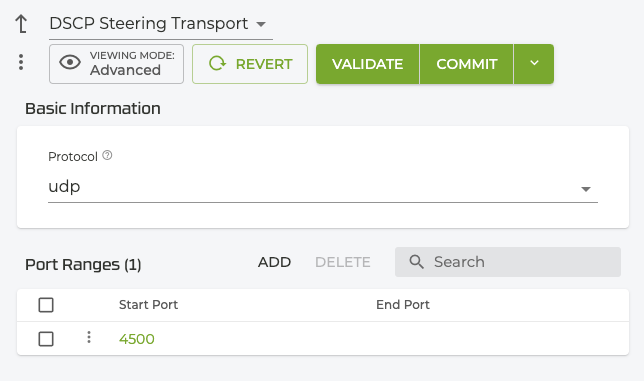
The following example is designed to target IPSec NAT traversal traffic which is typically UDP, with a destination port 4500.
network-interface foo
    name foo
    global-id 12
    vlan 0
    dscp-steering
        enabled true
        transport
            protocol udp
            port-range
                start-port 4500
            exit
        exit
    exit
exit
When steering ESP traffic, ports are not specified. For example:
network-interface foo
    name foo
    global-id 12
    vlan 0
    dscp-steering
        enabled true
        transport
            protocol esp
            exit
        exit
    exit
exit
Service Configuration
A DSCP value and range is configured for a child service; this identifies the priority and handling of the traffic at the router. DSCP aware services are configured in a hierarchy; DSCP values are not configured on the parent service.
The following example configuration splits the tunnel across 3 services. Traffic with dscp-range value 14 is handled by the high-priority service; traffic with dscp-range values from 26 to 28 is handled by the low-priority service. The remaining traffic falls back into the parent tunnel service.
service          tunnel
    name           tunnel
    description    "IPSec Tunnel"
    scope          public
    security       internal
    address        5.5.5.100/0
    access-policy  red
        source      red
        permission  allow
    exit
exit

service          high-priority.tunnel
    name           high-priority.tunnel
    description    "The high priority traffic within this tunnel"
    scope          public
    security       internal
    dscp-range     14
        start-value 14
    exit
exit

service          low-priority.tunnel
    name           low-priority.tunnel
    description    "The low priority traffic within this tunnel"
    scope          public
    security       internal
    dscp-range     26
        start-value 26
        end-value   28
    exit
exit
DSCP Steering Using GTP
While the configuration for DSCP steering using a GTP tunnel is nearly identical to the IPSec configuration, there are some restrictions.
- Configuring
dscp-steeringat the network-interface level supports several port ranges, but only a single protocol. For example, it is not currently possible to perform steering for both TCP and UDP at the same time. - The tunneled packets must either be an ESP packet or have a valid L4 header that accurately describes the tunnel endpoint.
- The listed protocol on the SSR session/flow keys will report ESP, even when not within an IPSec tunnel.
- The egress LAN must also have a DSCP Steering configuration enabled to support proper classification of reverse traffic.
In the following example, the receiver endpoint is at IP 2.2.2.2 at UDP port 2152. The initial packet entering the SSR will match against this service via the SSR’s FIB.
The tunnel is then further broken down into three DSCP ranges and assigned to child services. The SSR refines down to the appropriate child service based on the DSCP marking of the incoming packet. As with hierarchical services in general, a different service-policy may be defined on the child services, otherwise the parent policy will be inherited.
authority

   service tunnel
      description “Describes the properties of the tunnel endpoint receiver”
      address 2.2.2.2

      transport udp
         protocol udp
         port-range 2152
            start-port 2152
         exit
      exit

      access-policy lan
         source lan
         permission allow
      exit
   exit

   service low.tunnel
      dscp-range 0
         start-value 0
         end-value 15
      exit
   exit

   service med.tunnel
      dscp-range 16
         start-value 16
         end-value 40
      exit
   exit

   service high.tunnel
      dscp-range 41
         start-value 41
         end-value 63
      exit
   exit

exit
If the destination port is not found, the source-port of the packet is checked against the configured element. If the source-port is identified, then it is treated as a reverse dscp-steering packet.
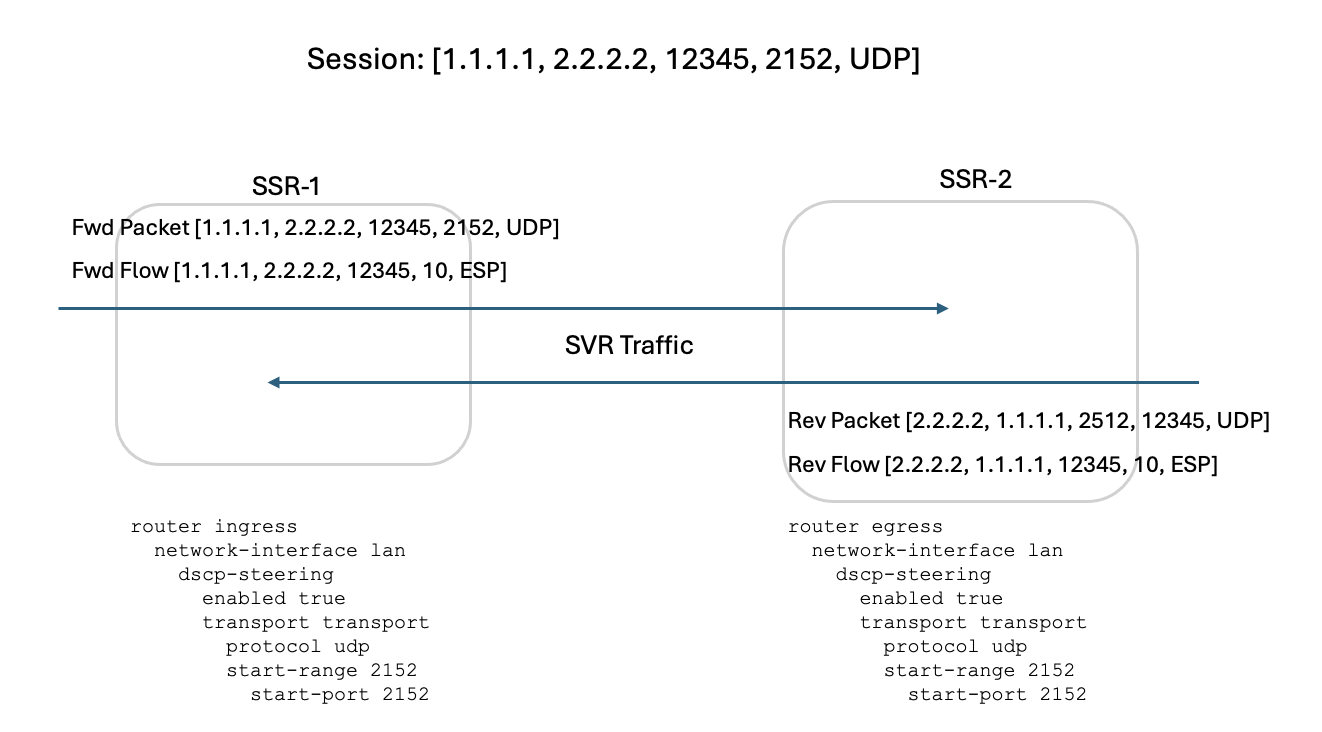
On the reverse flow, the packet will not match any configuration for the randomly generated port 12345. Because it does match the source-port of 2152, it is treated as a reverse tunnel packet.
The diagram above shows a DSCP value of 10 on both the forward and reverse flows. This assigns steering to the service low.tunnel configured above.
Service Route Configuration
DSCP steering follows the SSR's Hierarchical Services model. As such, service-route configurations from the parent tunnel service are available to the child DSCP services. Flows may be steered via DSCP value by defining a service-route configuration for the child DSCP services.
When no service-route configuration is applied, the RIB will be followed for routing purposes.
If a service-route is configured on the parent service, that route is inherited by the child service. This will prevent routing lookup for the child DSCP services.
In versions 6.2.7 and below, or version 6.3.0, if you did not configure a service-route for the parent or child services, the system would only consider BGP over SVR routes from the RIB. In versions beginning with 6.2.8 and 6.3.3-r2, if a service route is not configured on the parent or child services, all routes available to the RIB are considered; connected routes, static routes, routes from BGP neighbors (not just BGP over SVR neighbors), and OSPF routes.
Restrictions
- The DSCP steering transport list for a
network-interfaceis limited to one range. - Any service with a
dscp-rangeconfiguration must be a child service. - DSCP steering ranges must not overlap.
GUI Configuration Screens
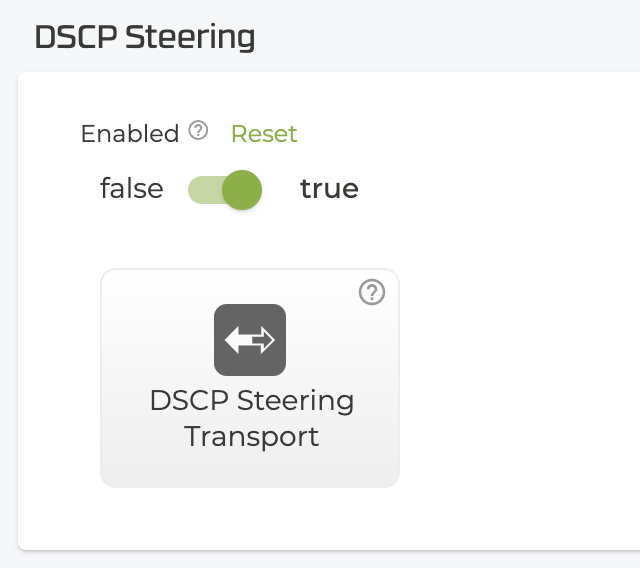
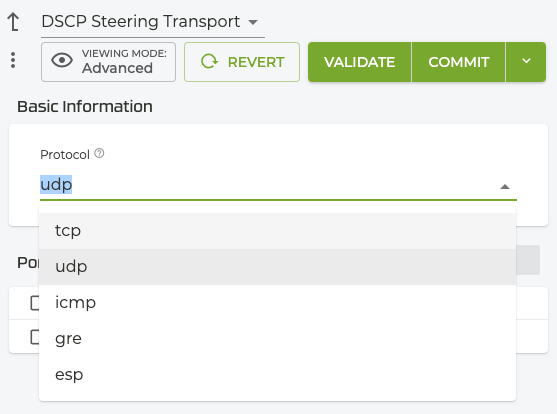
The following screens demonstrate configuring DSCP steering on the network interface using the GUI.
- Enable DSCP Steering, and select the DSCP Steering Transport button.
- Select a protocol.
- Enter the port or port range.
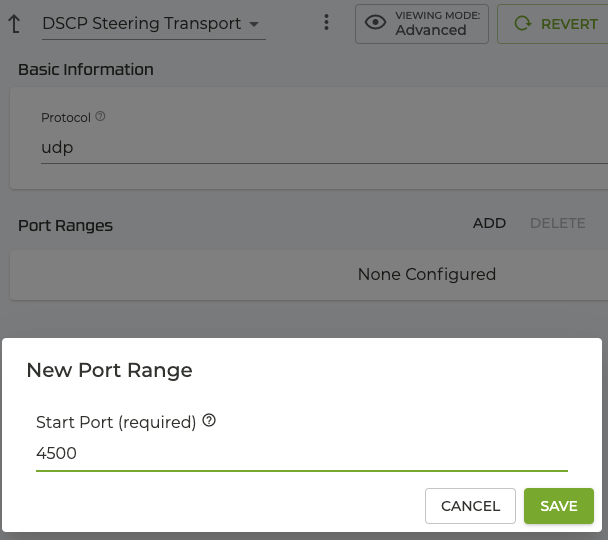
- Select Validate and Commit.