
このページで
ハブアンドスポーク デバイスでの AutoVPN
AutoVPNの概要と、SRXシリーズファイアウォールでの設定方法について説明します。
AutoVPN は、リモート サイトへの複数のトンネル(スポークと呼ばれる)の単一の終端ポイントとして機能する IPsec VPN アグリゲータ(ハブと呼ばれる)をサポートしています。AutoVPNを使用すると、ネットワーク管理者は現在および将来のスポーク用にハブを設定できます。
特定の機能のプラットフォームおよびリリースサポートを確認するには、機能エクスプローラーを使用します。
プラットフォームに関連する注意点については、プラットフォーム固有の AutoVPN の動作セクションを参照してください。
Auto VPNについて
AutoVPN は、リモート サイトへの複数のトンネル(スポークと呼ばれる)の単一の終端ポイントとして機能する IPsec VPN アグリゲータ(ハブと呼ばれる)をサポートしています。AutoVPNを使用すると、ネットワーク管理者は現在および将来のスポーク用にハブを設定できます。スポーク デバイスを追加または削除する際にハブの構成を変更する必要がないため、管理者は大規模なネットワーク導入を柔軟に管理できます。
セキュア トンネル モード
AutoVPN はルートベースの IPsec VPN でサポートされています。ルートベースVPNでは、セキュアトンネル(st0)インターフェイスを設定し、IPsec VPNトンネルにバインドします。AutoVPN ネットワークの st0 インターフェイスは、次の 2 つのモードのいずれかで設定できます。
-
ポイントツーポイントモード—デフォルトでは、[
edit interfaces st0 unit x]階層レベルで設定されたst0インターフェイスはポイントツーポイントモードです。 -
ポイントツーマルチポイント モード—このモードでは、
multipointオプションは AutoVPN ハブとスポークの両方の [edit interfaces st0 unit x] 階層レベルで設定されます。 ハブおよびスポークのst0インターフェイスには番号が付けられ、スポークに設定されたIPアドレスはハブのst0インターフェイスサブネットワークに存在する必要があります。
表 1 AutoVPN ポイントツーポイントおよびポイントツーマルチポイントのセキュア トンネル インターフェイス モードを比較します。
|
ポイントツーポイントモード |
ポイントツーマルチポイントモード |
|---|---|
|
IKEv1 または IKEv2 をサポートします。 |
IKEv1 または IKEv2 をサポートします。 |
| IPv4 および IPv6 トラフィックをサポートします。 |
IPv4 または IPv6 をサポートします。 |
| トラフィックセレクター |
動的ルーティング プロトコル(OSPF、OSPFv3、iBGP) |
| デッドピア検出 |
デッドピア検出 |
| スポークデバイスをSRXシリーズまたはサードパーティー製デバイスにすることができます。 |
このモードは、SRXシリーズファイアウォールでのみサポートされています。 |
認証
AutoVPNは、証明書と事前共有鍵ベースの認証方法の両方をサポートしています。
AutoVPN ハブとスポークでの証明書ベースの認証では、X.509 公開キー基盤(PKI)証明書を使用できます。ハブで構成されたグループ IKE ユーザー タイプでは、スポーク証明書の代替サブジェクト フィールドと一致する文字列を指定できます。スポーク証明書のサブジェクト フィールドの部分一致も指定できます。AutoVPN 展開におけるスポーク認証についてを参照してください。
AutoVPNは以下の2つのオプションでサポートされています。
- AutoVPN シード PSK: 異なる事前共有キーを持つ同じゲートウェイに接続する複数のピア。
- AutoVPN共有PSK: 同じ事前共有キーを持つ同じゲートウェイに接続する複数のピア。
シードされた PSK は、シードされていない PSK(つまり、同じ共有 PSK)とは異なります。シードされた PSK は、マスター キーを使用してピアの共有 PSK を生成します。そのため、各ピアは、同じゲートウェイに接続する異なるPSKを持つことになります。以下はその一例です。IKE ID user1@juniper.net を持つピア1とIKE ID user2@juniper.net を持つピア2がゲートウェイへの接続を試みるシナリオを考えてみましょう。このシナリオでは、ThisIsMySecretPreSharedkey として構成されたマスター キーを含むHUB_GWとして構成されたゲートウェイは、次のように異なる PSK を持ちます。
ピア 1 : 79e4ea39f5c06834a3c4c031e37c6de24d46798a
ピア2: 3db8385746f3d1e639435a882579a9f28464e5c7
つまり、異なるユーザー ID と同じマスター鍵を持つ異なるユーザーに対しては、異なるまたは一意の事前共有鍵が生成されます。
Auto-VPN PSKには、 seeded-pre-shared-key または pre-shared-key のいずれかを使用できます。
- 異なる事前共有キー:
seeded-pre-shared-keyが設定されている場合、VPN ゲートウェイは、各リモート ピアを認証するために異なる IKE 事前共有キーを使用します。ピアの事前共有鍵は、IKE ゲートウェイに設定されたmaster-keyを使用して生成され、ピア間で共有されます。VPN ゲートウェイが各リモート ピアの認証に異なる IKE 事前共有キー (PSK) を使用できるようにするには、
[edit security ike policy policy_name]階層レベルで新しい CLI コマンドseeded-pre-shared-key ascii-textまたはseeded-pre-shared-key hexadecimalを使用します。このコマンドは、同じ階層にある
pre-shared-keyコマンドと相互に排他的です。ポリシーを参照してください。
- 共有/同一事前共有キー:
pre-shared-key-typeが設定されていない場合、PSKは共有されていると見なされます。VPN ゲートウェイは、同じ IKE 事前共有キーを使用して、すべてのリモート ピアを認証します。VPN ゲートウェイがすべてのリモート ピアの認証に同じ IKE PSK を使用できるようにするには、既存の CLI コマンド
pre-sharedkey ascii-textまたはpre-shared-key hexadecimalを使用します。
VPN ゲートウェイでは、[edit security ike gateway gateway_name dynamic] 階層レベルの general-ikeid 構成ステートメントを使用して IKE ID 検証をバイパスできます。このオプションが構成されている場合、リモートピアの認証中に、VPNゲートウェイは任意のリモートIKE ID接続を許可します。「general-ikeid」を参照してください。
SPC3カードとvSRX仮想ファイアウォールでikedプロセス( junos-ike パッケージを使用)を実行しているSRX5000回線では、次のIKEモードをサポートしています。
|
IKE モード |
SPC3カードとvSRX仮想ファイアウォールを使用したSRX5000回線でikedプロセスを実行 |
|
|---|---|---|
|
共有PSK |
シードPSK |
|
|
IKEv2 |
◯ |
◯ |
|
IKEv2 と any - |
◯ |
◯ |
|
IKEv1 アグレッシブ モード |
◯ |
◯ |
|
IKEv1 アグレッシブ モード( |
◯ |
◯ |
|
IKEv1 メイン モード |
◯ |
いいえ |
|
IKEv1 メイン モードと any-remote-id/ |
◯ |
いいえ |
構成と管理
AutoVPNは、CLIを使用してSRXシリーズファイアウォール上で設定および管理されます。1台のSRXシリーズファイアウォールに複数のAutoVPNハブを設定できます。設定されたハブでサポートされるスポークの最大数は、SRXシリーズファイアウォールのモデルに固有です。
PIM を使用したマルチキャストのサポート
IPマルチキャストは、データパケットを複製することによって、複数の意図された受信者にトラフィックを配信します。マルチキャスト データは、ビデオ ストリーミングなどのアプリケーションに使用できます。ファイアウォールは、ポイントツーマルチポイント(P2MP)モードでPIM(プロトコル非依存マルチキャスト)をサポートします。P2MP モードを使用したファイアウォールのセキュア トンネル st0 インターフェイスで PIM を有効化できます。このプロトコルは、インターフェイス設定からP2MPインターフェイスを検出し、マルチキャストトラフィックをサポートします。PIM については、「 PIM の概要」を参照してください。
図 1 は、P2MPインフラストラクチャにおけるマルチキャストトポロジーを示しています。
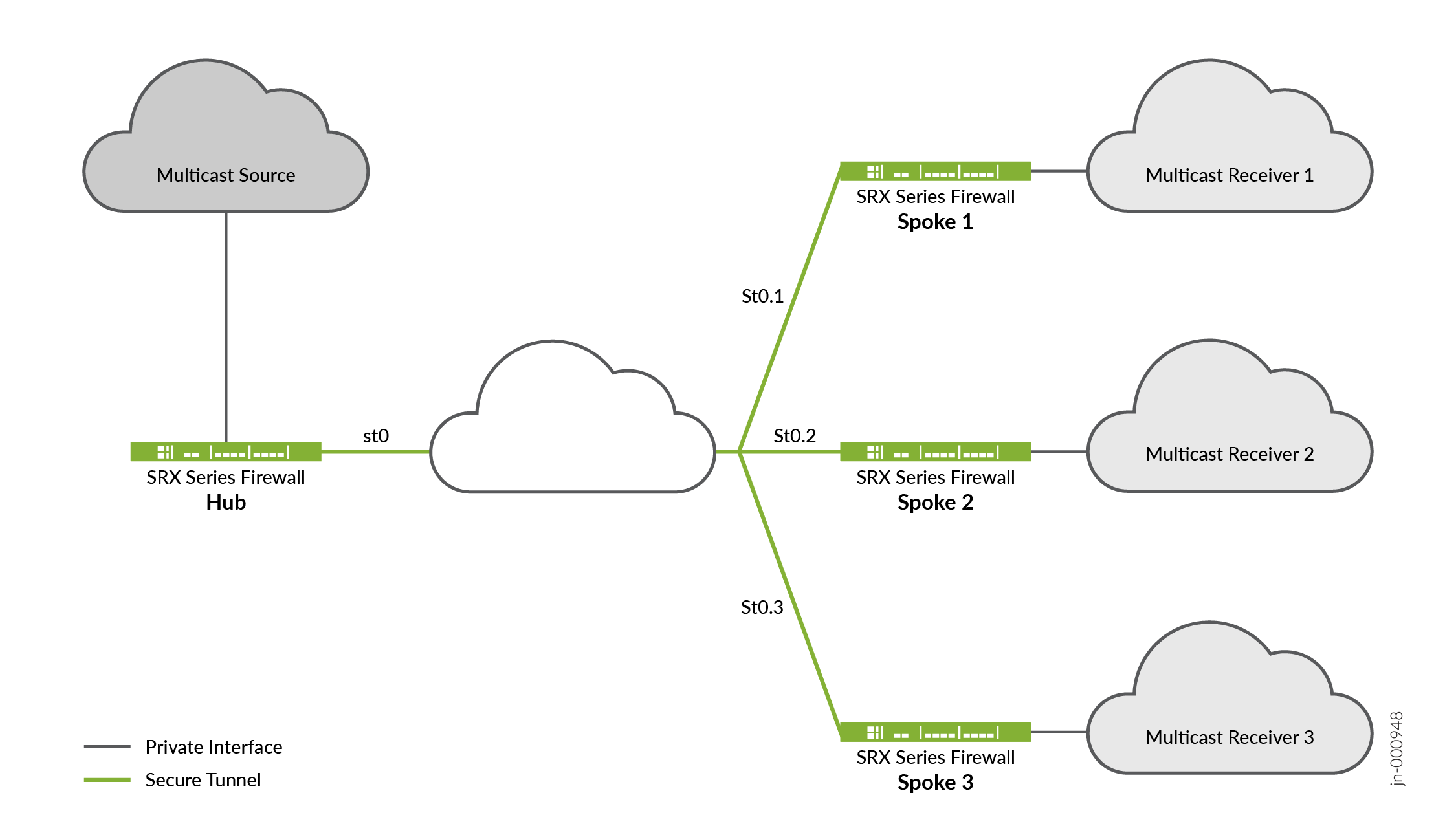
トポロジーからは、SRXシリーズファイアウォールの1つがハブとして機能し、残りの3つがスポークとして機能していることがわかります。トポロジーに 2 つのスポークを含めることもできます。通常、マルチキャスト送信者はハブの背後に存在し、マルチキャスト受信者はスポークの背後に存在します。マルチキャスト サポートについては、ハブアンドスポーク デバイス上のセキュア トンネル st0 論理インターフェイスが PIM P2MP モードで設定されていることに注意してください。これらの各デバイスで、st0 P2MP インターフェイスはネイバーごとのすべての PIM ジョイン を追跡し、マルチキャストの転送または複製がジョイン 状態のネイバーに対してのみ行われるようにします。
SRXシリーズファイアウォールは、st0 P2MPインターフェイスを介したPIMスパースモードでIPマルチキャストトラフィックをサポートします。ハブは、ファーストホップルーター(FHR)またはランデブーポイント(RP)として機能します。スポークは、P2MP ネットワークで LHR(ラストホップ ルーター)として機能できます。ネットワーク内のデバイスは、マルチキャスト グループ に参加しているネイバーにマルチキャスト データ パケットを複製します。
マルチキャストトラフィックサポートを設定する場合は、以下の点に注意してください。
-
P2MP インターフェイスに IPv6 マルチキャストを設定することはできません。
-
IP マルチキャスト構成を機能させるには、PMI(PowerMode IPsec)を無効にする必要があります。
-
P2MP インターフェイスとの間でマルチキャスト ping を実行することはできません。
-
PIM を有効にすると、IGMP はデフォルトで有効になりますが、P2MP インターフェイスでは動作しないことに注意してください。
P2MP インフラストラクチャでマルチキャスト サポートを構成する方法の詳細については、「 P2MP インフラストラクチャでマルチキャスト サポートを構成する」を参照してください。
AutoVPNの制限事項について
次の機能は AutoVPN ではサポートされていません。
-
ポリシーベースのVPNはサポートされていません。
-
RIP 動的ルーティング プロトコルは、AutoVPN トンネルではサポートされていません。
-
手動鍵および事前共有鍵を使用した Autokey IKE はサポートされていません。
-
スポークのハブでの静的ネクストホップトンネルバインディング(NHTB)の設定はサポートされていません。
-
IPv6 multicastはサポートされていません。
-
グループIKE IDユーザータイプは、IKE IDとしてのIPアドレスではサポートされていません。
-
グループ IKE ID ユーザー タイプを使用する場合、IKE ID は、同じ外部インターフェイス上に構成されている他の IKE ゲートウェイと重複しないようにする必要があります。
トラフィックセレクターによるAutoVPNについて
AutoVPN ハブは、スポークへのトラフィックを保護するために、複数のトラフィック セレクターで設定できます。この機能は、以下のメリットを提供します。
-
1つのVPN構成で、多くの異なるピアをサポートできます。
-
VPNピアは、SRXシリーズ以外のファイアウォールでも構いません。
-
単一のピアで、同じVPNで複数のトンネルを確立できます。
-
動的ルーティング プロトコルを使用する AutoVPN よりも多くのトンネルをサポートできます。
ポイントツーポイント モードでセキュア トンネル インターフェイスを使用する AutoVPN ネットワークは、トラフィック セレクターと IKE ピアに IPv6 アドレスをサポートします。
ハブツースポーク トンネルが確立されると、ハブは 自動ルート挿入(ARI)(以前のリリースでは RRI(リバース ルート挿入)と呼ばれていました)を使用して、ルーティング テーブルにスポーク プレフィックスへのルートを挿入します。その後、ARIルートをルーティングプロトコルにインポートして、コアネットワークに配信することができます。
トラフィックセレクター付きのAutoVPNは、IKEv1とIKEv2の両方でポイントツーポイントモードでセキュアトンネル(st0)インターフェイスを使用して設定できます。
トラフィックセレクターが設定されている場合、st0インターフェイスでは動的ルーティングプロトコルはサポートされません。
トラフィックセレクターを使用してAutoVPNを設定する場合は、以下の点に注意してください。
-
ダイナミック ルーティング プロトコルは、ポイントツーポイント モードの st0 インターフェイスのトラフィック セレクターではサポートされていません。
-
自動検出 VPN および IKEv2 構成ペイロード トラフィック セレクター付きの AutoVPN では構成できません。
-
スポークはSRXシリーズ以外のファイアウォールでもかまいません。ただし、次の違いに注意してください。
-
IKEv2 では、非 SRX シリーズ スポークが、1 つの SA ネゴシエーションで複数のトラフィック セレクターを提案できます。これはSRXシリーズファイアウォールではサポートされていないため、ネゴシエーションは拒否されます。
-
SRXシリーズ以外のスポークでも、トラフィックセレクターが使用する特定のポートまたはプロトコルを識別できます。ポートとプロトコルはSRXシリーズファイアウォール上のトラフィックセレクターでサポートされておらず、ネゴシエーションは拒否されます。
-
関連項目
AutoVPN 導入におけるスポーク認証について
AutoVPN 展開では、ハブ アンド スポーク デバイスに有効な X.509 PKI 証明書が読み込まれている必要があります。show security pki local-certificate detail コマンドを使用して、デバイスにロードされた証明書に関する情報を表示できます。
このトピックでは、スポークが証明書を使用してハブを認証して接続できるようにするハブの構成について説明します。
ハブでのグループIKE IDの構成
グループ IKE ID 機能を使用すると、複数のスポーク デバイスがハブ上の IKE 設定を共有できます。各スポークの X.509 証明書のサブジェクトまたは代替サブジェクト フィールドにある証明書所有者の ID には、すべてのスポークに共通する部分が含まれている必要があります。証明書 ID の共通部分は、ハブの IKE 構成に対して指定されます。
例えば、IKE ID example.net をハブで設定して、ホスト名 device1.example.net、 device2.example.net、 device3.example.netでスポークを識別することができます。各スポークの証明書では、代替サブジェクト フィールドにホスト名 ID が含まれ、フィールドの右端に example.net が含まれている必要があります(例: device1.example.net)。この例では、すべてのスポークが IKE ID ペイロードでこのホスト名 ID を使用しています。IKE ネゴシエーション時に、スポークからの IKE ID を使用して、ハブで構成されたピア IKE ID の共通部分と一致させます。有効な証明書がスポークを認証します。
証明書 ID の共通部分は、次のいずれかになります。
証明書の代替サブジェクト フィールドの右端のホスト名の一部(
example.netなど)。証明書の代替サブジェクト フィールドの右端にある電子メール アドレスの一部 (
@example.netなど)。証明書のサブジェクト フィールドと一致するコンテナー文字列、ワイルドカードのセット、またはその両方。サブジェクトフィールドには、抽象構文表記法 1 (ASN.1) 識別名 (DN) 形式でデジタル証明書所有者の詳細が含まれています。フィールドには、組織、組織単位、国、地域、または共通名を含めることができます。
証明書のサブジェクトフィールドと一致するようにグループIKE IDを構成するには、以下のタイプのID一致を指定できます。
コンテナ:スポーク証明書のサブジェクトフィールドがハブで設定された値と完全に一致する場合、ハブはスポークのIKE IDを認証します。サブジェクト フィールドごとに複数のエントリを指定できます (例:
ou=eng,ou=sw)。フィールド内の値の順序は一致する必要があります。ワイルドカード - ハブは、スポークの証明書のサブジェクト フィールドがハブで設定された値と一致する場合、スポークの IKE ID を認証します。ワイルドカード一致では、フィールドごとに 1 つの値のみがサポートされます (たとえば、
ou=engまたはou=swはサポートされますが、ou=eng,ou=swはサポートされません)。フィールドの順序は重要ではありません。
次の例では、証明書の代替サブジェクトフィールドにホスト名の一部 example.net を使用して、グループ IKE ID を構成します。
[edit]
security {
    ike {
        policy common-cert-policy {
            proposals common-ike-proposal;
            certificate {
                local-certificate hub-local-certificate;
            }
        }
        gateway common-gateway-to-all-spoke-peer {
            ike-policy common-cert-policy;
            dynamic {
                hostname example.net;
                ike-user-type group-ike-id;
            }
            external-interface fe-0/0/2;
        }
    }
}
この例では、 example.net は、すべてのスポークに使用されるホスト名識別の共通部分です。スポーク上のすべての X.509 証明書には、代替サブジェクト フィールドにホスト名 ID が含まれ、右端に example.net が含まれている必要があります。すべてのスポークは、IKE IDペイロードでホスト名IDを使用する必要があります。
次の例では、証明書組織のサブジェクト フィールドにある組織単位およびexamplesales値と一致するように、ワイルドカードを使用してグループ IKE ID を構成します。
[edit]
security {
    ike {
        policy common-cert-policy {
            proposals common-ike-proposal;
            certificate {
                local-certificate hub-local-certificate;
            }
        }
        gateway common-gateway-to-all-spoke-peer {
            ike-policy common-cert-policy;
            dynamic {
                distinguished-name {
                    wildcard ou=sales,o=example;
                }
                ike-user-type group-ike-id;
            }
            external-interface fe-0/0/2;
        }
    }
}
この例では、 ou=sales,o=example フィールドは、スポークから予期される証明書のサブジェクト フィールドの共通部分です。IKE ネゴシエーション中に、スポークが証明書に cn=alice,ou=sales,o=example サブジェクト フィールドを持つ証明書を提示した場合、認証は成功し、トンネルが確立されます。スポークが証明書にサブジェクト フィールド cn=thomas,ou=engineer,o=example 証明書を提示した場合、組織単位 sales必要があるため、証明書はハブによって拒否されます。
スポーク接続の除外
特定のスポークをハブへの接続から除外するには、そのスポークの証明書を取り消す必要があります。ハブは、失効した証明書のシリアル番号を含む CA から最新の証明書失効リスト (CRL) を取得する必要があります。その後、ハブは失効したスポークからの VPN 接続を拒否します。ハブで最新の CRL が使用可能になるまで、ハブは失効したスポークからトンネルを確立し続ける可能性があります。詳細については、「証明書および認証局プロファイルの登録」を参照してください。
関連項目
AutoVPN 構成の概要
次の手順では、ハブ アンド スポーク デバイスで AutoVPN を設定するための基本的なタスクについて説明します。AutoVPN ハブは、現在のスポークと新しいスポークすべてに対して 一度だけ 設定されます。
AutoVPN ハブを設定するには:
SRX シリーズの AutoVPN スポーク デバイスを設定するには、次の手順に従います。
CA 証明書とローカル証明書をデバイスに登録します。
ハブで事前共有キー認証を構成する場合は、事前共有キーベースの認証方法を使用します。
st0インターフェイスを作成し、ポイントツーマルチポイントモードで設定します。
ハブに設定されているIKEポリシーと一致するようにIKEポリシーを設定します。
ハブで構成されているグループIKE IDと一致するIDでIKEゲートウェイを構成します。
ハブで構成されている IPsec ポリシーと一致するように IPsec ポリシーを構成します。
動的ルーティングプロトコルを設定します。
このトピックの例では、ハブアンドスポークの構成にJunos OSを実行するSRXシリーズファイアウォールを使用しています。スポーク デバイスで Junos OS が実行されていない場合は、ネクストホップ トンネル バインディングを設定する必要があります。
関連項目
例:iBGP による基本的な AutoVPN の設定
この例では、単一の終端ポイントとして機能するように AutoVPN ハブを設定し、次にリモート サイトへのトンネルとして機能するように 2 つのスポークを設定する方法を示します。この例では、VPN トンネルを介してパケットを転送するように iBGP を設定し、証明書ベースの認証を使用します。
事前共有鍵による認証については、 ステップバイステップでの手順 ハブ で「フェーズ 1 オプションの設定」の手順を参照し、 ステップバイステップでの手順 ハブを設定するには spoke1 を設定し、spoke2 で ステップバイステップでの手順 spoke2 を設定します。
要件
この例では、以下のハードウェアとソフトウェアのコンポーネントを使用しています。
-
AutoVPNハブおよびスポークとしてサポートされる3つのSRXシリーズファイアウォール
-
AutoVPN をサポートする Junos OS リリース 12.1X44-D10 以降
始める前に:
-
ローカル証明書の要求を送信するときに、認証局 (CA) のアドレスと必要な情報 (チャレンジ・パスワードなど) を取得します。
VPN トンネルを介してパケットを転送するために使用される動的ルーティング プロトコルについて理解している必要があります。動的ルーティング プロトコルの特定の要件の詳細については、「 ルーティング プロトコルの概要」を参照してください。
概要
この例では、AutoVPN ハブの設定とそれに続く 2 つのスポークの設定を示します。
この例では、最初の手順として、簡易証明書登録プロトコル (SCEP) を使用して各デバイスにデジタル証明書を登録します。スポークの証明書には、サブジェクト フィールドに組織単位 (OU) 値 "SLT" が含まれています。ハブは、OU フィールドの値「SLT」と一致するグループ IKE ID で構成されています。
スポークはハブへのIPsec VPN接続を確立することで、相互の通信やハブ上のリソースへのアクセスを可能にします。AutoVPN ハブとすべてのスポークで設定されたフェーズ 1 とフェーズ 2 の IKE トンネル オプションは、同じ値である必要があります。 表 3 に、この例で使用するオプションを示します。
|
オプション |
値 |
|---|---|
|
IKEプロポーザル: |
|
|
認証方法 |
RSA デジタル証明書 |
|
Diffie-Hellman(DH)グループ |
2 |
|
認証アルゴリズム |
SHA-1 |
|
暗号化アルゴリズム |
AES 128 CBC |
|
IKEポリシー: |
|
|
モード |
メイン |
|
IPsecプロポーザル: |
|
|
プロトコル |
ESP |
|
認証アルゴリズム |
HMAC MD5 96 |
|
暗号化アルゴリズム |
DES CBC |
|
IPsecポリシー: |
|
|
完全転送機密保持(PFS)グループ |
14 |
すべてのデバイスで同じ認証局(CA)が設定されています。
Junos OS は、単一レベルの証明書階層のみをサポートします。
表 4 は、ハブとすべてのスポークで設定されているオプションを示しています。
|
オプション |
ハブ |
すべてのスポーク |
|---|---|---|
|
IKEゲートウェイ: |
||
|
リモート IP アドレス |
動的 |
10.1.1.1 |
|
リモート IKE ID |
スポークの証明書の識別名(DN)と、組織単位(OU)フィールドに文字列 |
ハブの証明書の DN |
|
ローカルIKE ID |
ハブの証明書の DN |
スポークの証明書のDN |
|
外部インターフェイス |
ge-0/0/1.0 |
スポーク1: fe-0/0/1.0 スポーク2: ge-0/0/1.0 |
|
VPN: |
||
|
バインド インターフェイス |
st0.0 |
st0.0 |
|
トンネルの確立 |
(未設定) |
コンフィギュレーションのコミット直後に実行 |
表 5 は、スポークごとに異なる構成オプションを示しています。
|
オプション |
スポーク 1 |
スポーク 2 |
|---|---|---|
|
st0.0インターフェイス |
10.10.10.2/24 |
10.10.10.3/24 |
|
内部ネットワークへのインターフェイス |
(fe-0.0/4.0)10.60.60.1/24 |
(fe-0.0/4.0)10.70.70.1/24 |
|
インターネットへのインターフェース |
(fe-0/0/1.0)10.2.2.1/30 |
(ge-0/0/1.0) 10.3.3.1/30 |
すべてのデバイスのルーティング情報は、VPN トンネルを介して交換されます。
この例では、すべてのトラフィックを許可するデフォルトのセキュリティポリシーがすべてのデバイスで使用されています。実稼働環境では、より制限の厳しいセキュリティポリシーを設定する必要があります。「セキュリティポリシーの概要」を参照してください。
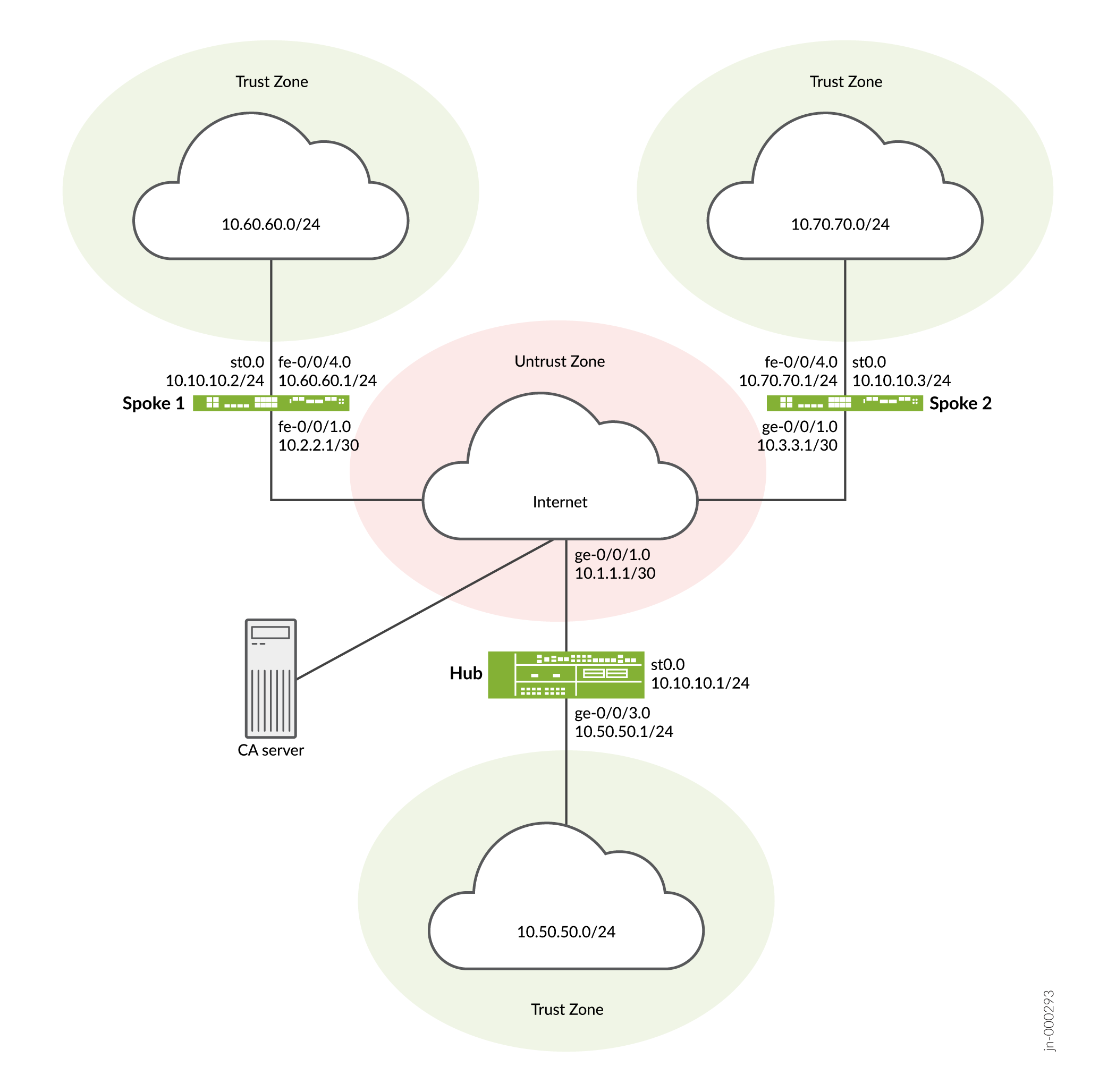
設定
AutoVPN を設定するには、次のタスクを実行します。
最初のセクションでは、ハブ デバイスとスポーク デバイスで簡易証明書登録プロトコル (SCEP) を使用して CA 証明書とローカル証明書をオンラインで取得する方法について説明します。PSK を使用している場合は、この手順を無視してください。
SCEP へのデバイス証明書の登録
ステップバイステップでの手順
ハブで SCEP にデジタル証明書を登録するには:
-
CA を設定します。
[edit]
user@host# set security pki ca-profile ca-profile1 ca-identity ca-profile1
user@host# set security pki ca-profile ca-profile1 enrollment url http://pc4/certsrv/mscep/mscep.dll
user@host# set security pki ca-profile ca-profile1 revocation-check disable
user@host# commit
-
CA 証明書を登録します。
user@host> request security pki ca-certificate enroll ca-profile ca-profile1
プロンプトで「 yes 」と入力して、CA 証明書を読み込みます。
-
キーペアを生成します。
user@host> request security pki generate-key-pair certificate-id Local1
-
ローカル証明書を登録します。
user@host> request security pki local-certificate enroll ca-profile ca-profile1 certificate-id Local1 domain-name example.net email hub@example.net ip-address 10.1.1.1 subject DC=example.net,CN=hub,OU=SLT,O=example,L=Bengaluru,ST=KA,C=IN challenge-password <password>
-
ローカル証明書を確認します。
user@host> show security pki local-certificate detail

Certificate identifier: Local1
  Certificate version: 3
  Serial number: 40a6d5f300000000258d
  Issuer:
    Common name: CASERVER1, Domain component: net, Domain component: internal
  Subject:
    Organization: example, Organizational unit: SLT, Country: IN, State: KA,
    Locality: Bengaluru, Common name: hub, Domain component: example.net
  Subject string:
    C=IN, DC=example.net, ST=KA, L=Bengaluru, O=example, OU=SLT, CN=hub
  Alternate subject: "hub@example.net", example.net, 10.1.1.1
  Validity:
    Not before: 11- 6-2012 09:39
    Not after: 11- 6-2013 09:49
  Public key algorithm: rsaEncryption(1024 bits)
    30:81:89:02:81:81:00:c9:c9:cc:30:b6:7a:86:12:89:b5:18:b3:76
    01:2d:cc:65:a8:a8:42:78:cd:d0:9a:a2:c0:aa:c4:bd:da:af:88:f3
    2a:78:1f:0a:58:e6:11:2c:81:8f:0e:7c:de:86:fc:48:4c:28:5b:8b
    34:91:ff:2e:91:e7:b5:bd:79:12:de:39:46:d9:fb:5c:91:41:d1:da
    90:f5:09:00:9b:90:07:9d:50:92:7d:ff:fb:3f:3c:bc:34:e7:e3:c8
    ea:cb:99:18:b4:b6:1d:a8:99:d3:36:b9:1b:36:ef:3e:a1:fd:48:82
    6a:da:22:07:da:e0:d2:55:ef:57:be:09:7a:0e:17:02:03:01:00:01
  Signature algorithm: sha1WithRSAEncryption
  Distribution CRL:
    http://ca-server1/CertEnroll/CASERVER1.crl
    file://\\ca-server1\CertEnroll\CASERVER1.crl
  Fingerprint:
    e1:f7:a1:a6:1e:c3:97:69:a5:07:9b:09:14:1a:c7:ae:09:f1:f6:35 (sha1)
    a0:02:fa:8d:5c:63:e5:6d:f7:f4:78:56:ac:4e:b2:c4 (md5)
  Auto-re-enrollment:
    Status: Disabled
    Next trigger time: Timer not started
ステップバイステップでの手順
スポーク 1 で SCEP を使用してデジタル証明書を登録するには:
-
CA を設定します。
[edit]
user@host# set security pki ca-profile ca-profile1 ca-identity ca-profile1
user@host# set security pki ca-profile ca-profile1 enrollment url http://pc4/certsrv/mscep/mscep.dll
user@host# set security pki ca-profile ca-profile1 revocation-check disable
user@host# commit
-
CA 証明書を登録します。
user@host> request security pki ca-certificate enroll ca-profile ca-profile1
プロンプトで「 yes 」と入力して、CA 証明書を読み込みます。
-
キーペアを生成します。
user@host> request security pki generate-key-pair certificate-id Local1
-
ローカル証明書を登録します。
user@host> request security pki local-certificate enroll ca-profile ca-profile1 certificate-id Local1 domain-name example.net email spoke1@example.net ip-address 10.2.2.1 subject DC=example.net,CN=spoke1,OU=SLT,O=example,L=Mysore,ST=KA,C=IN challenge-password <password>
-
ローカル証明書を確認します。
user@host> show security pki local-certificate detail

Certificate identifier: Local1
  Certificate version: 3
  Serial number: 40a7975f00000000258e
  Issuer:
    Common name: CASERVER1, Domain component: net, Domain component: internal
  Subject:
    Organization: example, Organizational unit: SLT, Country: IN, State: KA,
    Locality: Mysore, Common name: spoke1, Domain component: example.net
  Subject string:
    C=IN, DC=example.net, ST=KA, L=Mysore, O=example, OU=SLT, CN=spoke1
  Alternate subject: "spoke1@example.net", example.net, 10.2.2.1
  Validity:
    Not before: 11- 6-2012 09:40
    Not after: 11- 6-2013 09:50
  Public key algorithm: rsaEncryption(1024 bits)
    30:81:89:02:81:81:00:d8:45:09:77:cd:36:9a:6f:58:44:18:91:db
    b0:c7:8a:ee:c8:d7:a6:d2:e2:e7:20:46:2b:26:1a:92:e2:4e:8a:ce
    c9:25:d9:74:a2:81:ad:ea:e0:38:a0:2f:2d:ab:a6:58:ac:88:35:f4
    90:01:08:33:33:75:2c:44:26:f8:25:18:97:96:e4:28:de:3b:35:f2
    4a:f5:92:b7:57:ae:73:4f:8e:56:71:ab:81:54:1d:75:88:77:13:64
    1b:6b:01:96:15:0a:1c:54:e3:db:f8:ec:ec:27:5b:86:39:c1:09:a1
    e4:24:1a:19:0d:14:2c:4b:94:a4:04:91:3f:cb:ef:02:03:01:00:01
  Signature algorithm: sha1WithRSAEncryption
  Distribution CRL:
    http://ca-server1/CertEnroll/CASERVER1.crl
    file://\\ca-server1\CertEnroll\CASERVER1.crl
  Fingerprint:
    b6:24:2a:0e:96:5d:8c:4a:11:f3:5a:24:89:7c:df:ea:d5:c0:80:56 (sha1)
    31:58:7f:15:bb:d4:66:b8:76:1a:42:4a:8a:16:b3:a9 (md5)
  Auto-re-enrollment:
    Status: Disabled
    Next trigger time: Timer not started
件名フィールドに表示される組織単位 (OU) は
SLT。ハブのIKE設定には、スポークを識別するためのou=SLTが含まれています。
ステップバイステップでの手順
スポーク 2 で SCEP を使用してデジタル証明書を登録するには:
-
CA を設定します。
[edit]
user@host# set security pki ca-profile ca-profile1 ca-identity ca-profile1
user@host# set security pki ca-profile ca-profile1 enrollment url http://pc4/certsrv/mscep/mscep.dll
user@host# set security pki ca-profile ca-profile1 revocation-check disable
user@host# commit
-
CA 証明書を登録します。
user@host> request security pki ca-certificate enroll ca-profile ca-profile1
プロンプトで「 yes 」と入力して、CA 証明書を読み込みます。
-
キーペアを生成します。
user@host> request security pki generate-key-pair certificate-id Local1
-
ローカル証明書を登録します。
user@host> request security pki local-certificate enroll ca-profile ca-profile1 certificate-id Local1 domain-name example.net email spoke2@example.net ip-address 10.3.3.1 subject DC=example.net,CN=spoke2,OU=SLT,O=example,L=Tumkur,ST=KA,C=IN challenge-password <password>
-
ローカル証明書を確認します。
user@host> show security pki local-certificate detail

Certificate identifier: Local1
  Certificate version: 3
  Serial number: 40bb71d400000000258f
  Issuer:
    Common name: CASERVER1, Domain component: net, Domain component: internal
  Subject:
    Organization: example, Organizational unit: SLT, Country: IN, State: KA,
    Locality: Tumkur, Common name: spoke2, Domain component: example.net
  Subject string:
    C=IN, DC=example.net, ST=KA, L=Tumkur, O=example, OU=SLT, CN=spoke2
  Alternate subject: "spoke2@example.net", example.net, 10.3.3.1
  Validity:
    Not before: 11- 6-2012 10:02
    Not after: 11- 6-2013 10:12
  Public key algorithm: rsaEncryption(1024 bits)
    30:81:89:02:81:81:00:b6:2e:e2:da:e6:ac:57:e4:5d:ff:de:f6:89
    27:d6:3e:1b:4a:3f:b2:2d:b3:d3:61:ed:ed:6a:07:d9:8a:d2:24:03
    77:1a:fe:84:e1:12:8a:2d:63:6e:bf:02:6b:15:96:5a:4f:37:a0:46
    44:09:96:c0:fd:bb:ab:79:2c:5d:92:bd:31:f0:3b:29:51:ce:89:8e
    7c:2b:02:d0:14:5b:0a:a9:02:93:21:ea:f9:fc:4a:e7:08:bc:b1:6d
    7c:f8:3e:53:58:8e:f1:86:13:fe:78:b5:df:0b:8e:53:00:4a:46:11
    58:4a:38:e9:82:43:d8:25:47:7d:ef:18:f0:ef:a7:02:03:01:00:01
  Signature algorithm: sha1WithRSAEncryption
  Distribution CRL:
    http://ca-server1/CertEnroll/CASERVER1.crl
    file://\\ca-server1\CertEnroll\CASERVER1.crl
  Fingerprint:
    1a:6d:77:ac:fd:94:68:ce:cf:8a:85:f0:39:fc:e0:6b:fd:fe:b8:66 (sha1)
    00:b1:32:5f:7b:24:9c:e5:02:e6:72:75:9e:a5:f4:77 (md5)
  Auto-re-enrollment:
    Status: Disabled
    Next trigger time: Timer not started
件名フィールドに表示される組織単位 (OU) は
SLT。ハブのIKE設定には、スポークを識別するためのou=SLTが含まれています。
ハブの設定
CLIクイック構成
この例を迅速に設定するには、以下のコマンドをコピーして、テキストファイルに貼り付け、改行を削除し、ネットワーク設定に一致させる必要がある詳細情報を変更し、コマンドを [edit] 階層レベルでCLIにコピーアンドペーストして、設定モードから commit を入力します。
set interfaces ge-0/0/1 unit 0 family inet address 10.1.1.1/30
set interfaces ge-0/0/3 unit 0 family inet address 10.50.50.1/24
set interfaces st0 unit 0 multipoint
set interfaces st0 unit 0 family inet address 10.10.10.1/24
set policy-options policy-statement lan_nw from interface ge-0/0/3.0
set policy-options policy-statement lan_nw then accept
set protocols bgp group ibgp type internal
set protocols bgp group ibgp local-address 10.10.10.1
set protocols bgp group ibgp export lan_nw
set protocols bgp group ibgp cluster 10.2.3.4
set protocols bgp group ibgp peer-as 65010
set policy-options policy-statement lan_nw from interface ge-0/0/3.0
set policy-options policy-statement lan_nw then accept
set policy-options policy-statement bgp_nh_self term 1 from protocol bgp
set policy-options policy-statement bgp_nh_self term 1 then next-hop self
set policy-options policy-statement bgp_nh_self term 1 then accept
set protocols bgp group ibgp export bgp_nh_self
set protocols bgp group ibgp allow 10.10.10.0/24
set routing-options static route 10.2.2.0/30 next-hop 10.1.1.2
set routing-options static route 10.3.3.0/30 next-hop 10.1.1.2
set routing-options autonomous-system 65010
set security ike proposal ike-proposal authentication-method rsa-signatures
set security ike proposal ike-proposal dh-group group2
set security ike proposal ike-proposal authentication-algorithm sha1
set security ike proposal ike-proposal encryption-algorithm aes-128-cbc
set security ike policy ike-policy1 mode main
set security ike policy ike-policy1 proposals ike-proposal
set security ike policy ike-policy1 certificate local-certificate Local1
set security ike gateway hub-to-spoke-gw ike-policy ike-policy1
set security ike gateway hub-to-spoke-gw dynamic distinguished-name wildcard OU=SLT
set security ike gateway hub-to-spoke-gw dynamic ike-user-type group-ike-id
set security ike gateway hub-to-spoke-gw local-identity distinguished-name
set security ike gateway hub-to-spoke-gw external-interface ge-0/0/1.0
set security ipsec proposal ipsec-proposal protocol esp
set security ipsec proposal ipsec-proposal authentication-algorithm hmac-md5-96
set security ipsec proposal ipsec-proposal encryption-algorithm des-cbc
set security ipsec policy vpn-policy1 perfect-forward-secrecy keys group14
set security ipsec policy vpn-policy1 proposals ipsec-proposal
set security ipsec vpn hub-to-spoke-vpn bind-interface st0.0
set security ipsec vpn hub-to-spoke-vpn ike gateway hub-to-spoke-gw
set security ipsec vpn hub-to-spoke-vpn ike ipsec-policy vpn-policy1
set security zones security-zone untrust host-inbound-traffic system-services all
set security zones security-zone untrust host-inbound-traffic protocols all
set security zones security-zone untrust interfaces st0.0
set security zones security-zone untrust interfaces ge-0/0/1.0
set security zones security-zone trust host-inbound-traffic system-services all
set security zones security-zone trust host-inbound-traffic protocols all
set security zones security-zone trust interfaces ge-0/0/3.0
set security policies default-policy permit-all
set security pki ca-profile ca-profile1 ca-identity ca-profile1
set security pki ca-profile ca-profile1 enrollment url http://pc4/certsrv/mscep/mscep.dll
set security pki ca-profile ca-profile1 revocation-check disable
ステップバイステップでの手順
次の例では、設定階層のいくつかのレベルに移動する必要があります。その方法の詳細については、設定モードでのCLIエディターの使用を参照してください。
ハブを設定するには:
-
インターフェイスを設定します。
[edit interfaces]
user@host# set ge-0/0/1 unit 0 family inet address 10.1.1.1/30
user@host# set ge-0/0/3 unit 0 family inet address 10.50.50.1/24
user@host# set st0 unit 0 multipoint
user@host# set st0 unit 0 family inet address 10.10.10.1/24
-
ルーティング プロトコルを設定します。
[edit policy-options]
user@host# set policy-statement lan_nw from interface ge-0/0/3.0
user@host# set policy-statement lan_nw then accept
user@host# set policy-statement bgp_nh_self term 1 from protocol bgp
user@host# set policy-statement bgp_nh_self term 1 then next-hop self
user@host# set policy-statement bgp_nh_self term 1 then accept
[edit protocols bgp]
user@host# set group ibgp type internal
user@host# set group ibgp local-address 10.10.10.1
user@host# set group ibgp export lan_nw
user@host# set group ibgp cluster 10.2.3.4
user@host# set group ibgp peer-as 65010
user@host# set group ibgp allow 10.10.10.0/24
user@host# set group ibgp export bgp_nh_self
[edit routing-options]
user@host# set static route 10.2.2.0/30 next-hop 10.1.1.2
user@host# set static route 10.3.3.0/30 next-hop 10.1.1.2
user@host# set autonomous-system 65010
-
フェーズ1のオプションを設定します。
認証に証明書の代わりに事前共有キーを使用する場合は、構成を次のように変更します。
IKEプロポーザルの[
edit security ike proposal ike-proposal]階層レベルで、authentication-method rsa-signaturesをauthentication-method pre-shared-keysに置き換えます。オプションの詳細については、 プロポーザル(セキュリティ IKE)を参照してください。
IKEポリシーの[
edit security ike policy policy-name]階層レベルで、certificate local-certificate Local1をpre-shared-key ascii-text keyに置き換えます。例えば、
set pre-shared-key ascii-text juniper123
オプションの詳細については、 ポリシー(セキュリティ IKE)を参照してください。
IKEゲートウェイの[
edit security ike gateway hub-to-spoke-gw]階層レベルで、dynamic distinguished-name wildcard OU=SLTをdynamic hostname domain-nameに置き換えます。例えば、
set dynamic hostname juniper.netデバイスがホスト名を解決できることを確認します。または、スポークの動的 ID に
set dynamic general-ikeidとset dynamic ike-user-type group-ike-idを使用することもできます。
local-identity distinguished-nameをlocal-identity hostname hub-hostnameに置き換えます。例えば、
set local-identity hostname hub.juniper.net。デバイスがホスト名を解決できることを確認します。または、
set local-identity inet 192.168.1.100のようにinet ip-addressを使用することもできます。
オプションの詳細については、 ゲートウェイ(セキュリティ IKE)を参照してください。
[edit security ike proposal ike-proposal]
user@host# set authentication-method rsa-signatures
user@host# set dh-group group2
user@host# set authentication-algorithm sha1
user@host# set encryption-algorithm aes-128-cbc
[edit security ike policy ike-policy1]
user@host# set mode main
user@host# set proposals ike-proposal
user@host# set certificate local-certificate Local1
[edit security ike gateway hub-to-spoke-gw]
user@host# set ike-policy ike-policy1
user@host# set dynamic distinguished-name wildcard OU=SLT
user@host# set dynamic ike-user-type group-ike-id
user@host# set local-identity distinguished-name
user@host# set external-interface ge-0/0/1.0
-
フェーズ2のオプションを設定します。
[edit security ipsec proposal ipsec-proposal]
user@host# set protocol esp
user@host# set authentication-algorithm hmac-md5-96
user@host# set encryption-algorithm des-cbc
[edit security ipsec policy vpn-policy1]
user@host# set perfect-forward-secrecy keys group14
user@host# set proposals ipsec-proposal
[edit security ipsec vpn hub-to-spoke-vpn]
user@host# set bind-interface st0.0
user@host# set ike gateway hub-to-spoke-gw
user@host# set ike ipsec-policy vpn-policy1
-
ゾーンを設定します。
[edit security zones security-zone untrust]
user@host# set host-inbound-traffic system-services all
user@host# set host-inbound-traffic protocols all
user@host# set interfaces ge-0/0/1.0
user@host# set interfaces st0.0
[edit security zones security-zone trust]
user@host# set host-inbound-traffic system-services all
user@host# set host-inbound-traffic protocols all
user@host# set interfaces ge-0/0/3.0
-
デフォルトのセキュリティポリシーを設定します。
[edit security policies]
user@host# set default-policy permit-all
-
CA プロファイルを設定します。PSK を使用している場合は、この手順を無視してください。
[edit security pki]
user@host# set ca-profile ca-profile1 ca-identity ca-profile1
user@host# set ca-profile ca-profile1 enrollment url http://pc4/certsrv/mscep/mscep.dll
user@host# set ca-profile ca-profile1 revocation-check disable
結果
設定モードから、 show interfaces、 show policy-options、 show protocols、 show routing-options、 show security ike、 show security ipsec、 show security zones、 show security policies、および show security pki コマンドを入力して、設定を確認します。出力結果に意図した設定内容が表示されない場合は、この例の設定手順を繰り返して設定を修正します。
[edit]
user@host# show interfaces
ge-0/0/1 {
    unit 0 {
        family inet {
            address 10.1.1.1/30;
        }
    }
}
    ge-0/0/3 {
        unit 0 {
            family inet {
                address 10.50.50.1/24;
            }
        }
    }
    st0 {
        unit 0 {
            multipoint;
            family inet {
                address 10.10.10.1/24;
            }
        }
    }
[edit]
user@host# show policy-options
policy-statement bgp_nh_self {
    term 1 {
        from protocol bgp;
        then {
            next-hop self;
            accept;
        }
    }
}
policy-statement lan_nw {
    from interface ge-0/0/3.0;
    then accept;
}
[edit]
user@host# show protocols
bgp {
    group ibgp {
        type internal;
        local-address 10.10.10.1;
        export lan_nw;
        cluster 10.2.3.4;
        peer-as 65010;
        allow 10.10.10.0/24;
        export bgp_nh_self;
    }
}
[edit]
user@host# show routing-options
static {
    route 10.2.2.0/30 next-hop 10.1.1.2;
    route 10.3.3.0/30 next-hop 10.1.1.2;
    }
autonomous-system 65010;
[edit]
user@host# show security ike
proposal ike-proposal {
    authentication-method rsa-signatures;
    dh-group group2;
    authentication-algorithm sha1;
    encryption-algorithm aes-128-cbc;
}
    policy ike-policy1 {
        mode main;
        proposals ike-proposal;
        certificate {
            local-certificate Local1;
        }
    }
    gateway hub-to-spoke-gw {
        ike-policy ike-policy1;
        dynamic {
            distinguished-name {
                wildcard OU=SLT;
            }
            ike-user-type group-ike-id;
        }
        local-identity distinguished-name;
        external-interface ge-0/0/1.0;
    }
[edit]
user@host# show security ipsec
    proposal ipsec-proposal {
        protocol esp;
        authentication-algorithm hmac-md5-96;
        encryption-algorithm des-cbc;
    }
    policy vpn-policy1 {
        perfect-forward-secrecy {
            keys group14;
        }
        proposals ipsec-proposal;
    }
    vpn hub-to-spoke-vpn {
        bind-interface st0.0;
        ike {
            gateway hub-to-spoke-gw;
            ipsec-policy vpn-policy1;
        }
    }
[edit]
user@host# show security zones
security-zone untrust {
    host-inbound-traffic {
        system-services {
            all;
        }
        protocols {
            all;
        }
    }
    interfaces {
        st0.0;
        ge-0/0/1.0;
    }
}
    security-zone trust {
        host-inbound-traffic {
            system-services {
                all;
            }
            protocols {
                all;
            }
        }
        interfaces {
            ge-0/0/3.0;
        }
    }
[edit]
user@host# show security policies
default-policy {
    permit-all;
}
[edit]
user@host# show security pki
ca-profile ca-profile1 {
    ca-identity ca-profile1;
    enrollment {
        url http://pc4/certsrv/mscep/mscep.dll;
    }
    revocation-check {
        disable;
    }
}
デバイスの設定が完了したら、設定モードから commit を入力します。
スポーク1の設定
CLIクイック構成
この例を迅速に設定するには、以下のコマンドをコピーして、テキストファイルに貼り付け、改行を削除し、ネットワーク設定に一致させる必要がある詳細情報を変更し、コマンドを [edit] 階層レベルでCLIにコピーアンドペーストして、設定モードから commit を入力します。
set interfaces fe-0/0/1 unit 0 family inet address 10.2.2.1/30
set interfaces fe-0/0/4 unit 0 family inet address 10.60.60.1/24
set interfaces st0 unit 0 multipoint
set interfaces st0 unit 0 family inet address 10.10.10.2/24
set policy-options policy-statement lan_nw from interface fe-0/0/4.0
set policy-options policy-statement lan_nw then accept
set protocols bgp group ibgp type internal
set protocols bgp group ibgp local-address 10.10.10.2
set protocols bgp group ibgp export lan_nw
set protocols bgp group ibgp neighbor 10.10.10.1
set routing-options static route 10.1.1.0/30 next-hop 10.2.2.2
set routing-options autonomous-system 65010
set security ike proposal ike-proposal authentication-method rsa-signatures
set security ike proposal ike-proposal dh-group group2
set security ike proposal ike-proposal authentication-algorithm sha1
set security ike proposal ike-proposal encryption-algorithm aes-128-cbc
set security ike policy ike-policy1 mode main
set security ike policy ike-policy1 proposals ike-proposal
set security ike policy ike-policy1 certificate local-certificate Local1
set security ike gateway spoke-to-hub-gw ike-policy ike-policy1
set security ike gateway spoke-to-hub-gw address 10.1.1.1
set security ike gateway spoke-to-hub-gw local-identity distinguished-name
set security ike gateway spoke-to-hub-gw remote-identity distinguished-name
set security ike gateway spoke-to-hub-gw external-interface fe-0/0/1.0
set security ipsec proposal ipsec-proposal protocol esp
set security ipsec proposal ipsec-proposal authentication-algorithm hmac-md5-96
set security ipsec proposal ipsec-proposal encryption-algorithm des-cbc
set security ipsec policy vpn-policy1 perfect-forward-secrecy keys group14
set security ipsec policy vpn-policy1 proposals ipsec-proposal
set security ipsec vpn spoke-to-hub bind-interface st0.0
set security ipsec vpn spoke-to-hub ike gateway spoke-to-hub-gw
set security ipsec vpn spoke-to-hub ike ipsec-policy vpn-policy1
set security ipsec vpn spoke-to-hub establish-tunnels immediately
set security zones security-zone untrust host-inbound-traffic system-services all
set security zones security-zone untrust host-inbound-traffic protocols all
set security zones security-zone untrust interfaces fe-0/0/1.0
set security zones security-zone untrust interfaces st0.0
set security zones security-zone trust host-inbound-traffic system-services all
set security zones security-zone trust host-inbound-traffic protocols all
set security zones security-zone trust interfaces fe-0/0/4.0
set security policies default-policy permit-all
set security pki ca-profile ca-profile1 ca-identity ca-profile1
set security pki ca-profile ca-profile1 enrollment url http://pc4/certsrv/mscep/mscep.dll
set security pki ca-profile ca-profile1 revocation-check disable
ステップバイステップでの手順
次の例では、設定階層のいくつかのレベルに移動する必要があります。その方法の詳細については、設定モードでのCLIエディターの使用を参照してください。
スポーク 1 を設定するには:
-
インターフェイスを設定します。
[edit interfaces]
user@host# set fe-0/0/1 unit 0 family inet address 10.2.2.1/30
user@host# set fe-0/0/4 unit 0 family inet address 10.60.60.1/24
user@host# set st0 unit 0 multipoint
user@host# set st0 unit 0 family inet address 10.10.10.2/24
-
ルーティング プロトコルを設定します。
[edit policy-options]
user@host# set policy-statement lan_nw from interface fe-0/0/4.0
user@host# set policy-statement lan_nw then accept
[edit protocols bgp]
user@host# set group ibgp type internal
user@host# set group ibgp local-address 10.10.10.2
user@host# set group ibgp export lan_nw
user@host# set group ibgp neighbor 10.10.10.1
[edit routing-options]
user@host# set static route 10.1.1.0/30 next-hop 10.2.2.2
user@host# set autonomous-system 10
-
フェーズ1のオプションを設定します。
認証に証明書の代わりに事前共有キーを使用する場合は、構成を次のように変更します。
IKEプロポーザルの[
edit security ike proposal ike-proposal]階層レベルで、authentication-method rsa-signaturesをauthentication-method pre-shared-keysに置き換えます。IKEポリシーの[
edit security ike policy policy-name]階層レベルで、certificate local-certificate Local1をpre-shared-key ascii-text keyに置き換えます。IKEゲートウェイの[
edit security ike gateway hub-to-spoke-gw]階層レベルで、local-identity distinguished-nameをlocal-identity hostname spoke1-hostnameに置き換えます。例えば、
set local-identity hostname spoke1.juniper.net。
remote-identity distinguished-nameをremote-identity hostname hub-hostnameに置き換えます。例えば、
set remote-identity hostname hub.juniper.net
デバイスがホスト名を解決できることを確認します。または、
set local-identity inet 172.16.1.100やset remote-identity inet 192.168.1.100のようにinet ip-addressを使用することもできます。
[edit security ike proposal ike-proposal]
user@host# set authentication-method rsa-signatures
user@host# set dh-group group2
user@host# set authentication-algorithm sha1
user@host# set encryption-algorithm aes-128-cbc
[edit security ike policy ike-policy1]
user@host# set mode main
user@host# set proposals ike-proposal
user@host# set certificate local-certificate Local1
[edit security ike gateway spoke-to-hub-gw]
user@host# set ike-policy ike-policy1
user@host# set address 10.1.1.1
user@host# set local-identity distinguished-name
user@host# set remote-identity distinguished-name
user@host# set external-interface fe-0/0/1.0
-
フェーズ2のオプションを設定します。
[edit security ipsec proposal ipsec-proposal]
user@host# set protocol esp
user@host# set authentication-algorithm hmac-md5-96
user@host# set encryption-algorithm des-cbc
[edit security ipsec policy vpn-policy1]
user@host# set perfect-forward-secrecy keys group14
user@host# set proposals ipsec-proposal
[edit security ipsec vpn spoke-to-hub]
user@host# set bind-interface st0.0
user@host# set ike gateway spoke-to-hub-gw
user@host# set ike ipsec-policy vpn-policy1
user@host# set establish-tunnels immediately
-
ゾーンを設定します。
[edit security zones security-zone untrust]
user@host# set host-inbound-traffic system-services all
user@host# set host-inbound-traffic protocols all
user@host# set interfaces fe-0/0/1.0
user@host# set interfaces st0.0
[edit security zones security-zone trust]
user@host# set host-inbound-traffic system-services all
user@host# set host-inbound-traffic protocols all
user@host# set interfaces fe-0/0/4.0
-
デフォルトのセキュリティポリシーを設定します。
[edit security policies]
user@host# set default-policy permit-all
-
CA プロファイルを設定します。PSK を使用している場合は、この手順を無視してください。
[edit security pki]
user@host# set ca-profile ca-profile1 ca-identity ca-profile1
user@host# set ca-profile ca-profile1 enrollment url http://pc4/certsrv/mscep/mscep.dll
user@host# set ca-profile ca-profile1 revocation-check disable
結果
設定モードから、 show interfaces、 show policy-options、 show protocols、 show routing-options、 show security ike、 show security ipsec、 show security zones、 show security policies、および show security pki コマンドを入力して、設定を確認します。出力結果に意図した設定内容が表示されない場合は、この例の設定手順を繰り返して設定を修正します。
[edit]
user@host# show interfaces
fe-0/0/1 {
    unit 0 {
        family inet {
            address 10.2.2.1/30;
        }
    }
}
    fe-0/0/4 {
        unit 0 {
            family inet {
                address 10.60.60.1/24;
            }
        }
    }
    st0 {
        unit 0 {
            multipoint;
            family inet {
                address 10.10.10.2/24;
            }
        }
    }
[edit]
user@host# show policy-options
policy-statement lan_nw {
    from interface fe-0/0/4.0;
    then accept;
}
[edit]
user@host# show protocols
bgp {
    group ibgp {
        type internal;
        local-address 10.10.10.2;
        export lan_nw;
        neighbor 10.10.10.1;
    }
}
[edit]
user@host# show routing-options
static {
    route 10.1.1.0/30 next-hop 10.2.2.2;
    }
autonomous-system 65010;
[edit]
user@host# show security ike
proposal ike-proposal {
    authentication-method rsa-signatures;
    dh-group group2;
    authentication-algorithm sha1;
    encryption-algorithm aes-128-cbc;
}
    policy ike-policy1 {
        mode main;
        proposals ike-proposal;
        certificate {
            local-certificate Local1;
        }
    }
    gateway spoke-to-hub-gw {
        ike-policy ike-policy1;
        address 10.1.1.1;
        local-identity distinguished-name;
        remote-identity distinguished-name;
        external-interface fe-0/0/1.0;
    }
[edit]
user@host# show security ipsec
proposal ipsec-proposal {
    protocol esp;
    authentication-algorithm hmac-md5-96;
    encryption-algorithm des-cbc;
}
    policy vpn-policy1 {
        perfect-forward-secrecy {
            keys group14;
        }
        proposals ipsec-proposal;
    }
    vpn spoke-to-hub {
        bind-interface st0.0;
        ike {
            gateway spoke-to-hub-gw;
            ipsec-policy vpn-policy1;
        }
        establish-tunnels immediately;
    }
[edit]
user@host# show security zones
security-zone untrust {
    host-inbound-traffic {
        system-services {
            all;
        }
        protocols {
            all;
        }
    }
    interfaces {
        fe-0/0/1.0;
        st0.0;
    }
}
    security-zone trust {
        host-inbound-traffic {
            system-services {
                all;
            }
            protocols {
                all;
            }
        }
        interfaces {
            fe-0/0/4.0;
        }
    }
[edit]
user@host# show security policies
default-policy {
    permit-all;
}
[edit]
user@host# show security pki
ca-profile ca-profile1 {
    ca-identity ca-profile1;
    enrollment {
        url http://pc4/certsrv/mscep/mscep.dll;
    }
    revocation-check {
        disable;
    }
}
デバイスの設定が完了したら、設定モードから commit を入力します。
スポーク2の設定
CLIクイック構成
この例を迅速に設定するには、以下のコマンドをコピーして、テキストファイルに貼り付け、改行を削除し、ネットワーク設定に一致させる必要がある詳細情報を変更し、コマンドを [edit] 階層レベルでCLIにコピーアンドペーストして、設定モードから commit を入力します。
set interfaces ge-0/0/1 unit 0 family inet address 10.3.3.1/30
set interfaces fe-0/0/4 unit 0 family inet address 10.70.70.1/24
set interfaces st0 unit 0 multipoint
set interfaces st0 unit 0 family inet address 10.10.10.3/24
set policy-options policy-statement lan_nw from interface fe-0/0/4.0
set policy-options policy-statement lan_nw then accept
set protocols bgp group ibgp type internal
set protocols bgp group ibgp local-address 10.10.10.3
set protocols bgp group ibgp export lan_nw
set protocols bgp group ibgp neighbor 10.10.10.1
set routing-options static route 10.1.1.0/30 next-hop 10.3.3.2
set routing-options autonomous-system 65010
set security ike proposal ike-proposal authentication-method rsa-signatures
set security ike proposal ike-proposal dh-group group2
set security ike proposal ike-proposal authentication-algorithm sha1
set security ike proposal ike-proposal encryption-algorithm aes-128-cbc
set security ike policy ike-policy1 mode main
set security ike policy ike-policy1 proposals ike-proposal
set security ike policy ike-policy1 certificate local-certificate Local1
set security ike gateway spoke-to-hub-gw ike-policy ike-policy1
set security ike gateway spoke-to-hub-gw address 10.1.1.1
set security ike gateway spoke-to-hub-gw local-identity distinguished-name
set security ike gateway spoke-to-hub-gw remote-identity distinguished-name
set security ike gateway spoke-to-hub-gw external-interface ge-0/0/1.0
set security ipsec proposal ipsec-proposal protocol esp
set security ipsec proposal ipsec-proposal authentication-algorithm hmac-md5-96
set security ipsec proposal ipsec-proposal encryption-algorithm des-cbc
set security ipsec policy vpn-policy1 perfect-forward-secrecy keys group14
set security ipsec policy vpn-policy1 proposals ipsec-proposal
set security ipsec vpn spoke-to-hub bind-interface st0.0
set security ipsec vpn spoke-to-hub ike gateway spoke-to-hub-gw
set security ipsec vpn spoke-to-hub ike ipsec-policy vpn-policy1
set security ipsec vpn spoke-to-hub establish-tunnels immediately
set security zones security-zone untrust host-inbound-traffic system-services all
set security zones security-zone untrust host-inbound-traffic protocols all
set security zones security-zone untrust interfaces ge-0/0/1.0
set security zones security-zone untrust interfaces st0.0
set security zones security-zone trust host-inbound-traffic system-services all
set security zones security-zone trust host-inbound-traffic protocols all
set security zones security-zone trust interfaces fe-0/0/4.0
set security policies default-policy permit-all
set security pki ca-profile ca-profile1 ca-identity ca-profile1
set security pki ca-profile ca-profile1 enrollment url http://pc4/certsrv/mscep/mscep.dll
set security pki ca-profile ca-profile1 revocation-check disable
ステップバイステップでの手順
次の例では、設定階層のいくつかのレベルに移動する必要があります。その方法の詳細については、設定モードでのCLIエディターの使用を参照してください。
スポーク 2 を設定するには:
-
インターフェイスを設定します。
[edit interfaces]
user@host# set ge-0/0/1 unit 0 family inet address 10.3.3.1/30
user@host# set fe-0/0/4 unit 0 family inet address 10.70.70.1/24
user@host# set st0 unit 0 multipoint
user@host# set st0 unit 0 family inet address 10.10.10.3/24
-
ルーティング プロトコルを設定します。
[edit policy-options]
user@host# set policy-statement lan_nw from interface fe-0/0/4.0
user@host# set policy-statement lan_nw then accept
[edit protocols bgp]
user@host# set group ibgp type internal
user@host# set group ibgp local-address 10.10.10.3
user@host# set group ibgp export lan_nw
user@host# set group ibgp neighbor 10.10.10.1
[edit routing-options]
user@host# set static route 10.1.1.0/30 next-hop 10.3.3.2
user@host# set autonomous-system 10
-
フェーズ1のオプションを設定します。
認証に証明書の代わりに事前共有キーを使用する場合は、構成を次のように変更します。
IKEプロポーザルの[
edit security ike proposal ike-proposal]階層レベルで、authentication-method rsa-signaturesをauthentication-method pre-shared-keysに置き換えます。IKEポリシーの[
edit security ike policy policy-name]階層レベルで、certificate local-certificate Local1をpre-shared-key ascii-text keyに置き換えます。IKEゲートウェイの[
edit security ike gateway hub-to-spoke-gw]階層レベルで、local-identity distinguished-nameをlocal-identity hostname spoke2-hostnameに置き換えます。例えば、
set local-identity hostname spoke2.juniper.net
remote-identity distinguished-nameをremote-identity hostname hub-hostnameに置き換えます。例えば、
set remote-identity hostname hub.juniper.net
デバイスがホスト名を解決できることを確認します。または、
set local-identity inet 10.0.1.100やset remote-identity inet 192.168.1.100のようにinet ip-addressを使用することもできます。
[edit security ike proposal ike-proposal]
user@host# set authentication-method rsa-signatures
user@host# set dh-group group2
user@host# set authentication-algorithm sha1
user@host# set encryption-algorithm aes-128-cbc
[edit security ike policy ike-policy1]
user@host# set mode main
user@host# set proposals ike-proposal
user@host# set certificate local-certificate Local1
[edit security ike gateway spoke-to-hub-gw]
user@host# set ike-policy ike-policy1
user@host# set address 10.1.1.1
user@host# set local-identity distinguished-name
user@host# set remote-identity distinguished-name
user@host# set external-interface ge-0/0/1.0
-
フェーズ2のオプションを設定します。
[edit security ipsec proposal ipsec-proposal]
user@host# set protocol esp
user@host# set authentication-algorithm hmac-md5-96
user@host# set encryption-algorithm des-cbc
[edit security ipsec policy vpn-policy1]
user@host# set perfect-forward-secrecy keys group14
user@host# set proposals ipsec-proposal
[edit security ipsec vpn spoke-to-hub]
user@host# set bind-interface st0.0
user@host# set ike gateway spoke-to-hub-gw
user@host# set ike ipsec-policy vpn-policy1
user@host# set establish-tunnels immediately
-
ゾーンを設定します。
[edit security zones security-zone untrust]
user@host# set host-inbound-traffic system-services all
user@host# set host-inbound-traffic protocols all
user@host# set interfaces ge-0/0/1.0
user@host# set interfaces st0.0
[edit security zones security-zone trust]
user@host# set host-inbound-traffic system-services all
user@host# set host-inbound-traffic protocols all
user@host# set interfaces fe-0/0/4.0
-
デフォルトのセキュリティポリシーを設定します。
[edit security policies]
user@host# set default-policy permit-all
-
CA プロファイルを設定します。PSK を使用している場合は、この手順を無視してください。
[edit security pki]
user@host# set ca-profile ca-profile1 ca-identity ca-profile1
user@host# set ca-profile ca-profile1 enrollment url http://pc4/certsrv/mscep/mscep.dll
user@host# set ca-profile ca-profile1 revocation-check disable
結果
設定モードから、 show interfaces、 show policy-options、 show protocols、 show routing-options、 show security ike、 show security ipsec、 show security zones、 show security policies、および show security pki コマンドを入力して、設定を確認します。出力結果に意図した設定内容が表示されない場合は、この例の設定手順を繰り返して設定を修正します。
[edit]
user@host# show interfaces
ge-0/0/1 {
    unit 0 {
        family inet {
            address 10.3.3.1/30;
        }
    }
}
    fe-0/0/4 {
        unit 0 {
            family inet {
                address 10.70.70.1/24;
            }
        }
    }
    st0 {
        unit 0 {
            multipoint;
            family inet {
                address 10.10.10.3/24;
            }
        }
    }
[edit]
user@host# show policy-options
policy-statement lan_nw {
    from interface fe-0/0/4.0;
    then accept;
}
[edit]
user@host# show protocols
bgp {
    group ibgp {
        type internal;
        local-address 10.10.10.3;
        export lan_nw;
        neighbor 10.10.10.1;
    }
}
[edit]
user@host# show routing-options
static {
    route 10.1.1.0/30 next-hop 10.3.3.2;
    }
autonomous-system 65010;
[edit]
user@host# show security ike
proposal ike-proposal {
    authentication-method rsa-signatures;
    dh-group group2;
    authentication-algorithm sha1;
    encryption-algorithm aes-128-cbc;
}
    policy ike-policy1 {
        mode main;
        proposals ike-proposal;
        certificate {
            local-certificate Local1;
        }
    }
    gateway spoke-to-hub-gw {
        ike-policy ike-policy1;
        address 10.1.1.1;
        local-identity distinguished-name;
        remote-identity distinguished-name;
        external-interface ge-0/0/1.0;
    }
[edit]
user@host# show security ipsec
proposal ipsec-proposal {
    protocol esp;
    authentication-algorithm hmac-md5-96;
    encryption-algorithm des-cbc;
}
    policy vpn-policy1 {
        perfect-forward-secrecy {
            keys group14;
        }
        proposals ipsec-proposal;
    }
    vpn spoke-to-hub {
        bind-interface st0.0;
        ike {
            gateway spoke-to-hub-gw;
            ipsec-policy vpn-policy1;
        }
        establish-tunnels immediately;
    }
[edit]
user@host# show security zones
security-zone untrust {
    host-inbound-traffic {
        system-services {
            all;
        }
        protocols {
            all;
        }
    }
    interfaces {
        ge-0/0/1.0;
        st0.0;
    }
}
    security-zone trust {
        host-inbound-traffic {
            system-services {
                all;
            }
            protocols {
                all;
            }
        }
        interfaces {
            fe-0/0/4.0;
        }
    }
[edit]
user@host# show security policies
default-policy {
    permit-all;
}
[edit]
user@host# show security pki
ca-profile ca-profile1 {
    ca-identity ca-profile1;
    enrollment {
        url http://pc4/certsrv/mscep/mscep.dll;
    }
    revocation-check {
        disable;
    }
}
デバイスの設定が完了したら、設定モードから commit を入力します。
検証
設定が正常に機能していることを確認します。
IKEフェーズ1ステータスの確認
目的
IKEフェーズ1ステータスを確認します。
アクション
動作モードからshow security ike security-associations コマンドを入力します。
user@host> show security ike security-associations
Index   State  Initiator cookie  Responder cookie  Mode           Remote Address
5480163 UP     a558717f387074ab  6d0135c5ecaed61d  Main           10.3.3.1
5480162 UP     7a63d16a5a723df1  c471f7ae166d3a34  Main           10.2.2.1
意味
show security ike security-associationsコマンドは、すべてのアクティブなIKEフェーズ1のSAを一覧表示します。SAが表示されない場合は、フェーズ1の確立に問題があったことを示しています。設定でIKEポリシー パラメータと外部インターフェイスの設定を確認してください。フェーズ 1 のプロポーザル パラメータは、ハブとスポークで一致する必要があります。
IPsecフェーズ2ステータスの確認
目的
IPsec フェーズ 2 のステータスを確認します。
アクション
動作モードからsecurity ipsec security-associations コマンドを入力します。
user@host> security ipsec security-associations
  Total active tunnels: 2
  ID    Algorithm       SPI      Life:sec/kb  Mon vsys Port  Gateway
  <268173400 ESP:des/ md5 9bf33bc7 3567/ unlim -   root 500   10.2.2.1
  >268173400 ESP:des/ md5 aae5196b 3567/ unlim -   root 500   10.2.2.1
  <268173401 ESP:des/ md5 69c24d81 622/ unlim  -   root 500   10.3.3.1
  >268173401 ESP:des/ md5 e3fe0231 622/ unlim  -   root 500   10.3.3.1
意味
show security ipsec security-associations コマンドは、すべてのアクティブなIKEフェーズ2のSAを一覧表示します。SA が何も表示されない場合は、フェーズ 2 の確立に問題があったことになります。設定でIKEポリシー パラメータと外部インターフェイスの設定を確認してください。フェーズ 2 のプロポーザル パラメーターは、ハブとスポークで一致する必要があります。
IPsec ネクストホップ トンネルの検証
目的
IPsec ネクストホップ トンネルを検証します。
アクション
動作モードからshow security ipsec next-hop-tunnels コマンドを入力します。
user@host> show security ipsec next-hop-tunnels
Next-hop gateway  interface   IPSec VPN name                    Flag     IKE-ID                            XAUTH username
10.10.10.2        st0.0       hub-to-spoke-vpn                  Auto     C=IN, DC=example.net, ST=KA, L=Mysore, O=example, OU=SLT, CN=spoke1
10.10.10.3        st0.0       hub-to-spoke-vpn                  Auto     C=IN, DC=example.net, ST=KA, L=Tumkur, O=example, OU=SLT, CN=spoke2
意味
ネクストホップ ゲートウェイは、スポークの st0 インターフェイスの IP アドレスです。Next hopは、適切なIPsec VPN名に関連付けられているはずです。
BGPの検証
目的
BGP がスポークの st0 インターフェイスの IP アドレスを参照していることを確認します。
アクション
動作モードからshow bgp summaryコマンドを入力します。
user@host> show bgp summary
Groups: 1 Peers: 2 Down peers: 0
Unconfigured peers: 2
Table          Tot Paths  Act Paths Suppressed    History Damp State    Pending
inet.0                 2          2          0          0          0          0
Peer                     AS      InPkt     OutPkt    OutQ   Flaps Last Up/Dwn State|#Active/Received/Accepted/Damped...
10.10.10.2               10        116        119       0       0       50:25 1/1/1/0              0/0/0/0
10.10.10.3               10        114        114       0       0       50:04 1/1/1/0              0/0/0/0
学習したルートの確認
目的
スポークへのルートが学習済みであることを確認します。
アクション
動作モードからshow route 10.60.60.0 コマンドを入力します。
user@host> show route 10.60.60.0
inet.0: 45 destinations, 45 routes (44 active, 0 holddown, 1 hidden)
+ = Active Route, - = Last Active, * = Both

10.60.60.0/24      *[BGP/170] 00:50:57, localpref 100
                      AS path: I
                    > to 10.10.10.2 via st0.0
動作モードからshow route 10.70.70.0 コマンドを入力します。
user@host> show route 10.70.70.0
inet.0: 45 destinations, 45 routes (44 active, 0 holddown, 1 hidden)
+ = Active Route, - = Last Active, * = Both

10.70.70.0/24      *[BGP/170] 00:50:42, localpref 100
                      AS path: I
                    > to 10.10.10.3 via st0.0
例:IPv6トラフィック用のiBGPを使用した基本的なAutoVPNの設定
この例では、単一の終端ポイントとして機能するように AutoVPN ハブを設定し、次にリモート サイトへのトンネルとして機能するように 2 つのスポークを設定する方法を示します。この例では、iBGP を使用して AutoVPN for IPv6 環境を設定し、VPN トンネル経由でパケットを転送します 証明書ベースの認証を使用。事前共有鍵による認証の場合は、 例: iBGP を使用した基本的な AutoVPN の設定
要件
この例では、以下のハードウェアとソフトウェアのコンポーネントを使用しています。
-
AutoVPNハブおよびスポークとしてサポートされる3つのSRXシリーズファイアウォール。
-
Junos OS リリース 18.1R1 以降のリリース。
始める前に:
-
ローカル証明書の要求を送信するときに、認証局 (CA) のアドレスと必要な情報 (チャレンジ・パスワードなど) を取得します。
VPN トンネルを介してパケットを転送するために使用される動的ルーティング プロトコルについて理解している必要があります。動的ルーティング プロトコルの特定の要件の詳細については、「 ルーティング プロトコルの概要」を参照してください。
概要
この例では、AutoVPN ハブの設定とそれに続く 2 つのスポークの設定を示します。
この例では、最初の手順として、簡易証明書登録プロトコル (SCEP) を使用して各デバイスにデジタル証明書を登録します。スポークの証明書には、サブジェクト フィールドに組織単位 (OU) 値 "SLT" が含まれています。ハブは、OU フィールドの値「SLT」と一致するグループ IKE ID で構成されています。
スポークはハブへのIPsec VPN接続を確立することで、相互の通信やハブ上のリソースへのアクセスを可能にします。AutoVPN ハブとすべてのスポークで設定されたフェーズ 1 とフェーズ 2 の IKE トンネル オプションは、同じ値である必要があります。 表 6 に、この例で使用するオプションを示します。
|
オプション |
値 |
|---|---|
|
IKEプロポーザル: |
|
|
認証方法 |
RSA デジタル証明書 |
|
Diffie-Hellman(DH)グループ |
19 |
|
認証アルゴリズム |
SHA-384 |
|
暗号化アルゴリズム |
AES 256 CBC |
|
IKEポリシー: |
|
|
モード |
メイン |
|
IPsecプロポーザル: |
|
|
プロトコル |
ESP |
|
ライフタイム秒 |
3000 |
|
暗号化アルゴリズム |
AES 256 GCM |
|
IPsecポリシー: |
|
|
完全転送機密保持(PFS)グループ |
19 |
すべてのデバイスで同じ認証局(CA)が設定されています。
Junos OS は、単一レベルの証明書階層のみをサポートします。
表 7 は、ハブとすべてのスポークで設定されているオプションを示しています。
|
オプション |
ハブ |
すべてのスポーク |
|---|---|---|
|
IKEゲートウェイ: |
||
|
リモート IP アドレス |
動的 |
2001:db8:2000::1 |
|
リモート IKE ID |
スポークの証明書の識別名(DN)と、組織単位(OU)フィールドに文字列 |
ハブの証明書の DN |
|
ローカルIKE ID |
ハブの証明書の DN |
スポークの証明書のDN |
|
外部インターフェイス |
ge-0/0/0 |
スポーク1: ge-0/0/0.0 スポーク2: ge-0/0/0.0 |
|
VPN: |
||
|
バインド インターフェイス |
st0.1 |
st0.1 |
|
トンネルの確立 |
(未設定) |
トラフィック上のトンネルの確立 |
表 8 は、スポークごとに異なる構成オプションを示しています。
|
オプション |
スポーク 1 |
スポーク 2 |
|---|---|---|
|
st0.0インターフェイス |
2001:db8:7000::2/64 |
2001:db8:7000::3/64 |
|
内部ネットワークへのインターフェイス |
(ge-0/0/1.0) 2001:db8:4000::1/64 |
(ge-0/0/1.0) 2001:db8:6000::1/64 |
|
インターネットへのインターフェース |
(ge-0/0/0.0) 2001:db8:3000::2/64 |
(ge-0/0/0.0) 2001:db8:5000::2/64 |
すべてのデバイスのルーティング情報は、VPN トンネルを介して交換されます。
この例では、すべてのトラフィックを許可するデフォルトのセキュリティポリシーがすべてのデバイスで使用されています。実稼働環境では、より制限の厳しいセキュリティポリシーを設定する必要があります。「セキュリティポリシーの概要」を参照してください。
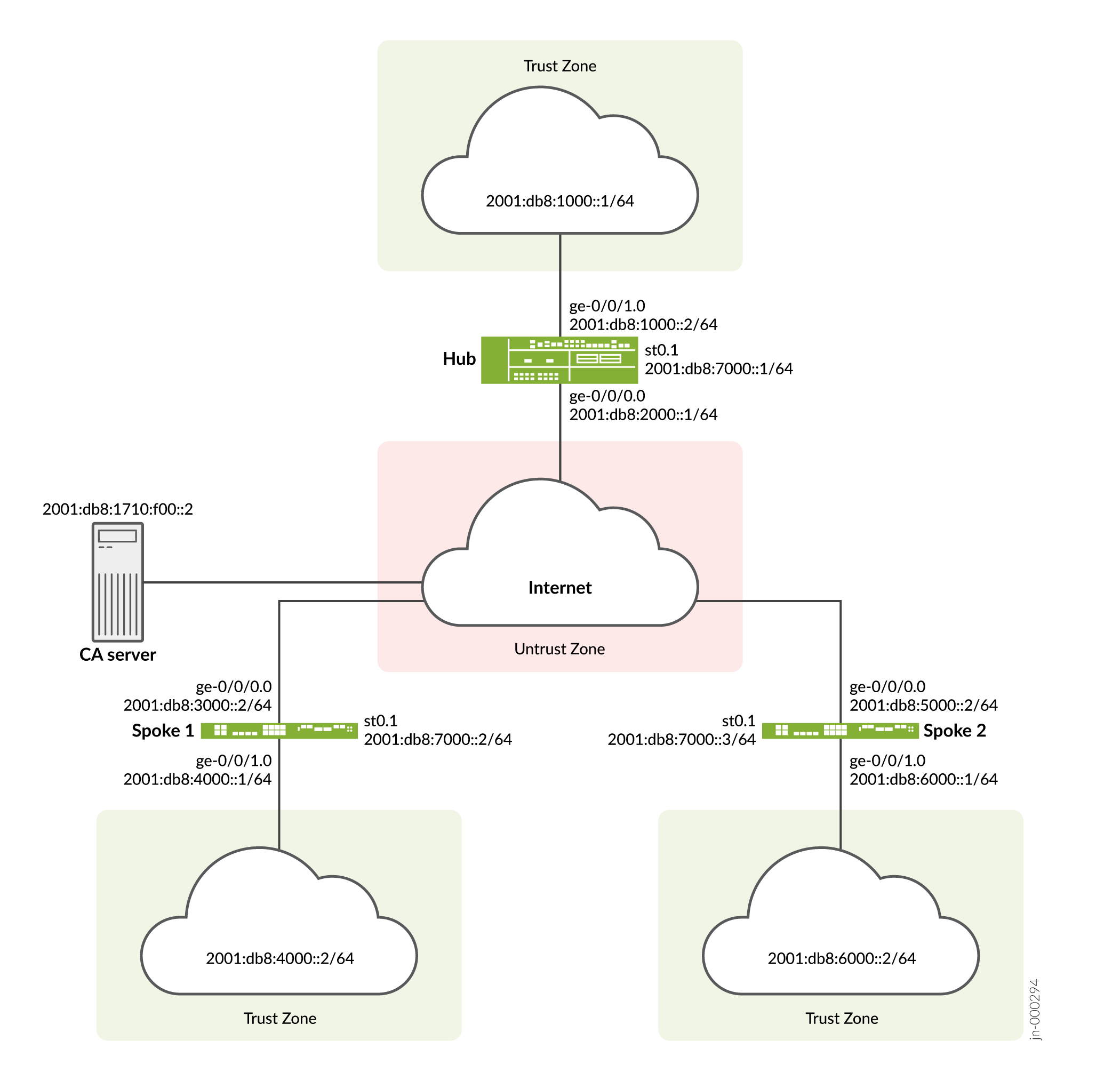
設定
AutoVPN を設定するには、次のタスクを実行します。
最初のセクションでは、ハブ デバイスとスポーク デバイスで簡易証明書登録プロトコル (SCEP) を使用して CA 証明書とローカル証明書をオンラインで取得する方法について説明します。
SCEP へのデバイス証明書の登録
ステップバイステップでの手順
ハブで SCEP にデジタル証明書を登録するには:
-
CA を設定します。
[edit]
user@host# set security pki ca-profile ca-profile1 ca-identity ca-profile1
user@host# set security pki ca-profile ca-profile1 enrollment url http://2001:db8:1710:f00::2/certsrv/mscep/mscep.dll
user@host# set security pki ca-profile ca-profile1 revocation-check disable
user@host# commit
-
CA 証明書を登録します。
user@host> request security pki ca-certificate enroll ca-profile ca-profile1
プロンプトで「 yes 」と入力して、CA 証明書を読み込みます。
-
キーペアを生成します。
user@host> request security pki generate-key-pair certificate-id Local1
-
ローカル証明書を登録します。
user@host> request security pki local-certificate enroll ca-profile ca-profile1 certificate-id Local1 domain-name example.net email hub@example.net ip-address 10.1.1.1 subject DC=example.net,CN=hub,OU=SLT,O=example,L=Bengaluru,ST=KA,C=IN challenge-password <password>
-
ローカル証明書を確認します。
user@host> show security pki local-certificate detail

Certificate identifier: Local1
  Certificate version: 3
  Serial number: 40a6d5f300000000258d
  Issuer:
    Common name: CASERVER1, Domain component: net, Domain component: internal
  Subject:
    Organization: example, Organizational unit: SLT, Country: IN, State: KA,
    Locality: Bengaluru, Common name: hub, Domain component: example.net
  Subject string:
    C=IN, DC=example.net, ST=KA, L=Bengaluru, O=example, OU=SLT, CN=hub
  Alternate subject: "hub@example.net", example.net, 10.1.1.1
  Validity:
    Not before: 11- 6-2012 09:39
    Not after: 11- 6-2013 09:49
  Public key algorithm: rsaEncryption(1024 bits)
    30:81:89:02:81:81:00:c9:c9:cc:30:b6:7a:86:12:89:b5:18:b3:76
    01:2d:cc:65:a8:a8:42:78:cd:d0:9a:a2:c0:aa:c4:bd:da:af:88:f3
    2a:78:1f:0a:58:e6:11:2c:81:8f:0e:7c:de:86:fc:48:4c:28:5b:8b
    34:91:ff:2e:91:e7:b5:bd:79:12:de:39:46:d9:fb:5c:91:41:d1:da
    90:f5:09:00:9b:90:07:9d:50:92:7d:ff:fb:3f:3c:bc:34:e7:e3:c8
    ea:cb:99:18:b4:b6:1d:a8:99:d3:36:b9:1b:36:ef:3e:a1:fd:48:82
    6a:da:22:07:da:e0:d2:55:ef:57:be:09:7a:0e:17:02:03:01:00:01
  Signature algorithm: sha1WithRSAEncryption
  Distribution CRL:
    http://ca-server1/CertEnroll/CASERVER1.crl
    file://\\ca-server1\CertEnroll\CASERVER1.crl
  Fingerprint:
    e1:f7:a1:a6:1e:c3:97:69:a5:07:9b:09:14:1a:c7:ae:09:f1:f6:35 (sha1)
    a0:02:fa:8d:5c:63:e5:6d:f7:f4:78:56:ac:4e:b2:c4 (md5)
  Auto-re-enrollment:
    Status: Disabled
    Next trigger time: Timer not started
ステップバイステップでの手順
スポーク 1 で SCEP を使用してデジタル証明書を登録するには:
-
CA を設定します。
[edit]
user@host# set security pki ca-profile ca-profile1 ca-identity ca-profile1
user@host# set security pki ca-profile ca-profile1 enrollment url http://2001:db8:1710:f00::2/certsrv/mscep/mscep.dll
user@host# set security pki ca-profile ca-profile1 revocation-check disable
user@host# commit
-
CA 証明書を登録します。
user@host> request security pki ca-certificate enroll ca-profile ca-profile1
プロンプトで「 yes 」と入力して、CA 証明書を読み込みます。
-
キーペアを生成します。
user@host> request security pki generate-key-pair certificate-id Local1
-
ローカル証明書を登録します。
user@host> request security pki local-certificate enroll ca-profile ca-profile1 certificate-id Local1 domain-name example.net email spoke1@example.net ip-address 10.2.2.1 subject DC=example.net,CN=spoke1,OU=SLT,O=example,L=Mysore,ST=KA,C=IN challenge-password <password>
-
ローカル証明書を確認します。
user@host> show security pki local-certificate detail

Certificate identifier: Local1
  Certificate version: 3
  Serial number: 40a7975f00000000258e
  Issuer:
    Common name: CASERVER1, Domain component: net, Domain component: internal
  Subject:
    Organization: example, Organizational unit: SLT, Country: IN, State: KA,
    Locality: Mysore, Common name: spoke1, Domain component: example.net
  Subject string:
    C=IN, DC=example.net, ST=KA, L=Mysore, O=example, OU=SLT, CN=spoke1
  Alternate subject: "spoke1@example.net", example.net, 10.2.2.1
  Validity:
    Not before: 11- 6-2012 09:40
    Not after: 11- 6-2013 09:50
  Public key algorithm: rsaEncryption(1024 bits)
    30:81:89:02:81:81:00:d8:45:09:77:cd:36:9a:6f:58:44:18:91:db
    b0:c7:8a:ee:c8:d7:a6:d2:e2:e7:20:46:2b:26:1a:92:e2:4e:8a:ce
    c9:25:d9:74:a2:81:ad:ea:e0:38:a0:2f:2d:ab:a6:58:ac:88:35:f4
    90:01:08:33:33:75:2c:44:26:f8:25:18:97:96:e4:28:de:3b:35:f2
    4a:f5:92:b7:57:ae:73:4f:8e:56:71:ab:81:54:1d:75:88:77:13:64
    1b:6b:01:96:15:0a:1c:54:e3:db:f8:ec:ec:27:5b:86:39:c1:09:a1
    e4:24:1a:19:0d:14:2c:4b:94:a4:04:91:3f:cb:ef:02:03:01:00:01
  Signature algorithm: sha1WithRSAEncryption
  Distribution CRL:
    http://ca-server1/CertEnroll/CASERVER1.crl
    file://\\ca-server1\CertEnroll\CASERVER1.crl
  Fingerprint:
    b6:24:2a:0e:96:5d:8c:4a:11:f3:5a:24:89:7c:df:ea:d5:c0:80:56 (sha1)
    31:58:7f:15:bb:d4:66:b8:76:1a:42:4a:8a:16:b3:a9 (md5)
  Auto-re-enrollment:
    Status: Disabled
    Next trigger time: Timer not started
件名フィールドに表示される組織単位 (OU) は
SLT。ハブのIKE設定には、スポークを識別するためのou=SLTが含まれています。
ステップバイステップでの手順
スポーク 2 で SCEP を使用してデジタル証明書を登録するには:
-
CA を設定します。
[edit]
user@host# set security pki ca-profile ca-profile1 ca-identity ca-profile1
user@host# set security pki ca-profile ca-profile1 enrollment url http://2001:db8:1710:f00::2/certsrv/mscep/mscep.dll
user@host# set security pki ca-profile ca-profile1 revocation-check disable
user@host# commit
-
CA 証明書を登録します。
user@host> request security pki ca-certificate enroll ca-profile ca-profile1
プロンプトで「 yes 」と入力して、CA 証明書を読み込みます。
-
キーペアを生成します。
user@host> request security pki generate-key-pair certificate-id Local1
-
ローカル証明書を登録します。
user@host> request security pki local-certificate enroll ca-profile ca-profile1 certificate-id Local1 domain-name example.net email spoke2@example.net ip-address 10.3.3.1 subject DC=example.net,CN=spoke2,OU=SLT,O=example,L=Tumkur,ST=KA,C=IN challenge-password <password>
-
ローカル証明書を確認します。
user@host> show security pki local-certificate detail

Certificate identifier: Local1
  Certificate version: 3
  Serial number: 40bb71d400000000258f
  Issuer:
    Common name: CASERVER1, Domain component: net, Domain component: internal
  Subject:
    Organization: example, Organizational unit: SLT, Country: IN, State: KA,
    Locality: Tumkur, Common name: spoke2, Domain component: example.net
  Subject string:
    C=IN, DC=example.net, ST=KA, L=Tumkur, O=example, OU=SLT, CN=spoke2
  Alternate subject: "spoke2@example.net", example.net, 10.3.3.1
  Validity:
    Not before: 11- 6-2012 10:02
    Not after: 11- 6-2013 10:12
  Public key algorithm: rsaEncryption(1024 bits)
    30:81:89:02:81:81:00:b6:2e:e2:da:e6:ac:57:e4:5d:ff:de:f6:89
    27:d6:3e:1b:4a:3f:b2:2d:b3:d3:61:ed:ed:6a:07:d9:8a:d2:24:03
    77:1a:fe:84:e1:12:8a:2d:63:6e:bf:02:6b:15:96:5a:4f:37:a0:46
    44:09:96:c0:fd:bb:ab:79:2c:5d:92:bd:31:f0:3b:29:51:ce:89:8e
    7c:2b:02:d0:14:5b:0a:a9:02:93:21:ea:f9:fc:4a:e7:08:bc:b1:6d
    7c:f8:3e:53:58:8e:f1:86:13:fe:78:b5:df:0b:8e:53:00:4a:46:11
    58:4a:38:e9:82:43:d8:25:47:7d:ef:18:f0:ef:a7:02:03:01:00:01
  Signature algorithm: sha1WithRSAEncryption
  Distribution CRL:
    http://ca-server1/CertEnroll/CASERVER1.crl
    file://\\ca-server1\CertEnroll\CASERVER1.crl
  Fingerprint:
    1a:6d:77:ac:fd:94:68:ce:cf:8a:85:f0:39:fc:e0:6b:fd:fe:b8:66 (sha1)
    00:b1:32:5f:7b:24:9c:e5:02:e6:72:75:9e:a5:f4:77 (md5)
  Auto-re-enrollment:
    Status: Disabled
    Next trigger time: Timer not started
件名フィールドに表示される組織単位 (OU) は
SLT。ハブのIKE設定には、スポークを識別するためのou=SLTが含まれています。
ハブの設定
CLIクイック構成
この例を迅速に設定するには、以下のコマンドをコピーして、テキストファイルに貼り付け、改行を削除し、ネットワーク設定に一致させる必要がある詳細情報を変更し、コマンドを [edit] 階層レベルでCLIにコピーアンドペーストして、設定モードから commit を入力します。
set security pki ca-profile ROOT-CA ca-identity ROOT-CA
set security pki ca-profile ROOT-CA enrollment url http://2001:db8:1710:f00::2/certsrv/mscep/mscep.dll
set security pki ca-profile ROOT-CA enrollment retry 5
set security pki ca-profile ROOT-CA enrollment retry-interval 0
set security pki ca-profile ROOT-CA revocation-check disable
set security ike traceoptions file ik
set security ike traceoptions flag all
set security ike proposal IKE_PROP authentication-method rsa-signatures
set security ike proposal IKE_PROP dh-group group19
set security ike proposal IKE_PROP authentication-algorithm sha-384
set security ike proposal IKE_PROP encryption-algorithm aes-256-cbc
set security ike proposal IKE_PROP lifetime-seconds 6000
set security ike policy IKE_POL mode main
set security ike policy IKE_POL proposals IKE_PROP
set security ike policy IKE_POL certificate local-certificate HUB
set security ike gateway IKE_GWA_1 ike-policy IKE_POL
set security ike gateway IKE_GWA_1 dynamic distinguished-name wildcard OU=SLT
set security ike gateway IKE_GWA_1 dead-peer-detection always-send
set security ike gateway IKE_GWA_1 dead-peer-detection interval 10
set security ike gateway IKE_GWA_1 dead-peer-detection threshold 3
set security ike gateway IKE_GWA_1 local-identity distinguished-name
set security ike gateway IKE_GWA_1 external-interface ge-0/0/0
set security ike gateway IKE_GWA_1 version v1-only
set security ipsec proposal IPSEC_PROP protocol esp
set security ipsec proposal IPSEC_PROP encryption-algorithm aes-256-gcm
set security ipsec proposal IPSEC_PROP lifetime-seconds 3000
set security ipsec policy IPSEC_POL perfect-forward-secrecy keys group19
set security ipsec policy IPSEC_POL proposals IPSEC_PROP
set security ipsec vpn IPSEC_VPNA_1 bind-interface st0.1
set security ipsec vpn IPSEC_VPNA_1 ike gateway IKE_GWA_1
set security ipsec vpn IPSEC_VPNA_1 ike ipsec-policy IPSEC_POL
set security policies default-policy permit-all
set security zones security-zone untrust host-inbound-traffic system-services all
set security zones security-zone untrust host-inbound-traffic protocols ospf3
set security zones security-zone untrust interfaces ge-0/0/1.0
set security zones security-zone untrust interfaces st0.1
set security zones security-zone trust host-inbound-traffic system-services all
set security zones security-zone trust host-inbound-traffic protocols ospf3
set security zones security-zone trust interfaces ge-0/0/0.0
set interfaces ge-0/0/0 unit 0 family inet6 address 2001:db8:2000::1/64
set interfaces ge-0/0/1 unit 0 family inet6 address 2001:db8:1000::2/64
set interfaces st0 unit 1 multipoint
set interfaces st0 unit 1 family inet6 address 2001:db8:7000::1/64
set routing-options rib inet6.0 static route 2001:db8:3000::/64 next-hop 2001:db8:2000::2
set routing-options rib inet6.0 static route 2001:db8:5000::/64 next-hop 2001:db8:2000::2
set routing-options autonomous-system 100
set routing-options forwarding-table export load_balance
set protocols bgp traceoptions file bgp
set protocols bgp traceoptions flag all
set protocols bgp group ibgp type internal
set protocols bgp group ibgp local-address 2001:db8:9000::1
set protocols bgp group ibgp export ibgp
set protocols bgp group ibgp cluster 10.1.3.4
set protocols bgp group ibgp peer-as 100
set protocols bgp group ibgp multipath
set protocols bgp group ibgp allow 2001:db8:9000::/64
set policy-options policy-statement ibgp from interface ge-0/0/1.0
set policy-options policy-statement ibgp then accept
set policy-options policy-statement load_balance then load-balance per-packet
ステップバイステップでの手順
次の例では、設定階層のいくつかのレベルに移動する必要があります。その方法の詳細については、設定モードでのCLIエディターの使用を参照してください。
ハブを設定するには:
-
インターフェイスを設定します。
[edit interfaces]
user@host# set ge-0/0/0 unit 0 family inet6 address 2001:db8:2000::1/64
user@host# set ge-0/0/1 unit 0 family inet6 address 2001:db8:1000::2/64
user@host# set st0 unit 1 multipoint
user@host# set st0 unit 1 family inet6 address 2001:db8:7000::1/64
-
ルーティング プロトコルを設定します。
[edit policy-options]
user@host# set policy-statement ibgp from interface ge-0/0/1.0
user@host# set policy-statement ibgp then accept
user@host# set policy-statement load_balance then load-balance per-packet
[edit protocols bgp]
user@host# set traceoptions file bgp
user@host# set traceoptions flag all
user@host# set group ibgp type internal
user@host# set group ibgp local-address 2001:db8:9000::1
user@host# set group ibgp export ibgp
user@host# set group ibgp cluster 10.1.3.4
user@host# set group ibgp peer-as 100
user@host# set group ibgp multipath
user@host# set group ibgp allow 2001:db8:9000::/64
[edit routing-options]
user@host# set rib inet6.0 static route 2001:db8:3000::/64 next-hop 2001:db8:2000::2
user@host# set rib inet6.0 static route 2001:db8:5000::/64 next-hop 2001:db8:2000::2
user@host# set autonomous-system 100
user@host# set forwarding-table export load_balance
-
フェーズ1のオプションを設定します。
[edit security ike traceoptions]
user@host# set file ik
user@host# set flag all
[edit security ike proposal ike-proposal IKE_PROP]
user@host# set authentication-method rsa-signatures
user@host# set dh-group group19
user@host# set authentication-algorithm sha-384
user@host# set encryption-algorithm aes-256-cbc
user@host# set lifetime-seconds 6000
[edit security ike policy IKE_POL]
user@host# set mode main
user@host# set proposals IKE_PROP
user@host# set certificate local-certificate HUB
[edit security ike gateway IKE_GWA_1]
user@host# set ike-policy IKE_POL
user@host# set dynamic distinguished-name wildcard OU=SLT
user@host# set dead-peer-detection always-send
user@host# set dead-peer-detection interval 10
user@host# set dead-peer-detection threshold 3
user@host# set local-identity distinguished-name
user@host# set external-interface ge-0/0/0
user@host# set version v1-only
-
フェーズ2のオプションを設定します。
[edit security ipsec proposal IPSEC_PROP]
user@host# set protocol esp
user@host# set encryption-algorithm aes-256-gcm
user@host# set lifetime-seconds 3000
[edit security ipsec policy IPSEC_POL]
user@host# set perfect-forward-secrecy keys group19
user@host# set proposals IPSEC_PROP
[edit security ipsec vpn IPSEC_VPNA_1]
user@host# set bind-interface st0.1
user@host# set ike gateway IKE_GWA_1
user@host# set ike ipsec-policy IPSEC_POL
-
ゾーンを設定します。
[edit security zones security-zone untrust]
user@host# set host-inbound-traffic system-services all
user@host# set host-inbound-traffic protocols ospf3
user@host# set interfaces ge-0/0/1.0
user@host# set interfaces st0.1
[edit security zones security-zone trust]
user@host# set host-inbound-traffic system-services all
user@host# set host-inbound-traffic protocols ospf3
user@host# set interfaces ge-0/0/0.0
-
デフォルトのセキュリティポリシーを設定します。
[edit security policies]
user@host# set default-policy permit-all
-
CA プロファイルを設定します。
[edit security pki]
user@host# set ca-profile ROOT-CA ca-identity ROOT-CA
user@host# set ca-profile ROOT-CA enrollment url http://2001:db8:1710:f00::2/certsrv/mscep/mscep.dll
user@host# set ca-profile ROOT-CA enrollment retry 5
user@host# set ca-profile ROOT-CA enrollment retry-interval 0
user@host# set ca-profile ROOT-CA revocation-check disable
結果
設定モードから、 show interfaces、 show policy-options、 show protocols、 show routing-options、 show security ike、 show security ipsec、 show security zones、 show security policies、および show security pki コマンドを入力して、設定を確認します。出力結果に意図した設定内容が表示されない場合は、この例の設定手順を繰り返して設定を修正します。
[edit]
user@host# show interfaces
ge-0/0/0 {
    unit 0 {
        family inet6 {
            address 2001:db8:2000::1/64;
        }
    }
}
    ge-0/0/1 {
        unit 0 {
            family inet6 {
                address 2001:db8:1000::2/64;
            }
        }
    }
    st0 {
        unit 1{
            multipoint;
            family inet6 {
                address 2001:db8:7000::1/64;
            }
        }
    }
[edit]
user@host# show policy-options
policy-statement ibgp {
    from interface ge-0/0/1.0;
    then accept;
}
policy-statement load_balance {
    then {
        load-balance per-packet;
    }
}
[edit]
user@host# show protocols
bgp {
    traceoptions {
        file bgp;
        flag all;
    }
    group ibgp {
        type internal;
        local-address 2001:db8:9000::1;
        export ibgp;
        cluster 10.1.3.4;
        peer-as 100;
        multipath;
        allow 2001:db8:9000::/64;
    }
}
[edit]
user@host# show routing-options
rib inet6.0 {
    static {
        route route 2001:db8:3000::/64 next-hop 2001:db8:2000::2;
        route 2001:db8:5000::/64 next-hop 2001:db8:2000::2;
    }
}
[edit]
user@host# show security ike
traceoptions {
    file ik;
    flag all;
}
proposal IKE_PROP {
    authentication-method rsa-signatures;
    dh-group group19;
    authentication-algorithm sha-384;
    encryption-algorithm aes-256-cbc;
    lifetime-seconds 6000;
}
policy IKE_POL {
    mode main;
    proposals IKE_PROP;
    certificate {
        local-certificate HUB;
    }
}
gateway IKE_GWA_1 {
    ike-policy IKE_POL;
    dynamic {
        distinguished-name {
            wildcard OU=SLT;
        }
    }
    dead-peer-detection {
        always-send;
        interval 10;
        threshold 3;
    }
    local-identity distinguished-name;
    external-interface ge-0/0/0;
    version v1-only;
}
[edit]
user@host# show security ipsec
proposal IPSEC_PROP {
    protocol esp;
    encryption-algorithm aes-256-gcm;
    lifetime-seconds 3000;
}
policy IPSEC_POL {
    perfect-forward-secrecy {
        keys group19;
    }
    proposals IPSEC_PROP;
}
vpn IPSEC_VPNA_1 {
    bind-interface st0.1;
    ike {
        gateway IKE_GWA_1;
        ipsec-policy IPSEC_POL;
    }
}
[edit]
user@host# show security zones
security-zone untrust {
    host-inbound-traffic {
        system-services {
            all;
        }
        protocols {
            ospf3;
        }
    }
    interfaces {
        ge-0/0/1.0;
        st0.1;
    }
}
security-zone trust {
    host-inbound-traffic {
        system-services {
            all;
        }
        protocols {
            ospf3;
        }
    }
    interfaces {
        ge-0/0/0.0;
    }
}
[edit]
user@host# show security policies
default-policy {
    permit-all;
}
[edit]
user@host# show security pki
ca-profile ROOT-CA {
    ca-identity ROOT-CA;
    enrollment {
        url http://2001:db8:1710:f00::2/certsrv/mscep/mscep.dll;
        retry 5;
        retry-interval 0;
    }
    revocation-check {
        disable;
    }
}
デバイスの設定が完了したら、設定モードから commit を入力します。
スポーク1の設定
CLIクイック構成
この例を迅速に設定するには、以下のコマンドをコピーして、テキストファイルに貼り付け、改行を削除し、ネットワーク設定に一致させる必要がある詳細情報を変更し、コマンドを [edit] 階層レベルでCLIにコピーアンドペーストして、設定モードから commit を入力します。
set security pki ca-profile ROOT-CA ca-identity ROOT-CA
set security pki ca-profile ROOT-CA enrollment url http://2001:db8:1710:f00::2/certsrv/mscep/mscep.dll
set security pki ca-profile ROOT-CA enrollment retry 5
set security pki ca-profile ROOT-CA enrollment retry-interval 0
set security pki ca-profile ROOT-CA revocation-check disable
set security ike traceoptions file ik
set security ike traceoptions flag all
set security ike proposal IKE_PROP authentication-method rsa-signatures
set security ike proposal IKE_PROP dh-group group19
set security ike proposal IKE_PROP authentication-algorithm sha-384
set security ike proposal IKE_PROP encryption-algorithm aes-256-cbc
set security ike proposal IKE_PROP lifetime-seconds 6000
set security ike policy IKE_POL mode main
set security ike policy IKE_POL proposals IKE_PROP
set security ike policy IKE_POL certificate local-certificate SPOKE1
set security ike gateway IKE_GW_SPOKE_1 ike-policy IKE_POL
set security ike gateway IKE_GW_SPOKE_1 address 2001:db8:2000::1
set security ike gateway IKE_GW_SPOKE_1 dead-peer-detection always-send
set security ike gateway IKE_GW_SPOKE_1 dead-peer-detection interval 10
set security ike gateway IKE_GW_SPOKE_1 dead-peer-detection threshold 3
set security ike gateway IKE_GW_SPOKE_1 local-identity distinguished-name
set security ike gateway IKE_GW_SPOKE_1 remote-identity distinguished-name container OU=SLT
set security ike gateway IKE_GW_SPOKE_1 external-interface ge-0/0/0.0
set security ike gateway IKE_GW_SPOKE_1 version v1-only
set security ipsec proposal IPSEC_PROP protocol esp
set security ipsec proposal IPSEC_PROP encryption-algorithm aes-256-gcm
set security ipsec proposal IPSEC_PROP lifetime-seconds 3000
set security ipsec policy IPSEC_POL perfect-forward-secrecy keys group19
set security ipsec policy IPSEC_POL proposals IPSEC_PROP
set security ipsec vpn IPSEC_VPN_SPOKE_1 bind-interface st0.1
set security ipsec vpn IPSEC_VPN_SPOKE_1 ike gateway IKE_GW_SPOKE_1
set security ipsec vpn IPSEC_VPN_SPOKE_1 ike ipsec-policy IPSEC_POL
set security ipsec vpn IPSEC_VPN_SPOKE_1 establish-tunnels on-traffic
set security policies default-policy permit-all
set security zones security-zone trust host-inbound-traffic system-services all
set security zones security-zone trust host-inbound-traffic protocols ospf3
set security zones security-zone trust interfaces ge-0/0/0.0
set security zones security-zone untrust host-inbound-traffic system-services all
set security zones security-zone untrust host-inbound-traffic protocols ospf3
set security zones security-zone untrust interfaces st0.1
set security zones security-zone untrust interfaces ge-0/0/1.0
set interfaces ge-0/0/0 unit 0 family inet6 address 2001:db8:3000::2/64
set interfaces ge-0/0/1 unit 0 family inet6 address 2001:db8:4000::1/64
set interfaces st0 unit 1 family inet6 address 2001:db8:7000::2/64
set routing-options rib inet6.0 static route 2001:db8:2000::/64 next-hop 2001:db8:3000::1
set routing-options autonomous-system 100
set protocols bgp traceoptions file bgp
set protocols bgp traceoptions flag all
set protocols bgp group ibgp type internal
set protocols bgp group ibgp local-address 2001:db8:9000::2
set protocols bgp group ibgp export ibgp
set protocols bgp group ibgp peer-as 100
set protocols bgp group ibgp neighbor 2001:db8:9000::1
set policy-options policy-statement ibgp from interface ge-0/0/1.0
set policy-options policy-statement ibgp then accept
ステップバイステップでの手順
次の例では、設定階層のいくつかのレベルに移動する必要があります。その方法の詳細については、設定モードでのCLIエディターの使用を参照してください。
スポーク 1 を設定するには:
-
インターフェイスを設定します。
[edit interfaces]
user@host# set ge-0/0/0 unit 0 family inet6 address 2001:db8:3000::2/64
user@host# set ge-0/0/1 unit 0 family inet6 address 2001:db8:4000::1/64
user@host# set st0 unit 1 family inet6 address 2001:db8:7000::2/64
-
ルーティング プロトコルを設定します。
[edit policy-options]
user@host# set policy-statement ibgp from interface ge-0/0/1.0
user@host# set policy-statement ibgp then accept
[edit protocols bgp]
user@host# set traceoptions file bgp
user@host# set traceoptions flag all
user@host# set group ibgp type internal
user@host# set group ibgp local-address 2001:db8:9000::2
user@host# set group ibgp export ibgp
user@host# set group ibgp peer-as 100
user@host# set group ibgp neighbor 2001:db8:9000::1
[edit routing-options]
user@host# set rib inet6.0 static route 2001:db8:2000::/64 next-hop 2001:db8:3000::1
user@host# set autonomous-system 100
-
フェーズ1のオプションを設定します。
[edit security ike traceoptions]
user@host# set file ik
user@host# set flag all
[edit security ike proposal ike-proposal IKE_PROP]
user@host# set authentication-method rsa-signatures
user@host# set dh-group group19
user@host# set authentication-algorithm sha-384
user@host# set encryption-algorithm aes-256-cbc
user@host# set lifetime-seconds 6000
[edit security ike policy IKE_POL]
user@host# set mode main
user@host# set proposals IKE_PROP
user@host# set certificate local-certificate SPOKE1
[edit security ike gateway IKE_GW_SPOKE_1]
user@host# set ike-policy IKE_POL
user@host# set address 2001:db8:2000::1
user@host# set dead-peer-detection always-send
user@host# set dead-peer-detection interval 10
user@host# set dead-peer-detection threshold 3
user@host# set local-identity distinguished-name
user@host# set remote-identity distinguished-name container OU=SLT
user@host# set external-interface ge-0/0/0
user@host# set version v1-only
-
フェーズ2のオプションを設定します。
[edit security ipsec proposal IPSEC_PROP]
user@host# set protocol esp
user@host# set encryption-algorithm aes-256-gcm
user@host# set lifetime-seconds 3000
[edit security ipsec policy IPSEC_POL]
user@host# set perfect-forward-secrecy keys group19
user@host# set proposals IPSEC_PROP
[edit security ipsec vpn IPSEC_VPNA_SPOKE_1]
user@host# set bind-interface st0.1
user@host# set ike gateway IKE_GWA_SPOKE_1
user@host# set ike ipsec-policy IPSEC_POL
user@host# set establish-tunnels on-traffic
-
ゾーンを設定します。
[edit security zones security-zone untrust]
user@host# set host-inbound-traffic system-services all
user@host# set host-inbound-traffic protocols ospf3
user@host# set interfaces ge-0/0/1.0
user@host# set interfaces st0.1
[edit security zones security-zone trust]
user@host# set host-inbound-traffic system-services all
user@host# set host-inbound-traffic protocols ospf3
user@host# set interfaces ge-0/0/0.0
-
デフォルトのセキュリティポリシーを設定します。
[edit security policies]
user@host# set default-policy permit-all
-
CA プロファイルを設定します。
[edit security pki]
user@host# set ca-profile ROOT-CA ca-identity ROOT-CA
user@host# set ca-profile ROOT-CA enrollment url http://2001:db8:1710:f00::2/certsrv/mscep/mscep.dll
user@host# set ca-profile ROOT-CA enrollment retry 5
user@host# set ca-profile ROOT-CA enrollment retry-interval 0
user@host# set ca-profile ROOT-CA revocation-check disable
結果
設定モードから、 show interfaces、 show policy-options、 show protocols、 show routing-options、 show security ike、 show security ipsec、 show security zones、 show security policies、および show security pki コマンドを入力して、設定を確認します。出力結果に意図した設定内容が表示されない場合は、この例の設定手順を繰り返して設定を修正します。
[edit]
user@host# show interfaces
ge-0/0/0 {
    unit 0 {
        family inet6 {
            address 2001:db8:3000::2/64;
        }
    }
}
    ge-0/0/1 {
        unit 0 {
            family inet6 {
                address 2001:db8:4000::1/64;
            }
        }
    }
    st0 {
        unit 1{
            family inet6 {
                address 2001:db8:7000::2/64;
            }
        }
    }
[edit]
user@host# show policy-options
policy-statement ibgp {
    from interface ge-0/0/1.0;
    then accept;
}
[edit]
user@host# show protocols
bgp {
    traceoptions {
        file bgp;
        flag all;
    }
    group ibgp {
        type internal;
        local-address 2001:db8:9000::2;
        export ibgp;
        peer-as 100;
        neighbor 2001:db8:9000::1;
    }
}
[edit]
user@host# show routing-options
rib inet6.0 {
    static {
        route route  2001:db8:2000::/64 next-hop 2001:db8:3000::1;
    }
}
[edit]
user@host# show security ike
traceoptions {
    file ik;
    flag all;
}
proposal IKE_PROP {
    authentication-method rsa-signatures;
    dh-group group19;
    authentication-algorithm sha-384;
    encryption-algorithm aes-256-cbc;
    lifetime-seconds 6000;
}
policy IKE_POL {
    mode main;
    proposals IKE_PROP;
    certificate {
        local-certificate SPOKE1;
    }
}
gateway IKE_GWA_SPOKE1 {
    ike-policy IKE_POL;
    dynamic {
        distinguished-name {
            wildcard OU=SLT;
        }
    }
    dead-peer-detection {
        always-send;
        interval 10;
        threshold 3;
    }
    local-identity distinguished-name;
    external-interface ge-0/0/0;
    version v1-only;
}
[edit]
user@host# show security ipsec
proposal IPSEC_PROP {
    protocol esp;
    encryption-algorithm aes-256-gcm;
    lifetime-seconds 3000;
}
policy IPSEC_POL {
    perfect-forward-secrecy {
        keys group19;
    }
    proposals IPSEC_PROP;
}
vpn IPSEC_VPNA_SPOKE_1 {
    bind-interface st0.1;
    ike {
        gateway IKE_GWA_SPOKE_1;
        ipsec-policy IPSEC_POL;
    }
}
[edit]
user@host# show security zones
security-zone untrust {
    host-inbound-traffic {
        system-services {
            all;
        }
        protocols {
            ospf3;
        }
    }
    interfaces {
        ge-0/0/1.0;
        st0.1;
    }
}
security-zone trust {
    host-inbound-traffic {
        system-services {
            all;
        }
        protocols {
            ospf3;
        }
    }
    interfaces {
        ge-0/0/0.0;
    }
}
[edit]
user@host# show security policies
default-policy {
    permit-all;
}
[edit]
user@host# show security pki
ca-profile ROOT-CA {
    ca-identity ROOT-CA;
    enrollment {
        url http://2001:db8:1710:f00::2/certsrv/mscep/mscep.dll;
        retry 5;
        retry-interval 0;
    }
    revocation-check {
        disable;
    }
}
デバイスの設定が完了したら、設定モードから commit を入力します。
スポーク2の設定
CLIクイック構成
この例を迅速に設定するには、以下のコマンドをコピーして、テキストファイルに貼り付け、改行を削除し、ネットワーク設定に一致させる必要がある詳細情報を変更し、コマンドを [edit] 階層レベルでCLIにコピーアンドペーストして、設定モードから commit を入力します。
set security pki ca-profile ROOT-CA ca-identity ROOT-CA
set security pki ca-profile ROOT-CA enrollment url http://2001:db8:1710:f00::2/certsrv/mscep/mscep.dll
set security pki ca-profile ROOT-CA enrollment retry 5
set security pki ca-profile ROOT-CA enrollment retry-interval 0
set security pki ca-profile ROOT-CA revocation-check disable
set security ike traceoptions file ik
set security ike traceoptions flag all
set security ike proposal IKE_PROP authentication-method rsa-signatures
set security ike proposal IKE_PROP dh-group group19
set security ike proposal IKE_PROP authentication-algorithm sha-384
set security ike proposal IKE_PROP encryption-algorithm aes-256-cbc
set security ike proposal IKE_PROP lifetime-seconds 6000
set security ike policy IKE_POL mode main
set security ike policy IKE_POL proposals IKE_PROP
set security ike policy IKE_POL certificate local-certificate SPOKE2
set security ike gateway IKE_GW_SPOKE_2 ike-policy IKE_POL
set security ike gateway IKE_GW_SPOKE_2 address 2001:db8:2000::1
set security ike gateway IKE_GW_SPOKE_2 dead-peer-detection always-send
set security ike gateway IKE_GW_SPOKE_2 dead-peer-detection interval 10
set security ike gateway IKE_GW_SPOKE_2 dead-peer-detection threshold 3
set security ike gateway IKE_GW_SPOKE_2 local-identity distinguished-name
set security ike gateway IKE_GW_SPOKE_2 remote-identity distinguished-name container OU=SLT
set security ike gateway IKE_GW_SPOKE_2 external-interface ge-0/0/0.0
set security ike gateway IKE_GW_SPOKE_2 version v1-only
set security ipsec proposal IPSEC_PROP protocol esp
set security ipsec proposal IPSEC_PROP encryption-algorithm aes-256-gcm
set security ipsec proposal IPSEC_PROP lifetime-seconds 3000
set security ipsec policy IPSEC_POL perfect-forward-secrecy keys group19
set security ipsec policy IPSEC_POL proposals IPSEC_PROP
set security ipsec vpn IPSEC_VPN_SPOKE_2 bind-interface st0.1
set security ipsec vpn IPSEC_VPN_SPOKE_2 ike gateway IKE_GW_SPOKE_2
set security ipsec vpn IPSEC_VPN_SPOKE_2 ike ipsec-policy IPSEC_POL
set security ipsec vpn IPSEC_VPN_SPOKE_2 establish-tunnels on-traffic
set security policies default-policy permit-all
set security zones security-zone trust host-inbound-traffic system-services all
set security zones security-zone trust host-inbound-traffic protocols ospf3
set security zones security-zone trust interfaces ge-0/0/0.0
set security zones security-zone untrust host-inbound-traffic system-services all
set security zones security-zone untrust host-inbound-traffic protocols ospf3
set security zones security-zone untrust interfaces st0.1
set security zones security-zone untrust interfaces ge-0/0/1.0
set interfaces ge-0/0/0 unit 0 family inet6 address 2001:db8:5000::2/64
set interfaces ge-0/0/1 unit 0 family inet6 address 2001:db8:6000::1/64
set interfaces st0 unit 1 family inet6 address 2001:db8:7000::3/64
set routing-options rib inet6.0 static route 2001:db8:2000::/64 next-hop 2001:db8:5000::1
set routing-options autonomous-system 100
set protocols bgp traceoptions file bgp
set protocols bgp traceoptions flag all
set protocols bgp group ibgp type internal
set protocols bgp group ibgp local-address 2001:db8:9000::3
set protocols bgp group ibgp export ibgp
set protocols bgp group ibgp peer-as 100
set protocols bgp group ibgp neighbor 2001:db8:9000::1
set policy-options policy-statement ibgp from interface ge-0/0/1.0
set policy-options policy-statement ibgp then accept
ステップバイステップでの手順
次の例では、設定階層のいくつかのレベルに移動する必要があります。その方法の詳細については、設定モードでのCLIエディターの使用を参照してください。
スポーク 2 を設定するには:
-
インターフェイスを設定します。
[edit interfaces]
user@host# set ge-0/0/0 unit 0 family inet6 address 2001:db8:5000::2/64
user@host# set ge-0/0/1 unit 0 family inet6 address 2001:db8:6000::1/64
user@host# set st0 unit 1 family inet6 address 2001:db8:7000::3/64
-
ルーティング プロトコルを設定します。
[edit policy-options]
user@host# set policy-statement ibgp from interface ge-0/0/1.0
user@host# set policy-statement ibgp then accept
[edit protocols bgp]
user@host# set traceoptions file bgp
user@host# set traceoptions flag all
user@host# set group ibgp type internal
user@host# set group ibgp local-address 2001:db8:9000::3
user@host# set group ibgp export ibgp
user@host# set group ibgp peer-as 100
user@host# set group ibgp neighbor 2001:db8:9000::1
[edit routing-options]
user@host# set rib inet6.0 static route 2001:db8:2000::/64 next-hop 2001:db8:5000::1
user@host# set autonomous-system 100
-
フェーズ1のオプションを設定します。
[edit security ike traceoptions]
user@host# set file ik
user@host# set flag all
[edit security ike proposal ike-proposal IKE_PROP]
user@host# set authentication-method rsa-signatures
user@host# set dh-group group19
user@host# set authentication-algorithm sha-384
user@host# set encryption-algorithm aes-256-cbc
user@host# set lifetime-seconds 6000
[edit security ike policy IKE_POL]
user@host# set mode main
user@host# set proposals IKE_PROP
user@host# set certificate local-certificate SPOKE2
[edit security ike gateway IKE_GW_SPOKE_2]
user@host# set ike-policy IKE_POL
user@host# set address 2001:db8:2000::1
user@host# set dead-peer-detection always-send
user@host# set dead-peer-detection interval 10
user@host# set dead-peer-detection threshold 3
user@host# set local-identity distinguished-name
user@host# set remote-identity distinguished-name container OU=SLT
user@host# set external-interface ge-0/0/0
user@host# set version v1-only
-
フェーズ2のオプションを設定します。
[edit security ipsec proposal IPSEC_PROP]
user@host# set protocol esp
user@host# set encryption-algorithm aes-256-gcm
user@host# set lifetime-seconds 3000
[edit security ipsec policy IPSEC_POL]
user@host# set perfect-forward-secrecy keys group19
user@host# set proposals IPSEC_PROP
[edit security ipsec vpn IPSEC_VPNA_SPOKE_2]
user@host# set bind-interface st0.1
user@host# set ike gateway IKE_GWA_SPOKE_2
user@host# set ike ipsec-policy IPSEC_POL
user@host# set establish-tunnels on-traffic
-
ゾーンを設定します。
[edit security zones security-zone untrust]
user@host# set host-inbound-traffic system-services all
user@host# set host-inbound-traffic protocols ospf3
user@host# set interfaces ge-0/0/1.0
user@host# set interfaces st0.1
[edit security zones security-zone trust]
user@host# set host-inbound-traffic system-services all
user@host# set host-inbound-traffic protocols ospf3
user@host# set interfaces ge-0/0/0.0
-
デフォルトのセキュリティポリシーを設定します。
[edit security policies]
user@host# set default-policy permit-all
-
CA プロファイルを設定します。
[edit security pki]
user@host# set ca-profile ROOT-CA ca-identity ROOT-CA
user@host# set ca-profile ROOT-CA enrollment url http://2001:db8:1710:f00::2/certsrv/mscep/mscep.dll
user@host# set ca-profile ROOT-CA enrollment retry 5
user@host# set ca-profile ROOT-CA enrollment retry-interval 0
user@host# set ca-profile ROOT-CA revocation-check disable
結果
設定モードから、 show interfaces、 show policy-options、 show protocols、 show routing-options、 show security ike、 show security ipsec、 show security zones、 show security policies、および show security pki コマンドを入力して、設定を確認します。出力結果に意図した設定内容が表示されない場合は、この例の設定手順を繰り返して設定を修正します。
[edit]
user@host# show interfaces
ge-0/0/0 {
    unit 0 {
        family inet6 {
            address 2001:db8:5000::2/64;
        }
    }
}
    ge-0/0/1 {
        unit 0 {
            family inet6 {
                address 2001:db8:6000::1/64;
            }
        }
    }
    st0 {
        unit 1{
            family inet6 {
                address 2001:db8:7000::3/64;
            }
        }
    }
[edit]
user@host# show policy-options
policy-statement ibgp {
    from interface ge-0/0/1.0;
    then accept;
}
[edit]
user@host# show protocols
bgp {
    traceoptions {
        file bgp;
        flag all;
    }
    group ibgp {
        type internal;
        local-address 2001:db8:9000::3;
        export ibgp;
        peer-as 100;
        neighbor 2001:db8:9000::1;
    }
}
[edit]
user@host# show routing-options
rib inet6.0 {
    static {
        route route 2001:db8:2000::/64 next-hop 2001:db8:5000::1;
    }
}
[edit]
user@host# show security ike
traceoptions {
    file ik;
    flag all;
}
proposal IKE_PROP {
    authentication-method rsa-signatures;
    dh-group group19;
    authentication-algorithm sha-384;
    encryption-algorithm aes-256-cbc;
    lifetime-seconds 6000;
}
policy IKE_POL {
    mode main;
    proposals IKE_PROP;
    certificate {
        local-certificate SPOKE2;
    }
}
gateway IKE_GWA_SPOKE2 {
    ike-policy IKE_POL;
    dynamic {
        distinguished-name {
            wildcard OU=SLT;
        }
    }
    dead-peer-detection {
        always-send;
        interval 10;
        threshold 3;
    }
    local-identity distinguished-name;
    external-interface ge-0/0/0;
    version v1-only;
}
[edit]
user@host# show security ipsec
proposal IPSEC_PROP {
    protocol esp;
    encryption-algorithm aes-256-gcm;
    lifetime-seconds 3000;
}
policy IPSEC_POL {
    perfect-forward-secrecy {
        keys group19;
    }
    proposals IPSEC_PROP;
}
vpn IPSEC_VPNA_SPOKE_2 {
    bind-interface st0.1;
    ike {
        gateway IKE_GWA_SPOKE_2;
        ipsec-policy IPSEC_POL;
    }
}
[edit]
user@host# show security zones
security-zone untrust {
    host-inbound-traffic {
        system-services {
            all;
        }
        protocols {
            ospf3;
        }
    }
    interfaces {
        ge-0/0/1.0;
        st0.1;
    }
}
security-zone trust {
    host-inbound-traffic {
        system-services {
            all;
        }
        protocols {
            ospf3;
        }
    }
    interfaces {
        ge-0/0/0.0;
    }
}
[edit]
user@host# show security policies
default-policy {
    permit-all;
}
[edit]
user@host# show security pki
ca-profile ROOT-CA {
    ca-identity ROOT-CA;
    enrollment {
        url http://2001:db8:1710:f00::2/certsrv/mscep/mscep.dll;
        retry 5;
        retry-interval 0;
    }
    revocation-check {
        disable;
    }
}
デバイスの設定が完了したら、設定モードから commit を入力します。
検証
設定が正常に機能していることを確認します。
IKEステータスの確認
目的
IKEステータスを検証します。
アクション
動作モードからshow security ike saコマンドを入力します。
user@host> show security ike sa
Index  State Initiator cookie          Responder cookie          Mode Remote Address

493333 UP    2001:db8:88b49d915e684c93 2001:db8:fe890b1cac8522b5 Main 2001:db8:3000::2

493334 UP    2001:db8:26e40244ad3d722d 2001:db8:68b4d9f94097d32e Main 2001:db8:5000::2
意味
show security ike saコマンドは、すべてのアクティブなIKEフェーズ1のSAを一覧表示します。SAが表示されない場合は、フェーズ1の確立に問題があったことを示しています。設定でIKEポリシー パラメータと外部インターフェイスの設定を確認してください。フェーズ 1 のプロポーザル パラメータは、ハブとスポークで一致する必要があります。
IPsecステータスの検証
目的
IPsecステータスを検証します。
アクション
動作モードからshow security ipsec saコマンドを入力します。
user@host> show security ipsec sa
Total active tunnels: 2
  ID        Algorithm      SPI  Life:sec/kb    Mon    lsys Port Gateway
  >67108885 ESP:aes-gcm-256/None fdef4dab 2918/ unlim - root 500  2001:db8:3000::2
  >67108885 ESP:aes-gcm-256/None e785dadc 2918/ unlim - root 500  2001:db8:3000::2
  >67108887 ESP:aes-gcm-256/None 34a787af 2971/ unlim - root 500  2001:db8:5000::2
  >67108887 ESP:aes-gcm-256/None cf57007f 2971/ unlim - root 500  2001:db8:5000::2
意味
show security ipsec sa コマンドは、すべてのアクティブなIKEフェーズ2のSAを一覧表示します。SA が何も表示されない場合は、フェーズ 2 の確立に問題があったことになります。設定でIKEポリシー パラメータと外部インターフェイスの設定を確認してください。フェーズ 2 のプロポーザル パラメーターは、ハブとスポークで一致する必要があります。
IPsec ネクストホップ トンネルの検証
目的
IPsec ネクストホップ トンネルを検証します。
アクション
動作モードからshow security ipsec next-hop-tunnelsコマンドを入力します。
user@host> show security ipsec next-hop-tunnels
Next-hop gateway              interface  IPSec VPN name  Flag  IKE-ID                                XAUTH username

2001:db8:9000::2              st0.1      IPSEC_VPNA_1    Auto  C=US, DC=example.net, ST=CA, L=Sunnyvale, O=example, OU=SLT, CN=SPOKE1 Not-Available

2001:db8:9000::3              st0.1      IPSEC_VPNA_1    Auto  C=US, DC=example.net, ST=CA, L=Sunnyvale, O=example, OU=SLT, CN=SPOKE2 Not-Available

2001:db8::5668:ad10:fcd8:163c st0.1      IPSEC_VPNA_1    Auto  C=US, DC=example.net, ST=CA, L=Sunnyvale, O=example, OU=SLT, CN=SPOKE1 Not-Available

2001:db8::5668:ad10:fcd8:18a1 st0.1      IPSEC_VPNA_1    Auto  C=US, DC=example.net, ST=CA, L=Sunnyvale, O=example, OU=SLT, CN=SPOKE2 Not-Available
意味
ネクストホップ ゲートウェイは、スポークの st0 インターフェイスの IP アドレスです。Next hopは、適切なIPsec VPN名に関連付けられているはずです。
BGPの検証
目的
BGP がスポークの st0 インターフェイスの IP アドレスを参照していることを確認します。
アクション
動作モードからshow bgp summaryコマンドを入力します。
user@host> show bgp summary
Groups: 1 Peers: 2 Down peers: 0
Unconfigured peers: 2
Table       Tot Paths  Act Paths  Suppressed History Damp State    Pending
inet6.0
            2          2          0          0            0        0
Peer                AS   InPkt     OutPkt  OutQ  Flaps Last Up/Dwn State
2001:db8:9000::2    100  4          4      0     0          32     Establ
  inet6.0: 1/1/1/0
2001:db8:9000::3    100  4          4      0     0          8      Establ
inet6.0: 1/1/1/0例:iBGP と ECMP を使用した AutoVPN の設定
この例では、AutoVPN ハブとスポークの間に 2 つの IPsec VPN トンネルを設定する方法を示します。この例では、証明書ベースの認証を使用してVPNトンネルを介してパケットを転送するように、等価コストマルチパス(ECMP)を使用してiBGPを設定します。事前共有鍵による認証の場合は、 例: iBGP を使用した基本的な AutoVPN の設定
要件
この例では、以下のハードウェアとソフトウェアのコンポーネントを使用しています。
-
2つのSRXシリーズファイアウォールをAutoVPNハブ&スポークとしてサポート
-
AutoVPN をサポートする Junos OS リリース 12.1X44-D10 以降
始める前に:
-
ローカル証明書の要求を送信するときに、認証局 (CA) のアドレスと必要な情報 (チャレンジ・パスワードなど) を取得します。
VPN トンネルを介してパケットを転送するために使用される動的ルーティング プロトコルについて理解している必要があります。
概要
この例では、AutoVPN ハブと 2 つの IPsec VPN トンネルを持つスポークの設定を示します。
この例では、最初の手順として、簡易証明書登録プロトコル (SCEP) を使用して各デバイスにデジタル証明書を登録します。証明書は、各 IPsec VPN トンネルのハブとスポークに登録されます。スポークの証明書の 1 つには、識別名 (DN) に組織単位 (OU) 値「SLT」が含まれています。ハブは、OU フィールドの値「SLT」と一致するグループ IKE ID で構成されています。スポークのもう一方の証明書には、DN に OU 値「SBU」が含まれています。ハブは、OU フィールドの値「SBU」と一致するグループ IKE ID を使用して構成されています。
スポークはハブへの IPsec VPN 接続を確立し、ハブ上のリソースにアクセスできるようにします。AutoVPN ハブとスポークで設定されたフェーズ 1 とフェーズ 2 の IKE トンネル オプションは、同じ値である必要があります表 9 に、この例で使用するオプションを示します。
|
オプション |
値 |
|---|---|
|
IKEプロポーザル: |
|
|
認証方法 |
RSA デジタル証明書 |
|
Diffie-Hellman(DH)グループ |
2 |
|
認証アルゴリズム |
SHA-1 |
|
暗号化アルゴリズム |
AES 128 CBC |
|
IKEポリシー: |
|
|
モード |
メイン |
|
IPsecプロポーザル: |
|
|
プロトコル |
ESP |
|
認証アルゴリズム |
HMAC MD5 96 |
|
暗号化アルゴリズム |
DES CBC |
|
IPsecポリシー: |
|
|
完全転送機密保持(PFS)グループ |
14 |
すべてのデバイスで同じ認証局(CA)が設定されています。
Junos OS は、単一レベルの証明書階層のみをサポートします。
表 10 は、ハブとスポークで設定されたオプションを示しています。
|
オプション |
ハブ |
スポーク 1 |
|---|---|---|
|
IKEゲートウェイ: |
||
|
リモート IP アドレス |
ハブツースポークGW-1: 動的 ハブツースポークGW-2: 動的 |
スポーク ツー ハブ GW-1: 10.1.1.1 スポーク ツー ハブ GW-2: 10.1.2.1 |
|
リモート IKE ID |
ハブツースポークGW-1: OU フィールドに文字列 ハブツースポークGW-2: OU フィールドに文字列 |
スポーク ツー ハブ GW-1: ハブの証明書の DN スポーク ツー ハブ GW-2: ハブの証明書の DN |
|
ローカルIKE ID |
ハブの証明書の DN |
スポークの証明書のDN |
|
外部インターフェイス |
ハブツースポークGW-1: ge-0/0/1.0 ハブツースポークGW-2: ge-0/0/2.0 |
スポーク ツー ハブ GW-1: fe-0/0/1.0 スポーク ツー ハブ GW-2: fe-0/0/2.0 |
|
VPN: |
||
|
バインド インターフェイス |
ハブツースポークVPN-1: st0.0 ハブツースポークVPN-2: st0.1 |
スポークツーハブ-1: st0.0 スポークツーハブ-2: st0.1 |
|
トンネルの確立 |
(未設定) |
コンフィギュレーションのコミット直後に実行 |
すべてのデバイスのルーティング情報は、VPN トンネルを介して交換されます。
この例では、すべてのトラフィックを許可するデフォルトのセキュリティポリシーがすべてのデバイスで使用されています。実稼働環境では、より制限の厳しいセキュリティポリシーを設定する必要があります。「セキュリティポリシーの概要」を参照してください。
設定
AutoVPN を設定するには、次のタスクを実行します。
最初のセクションでは、ハブ デバイスとスポーク デバイスで簡易証明書登録プロトコル (SCEP) を使用して CA 証明書とローカル証明書をオンラインで取得する方法について説明します。
SCEP へのデバイス証明書の登録
ステップバイステップでの手順
ハブで SCEP にデジタル証明書を登録するには:
-
CA を設定します。
[edit]
user@host# set security pki ca-profile ca-profile1 ca-identity ca-profile1
user@host# set security pki ca-profile ca-profile1 enrollment url http://pc4/certsrv/mscep/mscep.dll
user@host# set security pki ca-profile ca-profile1 revocation-check disable
user@host# commit
-
CA 証明書を登録します。
user@host> request security pki ca-certificate enroll ca-profile ca-profile1
プロンプトで「 yes 」と入力して、CA 証明書を読み込みます。
-
証明書ごとにキーペアを生成します。
user@host> request security pki generate-key-pair certificate-id Local1
user@host> request security pki generate-key-pair certificate-id Local2
-
ローカル証明書を登録します。
user@host> request security pki local-certificate enroll ca-profile ca-profile1 certificate-id Local1 domain-name example.net email hub@example.net ip-address 10.1.1.1 subject DC=example.net,CN=hub,OU=SLT,O=example,L=Bengaluru,ST=KA,C=IN challenge-password <password>
user@host> request security pki local-certificate enroll ca-profile ca-profile1 certificate-id Local2 domain-name example.net email hub_backup@example.net ip-address 10.1.2.1 subject DC=example.net,CN=hub_backup,OU=SBU,O=example,L=Bengaluru,ST=KA,C=IN challenge-password <password>
-
ローカル証明書を確認します。
user@host> show security pki local-certificate certificate-id Local1 detail Certificate identifier: Local1 Certificate version: 3 Serial number: 40a6d5f300000000258d Issuer: Common name: CASERVER1, Domain component: net, Domain component: internal Subject: Organization: example, Organizational unit: SLT, Country: IN, State: KA, Locality: Bengaluru, Common name: hub, Domain component: example.net Subject string: C=IN, DC=example.net, ST=KA, L=Bengaluru, O=example, OU=SLT, CN=hub Alternate subject: "hub@example.net", example.net, 10.1.1.1 Validity: Not before: 11- 6-2012 09:39 Not after: 11- 6-2013 09:49 Public key algorithm: rsaEncryption(1024 bits) 30:81:89:02:81:81:00:c9:c9:cc:30:b6:7a:86:12:89:b5:18:b3:76 01:2d:cc:65:a8:a8:42:78:cd:d0:9a:a2:c0:aa:c4:bd:da:af:88:f3 2a:78:1f:0a:58:e6:11:2c:81:8f:0e:7c:de:86:fc:48:4c:28:5b:8b 34:91:ff:2e:91:e7:b5:bd:79:12:de:39:46:d9:fb:5c:91:41:d1:da 90:f5:09:00:9b:90:07:9d:50:92:7d:ff:fb:3f:3c:bc:34:e7:e3:c8 ea:cb:99:18:b4:b6:1d:a8:99:d3:36:b9:1b:36:ef:3e:a1:fd:48:82 6a:da:22:07:da:e0:d2:55:ef:57:be:09:7a:0e:17:02:03:01:00:01 Signature algorithm: sha1WithRSAEncryption Distribution CRL: http://ca-server1/CertEnroll/CASERVER1.crl file://\\ca-server1\CertEnroll\CASERVER1.crl Fingerprint: e1:f7:a1:a6:1e:c3:97:69:a5:07:9b:09:14:1a:c7:ae:09:f1:f6:35 (sha1) a0:02:fa:8d:5c:63:e5:6d:f7:f4:78:56:ac:4e:b2:c4 (md5) Auto-re-enrollment: Status: Disabled Next trigger time: Timer not starteduser@host> show security pki local-certificate certificate-id Local2 detail Certificate identifier: Local2 Certificate version: 3 Serial number: 505efdf900000000259a Issuer: Common name: CASERVER1, Domain component: net, Domain component: internal Subject: Organization: example, Organizational unit: SBU, Country: IN, State: KA, Locality: Bengaluru, Common name: hub_backup, Domain component: example.net Subject string: C=IN, DC=example.net, ST=KA, L=Bengaluru, O=example, OU=SBU, CN=hub_backup Alternate subject: "hub_backup@example.net", example.net, 10.1.2.1 Validity: Not before: 11- 9-2012 10:55 Not after: 11- 9-2013 11:05 Public key algorithm: rsaEncryption(1024 bits) 30:81:89:02:81:81:00:d5:44:08:96:f6:77:05:e6:91:50:8a:8a:2a 4e:95:43:1e:88:ea:43:7c:c5:ac:88:d7:a0:8d:b5:d9:3f:41:db:db 44:34:1f:56:a5:38:4b:b2:c5:85:f9:f1:bf:b2:7b:d4:b2:af:98:a0 95:50:02:ad:f5:dd:4d:dc:67:85:dd:84:09:df:9c:68:a5:58:65:e7 2c:72:cc:47:4b:d0:cc:4a:28:ca:09:db:ad:6e:5a:13:6c:e6:cc:f0 29:ed:2b:2d:d1:38:38:bc:68:84:de:ae:86:39:c9:dd:06:d5:36:f0 e6:2a:7b:46:4c:cd:a5:24:1c:e0:92:8d:ad:35:29:02:03:01:00:01 Signature algorithm: sha1WithRSAEncryption Distribution CRL: http://ca-server1/CertEnroll/CASERVER1.crl file://\\ca-server1\CertEnroll\CASERVER1.crl Fingerprint: 98:96:2f:ff:ca:af:33:ee:d7:4c:c8:4f:f7:71:53:c0:5d:5f:c5:59 (sha1) c9:87:e3:a4:5c:47:b5:aa:90:22:e3:06:b2:0b:e1:ea (md5) Auto-re-enrollment: Status: Disabled Next trigger time: Timer not started
ステップバイステップでの手順
スポーク 1 で SCEP を使用してデジタル証明書を登録するには:
-
CA を設定します。
[edit]
user@host# set security pki ca-profile ca-profile1 ca-identity ca-profile1
user@host# set security pki ca-profile ca-profile1 enrollment url http://pc4/certsrv/mscep/mscep.dll
user@host# set security pki ca-profile ca-profile1 revocation-check disable
user@host# commit
-
CA 証明書を登録します。
user@host> request security pki ca-certificate enroll ca-profile ca-profile1
プロンプトで「 yes 」と入力して、CA 証明書を読み込みます。
-
証明書ごとにキーペアを生成します。
user@host> rrequest security pki generate-key-pair certificate-id Local1
user@host> request security pki generate-key-pair certificate-id Local2
-
ローカル証明書を登録します。
user@host> request security pki local-certificate enroll ca-profile ca-profile1 certificate-id Local1 domain-name example.net email spoke1@example.net ip-address 10.2.2.1 subject DC=example.net,CN=spoke1,OU=SLT,O=example,L=Mysore,ST=KA,C=IN challenge-password <password>
user@host> request security pki local-certificate enroll ca-profile ca-profile1 certificate-id Local2 domain-name example.net email spoke1_backup@example.net ip-address  10.3.3.1 subject DC=example.net,CN=spoke1_backup,OU=SBU,O=example,L=Mysore,ST=KA,C=IN challenge-password <password>
-
ローカル証明書を確認します。
user@host> show security pki local-certificate certificate-id Local1 detail

Certificate identifier: Local1
  Certificate version: 3
  Serial number: 40a7975f00000000258e
  Issuer:
    Common name: CASERVER1, Domain component: net, Domain component: internal
  Subject:
    Organization: example, Organizational unit: SLT, Country: IN, State: KA,
    Locality: Mysore, Common name: spoke1, Domain component: example.net
  Subject string:
    C=IN, DC=example.net, ST=KA, L=Mysore, O=example, OU=SLT, CN=spoke1
  Alternate subject: "spoke1@example.net", example.net, 10.2.2.1
  Validity:
    Not before: 11- 6-2012 09:40
    Not after: 11- 6-2013 09:50
  Public key algorithm: rsaEncryption(1024 bits)
    30:81:89:02:81:81:00:d8:45:09:77:cd:36:9a:6f:58:44:18:91:db
    b0:c7:8a:ee:c8:d7:a6:d2:e2:e7:20:46:2b:26:1a:92:e2:4e:8a:ce
    c9:25:d9:74:a2:81:ad:ea:e0:38:a0:2f:2d:ab:a6:58:ac:88:35:f4
    90:01:08:33:33:75:2c:44:26:f8:25:18:97:96:e4:28:de:3b:35:f2
    4a:f5:92:b7:57:ae:73:4f:8e:56:71:ab:81:54:1d:75:88:77:13:64
    1b:6b:01:96:15:0a:1c:54:e3:db:f8:ec:ec:27:5b:86:39:c1:09:a1
    e4:24:1a:19:0d:14:2c:4b:94:a4:04:91:3f:cb:ef:02:03:01:00:01
  Signature algorithm: sha1WithRSAEncryption
  Distribution CRL:
    http://ca-server1/CertEnroll/CASERVER1.crl
    file://\\ca-server1\CertEnroll\CASERVER1.crl
  Fingerprint:
    b6:24:2a:0e:96:5d:8c:4a:11:f3:5a:24:89:7c:df:ea:d5:c0:80:56 (sha1)
    31:58:7f:15:bb:d4:66:b8:76:1a:42:4a:8a:16:b3:a9 (md5)
  Auto-re-enrollment:
    Status: Disabled
    Next trigger time: Timer not started

user@host> show security pki local-certificate certificate-id Local2 detail

Certificate identifier: Local2
  Certificate version: 3
  Serial number: 506c3d0600000000259b
  Issuer:
    Common name: CASERVER1, Domain component: net, Domain component: internal
  Subject:
    Organization: example, Organizational unit: SBU, Country: IN, State: KA,
    Locality: Mysore, Common name: spoke1_backup, Domain component: example.net
  Subject string:
    C=IN, DC=example.net, ST=KA, L=Mysore, O=example, OU=SBU, CN=spoke1_backup
  Alternate subject: "spoke1_backup@example.net", example.net, 10.3.3.1
  Validity:
    Not before: 11- 9-2012 11:09
    Not after: 11- 9-2013 11:19
  Public key algorithm: rsaEncryption(1024 bits)
    30:81:89:02:81:81:00:a7:02:b5:e2:cd:79:24:f8:97:a3:8d:4d:27
    8c:2b:dd:f1:57:72:4d:2b:6d:d5:95:0d:9c:1b:5c:e2:a4:b0:84:2e
    31:82:3c:91:08:a2:58:b9:30:4c:5f:a3:6b:e6:2b:9c:b1:42:dd:1c
    cd:a2:7a:84:ea:7b:a6:b7:9a:13:33:c6:27:2b:79:2a:b1:0c:fe:08
    4c:a7:35:fc:da:4f:df:1f:cf:f4:ba:bc:5a:05:06:63:92:41:b4:f2
    54:00:3f:ef:ff:41:e6:ca:74:10:56:f7:2b:5f:d3:1a:33:7e:49:74
    1c:42:cf:c2:23:ea:4b:8f:50:2c:eb:1c:a6:37:89:02:03:01:00:01
  Signature algorithm: sha1WithRSAEncryption
  Distribution CRL:
    http://ca-server1/CertEnroll/CASERVER1.crl
    file://\\ca-server1\CertEnroll\CASERVER1.crl
  Fingerprint:
    d6:7f:52:a3:b6:f8:ae:cb:70:3f:a9:79:ea:8a:da:9e:ba:83:e4:5f (sha1)
    76:0b:72:73:cf:51:ee:58:81:2d:f7:b4:e2:5c:f4:5c (md5)
  Auto-re-enrollment:
    Status: Disabled
    Next trigger time: Timer not started
件名フィールドに表示される組織単位 (OU) は、ローカル 1 の場合は
SLT、ローカル 2 の場合はSBUです。ハブのIKE設定には、スポークを識別するためのOU=SLTとOU=SBUが含まれています。
ハブの設定
CLIクイック構成
この例を迅速に設定するには、以下のコマンドをコピーして、テキストファイルに貼り付け、改行を削除し、ネットワーク設定に一致させる必要がある詳細情報を変更し、コマンドを [edit] 階層レベルでCLIにコピーアンドペーストして、設定モードから commit を入力します。
set interfaces ge-0/0/1 unit 0 family inet address 10.1.1.1/30
set interfaces ge-0/0/2 unit 0 family inet address 10.1.2.1/30
set interfaces ge-0/0/3 unit 0 family inet address 10.50.50.1/24
set interfaces st0 unit 0 multipoint
set interfaces st0 unit 0 family inet address 10.10.10.1/24
set interfaces st0 unit 1 multipoint
set interfaces st0 unit 1 family inet address 10.20.20.1/24
set policy-options policy-statement lan_nw from interface ge-0/0/3.0
set policy-options policy-statement lan_nw then accept
set policy-options policy-statement load_balance then load-balance per-packet
set protocols bgp group ibgp-1 type internal
set protocols bgp group ibgp-1 local-address 10.10.10.1
set protocols bgp group ibgp-1 export lan_nw
set protocols bgp group ibgp-1 cluster 10.2.3.4
set protocols bgp group ibgp-1 multipath
set protocols bgp group ibgp-1 allow 10.10.10.0/24
set protocols bgp group ibgp-2 type internal
set protocols bgp group ibgp-2 local-address 10.20.20.1
set protocols bgp group ibgp-2 export lan_nw
set protocols bgp group ibgp-2 cluster 10.2.3.5
set protocols bgp group ibgp-2 multipath
set protocols bgp group ibgp-2 allow 10.20.20.0/24
set routing-options static route 10.2.2.0/30 next-hop 10.1.1.2
set routing-options static route 10.3.3.0/30 next-hop 10.1.2.2
set routing-options autonomous-system 65010
set routing-options forwarding-table export load_balance
set security ike proposal ike-proposal authentication-method rsa-signatures
set security ike proposal ike-proposal dh-group group2
set security ike proposal ike-proposal authentication-algorithm sha1
set security ike proposal ike-proposal encryption-algorithm aes-128-cbc
set security ike policy ike-policy-1 mode main
set security ike policy ike-policy-1 proposals ike-proposal
set security ike policy ike-policy-1 certificate local-certificate Local1
set security ike policy ike-policy-2 mode main
set security ike policy ike-policy-2 proposals ike-proposal
set security ike policy ike-policy-2 certificate local-certificate Local2
set security ike gateway hub-to-spoke-gw-1 ike-policy ike-policy-1
set security ike gateway hub-to-spoke-gw-1 dynamic distinguished-name wildcard OU=SLT
set security ike gateway hub-to-spoke-gw-1 dynamic ike-user-type group-ike-id
set security ike gateway hub-to-spoke-gw-1 local-identity distinguished-name
set security ike gateway hub-to-spoke-gw-1 external-interface ge-0/0/1.0
set security ike gateway hub-to-spoke-gw-2 ike-policy ike-policy-2
set security ike gateway hub-to-spoke-gw-2 dynamic distinguished-name wildcard OU=SBU
set security ike gateway hub-to-spoke-gw-2 dynamic ike-user-type group-ike-id
set security ike gateway hub-to-spoke-gw-2 local-identity distinguished-name
set security ike gateway hub-to-spoke-gw-2 external-interface ge-0/0/2.0
set security ipsec proposal ipsec-proposal protocol esp
set security ipsec proposal ipsec-proposal authentication-algorithm hmac-md5-96
set security ipsec proposal ipsec-proposal encryption-algorithm des-cbc
set security ipsec policy vpn-policy perfect-forward-secrecy keys group14
set security ipsec policy vpn-policy proposals ipsec-proposal
set security ipsec vpn hub-to-spoke-vpn-1 bind-interface st0.0
set security ipsec vpn hub-to-spoke-vpn-1 ike gateway hub-to-spoke-gw-1
set security ipsec vpn hub-to-spoke-vpn-1 ike ipsec-policy vpn-policy
set security ipsec vpn hub-to-spoke-vpn-2 bind-interface st0.1
set security ipsec vpn hub-to-spoke-vpn-2 ike gateway hub-to-spoke-gw-2
set security ipsec vpn hub-to-spoke-vpn-2 ike ipsec-policy vpn-policy
set security zones security-zone untrust host-inbound-traffic system-services all
set security zones security-zone untrust host-inbound-traffic protocols all
set security zones security-zone untrust interfaces st0.0
set security zones security-zone untrust interfaces ge-0/0/1.0
set security zones security-zone untrust interfaces ge-0/0/2.0
set security zones security-zone untrust interfaces st0.1
set security zones security-zone trust host-inbound-traffic system-services all
set security zones security-zone trust host-inbound-traffic protocols all
set security zones security-zone trust interfaces ge-0/0/3.0
set security policies default-policy permit-all
set security pki ca-profile ca-profile1 ca-identity ca-profile1
set security pki ca-profile ca-profile1 enrollment url http://pc4/certsrv/mscep/mscep.dll
set security pki ca-profile ca-profile1 revocation-check disable
ステップバイステップでの手順
次の例では、設定階層のいくつかのレベルに移動する必要があります。その方法の詳細については、設定モードでのCLIエディターの使用を参照してください。
ハブを設定するには:
-
インターフェイスを設定します。
[edit interfaces]
user@host# set ge-0/0/1 unit 0 family inet address 10.1.1.1/30
user@host# set ge-0/0/2 unit 0 family inet address 10.1.2.1/30
user@host# set ge-0/0/3 unit 0 family inet address 10.50.50.1/24
user@host# set st0 unit 0 multipoint
user@host# set st0 unit 0 family inet address 10.10.10.1/24
user@host# set st0 unit 1 multipoint
user@host# set st0 unit 1 family inet address 10.20.20.1/24
-
ルーティング プロトコルを設定します。
[edit policy-options]
user@host# set policy-statement lan_nw from interface ge-0/0/3.0
user@host# set policy-statement lan_nw then accept
user@host# set policy-statement load_balance then load-balance per-packet
[edit protocols bgp]
user@host# set group ibgp-1 type internal
user@host# set group ibgp-1 local-address 10.10.10.1
user@host# set group ibgp-1 export lan_nw
user@host# set group ibgp-1 cluster 10.2.3.4
user@host# set group ibgp-1 multipath
user@host# set group ibgp-1 allow 10.10.10.0/24
user@host# set group ibgp-2 type internal
user@host# set group ibgp-2 local-address 10.20.20.1
user@host# set group ibgp-2 export lan_nw
user@host# set group ibgp-2 cluster 10.2.3.5
user@host# set group ibgp-2 multipath
user@host# set group ibgp-2 allow 10.20.20.0/24
[edit routing-options]
user@host# set static route 10.2.2.0/30 next-hop 10.1.1.2
user@host# set static route 10.3.3.0/30 next-hop 10.1.2.2
user@host# set autonomous-system 65010
user@host# set forwarding-table export load_balance
-
フェーズ1のオプションを設定します。
[edit security ike proposal ike-proposal]
user@host# set authentication-method rsa-signatures
user@host# set dh-group group2
user@host# set authentication-algorithm sha1
user@host# set encryption-algorithm aes-128-cbc
[edit security ike policy ike-policy-1]
user@host# set mode main
user@host# set proposals ike-proposal
user@host# set certificate local-certificate Local1
[edit security ike policy ike-policy-2]
user@host# set mode main
user@host# set proposals ike-proposal
user@host# set certificate local-certificate Local2
[edit security ike gateway hub-to-spoke-gw-1]
user@host# set ike-policy ike-policy-1
user@host# set dynamic distinguished-name wildcard OU=SLT
user@host# set dynamic ike-user-type group-ike-id
user@host# set local-identity distinguished-name
user@host# set external-interface ge-0/0/1.0
[edit security ike gateway hub-to-spoke-gw-2]
user@host# set ike-policy ike-policy-2
user@host# set dynamic distinguished-name wildcard OU=SBU
user@host# set dynamic ike-user-type group-ike-id
user@host# set local-identity distinguished-name
user@host# set external-interface ge-0/0/2.0
-
フェーズ2のオプションを設定します。
[edit security ipsec proposal ipsec-proposal]
user@host# set protocol esp
user@host# set authentication-algorithm hmac-md5-96
user@host# set encryption-algorithm des-cbc
[edit security ipsec policy vpn-policy]
user@host# set perfect-forward-secrecy keys group14
user@host# set proposals ipsec-proposal
[edit security ipsec vpn hub-to-spoke-vpn-1]
user@host# set bind-interface st0.0
user@host# set ike gateway hub-to-spoke-gw-1
user@host# set ike ipsec-policy vpn-policy
[edit security ipsec vpn hub-to-spoke-vpn-2]
user@host# set bind-interface st0.1
user@host# set ike gateway hub-to-spoke-gw-2
user@host# set ike ipsec-policy vpn-policy
-
ゾーンを設定します。
[edit security zones security-zone untrust]
user@host# set host-inbound-traffic system-services all
user@host# set host-inbound-traffic protocols all
user@host# set interfaces st0.0
user@host# set interfaces ge-0/0/1.0
user@host# set interfaces ge-0/0/2.0
user@host# set interfaces st0.1
[edit security zones security-zone trust]
user@host# set host-inbound-traffic system-services all
user@host# set host-inbound-traffic protocols all
user@host# set interfaces ge-0/0/3.0
-
デフォルトのセキュリティポリシーを設定します。
[edit security policies]
user@host# set default-policy permit-all
-
CA プロファイルを設定します。
[edit security pki]
user@host# set ca-profile ca-profile1 ca-identity ca-profile1
user@host# set ca-profile ca-profile1 enrollment url http://pc4/certsrv/mscep/mscep.dll
user@host# set ca-profile ca-profile1 revocation-check disable
結果
設定モードから、 show interfaces、 show policy-options、 show protocols、 show routing-options、 show security ike、 show security ipsec、 show security zones、 show security policies、および show security pki コマンドを入力して、設定を確認します。出力結果に意図した設定内容が表示されない場合は、この例の設定手順を繰り返して設定を修正します。
[edit]
user@host# show interfaces
ge-0/0/1 {
    unit 0 {
        family inet {
            address 10.1.1.1/30;
        }
    }
}
    ge-0/0/2 {
        unit 0 {
            family inet {
                address 10.1.2.1/30;
            }
        }
    }
    ge-0/0/3 {
        unit 0 {
            family inet {
                address 10.50.50.1/24;
            }
        }
    }
    st0 {
        unit 0 {
            multipoint;
            family inet {
                address 10.10.10.1/24;
            }
        }
        unit 1 {
            multipoint;
            family inet {
                address 10.20.20.1/24;
            }
        }
    }
[edit]
user@host# show policy-options
policy-statement lan_nw {
    from interface ge-0/0/3.0;
    then accept;
}
    policy-statement load_balance {
        then {
            load-balance per-packet;
        }
    }
[edit]
user@host# show protocols
bgp {
    group ibgp-1 {
        type internal;
        local-address 10.10.10.1;
        export lan_nw;
        cluster 10.2.3.4;
        multipath;
        allow 10.10.10.0/24;
    }
    group ibgp-2 {
        type internal;
        local-address 10.20.20.1;
        export lan_nw;
        cluster 10.2.3.5;
        multipath;
        allow 10.20.20.0/24;
    }
}
[edit]
user@host# show routing-options
static {
    route 10.2.2.0/30 next-hop 10.1.1.2;
    route 10.3.3.0/30 next-hop 10.1.2.2;
    }
autonomous-system 65010;
    forwarding-table {
        export load_balance;
    }
[edit]
user@host# show security ike
proposal ike-proposal {
    authentication-method rsa-signatures;
    dh-group group2;
    authentication-algorithm sha1;
    encryption-algorithm aes-128-cbc;
}
    policy ike-policy-1 {
        mode main;
        proposals ike-proposal;
        certificate {
            local-certificate Local1;
        }
    }
    policy ike-policy-2 {
        mode main;
        proposals ike-proposal;
        certificate {
            local-certificate Local2;
        }
    }
    gateway hub-to-spoke-gw-1 {
        ike-policy ike-policy-1;
        dynamic {
            distinguished-name {
                wildcard OU=SLT;
            }
            ike-user-type group-ike-id;
        }
        local-identity distinguished-name;
        external-interface ge-0/0/1.0;
    }
    gateway hub-to-spoke-gw-2 {
        ike-policy ike-policy-2;
        dynamic {
            distinguished-name {
                wildcard OU=SBU;
            }
            ike-user-type group-ike-id;
        }
        local-identity distinguished-name;
        external-interface ge-0/0/2.0;
    }
[edit]
user@host# show security ipsec
proposal ipsec-proposal {
    protocol esp;
    authentication-algorithm hmac-md5-96;
    encryption-algorithm des-cbc;
}
    policy vpn-policy {
        perfect-forward-secrecy {
            keys group14;
        }
        proposals ipsec-proposal;
    }
    vpn hub-to-spoke-vpn-1 {
        bind-interface st0.0;
        ike {
            gateway hub-to-spoke-gw-1;
            ipsec-policy vpn-policy;
        }
    }
    vpn hub-to-spoke-vpn-2 {
        bind-interface st0.1;
        ike {
            gateway hub-to-spoke-gw-2;
            ipsec-policy vpn-policy;
        }
    }
[edit]
user@host# show security zones
security-zone untrust {
    host-inbound-traffic {
        system-services {
            all;
        }
        protocols {
            all;
        }
    }
    interfaces {
        st0.0;
        ge-0/0/1.0;
        ge-0/0/2.0;
        st0.1;
    }
}
    security-zone trust {
        host-inbound-traffic {
            system-services {
                all;
            }
            protocols {
                all;
            }
        }
        interfaces {
            ge-0/0/3.0;
        }
    }
[edit]
user@host# show security policies
default-policy {
    permit-all;
}
[edit]
user@host# show security pki
ca-profile ca-profile1 {
    ca-identity ca-profile1;
    enrollment {
        url http://pc4/certsrv/mscep/mscep.dll;
    }
    revocation-check {
        disable;
    }
}
デバイスの設定が完了したら、設定モードから commit を入力します。
スポーク1の設定
CLIクイック構成
この例を迅速に設定するには、以下のコマンドをコピーして、テキストファイルに貼り付け、改行を削除し、ネットワーク設定に一致させる必要がある詳細情報を変更し、コマンドを [edit] 階層レベルでCLIにコピーアンドペーストして、設定モードから commit を入力します。
set interfaces fe-0/0/1 unit 0 family inet address 10.2.2.1/30
set interfaces fe-0/0/2 unit 0 family inet address 10.3.3.1/30
set interfaces fe-0/0/4 unit 0 family inet address 10.60.60.1/24
set interfaces st0 unit 0 family inet address 10.10.10.2/24
set interfaces st0 unit 1 family inet address 10.20.20.2/24
set policy-options policy-statement lan_nw from interface fe-0/0/4.0
set policy-options policy-statement lan_nw then accept
set protocols bgp group ibgp-1 type internal
set protocols bgp group ibgp-1 local-address 10.10.10.2
set protocols bgp group ibgp-1 export lan_nw
set protocols bgp group ibgp-1 neighbor 10.10.10.1
set protocols bgp group ibgp-2 type internal
set protocols bgp group ibgp-2 local-address 10.20.20.2
set protocols bgp group ibgp-2 export lan_nw
set protocols bgp group ibgp-2 neighbor 10.20.20.1
set routing-options static route 10.1.1.0/30 next-hop 10.2.2.2
set routing-options static route 10.1.2.0/30 next-hop 10.3.3.2
set routing-options autonomous-system 65010
set security ike proposal ike-proposal authentication-method rsa-signatures
set security ike proposal ike-proposal dh-group group2
set security ike proposal ike-proposal authentication-algorithm sha1
set security ike proposal ike-proposal encryption-algorithm aes-128-cbc
set security ike policy ike-policy-1 mode main
set security ike policy ike-policy-1 proposals ike-proposal
set security ike policy ike-policy-1 certificate local-certificate Local1
set security ike policy ike-policy-2 mode main
set security ike policy ike-policy-2 proposals ike-proposal
set security ike policy ike-policy-2 certificate local-certificate Local2
set security ike gateway spoke-to-hub-gw-1 ike-policy ike-policy-1
set security ike gateway spoke-to-hub-gw-1 address 10.1.1.1
set security ike gateway spoke-to-hub-gw-1 local-identity distinguished-name
set security ike gateway spoke-to-hub-gw-1 remote-identity distinguished-name
set security ike gateway spoke-to-hub-gw-1 external-interface fe-0/0/1.0
set security ike gateway spoke-to-hub-gw-2 ike-policy ike-policy-2
set security ike gateway spoke-to-hub-gw-2 address 10.1.2.1
set security ike gateway spoke-to-hub-gw-2 local-identity distinguished-name
set security ike gateway spoke-to-hub-gw-2 remote-identity distinguished-name
set security ike gateway spoke-to-hub-gw-2 external-interface fe-0/0/2.0
set security ipsec proposal ipsec-proposal protocol esp
set security ipsec proposal ipsec-proposal authentication-algorithm hmac-md5-96
set security ipsec proposal ipsec-proposal encryption-algorithm des-cbc
set security ipsec policy vpn-policy perfect-forward-secrecy keys group14
set security ipsec policy vpn-policy proposals ipsec-proposal
set security ipsec vpn spoke-to-hub-1 bind-interface st0.0
set security ipsec vpn spoke-to-hub-1 ike gateway spoke-to-hub-gw-1
set security ipsec vpn spoke-to-hub-1 ike ipsec-policy vpn-policy
set security ipsec vpn spoke-to-hub-1 establish-tunnels immediately
set security ipsec vpn spoke-to-hub-2 bind-interface st0.1
set security ipsec vpn spoke-to-hub-2 ike gateway spoke-to-hub-gw-2
set security ipsec vpn spoke-to-hub-2 ike ipsec-policy vpn-policy
set security ipsec vpn spoke-to-hub-2 establish-tunnels immediately
set security zones security-zone untrust host-inbound-traffic system-services all
set security zones security-zone untrust host-inbound-traffic protocols all
set security zones security-zone untrust interfaces fe-0/0/1.0
set security zones security-zone untrust interfaces st0.0
set security zones security-zone untrust interfaces fe-0/0/2.0
set security zones security-zone untrust interfaces st0.1
set security zones security-zone trust host-inbound-traffic system-services all
set security zones security-zone trust host-inbound-traffic protocols all
set security zones security-zone trust interfaces fe-0/0/4.0
set security policies default-policy permit-all
set security pki ca-profile ca-profile1 ca-identity ca-profile1
set security pki ca-profile ca-profile1 enrollment url http://pc4/certsrv/mscep/mscep.dll
set security pki ca-profile ca-profile1 revocation-check disable
ステップバイステップでの手順
次の例では、設定階層のいくつかのレベルに移動する必要があります。その方法の詳細については、設定モードでのCLIエディターの使用を参照してください。
スポーク 1 を設定するには:
-
インターフェイスを設定します。
[edit interfaces]
user@host# set fe-0/0/1 unit 0 family inet address 10.2.2.1/30
user@host# set fe-0/0/2 unit 0 family inet address 10.3.3.1/30
user@host# set fe-0/0/4 unit 0 family inet address 10.60.60.1/24
user@host# set st0 unit 0 family inet address 10.10.10.2/24
user@host# set st0 unit 1 family inet address 10.20.20.2/24
-
ルーティング プロトコルを設定します。
[edit policy-options]
user@host# set policy-statement lan_nw from interface fe-0/0/4.0
user@host# set policy-statement lan_nw then accept
[edit protocols bgp]
user@host# set group ibgp-1 type internal
user@host# set group ibgp-1 local-address 10.10.10.2
user@host# set group ibgp-1 export lan_nw
user@host# set group ibgp-1 neighbor 10.10.10.1
user@host# set group ibgp-2 type internal
user@host# set group ibgp-2 local-address 10.20.20.2
user@host# set group ibgp-2 export lan_nw
user@host# set group ibgp-2 neighbor 10.20.20.1
[edit routing-options]
user@host# set static route 10.1.1.0/30 next-hop 10.2.2.2
user@host# set static route 10.1.2.0/30 next-hop 10.3.3.2
user@host# set autonomous-system 65010
-
フェーズ1のオプションを設定します。
[edit security ike proposal ike-proposal]
user@host# set authentication-method rsa-signatures
user@host# set dh-group group2
user@host# set authentication-algorithm sha1
user@host# set encryption-algorithm aes-128-cbc
[edit security ike policy ike-policy-1]
user@host# set mode main
user@host# set proposals ike-proposal
user@host# set certificate local-certificate Local1
[edit security ike policy ike-policy-2]
user@host# set mode main
user@host# set proposals ike-proposal
user@host# set certificate local-certificate Local2
[edit security ike gateway spoke-to-hub-gw-1]
user@host# set ike-policy ike-policy-1
user@host# set address 10.1.1.1
user@host# set local-identity distinguished-name
user@host# set remote-identity distinguished-name
user@host# set external-interface fe-0/0/1.0
[edit security ike gateway spoke-to-hub-gw-2]
user@host# set ike-policy ike-policy-2
user@host# set address 10.1.2.1
user@host# set local-identity distinguished-name
user@host# set remote-identity distinguished-name
user@host# set external-interface fe-0/0/2.0
-
フェーズ2のオプションを設定します。
[edit security ipsec proposal ipsec-proposal]
user@host# set protocol esp
user@host# set authentication-algorithm hmac-md5-96
user@host# set encryption-algorithm des-cbc
[edit security ipsec policy vpn-policy]
user@host# set perfect-forward-secrecy keys group14
user@host# set proposals ipsec-proposal
[edit security ipsec vpn spoke-to-hub-1]
user@host# set bind-interface st0.0
user@host# set ike gateway spoke-to-hub-gw-1
user@host# set ike ipsec-policy vpn-policy
user@host# set establish-tunnels immediately
[edit security ipsec vpn spoke-to-hub-2]
user@host# set bind-interface st0.1
user@host# set ike gateway spoke-to-hub-gw-2
user@host# set ike ipsec-policy vpn-policy
user@host# set establish-tunnels immediately
-
ゾーンを設定します。
[edit security zones security-zone untrust]
user@host# set host-inbound-traffic system-services all
user@host# set host-inbound-traffic protocols all
user@host# set interfaces fe-0/0/1.0
user@host# set interfaces st0.0
user@host# set interfaces fe-0/0/2.0
user@host# set interfaces st0.1
[edit security zones security-zone trust]
user@host# set host-inbound-traffic system-services all
user@host# set host-inbound-traffic protocols all
user@host# set interfaces fe-0/0/4.0
-
デフォルトのセキュリティポリシーを設定します。
[edit security policies]
user@host# set default-policy permit-all
-
CA プロファイルを設定します。
[edit security pki]
user@host# set ca-profile ca-profile1 ca-identity ca-profile1
user@host# set ca-profile ca-profile1 enrollment url http://pc4/certsrv/mscep/mscep.dll
user@host# set ca-profile ca-profile1 revocation-check disable
結果
設定モードから、 show interfaces、 show policy-options、 show protocols、 show routing-options、 show security ike、 show security ipsec、 show security zones、 show security policies、および show security pki コマンドを入力して、設定を確認します。出力結果に意図した設定内容が表示されない場合は、この例の設定手順を繰り返して設定を修正します。
[edit]
user@host# show interfaces
fe-0/0/1 {
    unit 0 {
        family inet {
            address 10.2.2.1/30;
        }
    }
}
    fe-0/0/2 {
        unit 0 {
            family inet {
                address 10.3.3.1/30;
            }
        }
    }
    fe-0/0/4 {
        unit 0 {
            family inet {
                address 10.60.60.1/24;
            }
        }
    }
    st0 {
        unit 0 {
            family inet {
                address 10.10.10.2/24;
            }
        }
        unit 1 {
            family inet {
                address 10.20.20.2/24;
            }
        }
    }
[edit]
user@host# show policy-options
policy-statement lan_nw {
    from interface fe-0/0/4.0;
    then accept;
}
[edit]
user@host# show protocols
bgp {
    group ibgp-1 {
        type internal;
        local-address 10.10.10.2;
        export lan_nw;
        neighbor 10.10.10.1;
    }
    group ibgp-2 {
        type internal;
        local-address 10.20.20.2;
        export lan_nw;
        neighbor 10.20.20.1;
    }
}
[edit]
user@host# show routing-options
static {
    route 10.1.1.0/30 next-hop 10.2.2.2;
    route 10.1.2.0/30 next-hop 10.3.3.2;
    }
autonomous-system 65010;
[edit]
user@host# show security ike
proposal ike-proposal {
    authentication-method rsa-signatures;
    dh-group group2;
    authentication-algorithm sha1;
    encryption-algorithm aes-128-cbc;
}
    policy ike-policy-1 {
        mode main;
        proposals ike-proposal;
        certificate {
            local-certificate Local1;
        }
    }
    policy ike-policy-2 {
        mode main;
        proposals ike-proposal;
        certificate {
            local-certificate Local2;
        }
    }
    gateway spoke-to-hub-gw-1 {
        ike-policy ike-policy-1;
        address 1o.1.1.1;
        local-identity distinguished-name;
        remote-identity distinguished-name;
        external-interface fe-0/0/1.0;
    }
    gateway spoke-to-hub-gw-2 {
        ike-policy ike-policy-2;
        address 1o.1.2.1;
        local-identity distinguished-name;
        remote-identity distinguished-name;
        external-interface fe-0/0/2.0;
    }
[edit]
user@host# show security ipsec
proposal ipsec-proposal {
    protocol esp;
    authentication-algorithm hmac-md5-96;
    encryption-algorithm des-cbc;
}
    policy vpn-policy {
        perfect-forward-secrecy {
            keys group14;
        }
        proposals ipsec-proposal;
    }
    vpn spoke-to-hub-1 {
        bind-interface st0.0;
        ike {
            gateway spoke-to-hub-gw-1;
            ipsec-policy vpn-policy;
        }
        establish-tunnels immediately;
    }
    vpn spoke-to-hub-2 {
        bind-interface st0.1;
        ike {
            gateway spoke-to-hub-gw-2;
            ipsec-policy vpn-policy;
        }
        establish-tunnels immediately;
    }
[edit]
user@host# show security zones
security-zone untrust {
    host-inbound-traffic {
        system-services {
            all;
        }
        protocols {
            all;
        }
    }
    interfaces {
        fe-0/0/1.0;
        st0.0;
        fe-0/0/2.0;
        st0.1;
    }
}
    security-zone trust {
        host-inbound-traffic {
            system-services {
                all;
            }
            protocols {
                all;
            }
        }
        interfaces {
            fe-0/0/4.0;
        }
    }
[edit]
user@host# show security policies
default-policy {
    permit-all;
}
[edit]
user@host# show security pki
ca-profile ca-profile1 {
    ca-identity ca-profile1;
    enrollment {
        url http://pc4/certsrv/mscep/mscep.dll;
    }
    revocation-check {
        disable;
    }
}
デバイスの設定が完了したら、設定モードから commit を入力します。
検証
設定が正常に機能していることを確認します。
IKEフェーズ1ステータスの確認
目的
IKEフェーズ1ステータスを確認します。
アクション
動作モードからshow security ike security-associations コマンドを入力します。
user@host> show security ike security-associations
Index   State  Initiator cookie  Responder cookie  Mode           Remote Address
3733049 UP     bc9686796c2e52e9  1fbe46eee168f24e  Main           10.2.2.1
3733048 UP     a88db7ed23ec5f6b  c88b81dff52617a5  Main           10.3.3.1
意味
show security ike security-associationsコマンドは、すべてのアクティブなIKEフェーズ1のSAを一覧表示します。SAが表示されない場合は、フェーズ1の確立に問題があったことを示しています。設定でIKEポリシー パラメータと外部インターフェイスの設定を確認してください。フェーズ 1 のプロポーザル パラメーターは、ハブとスポークで一致する必要があります。
IPsecフェーズ2ステータスの確認
目的
IPsec フェーズ 2 のステータスを確認します。
アクション
動作モードからsecurity ipsec security-associations コマンドを入力します。
user@host> security ipsec security-associations
  Total active tunnels: 2
  ID    Algorithm       SPI      Life:sec/kb  Mon vsys Port  Gateway
  <268173315 ESP:des/ md5 93cfb417 1152/ unlim -   root 500   10.2.2.1
  >268173315 ESP:des/ md5 101de6f7 1152/ unlim -   root 500   10.2.2.1
  <268173313 ESP:des/ md5 272e29c0 1320/ unlim -   root 500   10.3.3.1
  >268173313 ESP:des/ md5 a3bf8fad 1320/ unlim -   root 500   10.3.3.1
意味
show security ipsec security-associations コマンドは、すべてのアクティブなIKEフェーズ2のSAを一覧表示します。SA が何も表示されない場合は、フェーズ 2 の確立に問題があったことになります。設定でIKEポリシー パラメータと外部インターフェイスの設定を確認してください。フェーズ 2 のプロポーザル パラメーターは、ハブとスポークで一致する必要があります。
IPsec ネクストホップ トンネルの検証
目的
IPsec ネクストホップ トンネルを検証します。
アクション
動作モードからshow security ipsec next-hop-tunnels コマンドを入力します。
user@host> show security ipsec next-hop-tunnels
Next-hop gateway  interface   IPSec VPN name                    Flag     IKE-ID                            XAUTH username
10.10.10.2        st0.0       hub-to-spoke-vpn-1                Auto     C=IN, DC=example.net, ST=KA, L=Mysore, O=example, OU=SLT, CN=spoke1
10.20.20.2        st0.1       hub-to-spoke-vpn-2                Auto     C=IN, DC=example.net, ST=KA, L=Mysore, O=example, OU=SBU, CN=spoke1_backup
意味
ネクストホップ ゲートウェイは、スポークの st0 インターフェイスの IP アドレスです。Next hopは、適切なIPsec VPN名に関連付けられているはずです。
BGPの検証
目的
BGP がスポークの st0 インターフェイスの IP アドレスを参照していることを確認します。
アクション
動作モードからshow bgp summaryコマンドを入力します。
user@host> show bgp summary
Groups: 2 Peers: 2 Down peers: 0
Unconfigured peers: 2
Table          Tot Paths  Act Paths Suppressed    History Damp State    Pending
inet.0                 2          2          0          0          0          0
Peer                     AS      InPkt     OutPkt    OutQ   Flaps Last Up/Dwn State|#Active/Received/Accepted/Damped...
10.10.10.2            65010       4819       4820       0       2 1d 12:15:14 1/1/1/0              0/0/0/0
10.20.20.2            65010       4926       4928       0       0 1d 13:03:03 1/1/1/0              0/0/0/0
学習したルートの確認
目的
スポークへのルートが学習済みであることを確認します。
アクション
動作モードからshow route 10.60.60.0 detailコマンドを入力します。
user@host> show route 10.60.60.0 detail
inet.0: 47 destinations, 48 routes (46 active, 0 holddown, 1 hidden)
10.60.60.0/24 (2 entries, 1 announced)
        *BGP    Preference: 170/-101
                Next hop type: Indirect
                Address: 0x167407c
                Next-hop reference count: 3
                Source: 10.10.10.2
                Next hop type: Router
                Next hop: 10.10.10.2 via st0.0
                Next hop type: Router
                Next hop: 10.20.20.2 via st0.1, selected
                Protocol next hop: 10.10.10.2
                Indirect next hop: 15c8000 262142
                Protocol next hop: 10.20.20.2
                Indirect next hop: 15c80e8 262143
                State: <Act Int Ext>
                Local AS:    65010 Peer AS:    65010
                Age: 1d 12:16:25 	Metric2: 0
                Task: BGP_10.10.10.10.2+53120
                Announcement bits (2): 0-KRT 3-Resolve tree 1
                AS path: I
                Accepted Multipath
                Localpref: 100
                Router ID: 10.207.36.182
         BGP    Preference: 170/-101
                Next hop type: Indirect
                Address: 0x15b8ac0
                Next-hop reference count: 1
                Source: 10.20.20.2
                Next hop type: Router
                Next hop: 10.20.20.2 via st0.1, selected
                Protocol next hop: 10.20.20.2
                Indirect next hop: 15c80e8 262143
                State: <NotBest Int Ext>
                Inactive reason: Not Best in its group - Update source
                Local AS:    65010 Peer AS:    65010
                Age: 1d 13:04:14 	Metric2: 0
                Task: BGP_10.20.20.20.2+50733
                AS path: I
                Accepted MultipathContrib
                Localpref: 100
                Router ID: 10.207.36.182
転送テーブルでのルートインストールの確認
目的
スポークへのルートが転送テーブルにインストールされていることを確認します。
アクション
動作モードからshow route forwarding-table matching 10.60.60.0コマンドを入力します。
user@host> show route forwarding-table matching 60.60.60.0
Routing table: default.inet
Internet:
Destination        Type RtRef Next hop           Type Index NhRef Netif
10.60.60.0/24      user     0                    ulst 262144     1
                                                 indr 262142     2
                              10.10.10.2         ucst   572     3 st0.0
                                                 indr 262143     2
                              10.20.20.2         ucst   573     3 st0.1
例:iBGP とアクティブバックアップ トンネルを使用した AutoVPN の設定
この例では、AutoVPN ハブとスポーク間にアクティブおよびバックアップ IPsec VPN トンネルを設定する方法を示します。この例では、証明書ベースの認証を使用してVPNトンネルを介してトラフィックを転送するようにiBGPを設定します。事前共有鍵による認証の場合は、 例: iBGP を使用した基本的な AutoVPN の設定
要件
この例では、以下のハードウェアとソフトウェアのコンポーネントを使用しています。
-
2つのSRXシリーズファイアウォールをAutoVPNハブ&スポークとしてサポート
-
AutoVPN をサポートする Junos OS リリース 12.1X44-D10 以降
始める前に:
-
ローカル証明書の要求を送信するときに、認証局 (CA) のアドレスと必要な情報 (チャレンジ・パスワードなど) を取得します。
VPN トンネルを介してパケットを転送するために使用される動的ルーティング プロトコルについて理解している必要があります。
概要
この例では、AutoVPN ハブと 2 つの IPsec VPN トンネルを持つスポークの設定を示します。
この例では、最初の手順として、簡易証明書登録プロトコル (SCEP) を使用して各デバイスにデジタル証明書を登録します。証明書は、各 IPsec VPN トンネルのハブとスポークに登録されます。スポークの証明書の 1 つには、識別名 (DN) に組織単位 (OU) 値「SLT」が含まれています。ハブは、OU フィールドの値「SLT」と一致するグループ IKE ID で構成されています。スポークのもう一方の証明書には、DN に OU 値「SBU」が含まれています。ハブは、OU フィールドの値「SBU」と一致するグループ IKE ID を使用して構成されています。
スポークはハブへの IPsec VPN 接続を確立し、ハブ上のリソースにアクセスできるようにします。AutoVPN ハブとスポークで設定されたフェーズ 1 とフェーズ 2 の IKE トンネル オプションは、同じ値である必要があります。 表 11 に、この例で使用するオプションを示します。
|
オプション |
値 |
|---|---|
|
IKEプロポーザル: |
|
|
認証方法 |
RSA デジタル証明書 |
|
Diffie-Hellman(DH)グループ |
2 |
|
認証アルゴリズム |
SHA-1 |
|
暗号化アルゴリズム |
AES 128 CBC |
|
IKEポリシー: |
|
|
モード |
メイン |
|
IPsecプロポーザル: |
|
|
プロトコル |
ESP |
|
認証アルゴリズム |
HMAC MD5 96 |
|
暗号化アルゴリズム |
DES CBC |
|
IPsecポリシー: |
|
|
完全転送機密保持(PFS)グループ |
14 |
すべてのデバイスで同じ認証局(CA)が設定されています。
Junos OS は、単一レベルの証明書階層のみをサポートします。
表 12 は、ハブとスポークで設定されたオプションを示しています。
|
オプション |
ハブ |
スポーク 1 |
|---|---|---|
|
IKEゲートウェイ: |
||
|
リモート IP アドレス |
ハブツースポークGW-1: 動的 ハブツースポークGW-2: 動的 |
スポーク ツー ハブ GW-1: 10.1.1.1 スポーク ツー ハブ GW-2: 10.1.2.1 |
|
リモート IKE ID |
ハブツースポークGW-1: OU フィールドに文字列 ハブツースポークGW-2: OU フィールドに文字列 |
スポーク ツー ハブ GW-1: ハブの証明書の DN スポーク ツー ハブ GW-2: ハブの証明書の DN |
|
ローカルIKE ID |
ハブの証明書の DN |
スポークの証明書のDN |
|
外部インターフェイス |
ハブツースポークGW-1: ge-0/0/1.0 ハブツースポークGW-2: ge-0/0/2.0 |
スポーク ツー ハブ GW-1: fe-0/0/1.0 スポーク ツー ハブ GW-2: fe-0/0/2.0 |
|
VPN: |
||
|
バインド インターフェイス |
ハブツースポークVPN-1: st0.0 ハブツースポークVPN-2: st0.1 |
スポークツーハブ-1: st0.0 スポークツーハブ-2: st0.1 |
|
VPNモニター |
ハブツースポークVPN-1: ge-0/0/1.0(送信元インターフェイス) ハブツースポークVPN-2: ge-0/0/2.0(送信元インターフェイス) |
スポークツーハブ-1: 10.1.1.1 (宛先 IP) スポークツーハブ-2: 10.1.2.1 (宛先 IP) |
|
トンネルの確立 |
(未設定) |
コンフィギュレーションのコミット直後に実行 |
すべてのデバイスのルーティング情報は、VPN トンネルを介して交換されます。
この例では、すべてのトラフィックを許可するデフォルトのセキュリティポリシーがすべてのデバイスで使用されています。実稼働環境では、より制限の厳しいセキュリティポリシーを設定する必要があります。「セキュリティポリシーの概要」を参照してください。
トポロジー
図 5 この例では、AutoVPN用に設定するSRXシリーズファイアウォールを示しています。
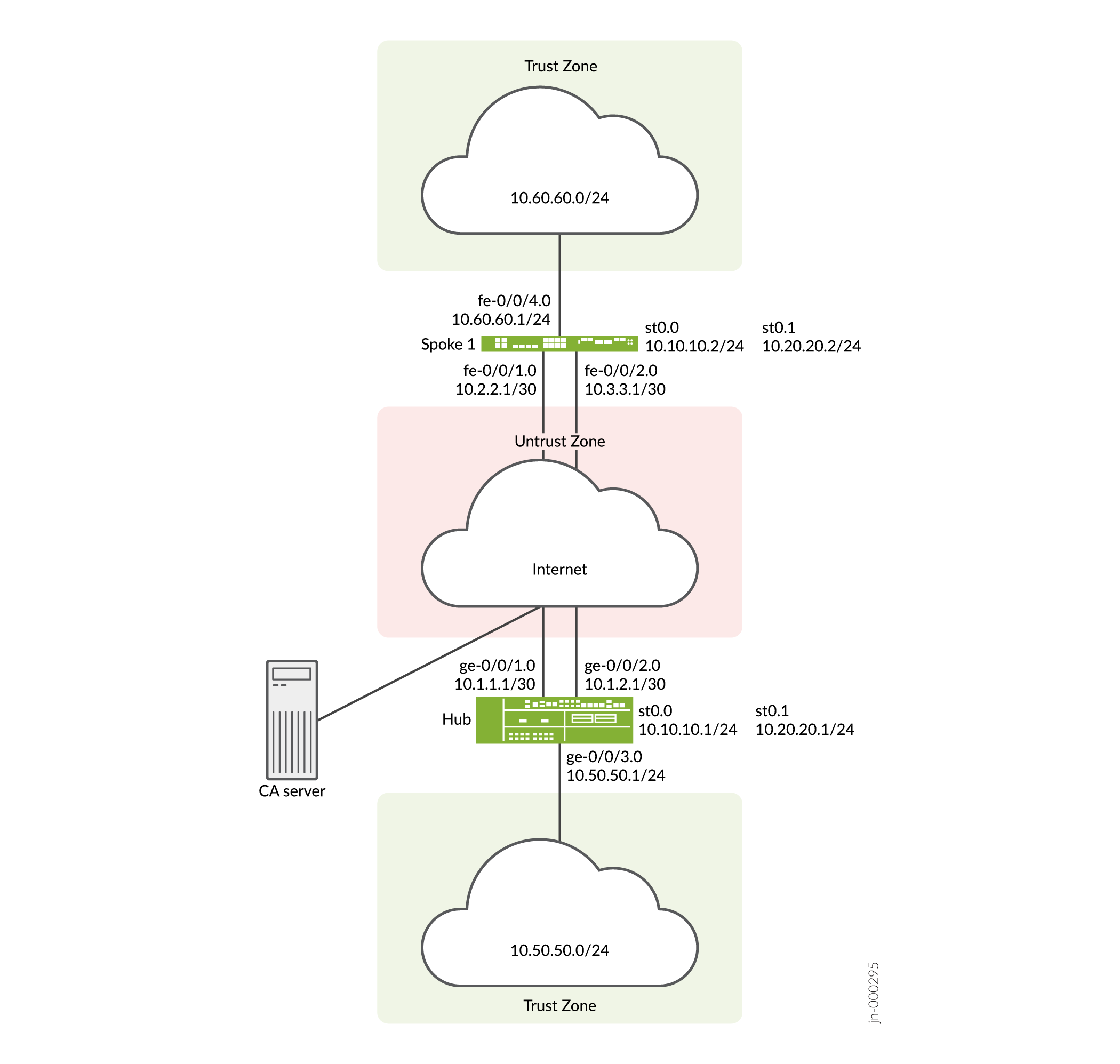
この例では、ハブとスポーク1の間に2つのIPsec VPNトンネルが確立されています。ルーティング情報は、各トンネルの iBGP セッションを介して交換されます。10.60.60.0/24 へのルートの最長プレフィックス一致は、ハブの st0.0 インターフェイス経由です。したがって、ルートのプライマリ トンネルは、ハブおよびスポーク 1 の st0.0 インターフェイスを経由します。デフォルト ルートは、ハブおよびスポーク 1 の st0.1 インターフェイス上のバックアップ トンネルを経由します。
VPN監視は、トンネルのステータスをチェックします。プライマリ トンネルに問題がある場合(リモート トンネル ゲートウェイに到達できない場合など)、トンネル ステータスは down に変わり、10.60.60.0/24 を宛先とするデータはバックアップ トンネルを介して再ルーティングされます。
設定
AutoVPN を設定するには、次のタスクを実行します。
最初のセクションでは、ハブ デバイスとスポーク デバイスで簡易証明書登録プロトコル (SCEP) を使用して CA 証明書とローカル証明書をオンラインで取得する方法について説明します。
SCEP へのデバイス証明書の登録
ステップバイステップでの手順
ハブで SCEP にデジタル証明書を登録するには:
-
CA を設定します。
[edit]
user@host# set security pki ca-profile ca-profile1 ca-identity ca-profile1
user@host# set security pki ca-profile ca-profile1 enrollment url http://pc4/certsrv/mscep/mscep.dll
user@host# set security pki ca-profile ca-profile1 revocation-check disable
user@host# commit
-
CA 証明書を登録します。
user@host> request security pki ca-certificate enroll ca-profile ca-profile1
プロンプトで「 yes 」と入力して、CA 証明書を読み込みます。
-
証明書ごとにキーペアを生成します。
user@host> request security pki generate-key-pair certificate-id Local1
user@host> request security pki generate-key-pair certificate-id Local2
-
ローカル証明書を登録します。
user@host> request security pki local-certificate enroll ca-profile ca-profile1 certificate-id Local1 domain-name example.net email hub@example.net ip-address 10.1.1.1 subject DC=example.net,CN=hub,OU=SLT,O=example,L=Bengaluru,ST=KA,C=IN challenge-password <password>
user@host> request security pki local-certificate enroll ca-profile ca-profile1 certificate-id Local2 domain-name example.net email hub_backup@example.net ip-address 10.1.2.1 subject DC=example.net,CN=hub_backup,OU=SBU,O=example,L=Bengaluru,ST=KA,C=IN challenge-password <password>
-
ローカル証明書を確認します。
user@host> show security pki local-certificate certificate-id Local1 detail Certificate identifier: Local1 Certificate version: 3 Serial number: 40a6d5f300000000258d Issuer: Common name: CASERVER1, Domain component: net, Domain component: internal Subject: Organization: example, Organizational unit: SLT, Country: IN, State: KA, Locality: Bengaluru, Common name: hub, Domain component: example.net Subject string: C=IN, DC=example.net, ST=KA, L=Bengaluru, O=example, OU=SLT, CN=hub Alternate subject: "hub@example.net", example.net, 10.1.1.1 Validity: Not before: 11- 6-2012 09:39 Not after: 11- 6-2013 09:49 Public key algorithm: rsaEncryption(1024 bits) 30:81:89:02:81:81:00:c9:c9:cc:30:b6:7a:86:12:89:b5:18:b3:76 01:2d:cc:65:a8:a8:42:78:cd:d0:9a:a2:c0:aa:c4:bd:da:af:88:f3 2a:78:1f:0a:58:e6:11:2c:81:8f:0e:7c:de:86:fc:48:4c:28:5b:8b 34:91:ff:2e:91:e7:b5:bd:79:12:de:39:46:d9:fb:5c:91:41:d1:da 90:f5:09:00:9b:90:07:9d:50:92:7d:ff:fb:3f:3c:bc:34:e7:e3:c8 ea:cb:99:18:b4:b6:1d:a8:99:d3:36:b9:1b:36:ef:3e:a1:fd:48:82 6a:da:22:07:da:e0:d2:55:ef:57:be:09:7a:0e:17:02:03:01:00:01 Signature algorithm: sha1WithRSAEncryption Distribution CRL: http://ca-server1/CertEnroll/CASERVER1.crl file://\\ca-server1\CertEnroll\CASERVER1.crl Fingerprint: e1:f7:a1:a6:1e:c3:97:69:a5:07:9b:09:14:1a:c7:ae:09:f1:f6:35 (sha1) a0:02:fa:8d:5c:63:e5:6d:f7:f4:78:56:ac:4e:b2:c4 (md5) Auto-re-enrollment: Status: Disabled Next trigger time: Timer not starteduser@host> show security pki local-certificate certificate-id Local2 detail Certificate identifier: Local2 Certificate version: 3 Serial number: 505efdf900000000259a Issuer: Common name: CASERVER1, Domain component: net, Domain component: internal Subject: Organization: example, Organizational unit: SBU, Country: IN, State: KA, Locality: Bengaluru, Common name: hub_backup, Domain component: example.net Subject string: C=IN, DC=example.net, ST=KA, L=Bengaluru, O=example, OU=SBU, CN=hub_backup Alternate subject: "hub_backup@example.net", example.net, 10.1.2.1 Validity: Not before: 11- 9-2012 10:55 Not after: 11- 9-2013 11:05 Public key algorithm: rsaEncryption(1024 bits) 30:81:89:02:81:81:00:d5:44:08:96:f6:77:05:e6:91:50:8a:8a:2a 4e:95:43:1e:88:ea:43:7c:c5:ac:88:d7:a0:8d:b5:d9:3f:41:db:db 44:34:1f:56:a5:38:4b:b2:c5:85:f9:f1:bf:b2:7b:d4:b2:af:98:a0 95:50:02:ad:f5:dd:4d:dc:67:85:dd:84:09:df:9c:68:a5:58:65:e7 2c:72:cc:47:4b:d0:cc:4a:28:ca:09:db:ad:6e:5a:13:6c:e6:cc:f0 29:ed:2b:2d:d1:38:38:bc:68:84:de:ae:86:39:c9:dd:06:d5:36:f0 e6:2a:7b:46:4c:cd:a5:24:1c:e0:92:8d:ad:35:29:02:03:01:00:01 Signature algorithm: sha1WithRSAEncryption Distribution CRL: http://ca-server1/CertEnroll/CASERVER1.crl file://\\ca-server1\CertEnroll\CASERVER1.crl Fingerprint: 98:96:2f:ff:ca:af:33:ee:d7:4c:c8:4f:f7:71:53:c0:5d:5f:c5:59 (sha1) c9:87:e3:a4:5c:47:b5:aa:90:22:e3:06:b2:0b:e1:ea (md5) Auto-re-enrollment: Status: Disabled Next trigger time: Timer not started
ステップバイステップでの手順
スポーク 1 で SCEP を使用してデジタル証明書を登録するには:
-
CA を設定します。
[edit]
user@host# set security pki ca-profile ca-profile1 ca-identity ca-profile1
user@host# set security pki ca-profile ca-profile1 enrollment url http://pc4/certsrv/mscep/mscep.dll
user@host# set security pki ca-profile ca-profile1 revocation-check disable
user@host# commit
-
CA 証明書を登録します。
user@host> request security pki ca-certificate enroll ca-profile ca-profile1
プロンプトで「 yes 」と入力して、CA 証明書を読み込みます。
-
証明書ごとにキーペアを生成します。
user@host> rrequest security pki generate-key-pair certificate-id Local1
user@host> request security pki generate-key-pair certificate-id Local2
-
ローカル証明書を登録します。
user@host> request security pki local-certificate enroll ca-profile ca-profile1 certificate-id Local1 domain-name example.net email spoke1@example.net ip-address 10.2.2.1 subject DC=example.net,CN=spoke1,OU=SLT,O=example,L=Mysore,ST=KA,C=IN challenge-password <password>
user@host> request security pki local-certificate enroll ca-profile ca-profile1 certificate-id Local2 domain-name example.net email spoke1_backup@example.net ip-address  10.3.3.1 subject DC=example.net,CN=spoke1_backup,OU=SBU,O=example,L=Mysore,ST=KA,C=IN challenge-password <password>
-
ローカル証明書を確認します。
user@host> show security pki local-certificate certificate-id Local1 detail

Certificate identifier: Local1
  Certificate version: 3
  Serial number: 40a7975f00000000258e
  Issuer:
    Common name: CASERVER1, Domain component: net, Domain component: internal
  Subject:
    Organization: example, Organizational unit: SLT, Country: IN, State: KA,
    Locality: Mysore, Common name: spoke1, Domain component: example.net
  Subject string:
    C=IN, DC=example.net, ST=KA, L=Mysore, O=example, OU=SLT, CN=spoke1
  Alternate subject: "spoke1@example.net", example.net, 10.2.2.1
  Validity:
    Not before: 11- 6-2012 09:40
    Not after: 11- 6-2013 09:50
  Public key algorithm: rsaEncryption(1024 bits)
    30:81:89:02:81:81:00:d8:45:09:77:cd:36:9a:6f:58:44:18:91:db
    b0:c7:8a:ee:c8:d7:a6:d2:e2:e7:20:46:2b:26:1a:92:e2:4e:8a:ce
    c9:25:d9:74:a2:81:ad:ea:e0:38:a0:2f:2d:ab:a6:58:ac:88:35:f4
    90:01:08:33:33:75:2c:44:26:f8:25:18:97:96:e4:28:de:3b:35:f2
    4a:f5:92:b7:57:ae:73:4f:8e:56:71:ab:81:54:1d:75:88:77:13:64
    1b:6b:01:96:15:0a:1c:54:e3:db:f8:ec:ec:27:5b:86:39:c1:09:a1
    e4:24:1a:19:0d:14:2c:4b:94:a4:04:91:3f:cb:ef:02:03:01:00:01
  Signature algorithm: sha1WithRSAEncryption
  Distribution CRL:
    http://ca-server1/CertEnroll/CASERVER1.crl
    file://\\ca-server1\CertEnroll\CASERVER1.crl
  Fingerprint:
    b6:24:2a:0e:96:5d:8c:4a:11:f3:5a:24:89:7c:df:ea:d5:c0:80:56 (sha1)
    31:58:7f:15:bb:d4:66:b8:76:1a:42:4a:8a:16:b3:a9 (md5)
  Auto-re-enrollment:
    Status: Disabled
    Next trigger time: Timer not started

user@host> show security pki local-certificate certificate-id Local2 detail

Certificate identifier: Local2
  Certificate version: 3
  Serial number: 506c3d0600000000259b
  Issuer:
    Common name: CASERVER1, Domain component: net, Domain component: internal
  Subject:
    Organization: example, Organizational unit: SBU, Country: IN, State: KA,
    Locality: Mysore, Common name: spoke1_backup, Domain component: example.net
  Subject string:
    C=IN, DC=example.net, ST=KA, L=Mysore, O=example, OU=SBU, CN=spoke1_backup
  Alternate subject: "spoke1_backup@example.net", example.net, 10.3.3.1
  Validity:
    Not before: 11- 9-2012 11:09
    Not after: 11- 9-2013 11:19
  Public key algorithm: rsaEncryption(1024 bits)
    30:81:89:02:81:81:00:a7:02:b5:e2:cd:79:24:f8:97:a3:8d:4d:27
    8c:2b:dd:f1:57:72:4d:2b:6d:d5:95:0d:9c:1b:5c:e2:a4:b0:84:2e
    31:82:3c:91:08:a2:58:b9:30:4c:5f:a3:6b:e6:2b:9c:b1:42:dd:1c
    cd:a2:7a:84:ea:7b:a6:b7:9a:13:33:c6:27:2b:79:2a:b1:0c:fe:08
    4c:a7:35:fc:da:4f:df:1f:cf:f4:ba:bc:5a:05:06:63:92:41:b4:f2
    54:00:3f:ef:ff:41:e6:ca:74:10:56:f7:2b:5f:d3:1a:33:7e:49:74
    1c:42:cf:c2:23:ea:4b:8f:50:2c:eb:1c:a6:37:89:02:03:01:00:01
  Signature algorithm: sha1WithRSAEncryption
  Distribution CRL:
    http://ca-server1/CertEnroll/CASERVER1.crl
    file://\\ca-server1\CertEnroll\CASERVER1.crl
  Fingerprint:
    d6:7f:52:a3:b6:f8:ae:cb:70:3f:a9:79:ea:8a:da:9e:ba:83:e4:5f (sha1)
    76:0b:72:73:cf:51:ee:58:81:2d:f7:b4:e2:5c:f4:5c (md5)
  Auto-re-enrollment:
    Status: Disabled
    Next trigger time: Timer not started
件名フィールドに表示される組織単位 (OU) は、ローカル 1 の場合は
SLT、ローカル 2 の場合はSBUです。ハブのIKE設定には、スポークを識別するためのOU=SLTとOU=SBUが含まれています。
ハブの設定
CLIクイック構成
この例を迅速に設定するには、以下のコマンドをコピーして、テキストファイルに貼り付け、改行を削除し、ネットワーク設定に一致させる必要がある詳細情報を変更し、コマンドを [edit] 階層レベルでCLIにコピーアンドペーストして、設定モードから commit を入力します。
set interfaces ge-0/0/1 unit 0 family inet address 10.1.1.1/30
set interfaces ge-0/0/2 unit 0 family inet address 10.1.2.1/30
set interfaces ge-0/0/3 unit 0 family inet address 10.50.50.1/24
set interfaces st0 unit 0 multipoint
set interfaces st0 unit 0 family inet address 10.10.10.1/24
set interfaces st0 unit 1 multipoint
set interfaces st0 unit 1 family inet address 10.20.20.1/24
set policy-options policy-statement lan_nw from interface ge-0/0/3.0
set policy-options policy-statement lan_nw then accept
set protocols bgp group ibgp-1 type internal
set protocols bgp group ibgp-1 local-address 10.10.10.1
set protocols bgp group ibgp-1 export lan_nw
set protocols bgp group ibgp-1 cluster 10.2.3.4
set protocols bgp group ibgp-1 allow 10.10.10.0/24
set protocols bgp group ibgp-2 type internal
set protocols bgp group ibgp-2 local-address 10.20.20.1
set protocols bgp group ibgp-2 export lan_nw
set protocols bgp group ibgp-2 cluster 10.2.3.5
set protocols bgp group ibgp-2 allow 10.20.20.0/24
set routing-options static route 10.2.2.0/30 next-hop 10.1.1.2
set routing-options static route 10.3.3.0/30 next-hop 10.1.2.2
set routing-options autonomous-system 65010
set security ike proposal ike-proposal authentication-method rsa-signatures
set security ike proposal ike-proposal dh-group group2
set security ike proposal ike-proposal authentication-algorithm sha1
set security ike proposal ike-proposal encryption-algorithm aes-128-cbc
set security ike policy ike-policy-1 mode main
set security ike policy ike-policy-1 proposals ike-proposal
set security ike policy ike-policy-1 certificate local-certificate Local1
set security ike policy ike-policy-2 mode main
set security ike policy ike-policy-2 proposals ike-proposal
set security ike policy ike-policy-2 certificate local-certificate Local2
set security ike gateway hub-to-spoke-gw-1 ike-policy ike-policy-1
set security ike gateway hub-to-spoke-gw-1 dynamic distinguished-name wildcard OU=SLT
set security ike gateway hub-to-spoke-gw-1 dynamic ike-user-type group-ike-id
set security ike gateway hub-to-spoke-gw-1 local-identity distinguished-name
set security ike gateway hub-to-spoke-gw-1 external-interface ge-0/0/1.0
set security ike gateway hub-to-spoke-gw-2 ike-policy ike-policy-2
set security ike gateway hub-to-spoke-gw-2 dynamic distinguished-name wildcard OU=SBU
set security ike gateway hub-to-spoke-gw-2 dynamic ike-user-type group-ike-id
set security ike gateway hub-to-spoke-gw-2 local-identity distinguished-name
set security ike gateway hub-to-spoke-gw-2 external-interface ge-0/0/2.0
set security ipsec vpn-monitor-options interval 5
set security ipsec vpn-monitor-options threshold 2
set security ipsec proposal ipsec-proposal protocol esp
set security ipsec proposal ipsec-proposal authentication-algorithm hmac-md5-96
set security ipsec proposal ipsec-proposal encryption-algorithm des-cbc
set security ipsec policy vpn-policy perfect-forward-secrecy keys group14
set security ipsec policy vpn-policy proposals ipsec-proposal
set security ipsec vpn hub-to-spoke-vpn-1 bind-interface st0.0
set security ipsec vpn hub-to-spoke-vpn-1 vpn-monitor source-interface ge-0/0/1.0
set security ipsec vpn hub-to-spoke-vpn-1 ike gateway hub-to-spoke-gw-1
set security ipsec vpn hub-to-spoke-vpn-1 ike ipsec-policy vpn-policy
set security ipsec vpn hub-to-spoke-vpn-2 bind-interface st0.1
set security ipsec vpn hub-to-spoke-vpn-2 vpn-monitor source-interface ge-0/0/2.0
set security ipsec vpn hub-to-spoke-vpn-2 ike gateway hub-to-spoke-gw-2
set security ipsec vpn hub-to-spoke-vpn-2 ike ipsec-policy vpn-policy
set security zones security-zone untrust host-inbound-traffic system-services all
set security zones security-zone untrust host-inbound-traffic protocols all
set security zones security-zone untrust interfaces st0.0
set security zones security-zone untrust interfaces ge-0/0/1.0
set security zones security-zone untrust interfaces ge-0/0/2.0
set security zones security-zone untrust interfaces st0.1
set security zones security-zone trust host-inbound-traffic system-services all
set security zones security-zone trust host-inbound-traffic protocols all
set security zones security-zone trust interfaces ge-0/0/3.0
set security policies default-policy permit-all
set security pki ca-profile ca-profile1 ca-identity ca-profile1
set security pki ca-profile ca-profile1 enrollment url http://pc4/certsrv/mscep/mscep.dll
set security pki ca-profile ca-profile1 revocation-check disable
ステップバイステップでの手順
次の例では、設定階層のいくつかのレベルに移動する必要があります。その方法の詳細については、設定モードでのCLIエディターの使用を参照してください。
ハブを設定するには:
-
インターフェイスを設定します。
[edit interfaces]
user@host# set ge-0/0/1 unit 0 family inet address 10.1.1.1/30
user@host# set ge-0/0/2 unit 0 family inet address 10.1.2.1/30
user@host# set ge-0/0/3 unit 0 family inet address 10.50.50.1/24
user@host# set st0 unit 0 multipoint
user@host# set st0 unit 0 family inet address 10.10.10.1/24
user@host# set st0 unit 1 multipoint
user@host# set st0 unit 1 family inet address 10.20.20.1/24
-
ルーティング プロトコルを設定します。
[edit policy-options]
user@host# set policy-statement lan_nw from interface ge-0/0/3.0
user@host# set policy-statement lan_nw then accept
[edit protocols bgp]
user@host# set group ibgp-1 type internal
user@host# set group ibgp-1 local-address 10.10.10.1
user@host# set group ibgp-1 export lan_nw
user@host# set group ibgp-1 cluster 10.2.3.4
user@host# set group ibgp-1 allow 10.10.10.0/24
user@host# set group ibgp-2 type internal
user@host# set group ibgp-2 local-address 10.20.20.1
user@host# set group ibgp-2 export lan_nw
user@host# set group ibgp-2 cluster 10.2.3.5
user@host# set group ibgp-2 allow 10.20.20.0/24
[edit routing-options]
user@host# set static route 10.2.2.0/30 next-hop 10.1.1.2
user@host# set static route 10.3.3.0/30 next-hop 10.1.2.2
user@host# set autonomous-system 65010
-
フェーズ1のオプションを設定します。
[edit security ike proposal ike-proposal]
user@host# set authentication-method rsa-signatures
user@host# set dh-group group2
user@host# set authentication-algorithm sha1
user@host# set encryption-algorithm aes-128-cbc
[edit security ike policy ike-policy-1]
user@host# set mode main
user@host# set proposals ike-proposal
user@host# set certificate local-certificate Local1
[edit security ike policy ike-policy-2]
user@host# set mode main
user@host# set proposals ike-proposal
user@host# set certificate local-certificate Local2
[edit security ike gateway hub-to-spoke-gw-1]
user@host# set ike-policy ike-policy-1
user@host# set dynamic distinguished-name wildcard OU=SLT
user@host# set dynamic ike-user-type group-ike-id
user@host# set local-identity distinguished-name
user@host# set external-interface ge-0/0/1.0
[edit security ike gateway hub-to-spoke-gw-2]
user@host# set ike-policy ike-policy-2
user@host# set dynamic distinguished-name wildcard OU=SBU
user@host# set dynamic ike-user-type group-ike-id
user@host# set local-identity distinguished-name
user@host# set external-interface ge-0/0/2.0
-
フェーズ2のオプションを設定します。
[edit security ipsec vpn-monitor]
user@host# set options interval 5
user@host# set options threshold 2
[edit security ipsec proposal ipsec-proposal]
user@host# set protocol esp
user@host# set authentication-algorithm hmac-md5-96
user@host# set encryption-algorithm des-cbc
[edit security ipsec policy vpn-policy]
user@host# set perfect-forward-secrecy keys group14
user@host# set proposals ipsec-proposal
[edit security ipsec vpn hub-to-spoke-vpn-1]
user@host# set bind-interface st0.0
user@host# set vpn-monitor source-interface ge-0/0/1.0
user@host# set ike gateway hub-to-spoke-gw-1
user@host# set ike ipsec-policy vpn-policy
[edit security ipsec vpn hub-to-spoke-vpn-2]
user@host# set bind-interface st0.1
user@host# set vpn-monitor source-interface ge-0/0/2.0
user@host# set ike gateway hub-to-spoke-gw-2
user@host# set ike ipsec-policy vpn-policy
-
ゾーンを設定します。
[edit security zones security-zone untrust]
user@host# set host-inbound-traffic system-services all
user@host# set host-inbound-traffic protocols all
user@host# set interfaces st0.0
user@host# set interfaces ge-0/0/1.0
user@host# set interfaces ge-0/0/2.0
user@host# set interfaces st0.1
[edit security zones security-zone trust]
user@host# set host-inbound-traffic system-services all
user@host# set host-inbound-traffic protocols all
user@host# set interfaces ge-0/0/3.0
-
デフォルトのセキュリティポリシーを設定します。
[edit security policies]
user@host# set default-policy permit-all
-
CA プロファイルを設定します。
[edit security pki]
user@host# set ca-profile ca-profile1 ca-identity ca-profile1
user@host# set ca-profile ca-profile1 enrollment url http://pc4/certsrv/mscep/mscep.dll
user@host# set ca-profile ca-profile1 revocation-check disable
結果
設定モードから、 show interfaces、 show policy-options、 show protocols、 show routing-options、 show security ike、 show security ipsec、 show security zones、 show security policies、および show security pki コマンドを入力して、設定を確認します。出力結果に意図した設定内容が表示されない場合は、この例の設定手順を繰り返して設定を修正します。
[edit]
user@host# show interfaces
ge-0/0/1 {
    unit 0 {
        family inet {
            address 10.1.1.1/30;
        }
    }
}
    ge-0/0/2 {
        unit 0 {
            family inet {
                address 10.1.2.1/30;
            }
        }
    }
    ge-0/0/3 {
        unit 0 {
            family inet {
                address 10.50.50.1/24;
            }
        }
    }
    st0 {
        unit 0 {
            multipoint;
            family inet {
                address 10.10.10.1/24;
            }
        }
        unit 1 {
            multipoint;
            family inet {
                address 10.20.20.1/24;
            }
        }
    }
[edit]
user@host# show policy-options
policy-statement lan_nw {
    from interface ge-0/0/3.0;
    then accept;
}
[edit]
user@host# show protocols
bgp {
    group ibgp-1 {
        type internal;
        local-address 10.10.10.1;
        export lan_nw;
        cluster 10.2.3.4;
        allow 10.10.10.0/24;
    }
    group ibgp-2 {
        type internal;
        local-address 10.20.20.1;
        export lan_nw;
        cluster 10.2.3.5;
        allow 10.20.20.0/24;
    }
}
[edit]
user@host# show routing-options
static {
    route 10.2.2.0/30 next-hop 10.1.1.2;
    route 10.3.3.0/30 next-hop 10.1.2.2;
    }
autonomous-system 65010;
[edit]
user@host# show security ike
proposal ike-proposal {
    authentication-method rsa-signatures;
    dh-group group2;
    authentication-algorithm sha1;
    encryption-algorithm aes-128-cbc;
}
    policy ike-policy-1 {
        mode main;
        proposals ike-proposal;
        certificate {
            local-certificate Local1;
        }
    }
    policy ike-policy-2 {
        mode main;
        proposals ike-proposal;
        certificate {
            local-certificate Local2;
        }
    }
    gateway hub-to-spoke-gw-1 {
        ike-policy ike-policy-1;
        dynamic {
            distinguished-name {
                wildcard OU=SLT;
            }
            ike-user-type group-ike-id;
        }
        local-identity distinguished-name;
        external-interface ge-0/0/1.0;
    }
    gateway hub-to-spoke-gw-2 {
        ike-policy ike-policy-2;
        dynamic {
            distinguished-name {
                wildcard OU=SBU;
            }
            ike-user-type group-ike-id;
        }
        local-identity distinguished-name;
        external-interface ge-0/0/2.0;
    }
[edit]
user@host# show security ipsec
vpn-monitor-options {
    interval 5;
    threshold 2;
}
    proposal ipsec-proposal {
        protocol esp;
        authentication-algorithm hmac-md5-96;
        encryption-algorithm des-cbc;
    }
    policy vpn-policy {
        perfect-forward-secrecy {
            keys group14;
        }
        proposals ipsec-proposal;
    }
    vpn hub-to-spoke-vpn-1 {
        bind-interface st0.0;
        vpn-monitor {
            source-interface ge-0/0/1.0;
        }
        ike {
            gateway hub-to-spoke-gw-1;
            ipsec-policy vpn-policy;
        }
    }
    vpn hub-to-spoke-vpn-2 {
        bind-interface st0.1;
        vpn-monitor {
            source-interface ge-0/0/2.0;
        }
        ike {
            gateway hub-to-spoke-gw-2;
            ipsec-policy vpn-policy;
        }
    }
[edit]
user@host# show security zones
security-zone untrust {
    host-inbound-traffic {
        system-services {
            all;
        }
        protocols {
            all;
        }
    }
    interfaces {
        st0.0;
        ge-0/0/1.0;
        ge-0/0/2.0;
        st0.1;
    }
}
    security-zone trust {
        host-inbound-traffic {
            system-services {
                all;
            }
            protocols {
                all;
            }
        }
        interfaces {
            ge-0/0/3.0;
        }
    }
[edit]
user@host# show security policies
default-policy {
    permit-all;
}
[edit]
user@host# show security pki
ca-profile ca-profile1 {
    ca-identity ca-profile1;
    enrollment {
        url http://pc4/certsrv/mscep/mscep.dll;
    }
    revocation-check {
        disable;
    }
}
デバイスの設定が完了したら、設定モードから commit を入力します。
スポーク1の設定
CLIクイック構成
この例を迅速に設定するには、以下のコマンドをコピーして、テキストファイルに貼り付け、改行を削除し、ネットワーク設定に一致させる必要がある詳細情報を変更し、コマンドを [edit] 階層レベルでCLIにコピーアンドペーストして、設定モードから commit を入力します。
set interfaces fe-0/0/1 unit 0 family inet address 10.2.2.1/30
set interfaces fe-0/0/2 unit 0 family inet address 10.3.3.1/30
set interfaces fe-0/0/4 unit 0 family inet address 10.60.60.1/24
set interfaces st0 unit 0 family inet address 10.10.10.2/24
set interfaces st0 unit 1 family inet address 10.20.20.2/24
set policy-options policy-statement default_route from protocol static
set policy-options policy-statement default_route from route-filter 0.0.0.0/0 exact
set policy-options policy-statement default_route then accept
set policy-options policy-statement lan_nw from interface fe-0/0/4.0
set policy-options policy-statement lan_nw then accept
set protocols bgp group ibgp-1 type internal
set protocols bgp group ibgp-1 local-address 10.10.10.2
set protocols bgp group ibgp-1 export lan_nw
set protocols bgp group ibgp-1 neighbor 10.10.10.1
set protocols bgp group ibgp-2 type internal
set protocols bgp group ibgp-2 local-address 10.20.20.2
set protocols bgp group ibgp-2 export default_route
set protocols bgp group ibgp-2 neighbor 10.20.20.1
set routing-options static route 10.1.1.0/30 next-hop 10.2.2.2
set routing-options static route 10.1.2.0/30 next-hop 10.3.3.2
set routing-options static route 0.0.0.0/0 next-hop st0.1
set routing-options autonomous-system 65010
set security ike proposal ike-proposal authentication-method rsa-signatures
set security ike proposal ike-proposal dh-group group2
set security ike proposal ike-proposal authentication-algorithm sha1
set security ike proposal ike-proposal encryption-algorithm aes-128-cbc
set security ike policy ike-policy-1 mode main
set security ike policy ike-policy-1 proposals ike-proposal
set security ike policy ike-policy-1 certificate local-certificate Local1
set security ike policy ike-policy-2 mode main
set security ike policy ike-policy-2 proposals ike-proposal
set security ike policy ike-policy-2 certificate local-certificate Local2
set security ike gateway spoke-to-hub-gw-1 ike-policy ike-policy-1
set security ike gateway spoke-to-hub-gw-1 address 10.1.1.1
set security ike gateway spoke-to-hub-gw-1 local-identity distinguished-name
set security ike gateway spoke-to-hub-gw-1 remote-identity distinguished-name
set security ike gateway spoke-to-hub-gw-1 external-interface fe-0/0/1.0
set security ike gateway spoke-to-hub-gw-2 ike-policy ike-policy-2
set security ike gateway spoke-to-hub-gw-2 address 10.1.2.1
set security ike gateway spoke-to-hub-gw-2 local-identity distinguished-name
set security ike gateway spoke-to-hub-gw-2 remote-identity distinguished-name
set security ike gateway spoke-to-hub-gw-2 external-interface fe-0/0/2.0
set security ipsec vpn-monitor-options interval 5
set security ipsec vpn-monitor-options threshold 2
set security ipsec proposal ipsec-proposal protocol esp
set security ipsec proposal ipsec-proposal authentication-algorithm hmac-md5-96
set security ipsec proposal ipsec-proposal encryption-algorithm des-cbc
set security ipsec policy vpn-policy perfect-forward-secrecy keys group14
set security ipsec policy vpn-policy proposals ipsec-proposal
set security ipsec vpn spoke-to-hub-1 bind-interface st0.0
set security ipsec vpn spoke-to-hub-1 vpn-monitor destination-ip 10.1.1.1
set security ipsec vpn spoke-to-hub-1 ike gateway spoke-to-hub-gw-1
set security ipsec vpn spoke-to-hub-1 ike ipsec-policy vpn-policy
set security ipsec vpn spoke-to-hub-1 establish-tunnels immediately
set security ipsec vpn spoke-to-hub-2 bind-interface st0.1
set security ipsec vpn spoke-to-hub-2 vpn-monitor destination-ip 10.1.2.1
set security ipsec vpn spoke-to-hub-2 ike gateway spoke-to-hub-gw-2
set security ipsec vpn spoke-to-hub-2 ike ipsec-policy vpn-policy
set security ipsec vpn spoke-to-hub-2 establish-tunnels immediately
set security zones security-zone untrust host-inbound-traffic system-services all
set security zones security-zone untrust host-inbound-traffic protocols all
set security zones security-zone untrust interfaces fe-0/0/1.0
set security zones security-zone untrust interfaces st0.0
set security zones security-zone untrust interfaces fe-0/0/2.0
set security zones security-zone untrust interfaces st0.1
set security zones security-zone trust host-inbound-traffic system-services all
set security zones security-zone trust host-inbound-traffic protocols all
set security zones security-zone trust interfaces fe-0/0/4.0
set security policies default-policy permit-all
set security pki ca-profile ca-profile1 ca-identity ca-profile1
set security pki ca-profile ca-profile1 enrollment url http://pc4/certsrv/mscep/mscep.dll
set security pki ca-profile ca-profile1 revocation-check disable
ステップバイステップでの手順
次の例では、設定階層のいくつかのレベルに移動する必要があります。その方法の詳細については、設定モードでのCLIエディターの使用を参照してください。
スポーク 1 を設定するには:
-
インターフェイスを設定します。
[edit interfaces]
user@host# set fe-0/0/1 unit 0 family inet address 10.2.2.1/30
user@host# set fe-0/0/2 unit 0 family inet address 10.3.3.1/30
user@host# set fe-0/0/4 unit 0 family inet address 10.60.60.1/24
user@host# set st0 unit 0 family inet address 10.10.10.2/24
user@host# set st0 unit 1 family inet address 10.20.20.2/24
-
ルーティング プロトコルを設定します。
[edit policy-options]
user@host# set policy-statement default_route from protocol static
user@host# set policy-statement default_route from route-filter 0.0.0.0/0 exact
user@host# set policy-statement default_route then accept
user@host# set policy-statement lan_nw from interface fe-0/0/4.0
user@host# set policy-statement lan_nw then accept
[edit protocols bgp]
user@host# set group ibgp-1 type internal
user@host# set group ibgp-1 local-address 10.10.10.2
user@host# set group ibgp-1 export lan_nw
user@host# set group ibgp-1 neighbor 10.10.10.1
user@host# set group ibgp-2 type internal
user@host# set group ibgp-2 local-address 10.20.20.2
user@host# set group ibgp-2 export default_route
user@host# set group ibgp-2 neighbor 10.20.20.1
[edit routing-options]
user@host# set static route 10.1.1.0/30 next-hop 10.2.2.2
user@host# set static route 10.1.2.0/30 next-hop 10.3.3.2
user@host# set static route 0.0.0.0/0 next-hop st0.1
user@host# set autonomous-system 65010
-
フェーズ1のオプションを設定します。
[edit security ike proposal ike-proposal]
user@host# set authentication-method rsa-signatures
user@host# set dh-group group2
user@host# set authentication-algorithm sha1
user@host# set encryption-algorithm aes-128-cbc
[edit security ike policy ike-policy-1]
user@host# set mode main
user@host# set proposals ike-proposal
user@host# set certificate local-certificate Local1
[edit security ike policy ike-policy-2]
user@host# set mode main
user@host# set proposals ike-proposal
user@host# set certificate local-certificate Local2
[edit security ike gateway spoke-to-hub-gw-1]
user@host# set ike-policy ike-policy-1
user@host# set address 10.1.1.1
user@host# set local-identity distinguished-name
user@host# set remote-identity distinguished-name
user@host# set external-interface fe-0/0/1.0
[edit security ike gateway spoke-to-hub-gw-2]
user@host# set ike-policy ike-policy-2
user@host# set address 10.1.2.1
user@host# set local-identity distinguished-name
user@host# set remote-identity distinguished-name
user@host# set external-interface fe-0/0/2.0
-
フェーズ2のオプションを設定します。
[edit security ipsec vpn-monitor]
user@host# set options interval 5
user@host# set options threshold 2
[edit security ipsec proposal ipsec-proposal]
user@host# set protocol esp
user@host# set authentication-algorithm hmac-md5-96
user@host# set encryption-algorithm des-cbc
[edit security ipsec policy vpn-policy]
user@host# set perfect-forward-secrecy keys group14
user@host# set proposals ipsec-proposal
[edit security ipsec vpn spoke-to-hub-1]
user@host# set bind-interface st0.0
user@host# set vpn-monitor destination-ip 10.1.1.1
user@host# set ike gateway spoke-to-hub-gw-1
user@host# set ike ipsec-policy vpn-policy
user@host# set establish-tunnels immediately
[edit security ipsec vpn spoke-to-hub-2]
user@host# set bind-interface st0.1
user@host# set vpn-monitor destination-ip 10.1.2.1
user@host# set ike gateway spoke-to-hub-gw-2
user@host# set ike ipsec-policy vpn-policy
user@host# set establish-tunnels immediately
-
ゾーンを設定します。
[edit security zones security-zone untrust]
user@host# set host-inbound-traffic system-services all
user@host# set host-inbound-traffic protocols all
user@host# set interfaces fe-0/0/1.0
user@host# set interfaces st0.0
user@host# set interfaces fe-0/0/2.0
user@host# set interfaces st0.1
[edit security zones security-zone trust]
user@host# set host-inbound-traffic system-services all
user@host# set host-inbound-traffic protocols all
user@host# set interfaces fe-0/0/4.0
-
デフォルトのセキュリティポリシーを設定します。
[edit security policies]
user@host# set default-policy permit-all
-
CA プロファイルを設定します。
[edit security pki]
user@host# set ca-profile ca-profile1 ca-identity ca-profile1
user@host# set ca-profile ca-profile1 enrollment url http://pc4/certsrv/mscep/mscep.dll
user@host# set ca-profile ca-profile1 revocation-check disable
結果
設定モードから、 show interfaces、 show policy-options、 show protocols、 show routing-options、 show security ike、 show security ipsec、 show security zones、 show security policies、および show security pki コマンドを入力して、設定を確認します。出力結果に意図した設定内容が表示されない場合は、この例の設定手順を繰り返して設定を修正します。
[edit]
user@host# show interfaces
fe-0/0/1 {
    unit 0 {
        family inet {
            address 10.2.2.1/30;
        }
    }
}
    fe-0/0/2 {
        unit 0 {
            family inet {
                address 10.3.3.1/30;
            }
        }
    }
    fe-0/0/4 {
        unit 0 {
            family inet {
                address 10.60.60.1/24;
            }
        }
    }
    st0 {
        unit 0 {
            family inet {
                address 10.10.10.2/24;
            }
        }
        unit 1 {
            family inet {
                address 10.20.20.2/24;
            }
        }
    }
[edit]
user@host# show policy-options
policy-statement default_route {
    from {
        protocol static;
        route-filter 0.0.0.0/0 exact;
    }
    then accept;
}
    policy-statement lan_nw {
        from interface fe-0/0/4.0;
        then accept;
    }
[edit]
user@host# show protocols
bgp {
    group ibgp-1 {
        type internal;
        local-address 10.10.10.2;
        export lan_nw;
        neighbor 10.10.10.1;
    }
    group ibgp-2 {
        type internal;
        local-address 10.20.20.2;
        export default_route;
        neighbor 10.20.20.1;
    }
}
[edit]
user@host# show routing-options
static {
    route 10.1.1.0/30 next-hop 10.2.2.2;
    route 10.1.2.0/30 next-hop 10.3.3.2;
    route 0.0.0.0/0 next-hop st0.1;
    }
autonomous-system 65010;
[edit]
user@host# show security ike
proposal ike-proposal {
    authentication-method rsa-signatures;
    dh-group group2;
    authentication-algorithm sha1;
    encryption-algorithm aes-128-cbc;
}
    policy ike-policy-1 {
        mode main;
        proposals ike-proposal;
        certificate {
            local-certificate Local1;
        }
    }
    policy ike-policy-2 {
        mode main;
        proposals ike-proposal;
        certificate {
            local-certificate Local2;
        }
    }
    gateway spoke-to-hub-gw-1 {
        ike-policy ike-policy-1;
        address 10.1.1.1;
        local-identity distinguished-name;
        remote-identity distinguished-name;
        external-interface fe-0/0/1.0;
    }
    gateway spoke-to-hub-gw-2 {
        ike-policy ike-policy-2;
        address 10.1.2.1;
        local-identity distinguished-name;
        remote-identity distinguished-name;
        external-interface fe-0/0/2.0;
    }
[edit]
user@host# show security ipsec
vpn-monitor-options {
    interval 5;
    threshold 2;
}
    proposal ipsec-proposal {
        protocol esp;
        authentication-algorithm hmac-md5-96;
        encryption-algorithm des-cbc;
    }
    policy vpn-policy {
        perfect-forward-secrecy {
            keys group14;
        }
        proposals ipsec-proposal;
    }
    vpn spoke-to-hub-1 {
        bind-interface st0.0;
        vpn-monitor {
            destination-ip 10.1.1.1;
        }
        ike {
            gateway spoke-to-hub-gw-1;
            ipsec-policy vpn-policy;
        }
        establish-tunnels immediately;
    }
    vpn spoke-to-hub-2 {
        bind-interface st0.1;
        vpn-monitor {
            destination-ip 10.1.2.1;
        }
        ike {
            gateway spoke-to-hub-gw-2;
            ipsec-policy vpn-policy;
        }
        establish-tunnels immediately;
    }
[edit]
user@host# show security zones
security-zone untrust {
    host-inbound-traffic {
        system-services {
            all;
        }
        protocols {
            all;
        }
    }
    interfaces {
        fe-0/0/1.0;
        st0.0;
        fe-0/0/2.0;
        st0.1;
    }
}
    security-zone trust {
        host-inbound-traffic {
            system-services {
                all;
            }
            protocols {
                all;
            }
        }
        interfaces {
            fe-0/0/4.0;
        }
    }
[edit]
user@host# show security policies
default-policy {
    permit-all;
}
[edit]
user@host# show security pki
ca-profile ca-profile1 {
    ca-identity ca-profile1;
    enrollment {
        url http://pc4/certsrv/mscep/mscep.dll;
    }
    revocation-check {
        disable;
    }
}
デバイスの設定が完了したら、設定モードから commit を入力します。
検証
設定が正常に機能していることを確認します。
- IKEフェーズ1ステータスの確認(両方のトンネルが稼働中)
- IPsecフェーズ2ステータスの確認(両方のトンネルが稼働中)
- IPsecネクストホップトンネルの確認(両方のトンネルが稼働中)
- BGPの検証(両方のトンネルが稼働しています)
- 学習したルートの確認(両方のトンネルが稼働中)
- IKEフェーズ1ステータスの確認(プライマリトンネルがダウンしています)
- IPsecフェーズ2ステータスの確認(プライマリトンネルがダウンしています)
- IPsecネクストホップトンネルの確認(プライマリトンネルがダウンしています)
- BGP(プライマリトンネルがダウンしている)の確認
- 学習したルートの確認(プライマリトンネルがダウン)
IKEフェーズ1ステータスの確認(両方のトンネルが稼働中)
目的
両方の IPSec VPN トンネルがアップしているときに、IKE フェーズ 1 のステータスを確認します。
アクション
動作モードからshow security ike security-associations コマンドを入力します。
user@host> show security ike security-associations
Index   State  Initiator cookie  Responder cookie  Mode           Remote Address
3733075 UP     d4f51c28c0a82101  05b125993a864d3c  Main           10.3.3.1
3733076 UP     d53c8a0b7d4c319b  c23c5f7a26388247  Main           10.2.2.1
意味
show security ike security-associationsコマンドは、すべてのアクティブなIKEフェーズ1のSAを一覧表示します。SAが表示されない場合は、フェーズ1の確立に問題があったことを示しています。設定でIKEポリシー パラメータと外部インターフェイスの設定を確認してください。フェーズ 1 のプロポーザル パラメーターは、ハブとスポークで一致する必要があります。
IPsecフェーズ2ステータスの確認(両方のトンネルが稼働中)
目的
両方の IPsec VPN トンネルがアップしているときに、IPsec フェーズ 2 のステータスを確認します。
アクション
動作モードからsecurity ipsec security-associations コマンドを入力します。
user@host> security ipsec security-associations
  Total active tunnels: 2
  ID    Algorithm       SPI      Life:sec/kb  Mon vsys Port  Gateway
  <268173316 ESP:des/ md5 3cd96946 3555/ unlim U   root 500   10.2.2.1
  >268173316 ESP:des/ md5 1c09b9b 3555/ unlim  U   root 500   10.2.2.1
  <268173313 ESP:des/ md5 7c6ffca3 3340/ unlim U   root 500   10.3.3.1
  >268173313 ESP:des/ md5 33bf6f2f 3340/ unlim U   root 500   10.3.3.1
意味
show security ipsec security-associations コマンドは、すべてのアクティブなIKEフェーズ2のSAを一覧表示します。SA が何も表示されない場合は、フェーズ 2 の確立に問題があったことになります。設定でIKEポリシー パラメータと外部インターフェイスの設定を確認してください。フェーズ 2 のプロポーザル パラメーターは、ハブとスポークで一致する必要があります。
IPsecネクストホップトンネルの確認(両方のトンネルが稼働中)
目的
IPsec ネクストホップ トンネルを検証します。
アクション
動作モードからshow security ipsec next-hop-tunnels コマンドを入力します。
user@host> show security ipsec next-hop-tunnels
Next-hop gateway  interface   IPSec VPN name                    Flag     IKE-ID                            XAUTH username
10.10.10.2        st0.0       hub-to-spoke-vpn-1                Auto     C=IN, DC=example.net, ST=KA, L=Mysore, O=example, OU=SLT, CN=spoke1
10.20.20.2        st0.1       hub-to-spoke-vpn-2                Auto     C=IN, DC=example.net, ST=KA, L=Mysore, O=example, OU=SBU, CN=spoke1_backup
意味
ネクストホップ ゲートウェイは、スポークの st0 インターフェイスの IP アドレスです。Next hopは、適切なIPsec VPN名に関連付けられているはずです。
BGPの検証(両方のトンネルが稼働しています)
目的
両方の IPsec VPN トンネルがアップしているときに、BGP がスポークの st0 インターフェイスの IP アドレスを参照することを確認します。
アクション
動作モードからshow bgp summaryコマンドを入力します。
user@host> show bgp summary
Groups: 2 Peers: 2 Down peers: 0
Unconfigured peers: 2
Table          Tot Paths  Act Paths Suppressed    History Damp State    Pending
inet.0                 2          2          0          0          0          0
Peer                     AS      InPkt     OutPkt    OutQ   Flaps Last Up/Dwn State|#Active/Received/Accepted/Damped...
10.10.10.2               65010       5          6       0       0          54 1/1/1/0              0/0/0/0
10.20.20.2               65010      13         16       0       0        4:29 1/1/1/0              0/0/0/0
学習したルートの確認(両方のトンネルが稼働中)
目的
両方のトンネルがアップしているときに、スポークへのルートが学習済みであることを確認します。10.60.60.0/24へのルートはst0.0インターフェイスを経由し、デフォルトルートはst0.1インターフェイスを経由します。
アクション
動作モードからshow route 10.60.60.0 コマンドを入力します。
user@host> show route 10.60.60.0
inet.0: 48 destinations, 48 routes (47 active, 0 holddown, 1 hidden)
+ = Active Route, - = Last Active, * = Both

60.60.60.0/24      *[BGP/170] 00:01:11, localpref 100
                      AS path: I
                    > to 10.10.10.2 via st0.0
動作モードからshow route 0.0.0.0コマンドを入力します。
user@host> show route 0.0.0.0
inet.0: 48 destinations, 48 routes (47 active, 0 holddown, 1 hidden)
+ = Active Route, - = Last Active, * = Both

0.0.0.0/0          *[BGP/170] 00:04:55, localpref 100
                      AS path: I
                    > to 10.20.20.2 via st0.1
IKEフェーズ1ステータスの確認(プライマリトンネルがダウンしています)
目的
プライマリ トンネルがダウンしたときの IKE フェーズ 1 ステータスを確認します。
アクション
動作モードからshow security ike security-associations コマンドを入力します。
user@host> show security ike security-associations
Index   State  Initiator cookie  Responder cookie  Mode           Remote Address
3733075 UP     d4f51c28c0a82101  05b125993a864d3c  Main           10.3.3.1
3733076 UP     d53c8a0b7d4c319b  c23c5f7a26388247  Main           10.2.2.1
意味
show security ike security-associationsコマンドは、すべてのアクティブなIKEフェーズ1のSAを一覧表示します。SAが表示されない場合は、フェーズ1の確立に問題があったことを示しています。設定でIKEポリシー パラメータと外部インターフェイスの設定を確認してください。フェーズ 1 のプロポーザル パラメーターは、ハブとスポークで一致する必要があります。
IPsecフェーズ2ステータスの確認(プライマリトンネルがダウンしています)
目的
プライマリ トンネルがダウンしたときの IPsec フェーズ 2 のステータスを確認します。
アクション
動作モードからsecurity ipsec security-associations コマンドを入力します。
user@host> security ipsec security-associations
   Total active tunnels: 1
  ID    Algorithm       SPI      Life:sec/kb  Mon vsys Port  Gateway
  <268173313 ESP:des/ md5 7c6ffca3 3156/ unlim U   root 500   10.3.3.1
  >268173313 ESP:des/ md5 33bf6f2f 3156/ unlim U   root 500   10.3.3.1
意味
show security ipsec security-associations コマンドは、すべてのアクティブなIKEフェーズ2のSAを一覧表示します。SA が何も表示されない場合は、フェーズ 2 の確立に問題があったことになります。設定でIKEポリシー パラメータと外部インターフェイスの設定を確認してください。フェーズ 2 のプロポーザル パラメーターは、ハブとスポークで一致する必要があります。
IPsecネクストホップトンネルの確認(プライマリトンネルがダウンしています)
目的
IPsec ネクストホップ トンネルを検証します。
アクション
動作モードからshow security ipsec next-hop-tunnels コマンドを入力します。
user@host> show security ipsec next-hop-tunnels
Next-hop gateway  interface   IPSec VPN name                    Flag     IKE-ID                            XAUTH username
10.20.20.2        st0.1       hub-to-spoke-vpn-2                Auto     C=IN, DC=example.net, ST=KA, L=Mysore, O=example, OU=SBU, CN=spoke1_backup
意味
ネクストホップ ゲートウェイは、スポークの st0 インターフェイスの IP アドレスです。Next hopは、正しいIPsec VPN名(この場合はバックアップVPNトンネル)に関連付けられている必要があります。
BGP(プライマリトンネルがダウンしている)の確認
目的
プライマリ トンネルがダウンしたときに、BGP がスポークの st0 インターフェイスの IP アドレスを参照することを確認します。
アクション
動作モードからshow bgp summaryコマンドを入力します。
user@host> show bgp summary
Groups: 2 Peers: 1 Down peers: 0
Unconfigured peers: 1
Table          Tot Paths  Act Paths Suppressed    History Damp State    Pending
inet.0                 1          1          0          0          0          0
Peer                     AS      InPkt     OutPkt    OutQ   Flaps Last Up/Dwn State|#Active/Received/Accepted/Damped...
10.20.20.2               10         20         24       0       0        7:24 1/1/1/0              0/0/0/0
学習したルートの確認(プライマリトンネルがダウン)
目的
プライマリ トンネルがダウンしたときに、スポークへのルートが学習済みであることを確認します。10.60.60.0/24へのルートとデフォルトルートはどちらもst0.1インターフェイスを経由します。
アクション
動作モードからshow route 10.60.60.0 コマンドを入力します。
user@host> show route 60.60.60.0
inet.0: 46 destinations, 46 routes (45 active, 0 holddown, 1 hidden)
+ = Active Route, - = Last Active, * = Both

0.0.0.0/0          *[BGP/170] 00:07:41, localpref 100
                      AS path: I
                    > to 10.20.20.2 via st0.1
動作モードからshow route 0.0.0.0コマンドを入力します。
user@host> show route 0.0.0.0
inet.0: 46 destinations, 46 routes (45 active, 0 holddown, 1 hidden)
+ = Active Route, - = Last Active, * = Both

0.0.0.0/0          *[BGP/170] 00:07:47, localpref 100
                      AS path: I
                    > to 10.20.20.2 via st0.1
例:OSPF を使用した基本的な AutoVPN の設定
この例では、単一の終端ポイントとして機能するように AutoVPN ハブを設定し、次にリモート サイトへのトンネルとして機能するように 2 つのスポークを設定する方法を示します。この例では、証明書ベースの認証を使用してVPNトンネルを介してパケットを転送するようにOSPFを設定します。事前共有鍵による認証の場合は、 例: iBGP を使用した基本的な AutoVPN の設定
要件
この例では、以下のハードウェアとソフトウェアのコンポーネントを使用しています。
-
AutoVPNハブおよびスポークとしてサポートされる3つのSRXシリーズファイアウォール
-
AutoVPN をサポートする Junos OS リリース 12.1X44-D10 以降
始める前に:
-
ローカル証明書の要求を送信するときに、認証局 (CA) のアドレスと必要な情報 (チャレンジ・パスワードなど) を取得します。
VPN トンネルを介してパケットを転送するために使用される動的ルーティング プロトコルについて理解している必要があります。
概要
この例では、AutoVPN ハブの設定とそれに続く 2 つのスポークの設定を示します。
この例では、最初の手順として、簡易証明書登録プロトコル (SCEP) を使用して各デバイスにデジタル証明書を登録します。スポークの証明書には、サブジェクト フィールドに組織単位 (OU) 値 "SLT" が含まれています。ハブは、OU フィールドの値「SLT」と一致するグループ IKE ID で構成されています。
スポークはハブへのIPsec VPN接続を確立することで、相互の通信やハブ上のリソースへのアクセスを可能にします。AutoVPN ハブとすべてのスポークで設定されたフェーズ 1 とフェーズ 2 の IKE トンネル オプションは、同じ値である必要があります。 表 13 に、この例で使用するオプションを示します。
|
オプション |
値 |
|---|---|
|
IKEプロポーザル: |
|
|
認証方法 |
RSA デジタル証明書 |
|
Diffie-Hellman(DH)グループ |
2 |
|
認証アルゴリズム |
SHA-1 |
|
暗号化アルゴリズム |
AES 128 CBC |
|
IKEポリシー: |
|
|
モード |
メイン |
|
IPsecプロポーザル: |
|
|
プロトコル |
ESP |
|
認証アルゴリズム |
HMAC MD5 96 |
|
暗号化アルゴリズム |
DES CBC |
|
IPsecポリシー: |
|
|
完全転送機密保持(PFS)グループ |
14 |
すべてのデバイスで同じ認証局(CA)が設定されています。
Junos OS は、単一レベルの証明書階層のみをサポートします。
表 14 は、ハブとすべてのスポークで設定されているオプションを示しています。
|
オプション |
ハブ |
すべてのスポーク |
|---|---|---|
|
IKEゲートウェイ: |
||
|
リモート IP アドレス |
動的 |
10.1.1.1 |
|
リモート IKE ID |
スポークの証明書の識別名(DN)と、組織単位(OU)フィールドに文字列 |
ハブの証明書の DN |
|
ローカルIKE ID |
ハブの証明書の DN |
スポークの証明書のDN |
|
外部インターフェイス |
ge-0/0/1.0 |
スポーク1: fe-0/0/1.0 スポーク2: ge-0/0/1.0 |
|
VPN: |
||
|
バインド インターフェイス |
st0.0 |
st0.0 |
|
トンネルの確立 |
(未設定) |
コンフィギュレーションのコミット直後に実行 |
表 15 は、スポークごとに異なる構成オプションを示しています。
|
オプション |
スポーク 1 |
スポーク 2 |
|---|---|---|
|
st0.0インターフェイス |
10.10.10.2/24 |
10.10.10.3/24 |
|
内部ネットワークへのインターフェイス |
fe-0.0/4.0: 100.60.60.1/24 |
fe-0.0/4.0: 10.70.70.1/24 |
|
インターネットへのインターフェース |
fe-0/0/1.0: 10.2.2.1/30 |
ge-0/0/1.0: 10.3.3.1/30 |
すべてのデバイスのルーティング情報は、VPN トンネルを介して交換されます。
この例では、すべてのトラフィックを許可するデフォルトのセキュリティポリシーがすべてのデバイスで使用されています。実稼働環境では、より制限の厳しいセキュリティポリシーを設定する必要があります。「セキュリティポリシーの概要」を参照してください。
設定
AutoVPN を設定するには、次のタスクを実行します。
最初のセクションでは、ハブ デバイスとスポーク デバイスで簡易証明書登録プロトコル (SCEP) を使用して CA 証明書とローカル証明書をオンラインで取得する方法について説明します。
SCEP へのデバイス証明書の登録
ステップバイステップでの手順
ハブで SCEP にデジタル証明書を登録するには:
-
CA を設定します。
[edit]
user@host# set security pki ca-profile ca-profile1 ca-identity ca-profile1
user@host# set security pki ca-profile ca-profile1 enrollment url http://pc4/certsrv/mscep/mscep.dll
user@host# set security pki ca-profile ca-profile1 revocation-check disable
user@host# commit
-
CA 証明書を登録します。
user@host> request security pki ca-certificate enroll ca-profile ca-profile1
プロンプトで「 yes 」と入力して、CA 証明書を読み込みます。
-
キーペアを生成します。
user@host> request security pki generate-key-pair certificate-id Local1
-
ローカル証明書を登録します。
user@host> request security pki local-certificate enroll ca-profile ca-profile1 certificate-id Local1 domain-name example.net email hub@example.net ip-address 10.1.1.1 subject DC=example.net,CN=hub,OU=SLT,O=example,L=Bengaluru,ST=KA,C=IN challenge-password <password>
-
ローカル証明書を確認します。
user@host> show security pki local-certificate detail

Certificate identifier: Local1
  Certificate version: 3
  Serial number: 40a6d5f300000000258d
  Issuer:
    Common name: CASERVER1, Domain component: net, Domain component: internal
  Subject:
    Organization: example, Organizational unit: SLT, Country: IN, State: KA,
    Locality: Bengaluru, Common name: hub, Domain component: example.net
  Subject string:
    C=IN, DC=example.net, ST=KA, L=Bengaluru, O=example, OU=SLT, CN=hub
  Alternate subject: "hub@example.net", example.net, 10.1.1.1
  Validity:
    Not before: 11- 6-2012 09:39
    Not after: 11- 6-2013 09:49
  Public key algorithm: rsaEncryption(1024 bits)
    30:81:89:02:81:81:00:c9:c9:cc:30:b6:7a:86:12:89:b5:18:b3:76
    01:2d:cc:65:a8:a8:42:78:cd:d0:9a:a2:c0:aa:c4:bd:da:af:88:f3
    2a:78:1f:0a:58:e6:11:2c:81:8f:0e:7c:de:86:fc:48:4c:28:5b:8b
    34:91:ff:2e:91:e7:b5:bd:79:12:de:39:46:d9:fb:5c:91:41:d1:da
    90:f5:09:00:9b:90:07:9d:50:92:7d:ff:fb:3f:3c:bc:34:e7:e3:c8
    ea:cb:99:18:b4:b6:1d:a8:99:d3:36:b9:1b:36:ef:3e:a1:fd:48:82
    6a:da:22:07:da:e0:d2:55:ef:57:be:09:7a:0e:17:02:03:01:00:01
  Signature algorithm: sha1WithRSAEncryption
  Distribution CRL:
    http://ca-server1/CertEnroll/CASERVER1.crl
    file://\\ca-server1\CertEnroll\CASERVER1.crl
  Fingerprint:
    e1:f7:a1:a6:1e:c3:97:69:a5:07:9b:09:14:1a:c7:ae:09:f1:f6:35 (sha1)
    a0:02:fa:8d:5c:63:e5:6d:f7:f4:78:56:ac:4e:b2:c4 (md5)
  Auto-re-enrollment:
    Status: Disabled
    Next trigger time: Timer not started
ステップバイステップでの手順
スポーク 1 で SCEP を使用してデジタル証明書を登録するには:
-
CA を設定します。
[edit]
user@host# set security pki ca-profile ca-profile1 ca-identity ca-profile1
user@host# set security pki ca-profile ca-profile1 enrollment url http://pc4/certsrv/mscep/mscep.dll
user@host# set security pki ca-profile ca-profile1 revocation-check disable
user@host# commit
-
CA 証明書を登録します。
user@host> request security pki ca-certificate enroll ca-profile ca-profile1
プロンプトで「 yes 」と入力して、CA 証明書を読み込みます。
-
キーペアを生成します。
user@host> request security pki generate-key-pair certificate-id Local1
-
ローカル証明書を登録します。
user@host> request security pki local-certificate enroll ca-profile ca-profile1 certificate-id Local1 domain-name example.net email spoke1@example.net ip-address 10.2.2.1 subject DC=example.net,CN=spoke1,OU=SLT,O=example,L=Mysore,ST=KA,C=IN challenge-password <password>
-
ローカル証明書を確認します。
user@host> show security pki local-certificate detail

Certificate identifier: Local1
  Certificate version: 3
  Serial number: 40a7975f00000000258e
  Issuer:
    Common name: CASERVER1, Domain component: net, Domain component: internal
  Subject:
    Organization: example, Organizational unit: SLT, Country: IN, State: KA,
    Locality: Mysore, Common name: spoke1, Domain component: example.net
  Subject string:
    C=IN, DC=example.net, ST=KA, L=Mysore, O=example, OU=SLT, CN=spoke1
  Alternate subject: "spoke1@example.net", example.net, 10.2.2.1
  Validity:
    Not before: 11- 6-2012 09:40
    Not after: 11- 6-2013 09:50
  Public key algorithm: rsaEncryption(1024 bits)
    30:81:89:02:81:81:00:d8:45:09:77:cd:36:9a:6f:58:44:18:91:db
    b0:c7:8a:ee:c8:d7:a6:d2:e2:e7:20:46:2b:26:1a:92:e2:4e:8a:ce
    c9:25:d9:74:a2:81:ad:ea:e0:38:a0:2f:2d:ab:a6:58:ac:88:35:f4
    90:01:08:33:33:75:2c:44:26:f8:25:18:97:96:e4:28:de:3b:35:f2
    4a:f5:92:b7:57:ae:73:4f:8e:56:71:ab:81:54:1d:75:88:77:13:64
    1b:6b:01:96:15:0a:1c:54:e3:db:f8:ec:ec:27:5b:86:39:c1:09:a1
    e4:24:1a:19:0d:14:2c:4b:94:a4:04:91:3f:cb:ef:02:03:01:00:01
  Signature algorithm: sha1WithRSAEncryption
  Distribution CRL:
    http://ca-server1/CertEnroll/CASERVER1.crl
    file://\\ca-server1\CertEnroll\CASERVER1.crl
  Fingerprint:
    b6:24:2a:0e:96:5d:8c:4a:11:f3:5a:24:89:7c:df:ea:d5:c0:80:56 (sha1)
    31:58:7f:15:bb:d4:66:b8:76:1a:42:4a:8a:16:b3:a9 (md5)
  Auto-re-enrollment:
    Status: Disabled
    Next trigger time: Timer not started
件名フィールドに表示される組織単位 (OU) は
SLT。ハブのIKE設定には、スポークを識別するためのou=SLTが含まれています。
ステップバイステップでの手順
スポーク 2 で SCEP を使用してデジタル証明書を登録するには:
-
CA を設定します。
[edit]
user@host# set security pki ca-profile ca-profile1 ca-identity ca-profile1
user@host# set security pki ca-profile ca-profile1 enrollment url http://pc4/certsrv/mscep/mscep.dll
user@host# set security pki ca-profile ca-profile1 revocation-check disable
user@host# commit
-
CA 証明書を登録します。
user@host> request security pki ca-certificate enroll ca-profile ca-profile1
プロンプトで「 yes 」と入力して、CA 証明書を読み込みます。
-
キーペアを生成します。
user@host> request security pki generate-key-pair certificate-id Local1
-
ローカル証明書を登録します。
user@host> request security pki local-certificate enroll ca-profile ca-profile1 certificate-id Local1 domain-name example.net email spoke2@example.net ip-address 10.3.3.1 subject DC=example.net,CN=spoke2,OU=SLT,O=example,L=Tumkur,ST=KA,C=IN challenge-password <password>
-
ローカル証明書を確認します。
user@host> show security pki local-certificate detail

Certificate identifier: Local1
  Certificate version: 3
  Serial number: 40bb71d400000000258f
  Issuer:
    Common name: CASERVER1, Domain component: net, Domain component: internal
  Subject:
    Organization: example, Organizational unit: SLT, Country: IN, State: KA,
    Locality: Tumkur, Common name: spoke2, Domain component: example.net
  Subject string:
    C=IN, DC=example.net, ST=KA, L=Tumkur, O=example, OU=SLT, CN=spoke2
  Alternate subject: "spoke2@example.net", example.net, 10.3.3.1
  Validity:
    Not before: 11- 6-2012 10:02
    Not after: 11- 6-2013 10:12
  Public key algorithm: rsaEncryption(1024 bits)
    30:81:89:02:81:81:00:b6:2e:e2:da:e6:ac:57:e4:5d:ff:de:f6:89
    27:d6:3e:1b:4a:3f:b2:2d:b3:d3:61:ed:ed:6a:07:d9:8a:d2:24:03
    77:1a:fe:84:e1:12:8a:2d:63:6e:bf:02:6b:15:96:5a:4f:37:a0:46
    44:09:96:c0:fd:bb:ab:79:2c:5d:92:bd:31:f0:3b:29:51:ce:89:8e
    7c:2b:02:d0:14:5b:0a:a9:02:93:21:ea:f9:fc:4a:e7:08:bc:b1:6d
    7c:f8:3e:53:58:8e:f1:86:13:fe:78:b5:df:0b:8e:53:00:4a:46:11
    58:4a:38:e9:82:43:d8:25:47:7d:ef:18:f0:ef:a7:02:03:01:00:01
  Signature algorithm: sha1WithRSAEncryption
  Distribution CRL:
    http://ca-server1/CertEnroll/CASERVER1.crl
    file://\\ca-server1\CertEnroll\CASERVER1.crl
  Fingerprint:
    1a:6d:77:ac:fd:94:68:ce:cf:8a:85:f0:39:fc:e0:6b:fd:fe:b8:66 (sha1)
    00:b1:32:5f:7b:24:9c:e5:02:e6:72:75:9e:a5:f4:77 (md5)
  Auto-re-enrollment:
    Status: Disabled
    Next trigger time: Timer not started
件名フィールドに表示される組織単位 (OU) は
SLT。ハブのIKE設定には、スポークを識別するためのou=SLTが含まれています。
ハブの設定
CLIクイック構成
この例を迅速に設定するには、以下のコマンドをコピーして、テキストファイルに貼り付け、改行を削除し、ネットワーク設定に一致させる必要がある詳細情報を変更し、コマンドを [edit] 階層レベルでCLIにコピーアンドペーストして、設定モードから commit を入力します。
set interfaces ge-0/0/1 unit 0 family inet address 10.1.1.1/30
set interfaces ge-0/0/3 unit 0 family inet address 10.50.50.1/24
set interfaces st0 unit 0 multipoint
set interfaces st0 unit 0 family inet address 10.10.10.1/24
set protocols ospf area 0.0.0.0 interface st0.0 interface-type p2mp
set protocols ospf area 0.0.0.0 interface st0.0 dynamic-neighbors
set protocols ospf area 0.0.0.0 interface ge-0/0/3.0
set routing-options static route 10.2.2.0/30 next-hop 10.1.1.2
set routing-options static route 10.3.3.0/30 next-hop 10.1.1.2
set security ike proposal ike-proposal authentication-method rsa-signatures
set security ike proposal ike-proposal dh-group group2
set security ike proposal ike-proposal authentication-algorithm sha1
set security ike proposal ike-proposal encryption-algorithm aes-128-cbc
set security ike policy ike-policy1 mode main
set security ike policy ike-policy1 proposals ike-proposal
set security ike policy ike-policy1 certificate local-certificate Local1
set security ike gateway hub-to-spoke-gw ike-policy ike-policy1
set security ike gateway hub-to-spoke-gw dynamic distinguished-name wildcard OU=SLT
set security ike gateway hub-to-spoke-gw dynamic ike-user-type group-ike-id
set security ike gateway hub-to-spoke-gw local-identity distinguished-name
set security ike gateway hub-to-spoke-gw external-interface ge-0/0/1.0
set security ipsec proposal ipsec-proposal protocol esp
set security ipsec proposal ipsec-proposal authentication-algorithm hmac-md5-96
set security ipsec proposal ipsec-proposal encryption-algorithm des-cbc
set security ipsec policy vpn-policy1 perfect-forward-secrecy keys group14
set security ipsec policy vpn-policy1 proposals ipsec-proposal
set security ipsec vpn hub-to-spoke-vpn bind-interface st0.0
set security ipsec vpn hub-to-spoke-vpn ike gateway hub-to-spoke-gw
set security ipsec vpn hub-to-spoke-vpn ike ipsec-policy vpn-policy1
set security zones security-zone untrust host-inbound-traffic system-services all
set security zones security-zone untrust host-inbound-traffic protocols all
set security zones security-zone untrust interfaces st0.0
set security zones security-zone untrust interfaces ge-0/0/1.0
set security zones security-zone trust host-inbound-traffic system-services all
set security zones security-zone trust host-inbound-traffic protocols all
set security zones security-zone trust interfaces ge-0/0/3.0
set security policies default-policy permit-all
set security pki ca-profile ca-profile1 ca-identity ca-profile1
set security pki ca-profile ca-profile1 enrollment url http://pc4/certsrv/mscep/mscep.dll
set security pki ca-profile ca-profile1 revocation-check disable
ステップバイステップでの手順
次の例では、設定階層のいくつかのレベルに移動する必要があります。その方法の詳細については、設定モードでのCLIエディターの使用を参照してください。
ハブを設定するには:
-
インターフェイスを設定します。
[edit interfaces]
user@host# set ge-0/0/1 unit 0 family inet address 10.1.1.1/30
user@host# set ge-0/0/3 unit 0 family inet address 10.50.50.1/24
user@host# set st0 unit 0 multipoint
user@host# set st0 unit 0 family inet address 10.10.10.1/24
-
ルーティング プロトコルを設定します。
[edit protocols ospf]
user@host# set area 0.0.0.0 interface st0.0 interface-type p2mp
user@host# set area 0.0.0.0 interface st0.0 dynamic-neighbors
user@host# set area 0.0.0.0 interface ge-0/0/3.0
[edit routing-options]
user@host# set static route 2.2.2.0/30 next-hop 10.1.1.2
user@host# set static route 3.3.3.0/30 next-hop 10.1.1.2
-
フェーズ1のオプションを設定します。
[edit security ike proposal ike-proposal]
user@host# set authentication-method rsa-signatures
user@host# set dh-group group2
user@host# set authentication-algorithm sha1
user@host# set encryption-algorithm aes-128-cbc
[edit security ike policy ike-policy1]
user@host# set mode main
user@host# set proposals ike-proposal
user@host# set certificate local-certificate Local1
[edit security ike gateway hub-to-spoke-gw]
user@host# set ike-policy ike-policy1
user@host# set dynamic distinguished-name wildcard OU=SLT
user@host# set dynamic ike-user-type group-ike-id
user@host# set local-identity distinguished-name
user@host# set external-interface ge-0/0/1.0
-
フェーズ2のオプションを設定します。
[edit security ipsec proposal ipsec-proposal]
user@host# set protocol esp
user@host# set authentication-algorithm hmac-md5-96
user@host# set encryption-algorithm des-cbc
[edit security ipsec policy vpn-policy1]
user@host# set perfect-forward-secrecy keys group14
user@host# set proposals ipsec-proposal
[edit security ipsec vpn hub-to-spoke-vpn]
user@host# set bind-interface st0.0
user@host# set ike gateway hub-to-spoke-gw
user@host# set ike ipsec-policy vpn-policy1
-
ゾーンを設定します。
[edit security zones security-zone untrust]
user@host# set host-inbound-traffic system-services all
user@host# set host-inbound-traffic protocols all
user@host# set interfaces ge-0/0/1.0
user@host# set interfaces st0.0
[edit security zones security-zone trust]
user@host# set host-inbound-traffic system-services all
user@host# set host-inbound-traffic protocols all
user@host# set interfaces ge-0/0/3.0
-
デフォルトのセキュリティポリシーを設定します。
[edit security policies]
user@host# set default-policy permit-all
-
CA プロファイルを設定します。
[edit security pki]
user@host# set ca-profile ca-profile1 ca-identity ca-profile1
user@host# set ca-profile ca-profile1 enrollment url http://pc4/certsrv/mscep/mscep.dll
user@host# set ca-profile ca-profile1 revocation-check disable
結果
設定モードから、 show interfaces、 show protocols、 show routing-options、 show security ike、 show security ipsec、 show security zones、 show security policies、および show security pki コマンドを入力して、設定を確認します。出力結果に意図した設定内容が表示されない場合は、この例の設定手順を繰り返して設定を修正します。
[edit]
user@host# show interfaces
ge-0/0/1 {
    unit 0 {
        family inet {
            address 10.1.1.1/30;
        }
    }
}
    ge-0/0/3 {
        unit 0 {
            family inet {
                address 10.50.50.1/24;
            }
        }
    }
    st0 {
        unit 0 {
            multipoint;
            family inet {
                address 10.10.10.1/24;
            }
        }
    }
[edit]
user@host# show protocols
ospf {
    area 0.0.0.0 {
        interface st0.0 {
            interface-type p2mp;
            dynamic-neighbors;
        }
        interface ge-0/0/3.0;
    }
}
[edit]
user@host# show routing-options
static {
    route 10.2.2.0/30 next-hop 10.1.1.2;
    route 10.3.3.0/30 next-hop 10.1.1.2;
}
[edit]
user@host# show security ike
proposal ike-proposal {
    authentication-method rsa-signatures;
    dh-group group2;
    authentication-algorithm sha1;
    encryption-algorithm aes-128-cbc;
}
    policy ike-policy1 {
        mode main;
        proposals ike-proposal;
        certificate {
            local-certificate Local1;
        }
    }
    gateway hub-to-spoke-gw {
        ike-policy ike-policy1;
        dynamic {
            distinguished-name {
                wildcard OU=SLT;
            }
            ike-user-type group-ike-id;
        }
        local-identity distinguished-name;
        external-interface ge-0/0/1.0;
    }
[edit]
user@host# show security ipsec
traceoptions {
    flag all;
}
    proposal ipsec-proposal {
        protocol esp;
        authentication-algorithm hmac-md5-96;
        encryption-algorithm des-cbc;
    }
    policy vpn-policy1 {
        perfect-forward-secrecy {
            keys group14;
        }
        proposals ipsec-proposal;
    }
    vpn hub-to-spoke-vpn {
        bind-interface st0.0;
        ike {
            gateway hub-to-spoke-gw;
            ipsec-policy vpn-policy1;
        }
    }
[edit]
user@host# show security zones
security-zone untrust {
    host-inbound-traffic {
        system-services {
            all;
        }
        protocols {
            all;
        }
    }
    interfaces {
        st0.0;
        ge-0/0/1.0;
    }
}
    security-zone trust {
        host-inbound-traffic {
            system-services {
                all;
            }
            protocols {
                all;
            }
        }
        interfaces {
            ge-0/0/3.0;
        }
    }
[edit]
user@host# show security policies
default-policy {
    permit-all;
}
[edit]
user@host# show security pki
ca-profile ca-profile1 {
    ca-identity ca-profile1;
    enrollment {
        url http://pc4/certsrv/mscep/mscep.dll;
    }
    revocation-check {
        disable;
    }
}
デバイスの設定が完了したら、設定モードから commit を入力します。
スポーク1の設定
CLIクイック構成
この例を迅速に設定するには、以下のコマンドをコピーして、テキストファイルに貼り付け、改行を削除し、ネットワーク設定に一致させる必要がある詳細情報を変更し、コマンドを [edit] 階層レベルでCLIにコピーアンドペーストして、設定モードから commit を入力します。
set interfaces fe-0/0/1 unit 0 family inet address 10.2.2.1/30
set interfaces fe-0/0/4 unit 0 family inet address 10.60.60.1/24
set interfaces st0 unit 0 multipoint
set interfaces st0 unit 0 family inet address 10.10.10.2/24
set protocols ospf area 0.0.0.0 interface st0.0 interface-type p2mp
set protocols ospf area 0.0.0.0 interface st0.0 neighbor 10.10.10.1
set protocols ospf area 0.0.0.0 interface fe-0/0/4.0
set routing-options static route 10.1.1.0/30 next-hop 10.2.2.2
set security ike proposal ike-proposal authentication-method rsa-signatures
set security ike proposal ike-proposal dh-group group2
set security ike proposal ike-proposal authentication-algorithm sha1
set security ike proposal ike-proposal encryption-algorithm aes-128-cbc
set security ike policy ike-policy1 mode main
set security ike policy ike-policy1 proposals ike-proposal
set security ike policy ike-policy1 certificate local-certificate Local1
set security ike gateway spoke-to-hub-gw ike-policy ike-policy1
set security ike gateway spoke-to-hub-gw address 10.1.1.1
set security ike gateway spoke-to-hub-gw local-identity distinguished-name
set security ike gateway spoke-to-hub-gw remote-identity distinguished-name
set security ike gateway spoke-to-hub-gw external-interface fe-0/0/1.0
set security ipsec proposal ipsec-proposal protocol esp
set security ipsec proposal ipsec-proposal authentication-algorithm hmac-md5-96
set security ipsec proposal ipsec-proposal encryption-algorithm des-cbc
set security ipsec policy vpn-policy1 perfect-forward-secrecy keys group14
set security ipsec policy vpn-policy1 proposals ipsec-proposal
set security ipsec vpn spoke-to-hub bind-interface st0.0
set security ipsec vpn spoke-to-hub ike gateway spoke-to-hub-gw
set security ipsec vpn spoke-to-hub ike ipsec-policy vpn-policy1
set security ipsec vpn spoke-to-hub establish-tunnels immediately
set security zones security-zone untrust host-inbound-traffic system-services all
set security zones security-zone untrust host-inbound-traffic protocols all
set security zones security-zone untrust interfaces fe-0/0/1.0
set security zones security-zone untrust interfaces st0.0
set security zones security-zone trust host-inbound-traffic system-services all
set security zones security-zone trust host-inbound-traffic protocols all
set security zones security-zone trust interfaces fe-0/0/4.0
set security policies default-policy permit-all
set security pki ca-profile ca-profile1 ca-identity ca-profile1
set security pki ca-profile ca-profile1 enrollment url http://pc4/certsrv/mscep/mscep.dll
set security pki ca-profile ca-profile1 revocation-check disable
ステップバイステップでの手順
次の例では、設定階層のいくつかのレベルに移動する必要があります。その方法の詳細については、設定モードでのCLIエディターの使用を参照してください。
スポーク 1 を設定するには:
-
インターフェイスを設定します。
[edit interfaces]
user@host# set fe-0/0/1 unit 0 family inet address 10.2.2.1/30
user@host# set fe-0/0/4 unit 0 family inet address 10.60.60.1/24
user@host# set st0 unit 0 multipoint
user@host# set st0 unit 0 family inet address 10.10.10.2/24
-
ルーティング プロトコルを設定します。
[edit protocols ospf]
user@host# set area 0.0.0.0 interface st0.0 interface-type p2mp
user@host# set area 0.0.0.0 interface st0.0 neighbor 10.10.10.1
user@host# set area 0.0.0.0 interface fe-0/0/4.0
[edit routing-options]
user@host# set static route 10.1.1.0/30 next-hop 10.2.2.2
-
フェーズ1のオプションを設定します。
[edit security ike proposal ike-proposal]
user@host# set authentication-method rsa-signatures
user@host# set dh-group group2
user@host# set authentication-algorithm sha1
user@host# set encryption-algorithm aes-128-cbc
[edit security ike policy ike-policy1]
user@host# set mode main
user@host# set proposals ike-proposal
user@host# set certificate local-certificate Local1
[edit security ike gateway spoke-to-hub-gw]
user@host# set ike-policy ike-policy1
user@host# set address 10.1.1.1
user@host# set local-identity distinguished-name
user@host# set remote-identity distinguished-name
user@host# set external-interface fe-0/0/1.0
-
フェーズ2のオプションを設定します。
[edit security ipsec proposal ipsec-proposal]
user@host# set protocol esp
user@host# set authentication-algorithm hmac-md5-96
user@host# set encryption-algorithm des-cbc
[edit security ipsec policy vpn-policy1]
user@host# set perfect-forward-secrecy keys group14
user@host# set proposals ipsec-proposal
[edit security ipsec vpn spoke-to-hub]
user@host# set bind-interface st0.0
user@host# set ike gateway spoke-to-hub-gw
user@host# set ike ipsec-policy vpn-policy1
user@host# set establish-tunnels immediately
-
ゾーンを設定します。
[edit security zones security-zone untrust]
user@host# set host-inbound-traffic system-services all
user@host# set host-inbound-traffic protocols all
user@host# set interfaces fe-0/0/1.0
user@host# set interfaces st0.0
[edit security zones security-zone trust]
user@host# set host-inbound-traffic system-services all
user@host# set host-inbound-traffic protocols all
user@host# set interfaces fe-0/0/4.0
-
デフォルトのセキュリティポリシーを設定します。
[edit security policies]
user@host# set default-policy permit-all
-
CA プロファイルを設定します。
[edit security pki]
user@host# set ca-profile ca-profile1 ca-identity ca-profile1
user@host# set ca-profile ca-profile1 enrollment url http://pc4/certsrv/mscep/mscep.dll
user@host# set ca-profile ca-profile1 revocation-check disable
結果
設定モードから、 show interfaces、 show protocols、 show routing-options、 show security ike、 show security ipsec、 show security zones、 show security policies、および show security pki コマンドを入力して、設定を確認します。出力結果に意図した設定内容が表示されない場合は、この例の設定手順を繰り返して設定を修正します。
[edit]
user@host# show interfaces
fe-0/0/1 {
    unit 0 {
        family inet {
            address 10.2.2.1/30;
        }
    }
}
    fe-0/0/4 {
        unit 0 {
            family inet {
                address 10.60.60.1/24;
            }
        }
    }
    st0 {
        unit 0 {
            multipoint;
            family inet {
                address 10.10.10.2/24;
            }
        }
    }
[edit]
user@host# show protocols
ospf {
    area 0.0.0.0 {
        interface st0.0 {
            interface-type p2mp;
            neighbor 10.10.10.1;
        }
        interface fe-0/0/4.0;
    }
}
[edit]
user@host# show routing-options
static {
    route 10.1.1.0/30 next-hop 10.2.2.2;
}
[edit]
user@host# show security ike
proposal ike-proposal {
    authentication-method rsa-signatures;
    dh-group group2;
    authentication-algorithm sha1;
    encryption-algorithm aes-128-cbc;
}
    policy ike-policy1 {
        mode main;
        proposals ike-proposal;
        certificate {
            local-certificate Local1;
        }
    }
    gateway spoke-to-hub-gw {
        ike-policy ike-policy1;
        address 10.1.1.1;
        local-identity distinguished-name;
        remote-identity distinguished-name;
        external-interface fe-0/0/1.0;
    }
[edit]
user@host# show security ipsec
proposal ipsec-proposal {
    protocol esp;
    authentication-algorithm hmac-md5-96;
    encryption-algorithm des-cbc;
}
    policy vpn-policy1 {
        perfect-forward-secrecy {
            keys group14;
        }
        proposals ipsec-proposal;
    }
    vpn spoke-to-hub {
        bind-interface st0.0;
        ike {
            gateway spoke-to-hub-gw;
            ipsec-policy vpn-policy1;
        }
        establish-tunnels immediately;
    }
[edit]
user@host# show security zones
security-zone untrust {
    host-inbound-traffic {
        system-services {
            all;
        }
        protocols {
            all;
        }
    }
    interfaces {
        fe-0/0/1.0;
        st0.0;
    }
}
    security-zone trust {
        host-inbound-traffic {
            system-services {
                all;
            }
            protocols {
                all;
            }
        }
        interfaces {
            fe-0/0/4.0;
        }
    }
[edit]
user@host# show security policies
default-policy {
    permit-all;
}
[edit]
user@host# show security pki
ca-profile ca-profile1 {
    ca-identity ca-profile1;
    enrollment {
        url http://pc4/certsrv/mscep/mscep.dll;
    }
    revocation-check {
        disable;
    }
}
デバイスの設定が完了したら、設定モードから commit を入力します。
スポーク2の設定
CLIクイック構成
この例を迅速に設定するには、以下のコマンドをコピーして、テキストファイルに貼り付け、改行を削除し、ネットワーク設定に一致させる必要がある詳細情報を変更し、コマンドを [edit] 階層レベルでCLIにコピーアンドペーストして、設定モードから commit を入力します。
set interfaces ge-0/0/1 unit 0 family inet address 10.3.3.1/30
set interfaces fe-0/0/4 unit 0 family inet address 10.70.70.1/24
set interfaces st0 unit 0 multipoint
set interfaces st0 unit 0 family inet address 10.10.10.3/24
set protocols ospf area 0.0.0.0 interface st0.0 interface-type p2mp
set protocols ospf area 0.0.0.0 interface st0.0 neighbor 10.10.10.1
set protocols ospf area 0.0.0.0 interface fe-0/0/4.0
set routing-options static route 10.1.1.1/32 next-hop 10.3.3.2
set security ike proposal ike-proposal authentication-method rsa-signatures
set security ike proposal ike-proposal dh-group group2
set security ike proposal ike-proposal authentication-algorithm sha1
set security ike proposal ike-proposal encryption-algorithm aes-128-cbc
set security ike policy ike-policy1 mode main
set security ike policy ike-policy1 proposals ike-proposal
set security ike policy ike-policy1 certificate local-certificate Local1
set security ike gateway spoke-to-hub-gw ike-policy ike-policy1
set security ike gateway spoke-to-hub-gw address 10.1.1.1
set security ike gateway spoke-to-hub-gw local-identity distinguished-name
set security ike gateway spoke-to-hub-gw remote-identity distinguished-name
set security ike gateway spoke-to-hub-gw external-interface ge-0/0/1.0
set security ipsec proposal ipsec-proposal protocol esp
set security ipsec proposal ipsec-proposal authentication-algorithm hmac-md5-96
set security ipsec proposal ipsec-proposal encryption-algorithm des-cbc
set security ipsec policy vpn-policy1 perfect-forward-secrecy keys group14
set security ipsec policy vpn-policy1 proposals ipsec-proposal
set security ipsec vpn spoke-to-hub bind-interface st0.0
set security ipsec vpn spoke-to-hub ike gateway spoke-to-hub-gw
set security ipsec vpn spoke-to-hub ike ipsec-policy vpn-policy1
set security ipsec vpn spoke-to-hub establish-tunnels immediately
set security zones security-zone untrust host-inbound-traffic system-services all
set security zones security-zone untrust host-inbound-traffic protocols all
set security zones security-zone untrust interfaces ge-0/0/1.0
set security zones security-zone untrust interfaces st0.0
set security zones security-zone trust host-inbound-traffic system-services all
set security zones security-zone trust host-inbound-traffic protocols all
set security zones security-zone trust interfaces fe-0/0/4.0
set security policies default-policy permit-all
set security pki ca-profile ca-profile1 ca-identity ca-profile1
set security pki ca-profile ca-profile1 enrollment url http://pc4/certsrv/mscep/mscep.dll
set security pki ca-profile ca-profile1 revocation-check disable
ステップバイステップでの手順
次の例では、設定階層のいくつかのレベルに移動する必要があります。その方法の詳細については、設定モードでのCLIエディターの使用を参照してください。
スポーク 2 を設定するには:
-
インターフェイスを設定します。
[edit interfaces]
user@host# set ge-0/0/1 unit 0 family inet address 10.3.3.1/30
user@host# set fe-0/0/4 unit 0 family inet address 10.70.70.1/24
user@host# set st0 unit 0 multipoint
user@host# set st0 unit 0 family inet address 10.10.10.3/24
-
ルーティング プロトコルを設定します。
[edit protocols ospf]
user@host# set area 0.0.0.0 interface st0.0 interface-type p2mp
user@host# set area 0.0.0.0 interface st0.0 neighbor 10.10.10.1
user@host# set area 0.0.0.0 interface fe-0/0/4.0
[edit routing-options]
user@host# set static route 10.1.1.1/32 next-hop 10.3.3.2
-
フェーズ1のオプションを設定します。
[edit security ike proposal ike-proposal]
user@host# set authentication-method rsa-signatures
user@host# set dh-group group2
user@host# set authentication-algorithm sha1
user@host# set encryption-algorithm aes-128-cbc
[edit security ike policy ike-policy1]
user@host# set mode main
user@host# set proposals ike-proposal
user@host# set certificate local-certificate Local1
[edit security ike gateway spoke-to-hub-gw]
user@host# set ike-policy ike-policy1
user@host# set address 10.1.1.1
user@host# set local-identity distinguished-name
user@host# set remote-identity distinguished-name
user@host# set external-interface ge-0/0/1.0
-
フェーズ2のオプションを設定します。
[edit security ipsec proposal ipsec-proposal]
user@host# set protocol esp
user@host# set authentication-algorithm hmac-md5-96
user@host# set encryption-algorithm des-cbc
[edit security ipsec policy vpn-policy1]
user@host# set perfect-forward-secrecy keys group14
user@host# set proposals ipsec-proposal
[edit security ipsec vpn spoke-to-hub]
user@host# set bind-interface st0.0
user@host# set ike gateway spoke-to-hub-gw
user@host# set ike ipsec-policy vpn-policy1
user@host# set establish-tunnels immediately
-
ゾーンを設定します。
[edit security zones security-zone untrust]
user@host# set host-inbound-traffic system-services all
user@host# set host-inbound-traffic protocols all
user@host# set interfaces ge-0/0/1.0
user@host# set interfaces st0.0
[edit security zones security-zone trust]
user@host# set host-inbound-traffic system-services all
user@host# set host-inbound-traffic protocols all
user@host# set interfaces fe-0/0/4.0
-
デフォルトのセキュリティポリシーを設定します。
[edit security policies]
user@host# set default-policy permit-all
-
CA プロファイルを設定します。
[edit security pki]
user@host# set ca-profile ca-profile1 ca-identity ca-profile1
user@host# set ca-profile ca-profile1 enrollment url http://pc4/certsrv/mscep/mscep.dll
user@host# set ca-profile ca-profile1 revocation-check disable
結果
設定モードから、 show interfaces、 show protocols、 show routing-options、 show security ike、 show security ipsec、 show security zones、 show security policies、および show security pki コマンドを入力して、設定を確認します。出力結果に意図した設定内容が表示されない場合は、この例の設定手順を繰り返して設定を修正します。
[edit]
user@host# show interfaces
ge-0/0/1 {
    unit 0 {
        family inet {
            address 10.3.3.1/30;
        }
    }
}
    fe-0/0/4 {
        unit 0 {
            family inet {
                address 10.70.70.1/24;
            }
        }
    }
    st0 {
        unit 0 {
            multipoint;
            family inet {
                address 10.10.10.3/24;
            }
        }
    }
[edit]
user@host# show protocols
ospf {
    area 0.0.0.0 {
        interface st0.0 {
            interface-type p2mp;
            neighbor 10.10.10.1;
        }
        interface fe-0/0/4.0;
    }
}
[edit]
user@host# show routing-options
static {
    route 10.1.1.1/32 next-hop 10.3.3.2;
}
[edit]
user@host# show security ike
proposal ike-proposal {
    authentication-method rsa-signatures;
    dh-group group2;
    authentication-algorithm sha1;
    encryption-algorithm aes-128-cbc;
}
    policy ike-policy1 {
        mode main;
        proposals ike-proposal;
        certificate {
            local-certificate Local1;
        }
    }
    gateway spoke-to-hub-gw {
        ike-policy ike-policy1;
        address 10.1.1.1;
        local-identity distinguished-name;
        remote-identity distinguished-name;
        external-interface ge-0/0/1.0;
    }
[edit]
user@host# show security ipsec
proposal ipsec-proposal {
    protocol esp;
    authentication-algorithm hmac-md5-96;
    encryption-algorithm des-cbc;
}
    policy vpn-policy1 {
        perfect-forward-secrecy {
            keys group14;
        }
        proposals ipsec-proposal;
    }
    vpn spoke-to-hub {
        bind-interface st0.0;
        ike {
            gateway spoke-to-hub-gw;
            ipsec-policy vpn-policy1;
        }
        establish-tunnels immediately;
    }
[edit]
user@host# show security zones
security-zone untrust {
    host-inbound-traffic {
        system-services {
            all;
        }
        protocols {
            all;
        }
    }
    interfaces {
        ge-0/0/1.0;
        st0.0;
    }
}
    security-zone trust {
        host-inbound-traffic {
            system-services {
                all;
            }
            protocols {
                all;
            }
        }
        interfaces {
            fe-0/0/4.0;
        }
    }
[edit]
user@host# show security policies
default-policy {
    permit-all;
}
[edit]
user@host# show security pki
ca-profile ca-profile1 {
    ca-identity ca-profile1;
    enrollment {
        url http://pc4/certsrv/mscep/mscep.dll;
    }
    revocation-check {
        disable;
    }
}
デバイスの設定が完了したら、設定モードから commit を入力します。
検証
設定が正常に機能していることを確認します。
IKEフェーズ1ステータスの確認
目的
IKEフェーズ1ステータスを確認します。
アクション
動作モードからshow security ike security-associations コマンドを入力します。
user@host> show security ike security-associations
Index   State  Initiator cookie  Responder cookie  Mode           Remote Address
5480159 UP     22432fb6f7fbc389  412b751f79b45099  Main           10.2.2.1
5480161 UP     d455050707bc3eaf  b3dde111232270d2  Main           10.3.3.1
意味
show security ike security-associationsコマンドは、すべてのアクティブなIKEフェーズ1のSAを一覧表示します。SAが表示されない場合は、フェーズ1の確立に問題があったことを示しています。設定でIKEポリシー パラメータと外部インターフェイスの設定を確認してください。フェーズ 1 のプロポーザル パラメータは、ハブとスポークで一致する必要があります。
IPsecフェーズ2ステータスの確認
目的
IPsec フェーズ 2 のステータスを確認します。
アクション
動作モードからsecurity ipsec security-associations コマンドを入力します。
user@host> security ipsec security-associations
  Total active tunnels: 2
  ID    Algorithm       SPI      Life:sec/kb  Mon vsys Port  Gateway
  <268173400 ESP:des/ md5 f38eea12 2954/ unlim -   root 500   10.2.2.1
  >268173400 ESP:des/ md5 bb48d228 2954/ unlim -   root 500   10.2.2.1
  <268173401 ESP:des/ md5 bcd1390b 3530/ unlim -   root 500   10.3.3.1
  >268173401 ESP:des/ md5 77fcf6e2 3530/ unlim -   root 500   10.3.3.1
意味
show security ipsec security-associations コマンドは、すべてのアクティブなIKEフェーズ2のSAを一覧表示します。SA が何も表示されない場合は、フェーズ 2 の確立に問題があったことになります。設定でIKEポリシー パラメータと外部インターフェイスの設定を確認してください。フェーズ 2 のプロポーザル パラメーターは、ハブとスポークで一致する必要があります。
IPsec ネクストホップ トンネルの検証
目的
IPsec ネクストホップ トンネルを検証します。
アクション
動作モードからshow security ipsec next-hop-tunnels コマンドを入力します。
user@host> show security ipsec next-hop-tunnels
Next-hop gateway  interface   IPSec VPN name                    Flag     IKE-ID                            XAUTH username
10.10.10.2        st0.0       hub-to-spoke-vpn                  Auto     C=IN, DC=example.net, ST=KA, L=Mysore, O=example, OU=SLT, CN=spoke1
10.10.10.3        st0.0       hub-to-spoke-vpn                  Auto     C=IN, DC=example.net, ST=KA, L=Tumkur, O=example, OU=SLT, CN=spoke2
意味
ネクストホップ ゲートウェイは、スポークの st0 インターフェイスの IP アドレスです。Next hopは、適切なIPsec VPN名に関連付けられているはずです。
OSPF の検証
目的
OSPF がスポークの st0 インターフェイスの IP アドレスを参照していることを確認します。
アクション
動作モードからshow ospf neighbor コマンドを入力します。
user@host> show ospf neighbor
Address          Interface              State     ID               Pri  Dead
10.10.10.3       st0.0                  Full      10.255.226.179   128    32
10.10.10.2       st0.0                  Full      10.207.36.182    128    38
学習したルートの確認
目的
スポークへのルートが学習済みであることを確認します。
アクション
動作モードからshow route 60.60.60.0 コマンドを入力します。
user@host> show route 10.60.60.0
 inet.0: 48 destinations, 48 routes (47 active, 0 holddown, 1 hidden)
+ = Active Route, - = Last Active, * = Both

10.60.60.0/24      *[OSPF/10] 00:51:13, metric 2
                    > to 10.10.10.2 via st0.0
動作モードからshow route 10.70.70.0 コマンドを入力します。
user@host> show route 10.70.70.0
inet.0: 48 destinations, 48 routes (47 active, 0 holddown, 1 hidden)
+ = Active Route, - = Last Active, * = Both

10.70.70.0/24      *[OSPF/10] 00:51:48, metric 2
                    > to 10.10.10.3 via st0.0
例:IPv6 トラフィック用の OSPFv3 を使用した AutoVPN の設定
この例では、単一の終端ポイントとして機能するように AutoVPN ハブを設定し、次にリモート サイトへのトンネルとして機能するように 2 つのスポークを設定する方法を示します。この例では、OSPFv3 を使用して AutoVPN for IPv6 環境を設定し、VPN トンネル経由でパケットを転送します 証明書ベースの認証を使用)。事前共有鍵による認証の場合は、 例: iBGP を使用した基本的な AutoVPN の設定
要件
この例では、以下のハードウェアとソフトウェアのコンポーネントを使用しています。
-
AutoVPNハブおよびスポークとしてサポートされる3つのSRXシリーズファイアウォール。
-
Junos OS リリース 18.1R1 以降のリリース。
始める前に:
-
ローカル証明書の要求を送信するときに、認証局 (CA) のアドレスと必要な情報 (チャレンジ・パスワードなど) を取得します。
VPN トンネルを介してパケットを転送するために使用される動的ルーティング プロトコルについて理解している必要があります。
概要
この例では、ハブでの OSPFv3 ルーティング プロトコルを使用した AutoVPN の設定と、その後の 2 つのスポークの設定を示します。
この例では、最初の手順として、簡易証明書登録プロトコル (SCEP) を使用して各デバイスにデジタル証明書を登録します。スポークの証明書には、サブジェクト フィールドに組織単位 (OU) 値 "SLT" が含まれています。ハブは、OU フィールドの値「SLT」と一致するグループ IKE ID で構成されています。
スポークはハブへのIPsec VPN接続を確立することで、相互の通信やハブ上のリソースへのアクセスを可能にします。AutoVPN ハブとすべてのスポークで設定されたフェーズ 1 とフェーズ 2 の IKE トンネル オプションは、同じ値である必要があります。 表 16 に、この例で使用するオプションを示します。
|
オプション |
値 |
|---|---|
|
IKEプロポーザル: |
|
|
認証方法 |
RSA デジタル証明書 |
|
Diffie-Hellman(DH)グループ |
19 |
|
認証アルゴリズム |
SHA-384 |
|
暗号化アルゴリズム |
AES 256 CBC |
|
IKEポリシー: |
|
|
モード |
メイン |
|
IPsecプロポーザル: |
|
|
プロトコル |
ESP |
|
ライフタイム秒 |
3000 |
|
暗号化アルゴリズム |
AES 256 GCM |
|
IPsecポリシー: |
|
|
完全転送機密保持(PFS)グループ |
19 |
すべてのデバイスで同じ認証局(CA)が設定されています。
表 17 は、ハブとすべてのスポークで設定されているオプションを示しています。
|
オプション |
ハブ |
すべてのスポーク |
|---|---|---|
|
IKEゲートウェイ: |
||
|
リモート IP アドレス |
動的 |
2001:db8:2000::1 |
|
リモート IKE ID |
スポークの証明書の識別名(DN)と、組織単位(OU)フィールドに文字列 |
ハブの証明書の DN |
|
ローカルIKE ID |
ハブの証明書の DN |
スポークの証明書のDN |
|
外部インターフェイス |
ge-0/0/0 |
スポーク1: ge-0/0/0.0 スポーク2: ge-0/0/0.0 |
|
VPN: |
||
|
バインド インターフェイス |
st0.1 |
st0.1 |
|
トンネルの確立 |
(未設定) |
コンフィギュレーションのコミット直後に実行 |
表 18 は、スポークごとに異なる構成オプションを示しています。
|
オプション |
スポーク 1 |
スポーク 2 |
|---|---|---|
|
st0.1インターフェイス |
2001:db8:7000::2/64 |
2001:db8:7000::3/64 |
|
内部ネットワークへのインターフェイス |
(ge-0/0/1.0) 2001:db8:4000::1/64 |
(ge-0/0/1.0) 2001:db8:6000::1/64 |
|
インターネットへのインターフェース |
(ge-0/0/0.0) 2001:db8:3000::2/64 |
(ge-0/0/0.0) 2001:db8:5000::2/64 |
すべてのデバイスのルーティング情報は、VPN トンネルを介して交換されます。
この例では、すべてのトラフィックを許可するデフォルトのセキュリティポリシーがすべてのデバイスで使用されています。実稼働環境では、より制限の厳しいセキュリティポリシーを設定する必要があります。「セキュリティポリシーの概要」を参照してください。
設定
AutoVPN を設定するには、次のタスクを実行します。
最初のセクションでは、ハブ デバイスとスポーク デバイスで簡易証明書登録プロトコル (SCEP) を使用して CA 証明書とローカル証明書をオンラインで取得する方法について説明します。
SCEP へのデバイス証明書の登録
ステップバイステップでの手順
ハブで SCEP にデジタル証明書を登録するには:
-
CA を設定します。
[edit]
user@host# set security pki ca-profile ca-profile1 ca-identity ca-profile1
user@host# set security pki ca-profile ca-profile1 enrollment url http://2001:db8:1710:f00::2/certsrv/mscep/mscep.dll
user@host# set security pki ca-profile ca-profile1 revocation-check disable
user@host# commit
-
CA 証明書を登録します。
user@host> request security pki ca-certificate enroll ca-profile ca-profile1
プロンプトで「 yes 」と入力して、CA 証明書を読み込みます。
-
キーペアを生成します。
user@host> request security pki generate-key-pair certificate-id Local1
-
ローカル証明書を登録します。
user@host> request security pki local-certificate enroll ca-profile ca-profile1 certificate-id Local1 domain-name example.net email hub@example.net ip-address 10.1.1.1 subject DC=example.net,CN=hub,OU=SLT,O=example,L=Bengaluru,ST=KA,C=IN challenge-password <password>
-
ローカル証明書を確認します。
user@host> show security pki local-certificate detail

Certificate identifier: Local1
  Certificate version: 3
  Serial number: 40a6d5f300000000258d
  Issuer:
    Common name: CASERVER1, Domain component: net, Domain component: internal
  Subject:
    Organization: example, Organizational unit: SLT, Country: IN, State: KA,
    Locality: Bengaluru, Common name: hub, Domain component: example.net
  Subject string:
    C=IN, DC=example.net, ST=KA, L=Bengaluru, O=example, OU=SLT, CN=hub
  Alternate subject: "hub@example.net", example.net, 10.1.1.1
  Validity:
    Not before: 11- 6-2020 09:39
    Not after: 11- 6-2021 09:49
  Public key algorithm: rsaEncryption(1024 bits)
    30:81:89:02:81:81:00:c9:c9:cc:30:b6:7a:86:12:89:b5:18:b3:76
    01:2d:cc:65:a8:a8:42:78:cd:d0:9a:a2:c0:aa:c4:bd:da:af:88:f3
    2a:78:1f:0a:58:e6:11:2c:81:8f:0e:7c:de:86:fc:48:4c:28:5b:8b
    34:91:ff:2e:91:e7:b5:bd:79:12:de:39:46:d9:fb:5c:91:41:d1:da
    90:f5:09:00:9b:90:07:9d:50:92:7d:ff:fb:3f:3c:bc:34:e7:e3:c8
    ea:cb:99:18:b4:b6:1d:a8:99:d3:36:b9:1b:36:ef:3e:a1:fd:48:82
    6a:da:22:07:da:e0:d2:55:ef:57:be:09:7a:0e:17:02:03:01:00:01
  Signature algorithm: sha1WithRSAEncryption
  Distribution CRL:
    http://ca-server1/CertEnroll/CASERVER1.crl
    file://\\ca-server1\CertEnroll\CASERVER1.crl
  Fingerprint:
    e1:f7:a1:a6:1e:c3:97:69:a5:07:9b:09:14:1a:c7:ae:09:f1:f6:35 (sha1)
    a0:02:fa:8d:5c:63:e5:6d:f7:f4:78:56:ac:4e:b2:c4 (md5)
  Auto-re-enrollment:
    Status: Disabled
    Next trigger time: Timer not started
ステップバイステップでの手順
スポーク 1 で SCEP を使用してデジタル証明書を登録するには:
-
CA を設定します。
[edit]
user@host# set security pki ca-profile ca-profile1 ca-identity ca-profile1
user@host# set security pki ca-profile ca-profile1 enrollment url http://2001:db8:1710:f00::2/certsrv/mscep/mscep.dll
user@host# set security pki ca-profile ca-profile1 revocation-check disable
user@host# commit
-
CA 証明書を登録します。
user@host> request security pki ca-certificate enroll ca-profile ca-profile1
プロンプトで「 yes 」と入力して、CA 証明書を読み込みます。
-
キーペアを生成します。
user@host> request security pki generate-key-pair certificate-id Local1
-
ローカル証明書を登録します。
user@host> request security pki local-certificate enroll ca-profile ca-profile1 certificate-id Local1 domain-name example.net email spoke1@example.net ip-address 10.2.2.1 subject DC=example.net,CN=spoke1,OU=SLT,O=example,L=Mysore,ST=KA,C=IN challenge-password <password>
-
ローカル証明書を確認します。
user@host> show security pki local-certificate detail

Certificate identifier: Local1
  Certificate version: 3
  Serial number: 40a7975f00000000258e
  Issuer:
    Common name: CASERVER1, Domain component: net, Domain component: internal
  Subject:
    Organization: example, Organizational unit: SLT, Country: IN, State: KA,
    Locality: Mysore, Common name: spoke1, Domain component: example.net
  Subject string:
    C=IN, DC=example.net, ST=KA, L=Mysore, O=example, OU=SLT, CN=spoke1
  Alternate subject: "spoke1@example.net", example.net, 10.2.2.1
  Validity:
    Not before: 11- 6-2020 09:40
    Not after: 11- 6-2021 09:50
  Public key algorithm: rsaEncryption(1024 bits)
    30:81:89:02:81:81:00:d8:45:09:77:cd:36:9a:6f:58:44:18:91:db
    b0:c7:8a:ee:c8:d7:a6:d2:e2:e7:20:46:2b:26:1a:92:e2:4e:8a:ce
    c9:25:d9:74:a2:81:ad:ea:e0:38:a0:2f:2d:ab:a6:58:ac:88:35:f4
    90:01:08:33:33:75:2c:44:26:f8:25:18:97:96:e4:28:de:3b:35:f2
    4a:f5:92:b7:57:ae:73:4f:8e:56:71:ab:81:54:1d:75:88:77:13:64
    1b:6b:01:96:15:0a:1c:54:e3:db:f8:ec:ec:27:5b:86:39:c1:09:a1
    e4:24:1a:19:0d:14:2c:4b:94:a4:04:91:3f:cb:ef:02:03:01:00:01
  Signature algorithm: sha1WithRSAEncryption
  Distribution CRL:
    http://ca-server1/CertEnroll/CASERVER1.crl
    file://\\ca-server1\CertEnroll\CASERVER1.crl
  Fingerprint:
    b6:24:2a:0e:96:5d:8c:4a:11:f3:5a:24:89:7c:df:ea:d5:c0:80:56 (sha1)
    31:58:7f:15:bb:d4:66:b8:76:1a:42:4a:8a:16:b3:a9 (md5)
  Auto-re-enrollment:
    Status: Disabled
    Next trigger time: Timer not started
件名フィールドに表示される組織単位 (OU) は
SLT。ハブのIKE設定には、スポークを識別するためのou=SLTが含まれています。
ステップバイステップでの手順
スポーク 2 で SCEP を使用してデジタル証明書を登録するには:
-
CA を設定します。
[edit]
user@host# set security pki ca-profile ca-profile1 ca-identity ca-profile1
user@host# set security pki ca-profile ca-profile1 enrollment url http://2001:db8:1710:f00::2/certsrv/mscep/mscep.dll
user@host# set security pki ca-profile ca-profile1 revocation-check disable
user@host# commit
-
CA 証明書を登録します。
user@host> request security pki ca-certificate enroll ca-profile ca-profile1
プロンプトで「 yes 」と入力して、CA 証明書を読み込みます。
-
キーペアを生成します。
user@host> request security pki generate-key-pair certificate-id Local1
-
ローカル証明書を登録します。
user@host> request security pki local-certificate enroll ca-profile ca-profile1 certificate-id Local1 domain-name example.net email spoke2@example.net ip-address 10.3.3.1 subject DC=example.net,CN=spoke2,OU=SLT,O=example,L=Tumkur,ST=KA,C=IN challenge-password <password>
-
ローカル証明書を確認します。
user@host> show security pki local-certificate detail

Certificate identifier: Local1
  Certificate version: 3
  Serial number: 40bb71d400000000258f
  Issuer:
    Common name: CASERVER1, Domain component: net, Domain component: internal
  Subject:
    Organization: example, Organizational unit: SLT, Country: IN, State: KA,
    Locality: Tumkur, Common name: spoke2, Domain component: example.net
  Subject string:
    C=IN, DC=example.net, ST=KA, L=Tumkur, O=example, OU=SLT, CN=spoke2
  Alternate subject: "spoke2@example.net", example.net, 10.3.3.1
  Validity:
    Not before: 11- 6-2020 10:02
    Not after: 11- 6-2021 10:12
  Public key algorithm: rsaEncryption(1024 bits)
    30:81:89:02:81:81:00:b6:2e:e2:da:e6:ac:57:e4:5d:ff:de:f6:89
    27:d6:3e:1b:4a:3f:b2:2d:b3:d3:61:ed:ed:6a:07:d9:8a:d2:24:03
    77:1a:fe:84:e1:12:8a:2d:63:6e:bf:02:6b:15:96:5a:4f:37:a0:46
    44:09:96:c0:fd:bb:ab:79:2c:5d:92:bd:31:f0:3b:29:51:ce:89:8e
    7c:2b:02:d0:14:5b:0a:a9:02:93:21:ea:f9:fc:4a:e7:08:bc:b1:6d
    7c:f8:3e:53:58:8e:f1:86:13:fe:78:b5:df:0b:8e:53:00:4a:46:11
    58:4a:38:e9:82:43:d8:25:47:7d:ef:18:f0:ef:a7:02:03:01:00:01
  Signature algorithm: sha1WithRSAEncryption
  Distribution CRL:
    http://ca-server1/CertEnroll/CASERVER1.crl
    file://\\ca-server1\CertEnroll\CASERVER1.crl
  Fingerprint:
    1a:6d:77:ac:fd:94:68:ce:cf:8a:85:f0:39:fc:e0:6b:fd:fe:b8:66 (sha1)
    00:b1:32:5f:7b:24:9c:e5:02:e6:72:75:9e:a5:f4:77 (md5)
  Auto-re-enrollment:
    Status: Disabled
    Next trigger time: Timer not started
件名フィールドに表示される組織単位 (OU) は
SLT。ハブのIKE設定には、スポークを識別するためのou=SLTが含まれています。
ハブの設定
CLIクイック構成
この例を迅速に設定するには、以下のコマンドをコピーして、テキストファイルに貼り付け、改行を削除し、ネットワーク設定に一致させる必要がある詳細情報を変更し、コマンドを [edit] 階層レベルでCLIにコピーアンドペーストして、設定モードから commit を入力します。
set security pki ca-profile ROOT-CA ca-identity ROOT-CA
set security pki ca-profile ROOT-CA enrollment url http://2001:db8:1710:f00::2/certsrv/mscep/mscep.dll
set security pki ca-profile ROOT-CA enrollment retry 5
set security pki ca-profile ROOT-CA enrollment retry-interval 0
set security pki ca-profile ROOT-CA revocation-check disable
set security ike traceoptions file ik
set security ike traceoptions flag all
set security ike proposal IKE_PROP authentication-method rsa-signatures
set security ike proposal IKE_PROP dh-group group19
set security ike proposal IKE_PROP authentication-algorithm sha-384
set security ike proposal IKE_PROP encryption-algorithm aes-256-cbc
set security ike proposal IKE_PROP lifetime-seconds 6000
set security ike policy IKE_POL mode main
set security ike policy IKE_POL proposals IKE_PROP
set security ike policy IKE_POL certificate local-certificate HUB
set security ike gateway IKE_GWA_1 ike-policy IKE_POL
set security ike gateway IKE_GWA_1 dynamic distinguished-name wildcard OU=SLT
set security ike gateway IKE_GWA_1 dead-peer-detection always-send
set security ike gateway IKE_GWA_1 dead-peer-detection interval 10
set security ike gateway IKE_GWA_1 dead-peer-detection threshold 3
set security ike gateway IKE_GWA_1 local-identity distinguished-name
set security ike gateway IKE_GWA_1 external-interface ge-0/0/0
set security ike gateway IKE_GWA_1 version v1-only
set security ipsec proposal IPSEC_PROP protocol esp
set security ipsec proposal IPSEC_PROP encryption-algorithm aes-256-gcm
set security ipsec proposal IPSEC_PROP lifetime-seconds 3000
set security ipsec policy IPSEC_POL perfect-forward-secrecy keys group19
set security ipsec policy IPSEC_POL proposals IPSEC_PROP
set security ipsec vpn IPSEC_VPNA_1 bind-interface st0.1
set security ipsec vpn IPSEC_VPNA_1 ike gateway IKE_GWA_1
set security ipsec vpn IPSEC_VPNA_1 ike ipsec-policy IPSEC_POL
set security policies default-policy permit-all
set security zones security-zone untrust host-inbound-traffic system-services all
set security zones security-zone untrust host-inbound-traffic protocols ospf3
set security zones security-zone untrust interfaces ge-0/0/0.0
set security zones security-zone untrust interfaces st0.1
set security zones security-zone trust host-inbound-traffic system-services all
set security zones security-zone trust host-inbound-traffic protocols ospf3
set security zones security-zone trust interfaces ge-0/0/l..0
set interfaces ge-0/0/0 unit 0 family inet6 address 2001:db8:2000::1/64
set interfaces ge-0/0/1 unit 0 family inet6 address 2001:db8:1000::2/64
set interfaces st0 unit 1 multipoint
set interfaces st0 unit 1 family inet6 address 2001:db8:7000::1/64
set routing-options rib inet6.0 static route 2001:db8:3000::/64 next-hop 2001:db8:2000::1
set routing-options rib inet6.0 static route 2001:db8:5000::/64 next-hop 2001:db8:2000::1
set protocols ospf3 traceoptions file ospf
set protocols ospf3 traceoptions flag all
set protocols ospf3 area 0.0.0.0 interface st0.1 interface-type p2mp
set protocols ospf3 area 0.0.0.0 interface st0.1 demand-circuit
set protocols ospf3 area 0.0.0.0 interface st0.1 dynamic-neighbors
set protocols ospf3 area 0.0.0.0 interface ge-0/0/1.0
ステップバイステップでの手順
次の例では、設定階層のいくつかのレベルに移動する必要があります。その方法の詳細については、設定モードでのCLIエディターの使用を参照してください。
ハブを設定するには:
-
インターフェイスを設定します。
[edit interfaces]
user@host# set ge-0/0/0 unit 0 family inet6 address 2001:db8:2000::1/64
user@host# set ge-0/0/1 unit 0 family inet6 address 2001:db8:1000::2/64
user@host# set st0 unit 1 multipoint
user@host# set st0 unit 1 family inet6 address 2001:db8:7000::1/64
-
ルーティング プロトコルを設定します。
[edit protocols ospf3]
user@host# set traceoptions file ospf
user@host# set traceoptions flag all
user@host# set area 0.0.0.0 interface st0.1 interface-type p2mp
user@host# set area 0.0.0.0 interface st0.1 demand-circuit
user@host# set area 0.0.0.0 interface st0.1 dynamic-neighbors
user@host# set area 0.0.0.0 interface ge-0/0/1.0
[edit routing-options]
user@host# set rib inet6.0 static route 2001:db8:3000::/64 next-hop 2001:db8:2000::1
user@host# set rib inet6.0 static route 2001:db8:5000::/64 next-hop 2001:db8:2000::1
-
フェーズ1のオプションを設定します。
[edit security ike traceoptions]
user@host# set file ik
user@host# set flag all
[edit security ike proposal IKE_PROP]
user@host# set authentication-method rsa-signatures
user@host# set dh-group group19
user@host# set authentication-algorithm sha-384
user@host# set encryption-algorithm aes-256-cbc
user@host# set lifetime-seconds 6000
[edit security ike policy IKE_POL]
user@host# set mode main
user@host# set proposals IKE_PROP
user@host# set certificate local-certificate HUB
[edit security ike gateway IKE_GWA_1]
user@host# set ike-policy IKE_POL
user@host# set dynamic distinguished-name wildcard OU=SLT
user@host# set dead-peer-detection always-send
user@host# set dead-peer-detection interval 10
user@host# set dead-peer-detection threshold 3
user@host# set local-identity distinguished-name
user@host# set external-interface ge-0/0/0
user@host# set version v1-only
-
フェーズ2のオプションを設定します。
[edit security ipsec proposal IPSEC_PROP]
user@host# set protocol esp
user@host# set encryption-algorithm aes-256-gcm
user@host# set lifetime-seconds 3000
[edit security ipsec policy IPSEC_POL]
user@host# set perfect-forward-secrecy keys group19
user@host# set proposals IPSEC_PROP
[edit security ipsec vpn IPSEC_VPNA_1]
user@host# set bind-interface st0.1
user@host# set ike gateway IKE_GWA_1
user@host# set ike ipsec-policy IPSEC_POL
-
ゾーンを設定します。
[edit security zones security-zone untrust] user@host# set host-inbound-traffic system-services all user@host# set host-inbound-traffic protocols ospf3 user@host# set interfaces ge-0/0/0.0 user@host# set interfaces st0.1 [edit security zones security-zone trust] user@host# set host-inbound-traffic system-services all user@host# set host-inbound-traffic protocols ospf3 user@host# set interfaces ge-0/0/1.0
-
デフォルトのセキュリティポリシーを設定します。
[edit security policies] user@host# set default-policy permit-all
-
CA プロファイルを設定します。
[edit security pki] user@host# set ca-profile ROOT-CA ca-identity ROOT-CA user@host# set ca-profile ROOT-CA enrollment url http://2001:db8:1710:f00::2/certsrv/mscep/mscep.dll user@host# set ca-profile ROOT-CA enrollment retry 5 user@host# set ca-profile ROOT-CA enrollment retry-interval 0 user@host# set pki ca-profile ROOT-CA revocation-check disable
結果
設定モードから、 show interfaces、 show protocols、 show routing-options、 show security ike、 show security ipsec、 show security zones、 show security policies、および show security pki コマンドを入力して、設定を確認します。出力結果に意図した設定内容が表示されない場合は、この例の設定手順を繰り返して設定を修正します。
[edit]
user@host# show interfaces
ge-0/0/0 {
unit 0 {
family inet6 {
address 2001:db8:2000::1/64;
}
}
}
ge-0/0/1 {
unit 0 {
family inet6 {
address 2001:db8:1000::2/64;
}
}
}
st0 {
unit 1 {
family inet6 {
address 2001:db8:7000::1/64;
}
}
}
[edit]
user@host# show protocols
ospf3 {
traceoptions {
file ospf;
flag all;
}
area 0.0.0.0 {
interface st0.1 {
interface-type p2mp;
demand-circuit;
dynamic-neighbors;
}
interface ge-0/0/1.0;
}
}
[edit]
user@host# show routing-options
rib inet6.0 {
static {
route 2001:db8:3000::/64 next-hop 2001:db8::1;
route 2001:db8:5000::/64 next-hop 2001:db8::1;
}
}
[edit]
user@host# show security ike
traceoptions {
file ik;
flag all;
}
proposal IKE_PROP {
authentication-method rsa-signatures;
dh-group group19;
authentication-algorithm sha-384;
encryption-algorithm aes-256-cbc;
lifetime-seconds 6000;
}
policy IKE_POL {
mode main;
proposals IKE_PROP;
certificate {
local-certificate HUB;
}
}
gateway IKE_GWA_1 {
ike-policy IKE_POL;
dynamic {
distinguished-name {
wildcard OU=SLT;
}
}
dead-peer-detection {
always-send;
interval 10;
threshold 3;
}
local-identity distinguished-name;
external-interface ge-0/0/0.0;
version v1-only;
}
[edit]
user@host# show security ipsec
proposal IPSEC_PROP {
protocol esp;
authentication-algorithm aes-256-gcm;
set lifetime-seconds 3000;
}
policy IPSEC_POL {
perfect-forward-secrecy {
keys group19;
}
proposals IPSEC_PROP;
}
vpn IPSEC_VPNA_1 {
bind-interface st0.1;
ike {
gateway IKE_GWA_1;
ipsec-policy IPSEC_POL;
}
}
[edit]
user@host# show security zones
security-zone untrust {
host-inbound-traffic {
system-services {
all;
}
protocols {
ospf3;
}
}
interfaces {
ge-0/0/0.0;
st0.1;
}
}
security-zone trust {
host-inbound-traffic {
system-services {
all;
}
protocols {
ospf3;
}
}
interfaces {
ge-0/0/1.0;
}
}
[edit]
user@host# show security policies
default-policy {
permit-all;
}
[edit]
user@host# show security pki
ca-profile ROOT-CA {
ca-identity ROOT-CA;
enrollment {
url http://2001:db8:1710:f00::2/certsrv/mscep/mscep.dll;
retry 5;
retry-interval 0;
}
revocation-check {
disable;
}
}
デバイスの設定が完了したら、設定モードから commit を入力します。
スポーク1の設定
CLIクイック構成
この例を迅速に設定するには、以下のコマンドをコピーして、テキストファイルに貼り付け、改行を削除し、ネットワーク設定に一致させる必要がある詳細情報を変更し、コマンドを [edit] 階層レベルでCLIにコピーアンドペーストして、設定モードから commit を入力します。
set security pki ca-profile ROOT-CA ca-identity ROOT-CA set security pki ca-profile ROOT-CA enrollment url http://2001:db8:1710:f00::2/certsrv/mscep/mscep.dll set security pki ca-profile ROOT-CA enrollment retry 5 set security pki ca-profile ROOT-CA enrollment retry-interval 0 set security pki ca-profile ROOT-CA revocation-check disable set security ike traceoptions file ik set security ike traceoptions flag all set security ike proposal IKE_PROP authentication-method rsa-signatures set security ike proposal IKE_PROP dh-group group19 set security ike proposal IKE_PROP authentication-algorithm sha-384 set security ike proposal IKE_PROP encryption-algorithm aes-256-cbc set security ike proposal IKE_PROP lifetime-seconds 6000 set security ike policy IKE_POL mode main set security ike policy IKE_POL proposals IKE_PROP set security ike policy IKE_POL certificate local-certificate SPOKE1 set security ike gateway IKE_GW_SPOKE_1 ike-policy IKE_POL set security ike gateway IKE_GW_SPOKE_1 address 2001:db8:2000::1 set security ike gateway IKE_GW_SPOKE_1 dead-peer-detection always-send set security ike gateway IKE_GW_SPOKE_1 dead-peer-detection interval 10 set security ike gateway IKE_GW_SPOKE_1 dead-peer-detection threshold 3 set security ike gateway IKE_GW_SPOKE_1 local-identity distinguished-name set security ike gateway IKE_GW_SPOKE_1 remote-identity distinguished-name container OU=SLT set security ike gateway IKE_GW_SPOKE_1 external-interface ge-0/0/0.0 set security ike gateway IKE_GW_SPOKE_1 version v1-only set security ipsec proposal IPSEC_PROP protocol esp set security ipsec proposal IPSEC_PROP encryption-algorithm aes-256-gcm set security ipsec proposal IPSEC_PROP lifetime-seconds 3000 set security ipsec policy IPSEC_POL perfect-forward-secrecy keys group19 set security ipsec policy IPSEC_POL proposals IPSEC_PROP set security ipsec vpn IPSEC_VPN_SPOKE_1 bind-interface st0.1 set security ipsec vpn IPSEC_VPN_SPOKE_1 ike gateway IKE_GW_SPOKE_1 set security ipsec vpn IPSEC_VPN_SPOKE_1 ike ipsec-policy IPSEC_POL set security ipsec vpn IPSEC_VPN_SPOKE_1 establish-tunnels immediately set security policies default-policy permit-all set security zones security-zone trust host-inbound-traffic system-services all set security zones security-zone trust host-inbound-traffic protocols ospf3 set security zones security-zone trust interfaces ge-0/0/0.0 set security zones security-zone untrust host-inbound-traffic system-services all set security zones security-zone untrust host-inbound-traffic protocols ospf3 set security zones security-zone untrust interfaces st0.1 set security zones security-zone untrust interfaces ge-0/0/1.0 set interfaces ge-0/0/0 unit 0 family inet6 address 2001:db8:3000::2/64 set interfaces ge-0/0/1 unit 0 family inet6 address 2001:db8:4000::1/64 set interfaces st0 unit 1 family inet6 address 2001:db8:7000::2/64 set routing-options rib inet6.0 static route 2001:db8:2000::/64 next-hop 2001:db8:3000::2 set protocols ospf3 traceoptions file ospf set protocols ospf3 traceoptions flag all set protocols ospf3 area 0.0.0.0 interface st0.1 interface-type p2mp set protocols ospf3 area 0.0.0.0 interface st0.1 demand-circuit set protocols ospf3 area 0.0.0.0 interface st0.1 dynamic-neighbors set protocols ospf3 area 0.0.0.0 interface ge-0/0/1.0
ステップバイステップでの手順
次の例では、設定階層のいくつかのレベルに移動する必要があります。その方法の詳細については、設定モードでのCLIエディターの使用を参照してください。
スポーク 1 を設定するには:
-
インターフェイスを設定します。
[edit interfaces] user@host# set ge-0/0/0 unit 0 family inet6 address 2001:db8:3000::2/64 user@host# set ge-0/0/1 unit 0 family inet6 address 2001:db8:4000::1/64 user@host# set st0 unit 1 family inet6 address 2001:db8:7000::2/64
-
ルーティング プロトコルを設定します。
[edit protocols ospf3] user@host# set traceoptions file ospf user@host# set traceoptions flag all user@host# set area 0.0.0.0 interface st0.1 interface-type p2mp user@host# set area 0.0.0.0 interface st0.1 demand-circuit user@host# set area 0.0.0.0 interface st0.1 dynamic-neighbors user@host# set area 0.0.0.0 interface ge-0/0/1.0 [edit routing-options] user@host# set rib inet6.0 static route 2001:db8:2000::/64 next-hop 2001:db8:3000::2
-
フェーズ1のオプションを設定します。
[edit security ike proposal IKE_PROP] user@host# set authentication-method rsa-signatures user@host# set dh-group group19 user@host# set authentication-algorithm sha-384 user@host# set encryption-algorithm aes-256-cbc user@host# set lifetime-seconds 6000 [edit security ike traceoptions] user@host# set file ik user@host# set flag all [edit security ike policy IKE_POL] user@host# set mode main user@host# set proposals IKE_PROP user@host# set certificate local-certificate SPOKE1 [edit security ike gateway IKE_GW_SPOKE_1] user@host# set ike-policy IKE_POL user@host# set address 2001:db8:2000::1 user@host# set dead-peer-detection always-send user@host# set dead-peer-detection interval 10 user@host# set dead-peer-detection threshold 3 user@host# set local-identity distinguished-name user@host# set remote-identity distinguished-name container OU=SLT user@host# set external-interface ge-0/0/0.0 user@host# set version v1-only
-
フェーズ2のオプションを設定します。
[edit security ipsec proposal IPSEC_PROPl] user@host# set protocol esp user@host# set encryption-algorithm aes-256-gcm user@host# set lifetime-seconds 3000 [edit security ipsec policy IPSEC_POL] user@host# set perfect-forward-secrecy keys group19 user@host# set proposals IPSEC_PROP [edit security ipsec vpn IPSEC_VPN_SPOKE_1] user@host# set bind-interface st0.1 user@host# set ike gateway IKE_GW_SPOKE_1 user@host# set ike ipsec-policy IPSEC_POL user@host# set establish-tunnels immediately
-
ゾーンを設定します。
[edit security zones security-zone untrust] user@host# set host-inbound-traffic system-services all user@host# set host-inbound-traffic protocols ospf3 user@host# set interfaces st0.1 user@host# set interfaces ge-0/0/1.0 [edit security zones security-zone trust] user@host# set host-inbound-traffic system-services all user@host# set host-inbound-traffic protocols ospf3 user@host# set interfaces ge-0/0/0.0
-
デフォルトのセキュリティポリシーを設定します。
[edit security policies] user@host# set default-policy permit-all
-
CA プロファイルを設定します。
[edit security pki] user@host# set ca-profile ROOT-CA ca-identity ROOT-CA user@host# set ca-profile ROOT-CA enrollment url http://2001:db8:1710:f00::2/certsrv/mscep/mscep.dll user@host# set ca-profile ROOT-CA enrollment retry 5 user@host# set ca-profile ROOT-CA enrollment retry-interval 0 user@host# set ca-profile ROOT-CA revocation-check disable
結果
設定モードから、 show interfaces、 show protocols、 show routing-options、 show security ike、 show security ipsec、 show security zones、 show security policies、および show security pki コマンドを入力して、設定を確認します。出力結果に意図した設定内容が表示されない場合は、この例の設定手順を繰り返して設定を修正します。
[edit]
user@host# show interfaces
ge-0/0/0 {
unit 0 {
family inet6 {
address 2001:db8:3000::2/64;
}
}
}
ge-0/0/1 {
unit 0 {
family inet6 {
address 2001:db8:4000::1/64;
}
}
}
st0 {
unit 1 {
family inet6 {
address 2001:db8:7000::2/64;
}
}
}
[edit]
user@host# show protocols
ospf3 {
traceoptions {
file ospf;
flag all;
}
area 0.0.0.0 {
interface st0.1 {
interface-type p2mp;
demand-circuit;
dynamic-neighbors;
}
interface ge-0/0/1.0;
}
}
[edit]
user@host# show routing-options
rib inet6.0 {
static {
route 2001:db8:2000::/64 next-hop [ 2001:db8:3000::1 2001:db8:5000::1 ];
}
}
[edit]
user@host# show security ike
traceoptions {
file ik;
flag all;
}
proposal IKE_PROP {
authentication-method rsa-signatures;
dh-group group19;
authentication-algorithm sha-384;
encryption-algorithm aes-256-cbc;
lifetime-seconds 6000;
}
policy IKE_POL {
mode main;
proposals IKE_PROP;
certificate {
local-certificate SPOKE1;
}
}
gateway IKE_GW_SPOKE_1 {
ike-policy IKE_POL;
address 2001:db8:2000::1;
dead-peer-detection {
always-send;
interval 10;
threshold 3;
}
local-identity distinguished-name;
remote-identity distinguished-name container OU=SLT;
external-interface ge-0/0/0.0;
version v1-only;
}
[edit]
user@host# show security ipsec
proposal IPSEC_PROP {
protocol esp;
encryption-algorithm aes-256-gcm;
lifetime-seconds 3000;
}
policy IPSEC_POL {
perfect-forward-secrecy {
keys group19;
}
proposals IPSEC_PROP;
}
vpn IPSEC_VPN_SPOKE_1 {
bind-interface st0.1;
ike {
gateway IKE_GW_SPOKE_1;
ipsec-policy IPSEC_POL;
}
establish-tunnels immediately;
}
[edit]
user@host# show security zones
security-zone untrust {
host-inbound-traffic {
system-services {
all;
}
protocols {
ospf3;
}
}
interfaces {
ge-0/0/1.0;
st0.1;
}
}
security-zone trust {
host-inbound-traffic {
system-services {
all;
}
protocols {
ospf3;
}
}
interfaces {
ge-0/0/0.0;
}
}
[edit]
user@host# show security policies
default-policy {
permit-all;
}
[edit]
user@host# show security pki
ca-profile ROOT-CA {
ca-identity ROOT-CA;
enrollment {
url http://2001:db8:1710:f00::2/certsrv/mscep/mscep.dll;
retry 5;
retry-interval 0;
}
revocation-check {
disable;
}
}
デバイスの設定が完了したら、設定モードから commit を入力します。
スポーク2の設定
CLIクイック構成
この例を迅速に設定するには、以下のコマンドをコピーして、テキストファイルに貼り付け、改行を削除し、ネットワーク設定に一致させる必要がある詳細情報を変更し、コマンドを [edit] 階層レベルでCLIにコピーアンドペーストして、設定モードから commit を入力します。
set security pki ca-profile ROOT-CA ca-identity ROOT-CA set security pki ca-profile ROOT-CA enrollment url http://2001:db8:1710:f00::2/certsrv/mscep/mscep.dll set security pki ca-profile ROOT-CA enrollment retry 5 set security pki ca-profile ROOT-CA enrollment retry-interval 0 set security pki ca-profile ROOT-CA revocation-check disable set security ike traceoptions file ik set security ike traceoptions flag all set security ike proposal IKE_PROP authentication-method rsa-signatures set security ike proposal IKE_PROP dh-group group19 set security ike proposal IKE_PROP authentication-algorithm sha-384 set security ike proposal IKE_PROP encryption-algorithm aes-256-cbc set security ike proposal IKE_PROP lifetime-seconds 6000 set security ike policy IKE_POL mode main set security ike policy IKE_POL proposals IKE_PROP set security ike policy IKE_POL certificate local-certificate SPOKE2 set security ike gateway IKE_GW_SPOKE_2 ike-policy IKE_POL set security ike gateway IKE_GW_SPOKE_2 address 2001:db8:2000::1 set security ike gateway IKE_GW_SPOKE_2 dead-peer-detection always-send set security ike gateway IKE_GW_SPOKE_2 dead-peer-detection interval 10 set security ike gateway IKE_GW_SPOKE_2 dead-peer-detection threshold 3 set security ike gateway IKE_GW_SPOKE_2 local-identity distinguished-name set security ike gateway IKE_GW_SPOKE_2 remote-identity distinguished-name container OU=SLT set security ike gateway IKE_GW_SPOKE_2 external-interface ge-0/0/0.0 set security ike gateway IKE_GW_SPOKE_2 version v1-only set security ipsec proposal IPSEC_PROP protocol esp set security ipsec proposal IPSEC_PROP encryption-algorithm aes-256-gcm set security ipsec proposal IPSEC_PROP lifetime-seconds 3000 set security ipsec policy IPSEC_POL perfect-forward-secrecy keys group19 set security ipsec policy IPSEC_POL proposals IPSEC_PROP set security ipsec vpn IPSEC_VPN_SPOKE_2 bind-interface st0.1 set security ipsec vpn IPSEC_VPN_SPOKE_2 ike gateway IKE_GW_SPOKE_2 set security ipsec vpn IPSEC_VPN_SPOKE_2 ike ipsec-policy IPSEC_POL set security ipsec vpn IPSEC_VPN_SPOKE_2 establish-tunnels on-traffic set security policies default-policy permit-all set security zones security-zone trust host-inbound-traffic system-services all set security zones security-zone trust host-inbound-traffic protocols ospf3 set security zones security-zone trust interfaces ge-0/0/0.0 set security zones security-zone untrust host-inbound-traffic system-services all set security zones security-zone untrust host-inbound-traffic protocols ospf3 set security zones security-zone untrust interfaces st0.1 set security zones security-zone untrust interfaces ge-0/0/1.0 set interfaces ge-0/0/0 unit 0 family inet6 address 2001:db8:5000::2/64 set interfaces ge-0/0/1 unit 0 family inet6 address 2001:db8:6000::1/64 set interfaces st0 unit 1 family inet6 address 2001:db8:7000::3/64 set routing-options rib inet6.0 static route 2001:db8:2000::/64 next-hop 2001:db8:5000::1 set protocols ospf3 traceoptions file ospf set protocols ospf3 traceoptions flag all set protocols ospf3 area 0.0.0.0 interface st0.1 interface-type p2mp set protocols ospf3 area 0.0.0.0 interface st0.1 demand-circuit set protocols ospf3 area 0.0.0.0 interface st0.1 dynamic-neighbors set protocols ospf3 area 0.0.0.0 interface ge-0/0/1.0
ステップバイステップでの手順
次の例では、設定階層のいくつかのレベルに移動する必要があります。その方法の詳細については、設定モードでのCLIエディターの使用を参照してください。
スポーク 2 を設定するには:
-
インターフェイスを設定します。
[edit interfaces] user@host# set ge-0/0/0 unit 0 family inet6 address 2001:db8:5000::2/64 user@host# set ge-0/0/1 unit 0 family inet6 address 2001:db8:6000::1/64 user@host# set st0 unit 1 family inet6 address 2001:db8:7000::3/64
-
ルーティング プロトコルを設定します。
[edit protocols ospf3] user@host# set traceoptions file ospf user@host# set traceoptions flag all user@host# set area 0.0.0.0 interface st0.1 interface-type p2mp user@host# set area 0.0.0.0 interface st0.1 demand-circuit user@host# set area 0.0.0.0 interface st0.1 dynamic-neighbors user@host# set area 0.0.0.0 interface ge-0/0/1.0 [edit routing-options] user@host# set rib inet6.0 static route 2001:db8:2000::/64 next-hop 2001:db8:5000::1
-
フェーズ1のオプションを設定します。
[edit security ike proposal IKE_PROP] user@host# set authentication-method rsa-signatures user@host# set dh-group group19 user@host# set authentication-algorithm sha-384 user@host# set encryption-algorithm aes-256-cbc user@host# set lifetime-seconds 6000 [edit security ike traceoptions] user@host# set file ik user@host# set flag all [edit security ike policy IKE_POL] user@host# set mode main user@host# set proposals IKE_PROP user@host# set certificate local-certificate SPOKE2 [edit security ike gateway IKE_GW_SPOKE_2] user@host# set ike-policy IKE_POL user@host# set address 2001:db8:2000::1 user@host# set dead-peer-detection always-send user@host# set dead-peer-detection interval 10 user@host# set dead-peer-detection threshold 3 user@host# set local-identity distinguished-name user@host# set remote-identity distinguished-name container OU=SLT user@host# set external-interface ge-0/0/0.0 user@host# set version v1-only
-
フェーズ2のオプションを設定します。
[edit security ipsec proposal IPSEC_PROPl] user@host# set protocol esp user@host# set encryption-algorithm aes-256-gcm user@host# set lifetime-seconds 3000 [edit security ipsec policy IPSEC_POL] user@host# set perfect-forward-secrecy keys group19 user@host# set proposals IPSEC_PROP [edit security ipsec vpn IPSEC_VPN_SPOKE_2] user@host# set bind-interface st0.1 user@host# set ike gateway IKE_GW_SPOKE_2 user@host# set ike ipsec-policy IPSEC_POL user@host# set establish-tunnels on-traffic
-
ゾーンを設定します。
[edit security zones security-zone untrust] user@host# set host-inbound-traffic system-services all user@host# set host-inbound-traffic protocols ospf3 user@host# set interfaces st0.1 user@host# set interfaces ge-0/0/1.0 [edit security zones security-zone trust] user@host# set host-inbound-traffic system-services all user@host# set host-inbound-traffic protocols ospf3 user@host# set interfaces ge-0/0/0.0
-
デフォルトのセキュリティポリシーを設定します。
[edit security policies] user@host# set default-policy permit-all
-
CA プロファイルを設定します。
[edit security pki] user@host# set ca-profile ROOT-CA ca-identity ROOT-CA user@host# set ca-profile ROOT-CA enrollment url http://2001:db8:1710:f00::2/certsrv/mscep/mscep.dll user@host# set ca-profile ROOT-CA enrollment retry 5 user@host# set ca-profile ROOT-CA enrollment retry-interval 0 user@host# set ca-profile ROOT-CA revocation-check disable
結果
設定モードから、 show interfaces、 show protocols、 show routing-options、 show security ike、 show security ipsec、 show security zones、 show security policies、および show security pki コマンドを入力して、設定を確認します。出力結果に意図した設定内容が表示されない場合は、この例の設定手順を繰り返して設定を修正します。
[edit]
user@host# show interfaces
ge-0/0/0 {
unit 0 {
family inet6 {
address 2001:db8:5000::2/64;
}
}
}
ge-0/0/1 {
unit 0 {
family inet6 {
address 2001:db8:6000::1/64;
}
}
}
st0 {
unit 1 {
family inet6 {
address 2001:db8:7000::3/64;
}
}
}
[edit]
user@host# show protocols
ospf3 {
traceoptions {
file ospf;
flag all;
}
area 0.0.0.0 {
interface st0.1 {
interface-type p2mp;
demand-circuit;
dynamic-neighbors;
}
interface ge-0/0/1.0;
}
}
[edit]
user@host# show routing-options
rib inet6.0 {
static {
route 2001:db8:2000::/64 next-hop [ 2001:db8:3000::1 2001:db8:5000::1 ];
}
}
[edit]
user@host# show security ike
traceoptions {
file ik;
flag all;
}
proposal IKE_PROP {
authentication-method rsa-signatures;
dh-group group19;
authentication-algorithm sha-384;
encryption-algorithm aes-256-cbc;
lifetime-seconds 6000;
}
policy IKE_POL {
mode main;
proposals IKE_PROP;
certificate {
local-certificate SPOKE2;
}
}
gateway IKE_GW_SPOKE_2 {
ike-policy IKE_POL;
address 2001:db8:2000::1;
dead-peer-detection {
always-send;
interval 10;
threshold 3;
}
local-identity distinguished-name;
remote-identity distinguished-name container OU=SLT;
external-interface ge-0/0/0.0;
version v1-only;
}
[edit]
user@host# show security ipsec
proposal IPSEC_PROP {
protocol esp;
encryption-algorithm aes-256-gcm;
lifetime-seconds 3000;
}
policy IPSEC_POL {
perfect-forward-secrecy {
keys group19;
}
proposals IPSEC_PROP;
}
vpn IPSEC_VPN_SPOKE_2 {
bind-interface st0.1;
ike {
gateway IKE_GW_SPOKE_2;
ipsec-policy IPSEC_POL;
}
establish-tunnels on-traffic;
}
[edit]
user@host# show security zones
security-zone untrust {
host-inbound-traffic {
system-services {
all;
}
protocols {
ospf3;
}
}
interfaces {
ge-0/0/1.0;
st0.0;
}
}
security-zone trust {
host-inbound-traffic {
system-services {
all;
}
protocols {
ospf3;
}
}
interfaces {
ge-0/0/0.0;
}
}
[edit]
user@host# show security policies
default-policy {
permit-all;
}
[edit]
user@host# show security pki
ca-profile ROOT-CA {
ca-identity ROOT-CA;
enrollment {
url http://2001:db8:1710:f00::2/certsrv/mscep/mscep.dll;
retry 5;
retry-interval 0;
}
revocation-check {
disable;
}
}
デバイスの設定が完了したら、設定モードから commit を入力します。
検証
設定が正常に機能していることを確認します。
IKEステータスの確認
目的
IKEステータスを検証します。
アクション
動作モードからshow security ike saコマンドを入力します。
user@host> show security ike sa Index State Initiator cookie Responder cookie Mode Remote Address 493333 UP 2001:db8:88b49d915e684c93 2001:db8:fe890b1cac8522b5 Main 2001:db8:3000::2 493334 UP 2001:db8:26e40244ad3d722d 2001:db8:68b4d9f94097d32e Main 2001:db8:5000::2
意味
show security ike saコマンドは、すべてのアクティブなIKEフェーズ1のSAを一覧表示します。SAが表示されない場合は、フェーズ1の確立に問題があったことを示しています。設定でIKEポリシー パラメータと外部インターフェイスの設定を確認してください。フェーズ 1 のプロポーザル パラメータは、ハブとスポークで一致する必要があります。
IPsecステータスの検証
目的
IPsecステータスを検証します。
アクション
動作モードからshow security ipsec sa コマンドを入力します。
user@host> show security ipsec sa Total active tunnels: 2 ID Algorithm SPI Life:sec/kb Mon lsys Port Gateway >67108885 ESP:aes-gcm-256/None fdef4dab 2918/ unlim - root 500 2001:db8:3000::2 >67108885 ESP:aes-gcm-256/None e785dadc 2918/ unlim - root 500 2001:db8:3000::2 >67108887 ESP:aes-gcm-256/None 34a787af 2971/ unlim - root 500 2001:db8:5000::2 >67108887 ESP:aes-gcm-256/None cf57007f 2971/ unlim - root 500 2001:db8:5000::2
意味
show security ipsec sa コマンドは、すべてのアクティブなIKEフェーズ2のSAを一覧表示します。SA が何も表示されない場合は、フェーズ 2 の確立に問題があったことになります。設定でIKEポリシー パラメータと外部インターフェイスの設定を確認してください。フェーズ 2 のプロポーザル パラメーターは、ハブとスポークで一致する必要があります。
IPsec ネクストホップ トンネルの検証
目的
IPsec ネクストホップ トンネルを検証します。
アクション
動作モードからshow security ipsec next-hop-tunnelsコマンドを入力します。
user@host> show security ipsec next-hop-tunnels Next-hop gateway interface IPSec VPN name Flag IKE-ID XAUTH username 2001:db8:9000::2 st0.1 IPSEC_VPNA_1 Auto C=US, DC=example.net, ST=CA, L=Sunnyvale, O=example, OU=SLT, CN=SPOKE1 Not-Available 2001:db8:9000::3 st0.1 IPSEC_VPNA_1 Auto C=US, DC=example.net, ST=CA, L=Sunnyvale, O=example, OU=SLT, CN=SPOKE2 Not-Available 2001:db8::5668:ad10:fcd8:163c st0.1 IPSEC_VPNA_1 Auto C=US, DC=example.net, ST=CA, L=Sunnyvale, O=example, OU=SLT, CN=SPOKE1 Not-Available 2001:db8::5668:ad10:fcd8:18a1 st0.1 IPSEC_VPNA_1 Auto C=US, DC=example.net, ST=CA, L=Sunnyvale, O=example, OU=SLT, CN=SPOKE2 Not-Available
意味
ネクストホップ ゲートウェイは、スポークの st0 インターフェイスの IP アドレスです。Next hopは、適切なIPsec VPN名に関連付けられているはずです。
OSPFv3 の検証
目的
OSPFv3 がスポークの st0 インターフェイスの IP アドレスを参照していることを確認します。
アクション
動作モードからshow ospf3 neighbor detailコマンドを入力します。
ハブ:
user@host> show ospf3 neighbor detail ID Interface State Pri Dead 2001:db8:7000:2 st0.1 Full 128 - Neighbor-address 2001:db8::5668:ad10:fcd8:18a1 Area 0.0.0.0, opt 0x33, OSPF3-Intf-Index 2 DR-ID 0.0.0.0, BDR-ID 0.0.0.0 Up 00:01:35, adjacent 00:01:31 Hello suppressed 00:01:31 ago 2001:db8:7000:3 st0.1 Full 128 - Neighbor-address 2001:db8::5668:ad10:fcd8:163c Area 0.0.0.0, opt 0x33, OSPF3-Intf-Index 2 DR-ID 0.0.0.0, BDR-ID 0.0.0.0 Up 00:01:41, adjacent 00:01:37 Hello suppressed 00:01:37 ago
スポーク1:
user@host> show ospf3 neighbor detail ID Interface State Pri Dead 2001:db8:7000:1 st0.1 Full 128 - Neighbor-address 2001:db8::5668:ad10:fcd8:1946 Area 0.0.0.0, opt 0x33, OSPF3-Intf-Index 2 DR-ID 0.0.0.0, BDR-ID 0.0.0.0 Up 00:05:38, adjacent 00:05:38 Hello suppressed 00:05:34 ago
スポーク2:
user@host> show ospf3 neighbor detail ID Interface State Pri Dead 2001:db8:7000:1 st0.1 Full 128 - Neighbor-address 2001:db8::5668:ad10:fcd8:1946 Area 0.0.0.0, opt 0x33, OSPF3-Intf-Index 2 DR-ID 0.0.0.0, BDR-ID 0.0.0.0 Up 00:04:44, adjacent 00:04:44 Hello suppressed 00:04:40 ago
例:トラフィックセレクターを使用したAutoVPNトンネルを介したトラフィックの転送
この例では、AutoVPN 導入で VPN トンネルを介してパケットを転送するために、動的ルーティング プロトコルではなく、トラフィック セレクターを設定する方法を示します。トラフィックセレクターが設定されている場合、セキュアトンネル(st0)インターフェイスはポイントツーポイントモードである必要があります。トラフィック セレクターは、ハブ デバイスとスポーク デバイスの両方で設定されます。この例では、証明書ベースの認証を使用しています。事前共有鍵による認証の場合は、 例: iBGP を使用した基本的な AutoVPN の設定
要件
この例では、以下のハードウェアとソフトウェアのコンポーネントを使用しています。
シャーシクラスターで接続され、設定された2台のSRXシリーズファイアウォール。シャーシ クラスタは AutoVPN ハブです。
AutoVPNスポークとして設定されたSRXシリーズファイアウォール。
Junos OS リリース 12.3X48-D10 以降。
ハブに登録されているデジタル証明書と、デバイスが相互に認証できるようにするスポーク デバイス。
始める前に:
ローカル証明書の要求を送信するときに、認証局 (CA) のアドレスと必要な情報 (チャレンジ・パスワードなど) を取得します。
各デバイスにデジタル証明書を登録します。「 証明書の登録」を参照してください。
概要
この例では、トラフィックセレクターはAutoVPNハブで設定され、スポークします。設定されたトラフィックセレクターに適合したトラフィックのみが、トンネルを介して転送されます。ハブでは、トラフィックセレクターはローカルIPアドレス192.0.0.0/8とリモートIPアドレス172.0.0.0/8で設定されます。スポークでは、トラフィックセレクターはローカルIPアドレス172.0.0.0/8とリモートIPアドレス192.0.0.0/8で設定されています。
スポークに設定したトラフィックセレクターIPアドレスは、ハブに設定したトラフィックセレクターIPアドレスのサブセットにすることができます。これは、 トラフィックセレクターフレキシブルマッチと呼ばれます。
AutoVPN ハブとスポークで設定された特定のフェーズ 1 およびフェーズ 2 IKE トンネル オプションは、同じ値を持つ必要があります。 表 19 に、この例で使用されている値を示します。
オプション |
値 |
|---|---|
IKEプロポーザル: |
|
認証方法 |
rsa-signatures |
Diffie-Hellman(DH)グループ |
group5 |
認証アルゴリズム |
SHA-1 |
暗号化アルゴリズム |
aes-256-cbc |
IKEポリシー: |
|
モード |
メイン |
証書 |
ローカル証明書 |
IKEゲートウェイ: |
|
動的 |
識別名ワイルドカード DC=Common_component |
IKE ユーザー タイプ |
グループ IKE ID |
ローカルID |
識別名 |
バージョン |
v1 のみ |
IPsecプロポーザル: |
|
プロトコル |
esp |
認証アルゴリズム |
hmac-sha1-96 |
暗号化アルゴリズム |
AES-192-CBC |
一生 |
3600秒 150,000キロバイト |
IPsecポリシー: |
|
完全転送機密保持(PFS)グループ |
group5 |
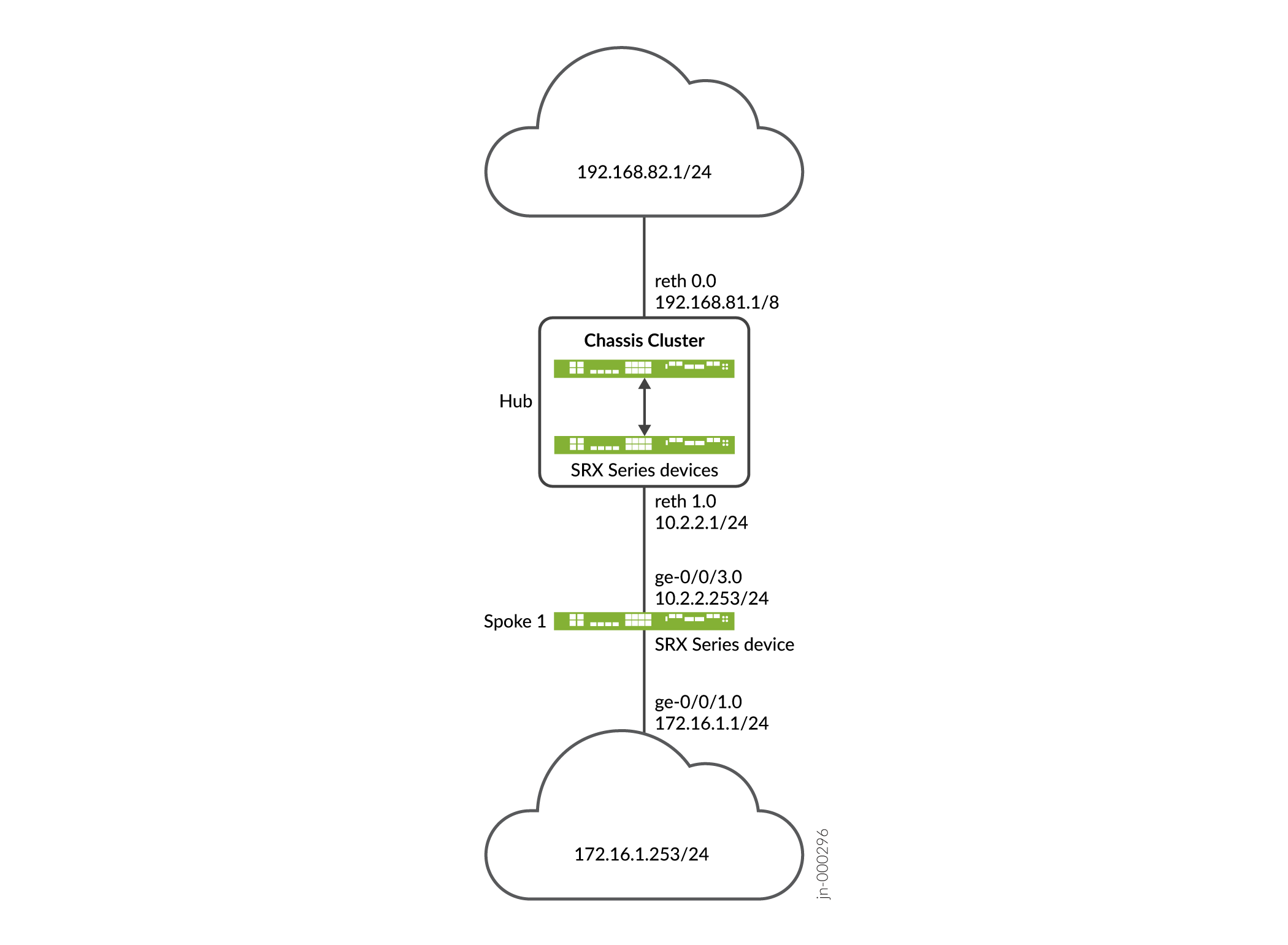
設定
ハブの設定
CLIクイック構成
この例を迅速に設定するには、以下のコマンドをコピーして、テキストファイルに貼り付け、改行を削除し、ネットワーク設定に一致させる必要がある詳細情報を変更し、コマンドを [edit] 階層レベルでCLIにコピーアンドペーストして、設定モードから commit を入力します。
set interfaces ge-0/0/2 gigether-options redundant-parent reth1 set interfaces ge-0/0/3 gigether-options redundant-parent reth0 set interfaces ge-8/0/2 gigether-options redundant-parent reth1 set interfaces ge-8/0/3 gigether-options redundant-parent reth0 set interfaces lo0 unit 0 family inet address 10.100.1.100/24 set interfaces lo0 redundant-pseudo-interface-options redundancy-group 1 set interfaces reth0 redundant-ether-options redundancy-group 1 set interfaces reth0 unit 0 family inet address 192.168.81.1/8 set interfaces reth1 redundant-ether-options redundancy-group 1 set interfaces reth1 unit 0 family inet address 10.2.2.1/24 set interfaces st0 unit 1 family inet set security ike proposal prop_ike authentication-method rsa-signatures set security ike proposal prop_ike dh-group group5 set security ike proposal prop_ike authentication-algorithm sha1 set security ike proposal prop_ike encryption-algorithm aes-256-cbc set security ike policy ikepol1 mode main set security ike policy ikepol1 proposals prop_ike set security ike policy ikepol1 certificate local-certificate Hub_ID set security ike gateway HUB_GW ike-policy ikepol1 set security ike gateway HUB_GW dynamic distinguished-name wildcard DC=Domain_component set security ike gateway HUB_GW dynamic ike-user-type group-ike-id set security ike gateway HUB_GW local-identity distinguished-name set security ike gateway HUB_GW external-interface reth1 set security ike gateway HUB_GW version v1-only set security ipsec proposal prop_ipsec protocol esp set security ipsec proposal prop_ipsec authentication-algorithm hmac-sha1-96 set security ipsec proposal prop_ipsec encryption-algorithm aes-192-cbc set security ipsec proposal prop_ipsec lifetime-seconds 3600 set security ipsec proposal prop_ipsec lifetime-kilobytes 150000 set security ipsec policy ipsecpol1 perfect-forward-secrecy keys group5 set security ipsec policy ipsecpol1 proposals prop_ipsec set security ipsec vpn HUB_VPN bind-interface st0.1 set security ipsec vpn HUB_VPN ike gateway HUB_GW set security ipsec vpn HUB_VPN ike ipsec-policy ipsecpol1 set security ipsec vpn HUB_VPN traffic-selector ts1 local-ip 192.0.0.0/8 set security ipsec vpn HUB_VPN traffic-selector ts1 remote-ip 172.0.0.0/8 set security pki ca-profile rsa ca-identity rsa set security pki ca-profile rsa revocation-check disable set security zones security-zone trust host-inbound-traffic system-services all set security zones security-zone trust host-inbound-traffic protocols all set security zones security-zone trust interfaces st0.1 set security zones security-zone trust interfaces reth0.0 set security zones security-zone untrust host-inbound-traffic system-services all set security zones security-zone untrust host-inbound-traffic protocols all set security zones security-zone untrust interfaces lo0.0 set security zones security-zone untrust interfaces reth1.0 set security policies default-policy permit-all
[edit security ike gateway gateway-name dynamic] 階層レベルで CLI オプション reject-duplicate-connection を構成する、既存のトンネル セッションを保持し、同じ IKE ID を持つ新しいトンネルのネゴシエーション要求を拒否することができます。デフォルトでは、同じIKE IDを持つ新しいトンネルが確立されると、既存のトンネルは破棄されます。reject-duplicate-connection オプションは、IKE ゲートウェイに ike-user-type group-ike-id または ike-user-type shared-ike-id が設定されている場合にのみサポートされます。このオプションでは、aaa access-profile profile-name 設定はサポートされません。
CLI オプションは reject-duplicate-connection 同じ IKE ID を持つ新しいトンネルの再確立を拒否する必要があることが確実な場合にのみ使用してください。
ステップバイステップでの手順
次の例では、設定階層のいくつかのレベルに移動する必要があります。その方法の詳細については、CLIユーザー ガイドの設定モードにおけるCLIエディターの使用を参照してください。
ハブを設定するには:
インターフェイスを設定します。
[edit interfaces] user@host# set ge-0/0/2 gigether-options redundant-parent reth1 user@host# set ge-0/0/3 gigether-options redundant-parent reth0 user@host# set ge-8/0/2 gigether-options redundant-parent reth1 user@host# set ge-8/0/3 gigether-options redundant-parent reth0 user@host# set lo0 unit 0 family inet address 10.100.1.100/24 user@host# set lo0 redundant-pseudo-interface-options redundancy-group 1 user@host# set reth0 redundant-ether-options redundancy-group 1 user@host# set reth0 unit 0 family inet address 192.168.81.1/8 user@host# set reth1 redundant-ether-options redundancy-group 1 user@host# set reth1 unit 0 family inet address 10.2.2.1/24 user@host# set st0 unit 1 family inet
フェーズ1のオプションを設定します。
[edit security ike proposal prop_ike] user@host# set authentication-method rsa-signatures user@host# set dh-group group5 user@host# set authentication-algorithm sha1 user@host# set encryption-algorithm aes-256-cbc [edit security ike policy ikepol1] user@host# set mode main user@host# set proposals prop_ike user@host# set certificate local-certificate Hub_ID [edit security ike gateway HUB_GW] user@host# set ike-policy ikepol1 user@host# set dynamic distinguished-name wildcard DC=Domain_component user@host# set dynamic ike-user-type group-ike-id user@host# set local-identity distinguished-name user@host# set external-interface reth1 user@host# set version v1-only
フェーズ2のオプションを設定します。
[edit security ipsec proposal prop_ipsec] user@host# set protocol esp user@host# set authentication-algorithm hmac-sha1-96 user@host# set encryption-algorithm aes-192-cbc user@host# set lifetime-seconds 3600 user@host# set lifetime-kilobytes 150000 [edit security ipsec policy ipsecpol1] user@host# set perfect-forward-secrecy keys group5 user@host# set proposals prop_ipsec [edit security ipsec HUB_VPN] user@host# set bind-interface st0.1 user@host# set ike gateway HUB_GW user@host# set ike ipsec-policy ipsecpol1 user@host# set traffic-selector ts1 local-ip 192.0.0.0/8 user@host# set traffic-selector ts1 remote-ip 172.0.0.0/8
証明書情報を構成します。
[edit security pki] user@host# set ca-profile rsa ca-identity rsa user@host# set ca-profile rsa revocation-check disable
セキュリティ ゾーンを構成します。
[edit security zones security-zone trust] user@host# set host-inbound-traffic system-services all user@host# set host-inbound-traffic protocols all user@host# set interfaces st0.1 user@host# set interfaces reth0.0 [edit security zones security-zone untrust] user@host# set host-inbound-traffic system-services all user@host# set host-inbound-traffic protocols all user@host# set interfaces lo0.0 user@host# set interfaces reth1.0 [edit security policies] user@host# set default-policy permit-all
結果
設定モードから、 show interfacesshow security ike、 、 show security ipsec、 、 show security pkishow security zones、および コマshow security policiesンドを入力して、設定を確認します。出力結果に意図した設定内容が表示されない場合は、この例の手順を繰り返して設定を修正します。
[edit]
user@host# show interfaces
ge-0/0/2 {
gigether-options {
redundant-parent reth1;
}
}
ge-0/0/3 {
gigether-options {
redundant-parent reth0;
}
}
lo0 {
unit 0 {
family inet {
address 10.100.1.100/24;
}
}
redundant-pseudo-interface-options {
redundancy-group 1;
}
}
reth0 {
redundant-ether-options {
redundancy-group 1;
}
unit 0 {
family inet {
address 192.168.81.1/8;
}
}
}
reth1 {
redundant-ether-options {
redundancy-group 1;
}
unit 0 {
family inet {
address 10.2.2.1/24;
}
}
}
st0 {
unit 1 {
family inet;
}
}
[edit]
user@host# show security ike
proposal prop_ike {
authentication-method rsa-signatures;
dh-group group5;
authentication-algorithm sha1;
encryption-algorithm aes-256-cbc;
}
policy ikepol1 {
mode main;
proposals prop_ike;
certificate {
local-certificate Hub_ID;
}
}
gateway HUB_GW {
ike-policy ikepol1;
dynamic distinguished-name wildcard DC=Domain_component;
dynamic ike-user-type group-ike-id;
local-identity distinguished-name;
external-interface reth1;
version v1-only;
}
[edit]
user@host# show security ipsec
proposal prop_ipsec {
protocol esp;
authentication-algorithm hmac-sha1-96;
encryption-algorithm aes-192-cbc;
lifetime-seconds 3600;
lifetime-kilobytes 150000;
}
policy ipsecpol1 {
perfect-forward-secrecy {
keys group5;
}
proposals prop_ipsec;
}
vpn HUB_VPN {
bind-interface st0.1;
ike {
gateway HUB_GW;
ipsec-policy ipsecpol1;
}
traffic-selector ts1 {
local-ip 192.0.0.0/8;
remote-ip 172.0.0.0/8;
}
}
[edit]
user@host# show security pki
ca-profile rsa {
ca-identity rsa;
revocation-check {
disable;
}
}
[edit]
user@host# show security zones
security-zone trust {
host-inbound-traffic {
system-services {
all;
}
protocols {
all;
}
}
interfaces {
st0.1;
reth0.0;
}
}
security-zone untrust {
host-inbound-traffic {
system-services {
all;
}
protocols {
all;
}
}
interfaces {
lo0.0;
reth1.0;
}
}
[edit]
user@host# show security policies
default-policy {
permit-all;
}
デバイスの設定が完了したら、設定モードから commit を入力します。
スポークの設定
CLIクイック構成
この例を迅速に設定するには、以下のコマンドをコピーして、テキストファイルに貼り付け、改行を削除し、ネットワーク設定に一致させる必要がある詳細情報を変更し、コマンドを [edit] 階層レベルでCLIにコピーアンドペーストして、設定モードから commit を入力します。
set interfaces ge-0/0/1 unit 0 family inet address 172.16.1.1/24 set interfaces ge-0/0/3 unit 0 family inet address 10.2.2.253/24 set interfaces st0 unit 1 family inet set security ike proposal prop_ike authentication-method rsa-signatures set security ike proposal prop_ike dh-group group5 set security ike proposal prop_ike authentication-algorithm sha1 set security ike proposal prop_ike encryption-algorithm aes-256-cbc set security ike policy ikepol1 mode main set security ike policy ikepol1 proposals prop_ike set security ike policy ikepol1 certificate local-certificate Spoke1_ID set security ike gateway SPOKE_GW ike-policy ikepol1 set security ike gateway SPOKE_GW address 10.2.2.1 set security ike gateway SPOKE_GW local-identity distinguished-name set security ike gateway SPOKE_GW remote-identity distinguished-name container DC=Domain_component set security ike gateway SPOKE_GW external-interface ge-0/0/3.0 set security ike gateway SPOKE_GW version v1-only set security ipsec proposal prop_ipsec protocol esp set security ipsec proposal prop_ipsec authentication-algorithm hmac-sha1-96 set security ipsec proposal prop_ipsec encryption-algorithm aes-192-cbc set security ipsec proposal prop_ipsec lifetime-seconds 3600 set security ipsec proposal prop_ipsec lifetime-kilobytes 150000 set security ipsec policy ipsecpol1 perfect-forward-secrecy keys group5 set security ipsec policy ipsecpol1 proposals prop_ipsec set security ipsec vpn SPOKE_VPN bind-interface st0.1 set security ipsec vpn SPOKE_VPN ike gateway SPOKE_GW set security ipsec vpn SPOKE_VPN ike ipsec-policy ipsecpol1 set security ipsec vpn SPOKE_VPN traffic-selector ts1 local-ip 172.0.0.0/8 set security ipsec vpn SPOKE_VPN traffic-selector ts1 remote-ip 192.0.0.0/8 set security ipsec vpn SPOKE_VPN establish-tunnels immediately set security pki ca-profile rsa ca-identity rsa set security pki ca-profile rsa revocation-check disable set security zones security-zone trust host-inbound-traffic system-services all set security zones security-zone trust host-inbound-traffic protocols all set security zones security-zone trust interfaces st0.1 set security zones security-zone trust interfaces ge-0/0/3.0 set security zones security-zone untrust host-inbound-traffic system-services all set security zones security-zone untrust host-inbound-traffic protocols all set security zones security-zone untrust interfaces ge-0/0/1.0 set security policies default-policy permit-all
ステップバイステップでの手順
次の例では、設定階層のいくつかのレベルに移動する必要があります。その方法の詳細については、CLIユーザー ガイドの設定モードにおけるCLIエディターの使用を参照してください。
ハブを設定するには:
インターフェイスを設定します。
[edit interfaces] user@host# set ge-0/0/1 unit 0 family inet address 172.16.1.1/24 user@host# set ge-0/0/3 unit 0 family inet address 10.2.2.253/24 user@host# set st0 unit 1 family inet
フェーズ1のオプションを設定します。
[edit security ike proposal prop_ike] user@host# set authentication-method rsa-signatures user@host# set dh-group group5 user@host# set authentication-algorithm sha1 user@host# set encryption-algorithm aes-256-cbc [edit security ike policy ikepol1] user@host# set mode main user@host# set proposals prop_ike user@host# set certificate local-certificate Spoke1_ID [edit security ike gateway SPOKE_GW] user@host# set ike-policy ikepol1 user@host# set address 10.2.2.1 user@host# set local-identity distinguished-name user@host# set remote-identity distinguished-name container DC=Domain_component user@host# set external-interface ge-0/0/3.0 user@host# set version v1-only
フェーズ2のオプションを設定します。
[edit security ipsec proposal prop_ipsec] user@host# set protocol esp user@host# set authentication-algorithm hmac-sha1-96 user@host# set encryption-algorithm aes-192-cbc user@host# set lifetime-seconds 3600 user@host# set lifetime-kilobytes 150000 [edit security ipsec policy ipsecpol1] user@host# set perfect-forward-secrecy keys group5 user@host# set proposals prop_ipsec [edit security ipsec SPOKE_VPN] user@host# set bind-interface st0.1 user@host# set ike gateway SPOKE_GW user@host# set ike ipsec-policy ipsecpol1 user@host# set traffic-selector ts1 local-ip 172.0.0.0/8 user@host# set traffic-selector ts1 remote-ip 192.0.0.0/8 user@host# set establish-tunnels immediately
証明書情報を構成します。
[edit security pki] user@host# set ca-profile rsa ca-identity rsa user@host# set ca-profile rsa revocation-check disable
セキュリティ ゾーンを構成します。
[edit security zones security-zone trust] user@host# set host-inbound-traffic system-services all user@host# set host-inbound-traffic protocols all user@host# set interfaces st0.1 user@host# set interfaces ge-0/0/3.0 [edit security zones security-zone untrust] user@host# set host-inbound-traffic system-services all user@host# set host-inbound-traffic protocols all user@host# set interfaces ge-0/0/1.0 [edit security policies] user@host# set default-policy permit-all
結果
設定モードから、 show interfacesshow security ike、 、 show security ipsec、 、 show security pkishow security zones、および コマshow security policiesンドを入力して、設定を確認します。出力結果に意図した設定内容が表示されない場合は、この例の手順を繰り返して設定を修正します。
[edit]
user@host# show interfaces
ge-0/0/1 {
unit 0 {
family inet {
address 172.16.1.1/24;
}
}
}
ge-0/0/3 {
unit 0 {
family inet {
address 10.2.2.253/24;
}
}
}
st0 {
unit 1 {
family inet;
}
}
[edit]
user@host# show security ike
proposal prop_ike {
authentication-method rsa-signatures;
dh-group group5;
authentication-algorithm sha1;
encryption-algorithm aes-256-cbc;
}
policy ikepol1 {
mode main;
proposals prop_ike;
certificate {
local-certificate Spoke1_ID;
}
}
gateway SPOKE_GW {
ike-policy ikepol1;
address 10.2.2.1;
local-identity distinguished-name;
remote-identity distinguished-name container DC=Domain_component;
external-interface ge-0/0/3.0;
version v1-only;
}
[edit]
user@host# show security ipsec
proposal prop_ipsec {
protocol esp;
authentication-algorithm hmac-sha1-96;
encryption-algorithm aes-192-cbc;
lifetime-seconds 3600;
lifetime-kilobytes 150000;
}
policy ipsecpol1 {
perfect-forward-secrecy {
keys group5;
}
proposals prop_ipsec;
}
vpn SPOKE_VPN {
bind-interface st0.1;
ike {
gateway SPOKE_GW;
ipsec-policy ipsecpol1;
}
traffic-selector ts1 {
local-ip 172.0.0.0/8;
remote-ip 192.0.0.0/8;
}
establish-tunnels immediately;
}
[edit]
user@host# show security pki
ca-profile rsa {
ca-identity rsa;
revocation-check {
disable;
}
}
[edit]
user@host# show security zones
security-zone trust {
host-inbound-traffic {
system-services {
all;
}
protocols {
all;
}
}
interfaces {
st0.1;
ge-0/0/3.0;
}
}
security-zone untrust {
host-inbound-traffic {
system-services {
all;
}
protocols {
all;
}
}
interfaces {
ge-0/0/1.0;
}
}
[edit]
user@host# show security policies
default-policy {
permit-all;
}
デバイスの設定が完了したら、設定モードから commit を入力します。
検証
設定が正常に機能していることを確認します。
トンネルの検証
目的
AutoVPN ハブとスポークの間にトンネルが確立されていることを確認します。
アクション
動作モードから、ハブで show security ike security-associations コマンドと show security ipsec security-associations コマンドを入力します。
user@host> show security ike security-associations
node0:
--------------------------------------------------------------------------
Index State Initiator cookie Responder cookie Mode Remote Address
1350248074 UP d195bce6ccfcf9af 8f1569c6592c8408 Main 10.2.2.253
user@host> show security ipsec security-associations
node0:
--------------------------------------------------------------------------
Total active tunnels: 1
ID Algorithm SPI Life:sec/kb Mon lsys Port Gateway
<77594650 ESP:aes-cbc-192/sha1 ac97cb1 2799/ 150000 - root 500 10.2.2.253
>77594650 ESP:aes-cbc-192/sha1 828dc013 2798/ 150000 - root 500 10.2.2.253
user@host> show security ipsec security-associations detail
node0:
--------------------------------------------------------------------------
ID: 77594650 Virtual-system: root, VPN Name: HUB_VPN
Local Gateway: 10.2.2.1, Remote Gateway: 10.2.2.253
Traffic Selector Name: ts1
Local Identity: ipv4(192.0.0.0-192.255.255.255)
Remote Identity: ipv4(172.0.0.0-172.255.255.255)
Version: IKEv1
DF-bit: clear, Bind-interface: st0.1
Port: 500, Nego#: 2, Fail#: 0, Def-Del#: 0 Flag: 0x24608b29
Tunnel events:
Tue Dec 30 2014 11:30:21 -0800: IPSec SA negotiation successfully completed (1 times)
Tue Dec 30 2014 11:30:20 -0800: Tunnel is ready. Waiting for trigger event or peer to trigger negotiation (1 times)
Tue Dec 30 2014 11:30:20 -0800: IKE SA negotiation successfully completed (3 times)
Location: FPC 5, PIC 0, KMD-Instance 1
Direction: inbound, SPI: ac97cb1, AUX-SPI: 0
Hard lifetime: Expires in 2796 seconds
Lifesize Remaining: 150000 kilobytes
Soft lifetime: Expires in 2211 seconds
Mode: Tunnel(0 0), Type: dynamic, State: installed
Protocol: ESP, Authentication: hmac-sha1-96, Encryption: aes-cbc (192 bits)
Anti-replay service: counter-based enabled, Replay window size: 64
Location: FPC 5, PIC 0, KMD-Instance 1
Direction: outbound, SPI: 828dc013, AUX-SPI: 0
Hard lifetime: Expires in 2796 seconds
Lifesize Remaining: 150000 kilobytes
Soft lifetime: Expires in 2211 seconds
Mode: Tunnel(0 0), Type: dynamic, State: installed
Protocol: ESP, Authentication: hmac-sha1-96, Encryption: aes-cbc (192 bits)
Anti-replay service: counter-based enabled, Replay window size: 64
動作モードから、スポークの show security ike security-associations コマンドと show security ipsec security-associations コマンドを入力します。
user@host> show security ike security-associations
Index State Initiator cookie Responder cookie Mode Remote Address
276505646 UP d195bce6ccfcf9af 8f1569c6592c8408 Main 10.2.2.1
user@host> show security ipsec security-associations
Total active tunnels: 1
ID Algorithm SPI Life:sec/kb Mon lsys Port Gateway
<69206018 ESP:aes-cbc-192/sha1 828dc013 2993/ 150000 - root 500 10.2.2.1
>69206018 ESP:aes-cbc-192/sha1 ac97cb1 2993/ 150000 - root 500 10.2.2.1
user@host> show security ipsec security-associations detail
ID: 69206018 Virtual-system: root, VPN Name: SPOKE_VPN
Local Gateway: 10.2.2.253, Remote Gateway: 10.2.2.1
Traffic Selector Name: ts1
Local Identity: ipv4(172.0.0.0-172.255.255.255)
Remote Identity: ipv4(192.0.0.0-192.255.255.255)
Version: IKEv1
DF-bit: clear, Bind-interface: st0.1
Port: 500, Nego#: 0, Fail#: 0, Def-Del#: 0 Flag: 0x2c608b29
Tunnel events:
Tue Dec 30 2014 11:30:20 -0800: IPSec SA negotiation successfully completed (1 times)
Tue Dec 30 2014 11:30:20 -0800: IKE SA negotiation successfully completed (1 times)
Tue Dec 30 2014 11:26:11 -0800: Tunnel is ready. Waiting for trigger event or peer to trigger negotiation (1 times)
Location: FPC 1, PIC 0, KMD-Instance 1
Direction: inbound, SPI: 828dc013, AUX-SPI: 0
Hard lifetime: Expires in 2991 seconds
Lifesize Remaining: 150000 kilobytes
Soft lifetime: Expires in 2369 seconds
Mode: Tunnel(0 0), Type: dynamic, State: installed
Protocol: ESP, Authentication: hmac-sha1-96, Encryption: aes-cbc (192 bits)
Anti-replay service: counter-based enabled, Replay window size: 64
Location: FPC 1, PIC 0, KMD-Instance 1
Direction: outbound, SPI: ac97cb1, AUX-SPI: 0
Hard lifetime: Expires in 2991 seconds
Lifesize Remaining: 150000 kilobytes
Soft lifetime: Expires in 2369 seconds
Mode: Tunnel(0 0), Type: dynamic, State: installed
Protocol: ESP, Authentication: hmac-sha1-96, Encryption: aes-cbc (192 bits)
Anti-replay service: counter-based enabled, Replay window size: 64
意味
show security ike security-associationsコマンドは、すべてのアクティブなIKEフェーズ1のSAを一覧表示します。show security ipsec security-associations コマンドは、すべてのアクティブなIKEフェーズ2のSAを一覧表示します。ハブはスポークに対して 1 つのアクティブなトンネルを示し、スポークはハブに対して 1 つのアクティブなトンネルを示しています。
IKE フェーズ 1 の SA がリストされていない場合は、フェーズ 1 の確立に問題があったことになります。設定でIKEポリシー パラメータと外部インターフェイスの設定を確認してください。フェーズ 1 のプロポーザル パラメーターは、ハブとスポークで一致する必要があります。
IKE フェーズ 2 に SA がリストされていない場合は、フェーズ 2 の確立に問題があったことになります。設定でIKEポリシー パラメータと外部インターフェイスの設定を確認してください。フェーズ 2 のプロポーザル パラメーターは、ハブとスポークで一致する必要があります。
トラフィックセレクターの確認
目的
トラフィックセレクターを確認します。
アクション
動作モードから、ハブで show security ipsec traffic-selector interface-name st0.1 コマンドを入力します。
user@host> show security ipsec traffic-selector interface-name st0.1 node0: -------------------------------------------------------------------------- Source IP Destination IP Interface Tunnel-id IKE-ID 192.0.0.0-192.255.255.255 172.0.0.0-172.255.255.255 st0.1 77594650 DC=Domain_component, CN=Spoke1_ID, OU=Sales, O=XYZ, L=Sunnyvale, ST=CA, C=US
動作モードから、スポークの show security ipsec traffic-selector interface-name st0.1 コマンドを入力します。
user@host> show security ipsec traffic-selector interface-name st0.1 Source IP Destination IP Interface Tunnel-id IKE-ID 172.0.0.0-172.255.255.255 192.0.0.0-192.255.255.255 st0.1 69206018 DC=Domain_component, CN=Hub_ID, OU=Sales, O=XYZ, L=Sunnyvale, ST=CA, C=US
意味
トラフィックセレクターとは、指定されたローカルアドレスとリモートアドレスのペアが一致する場合に、トンネルを介したトラフィックを許可するIKEピア間の合意です。トラフィック セレクターに適合したトラフィックのみが SA を介して許可されます。トラフィックセレクターは、イニシエータとレスポンダ(SRXシリーズハブ)の間でネゴシエートされます。
例:AutoVPNとトラフィックセレクターによるVPNトンネルの可用性の確保
ジオリダンダンシーとは、停電や自然災害などサイトに影響を与える壊滅的な事象が発生した場合でも、トラフィックがプロバイダネットワーク上を流れ続けるように、地理的に離れた複数のサイトを展開することです。モバイルプロバイダーネットワークでは、SRXシリーズファイアウォール上のgeoredundant IPsec VPNゲートウェイを介して、複数のEvolved Node B(eNodeB)デバイスをコアネットワークに接続できます。eNodeB デバイスへの代替ルートは、動的ルーティング プロトコルを使用してコア ネットワークに分散されます。
この例では、SRXシリーズファイアウォール上で複数のトラフィックセレクターを使用してAutoVPNハブを構成し、eNodeBデバイスへのgeoredundantIPsec VPNゲートウェイを確保するものです。自動ルート挿入 (ARI) は、ハブ上のルーティング テーブル内の eNodeB デバイスに向けたルートを自動的に挿入するために使用されます。ARIのルートは、BGPを通じてプロバイダのコアネットワークに配信されます。この例では、証明書ベースの認証を使用しています。事前共有鍵による認証の場合は、 例: iBGP を使用した基本的な AutoVPN の設定
要件
この例では、以下のハードウェアとソフトウェアのコンポーネントを使用しています。
-
シャーシクラスターで接続され、設定された2台のSRXシリーズファイアウォール。シャーシ クラスタは AutoVPN ハブ A です。
-
AutoVPNハブBとして設定されたSRXシリーズファイアウォール。
-
Junos OS リリース 12.3X48-D10 以降。
-
AutoVPN ハブとの IPsec VPN トンネルを確立できる eNodeB デバイス。eNodeBデバイスは、AutoVPNハブとのVPNトンネルを開始するサードパーティのネットワーク機器プロバイダーです。
-
ハブに登録されているデジタル証明書と、デバイスが相互に認証できるようにする eNodeB デバイス。
始める前に:
-
ローカル証明書の要求を送信するときに、認証局 (CA) のアドレスと必要な情報 (チャレンジ・パスワードなど) を取得します。
-
各デバイスにデジタル証明書を登録します。「 証明書の登録」を参照してください。
この例では、BGP 動的ルーティングプロトコルを使用して、eNodeB デバイスに向けてコアネットワークにルートをアドバタイズします。
概要
この例では、2つのAutoVPNハブがSRXシリーズファイアウォール上で複数のトラフィックセレクターを使用して設定され、eNodeBデバイスに地理的冗長なIPsec VPNゲートウェイを提供します。ARIは、ハブのルーティングテーブルにeNodeBデバイスへのルートを自動的に挿入します。ARIのルートは、BGPを通じてプロバイダのコアネットワークに配信されます。
AutoVPN ハブと eNodeB デバイスで設定された特定のフェーズ 1 およびフェーズ 2 IKE トンネル オプションは、同じ値を持つ必要があります。 表 20 に、この例で使用されている値を示します。
|
オプション |
値 |
|---|---|
|
IKEプロポーザル: |
|
|
認証方法 |
rsa-signatures |
|
Diffie-Hellman(DH)グループ |
group5 |
|
認証アルゴリズム |
SHA-1 |
|
暗号化アルゴリズム |
aes-256-cbc |
|
IKEポリシー: |
|
|
証書 |
ローカル証明書 |
|
IKEゲートウェイ: |
|
|
動的 |
識別名ワイルドカード DC=Common_component |
|
IKE ユーザー タイプ |
グループ IKE ID |
|
デッドピア検出 |
probe-idle-tunnel |
|
ローカルID |
識別名 |
|
バージョン |
v2 のみ |
|
IPsecプロポーザル: |
|
|
プロトコル |
esp |
|
認証アルゴリズム |
hmac-sha1-96 |
|
暗号化アルゴリズム |
aes-256-cbc |
|
IPsecポリシー: |
|
|
完全転送機密保持(PFS)グループ |
group5 |
この例では、すべてのトラフィックを許可するデフォルトのセキュリティポリシーがすべてのデバイスで使用されています。実稼働環境では、より制限の厳しいセキュリティポリシーを設定する必要があります。「セキュリティポリシーの概要」を参照してください。わかりやすくするために、SRXシリーズファイアウォールの設定では、あらゆる種類のインバウンドトラフィックを許可します。この構成は、運用環境のデプロイには推奨されません。
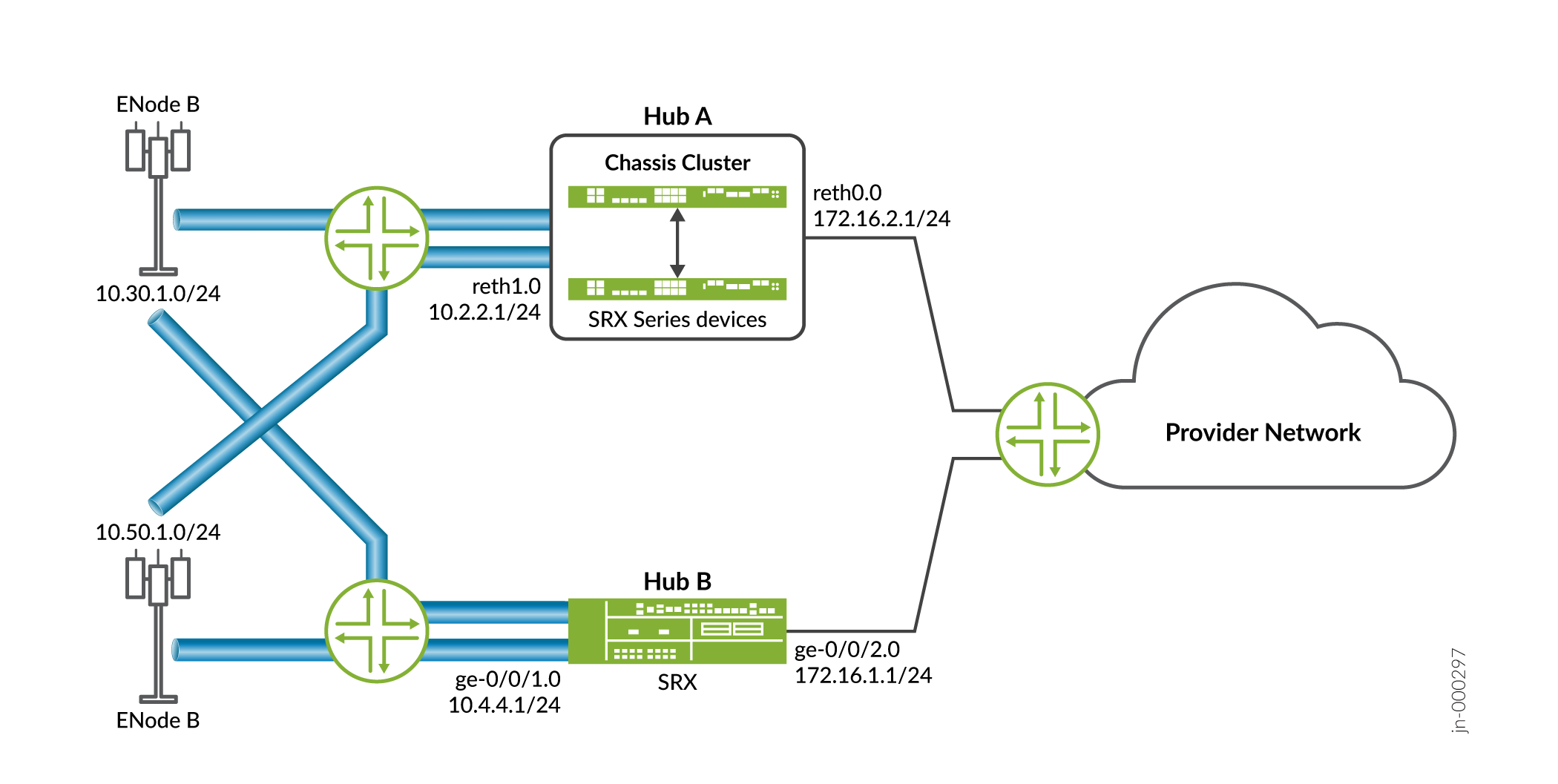
設定
ハブ A の設定
CLIクイック構成
この例を迅速に設定するには、以下のコマンドをコピーして、テキストファイルに貼り付け、改行を削除し、ネットワーク設定に一致させる必要がある詳細情報を変更し、コマンドを [edit] 階層レベルでCLIにコピーアンドペーストして、設定モードから commit を入力します。
set interfaces ge-0/0/2 gigether-options redundant-parent reth1 set interfaces ge-0/0/3 gigether-options redundant-parent reth0 set interfaces ge-8/0/2 gigether-options redundant-parent reth1 set interfaces ge-8/0/3 gigether-options redundant-parent reth0 set interfaces lo0 unit 0 family inet address 10.100.1.100/24 set interfaces lo0 redundant-pseudo-interface-options redundancy-group 1 set interfaces reth0 redundant-ether-options redundancy-group 1 set interfaces reth0 unit 0 family inet address 172.16.2.1/24 set interfaces reth1 redundant-ether-options redundancy-group 1 set interfaces reth1 unit 0 family inet address 10.2.2.1/24 set interfaces st0 unit 1 family inet set security ike proposal prop_ike authentication-method rsa-signatures set security ike proposal prop_ike dh-group group5 set security ike proposal prop_ike authentication-algorithm sha1 set security ike proposal prop_ike encryption-algorithm aes-256-cbc set security ike policy ph1_ike_policy proposals prop_ike set security ike policy ph1_ike_policy certificate local-certificate HubA_certificate set security ike gateway HUB_GW ike-policy ph1_ike_policy set security ike gateway HUB_GW dynamic distinguished-name wildcard DC=Common_component set security ike gateway HUB_GW dynamic ike-user-type group-ike-id set security ike gateway HUB_GW dead-peer-detection probe-idle-tunnel set security ike gateway HUB_GW local-identity distinguished-name set security ike gateway HUB_GW external-interface reth1 set security ike gateway HUB_GW version v2-only set security ipsec proposal prop_ipsec protocol esp set security ipsec proposal prop_ipsec authentication-algorithm hmac-sha1-96 set security ipsec proposal prop_ipsec encryption-algorithm aes-256-cbc set security ipsec policy ph2_ipsec_policy perfect-forward-secrecy keys group5 set security ipsec policy ph2_ipsec_policy proposals prop_ipsec set security ipsec vpn HUB_VPN bind-interface st0.1 set security ipsec vpn HUB_VPN ike gateway HUB_GW set security ipsec vpn HUB_VPN ike ipsec-policy ph2_ipsec_policy set security ipsec vpn HUB_VPN traffic-selector ts1 local-ip 172.16.0.0/16 set security ipsec vpn HUB_VPN traffic-selector ts1 remote-ip 10.50.0.0/16 set security ipsec vpn HUB_VPN traffic-selector ts2 local-ip 172.16.0.0/16 set security ipsec vpn HUB_VPN traffic-selector ts2 remote-ip 10.30.0.0/16 set protocols bgp group internal-peers type internal set protocols bgp group internal-peers local-address 172.16.2.1 set protocols bgp group internal-peers export inject_ts1_routes set protocols bgp group internal-peers export inject_ts2_routes set protocols bgp group internal-peers export inject_up_routes set protocols bgp group internal-peers neighbor 172.16.2.4 set policy-options policy-statement inject_ts1_routes term cp_allow from protocol static set policy-options policy-statement inject_ts1_routes term cp_allow from route-filter 10.30.1.0/24 orlonger set policy-options policy-statement inject_ts1_routes term cp_allow from route-filter 10.30.1.0/24 orlonger set policy-options policy-statement inject_ts1_routes term cp_allow then next-hop self set policy-options policy-statement inject_ts1_routes term cp_allow then accept set policy-options policy-statement inject_ts2_routes term mp_allow from protocol static set policy-options policy-statement inject_ts2_routes term mp_allow from route-filter 10.50.1.0/24 orlonger set policy-options policy-statement inject_ts2_routes term mp_net_allow from route-filter 10.50.2.0/24 orlonger set policy-options policy-statement inject_ts2_routes term mp_net_allow then next-hop self set policy-options policy-statement inject_ts2_routes term mp_net_allow then accept set policy-options policy-statement inject_up_routes term up_allow from protocol static set policy-options policy-statement inject_up_routes term up_allow from route-filter 172.16.1.0/24 orlonger set policy-options policy-statement inject_up_routes term up_allow from route-filter 172.16.2.0/24 orlonger set policy-options policy-statement inject_up_routes term up_allow then next-hop self set policy-options policy-statement inject_up_routes term up_allow then accept set security pki ca-profile csa ca-identity csa set security pki ca-profile csa revocation-check disable set security zones security-zone trust host-inbound-traffic system-services all set security zones security-zone trust host-inbound-traffic protocols all set security zones security-zone trust interfaces st0.1 set security zones security-zone trust interfaces reth0.0 set security zones security-zone untrust host-inbound-traffic system-services all set security zones security-zone untrust host-inbound-traffic protocols all set security zones security-zone untrust interfaces lo0.0 set security zones security-zone untrust interfaces reth1.0 set security policies default-policy permit-all
ステップバイステップでの手順
次の例では、設定階層のいくつかのレベルに移動する必要があります。その方法の詳細については、CLIユーザー ガイドの設定モードにおけるCLIエディターの使用を参照してください。
ハブ A を設定するには:
-
インターフェイスを設定します。
[edit interfaces] user@host# set ge-0/0/2 gigether-options redundant-parent reth1 user@host# set ge-0/0/3 gigether-options redundant-parent reth0 user@host# set ge-8/0/2 gigether-options redundant-parent reth1 user@host# set ge-8/0/3 gigether-options redundant-parent reth0 user@host# set lo0 unit 0 family inet address 10.100.1.100/24 user@host# set lo0 redundant-pseudo-interface-options redundancy-group 1 user@host# set reth0 redundant-ether-options redundancy-group 1 user@host# set reth0 unit 0 family inet address 172.16.2.1/24 user@host# set reth1 redundant-ether-options redundancy-group 1 user@host# set reth1 unit 0 family inet address 10.2.2.1/24 user@host# set st0 unit 1 family inet
-
フェーズ1のオプションを設定します。
[edit security ike proposal prop_ike] user@host# set authentication-method rsa-signatures user@host# set dh-group group5 user@host# set authentication-algorithm sha1 user@host# set encryption-algorithm aes-256-cbc [edit security ike policy ph1_ike_policy] user@host# set proposals prop_ike user@host# set certificate local-certificate HubA_certificate [edit security ike gateway HUB_GW] user@host# set ike-policy ph1_ike_policy user@host# set dynamic distinguished-name wildcard DC=Common_component user@host# set dynamic ike-user-type group-ike-id user@host# set dead-peer-detection probe-idle-tunnel user@host# set local-identity distinguished-name user@host# set external-interface reth1 user@host# set version v2-only
-
フェーズ2のオプションを設定します。
[edit security ipsec proposal prop_ipsec] user@host# set protocol esp user@host# set authentication-algorithm hmac-sha1-96 user@host# set encryption-algorithm aes-256-cbc [edit security ipsec policy ph2_ipsec_policy] user@host# set perfect-forward-secrecy keys group5 user@host# set proposals prop_ipsec [edit security ipsec vpn HUB_VPN] user@host# set bind-interface st0.1 user@host# set ike gateway HUB_GW user@host# set ike ipsec-policy ph2_ipsec_policy user@host# set traffic-selector ts1 local-ip 172.16.0.0/16 user@host# set traffic-selector ts1 remote-ip 10.50.0.0/16 user@host# set traffic-selector ts2 local-ip 172.16.0.0/16 user@host# set traffic-selector ts2 remote-ip 10.30.0.0/16
-
BGP ルーティング プロトコルを設定します。
[edit protocols bgp group internal-peers] user@host# set type internal user@host# set local-address 172.16.2.1 user@host# set export inject_ts1_routes user@host# set export inject_ts2_routes user@host# set export inject_up_routes user@host# set neighbor 172.16.2.4
-
ルーティングオプションを設定します。
[edit policy-options policy-statement inject_ts1_routes] user@host# set term cp_allow from protocol static user@host# set term cp_allow from route-filter 10.30.2.0/24 orlonger user@host# set term cp_allow from route-filter 10.30.1.0/24 orlonger user@host# set term cp_allow then next-hop self user@host# set term cp_allow then accept [edit policy-options policy-statement inject_ts2_routes] user@host# set term mp_allow from protocol static user@host# set term mp_allow from route-filter 10.50.1.0/24 orlonger user@host# set term mp_allow from route-filter 10.50.2.0/24 orlonger user@host# set term mp_allow then next-hop self user@host# set term mp_allow then accept [edit policy-options policy-statement inject_up_routes] user@host# set term up_allow from protocol static user@host# set term up_allow from route-filter 172.16.1.0/24 orlonger user@host# set term up_allow from route-filter 172.16.2.0/24 orlonger user@host# set term up_allow then next-hop self user@host# set term up_allow then accept
-
証明書情報を構成します。
[edit security pki] user@host# set ca-profile csa ca-identity csa user@host# set ca-profile csa revocation-check disable
-
セキュリティ ゾーンを構成します。
[edit security zones security-zone trust] user@host# set host-inbound-traffic system-services all user@host# set host-inbound-traffic protocols all user@host# set interfaces st0.1 user@host# set interfaces reth0.0 [edit security zones security-zone untrust] user@host# set host-inbound-traffic system-services all user@host# set host-inbound-traffic protocols all user@host# set interfaces lo0.0 user@host# set interfaces reth1.0 [edit security policies] user@host# set default-policy permit-all
結果
設定モードから、 show interfaces show security ike、 show security ipsec、 show protocols bgp、 show policy-options、 show security pki、 show security zones、および show security policies コマンドを入力して、設定を確認します。出力結果に意図した設定内容が表示されない場合は、この例の手順を繰り返して設定を修正します。
[edit]
user@host# show interfaces
ge-0/0/2 {
gigether-options {
redundant-parent reth1;
}
}
ge-0/0/3 {
gigether-options {
redundant-parent reth0;
}
}
ge-8/0/2 {
gigether-options {
redundant-parent reth1;
}
}
ge-8/0/3 {
gigether-options {
redundant-parent reth0;
}
}
lo0 {
unit 0 {
family inet {
address 10.100.1.100/24;
}
}
redundant-pseudo-interface-options {
redundancy-group 1;
}
}
reth0 {
redundant-ether-options {
redundancy-group 1;
}
unit 0 {
family inet {
address 172.16.2.1/16;
}
}
}
reth1 {
redundant-ether-options {
redundancy-group 1;
}
unit 0 {
family inet {
address 10.2.2.1/24;
}
}
}
st0 {
unit 1 {
family inet;
}
}
[edit]
user@host# show security ike
proposal prop_ike {
authentication-method rsa-signatures;
dh-group group5;
authentication-algorithm sha1;
encryption-algorithm aes-256-cbc;
}
policy ph1_ike_policy {
proposals prop_ike;
certificate {
local-certificate HubA_certificate;
}
}
gateway HUB_GW {
ike-policy ph1_ike_policy;
dynamic {
distinguished-name {
wildcard DC=Common_component;
}
ike-user-type group-ike-id;
}
dead-peer-detection {
probe-idle-tunnel;
}
local-identity distinguished-name;
external-interface reth1;
version v2-only;
}
[edit]
user@host# show security ipsec
proposal prop_ipsec {
protocol esp;
authentication-algorithm hmac-sha1-96;
encryption-algorithm aes-256-cbc;
}
policy ph2_ipsec_policy {
perfect-forward-secrecy {
keys group5;
}
proposals prop_ipsec;
}
vpn HUB_VPN {
bind-interface st0.1;
ike {
gateway HUB_GW;
ipsec-policy ph2_ipsec_policy;
}
traffic-selector ts1 {
local-ip 172.16.0.0/16;
remote-ip 10.50.0.0/16;
}
traffic-selector ts2 {
local-ip 172.16.0.0/16;
remote-ip 10.30.0.0/16;
}
}
[edit]
user@host# show protocols bgp
group internal-peers {
type internal;
local-address 172.16.2.1;
export [ inject_ts1_routes inject_ts2_routes inject_up_routes ];
neighbor 172.16.2.4;
}
[edit]
user@host# show policy-options
policy-statement inject_ts1_routes {
term cp_allow {
from {
protocol static;
route-filter 10.30.2.0/24 orlonger;
route-filter 10.30.1.0/24 orlonger;
}
then {
next-hop self;
accept;
}
}
}
policy-statement inject_ts2_routes {
term mp_allow {
from {
protocol static;
route-filter 10.50.1.0/24 orlonger;
route-filter 10.50.2.0/24 orlonger;
}
then {
next-hop self;
accept;
}
}
}
policy-statement inject_up_routes {
term up_allow {
from {
protocol static;
route-filter 172.16.1.0/24 orlonger;
route-filter 172.16.2.0/24 orlonger;
}
then {
next-hop self;
accept;
}
}
}
[edit]
user@host# show security pki
ca-profile csa {
ca-identity csa;
revocation-check {
disable;
}
}
[edit]
user@host# show security zones
security-zone trust {
host-inbound-traffic {
system-services {
all;
}
protocols {
all;
}
}
interfaces {
st0.1;
reth0.0;
}
}
security-zone untrust {
host-inbound-traffic {
system-services {
all;
}
protocols {
all;
}
}
interfaces {
lo0.0;
reth1.0;
}
}
[edit]
user@host# show security policies
default-policy {
permit-all;
}
デバイスの設定が完了したら、設定モードから commit を入力します。
ハブ B の設定
CLIクイック構成
この例を迅速に設定するには、以下のコマンドをコピーして、テキストファイルに貼り付け、改行を削除し、ネットワーク設定に一致させる必要がある詳細情報を変更し、コマンドを [edit] 階層レベルでCLIにコピーアンドペーストして、設定モードから commit を入力します。
set interfaces ge-0/0/1 unit 0 family inet address 10.4.4.1/24 set interfaces ge-0/0/2 unit 0 family inet address 172.16.1.1/16 set interfaces lo0 unit 0 family inet address 10.100.1.101/24 set interfaces st0 unit 1 family inet set security ike proposal prop_ike authentication-method rsa-signatures set security ike proposal prop_ike dh-group group5 set security ike proposal prop_ike authentication-algorithm sha1 set security ike proposal prop_ike encryption-algorithm aes-256-cbc set security ike policy ph1_ike_policy proposals prop_ike set security ike policy ph1_ike_policy certificate local-certificate HubB_certificate set security ike gateway HUB_GW ike-policy ph1_ike_policy set security ike gateway HUB_GW dynamic distinguished-name wildcard DC=Common_component set security ike gateway HUB_GW dynamic ike-user-type group-ike-id set security ike gateway HUB_GW dead-peer-detection probe-idle-tunnel set security ike gateway HUB_GW local-identity distinguished-name set security ike gateway HUB_GW external-interface ge-0/0/1 set security ike gateway HUB_GW version v2-only set security ipsec proposal prop_ipsec protocol esp set security ipsec proposal prop_ipsec authentication-algorithm hmac-sha1-96 set security ipsec proposal prop_ipsec encryption-algorithm aes-256-cbc set security ipsec policy ph2_ipsec_policy perfect-forward-secrecy keys group5 set security ipsec policy ph2_ipsec_policy proposals prop_ipsec set security ipsec vpn HUB_VPN bind-interface st0.1 set security ipsec vpn HUB_VPN ike gateway HUB_GW set security ipsec vpn HUB_VPN ike ipsec-policy ph2_ipsec_policy set security ipsec vpn HUB_VPN traffic-selector ts1 local-ip 172.16.0.0/16 set security ipsec vpn HUB_VPN traffic-selector ts1 remote-ip 10.50.0.0/16 set security ipsec vpn HUB_VPN traffic-selector ts2 local-ip 172.16.0.0/16 set security ipsec vpn HUB_VPN traffic-selector ts2 remote-ip 10.30.0.0/8 set protocols bgp group internal-peers type internal set protocols bgp group internal-peers local-address 172.16.1.1 set protocols bgp group internal-peers export inject_ts1_routes set protocols bgp group internal-peers export inject_ts2_routes set protocols bgp group internal-peers export inject_up_routes set policy-options policy-statement inject_ts1_routes term cp_allow from protocol static set policy-options policy-statement inject_ts1_routes term cp_allow from route-filter 10.30.2.0/24 orlonger set policy-options policy-statement inject_ts1_routes term cp_allow from route-filter 10.30.1.0/24 orlonger set policy-options policy-statement inject_ts1_routes term cp_allow then next-hop self set policy-options policy-statement inject_ts1_routes term cp_allow then accept set policy-options policy-statement inject_ts2_routes term mp_allow from protocol static set policy-options policy-statement inject_ts2_routes term mp_allow from route-filter 10.50.1.0/24 orlonger set policy-options policy-statement inject_ts2_routes term mp_net_allow from route-filter 10.50.2.0/24 orlonger set policy-options policy-statement inject_ts2_routes term mp_net_allow then next-hop self set policy-options policy-statement inject_ts2_routes term mp_net_allow then accept set policy-options policy-statement inject_up_routes term up_allow from protocol static set policy-options policy-statement inject_up_routes term up_allow from route-filter 172.16.1.0/24 orlonger set policy-options policy-statement inject_up_routes term up_allow from route-filter 172.16.2.0/24 orlonger set policy-options policy-statement inject_up_routes term up_allow then next-hop self set policy-options policy-statement inject_up_routes term up_allow then accept set security pki ca-profile csa ca-identity csa set security pki ca-profile csa revocation-check disable set security zones security-zone trust host-inbound-traffic system-services all set security zones security-zone trust host-inbound-traffic protocols all set security zones security-zone trust interfaces st0.1 set security zones security-zone trust interfaces ge-0/0/2.0 set security zones security-zone untrust host-inbound-traffic system-services all set security zones security-zone untrust host-inbound-traffic protocols all set security zones security-zone untrust interfaces lo0.0 set security zones security-zone untrust interfaces ge-0/0/1.0 set security policies default-policy permit-all
ステップバイステップでの手順
次の例では、設定階層のいくつかのレベルに移動する必要があります。その方法の詳細については、CLIユーザー ガイドの設定モードにおけるCLIエディターの使用を参照してください。
ハブ B を設定するには:
-
インターフェイスを設定します。
[edit interfaces] user@host# set ge-0/0/1 unit 0 family inet address 10.4.4.1/24 user@host# set ge-0/0/2 unit 0 family inet address 172.16.1.1/16 user@host# set lo0 unit 0 family inet address 10.100.1.101/24 user@host# set st0 unit 1 family inet
-
フェーズ1のオプションを設定します。
[edit security ike proposal prop_ike] user@host# set authentication-method rsa-signatures user@host# set dh-group group5 user@host# set authentication-algorithm sha1 user@host# set encryption-algorithm aes-256-cbc [edit security ike policy ph1_ike_policy] user@host# set proposals prop_ike user@host# set certificate local-certificate HubB_certificate [edit security ike gateway HUB_GW] user@host# set ike-policy ph1_ike_policy user@host# set dynamic distinguished-name wildcard DC=Common_component user@host# set dynamic ike-user-type group-ike-id user@host# set dead-peer-detection probe-idle-tunnel user@host# set local-identity distinguished-name user@host# set external-interface ge-0/0/1 user@host# set version v2-only
-
フェーズ2のオプションを設定します。
[edit security ipsec proposal prop_ipsec] user@host# set protocol esp user@host# set authentication-algorithm hmac-sha1-96 user@host# set encryption-algorithm aes-256-cbc [edit security ipsec policy ph2_ipsec_policy] user@host# set perfect-forward-secrecy keys group5 user@host# set proposals prop_ipsec [edit security ipsec vpn HUB_VPN] user@host# set bind-interface st0.1 user@host# set ike gateway HUB_GW user@host# set ike ipsec-policy ph2_ipsec_policy user@host# set traffic-selector ts1 local-ip 172.16.0.0/16 user@host# set traffic-selector ts1 remote-ip 10.50.0.0/16 user@host# set traffic-selector ts2 local-ip 172.16.0.0/16 user@host# set traffic-selector ts2 remote-ip 10.30.0.0/16
-
BGP ルーティング プロトコルを設定します。
[edit protocols bgp group internal-peers] user@host# set type internal user@host# set local-address 172.16.1.1 user@host# set export inject_ts1_routes user@host# set export inject_ts2_routes user@host# set export inject_up_routes user@host# set neighbor 172.16.1.2
-
ルーティングオプションを設定します。
[edit policy-options policy-statement inject_ts1_routes] user@host# set term cp_allow from protocol static user@host# set term cp_allow from route-filter 10.30.2.0/24 orlonger user@host# set term cp_allow from route-filter 10.30.1.0/24 orlonger user@host# set term cp_allow then next-hop self user@host# set term cp_allow then accept [edit policy-options policy-statement inject_ts2_routes] user@host# set term mp_allow from protocol static user@host# set term mp_allow from route-filter 10.50.1.0/24 orlonger user@host# set term mp_allow from route-filter 10.50.2.0/24 orlonger user@host# set term mp_allow then next-hop self user@host# set term mp_allow then accept [edit policy-options policy-statement inject_up_routes] user@host# set term up_allow from protocol static user@host# set term up_allow from route-filter 172.16.1.0/24 orlonger user@host# set term up_allow from route-filter 172.16.2.0/24 orlonger user@host# set term up_allow then next-hop self user@host# set term up_allow then accept
-
証明書情報を構成します。
[edit security pki] user@host# set ca-profile csa ca-identity csa user@host# set ca-profile csa revocation-check disable
-
セキュリティ ゾーンを構成します。
[edit security zones security-zone trust] user@host# set host-inbound-traffic system-services all user@host# set host-inbound-traffic protocols all user@host# set interfaces st0.1 user@host# set interfaces ge-0/0/2.0 [edit security zones security-zone untrust] user@host# set host-inbound-traffic system-services all user@host# set host-inbound-traffic protocols all user@host# set interfaces lo0.0 user@host# set interfaces ge-0/0/1.0 [edit security policies] user@host# set default-policy permit-all
結果
設定モードから、 show interfaces show security ike、 show security ipsec、 show protocols bgp、 show security pki、 show security zones、および show security policies コマンドを入力して、設定を確認します。出力結果に意図した設定内容が表示されない場合は、この例の手順を繰り返して設定を修正します。
[edit]
user@host# show interfaces
ge-0/0/1 {
unit 0 {
family inet {
address 10.4.4.1/24;
}
}
}
ge-0/0/2 {
unit 0 {
family inet {
address 172.16.1.1/16;
}
}
}
lo0 {
unit 0 {
family inet {
address 10.100.1.101/24;
}
}
}
st0 {
unit 1 {
family inet;
}
}
[edit]
user@host# show security ike
proposal prop_ike {
authentication-method rsa-signatures;
dh-group group5;
authentication-algorithm sha1;
encryption-algorithm aes-256-cbc;
}
policy ph1_ike_policy {
proposals prop_ike;
certificate {
local-certificate HubB_certificate;
}
}
gateway HUB_GW {
ike-policy ph1_ike_policy;
dynamic {
distinguished-name {
wildcard DC=Common_component;
}
ike-user-type group-ike-id;
}
dead-peer-detection {
probe-idle-tunnel;
}
local-identity distinguished-name;
external-interface reth1;
version v2-only;
}
[edit]
user@host# show security ipsec
proposal prop_ipsec {
protocol esp;
authentication-algorithm hmac-sha1-96;
encryption-algorithm aes-256-cbc;
}
policy ph2_ipsec_policy {
perfect-forward-secrecy {
keys group5;
}
proposals prop_ipsec;
}
vpn HUB_VPN {
bind-interface st0.1;
ike {
gateway HUB_GW;
ipsec-policy ph2_ipsec_policy;
}
traffic-selector ts1 {
local-ip 172.16.0.0/16;
remote-ip 10.50.0.0/16;
}
traffic-selector ts2 {
local-ip 172.16.0.0/16;
remote-ip 10.30.0.0/16;
}
}
[edit]
user@host# show protocols bgp
group internal-peers {
type internal;
local-address 172.16.1.1;
export [ inject_ts1_routes inject_ts2_routes inject_up_routes ];
neighbor 172.16.1.2;
}
user@host# show policy-options
policy-statement inject_ts1_routes {
term cp_allow {
from {
protocol static;
route-filter 10.30.2.0/24 orlonger;
route-filter 10.30.1.0/24 orlonger;
}
then {
next-hop self;
accept;
}
}
}
policy-statement inject_ts2_routes {
term mp_allow {
from {
protocol static;
route-filter 10.50.1.0/24 orlonger;
route-filter 10.50.2.0/24 orlonger;
}
then {
next-hop self;
accept;
}
}
}
policy-statement inject_up_routes {
term up_allow {
from {
protocol static;
route-filter 172.16.1.0/24 orlonger;
route-filter 172.16.2.0/24 orlonger;
}
then {
next-hop self;
accept;
}
}
}
[edit]
user@host# show security pki
ca-profile csa {
ca-identity csa;
revocation-check {
disable;
}
}
[edit]
user@host# show security zones
security-zone trust {
host-inbound-traffic {
system-services {
all;
}
protocols {
all;
}
}
interfaces {
st0.1;
ge-0/0/2.0;
}
}
security-zone untrust {
host-inbound-traffic {
system-services {
all;
}
protocols {
all;
}
}
interfaces {
ge-0/0/1.0;
lo0.0;
}
}
[edit]
user@host# show security policies
default-policy {
permit-all;
}
デバイスの設定が完了したら、設定モードから commit を入力します。
eNodeBの設定(サンプル設定)
ステップバイステップでの手順
-
この例の eNodeB 設定は、参照用に提供されています。詳細な eNodeB 設定情報は、このドキュメントの範囲外です。eNodeB の設定には、次の情報を含める必要があります。
-
ローカル証明書(X.509v3)および IKE ID 情報
-
SRXシリーズIKE ID情報とパブリックIPアドレス
-
SRXシリーズハブの構成と一致するフェーズ1およびフェーズ2のプロポーザル
-
結果
この例のeNodeBデバイスは、IPsecベースのVPN接続にstrongSwanオープンソースソフトウェアを使用しています。
config setup
plutostart=yes
plutodebug=all
charondebug="ike 4, cfg 4, chd 4, enc 1"
charonstart=yes #ikev2 deamon"
nat_traversal=yes #<======= need to enable even no nat_t
conn %default
ikelifetime=60m
keylife=45m
rekeymargin=2m
keyingtries=4
mobike=no
conn Hub_A
keyexchange=ikev2
authby=pubkey
ike=aes256-sha-modp1536
esp=aes256-sha1-modp1536
leftcert=/usr/local/etc/ipsec.d/certs/fight02Req.pem.Email.crt
left=10.5.5.1 # self if
leftsubnet=10.1.1.0/24 # left subnet
leftid="CN=fight02, DC=Common_component, OU=Dept, O=Company, L=City, ST=CA, C=US " # self id
right=10.2.2.1 # peer if
rightsubnet=10.1.1.0/24 # peer net for proxy id
rightid="DC=Domain_component, CN=HubA_certificate, OU=Dept, O=Company, L=City, ST=CA, C=US " # peer id
auto=add
leftfirewall=yes
dpdaction=restart
dpddelay=10
dpdtimeout=120
rekeyfuzz=10%
reauth=no
conn Hub_B
keyexchange=ikev2
authby=pubkey
ike=aes256-sha-modp1536
esp=aes192-sha1-modp1536
leftcert=/usr/local/etc/ipsec.d/certs/fight02Req.pem.Email.crt
left=10.5.5.1 # self if
leftsubnet=10.1.1.0/24 # self net for proxy id
leftid="CN=fight02, DC=Common_component, OU=Dept, O=Company, L=City, ST=CA, C=US " # self id
right=10.4.4.1 # peer if
rightsubnet=10.1.1.0/24 # peer net for proxy id
rightid="DC=Domain_component, CN=HubB_certificate, OU=Dept, O=Company, L=City, ST=CA, C=US " # peer id
auto=add
leftfirewall=yes
dpdaction=restart
dpddelay=10
dpdtimeout=120
rekeyfuzz=10%
reauth=no
検証
設定が正常に機能していることを確認します。
AutoVPN ハブでのトンネルの検証
目的
AutoVPN ハブと eNodeB デバイスの間にトンネルが確立されていることを確認します。
アクション
動作モードから、ハブで show security ike security-associations コマンドと show security ipsec security-associations コマンドを入力します。
user@host> show security ike security-associations node0: -------------------------------------------------------------------------- Index State Initiator cookie Responder cookie Mode Remote Address 276505706 UP 16d6e53f0866b5cc ccd8ca944da7b63e IKEv2 10.5.5.1 1350247532 UP d5f0cb3a3b18cb92 91269f05527217a0 IKEv2 10.1.1.1 user@host> show security ipsec security-associations node0: -------------------------------------------------------------------------- Total active tunnels: 2 ID Algorithm SPI Life:sec/kb Mon lsys Port Gateway <77594626 ESP:aes-cbc-192/sha1 a82bbc3 3600/ 64 - root 500 10.1.1.1 >77594626 ESP:aes-cbc-192/sha1 c930a858 3600/ 64 - root 500 10.1.1.1 <69206018 ESP:aes-cbc-192/sha1 2b437fc 3600/ 64 - root 500 10.5.5.1 >69206018 ESP:aes-cbc-192/sha1 c6e02755 3600/ 64 - root 500 10.5.5.1
意味
show security ike security-associationsコマンドは、すべてのアクティブなIKEフェーズ1のSAを一覧表示します。show security ipsec security-associations コマンドは、すべてのアクティブなIKEフェーズ2のSAを一覧表示します。ハブには、各 eNodeB デバイスに 1 つずつ、合計 2 つのアクティブなトンネルが表示されています。
IKE フェーズ 1 の SA がリストされていない場合は、フェーズ 1 の確立に問題があったことになります。設定でIKEポリシー パラメータと外部インターフェイスの設定を確認してください。フェーズ 1 のプロポーザル パラメータは、ハブ デバイスと eNodeB デバイスで一致する必要があります。
IKE フェーズ 2 に SA がリストされていない場合は、フェーズ 2 の確立に問題があったことになります。設定でIKEポリシー パラメータと外部インターフェイスの設定を確認してください。フェーズ 2 のプロポーザル パラメータは、ハブ デバイスと eNodeB デバイスで一致する必要があります。
トラフィックセレクターの確認
目的
トラフィックセレクターを確認します。
アクション
動作モードからshow security ipsec traffic-selector interface-name st0.1コマンドを入力します。
user@host> show security ipsec traffic-selector interface-name st0.1 node0: -------------------------------------------------------------------------- Source IP Destination IP Interface Tunnel-id IKE-ID 10.1.1.0-10.1.1.255 10.1.1.0-10.1.1.255 st0.1 69206018 DC=Common_component, CN=enodebA, OU=Dept, O=Company, L=City, ST=CA, C=US 10.1.1.0-10.1.1.255 10.1.1.0-10.1.1.255 st0.1 77594626 DC=Common_component, CN=enodebB, OU=Dept, O=Company, L=City, ST=CA, C=US
意味
トラフィックセレクターとは、指定されたローカルアドレスとリモートアドレスのペアが一致する場合に、トンネルを介したトラフィックを許可するIKEピア間の合意です。トラフィック セレクターに適合したトラフィックのみが SA を介して許可されます。トラフィックセレクターは、イニシエータとレスポンダ(SRXシリーズハブ)の間でネゴシエートされます。
ARIルートの検証
目的
ARIルートがルーティングテーブルに追加されていることを確認します。
アクション
動作モードからshow routeコマンドを入力します。
user@host> show route
inet.0: 23 destinations, 23 routes (22 active, 0 holddown, 1 hidden)
+ = Active Route, - = Last Active, * = Both
10.1.0.0/16 *[Static/5] 02:57:57
> to 2.2.2.253 via reth1.0
10.2.2.0/24 *[Direct/0] 02:58:43
> via reth1.0
10.2.2.1/32 *[Local/0] 02:59:25
Local via reth1.0
10.5.0.0/16 *[Static/5] 02:57:57
> to 2.2.2.253 via reth1.0
10.157.64.0/19 *[Direct/0] 21:54:52
> via fxp0.0
10.157.75.117/32 *[Local/0] 21:54:52
Local via fxp0.0
10.254.75.117/32 *[Direct/0] 21:54:52
> via lo0.0
10.30.1.0/24 *[ARI-TS/5] 02:28:10 [ARI route added based on TSi]
> via st0.1
10.50.1.0/24 *[ARI-TS/5] 02:28:26
> via st0.1
10.80.0.0/16 *[Direct/0] 02:57:57
> via reth0.0
10.80.1.1/32 *[Local/0] 02:57:57
Local via reth0.0
10.100.1.0/24 *[Direct/0] 02:57:57
> via lo0.0
10.100.1.100/32 *[Local/0] 02:57:57
Local via lo0.0
10.102.1.0/24 *[Static/5] 02:57:57
> to 10.2.2.253 via reth1.0
10.104.1.0/24 *[Static/5] 02:57:57
> to 10.2.2.253 via reth1.0
172.16.0.0/12 *[Static/5] 21:54:52
意味
自動ルート挿入(ARI)は、リモートネットワークの静的ルートと、リモートトンネルのエンドポイントによって保護されるホストを自動的に挿入します。トラフィックセレクターに設定されたリモートIPアドレスに基づいてルートが作成されます。トラフィックセレクターの場合、設定されたリモートアドレスは、VPNにバインドされたst0インターフェイスに関連付けられたルーティングインスタンスにルートとして挿入されます。
eNodeBの宛先へのスタティックルート 10.30.1.0/24 および 10.50.1.0/24がSRXシリーズハブのルーティングテーブルに追加されます。これらのルートは、st0.1インターフェイスを介して到達可能です。
例:事前共有キーを使用した AutoVPN の設定
この例では、VPN ゲートウェイがリモート ピアを認証するために使用する別の IKE 事前共有キーを設定する方法を示します。同様に、VPN ゲートウェイがリモート ピアを認証するために使用するのと同じ IKE 事前共有キーを設定します。
AutoVPNのエンドツーエンドの設定については、このトピックの他の例を参照してください。
要件
この例では、以下のハードウェアとソフトウェアのコンポーネントを使用しています。
- AutoVPNをサポートするMX240、MX480、MX960、MX-SPC3およびJunos OSリリース21.1R1
- またはAutoVPNをサポートするSPC3およびJunos OSリリース21.2R1のSRX5000ライン
- または、AutoVPNをサポートするiked プロセス(
junos-ikeパッケージを使用) およびJunos OSリリース21.2R1を実行するvSRX仮想ファイアウォール
異なるIKE事前共有キーを設定する
VPN ゲートウェイがリモート ピアの認証に使用する別の IKE 事前共有キーを構成するには、次のタスクを実行します。
- AutoVPNハブのあるデバイスでIKEポリシーのシード済み事前共有を設定します。
[edit] user@host# set security ike policy IKE_POL seeded-pre-shared-key ascii-text ascii-text
または
user@host# set security ike policy IKE_POL seeded-pre-shared-key hexadecimal hexadecimal
以下はその一例です。
user@host# set security ike policy IKE_POL seeded-pre-shared-key ascii-text ThisIsMySecretPreSharedkey
または
user@host# set security ike policy IKE_POL seeded-pre-shared-key hexadecimal 5468697349734d79536563726563745072655368617265646b6579
- ゲートウェイ名とユーザー ID を使用してリモートピアの
pre-shared keyを表示します。[edit] user@host> show security ike pre-shared-key gateway gateway-name user-id user-id
以下はその一例です。
user@host> show security ike pre-shared-key gateway-name HUB_GW user-id user1@juniper.net
Pre-shared key: 79e4ea39f5c06834a3c4c031e37c6de24d46798a - リモートピアデバイスのIKEポリシーで、生成されたPSK( ステップ2の「79e4ea39f5c06834a3c4c031e37c6de24d46798a」)を設定します。
[edit] user@peer# set security ike policy IKE_POL pre-shared-key ascii-text generated-psk
以下はその一例です。
user@peer# set security ike policy IKE_POL pre-shared-key ascii-text 79e4ea39f5c06834a3c4c031e37c6de24d46798a
- (オプション)IKE ID検証をバイパスし、すべてのIKE IDタイプを許可するには、ゲートウェイ
general-ikeid[edit security ike gateway gateway_name dynamic]階層レベルで構成ステートメントを構成します。[edit] user@host# set security ike gateway HUB_GW dynamic general-ikeid
結果
設定モードから、show security コマンドを入力して設定を確認します。出力結果に意図した設定内容が表示されない場合は、この例の手順を繰り返して設定を修正します。
[edit]
user@host> show security
ike {
proposal IKE_PROP {
authentication-method pre-shared-keys;
dh-group group14;
authentication-algorithm sha-256;
encryption-algorithm aes-256-cbc;
lifetime-seconds 750;
}
policy IKE_POL {
proposals IKE_PROP;
seeded-pre-shared-key ascii-text "$9$zoDln9pIEyWLN0BLNdboaFn/C0BRhSeM8"; ##SECRET-DATA
}
gateway HUB_GW {
ike-policy IKE_POL;
dynamic {
general-ikeid;
ike-user-type group-ike-id;
}
local-identity hostname hub.juniper.net;
external-interface lo0.0;
local-address 11.0.0.1;
version v2-only;
}
}
同じIKE事前共有キーを設定します
VPN ゲートウェイがリモート ピアの認証に使用するのと同じ IKE 事前共有キーを構成するには、次のタスクを実行します。
- AutoVPNハブのあるデバイスで共通の
pre-shared-keyのIKEポリシーを設定します。[edit] user@host# set security ike policy IKE_POL pre-shared-key ascii-text ascii text
以下はその一例です。
user@host# # set security ike policy IKE_POL pre-shared-key ascii-text ThisIsMySecretPreSharedkey
- リモートピアデバイスのIKEポリシーに共通
pre-shared-keyを設定します。[edit] user@peer# set security ike policy IKE_POL pre-shared-key ascii-text ascii text
以下はその一例です。
user@peer# set security ike policy IKE_POL pre-shared-key ascii-text ThisIsMySecretPreSharedkey
- (オプション)IKE ID検証をバイパスし、すべてのIKE IDタイプを許可するには、ゲートウェイ
general-ikeid[edit security ike gateway gateway_name dynamic]階層レベルで構成ステートメントを構成します。[edit] user@host# set security ike gateway HUB_GW dynamic general-ikeid
結果
設定モードから、show security コマンドを入力して設定を確認します。出力結果に意図した設定内容が表示されない場合は、この例の手順を繰り返して設定を修正します。
[edit]
user@host> show security
ike {
proposal IKE_PROP {
authentication-method pre-shared-keys;
dh-group group14;
authentication-algorithm sha-256;
encryption-algorithm aes-256-cbc;
lifetime-seconds 750;
}
policy IKE_POL {
proposals IKE_PROP;
pre-shared-key ascii-text "$9$wo2oGk.569pDi9p0BSys24"; ## SECRET-DATA
}
gateway HUB_GW {
ike-policy IKE_POL;
dynamic {
general-ikeid;
ike-user-type group-ike-id;
}
local-identity user-at-hostname user1@juniper.net;
external-interface lo0;
local-address 11.0.0.1;
version v2-only;
}
}P2MP インフラストラクチャでのマルチキャスト サポートの設定
マルチキャスト サポートを有効にする前に、 PIM を使用したマルチキャスト サポートに記載されている考慮事項を満たしていることを確認してください。
マルチキャスト サポートを構成および確認するには、次のセクションを参照してください。
構成 マルチキャスト インターフェイス
-
st0.0 インターフェイスで PIM を有効にするには、次の
set protocols pim interface interface-name commandを使用します。[edit] user@host# set protocols pim interface st0.0
ここで、
st0.0はセキュアトンネルインターフェイスです。 -
P2MPモードでst0.0インターフェイスでマルチポイントを有効にするには
set interfaces interface-name unit unit-number multipoint次のコマンドを使用します。[edit] user@host# set interfaces st0.0 unit 0 multipoint
-
st0.0インターフェイスのIPv4アドレスを設定するには、
set interfaces interface-name unit unit-number family inet address IPv4 addressコマンドを使用します。[edit] user@host# set interfaces st0.0 unit 0 family inet address 192.168.1.3/24
ここで、192.168.1.3/24はインターフェイスのIPアドレスです。
-
st0.0 インターフェイスで PIM を無効にするには、オプション
disableを使用します。[edit] user@host# set protocols pim interface st0.0 disable
マルチキャスト設定を確認するためのCLIコマンド
マルチキャストの設定は、次のコマンドを使用して確認できます。
-
PIM インターフェイスを一覧表示するには、
show pim interfacesコマンドを使用します。 -
マルチキャスト グループに参加したネイバーを一覧表示するには、
show pim join extensiveコマンドを使用します。 -
IPマルチキャスト転送テーブルのエントリーを表示するには、
show multicast routeコマンドを使用します。 -
マルチキャストネクストホップの詳細を表示するには、
show multicast next-hops detailコマンドを使用します。 -
IP マルチキャストの統計情報を表示するには、
show multicast statisticsコマンドを使用します。 -
転送テーブルのエントリを表示するには、
show route forwarding-table extensiveコマンドを使用します。
関連項目
プラットフォーム固有の AutoVPN の動作
特定の機能のプラットフォームおよびリリースサポートを確認するには、機能エクスプローラーを使用します。
次の表を使用して、プラットフォームのプラットフォーム固有の動作を確認します。
プラットフォーム固有の 認証 動作
|
プラットフォーム |
違い |
|---|---|
|
SRXシリーズ |
|
プラットフォーム固有の マルチキャスト 動作
|
プラットフォーム |
違い |
|---|---|
|
SRXシリーズ |
|
変更履歴
サポートされる機能は、使用しているプラットフォームとリリースによって決まります。 特定の機能がお使いのプラットフォームでサポートされているかどうかを確認するには、 Feature Explorer をご利用ください。
edit security ike gateway gateway-name dynamic] 階層レベルで CLI オプション reject-duplicate-connectionを設定して、既存のトンネル セッションを保持し、同じ IKE ID を持つ新しいトンネルのネゴシエーション要求を拒否できるようになりました。