
查找设备用例
观看此视频并按照示例作,了解如何使用Juniper Mist™资产可见性定位整个站点的物品,无论是跟踪轮椅、机械和移动设备等设备,还是通过公司门卡或学生证跟踪人员。
好处
通过资产可见性订阅,您可以轻松找到设备和其他资产,并根据其位置进行详细分析。
您可以在许多环境和行业(教育、能源、政府、医疗保健、娱乐、零售等)中使用资产可见性。
So what you can see on the screen right now is you can see the ability for the infrastructure, the Mist AP41 or the Mist BT11. Working in conjunction with the machine Learning cloud delivered not only location for the mobile devices that you see roaming around on our floor plan, but also those green Bluetooth icons that you see are actually assets which could be employee badges such as this right here that I have in my hand or these could be asset tags on any of the office equipment that is around the office. And that's exactly what you're seeing on the screen right now.
And so that's maybe a good lead in. So what are some of the use cases we're seeing? So I know asset visibility really kind of started off in healthcare, maybe retail, maybe warehousing. Do we see that changing? Is it more the same in those same environments or where do we see the most common use cases? We are definitely seeing a lot of interest across all verticals. Now healthcare of course has been the poster child for RTLS. I mean they were the first ones to adopt RTLS technology. They've been very adventurous in terms of the varied use of various technologies as well. But we are seeing use of BLE as a foundational asset visibility technology across various verticals.
You have healthcare of course for asset visibility, but then you also have retail. For locating forklifts and pallets and even mobile devices, you have warehouses that are trying to track material as it goes through different workflows. And then you have education where they want to now track students, especially in the elementary school where you give them a BLE wristband. And you know if a student is on campus or off campus. As well as the enterprise space where we're getting into a lot of use cases around smart spaces, smart buildings and how we're able to, again from the same Mist infrastructure, deliver location for both mobile phones with an application or non mobile device based employee batch maybe a future. We bring IoT into the equation there which we're not even talking about here. Absolutely that makes it exciting as well, very cool.
So in last December we had announced our BLE ecosystem, the Mist BLE Alliance where it was primarily focused on the engagement service, so mapping software application vendors, the resource scheduling, marketing vendors. What have we done now with the asset Visibility to kind of expand that? No, absolutely. So just like engagement for engagement use cases to come alive it took a village of ecosystem partners to bring the use case to life where we had signed up Fun Where and Conexient and Swirl and Jibestream and some of our other partners. The same way for the asset Visibility solution, we have brought to the market a full stack solution where on the tech side we are working very closely and we have full interoperability with Beacon vendors such as Arista, Blue Vision and and Contact IO. This is a Contact IO asset tag. This is an Arista tag and then you have a Blue Vision employee batch compactor and we can work with these tags in any protocol, at least on or iBeacon and then on the business application logic layer, which is where workflow optimizations come into play. We're working with Satani and Arista.
场景
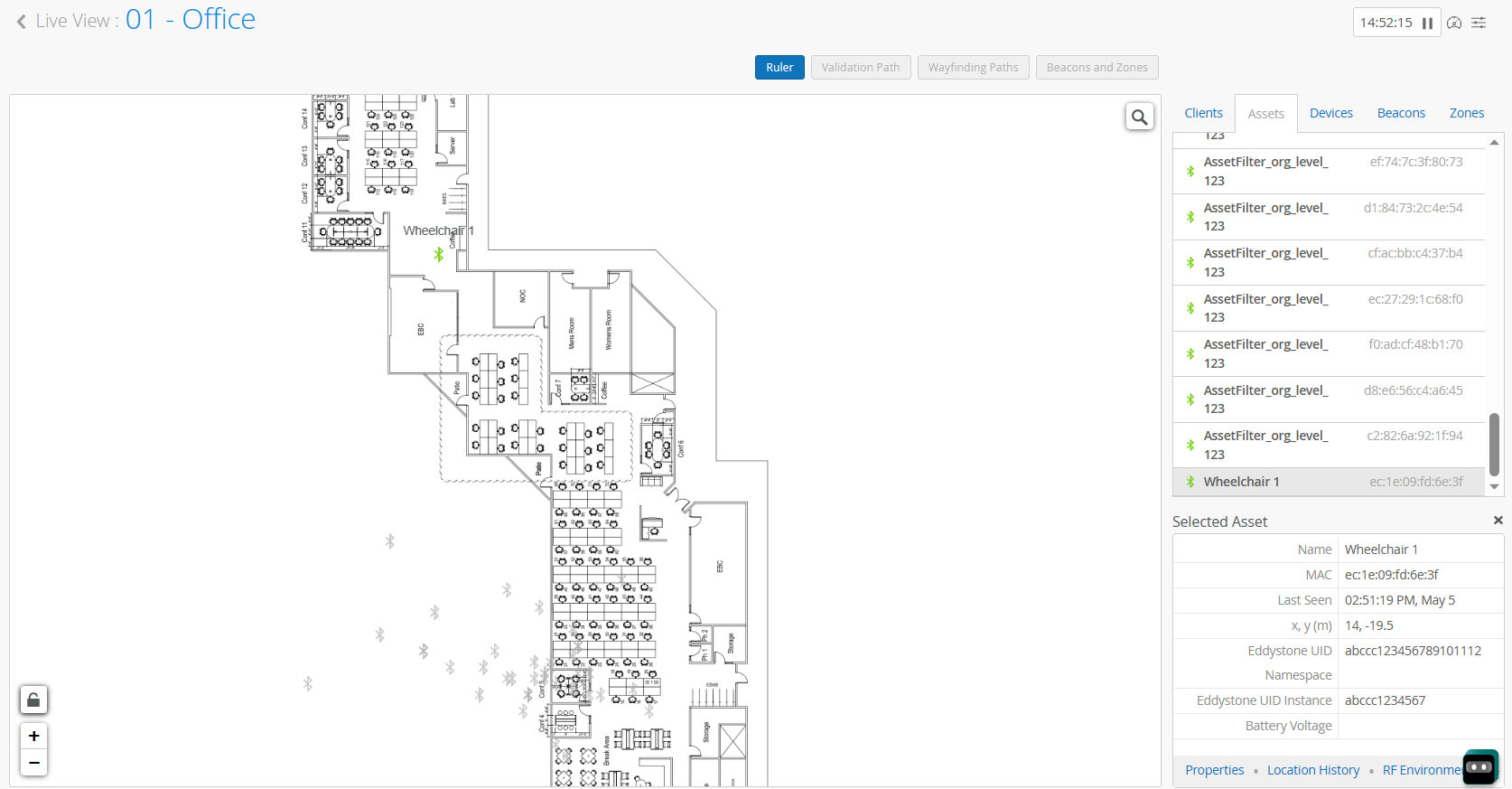
对于这种情况,让我们考虑医疗保健中的一个示例。人们经常将轮椅遗弃在大厅或走廊上。当患者需要轮椅时,您需要快速找到轮椅。如下图所示,您可以转到 实时视图 平面图,并快速发现留在大厅中的轮椅。
组件
此方案依赖于以下组件:
-
蓝牙低能耗 (BLE) 信标标签 — BLE 标签定期广播 BLE 信号。您可以使用任何符合我们的 BLE 信标标签准则的标签。
-
接入点 (AP) — AP 检测来自 BLE 标记的信号。
-
Juniper Mist定位引擎 — 瞻博网络 Mist 云中的定位引擎处理可用信息以确定资产的位置。
注意:使用 BLE 信标标签时,唯一可用的信息就是 BLE 信号本身。凭借这些有限的信息,Juniper Mist可以提供区域精度,识别 3 到 5 米内的位置。
-
Juniper Mist门户 - 在门户中,您将激活订阅,输入资产名称,然后使用 实时视图 进行跟踪。
设备查找过程概述
若要实现该方案,请执行以下任务。
| 步骤 | 作 | 更多信息 |
|---|---|---|
| 1 | 购买 瞻博网络 Mist 资产可见性 订阅,并在 Mist 门户中激活它。 | |
| 2 | 转到 “组织 ”> “站点配置”,然后完成以下两项任务:
|
|
| 3 | 确保按照“橡皮筋模型”放置接入点。 | 橡皮筋模型 |
| 4 | 确保平面图包含接入点的准确位置、高度和方向数据。 | 平面图设置 |
| 5 | 获取兼容的 BLE 信标标记,并将其附加到要跟踪的资产上。 | BLE 信标标签准则 |
| 6 | 为资产命名。 | 创建命名资产 |
| 7 | 在 实时取景中跟踪资产。 | 查找已命名资产的当前位置 |
另请参阅 资产见解仪表板。