Installing a BYOL Mist-managed Router in Azure
This guide describes the process for deploying a Mist-managed Session Smart Router (SSR) in Azure using your own license. When installed as an Azure image, SSR Version 6.x supports Mist-managed routers. The process consists of the following steps:
- Selecting the Azure Plan.
- Deploying a Session Smart Router.
Selecting the Azure Plan
Bring Your Own License (BYOL): This allows you to install your own licensed copy of the SSR software on an Azure VM. The device registration code is used to authenticate access to the Mist installation repositories.
For the latest information about SSR BYOL offerings, please refer to the Cloud Images BYOL Release Notes.
Once you have selected the plan that best suits the needs of your deployment, proceed to the Session Smart Router Deployment to deploy a Session Smart Router.
Selecting the Instance Size
The following instance types are supported for virtual SSR in Azure. Choose the size that best meets your requirements. More information can be found in the Azure Documentation.
| Recommended Azure VM Size | Max vNICs Supported | vCPU Cores | Memory |
|---|---|---|---|
| Standard_F8s_v2 | 4 | 8 | 16 GB |
| Standard_F16s_v2 | 4 | 16 | 32 GB |
| Standard_F32s_v2 | 8 | 32 | 64 GB |
| Standard_D8s_v5 | 4 | 8 | 32 GB |
Session Smart Router
Use the following process to deploy a Mist-managed Session Smart Router in Azure.
Requirements
The following infrastructure must exist in your Azure subscription:
- A VNet where the Session Smart Router (SSR) will be deployed.
- An Availability Set where the SSR will be deployed.
- The existing VNet is segmented with at least the following three subnets:
- Public Subnet: This subnet must provide connectivity to enable communication with external/remote SSR peers as well as access to the Mist cloud infrastructure if no management subnet is provided.
- Private Subnet: This subnet must provide connectivity to internal workloads within the cloud.
- [OPTIONAL] Management Subnet: This subnet must provide connectivity to the Mist cloud and is reachable for SSH administration purposes.
- A Managed Identity with the minimum read permissions.
Microsoft.Compute/virtualMachines/read
Microsoft.Network/virtualNetworks/read
Microsoft.Network/networkInterfaces/read
Please note that deploying Session Smart Routers without a valid token is limited to deployments within the cloud. If your use case also requires the deployment of an on-premises SSR, please contact your Juniper sales representative.
Deployment
A Session Smart Router can be deployed manually via the Azure Portal or in an automated fashion using Azure CLI or PowerShell commands. This section describes both methods. Choose the method that better suits your needs.
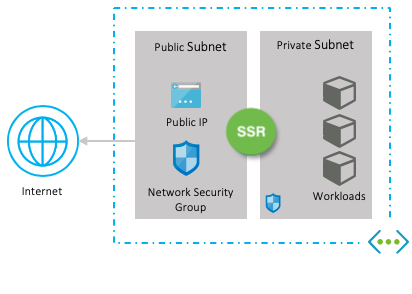
When deploying the Session Smart Router using the templates referenced in this section, the following infrastructure elements are created automatically to assist with the deployment process:
- Virtual machine with the Session Smart image specified in the template.
- The router is deployed with three network interfaces: public, private, and optional management interfaces.
- Each network interface has a network security group associated. The network security groups are configured in accordance with the requirements to deploy a fabric with Session Smart Networking software.
- The public and management interfaces have a unique and static public IP address associated.
The following image shows the infrastructure elements deployed:
Azure Portal
To deploy the Session Smart Networking software via the Azure Portal:
- Click on the Session Smart Networking Platform offering selected during the previous section selecting the Azure Plan.
- Click on the Get it now button.
- Agree to the terms of use and privacy policy of the image.
- Click on the tab Plans + Pricing as shown in the following picture:

- Click the Launch link of the Mist-managed template.
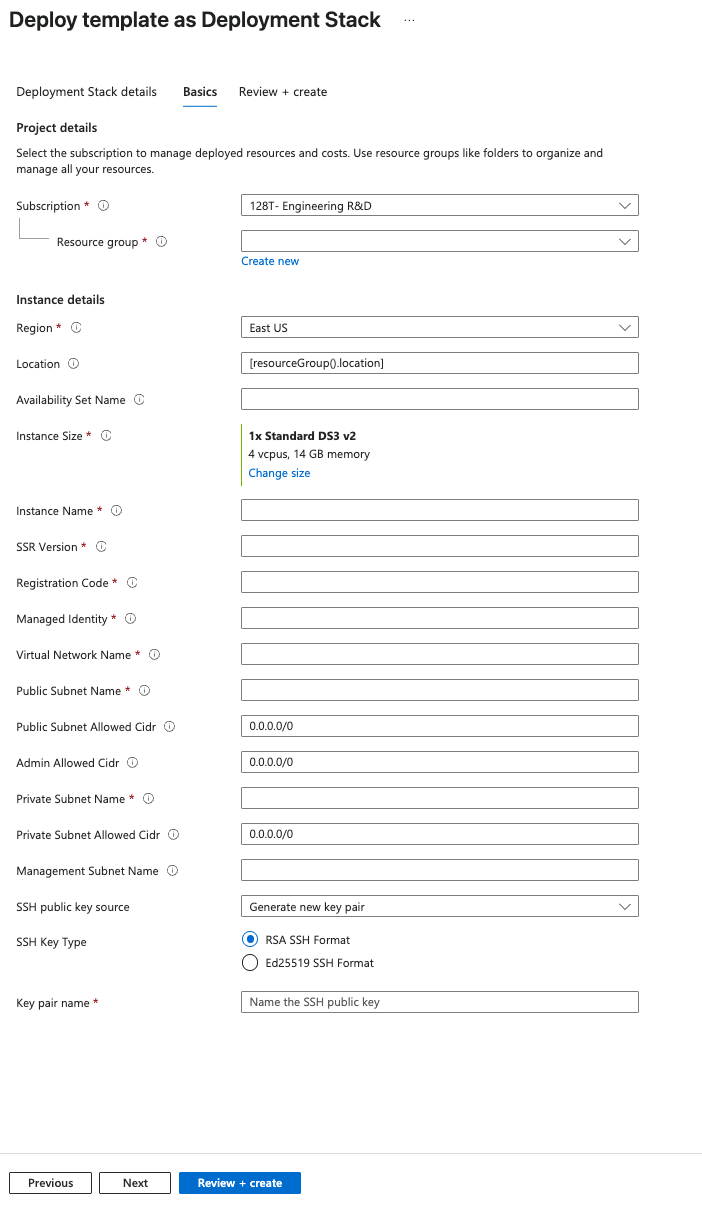
Answer the following questions to launch the deployment of an SSR. For additional information refer to Launch the Template.
- Where do you want to deploy the SSR?
- Provide the location where the VNet exists in the Location field (for example: eastus). All available locations here. Note the name of the Location field is one word and all lowercase like eastus, westus, westeurope, eastasia, etc.
- Provide the name of the availability set in the Availability Set Name field
- What name do you want to give the SSR?
- What version of SSR software do you want to install?
- Which Mist organization is going to manage the SSR? Provide the registration code for the Mist organization.
- Provide the name of the Managed Identity in the resource group
- Provide the name of the VNet in the Virtual Network Name field.
- Provide the name of the Public Subnet Name
- Provide the name of the Private Subnet Name
- [Optional] Provide the name of the Management Subnet
- Who is going to be the administrator?
-
Provide the content of your public SSH key in the
Admin Public Key Datafield. -
Agree to the terms of use and conditions of the deployment.
-
Click the Purchase button to launch the deployment.
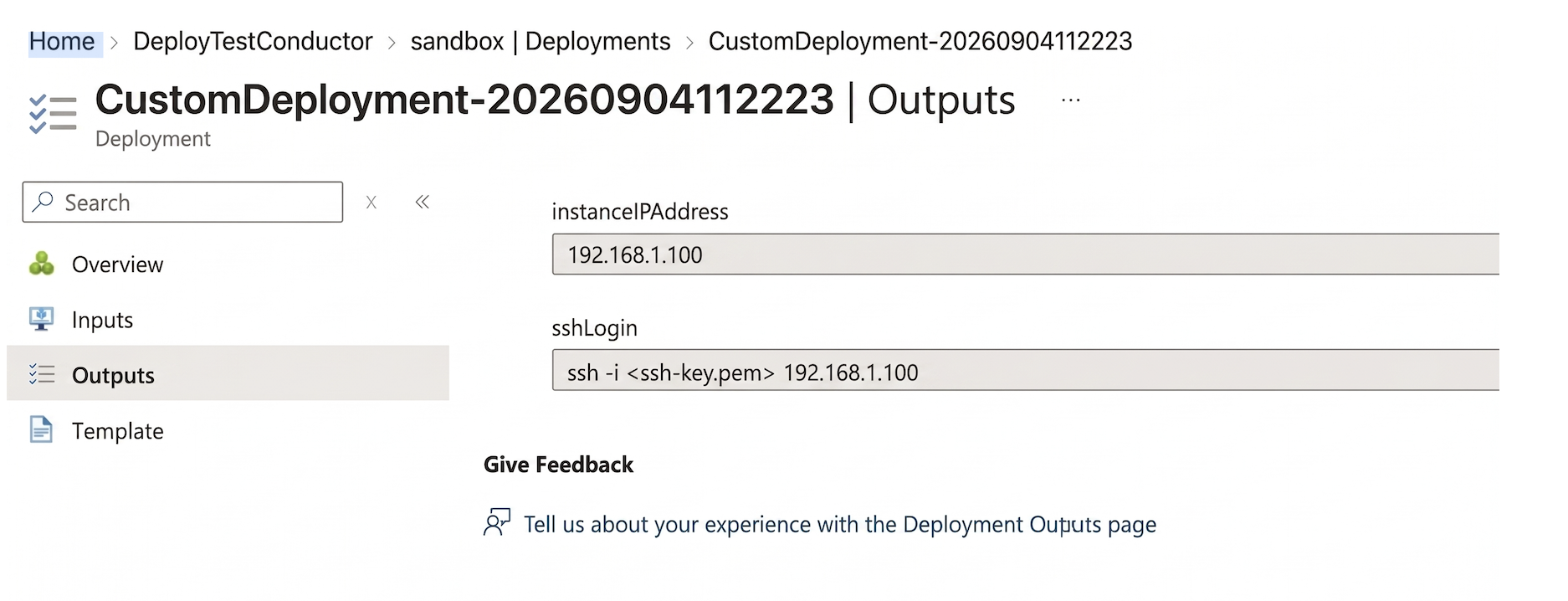
Once the deployment completes, information is provided in the Outputs tab on the left hand side.
The non-interactive, Zero Touch Provisioning (ZTP) method is triggered. After the VM is deployed, it will take an additional 2-3 minutes for the ZTP process to complete. When the ZTP process concludes, there will be an asset in the Mist inventory to be associated with the router configuration. It will then take an additional 5-10 minutes for the desired SSR version to be installed. Once complete the Version will be populated in the Mist inventory.
Azure CLI or PowerShell
To deploy the Session Smart Networking software using the Azure CLI or Powershell:
- Click on the Session Smart Networking Platform BYOL offering.
- Click on Get it now.
- Agree to the terms of use and privacy policy of the image.
- Click on Get started to enable programmatic deployment for the subscription, then click Save.

- Click on the tab Plans + Pricing as shown in the following picture:
- Copy the URL of the template located in the field URL that best suits your needs.
- Create the parameters file.
- Accept the terms of use and conditions of the image.
- Launch the deployment with the corresponding Azure CLI or PowerShell commands, making use of the URL of the template identified previously. For additional information see Launch the Template.
Once the deployment completes, information is provided in the Outputs tab on the left hand side.
The non-interactive, Zero Touch Provisioning (ZTP) method is triggered. After the VM is deployed, it will take an additional 2-3 minutes for the ZTP process to complete. When the ZTP process concludes, there will be an asset in the Mist inventory to be associated with the router configuration. It will then take an additional 5-10 minutes for the desired SSR version to be installed.
Cloud-init Onboarding
When launching an instance using CLI or Powershell or while using automation the following user-data section can be leveraged to setup the onboarding data for the instance.
#cloud-config
write_files:
  - path: /etc/128T-hardware-bootstrapper/onboarding-config.json
    content: |
      { "name": "<router-name>", "ssr-version": "<version>", "registration-code": "<regcode>", "mode": "mist-managed", "cloud-provider": "azure"}
| Option | Meaning |
|---|---|
| name | The name of the router to use for Mist onboarding. By default, the instance name will be used. |
| registration-code | The Mist registration used for adoption of the instance to a Mist organization. |
| ssr-version | The SSR software version to be installed on the instance. |
| download-timeout | The timeout duration for installing BYOL (default: 6h) |
| download-retries | The number of times to retry SSR installation (default: unlimited) |
Manual Onboarding
If a user does not supply the onboarding configuration before launching the instance, the onboarding steps can be manually executed.
- Log into the instance using the admin credentials provided when launching.
- Run
/usr/libexec/hardwareBootstrapper128t config-generator - Follow the prompts to generate and apply the onboarding configuration.
Mist-Managed Setup
Once the instance is launched with the correct registration-code, the device will self-onboard to the appropriate Mist organization. The process can take up to 10 minutes. The device is visible as Unassigned in the Mist organization once onboarding is complete.
Network Interfaces Layout
The Session Smart Router Template deploys a VM for the SSR with two network interfaces and an optional third management network interface. The template attaches the network interfaces to the VM in the following order: Management (Optional), Public, Private.
If a management network interface is provided, the names to be used in the Mist configuration are as follows: The network interfaces to be used in Mist configuration are as follows:
| Network Interface Name | Subnet | Mist Config Name |
|---|---|---|
| ge-0-0 | Management | Out Of Band Management |
| ge-0-1 | Public | ge-0/0/1 |
| ge-0-2 | Private | ge-0/0/2 |
If no management network interface is provided, the names to be used in the Mist configuration are as follows:
| Network Interface Name | Subnet | Mist Config Name |
|---|---|---|
| ge-0-0 | Public | ge-0/0/0 |
| ge-0-1 | Private | ge-0/0/1 |
| ge-0-2 (If Applicable) | HASync | ge-0/0/2 |
| ge-0-3 (If Applicable) | HAFabric | ge-0/0/3 |
Interface Tagging
In addition to using the cloud formation template, the admin can tag the interface with the key SSR-ROLE. The possible values are as follows:
| Tag Value | Meaning |
|---|---|
| WAN | Interface is marked as WAN for onboarding purposes and is assumed to have connectivity to Mist cloud infrastructure. |
| LAN | Interface is marked as LAN and is assumed to be used as a private network for internal workflows. |
| MGMT | Interface is marked as MGMT and is assumed to have connectivity to Mist cloud infrastructure and SSH access prior to to site assignment. |
| HAFabric | Interface is marked as HAFabric and is used as the fabric link in an HA deployment. |
| HASync | Interface is marked as HASync and is used as the redundancy link in an HA deployment. |
The following role permissions are required on the resource's managed identity for tagging to be enabled
Microsoft.Compute/virtualMachines/read
Microsoft.Network/virtualNetworks/read
Microsoft.Network/networkInterfaces/read
Troubleshooting
Device Does Not Exist In Mist after ZTP
Once the instance is launched with the correct registration-code, the device will self-onboard to appropriate Mist organization. The device is visible as Unassigned in the Mist organization once onboarding is complete. At this point, the SSR install process will begin. This process can take up to 15 minutes to complete.
If the device does not show up in the Mist organization or the desired SSR version was not installed after 15 minutes, SSH into the instance.
-
Try to log into the pcli, run
su adminand thenshow mist. -
If the pcli is not accessible or the status and necessary action is not obvious, capture the Hardware Bootstrapper tech support (
/var/log/128T-hardware-bootstrapper/hardware-bootstrapper-tech-support.zip) and examine the journal for128T-hardware-bootstrapper,ember, and128T-mist-agent.
Annexes
Agree to the Terms of Use and the Privacy Policy
To agree to the Terms of Use and the Privacy Policy for the Session Smart Networking image used, click on Get It Now as shown in the following image:

Click on Continue in order to agree to the Terms of Use and the Privacy Policy.
To deploy the Session Smart Networking software programmatically, you must enable Programmatic Deployment and accept its Terms of Use. If Programmatic Deployment is desirable, please click on the Get started button located under the Create button as shown in the image below:
Finally, select the subscription you want and click on Save to apply the changes.
Alternatively, it is possible to accept the term of use and privacy policy programmatically. The PowerShell commands for each Session Smart Networking software image are shown next, please run the commands corresponding to the image you want to use:
- Session Smart Networking - BYOL
Get-AzureRmMarketplaceTerms `
-Publisher "juniper-networks" `
-Product "session-smart-networking-byol" `
-Name "session-smart-networking-byol-XYZ" `
| Set-AzureRmMarketplaceTerms -Accept
Replace the XYZ placeholder right in the command above with the version of the Session Smart Software to be deployed. For example, if the version to deploy is 6.2.5, then replace XYZ with 625.
Load the Template
After the Terms of Use and the Privacy Policy have been accepted, select the Plan tab. The available templates are listed there.
When you select a template, a new tab opens in the browser that redirects you to the template.
Launch the Template
This section describes the parameters to complete the template to deploy a Mist-managed SSR using either the Azure marketplace, or programmatically.
A description of the parameters of the template are listed in the following table:
| Parameter | Description |
|---|---|
| Subscription | Subscription for the deployment. |
| Resource group | Select an existing resource group or create a new one. |
| Region | The first instance of the Region field is automatically populated with the region corresponding to the resource group. |
| Location | As indicated in the requirements, the Session Smart Router is going to be deployed into an existing VNet. The Location field is the name of the location where such VNet exists. Please refer to the following list https://azure.microsoft.com/en-us/global-infrastructure/locations (the name of the Location field is one word and all lowercase). Example: eastus, westus, westeurope, eastasia... |
| Availability Set Name | Name of the existing availability set within the same resource group and region as the VNet selected above the Session Smart Router is going to be deployed to. |
| Instance size | Select the size of the VM in the field Instance Size. |
| Instance Name | Provide a name to the VM for the Session Smart Router. |
| SSR Version | SSR software version installed on the instance. |
| Registration Code | The Mist registration used for adoption of the instance to a Mist organization. |
| Managed Identity | The Azure Managed identity used to manage permissions for the router instance. |
| Virtual Network Name | Name of the existing VNet where the Session Smart Router is going to be deployed to. |
| Public Subnet Name | The name of the public subnet within the VNet. |
| Public Subnet Allowed CIDR | It corresponds to the source IP CIDR range of the SSR/s at the data center/branch (outside the cloud) allowed to originate traffic to the public interface of the router. This field allows for defining a well defined and trusted IP address range. It is common to set this field to 0.0.0.0/0 for now, as the source IP addresses of the routers at the data center or branch (outside the cloud) are not known at this time. However, after the deployment and once these external IP addresses are known it is recommended to provision them in the corresponding security groups to increase the degree of security. |
| Admin Allowed CIDR | Allows for restricting reachability to the management interface of the router to a well known source IP address CIDR range. Default is set to 0.0.0.0/0 allowing every IP address to reach the management interface. Once the deployment completes, it is highly recommended to update the configuration of the network security group to allow only access from the source IP address/es where the Session Smart Router will be administered. |
| Private Subnet Name | The name of the private subnet within the VNet. |
| Private Subnet Allowed CIDR | It corresponds to the source IP CIDR range of the internal workloads/endpoints allowed to originate traffic to the private interface of the router. This field allows for defining a well defined and trusted IP address range. By default is set to 0.0.0.0/0 to allow every workload/endpoint to communicate with the router. |
| Management Subnet Name | [OPTIONAL] The name of the management subnet within the VNet. |
| Admin Public Key Data | Paste in the field Admin Public Key Data the SSH public key to be used to authenticate with the VM (Linux) instance via SSH. The key needs to be at least 2048-bit and in ssh-rsa format. Please find the following an example of a valid key next (To reduce the length of the key in this example multiple character have been replaced by three dots): ssh-rsa AAAAB3NzaC1yc2EAAAADAQABAAACAQDHwB1Qe1KndGqKuT3F...GumfdHfdasy8N0kncMtp2wtkqoLsRWdJ4/WKaZBOrPd4Q== admin@Admin-MacBook-Pro.local. For more information about creating ssh keys, see Create SSH keys on Linux and Mac for Linux VMs in Azure. |
Azure Portal
- Click on the Session Smart Networking Platform BYOL offering.
- Click on the Get it now button.
- Agree to the terms of use and privacy policy of the image.
- Click on the tab Plans + Pricing as shown in the following picture:
- Click on the Launch link of the Juniper Session Smart Router template that best suits your needs.
- Agree to the terms of use and conditions of the deployment.
- Click on the Purchase button to launch the deployment.
Once the deployment of the template is complete, information about the new router deployment is provided in the Output tab.
The information listed in the Outputs tab is the following:
- Name of the VM instance.
- Public IP address of the interface used to SSH into the instance.
- SSH command to login to the Linux VM via the management interface.
When logging to the Linux instance via SSH use the default username of t128 and the private key specified in the Admin Public Key Data field.
Azure CLI or PowerShell
Alternatively, it is possible to launch the template programmatically. Please adjust the content of the JSON file below to match the input of each template:
Create the parameters file router_private.parameters.json with the following command:
vi router_private.parameters.json
Paste the following JSON content. Please adjust the values to your specific environment:
{
  "$schema": "https://schema.management.azure.com/schemas/2015-01-01/deploymentParameters.json#",
  "contentVersion": "1.0.0.0",
  "parameters": {
    "location": {
      "value": "<location of the VNet>"
    },
    "availabilitySetName": {
      "value": "<Name of the Availability Set>"
    },
    "instanceSize": {
      "value": "Standard_F8s_v2"
    },
    "instanceName": {
      "value": "<Instance Name>"
    },
    "SSR Version": {
      "value": "<SSR Version to be Installed>"
    },
    "registrationCode": {
      "value": "<Registration code from the Mist UI>"
    },
    "managedIdentity": {
      "value": "<Name of the Managed Identity>"
    },
    "virtualNetworkName": {
      "value": "<Name of the VNet>"
    },
    "publicSubnetName": {
      "value": "<Name of the Public Subnet>"
    },
    "publicSubnetAllowedCidr": {
      "value": "0.0.0.0/0"
    },
    "adminAllowedCidr": {
      "value": "0.0.0.0/0"
    },
    "privateSubnetName": {
      "value": "<Name of the Private Subnet>"
    },
    "privateSubnetAllowedCidr": {
      "value": "0.0.0.0/0"
    },
    "managementSubnetName": {
      "value": "<Name of the Management Subnet>"
    },
    "adminPublicKeyData": {
      "value": "<Content of the SSH RSA Key>"
    }
  }
}
- Go to the Session Smart Networking Platform BYOL offering.
- Click on the Get it now button.
- Agree to the terms of use and privacy policy of the image.
- Click on the Get started button to enable programmatic deployment for the subscription.
- Click the button Save to save the changes.
- Close the Configure Programmatic Deployment window.
- Click on the tab Plans + Pricing.
- Copy the URL of the Session Smart Router template located in the field URL to the clipboard.
- Launch the template running the following command:
New-AzResourceGroupDeployment -ResourceGroupName <your-resource-group-name> `
-TemplateUri <template-URL> `
-TemplateParameterFile ./router_private.parameters.json
When logging to the Linux instance via SSH use the default username of t128 and the private key specified in the Admin Public Key Data field.