Enhanced Security Key Management
Version History
| Release | Modification |
|---|---|
| 7.0.1 | Enhanced Security Key Management support added. |
| 7.1.3 | Support for ML-KEM added. |
Security is a critical component of SD-WAN (software-defined wide area network) products in today’s market. The SSR (Session Smart Router) offers several means of ensuring the integrity of data transmitted through the router, such as encrypting application payload content, encrypting SVR (Secure Vector Routing) metadata, and authentication for metadata.
As an example, let's look at the needs of a financial institution. They have to keep transaction traffic secure. If not, the results are catastrophic for both the institution and the individual/companies whose transaction gets hijacked. SSR technology uses SVR along with Enhanced Security Key Management, allowing you to configure unparalelled security without the increased packet size, fragmentation, and increased transaction time common with IPSec. This design creates maximum scale, avoids mid-network re-encryption, and provides the ability to rotate keys as required.
The following diagrams show simple examples of how Enhanced Security Key Management can be deployed.
Conductor Hub and Spoke
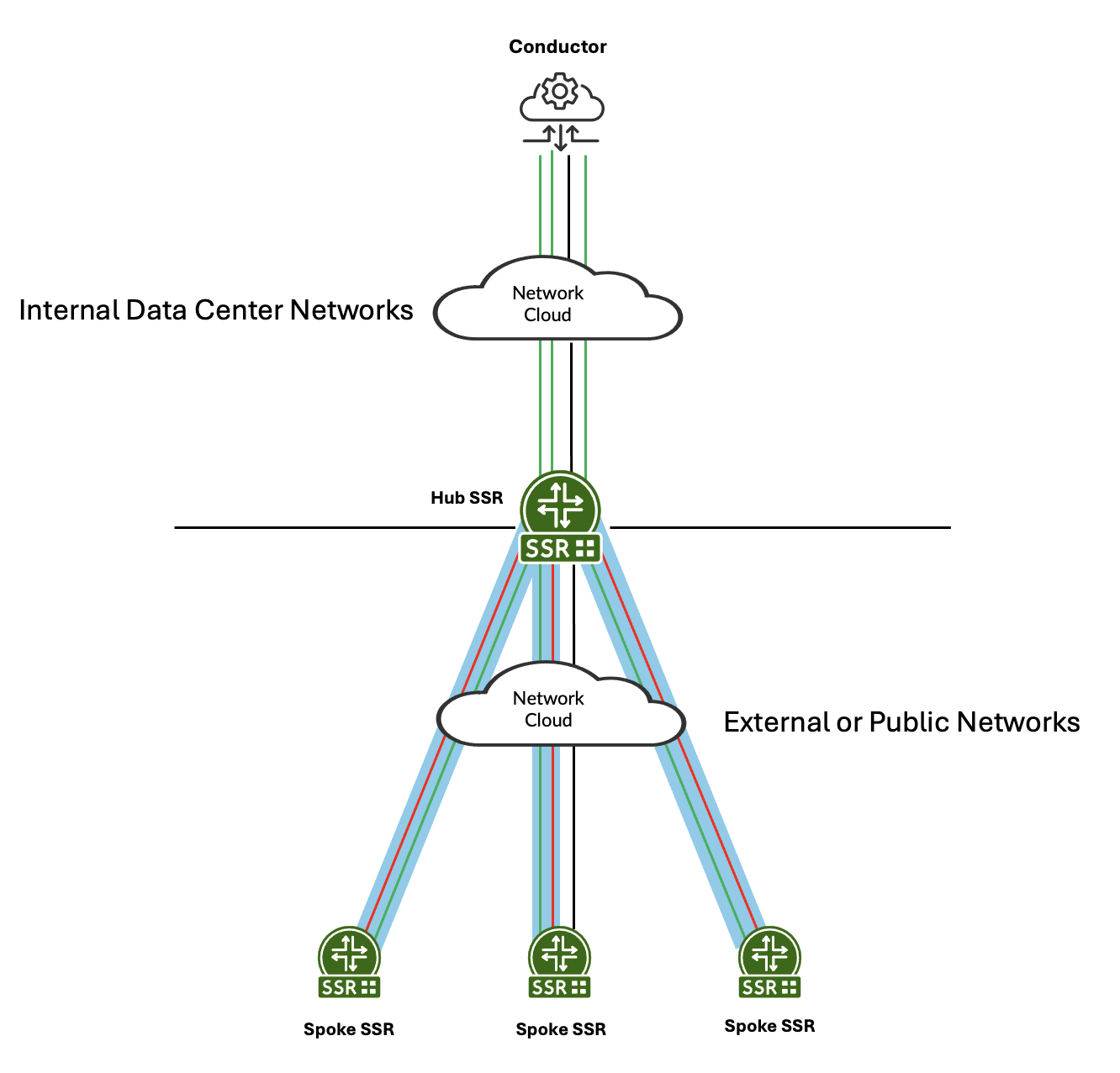
In this example, green represents management traffic on TCP/930 and TCP/4505-4506. Blue represents SVR between the hub and spokes. The management traffic flows inside the SVR path to the hub. The hub then sends it over the LAN to the conductor. Management traffic can be configured to traverse SVR paths if required. Red represents customer traffic between the hub and spokes. For additional deployment information, see Conductor Deployment - Conductor Behind SSR.
Multi-hop Hub and Spoke
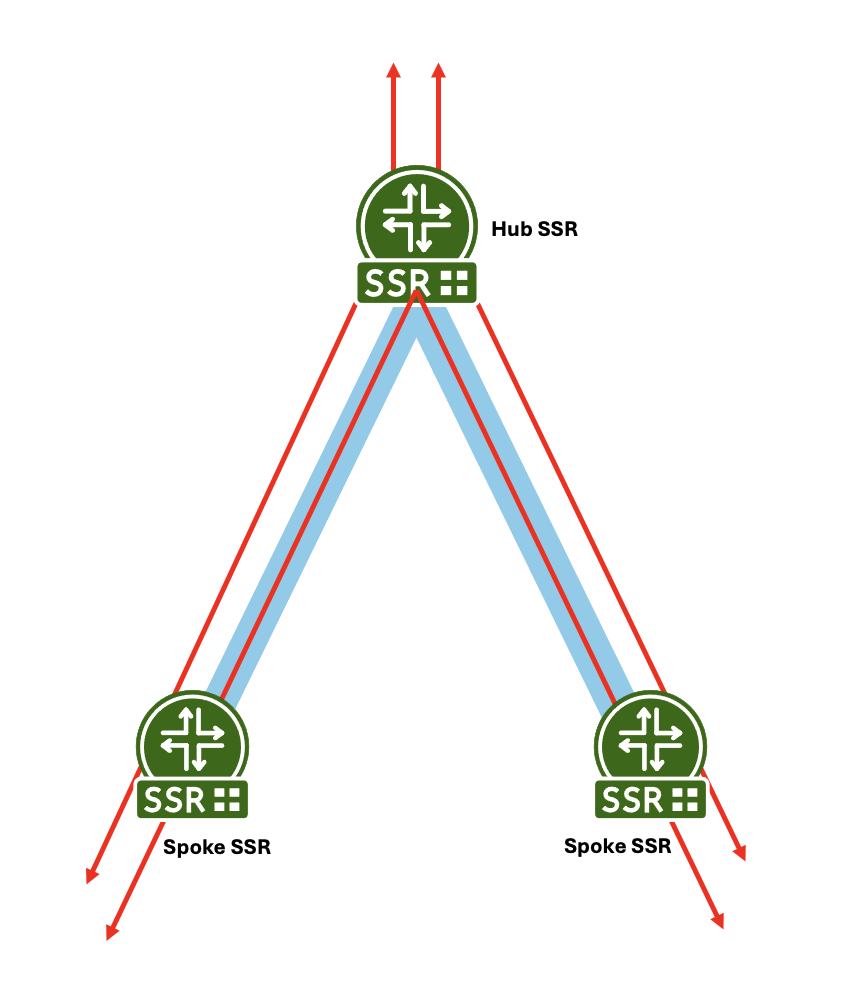
This example shows a multi-hop hub and spoke deployment. Red represents customer traffic between the hubs and spoke, and out to a public network. Blue represents the SVR connection between spokes and the hub. The traffic flows inside the SVR path from spoke to hub or spoke to hub to spoke.
In a newly deployed network, Enhanced Security Key Management is more secure than the default security implementation of SVR, and far more secure than IPSec. Enhanced Security Key Management affords you the best security strength not only because of the encryption key exchange, and its unique per-session encryption keys, but through its ability to perform key rotations for any network topology.
Additionally, the flexiblity of SVR to choose a different physical path to satisfy SLA requirements is not found in traffic encrypted within an IPSec Tunnel. Traffic encrypted within an IPSec Tunnel always follows the same path, not allowing for different flows to have different SLA-driven physical paths.
Enhanced Security Key Management and IPSec
To understand the value of Enhanced Security Key Management, we can draw some comparisons against IPSec.
| Characteristic | IPSec/IKE | Enhanced Security Key Management |
|---|---|---|
| Payload Encryption | ESP | Encrypted with per-Flow AES-CBC-256 payload key. |
| Encrypt Original IP SA/DA | ESP | Encrypted with AES-CBC-256 encrypted Metadata sent within first Payload packet using metadata key. |
| Secure Channel to exchange keys | IKEv2 | Diffie-Hellman. DH provides 4096-bit Peer key used to encrypt BFD Metadata. |
| Confidentiality | Payload is encrypted with the IPSec Tunnel key; however, all individual sessions with the same IPSec tunnel share the same key. There is no confidentiality between sessions sharing the same source and destination address. | Payload encrypted with Per-Flow Payload key; SVR Metadata (containing the Per-Flow Payload key) is encrypted with the SVR Metadata Key. Because each session has a separate key, each session has confidentiality, even between the same source and destination address. |
| Integrity | ESP Authentication Header | HMAC SHA-384 and HMAC-SHA-512 signatures sign all SVR Metadata and Payloads in SVR packets. |
| Authentication | IKEv2 PSK or x.509v3 certificates | SSR-signed x.509v3 certificate through root of trust to Intermediate CA installed on SSR. |
| Data Origin Authentication | HMAC-SHA-384 and HMAC-SHA-512 | HMAC SHA-384 and HMAC-SHA-512 signature. |
| Replay Protection | Yes | Nonce added for Replay Protection. |
| Perfect Forward Secrecy | Yes | Keys in DH are seeded by Salt. |
| IPv4 and IPv6 | Yes | Yes |
Enhanced Security Key Management provides a more secure, more flexible, and more efficient transport network. If you want securtiy across your network, this is the best option.
How It Works
The foundation of Enhanced Security Key Management is the ability to define peer-to-peer certificate-based security and key rotation within your SVR peer network. There are two ways you can provision this level of security.
When configured to used Enhanced Security Key Management, the SSR automatically creates a self-signed certificate. This allows you to configure peering between SSRs quickly. However because it is a self-signed certificate, it does not offer the same protections as a CA-signed certificate. To configure Enhanced Security Key Management using the self-signed certificate, use the Configuration procedure below.
To provide thorough, end-to-end security, the use of a trusted and provisioned certificate and signing authority is supported. To take advantage of this feature, begin with Configuring Certificate Management, and then return to the Configuration section below.
The user provided certificates and signing authority must be in place before configuring Enhanced Security Key Management. If they are NOT in place prior to configuration and are added afterwards, then the SSR service must be restarted in order to pick up the changes.
The following diagram provides a look at a typical SSR/SVR deployment.
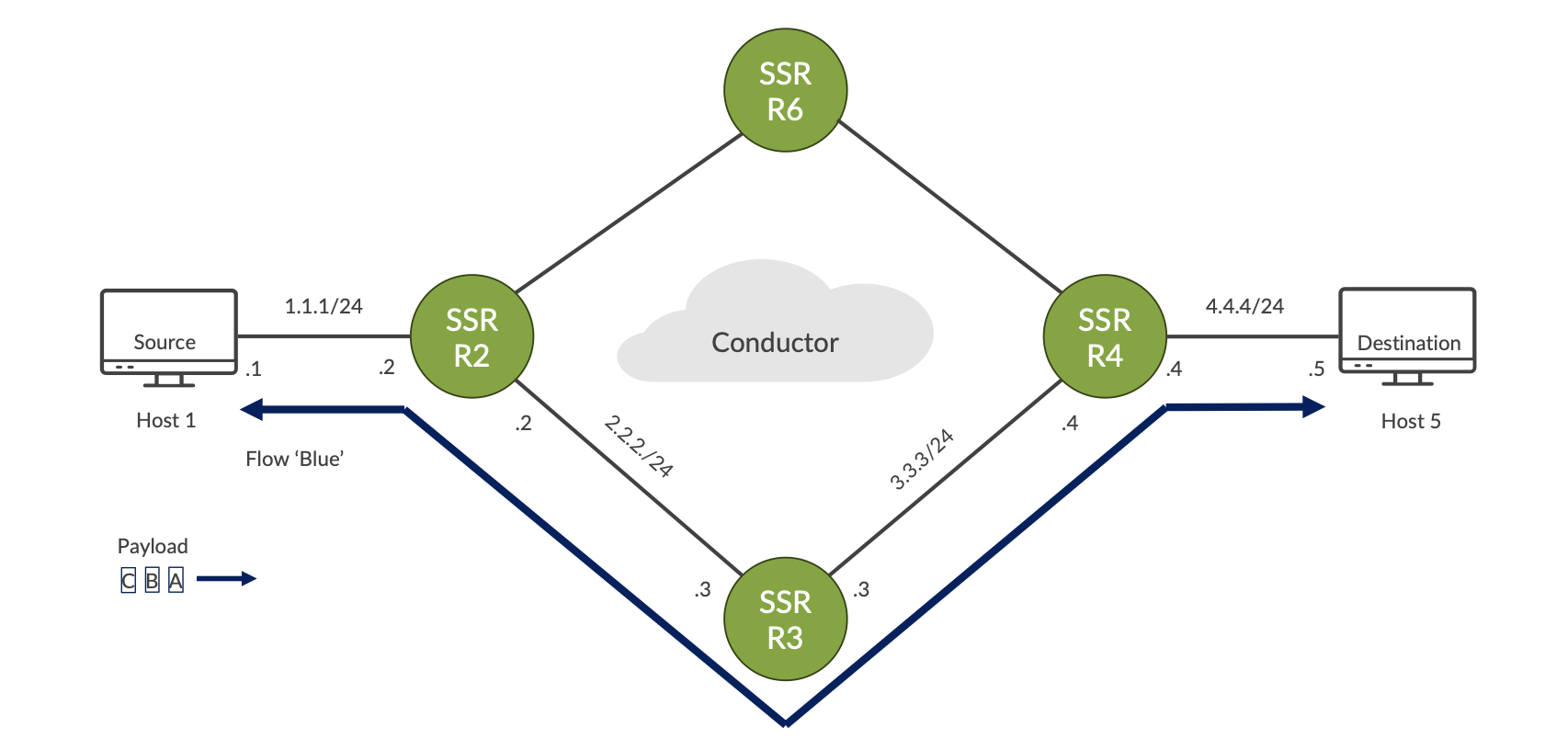
In this topology, the selected path through the network is: Host 1 – R2 – R3 – R4 – Host 5
The payload for the first flow - Blue - consists of data packets A, B, and C. Additional flows may have the same source and destination (Host 1/Host 5) but to satisfy SLA requirements they could take a different physical path through Router 6.
This illustrates an important difference between SVR and IPSec tunnels; traffic encrypted within an IPSec Tunnel always follows the same path, not allowing different flows to have different SLA-driven physical paths. SVR does not have this limitation.
Key Rotation
Key rotation provides a high level of transport security. Configuring this feature creates a specific interval for the router to generate a new security key/payload key and distribute it across the network.
The security rekeying mechanism (key rotation) is configured on the conductor, at the Authority level, and requires that all routers and conductors are running the same version of software that supports this feature.
This enhanced level of security is enabled by setting enhanced-security-key-management to true, which triggers the router to generate a local metadata key.
SSR Keys
The router sends the metadata key and other information to the peers, allowing peer authentication and the ability to encrypt and decrypt messages. The peers store this key until a new key is accepted as a replacement. This dynamic key generation and exchange provides the encryption of Secure Vector Routing (SVR) traffic.
- Metadata Key
- Transmitted within BFD Metadata
- Metadata Key is same for all peer router connections
- Encrypts SVR TLVs
Routers generate their own peer keys based on X.509 certificates for encrypting metadata keys and distribute them to their peers by BFD metadata.
- Peer Key
- Generated via DH from PKI
- Encrypts BFD Metadata
Sessions are encrypted using payload keys generated on demand, encrypted, and distributed to the peer over SVR.
- Payload Key
- Transmitted within SVR Metadata encrypted by the peer key
- Encrypts Payload per-session
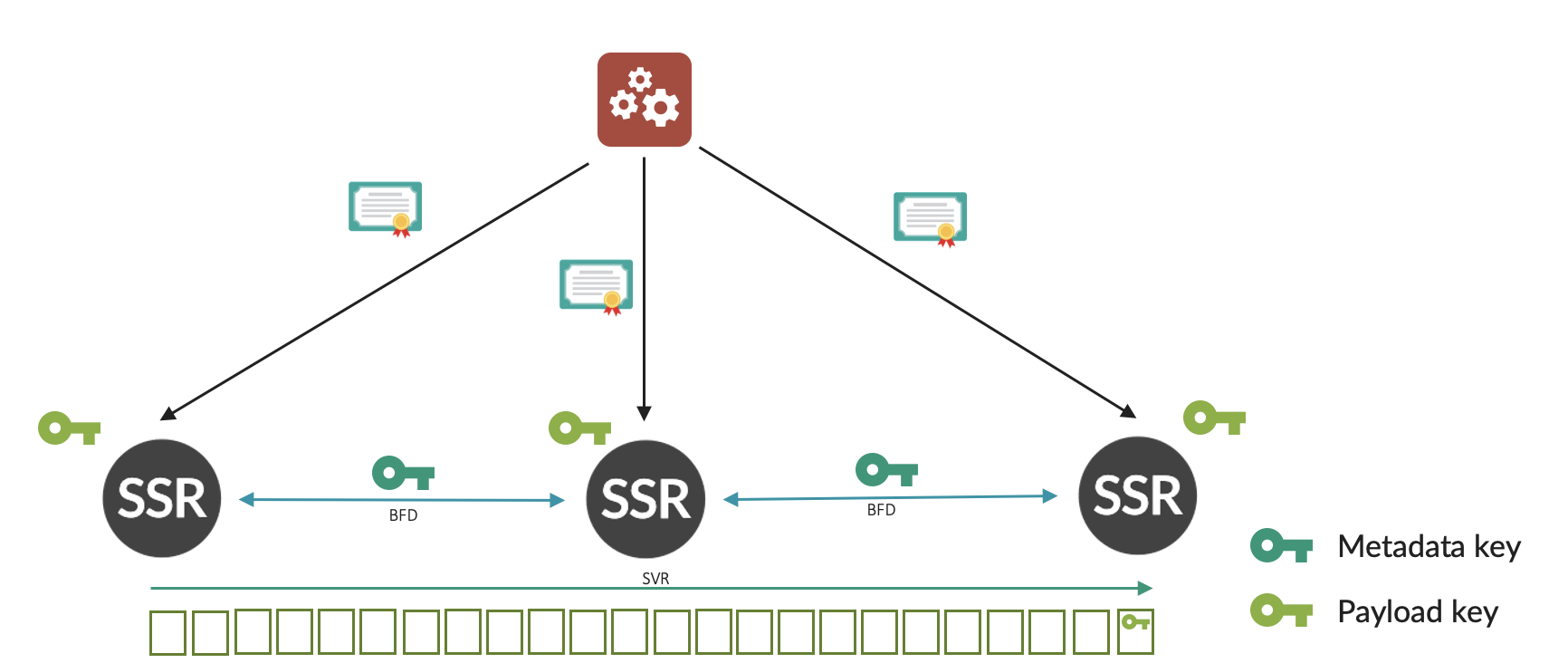
The following diagram illustrates the SSR Key Exchange process:
-
SVR certificates are installed onto the SSR from the Conductor.
- SCEP is used to communicate to an intermediate/root CA.
-
The DH key exchange between routers creates a peer key.
-
Each router generates a metadata key and transmits this via BFD Metadata, encrypted using the Peer Key.
- Each Peer creates their own key.
- The originating router encrypts SVR Metadata with the peer’s metadata key.
-
Each router generates unique payload key per session, and transmits this key in the metadata TLV, encrypted using the metadata key on a router-to-router basis (end-to-end).
Peer Key and Key Rotation
A single key is used for all paths between two routers. The key is saved and remains valid during network outages and path failures, until a new key is accepted as a replacement.
During the rekeying period the old key is used. A wait time of 30 seconds is added post key computation to prevent any retransmitted packets, delayed packets, or long latency packets not having a key ready for use.
If a peer sends a Key Request to a peer for which there is no valid key and receives no response, then the peer path remains out of service until there is a valid response.
The peer continues to resend requests at periodic intervals as defined in the configuration setting authority > security-key-management > peer-key-retransmit-interval. If there is no response after the time defined by authority > security-key-management > peer-key-timeout, the peer path is declared invalid and removed from service. Once the peer is taken out of service due to key timeout, it will continue to send rekey attempts at the peer-key-timeout intervals, or upon interface state change.
High Availability
Each node of an HA pair manages its own unique certificate - certificates are not shared between nodes. Each node manages its own unique connection to its peers.
When two nodes are configured as a redundant pair, each of the keys are exchanged between nodes. This will avoid rekeying on flow migration due to node failures. Keys can be safely exchanged between nodes as the HA sync interfaces are connected point to point over an SSH connection.
Certificate Replacement or Revocation
When a certificate is revoked, expired, or invalid, the SSR generates an alarm. Based upon the SSR configuration, it will either fail-soft (the default behavior) or fail-hard.
fail-soft results in a notification that the certificate is no longer valid and that appropriate action must be taken.
fail-hard results in a notification that the certificate is no longer valid, as well as the removal of all peering relationships. This severs the peer connection and stops the device from participating in SVR.
Peer Authentication
Peer validation is done whenever a new certificate is added, or peer configuration has changed. When a certificate is received, a cached validation response is used. If configured, the received certificate is validated against the trusted-ca-certificate list.
When receiving a certificate from a peer router and performing validation, the receiving router extracts and saves the peer router's public key. This is used for validating the authenticity of any subsequent Peer Key/Rekey requests.
Requirements
SSR 7.0.1 is required on all devices participating in Enhanced Security Key Management. Any SSR running an older version of software that does not support this functionality will cause traffic to fail between those peers. In these cases, events will be generated when peering fails to establish.
Configuration
Configuration is performed on the conductor, at the Authority level, on a per router basis.
To enable ESKM and accept the default rekey values:
- Set
enhanced-security-key-managementtotrue;
config

    authority
        enhanced-security-key-management  true
- Configure a
peering-common-nameon each router. In a secure environment, the router name should never be sent between routers as plaintext in BFD messages. Thepeering-common-nameis an alias that identifies the router and is configured at the router level. Whenenhanced-security-key-managementis configured, it is validated against the peering-common-name from the ceritficate, and integrated into the auto-generated adjacencies list for the peers of the router from the neighborhood configuration.
        router                            combo-east
            name                 combo-east
            peering-common-name  second-fake-alias-2
            location             usa
            description          "router 1"
            inter-node-security  internal
The peer list of the router must also have the peering-common-name of that peer. If the peer list is not manually configured, it is auto-generated from the neighborhoods.
Post Quantum Cryptography Support
ML-KEM (Module-Lattice-Based Key-Encapsulation Mechanism) is a cryptographic protocol used in post-quantum cryptography to securely exchange keys over public channels. This level of protection offers security against both quantum and classical adversaries.
For the SSR, ML-KEM can be used in conjuction with Diffie-Hellman as a hybrid approach to peer-key exchange and encryption. In this configuration, two peer keys are generated after key exchange. BFD metadata is the first encrypted by the DH key, followed by the ML-KEM key. The receiving SSR peer decrypts in reverse order as described below.
In order to take advantage of ML-KEM Cryptography, all devices must be running SSR software that provides support for this feature.
How It Works
Each participant generates a public-private key pair for encryption and decryption. These keys are generated upon system startup, are stored securely, and are encrypted with the onboard TPM.
A Symmetric Key is generated using the Nist-approved FIPS 203 ML-KEM algorithm and exchanged between the sender and the reciever. This is the shared, secret key used for encryption and decryption.
The encapsulation process wraps the symmetric key in layers of encryption, and the decapsulation process removes the layers using the private key associated with the device.
Information can then be securely transmitted between devices.
Configuration
ML-KEM cryptography is configured under key-exchange-algorithm and has the following attributes.
| Configuration Attributes | Description |
|---|---|
key-exchange-algorithm | The algorithm to use for exchanging keys between peers. Algorithm types include: diffie-hellman, ml-kem, or diffie-hellman-ml-kem. |
ml-kem | Use the ml-kem-key-size parameter to define the key size to use. Possible values in order of increasing security strength and decreasing performance are 512, 768 or 1024. |
diffie-hellman | Use the diffie-hellman-key-size parameter to define the key size to use. Possible values in order of increasing security strength and decreasing performance are 1024, 2048 or 4096. |
diffie-hellman-ml-kem | Use this parameter if you require hybrid mode cryptography. This employs both methods of encryption for greater security. However, as with the individual settings above, be aware that values with increasing security strength result in decreasing performance. The above values are used and set individually in the configuration. |
ML-KEM is a NIST approved algorithm for FIPS-203. However, the use of ml-kem-only mode is not certified for FIPS 140-3. Users requiring strict FIPS 140-3 compliance must use either diffie-hellman only, or the hybrid mode, diffie-hellman-ml-kem.
ML-KEM Example
The ML-KEM key size values are as follows:
- 512: Smallest footprint, highest performance
- 768: Balanced for most applications - Default value
- 1024: Maximum security for long-lived systems
configure
    authority
        security-key-management
            key-exchange-algorithm
                ml-kem
                    ml-kem-key-size 1024
                exit
            exit
        exit
Diffie-Hellman Example
The Diffie-Hellman key size values are as follows: 1024, 2048 or 4096
- 1024: Smallest footprint, highest performance
- 2048: Balanced for most applications - Default value
- 4096: Maximum security
configure
    authority
        security-key-management
            key-exchange-algorithm
                diffie-hellman
                    dh-key-size 2048
                exit
            exit
        exit
Diffie-Hellman ML-KEM Example
configure
    authority
        security-key-management
            key-exchange-algorithm
                diffie-hellman-ml-kem
                    dh-key-size 2048
                    ml-kem-key-size 1024
                exit
            exit
        exit
Rekeying (Key Rotation) Atttributes and Default Values
The key-exchange-algorithm is configurable at both the Authority and Router/Peer level (using key-exchange-algorithm-override). The peer path override allows the migration from an existing algorithm to a different algorithm within authority. This makes it possible to onboard new routers to an existing authority with different key-exchange-algorithms.
If no override is specified at router and peer level, the authority key-exchange-algorithm setting is used. However when set, the router and peer key-exchange-algorithm-override settings are used. See Key Exchange Algorithm Router Override for addtitional details.
When the key-exchange-algorithm is changed, the SSR returns to the shared-secret exchange state (since certificate exchange is not impacted) and opertation proceeds until the peer metadata-keys are re-exchanged. Existing sessions continue using the established payload keys until the next payload key rekey-time. Payload key updates are encrypted using the latest exchanged peer metadata-keys.
Configuration Example
config
    authority
        enhanced-security-key-management  true

        security-key-management
            payload-key-rekey-interval    24
            peer-key-rekey-interval       24
            peer-key-retransmit-interval  30
            peer-key-timeout              3600
            invalid-certificate-behavior  fail-soft

            key-exchange-algorithm
                diffie-hellman-ml-kem
                    dh-key-size      4096
                    ml-kem-key-size  1024
                exit
            exit
        exit
| Configuration Attributes | Description |
|---|---|
| key-exchange-algorithm | The algorithm to use for exchanging keys between peers. Algorithm types include: diffie-hellman, ml-kem, or diffie-hellman-ml-kem. |
| diffie-hellman-key-size | Key size to use when key-exchange-algorithm is set to ml-kem or diffie-hellman-ml-kem. Values can be 1024, 2048 or 4096. Default is 2048. |
| ml-kem-key-size | Key size to use when key-exchange-algorithm is set to ml-kem or diffie-hellman-ml-kem. Values can be 512, 768 or 1024. Default is 768. |
| payload-key-rekey-interval | Hours between payload security key regeneration. Range is 1-720, or never. Default is 24 hours. |
| peer-key-rekey-interval | Hours between security key regeneration for peer routers. Range is 1-720, or never. Default is 24 hours. |
| peer-key-retransmit-interval | Seconds between security key retransmission for peer routers, when peer key establishment has not been acknowledged. Range is 5-3600. Default is 30 seconds. |
| peer-key-timeout | Seconds before security key retransmission timeout for peer routers, when peer key establishment has not been acknowledged. Default is 3600 seconds. |
When rekeying is enabled on a newly initialized router that does NOT have a valid, signed certificate, an alarm is generated. A valid certificate must be obtained from a Certificate Authority before valid secure communication can take place. When a valid certificate is present, the router will create a public/private key pair (see [RFC8422] for addtional information).
In cases where it is necessary to manually force key rotation on the routers, use the rotate security metadata-key command to tell the active node to immediately regenerate the metadata key with an incremented rekey index. The active node will push the new metadata key to the peer node.
Sample Default Configuration:
config

    authority
        enhanced-security-key-management  true

        router                  RTR_EAST_CONDUCTOR
            name                RTR_EAST_CONDUCTOR

            node                conductor-east-1
                name            conductor-east-1
            exit
        exit

        router                   combo-east
            name                 combo-east
            peering-common-name  second-fake-alias-2
            location             usa
            description          "router 1"
            inter-node-security  internal

        router                   combo-west
            name                 combo-west
            peering-common-name  second-fake-alias-3
            location             usa
            inter-node-security  internal
Key Exchange Algorithm Router Override
When the key-exchange-algorithm is set at the Authority level, all existing sessions and keys remain in use until the next key exchange cycle. Any change to the selected algorithm, such as the key-size, impact the existing environment. If an administrator selects a new algorithm or onboards new routers with a different key-exchange-algorithm, they are then required to update all routers and peers in the authority to the same version, otherwise new session creation will fail.
To address this use case, a router and router peer key-exchange-algorithm-override is configured at the router level. This allows the migration from an existing algorithm to a different algorithm within authority, making it possible to onboard new routers to an existing authority with different key-exchange-algorithms.
The key-exchange-algorithm-override follows this precedence:
- If no override is specified at router and peer level, the authority key-exchange-algorithm setting will be used.
- If router/peer
key-exchange-algorithm-overrideis set, use this algorithm settings for the peering security with the peer. - If the router/peer has no override specified, and the local router has
key-exchange-algorithm-overrideset, use this algorithm settings.
The router level key-exchange-algorithm-override is automatically populated with the router/peer configuration under the router with which it is peered. However, if the router/peer configuration is set to manual override - by explicitly setting generated to false - or the router is in standalone mode, the key-exchange-algorithm-override and ml-kem-kegen-priority should be updated to reflect the remote router’s configuration.
ml-kem-keygen-priority is configured at the router or peer level, and is used to determine which router in the peering is the key generator for the ML-KEM related algorithm. The higher value is given priority as the key generator. Once the ML-KEM algorithm (ml-kem or diffie-hellman-ml-kem) is selected as the active key-exchange-algorithm, the highest ml-kem-keygen-priority is enforced.
Authority > Router > key-exchange-algorithm-override
| Configuration Attributes | Description |
|---|---|
| diffie-hellman | Router level override of algorithm to use for exchange keys between peers. This is the default value. |
| ml-kem | Router level override of algorithm to use for exchange keys between peers. |
| diffie-hellman-ml-kem | Router level override of algorithm to use for exchange keys between peers. |
| diffie-hellman-key-size | Key size to use when key-exchange-algorithm-override is set to ml-kem or diffie-hellman-ml-kem. Values can be 1024, 2048 or 4096. Default is 2048. |
| ml-kem-key-size | Key size to use when key-exchange-algorithm-override is set to ml-kem or diffie-hellman-ml-kem. Values can be 512, 768 or 1024. Default is 768. |
Authority > Router > Peer > key-exchange-algorithm-override
| Configuration Attributes | Description |
|---|---|
| diffie-hellman | Peer level override of algorithm to use for exchange keys between peers. This is the default value. |
| ml-kem | Peer level override of algorithm to use for exchange keys between peers. |
| diffie-hellman-ml-kem | Peer level override of algorithm to use for exchange keys between peers. |
| diffie-hellman-key-size | Key size to use when key-exchange-algorithm-override is set to ml-kem or diffie-hellman-ml-kem. Values can be 1024, 2048 or 4096. Default is 2048. |
| ml-kem-key-size | Key size to use when key-exchange-algorithm-override is set to ml-kem or diffie-hellman-ml-kem. Values can be 512, 768 or 1024. Default is 768. |
At the router level, configure key-exchange-algorithm-override:
Configuration Example
configure
    authority
        router                                  combo-east
            name                                combo-east
            peering-common-name                 my-fake-alias-2
            ml-kem-keygen-priority              10

            key-exchange-algorithm-override

                diffie-hellman-ml-kem
                    dh-key-size      4096
                    ml-kem-key-size  1024
                exit
            exit

            peer                                combo-east
                name                            combo-east
                peering-common-name             my-fake-alias-2
                ml-kem-keygen-priority          10

                key-exchange-algorithm-override

                    diffie-hellman-ml-kem
                        dh-key-size      4096
                        ml-kem-key-size  1024
                    exit
                exit
            exit
Troubleshooting
The following Events, Alarms, and Show commands are available to troubleshoot issues encountered with Enhanced Security Key Management.
Events and Alarms
The following alarms are generated by the router on any certificate it owns if the certificate is invalid, expired, or if the router is unable to authenticate the peer. Use the show alarms command to see details about the alarm.
- Expiring within a month (Minor)
- Expiring within a week (Major)
- Expired (Critical)
- Revoked (Critical)
- Unable to Authenticate Peer
The following is an example of an alarm generated if the certificate state is invalid:
=============== ===================== ============ ==================== ================ ========================================================================

      ID              Time              Severity    Source              Category        Message

=============== ===================== ============ ==================== ================ ========================================================================

combo-east-1:4   2025-01-28 19:07:00   MAJOR       INTERFACE                                DHCP address for interface [wan-intf] has not been resolved
combo-east-1:5   2025-01-28 19:07:00   MAJOR       INTERFACE                                DHCP address for interface [lan-intf] has not been resolved
combo-east-1:13  2025-01-28 19:12:21   CRITICAL    RTR_WEST_COMBO           PEER            Peer RTR_WEST_COMBO certificate is invalid: expired - testing-detail
admin@combo-east-1.RTR_EAST_COMBO# show alarms id combo-east-1:13
Tue 2025-01-28 19:17:39 UTC
✔ Retrieving alarms...
============================================================================================
combo-east-1:13
============================================================================================
Time: 2025-01-28 19:12:21
Severity: CRITICAL
Source: RTR_WEST_COMBO
Category: PEER
Process: stateMonitor
Message: Peer RTR_WEST_COMBO certificate is invalid: expired - testing-detail
Completed in 0.02 seconds
Show Commands
show security key-status provides the following additional information:
metadata rekey index- Index of the current rekey interval.metadata last rekey- Number of seconds since the last rekey occurred.metadata next rekey- Number of seconds until the next rekey occurs.metadata manager status- Indicates whether the current node is Active Leader or Redundant Peer, or displays Inactive when the feature is not enabled.
admin@node0.Conductor# show security key-status router SSR_701_hub1
Fri 2025-12-19 05:12:19 UTC
✔ Retrieving key state...
====================================================
 node0.SSR_701_hub1
====================================================
  Key Manager State:           Inactive
  Rekey Index:                 1
  Last Rekey:                  N/A
  Next Rekey:                  N/A
  Key Change Count:            1
  Config Key Change Count:     6
  Key Change Error:            N/A
  Config Key Change Error:     N/A
  Metadata Rekey Index:        61
  Metadata Last Rekey:         0 hrs 17 min 29 sec
  Metadata Next Rekey:         23 hrs 42 min 31 sec
  Metadata Key Manager State:  Active Leader
Completed in 0.02 seconds
Key Manager State shows the state for Security Dynamic Rekey without Enhanced Security Key Management. Nodes managed by the Conductor will always show inactive as the rekey control process runs on the Conductor.
The Metadata Key Manager State refers to the key management state for the Enhanced Security Key Management feature. It indicates whether the current node is Active Leader or Redundant Peer, or displays Inactive when the feature is not enabled.
show peers security includes the following information:
- Security state machine state
- Local salt value
- Peer salt value
- Local metadata key index
- Peer metadata key index
- Whether a peer’s certificate has been received
- Whether a local certificate has been acknowledged by peer
- Whether a peer’s salt has been received
- Whether a local salt has been acknowledged by peer
- Whether a peer’s metadata key has been received
- Whether a local metadata key has been acknowledged by peer
admin@test1.headend# show peers security
Mon 2025-07-21 20:28:18 UTC
✔ Retrieving peer paths...

==============
 Peer: branch
==============
  Peer:               branch
  Node:               test1
  Network Interface:  intf11
  Destination:        172.16.4.5
  Status:             up
  Hostname:           unavailable
  Path Mtu:           unavailable
  Security Status:    MKEY_EXCH_COMP
  Salt:               3565600980
  Peer Salt:          1668479739
  Key Index:          5
  Peer Ki:            253
  Cert Rec:           True
  Cert Ack:           True
  Salt Rec:           True
  Salt Ack:           True
  Key Rec:            True
  Key Ack:            True


==============
 Peer: branch
==============
  Peer:               branch
  Node:               test1
  Network Interface:  intf12
  Destination:        172.16.4.7
  Status:             up
  Hostname:           unavailable
  Path Mtu:           unavailable
  Security Status:    MKEY_EXCH_COMP
  Salt:               3565600980
  Peer Salt:          1668479739
  Key Index:          5
  Peer Ki:            253
  Cert Rec:           True
  Cert Ack:           True
  Salt Rec:           True
  Salt Ack:           True
  Key Rec:            True
  Key Ack:            True

Completed in 0.10 seconds
admin@test1.headend#
show peers certificate provides peer certificate information.
admin@node0.Conductor# show peers certificate router SSR_701_spoke1
Fri 2025-12-19 05:12:09 UTC
✔ Retrieving peer paths...
======================================
 Peer: SSR_701_spoke1 -> SSR_701_hub1
======================================
  Peer:               SSR_701_spoke1 -> SSR_701_hub1
  Node:               node0
  Network Interface:  WAN_250
  Destination:        30.100.1.2
  Status:             up
  Hostname:           unavailable
  Path Mtu:           1500
  Local Cert:         -----BEGIN CERTIFICATE-----
 MIICMTCCAdegAwIBAgIQEjFpHpHNP731vpBGU3mfyTAKBggqhkjOPQQDAjAVMRMw
 EQYDVQQDDApTU1ItTEFCLUNBMB4XDTI1MTIxOTA0MzkxMVoXDTI4MDMyMzA0Mzkx
 MVowITEfMB0GA1UEAwwWU1NSXzcwMV9zcG9rZTFfcGVlcmluZzCBmzAQBgcqhkjO
 PQIBBgUrgQQAIwOBhgAEAJRKn1&h#$hooz@yNees9xfUK3U+2Iy3p7TqCNphRui
.
.
.
 CwYDVR0PBAQDAgWgMCEGA1UdEQQaMBiCFlNTUl83MDFfc3Bva2UxX3BlZXJpbmcw
 CgYIKoZIzj0EAwIDSAAwRQIhAMtA2bwG4Oz5qL5epbFqzZYdJygonCajB8gupyk6
 Mw9yAiBPur1txROTK7FTyFZ2cXAWSOszEiiwbc1lqNGtSgsPhQ==
 -----END CERTIFICATE-----

  Peer Cert:          -----BEGIN CERTIFICATE-----
 MIICKjCCAdGgAwIBAgIQfWKMXKIOR3RRA5wI+VXnBjAKBggqhkjOPQQDAjAVMRMw
 EQYDVQQDDApTU1ItTEFCLUNBMB4XDTI1MTIxOTA0NDc0N1oXDTI4MDMyMzA0NDc0
 N1owHjEcMBoGA1wTU1NSbr!n&u$@SHRubberyGVlcmluZzCBmzAQBgcqhkjOPQIB
.
.
.
 VR0PBAQDAgWgMB4GA1UdEQQXMBWCE1NTUl83MDFfaHViX3BlZXJpbmcwCgYIKoZI
 zj0EAwIDRwAwRAIgHEB93SRCeCp9fH4PhsQqWl0mCCvT2St4okZscBIWc5kCIHMN
 KHkH19zCivm6Apwd5IyMaiSeMRBaRPpLlDOcY89H
 -----END CERTIFICATE-----