Help us improve your experience.

Let us know what you think.

Do you have time for a two-minute survey?


Use Postman to Connect to the WebSocket API

Postman is a platform that is designed to make it easy to work with APIs. This topic walks you through how to use Postman to connect to the Mist WebSocket API and stream data.

Postman is an API platform that makes it easy for you to complete API related tasks, including sending and receiving data from a WebSocket server. This topic covers how to get set up in Postman and how to leverage it so that you can use the Mist WebSocket API to stream data.

See

Postman Setup

To use Postman, you can use the Postman website or download the Postman application as described in Download Postman.

  1. Sign in to Postman (or create an account) from the Postman website or application. This allows you to save your environment. See the Create Your Environment section further down in this topic.
  2. Once your account is created, you get access to your workspace. This is where you can save your API calls and configure your environment to interact with the Mist API.

Import the Mist API Collection

Next, import the Mist API Collection. Juniper Mist has built a list of Postman API calls that you can import directly into your Postman workspace. This list is maintained and matches what the API documentation lists.

  1. Navigate to the Juniper Mist Postman collections page and select the Mist Cloud Websockets collection.
  2. Once the collection is opened, click on Fork as described in Fork collections and environments in Postman. This enables you to create a copy of the collection in your own workspace and still receive updates when the main collection is updated.
  3. In the top left corner of Postman, you should see that the collection has now been forked into your workspace. Expand the collection and its subsections to see how all the WebSocket APi requests are organized.

Create Your Environment

A postman environment allows you to store variables in a profile that you can reuse across multiple API calls and collections. You must create an environment and define variables before you begin in Postman.

  1. Create and name your environment as described in Create an Environment.
  2. Define variables in your Postman environment by entering them into the table as described in Add Environment Variables.
    • In order to interact with the Mist WebSocket API, you must set the following variables:
      Table 1: Environment Variables
      Variable Description
      host

      This is the URL of the Mist API endpoint. For example, api.mist.com is used to access the GLOBAL 01 cloud. See API Endpoints and Global Regions for the full list of Mist API endpoints and global regions.

      host-ws

      This is the URL of the Mist websocket API endpoint. For example, api-ws.mist.com is the value used for access to the GLOBAL 01 region. The full list of Mist API endpoints can be found in the WebSocket Endpoints list.

      apitoken

      This is the Mist API token required to authenticate Postman to the Mist API. For more information on how to create a Mist API token for REST API, see Create API Token.

      org_id

      This is the UUID of your Mist organization. For more information on how you can retrieve your org ID, see Find Your Organization ID and Get Org.

      site_id

      This is the UUID of a specific Mist site. For more information on how you can retrieve a site ID, see Get Site Info.

  3. Once you have entered all your variables, select Save.
  4. Apply the environment to your Postman workspace by navigating to the Environment drop-down menu in the top right corner of the page, then select your newly created environment.

Connect to the WebSocket API

Now that you have set up Postman with all of the necessary information, it's time to test the connection to the WebSocket API. You can do this using the GET /api/v1/self call to be returned with information about your privileges and accounts. You can view steps on how to this in Test Your First API Call, or see full documentation on this here.

Let's say the first set of data you want to stream is related to Wi-Fi client statistics. To stream this data, you must connect to the WebSocket API and then subscribe to the /sites/<i>{{site_id}}</i>/stats/clients channel.

In order to test your connection to the Juniper Mist WebSocket API, follow these steps:

  1. In Postman, select Collections on the left menu. Then, open the Mist Cloud Websockets section. Finally, click on the siteClientStatsStream request.
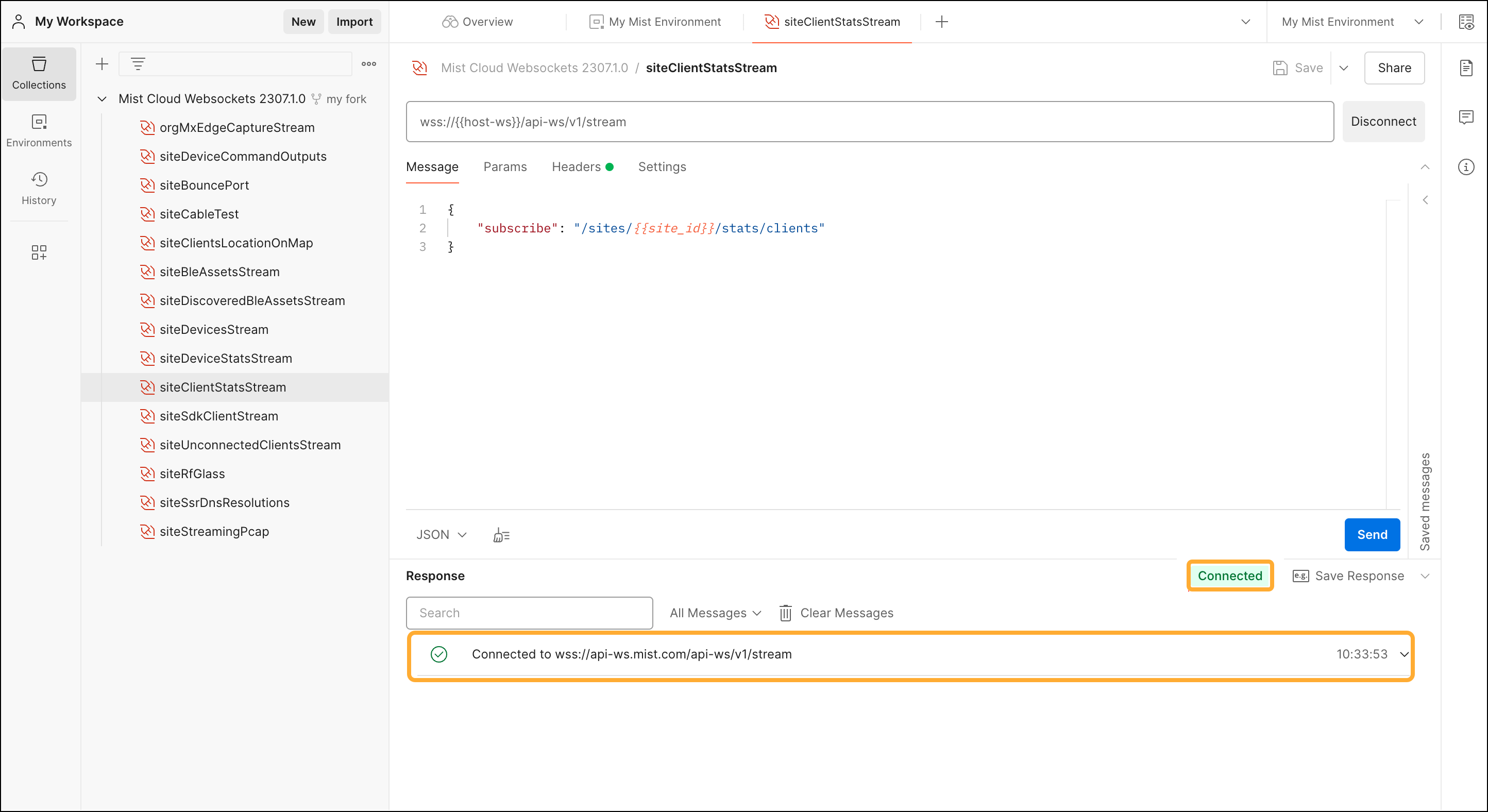
  2. Next, click the Connect button to establish a connection with the Mist WebSocket API. This request will use the {{apitoken}}, the {{ws-host}}, and the {{site_id}} variables from your environment.
  3. If you were able to successfully connect to the websocket API, you should see a message detailing your connection as well as a green check mark.Postman workspace showing an active WebSocket connection to Mist Cloud Websockets. The selected endpoint is siteClientStatsStream with a JSON payload subscribing to client stats for a site. Connection status is green and connected. Response confirms successful subscription.
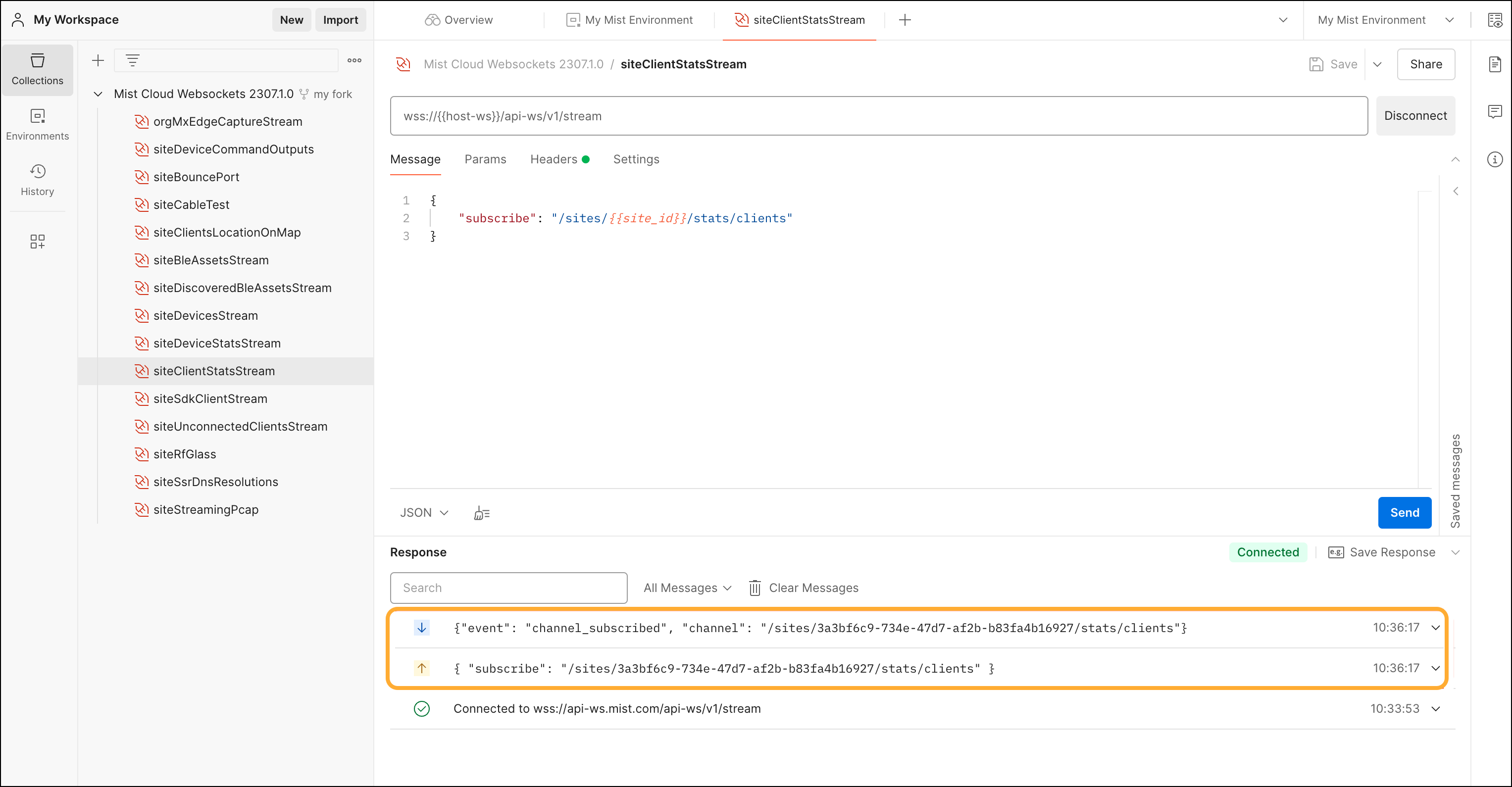
  4. Next, you must subscribe to the channel so that you can start to receive data. To do this, click the Send button.
  5. Mist will then send you a message confirming that you have subscribed to the channel. Postman workspace testing Mist Cloud WebSocket API with collection Mist Cloud Websockets 2307.1.0. Active WebSocket endpoint is /api-ws/v1/stream. JSON payload subscribes to channel /sites/{{site_id}}/stats/clients. Connection is active with confirmed channel subscription.
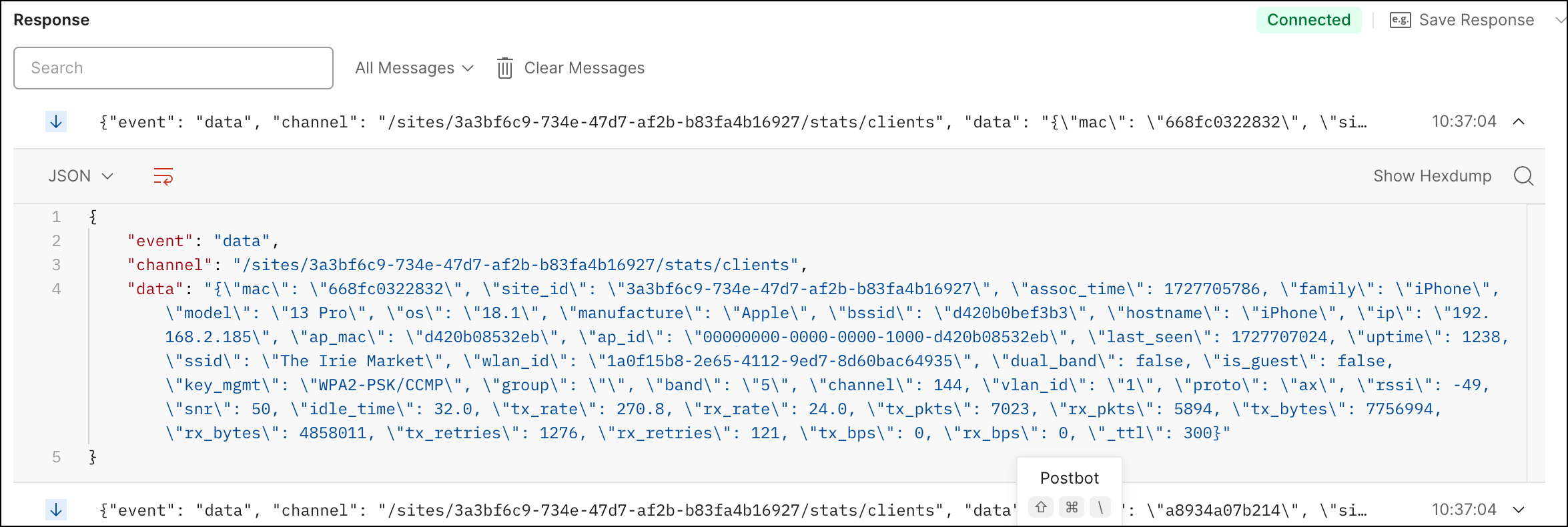
  6. Now that you are subscribed to the channel, you should see messages containing client statistics stream in from Mist. You can view these in the Response section of Postman.JSON response showing Wi-Fi client statistics, including MAC address, site ID, device type iPhone 13 Pro, OS version 18.1, manufacturer Apple, IP 192.168.2.185, SSID The Irie Macket, RSSI -49, SNR 50, and network metrics like tx rate 270.8 Mbps, rx rate 24.0 Mbps, and uptime in seconds.
  7. When you are ready to disconnect from the WebSocket API, click the Disconnect button. You will then receive a message in the Response section indicating that you are now disconnected.

    Now you are ready to explore other streaming channels. Below are some suggestions:

      • siteDeviceStatsStream—Use this stream to get statistics about your network devices that are managed by Mist.
      • siteStreamingPcap—Use this to perform packet captures (PCAPs).
      • siteBleAssetsStream—Use this stream to retrieve location data about your BLE asset tag.