
Revoke a Certificate
Learn how to revoke various PKI certificates.
Digital certificates have an expiration date; however, before expiration, a certificate might no longer be valid due to many reasons. You can manage certificate revocations and validations locally and by referencing a CA CRL.
Example: Manually Load a CRL onto the Device
This example shows how to load a CRL manually onto the device.
Requirements
Before you begin:
Generate a public–private keypair. See Self-Signed Digital Certificates.
Generate a certificate request. See Example: Configure a CA Profile.
Configure a CA profile. See Example: Configure a CA Profile.
Load your certificate onto the device. See Example: Load CA and Local Certificates Manually.
Overview
You can load a CRL manually, or you can have the device load it automatically when you verify the certificate validity. To load a CRL manually, you obtain the CRL from a CA and transfer it to the device (for example, using FTP).
In this example, you load a CRL certificate called revoke.crl from the /var/tmp
directory on the device. The CA profile is called ca-profile-ipsec (maximum
file size is 5 MB.)
If you have already loaded a CRL into the ca-profile, run clear security pki crl
ca-profile ca-profile-ipsec the command first to clear the old CRL.
Configuration
Procedure
Step-by-Step Procedure
To load a CRL certificate manually:
Load a CRL certificate.
[edit]
user@host> request security pki crl load ca-profile ca-profile-ipsec filename /var/tmp/revoke.crl
Junos OS supports loading of CA certificates in X509, PKCS #7, DER, or PEM formats.
Verification
To verify the configuration is working properly, enter the show security pki
crl operational mode command.
Dynamic CRL Download and Verify
Digital certificates are issued for a set period of time. Digital certificates become invalid after the specified expiration date. A CA can revoke an issued certificate by listing it in a CRL. During peer certificate validation, the revocation status of a peer certificate is checked by downloading the CRL from a CA server to the local device.
To facilitate the CRL check for the certificates when a CA profile is not configured,
dynamic CA profile is created. A dynamic CA profile is automatically created on the
local device with the format dynamic-nnn.
A dynamic CA profile:
- Allows the local device to download the Dynamic CA and Dynamic CRL (for corresponding CA) as per peer’s localcert issuer
- Checks the revocation status of the peer's certificate
A VPN device checks a peer's EE certificate for its revocation status. A VPN device uses the certificate received from its peer to do the following:
- Extract the URL to dynamically download the CA's CRL
- Check the revocation status of the peer's EE certificate
In Figure 1, Host-A can use the Sales-CA and EE certificates received from Host-B to dynamically download the CRL for Sales-CA and check the revocation status of Host-B’s certificate.
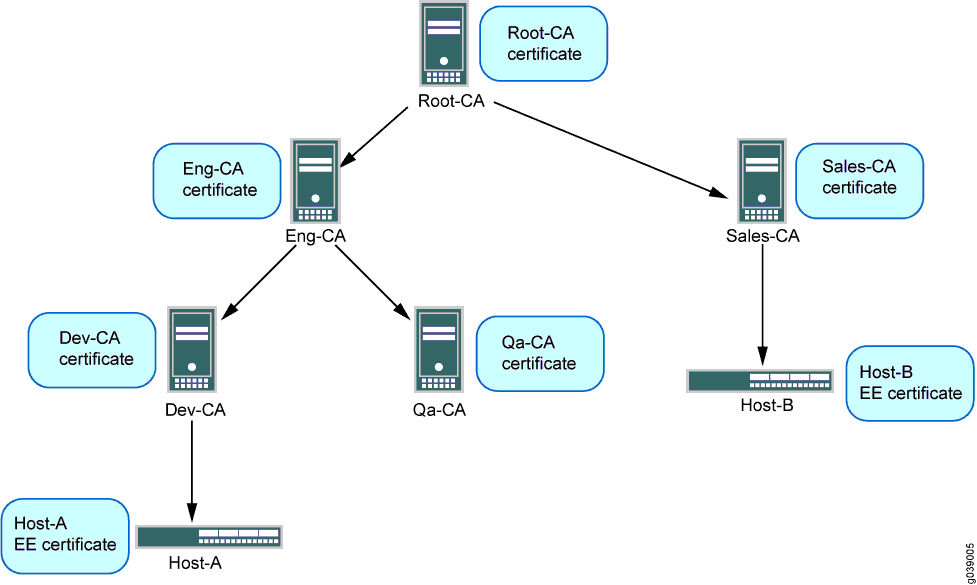
In case of single hierarchy CA servers or CA certificate chain, the local EE certificate and the received peer EE certificate is issued from the same CA server.
Following are some of the SRX Series Firewall behavior based on different configurations:
- If you have configured a SRX Series Firewall with a trusted-ca or trusted-ca-group, then the device does not validate or trust any other CAs.
- If you have defined a CA profile that has a chain of CAs where the SRX Series Firewall only trusts the root CA and peer has a certificate signed by a sub-CA to this root, then dynamic CA and CRL will be added to the device.
Table 1 provides few sample scenarios where dynamic CA or CRL is not created:
|
Scenario |
Condition |
|---|---|
|
Sample scenario 1 |
In the CA profile, you have defined a trusted CA for ca-profile-name, and you receive a connection from a device that has a certificate signed by a different CA that was not defined as a trusted CA in your CA profile. |
|
Sample scenario 2 |
You have defined a CA profile that has a chain of CAs where the SRX Series Firewall only trust a sub-CA, and peer has a certificate signed by a level above this sub-CA. |
To enable dynamic CA profiles, you must configure the revocation-check crl
option on a Root-CA profiles at the [edit security pki ca-profile
profile-name] hierarchy level.
The revocation check properties of a Root-CA profile are inherited for dynamic CA profiles. In Figure 1, the CA profile configuration on Host-A for Root-CA enables dynamic CA profiles as shown in the following output:
admin@host-A# show security
pki {
    ca-profile Root-CA {
        ca-identity Root-CA;
        enrollment {
            url “www.example.net/scep/Root/”;
        }
        revocation-check {
            crl;
        }
    }
}
A dynamic CA profile is created on Host-A for Sales-CA. Revocation checking is inherited for the Sales-CA dynamic CA profile from Root-CA.
If the revocation-check disable statement is configured in a Root-CA profile,
dynamic CA profiles are not created and dynamic CRL download and checking is not
performed.
The data for CRLs downloaded from dynamic CA profiles are displayed with the show
security pki crl command in the same way as CRLs downloaded by configured
CA profiles. The CRL from a dynamic CA profile is updated periodically as are those for
CA profiles that are configured in the device. The peer CA certificate is also required
for signature validation of CRL downloaded from CA server.
The CA certificate is required to validate the CRL received from a CA server; therefore, the CA certificate received from a peer is stored on the local device. The received CA certificate from peer is used to validate the CRL and the certificate it issued. Because the received CA certificate is not enrolled by an administrator, the result of a successful certificate verification is not conclusive until the whole certificate chain up to the root CA is verified. The certificate of the root CA must be enrolled by an administrator.
Example: Configuring a CA Profile with CRL Locations
This example shows how to configure a CA profile with CRL locations.
Requirements
Before you begin:
Generate a keypair in the device. See Digital Certificates.
Create a CA profile or profiles containing information specific to a CA. See Example: Configure a CA Profile.
Obtain a personal certificate from the CA. See Example: Manually Generate a CSR for the Local Certificate and Send it to the CA Server.
Load the certificate onto the device. See Example: Load CA and Local Certificates Manually.
Configure automatic reenrollment. See Example: Configuring SecurID User Authentication.
If necessary, load the certificate's CRL on the device. See Example: Manually Load a CRL onto the Device.
Overview
In this example, you direct the device to check the validity of the CA profile called
my_profile. Also, if a CRL did not accompany a CA certificate
and is not loaded on the device, you direct the device to retrieve the CRL from the
URL http://abc/abc-crl.crl.
Configuration
Procedure
Step-by-Step Procedure
To configure certificate using CRL:
Specify the CA profile and URL.
[edit]
user@host# set security pki ca-profile my_profile revocation-check crl url http://abc/abc-crl.crl
If you are done configuring the device, commit the configuration.
[edit]
user@host# commit
Verification
To verify the configuration is working properly,
enter the show security pki operational mode command.
Example: Verify Certificate Validity
This example shows how to verify the validity of a certificate.
Requirements
No special configuration beyond device initialization is required before configuring this feature.
Overview
In this example, you verify certificates manually to find out whether a certificate has been revoked or whether the CA certificate used to create a local certificate is no longer present on the device.
When you verify certificates manually, the device uses the CA certificate
(ca-cert) to verify the local certificate
(local.cert). If the local certificate is valid and if
revocation-check is enabled in the CA profile, the device
verifies that the CRL is loaded and valid. If the CRL is not loaded and valid, the
device downloads the new CRL.
For CA-issued certificates or CA certificates, a DNS must be configured in the device’s configuration. The DNS must be able to resolve the host in the distribution CRL and in the CA CRL url in the ca-profile configuration. Additionally, you must have network reachability to the same host to receive the checks.
Configuration
Procedure
Step-by-Step Procedure
To manually verify the validity of a certificate:
Verify the validity of a local certificate.
[edit]
user@host> request security pki local-certificate verify certificate-id local.cert
Verify the validity of a CA certificate.
[edit]
user@host> request security pki ca-certificate verify ca-profile ca-profile-ipsec
The associated private key and the signature are also verified.
Verification
To verify the configuration is working properly,
enter the show security pki ca-profile command.
If an error is returned instead of a, positive verification the failure is logged in pkid.
Delete a Loaded CRL
You can choose to delete a loaded CRL if you no longer need to use it to manage certificate revocations and validation.
Use the following command to delete a loaded CRL.
user@host> clear security pki crl ca-profile (ca-profile all)
Specify a CA profile to delete a CRL associated
with the CA identified by the profile, or use all to delete
all CRLs.