
Request Configuration Data Using the Junos XML Protocol
Junos XML protocol client applications can use the
<get-configuration> operation to request configuration data from
Junos devices.
How to Request Configuration Data Using the Junos XML Protocol
A Junos XML protocol client application can request configuration data from a
device running Junos OS or a device running Junos OS Evolved. To request
configuration data, a client application encloses the
<get-configuration> operation in an
<rpc> element. A client application can include
optional attributes to specify the source and format of the configuration
information to return. In addition, a client application can define the scope of
the information to return by including the appropriate child tag elements. For
example, the client can request the entire configuration or specific portions of
the configuration.
The basic syntax is as follows:
<rpc>
    <!-- Request the complete configuration -->
        <get-configuration [optional attributes]/>

     <!-- Request part of the configuration -->
        <get-configuration [optional attributes]>
            <configuration>
                <!-- tag elements representing the data to return -->
            </configuration>
        </get-configuration>
</rpc>To view configuration data in a specific instance of the ephemeral
configuration database, a client application must open the ephemeral
instance using the <open-configuration> operation
with the appropriate child tags before executing the
<get-configuration> request.
A Junos XML protocol client application can use the
<get-configuration> operation to request the
entire logical system configuration or specific logical system configuration
hierarchies.
The following topics describe how a client application specifies the source, format, and scope of information returned by the Junos XML protocol server:
The Junos XML protocol server encloses its reply in an
<rpc-reply> element. Within the
<rpc-reply> element, the server encloses the
configuration data within the tag that corresponds to the requested format for
all formats except JavaScript Object Notation (JSON).
-
<configuration>—Encloses Junos XML-tagged output -
<configuration-text>—Encloses formatted ASCII output -
<configuration-set>—Encloses configuration mode commands
For Junos XML and JSON data, the server includes attributes with the
junos: prefix to indicate when the configuration was last
changed or committed and the user who committed it. For more information about
the attributes, see Specify the Database Source for Configuration Data to Return.
<rpc-reply xmlns:junos="URL">
    <!-- If the application requests Junos XML tag elements -->
    <configuration junos:(changed | commit)-seconds="seconds" \
            junos:(changed | commit)-localtime="YYYY-MM-DD hh:mm:ss TZ" \
            [junos:commit-user="username"]>
        <!-- Junos XML tag elements representing configuration elements -->
    </configuration>

    <!-- If the application requests formatted ASCII text -->
    <configuration-text>
        <!-- formatted ASCII configuration statements -->
    </configuration-text>

    <!-- If the application requests configuration mode commands -->
    <configuration-set>
        <!-- configuration mode commands -->
    </configuration-set>

    <!-- If the application requests JSON format -->
    <!-- JSON configuration data -->
</rpc-reply>When displaying operational or configuration data that contains characters outside the 7-bit ASCII character set, Junos OS escapes and encodes these character using the equivalent UTF-8 decimal character reference. For more information see Understanding Character Encoding on Devices Running Junos OS.
Applications can also request other configuration-related information, including an XML schema representation of the configuration hierarchy or information about previously committed configurations. For more information, see the following:
-
Retrieve a Previous (Rollback) Configuration Using the Junos XML Protocol
-
Retrieve the Rescue Configuration Using the Junos XML Protocol
-
Compare the Active or Candidate Configuration to a Prior Version Using the Junos XML Protocol
-
Compare Two Previous (Rollback) Configurations Using the Junos XML Protocol
-
Request an XML Schema for the Configuration Hierarchy Using the Junos XML Protocol
Specify the Database Source for Configuration Data to Return
A Junos XML protocol client application can use the
<get-configuration> operation to request configuration
data from a Junos device. A client application can request information from the
following configuration databases:
-
Candidate configuration database
-
Active configuration database
-
Open instance of the ephemeral configuration database
A client application can request information from the candidate configuration or the
active configuration by using the <get-configuration>
operation and setting the database attribute to the appropriate
value. By default, the <get-configuration> operation returns
data from the candidate configuration database. The Junos XML protocol server
returns Junos XML-tagged output by default, except when the compare
attribute is included.
The database attribute can be combined with one or more of the
following attributes in the <get-configuration> tag:
changed, commit-scripts,
compare, format, inherit and
optionally groups and interface-ranges.
The following sections: outline how to specify the source of the requested configuration data; describe the Junos XML protocol server reply; and provide a sample request.
- Request Candidate Configuration Data
- Request Active Configuration Data
- Request Ephemeral Configuration Data
- Junos XML Protocol Server Reply
- Example: Request the Active Configuration
Request Candidate Configuration Data
To request information from the candidate configuration database, a client
application includes the database="candidate" attribute or
omits the database attribute.
<rpc>
    <get-configuration/>

<!-- OR -->

    <get-configuration>
        <!-- tag elements for the configuration elements to return -->
    </get-configuration>
</rpc>
Request Active Configuration Data
To request information from the active configuration database, a client
application includes the database="committed" attribute.
<rpc>
    <get-configuration database="committed"/>

<!-- OR -->

    <get-configuration database="committed">
        <!-- tag elements for the configuration elements to return -->
    </get-configuration>
</rpc>
Request Ephemeral Configuration Data
To request information from a specific instance of the ephemeral configuration
database, a client application first opens the ephemeral instance using the
<open-configuration> operation with the appropriate
child tags.
<rpc>
  <!-- Default instance  -->
    <open-configuration>
        <ephemeral/>
    </open-configuration>

  <!-- Named instance -->
    <open-configuration>
        <ephemeral-instance>instance-name</ephemeral-instance>
    </open-configuration>
</rpc>
After opening the ephemeral instance, the client application requests information
from that instance by using the <get-configuration>
operation. After all operations on the ephemeral instance are complete, the
client application closes the instance with the
<close-configuration/> operation.
<rpc>
    <get-configuration/>

  <!-- OR -->

    <get-configuration>
        <!-- tag elements for the configuration elements to return -->
    </get-configuration>
</rpc>

<rpc>
    <close-configuration/>
</rpc>
Junos XML Protocol Server Reply
The Junos XML protocol server encloses its reply in an
<rpc-reply> element. Depending on the database
source, the Junos XML protocol server includes information about when the
configuration was last changed or committed. Junos XML-tagged output and JSON
data include this information as attributes in the opening
configuration tag or object.
| Database | Attribute | Description |
|---|---|---|
|
Candidate configuration or open ephemeral instance |
junos:changed-localtime="YYYY-MM-DD
hh:mm:ss TZ" |
Represents the time of the last change as the date and time in the device’s local time zone. |
junos:changed-seconds="seconds" |
Represents the time of the last change as the number of seconds since midnight on 1 January 1970. |
|
|
Active configuration |
junos:commit-localtime="YYYY-MM-DD
                                            hh:mm:ss TZ"
|
Represents the commit time as the date and time in the device’s local time zone. |
junos:commit-seconds="seconds" |
Represents the commit time as the number of seconds since midnight on 1 January 1970. |
|
junos:commit-user="username" |
User who requested the commit operation. |
For example, when returning information from the candidate configuration or from an instance of the ephemeral configuration database, the output includes information about when the configuration was last changed.
<rpc-reply xmlns:junos="URL">
    <configuration junos:changed-seconds="seconds" \
        junos:changed-localtime="YYYY-MM-DD hh:mm:ss TZ">
        <!-- Junos XML tag elements representing configuration elements -->
    </configuration>
</rpc-reply>
When returning information from the active configuration, the output includes information about when the configuration was last committed.
<rpc-reply xmlns:junos="URL">
    <configuration junos:commit-seconds="seconds" \
        junos:commit-localtime="YYYY-MM-DD hh:mm:ss TZ" \
        junos:commit-user="username">
        <!-- Junos XML tag elements representing configuration elements -->
    </configuration>
</rpc-reply>
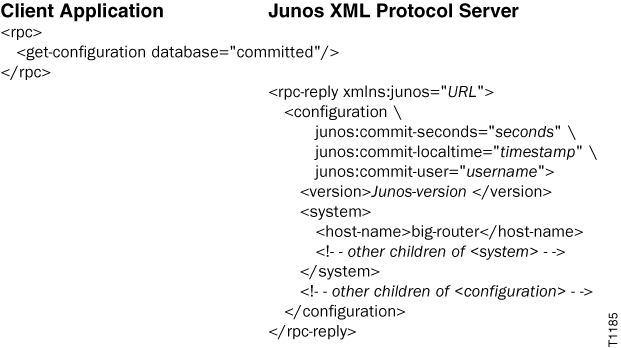
Example: Request the Active Configuration
The following example requests the entire committed configuration. In actual output, the Junos-version variable is replaced by a value such as 20.4R1 for the initial version of Junos OS Release 20.4.
Specify the Output Format for Configuration Data to Return
A Junos XML protocol client application can use the
<get-configuration> operation to request configuration
data from a Junos device. A client application can include the optional
format attribute to specify the format of the configuration
data. The application can request configuration data in the following formats:
-
Junos XML format (default)
-
Formatted ASCII text
-
Configuration mode commands
-
JSON
Client applications use Junos XML tag elements to represent the configuration
elements to display regardless of which output format they request. The
format attribute controls the format of the Junos XML
protocol server’s output only.
The following sections: outline how to specify the format of the requested
configuration data; discuss the attributes that you can combine with the
format attribute; and provide a sample request.
- Request Junos XML Format
- Request Formatted ASCII Text
- Request Configuration Mode Commands
- Request JSON Format
- Include Additional Attributes
- Example: Request Configuration Data and Specify the Format
Request Junos XML Format
To request that the Junos XML protocol server return configuration data in Junos
XML-tagged output, a client application includes the
format="xml" attribute in the
<get-configuration> tag or omits the
format attribute. The Junos XML protocol server returns
Junos XML-tagged output by default, except when the compare
attribute is included.
<rpc>
        <get-configuration/>

    <!-- OR -->

        <get-configuration>
            <!-- tag elements for the configuration elements to return -->
        </get-configuration>
</rpc>
When the application requests Junos XML tag elements, the Junos XML protocol
server encloses its output in <rpc-reply> and
<configuration> elements.
<rpc-reply xmlns:junos="URL">
    <configuration attributes>
        <!-- Junos XML tag elements representing configuration elements -->
    </configuration>
</rpc-reply>
Request Formatted ASCII Text
To request that the Junos XML protocol server return configuration data as
formatted ASCII text, a client application includes the
format="text" attribute in the
<get-configuration> tag.
<rpc>
        <get-configuration format="text"/>

    <!-- OR -->

        <get-configuration format="text">
            <!-- tag elements for the configuration elements to return -->
        </get-configuration>
</rpc>
When the application requests formatted ASCII output, the Junos XML protocol
server encloses the data in <rpc-reply> and
<configuration-text> elements. The server formats the
data in the same way that the CLI show configuration command
displays configuration data. The output uses the newline character, tabs,
braces, and square brackets to indicate the hierarchical relationships between
configuration statements.
<rpc-reply xmlns:junos="URL">
    <configuration-text>
        <!-- formatted ASCII configuration statements -->
    </configuration-text>
</rpc-reply>
Request Configuration Mode Commands
To request configuration data formatted as configuration mode commands, a client
application includes the format="set" attribute in the
<get-configuration> tag.
<rpc>
        <get-configuration format="set"/>

    <!-- OR -->

        <get-configuration format="set">
            <!-- tag elements for the configuration elements to return -->
        </get-configuration>
</rpc>
When the application requests configuration mode commands, the Junos XML protocol
server encloses the data in <rpc-reply> and
<configuration-set> elements. The server formats the
data in the same way that the CLI
show configuration | display set command displays
configuration data.
<rpc-reply xmlns:junos="URL">
    <configuration-set>
        <!-- configuration mode commands -->
    </configuration-set>
</rpc-reply>
Request JSON Format
To return configuration data in JSON format, a client application includes the
format="json" attribute in the
<get-configuration> tag.
<rpc>
        <get-configuration format="json"/>

    <!-- OR -->

        <get-configuration format="json">
            <!-- tag elements for the configuration elements to return -->
        </get-configuration>
</rpc>
When the application requests JSON format, the Junos XML protocol server encloses
the JSON data in an <rpc-reply> element.
<rpc-reply xmlns:junos="URL">
     <!-- JSON configuration data -->
</rpc-reply>
Junos OS configuration data emitted in JSON format does not enclose integers in quotation marks.
Include Additional Attributes
The format attribute can be combined with one or more of the
following other attributes in the <get-configuration/>
tag:
-
comparewith the valuecompare="rollback"and withrollback="0". When you compare the candidate configuration to the active configuration (rollback="0"), you can display the differences in formats other than text by including the appropriate value for theformatattribute in the request. -
commit-scriptswith a value ofcommit-scripts="apply"orcommit-scripts="apply-no-transients". Thecommit-scripts="view"attribute returns Junos XML-tagged output by default, even if theformat="text"attribute is included, since this is the format that is input to commit scripts. -
database, which is described in Specify the Database Source for Configuration Data to Return. -
inheritand optionallygroupsandinterface-ranges, which are described in Specify How to Display Inheritance for Configuration Groups and Interface Ranges Using the Junos XML Protocol.
The change and identifier indicators appear only in Junos XML-tagged output and
JSON output. Thus, you cannot combine the format="text"
attribute with the changed attribute or include it after
requesting an indicator for identifiers.
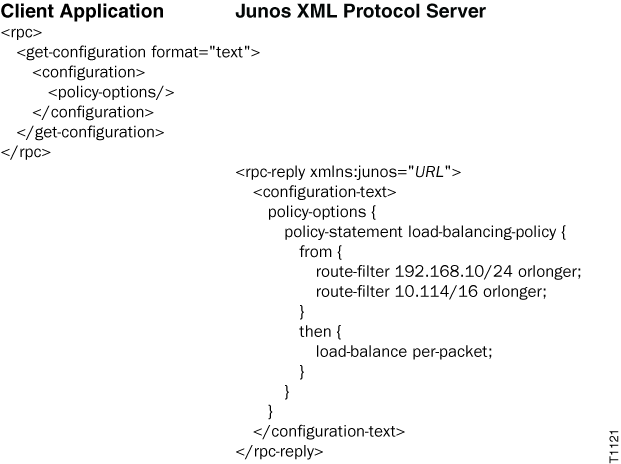
Example: Request Configuration Data and Specify the Format
The
following example requests the [edit policy-options] hierarchy
level in the candidate configuration as formatted ASCII output.
Specify the Scope of the Configuration Data to Return
A Junos XML protocol client application can use the
<get-configuration> operation to request configuration
data from a Junos device. A client application can request the entire configuration
or specific portions of the configuration from the device. To request the complete
or partial configuration, a client application encloses the
<get-configuration> operation in an
<rpc> element and includes the appropriate child tag
elements.
For information about specifying the scope of the configuration information to return, see the following topics:
-
Request the Complete Configuration Using the Junos XML Protocol
-
Request All Configuration Objects of a Specific Type Using the Junos XML Protocol
-
Request a Specific Number of Configuration Objects Using the Junos XML Protocol
-
Request Identifiers for Configuration Objects of a Specific Type Using the Junos XML Protocol
-
Request a Single Configuration Object Using the Junos XML Protocol
-
Request Subsets of Configuration Objects Using Regular Expressions
-
Request Multiple Configuration Elements Using the Junos XML Protocol