
Use Case: Next Generation Firewall
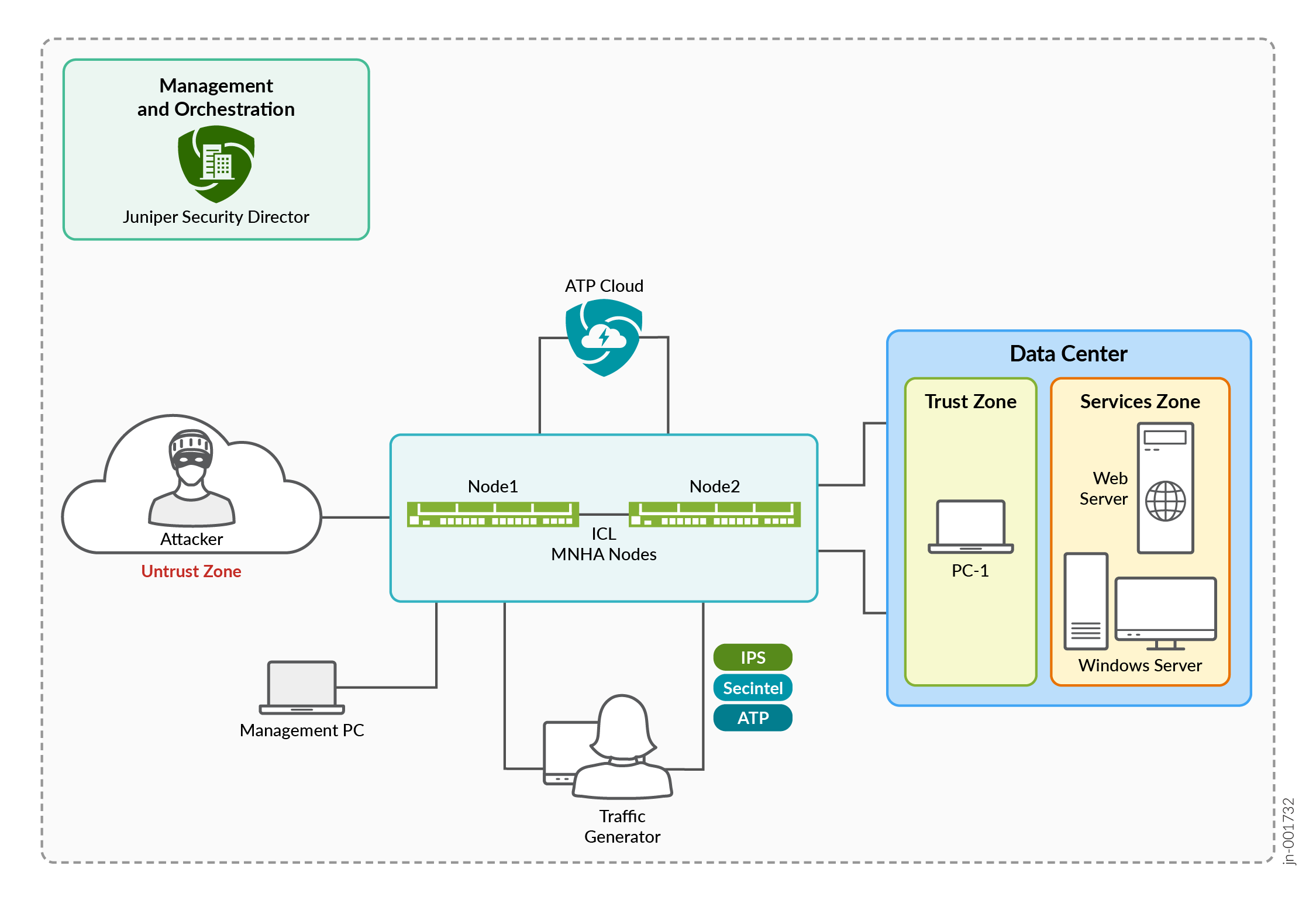
This topology represents a Juniper AI-Native Next-Generation Firewall (NGFW) deployment in a Multi-Node High Availability (MNHA) environment designed to validate threat prevention, high availability, and centralized security management.
Overview
The environment consists of an Untrust Zone, Trust Zone, and Services Zone connected through a pair of MNHA firewall nodes (Node1 and Node2) synchronized over an Inter-Chassis Link (ICL). The setup protects data center resources, including client systems, web applications, and Windows-based services.
Traffic originating from trusted users or external attackers is inspected by the NGFW cluster before reaching protected servers. The firewall enforces security policies and integrates with advanced security services such as:
- Intrusion Prevention System (IPS) for exploit detection and prevention. You need a valid license to download and install a signature database.
- Security Intelligence (SecIntel) for reputation-based threat blocking. You need a SecIntel license to function.
- Advanced Threat Prevention (ATP) for detecting sophisticated and unknown threats. You need a HPE Networking ATP Cloud license before configuring HPE Networking ATP Cloud on your firewall .
Ensure that you have a valid license to use the advanced Layer 7 security features. For more information, see Software Licenses for SRX Series Firewalls.
The MNHA cluster is connected to HPE Networking ATP Cloud, which provides cloud-based threat intelligence and malware analysis to enhance threat detection capabilities.
Administration and orchestration are performed through HPE Networking Security Director, which provides centralized policy management, monitoring, logging, and reporting. A management PC is used for operational access and verification, while a traffic generator simulates legitimate and malicious traffic to validate security enforcement and system behavior.
Overall, this topology demonstrates how an AI-Native NGFW deployed in an MNHA architecture delivers high availability, advanced threat protection, centralized management, and secure access to data center resources.
Topology
Deploy the SRX400 firewall to provision the data center next-generation firewall architecture.
Baseline Configurations
To configure this use case in your data center environment, see Next-Generation Firewall JVD Configuration.
Interfaces
Configure interfaces for ICL, internal traffic, and for external traffic on the firewall.
set interfaces ge-0/0/2 description "Connected to Bundle to North"
set interfaces ge-0/0/2 unit 0 family inet address 10.10.40.18/29
set interfaces ge-0/0/4 description "Connected Bundle to South"
set interfaces ge-0/0/4 unit 0 family inet address 10.10.40.66/29
set interfaces ge-0/0/0 description "connected as Inter Chassis Link"
set interfaces ge-0/0/0 unit 0 family inet address 10.10.40.33/29
set interfaces ge-0/0/8 description "connected to internet for SKY/UTM server reachability"

set interfaces lo0 unit 0 family inet address 10.16.1.2/32
set interfaces lo0 unit 0 family inet address 10.16.1.4/32
Security Policies
Configure security policies for the inspection profiles.
set security policies from-zone SOUTH to-zone NORTH policy SOUTH-NORTH-ANY match source-address any
set security policies from-zone SOUTH to-zone NORTH policy SOUTH-NORTH-ANY match destination-address any
set security policies from-zone SOUTH to-zone NORTH policy SOUTH-NORTH-ANY match application any
set security policies from-zone SOUTH to-zone NORTH policy SOUTH-NORTH-ANY then permit application-services idp-policy Web_Server
set security policies from-zone SOUTH to-zone NORTH policy SOUTH-NORTH-ANY then permit application-services utm-policy websense-UTM
set security policies from-zone SOUTH to-zone NORTH policy SOUTH-NORTH-ANY then permit application-services security-intelligence-policy SKY-SECINTEL-USERS-POLICY
set security policies from-zone SOUTH to-zone NORTH policy SOUTH-NORTH-ANY then permit application-services advanced-anti-malware-policy SKY-AAMW-USERS-POLICY
set security policies from-zone SOUTH to-zone NORTH policy SOUTH-NORTH-ANY then log session-init
set security policies from-zone SOUTH to-zone NORTH policy SOUTH-NORTH-ANY then log session-close
Security Zones
Configure security zones as required for your network along with necessary host-inbound system services.
set security zones security-zone NORTH host-inbound-traffic system-services ping
set security zones security-zone NORTH host-inbound-traffic protocols bfd
set security zones security-zone NORTH interfaces ge-0/0/2.0
set security zones security-zone SOUTH host-inbound-traffic system-services ssh
set security zones security-zone SOUTH host-inbound-traffic protocols bfd
set security zones security-zone SOUTH interfaces ge-0/0/4.0
set security zones security-zone ha-link host-inbound-traffic system-services ssh
set security zones security-zone ha-link host-inbound-traffic protocols bfd
set security zones security-zone ha-link interfaces ge-0/0/0.0
set security zones security-zone internet host-inbound-traffic system-services ping
set security zones security-zone internet host-inbound-traffic protocols bfd
set security zones security-zone internet interfaces ge-0/0/8.0
set security zones security-zone NORTH interfaces lo0.0
AAMW
Create the HPE Networking ATP Cloud policy.
set services advanced-anti-malware connection url https://srxapi-tpm.preprod.sky.junipersecurity.net
set services advanced-anti-malware connection authentication tls-profile aamw-ssl
set services advanced-anti-malware policy SKY-AAMW-USERS-POLICY http inspection-profile OATH_US_USERS_PROFILE
set services advanced-anti-malware policy SKY-AAMW-USERS-POLICY http action permit
set services advanced-anti-malware policy SKY-AAMW-USERS-POLICY http notification log
set services advanced-anti-malware policy SKY-AAMW-USERS-POLICY verdict-threshold 7
set services advanced-anti-malware policy SKY-AAMW-USERS-POLICY fallback-options action permit
set services advanced-anti-malware policy SKY-AAMW-USERS-POLICY fallback-options notification log
Security Intelligence
Create a security intelligence profile.
set services security-intelligence url https://cloudfeeds-tpm.preprod.sky.junipersecurity.net/api/manifest.xml
set services security-intelligence authentication tls-profile aamw-ssl
set services security-intelligence profile CC-PROFILE category CC
set services security-intelligence profile CC-PROFILE rule US-OATH-USERS match threat-level 8
set services security-intelligence profile CC-PROFILE rule US-OATH-USERS match threat-level 9
set services security-intelligence profile CC-PROFILE rule US-OATH-USERS match threat-level 10
set services security-intelligence profile CC-PROFILE rule US-OATH-USERS then action block
set services security-intelligence profile CC-PROFILE rule US-OATH-USERS then log
set services security-intelligence profile CC-PROFILE default-rule then action permit
set services security-intelligence profile CC-PROFILE default-rule then log
set services security-intelligence profile IH-PROFILE category Infected-Hosts
set services security-intelligence profile IH-PROFILE rule US-OATH-USERS match threat-level 10
set services security-intelligence profile IH-PROFILE rule US-OATH-USERS match threat-level 8
set services security-intelligence profile IH-PROFILE rule US-OATH-USERS match threat-level 9
set services security-intelligence profile IH-PROFILE rule US-OATH-USERS then action block
set services security-intelligence profile IH-PROFILE rule US-OATH-USERS then log
set services security-intelligence profile IH-PROFILE default-rule then action permit
set services security-intelligence profile IH-PROFILE default-rule then log
set services security-intelligence policy SKY-SECINTEL-USERS-POLICY CC CC-PROFILE
set services security-intelligence policy SKY-SECINTEL-USERS-POLICY Infected-Hosts IH-PROFILE
IDP
Create an IDP policy for packet capture.
set security idp idp-policy Web_Server rulebase-ips rule 1 match from-zone any
set security idp idp-policy Web_Server rulebase-ips rule 1 match source-address any
set security idp idp-policy Web_Server rulebase-ips rule 1 match to-zone any
set security idp idp-policy Web_Server rulebase-ips rule 1 match destination-address any
set security idp idp-policy Web_Server rulebase-ips rule 1 match application default
set security idp idp-policy Web_Server rulebase-ips rule 1 match attacks predefined-attack-groups "IP - Major"
set security idp idp-policy Web_Server rulebase-ips rule 1 match attacks predefined-attack-groups "IP - Critical"
set security idp idp-policy Web_Server rulebase-ips rule 1 match attacks predefined-attack-groups "TCP - Critical"
set security idp idp-policy Web_Server rulebase-ips rule 1 match attacks predefined-attack-groups "TCP - Major"
set security idp idp-policy Web_Server rulebase-ips rule 1 then action drop-packet
set security idp idp-policy Web_Server rulebase-ips rule 1 then notification log-attacks
set security idp idp-policy Web_Server rulebase-ips rule 2 match from-zone any
set security idp idp-policy Web_Server rulebase-ips rule 2 match source-address any
set security idp idp-policy Web_Server rulebase-ips rule 2 match to-zone any
set security idp idp-policy Web_Server rulebase-ips rule 2 match destination-address any
set security idp idp-policy Web_Server rulebase-ips rule 2 match application default
set security idp idp-policy Web_Server rulebase-ips rule 2 match attacks predefined-attack-groups "DNS - Critical"
set security idp idp-policy Web_Server rulebase-ips rule 2 match attacks predefined-attack-groups "DNS - Major"
set security idp idp-policy Web_Server rulebase-ips rule 2 then action drop-packet
UTM
Configure web filtering.
Ensure to manully generate the self-signed client certificate. For more information, see Configure PKI and SSL Forward Proxy to Authenticate Users.
set security utm default-configuration web-filtering type ng-juniper
set security utm default-configuration web-filtering ng-juniper cache timeout 30
set security utm default-configuration web-filtering ng-juniper cache size 4k
set security utm default-configuration web-filtering ng-juniper server tls-profile ssl_init_prof
set security utm feature-profile web-filtering ng-juniper profile CUSTOM_USERS fallback-settings default log-and-permit
set security utm feature-profile web-filtering ng-juniper profile CUSTOM_USERS fallback-settings server-connectivity log-and-permit
set security utm feature-profile web-filtering ng-juniper profile CUSTOM_USERS fallback-settings timeout log-and-permit
set security utm feature-profile web-filtering ng-juniper profile CUSTOM_USERS fallback-settings too-many-requests log-and-permit
set security utm utm-policy websense-UTM web-filtering http-profile CUSTOM_USERS
set security utm custom-objects url-pattern custom_url1 value www.google.com
set security utm custom-objects custom-url-category custom_url_category1 value custom_url1
set services ssl initiation profile ssl_init_prof client-certificate utmcert
set security utm feature-profile web-filtering ng-juniper profile CUSTOM_USERS fallback-settings default log-and-permit
set security utm feature-profile web-filtering ng-juniper profile CUSTOM_USERS fallback-settings server-connectivity log-and-permit
set security utm feature-profile web-filtering ng-juniper profile CUSTOM_USERS fallback-settings timeout log-and-permit
set security utm feature-profile web-filtering ng-juniper profile CUSTOM_USERS fallback-settings too-many-requests log-and-permit
set security utm utm-policy custom_url_category_policy1 web-filtering http-profile custom_url_category_profile1
MNHA
Configure MNHA. For more information, see Example: Configure Multinode High Availability on SRX Series Firewalls.
set chassis high-availability local-id 4
set chassis high-availability local-id local-ip 10.10.40.33
set chassis high-availability peer-id 8 peer-ip 10.10.40.34
set chassis high-availability peer-id 8 interface ge-0/0/5.0
set chassis high-availability peer-id 8 liveness-detection minimum-interval 4999
set chassis high-availability peer-id 8 liveness-detection multiplier 3
set chassis high-availability services-redundancy-group 1 mode active-backup
set chassis high-availability services-redundancy-group 1 deployment-type routing
set chassis high-availability services-redundancy-group 1 peer-id 8
set chassis high-availability services-redundancy-group 1 activeness-probe dest-ip 10.16.1.1
set chassis high-availability services-redundancy-group 1 activeness-probe dest-ip src-ip 10.16.1.2
set chassis high-availability services-redundancy-group 1 monitor bfd-liveliness 10.10.40.17 src-ip 10.10.40.18
set chassis high-availability services-redundancy-group 1 monitor bfd-liveliness 10.10.40.17 session-type singlehop
set chassis high-availability services-redundancy-group 1 monitor bfd-liveliness 10.10.40.17 interface ge-0/0/2.0
set chassis high-availability services-redundancy-group 1 monitor bfd-liveliness 10.10.40.65 src-ip 10.10.40.66
set chassis high-availability services-redundancy-group 1 monitor bfd-liveliness 10.10.40.65 session-type singlehop
set chassis high-availability services-redundancy-group 1 monitor bfd-liveliness 10.10.40.65 interface ge-0/0/4.0
set chassis high-availability services-redundancy-group 1 monitor interface ge-0/0/2
set chassis high-availability services-redundancy-group 1 monitor interface ge-0/0/4
set chassis high-availability services-redundancy-group 1 active-signal-route 10.16.2.1
set chassis high-availability services-redundancy-group 1 backup-signal-route 10.16.2.2
set chassis high-availability services-redundancy-group 1 prefix-list SRG1_PFX
set chassis high-availability services-redundancy-group 1 activeness-priority 200
Verification and Monitoring
Verify your configurations using the following commands:
show chassis high-availability information detailshow chassis high-availability services-redundancy-group 1show chassis high-availability data-plane statisticsshow services advanced-anti-malware statusshow services advanced-anti-malware statisticsshow services security-intelligence update statusshow services security-intelligence statisticsshow security utm web-filtering statusshow security utm web-filtering statisticsshow security idp security-package-versionshow security idp status