
Help us improve your experience.
Let us know what you think.
Do you have time for a two-minute survey?
Help us improve your experience.
Let us know what you think.
Do you have time for a two-minute survey?
Access the HTTP File Download page from the Monitor > Files > HTTP File Downloads menu.
Benefits of viewing HTTP File Downloads
Allows you to view a compiled list of suspicious downloaded files all in one place, including the signature, threat level, URL, and malware type.
Allows you to filter the list of downloaded files by individual categories.
Export Data—Click the Export button to download file scanning data to a CSV file. You are prompted to narrow the data download to a selected time-frame.
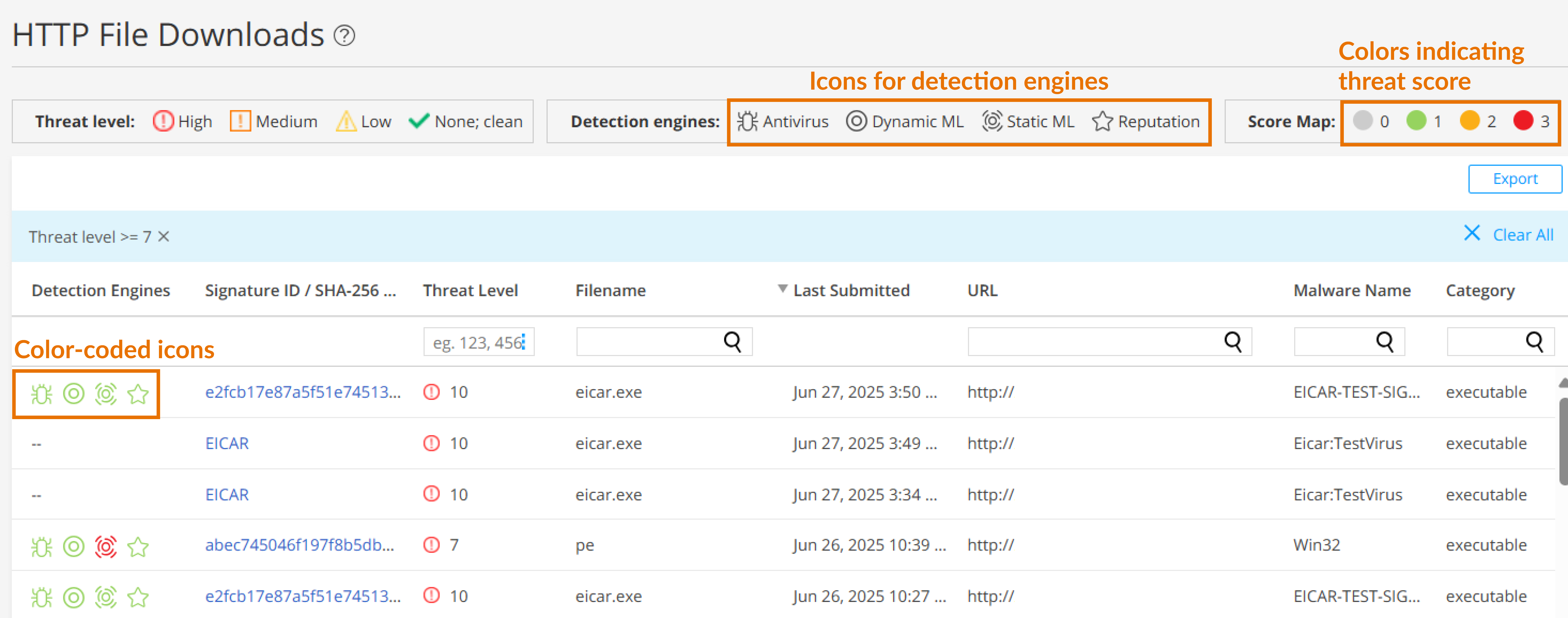
The following information is available on this page.
|
Field |
Definition |
|---|---|
| Detection Engine |
Displays color-coded icons representing the confidence levels of various detection engines in identifying threats. For more information more detection engines, see Table 2. The color codes signify the following threat severities:
To view the threat severity score assigned by each detection engine, hover over the icons. |
|
Signature ID / SHA-256 / ML Hit |
If applicable, the Signature ID uniquely identifies the signature that is triggered for this detection; otherwise, the SHA-256 file hash is displayed.
|
|
Threat Level |
The threat score. Click the three vertical dots at the top of the column to filter the information in the page by threat level. |
|
Filename |
The name of the file, including the extension |
|
Last Submitted |
The time and date of the most recent file scan |
|
URL |
The URL from which the file originated |
|
Malware Name |
The name of file and the type of threat if the verdict is positive for malware. Examples: Trojan, Application, Adware. If the file is not malware, the verdict is "clean." |
|
Category |
The type of file Examples: PDF, executable, document |
|
Detection Engines |
Description |
|---|---|
|
Antivirus |
|
|
Dynamic ML |
|
| Static ML |
|
|
Reputation |
File hash reputation |