
Contact Customer Support and Return the Chassis or Components
If you need to return a hardware component to Juniper Networks, Inc., you need a Return Material Authorization (RMA) number and the equipment serial number. Contact the Juniper Networks Technical Assistance Center (JTAC) to generate an RMA number. You may also need to locate the chassis or component details using the CLI or by referring to equipment labels. You then pack and ship the component.
Contact Customer Support
You can contact JTAC 24 hours a day, seven days a week.
| Chat |
Use the Ask me icon at the bottom right of the Support page. Don't see the Chat icon? Read this. |
| Web | |
| Telephone |
U.S. and Canada (Toll-free): 1-888-314-JTAC (5822) Outside the US or Canada, use the relevant country number listed on the regional tabs listed on the Contact Support page. Federal Government Support: 1-833-900-1454 |
We do not support opening new cases through e-mail. Please use one of the above options to contact JTAC.
Return a Hardware Component to Juniper Networks
If a hardware component fails, contact Juniper Networks to obtain an RMA number. We use this number to track the returned material at the factory and to return the repaired or new components to you, as needed.
Do not return any component to Juniper Networks unless you have first obtained an RMA number. Juniper Networks reserves the right to refuse shipments that do not have an RMA number. Refused shipments are returned to you by collect freight.
To return a defective hardware component:
- Determine the part number and the serial number of the defective component. See Locate the Serial Number of the QFX5250 or its Components.
- Obtain an RMA number from JTAC as described in Request a Return Material Authorization.
- For a liquid-cooled model with leakage, ensure that you follow the leakage maintenance steps. See Leakage Maintenance for the QFX5250 Switch.
- Pack the component for shipment. See Guidelines for Packing and Shipping Hardware Components.
For more information about return and repair policies, see the Support page at https://support.juniper.net/support/.
Locate the Serial Number of the QFX5250 or its Components
If the device is operational and you can access the CLI, you can list serial numbers for the device and for some components with a CLI command. If you don’t have access to the CLI, or if the serial number for the component doesn’t appear in the command output, you can locate the serial number ID label on the device or component.
If you want to find the serial number ID label on a component, you need to remove the component from the device chassis.
- List the QFX5250 Chassis and Component Details Using the CLI
- Locate the Chassis Serial Number ID Label
List the QFX5250 Chassis and Component Details Using the CLI
To list the device and device components and their serial numbers, enter the
show chassis hardware command on the CLI. The following is
an output of show chassis hardware for the QFX5250 liquid-cooled model:
host@device> show chassis hardware
Hardware inventory:
Item             Version  Part number  Serial number     Description
Chassis                                LA5125AN0010      QFX5250-64OE-L
PSM 0                     BUILTIN      252001312         DC-DC 1600W Brick
PSM 1                     BUILTIN      252001311         DC-DC 1600W Brick
PSM 2                     BUILTIN      252001326         DC-DC 1600W Brick
Routing Engine 0          BUILTIN      BUILTIN           RE-QFX5250-64OE-L
CB 0             REV 03   650-191066   LA5125AN0010      QFX5250-64OE-L
FPC 0                     BUILTIN      BUILTIN           QFX5250-64OE-L
  PIC 0                   BUILTIN      BUILTIN           64x1600G-OSFP
    Xcvr 0       REV 01   740-189762   1W1CMMAB0100F     ORHS-1600G-DR8-2-P
    Xcvr 1       REV 01   740-189762   1G1CMMAB0201T     ORHS-1600G-DR8-2-P
    Xcvr 2       REV 01   740-189762   1G1CMMAA3702W     ORHS-1600G-DR8-2-P
    Xcvr 3       REV 01   740-189762   1W1CMMAA49003     ORHS-1600G-DR8-2-P
    Xcvr 4       REV 01   740-189762   1W1CMMAA4800S     ORHS-1600G-DR8-2-P
    Xcvr 5       REV 01   740-189762   1W1CMMAA4800R     ORHS-1600G-DR8-2-P
    Xcvr 6       REV 01   740-189762   1W1CMMAB01004     ORHS-1600G-DR8-2-P
    Xcvr 7       REV 01   740-189762   1G1CMMAA37032     ORHS-1600G-DR8-2-P
    Xcvr 8       REV 01   740-189762   1G1CMMAB0201G     ORHS-1600G-DR8-2-P
    Xcvr 9       REV 01   740-189762   1W1CMMAA44013     ORHS-1600G-DR8-2-P
    Xcvr 10      REV 01   740-189762   1W1CMMAA51005     ORHS-1600G-DR8-2-P
    Xcvr 11      REV 01   740-189762   1G1CMMAA3701L     ORHS-1600G-DR8-2-P
    Xcvr 12      REV 01   740-189762   1G1CMMAB0200W     ORHS-1600G-DR8-2-P
    Xcvr 13      REV 01   740-189762   1W1CMMAB01003     ORHS-1600G-DR8-2-P
    Xcvr 14      REV 01   740-189762   1W1CMMAB01005     ORHS-1600G-DR8-2-P
    Xcvr 15      REV 01   740-189762   1G1CMMAB02005     ORHS-1600G-DR8-2-P
    Xcvr 16      REV 01   740-189762   1G1CMMAA37021     ORHS-1600G-DR8-2-P
    Xcvr 17      REV 01   740-189762   1G1CMMAA3703H     ORHS-1600G-DR8-2-P
    Xcvr 18      REV 01   740-189762   1G1CMMAB0200H     ORHS-1600G-DR8-2-P
    Xcvr 19      REV 01   740-189762   1G1CMMAB0201J     ORHS-1600G-DR8-2-P
    Xcvr 20      REV 01   740-189762   1G1CMMAB0201Z     ORHS-1600G-DR8-2-P
    Xcvr 21      REV 01   740-189762   1W1CMMAB01007     ORHS-1600G-DR8-2-P
    Xcvr 22      REV 01   740-189762   1G1CMMAB02026     ORHS-1600G-DR8-2-P
    Xcvr 23      REV 01   740-189762   1G1CMMAB0200L     ORHS-1600G-DR8-2-P
    Xcvr 24      REV 01   740-189762   1W1CMMAB01009     ORHS-1600G-DR8-2-P
    Xcvr 25      REV 01   740-189762   1W1CMMAA4800H     ORHS-1600G-DR8-2-P
    Xcvr 26      REV 01   740-189762   1W1CMMAB01001     ORHS-1600G-DR8-2-P
    Xcvr 27      REV 01   740-189762   1W1CMMAB01006     ORHS-1600G-DR8-2-P
    Xcvr 28      REV 01   740-189762   1W1CMMAB01008     ORHS-1600G-DR8-2-P
    Xcvr 29      REV 01   740-189762   1G1CMMAB02001     ORHS-1600G-DR8-2-P
    Xcvr 30      REV 01   740-189762   1G1CMMAB0201S     ORHS-1600G-DR8-2-P
    Xcvr 31      REV 01   740-189762   1G1CMMAB0200G     ORHS-1600G-DR8-2-P
    Xcvr 32      REV 01   740-189762   1G1CMMAB02007     ORHS-1600G-DR8-2-P
    Xcvr 33      REV 01   740-189762   1G1CMMAB02028     ORHS-1600G-DR8-2-P
    Xcvr 34      REV 01   740-189762   1G1CMMAB0201E     ORHS-1600G-DR8-2-P
    Xcvr 35      REV 01   740-189762   1W1CMMAB01002     ORHS-1600G-DR8-2-P
    Xcvr 36      REV 01   740-189762   1G1CMMAB02014     ORHS-1600G-DR8-2-P
    Xcvr 37      REV 01   740-189762   1G1CMMAB0201K     ORHS-1600G-DR8-2-P
    Xcvr 38      REV 01   740-189762   1G1CMMAA47009     ORHS-1600G-DR8-2-P
    Xcvr 39      REV 01   740-189762   1G1CMMAB0200Z     ORHS-1600G-DR8-2-P
    Xcvr 40      REV 01   740-189762   1G1CMMAB02015     ORHS-1600G-DR8-2-P
    Xcvr 41      REV 01   740-189762   1G1CMMAB0202L     ORHS-1600G-DR8-2-P
    Xcvr 42      REV 01   740-189762   1G1CMMAB0201D     ORHS-1600G-DR8-2-P
    Xcvr 43      REV 01   740-189762   1G1CMMAA3900B     OSFP-1600G-DR8-2-P
    Xcvr 44      REV 01   740-189762   1G1CMMAB0200P     ORHS-1600G-DR8-2-P
    Xcvr 45      REV 01   740-189762   1W1CMMAA49002     ORHS-1600G-DR8-2-P
    Xcvr 46      REV 01   740-189762   1G1CMMAB02020     ORHS-1600G-DR8-2-P
    Xcvr 47      REV 01   740-189762   1G1CMMAB0201Q     ORHS-1600G-DR8-2-P
    Xcvr 48      REV 01   740-189762   1G1CMMAB02023     ORHS-1600G-DR8-2-P
    Xcvr 49      REV 01   740-189762   1W1CMMAA49006     ORHS-1600G-DR8-2-P
    Xcvr 50      REV 01   740-189762   1W1CMMAB0100B     ORHS-1600G-DR8-2-P
    Xcvr 51      REV 01   740-189762   1G1CMMAB0201X     ORHS-1600G-DR8-2-P
    Xcvr 52      REV 01   740-189762   1W1CMMAA4800J     ORHS-1600G-DR8-2-P
    Xcvr 53      REV 01   740-189762   1W1CMMAB0100A     ORHS-1600G-DR8-2-P
    Xcvr 54      REV 01   740-189762   1W1CMMAA44011     ORHS-1600G-DR8-2-P
    Xcvr 55      REV 01   740-189762   1G1CMMAA3900J     OSFP-1600G-DR8-2-P
    Xcvr 56      REV 01   740-189762   1W1CMMAA44027     ORHS-1600G-DR8-2-P
    Xcvr 57      REV 01   740-189762   1W1CMMAA49001     ORHS-1600G-DR8-2-P
    Xcvr 58      REV 01   740-189762   1W1CMMAA4800T     ORHS-1600G-DR8-2-P
    Xcvr 59      REV 01   740-189762   1W1CMMAB0100D     ORHS-1600G-DR8-2-P
    Xcvr 60      REV 01   740-189762   1W1CMMAB0100E     ORHS-1600G-DR8-2-P
    Xcvr 61      REV 01   740-189762   1G1CMMAB0200Q     ORHS-1600G-DR8-2-P
    Xcvr 62      REV 01   740-189762   1W1CMMAA51001     ORHS-1600G-DR8-2-P
    Xcvr 63      REV 01   740-189762   1G1CMMAB0202A     ORHS-1600G-DR8-2-P
    Xcvr 64      REV 01   740-021308   AQQ0K0E           SFP+-10G-SR
Locate the Chassis Serial Number ID Label
You can find the chassis serial number in either the show chassis
hardware command output or physically on top of the QFX5250 switch. See Figure 1.
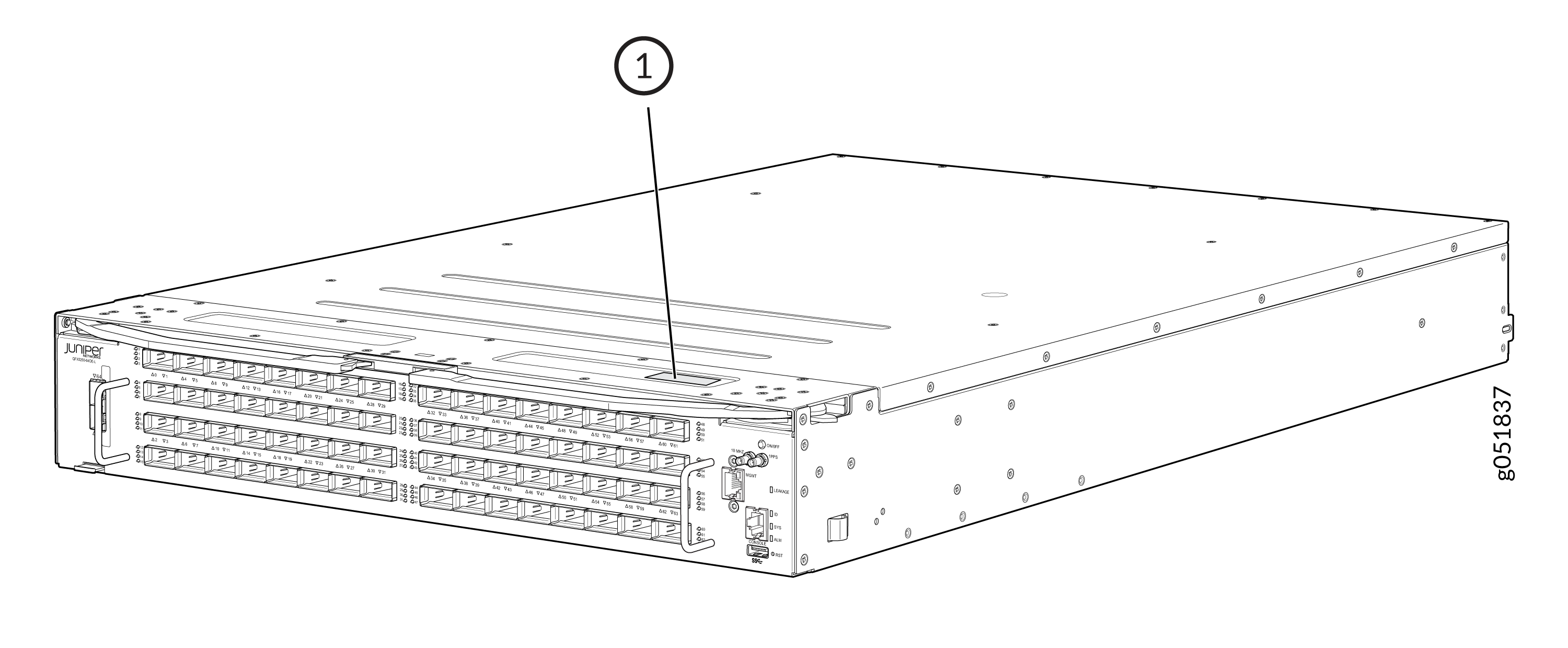
1 — Serial number ID label |
You can also find the serial number on the pull out tab on the front panel of the device.
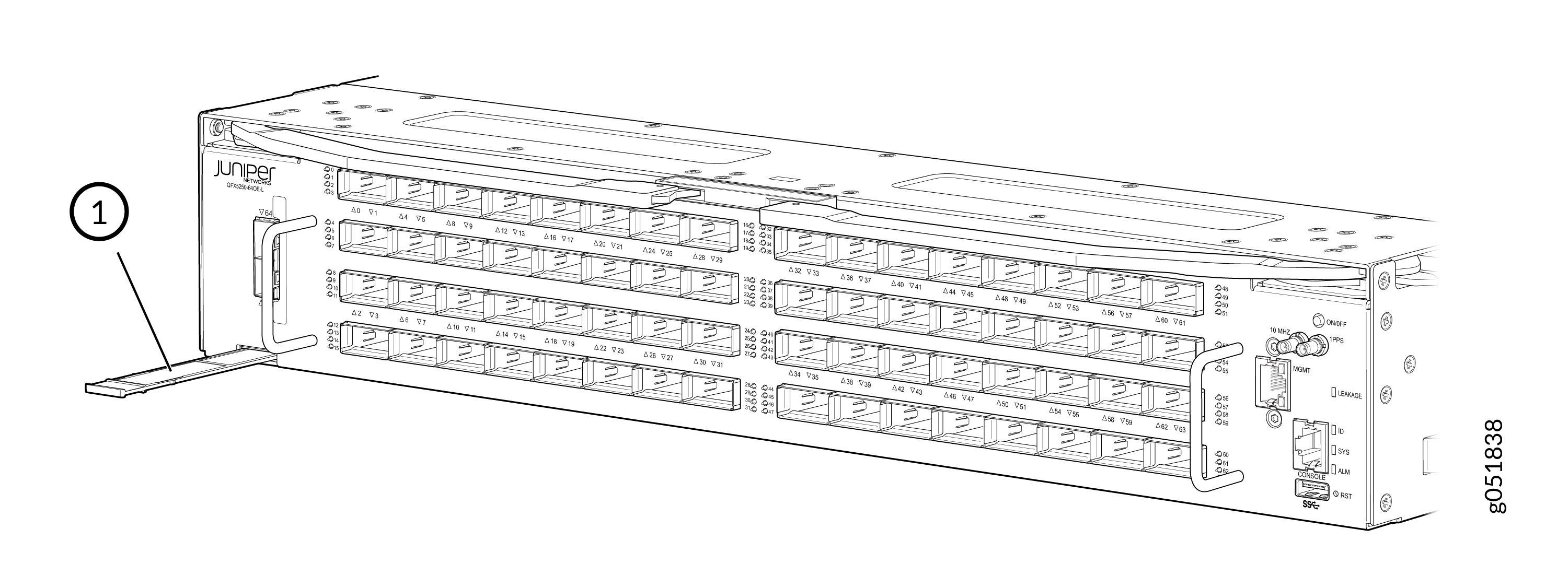
1 — Serial number ID label |
Remove the Solid-State Drives for RMA on a QFX5250 Switch
Request a Return Material Authorization
If you are returning a device or hardware component to Juniper Networks for repair or replacement, obtain an RMA number from JTAC.
Before you request an RMA from JTAC, be prepared to provide the following information:
-
Your existing service request number, if you have one
-
Serial number of the device or component
-
Your name, organization name, telephone number, fax number, and shipping address
-
Details of the failure or problem
-
Type of activity you were performing on the device when the problem occurred
-
Configuration data displayed by one or more
showcommands
If you're contacting JTAC by telephone:
-
To report a new incident, press the star (*) key to be routed to the next available support engineer.
-
To enquire about an existing case, enter your 12-digit service request number followed by the pound (#) key.
The support representative validates your request and issues an RMA number for return of the device or component.
Guidelines for Packing and Shipping Hardware Components
When you return the chassis or components:
- Make sure to adequately protect them with packing materials. Pack them properly to prevent the pieces from moving around the carton.
- Use the original shipping materials, if they are available.
- Place the individual components in antistatic bags.
- Write the RMA number on the exterior of the box to ensure proper tracking.