Connect the MX301 and MX301-M to Power
Connect the MX301 and MX301-M to power by performing the following steps. Take safety precautions to prevent equipment damage and personal injury
Ground the MX301 and MX301-M
To meet safety and electromagnetic interference (EMI) requirements and to ensure proper operation, you must connect the MX301 and MX301-M to an earth ground before you connect it to power.
Before you connect an earth ground to the protective earthing terminal of the device, ensure that a licensed electrician attaches an appropriate grounding terminal to the grounding cable. Using a grounding cable with an incorrectly attached terminal can damage the device.
You must install the router in a restricted-access location and ensure that the chassis is always properly grounded. The router has a two-hole protective grounding 73 terminal on the rear panel. Under all circumstances, use this grounding connection to ground the chassis. For AC and HVAC/HVDC-powered systems, you must also use the grounding wire in the power cord along with the two-hole protective grounding lug connection. This tested system meets or exceeds all applicable EMC regulatory requirements with the two-hole protective grounding terminal.
Before connecting the device to an earth ground, ensure that you have the following parts and tools:
-
An electrostatic discharge (ESD) grounding strap (provided).
-
Terminal lug (provided)—Panduit LCD6-14AF-L terminal lug or an equivalent lug are sized for 6 AWG (4.11 mm²) power source cables. The 2-hole terminal lug connects to the grounding point located at the rear panel of the MX301 and MX301-M.
-
Grounding cable for your device (not provided)—The grounding cable must be 6 AWG (4.11 mm²) stranded wire and rated 90 °C or according to local electrical code.
-
A Phillips (+) screwdriver, number 2 to tighten the screw (not provided).
You must install heat-shrink tubing insulation around the crimped section of the power source cables and lugs.
Under all circumstances, use the chassis grounding point to ground the chassis to earth ground.
To ground the MX301 and MX301-M:
-
Wrap and fasten one end of the ESD grounding strap around your wrist. Connect
the other end to the ESD point on the chassis.
Figure 1: Chassis ESD Point
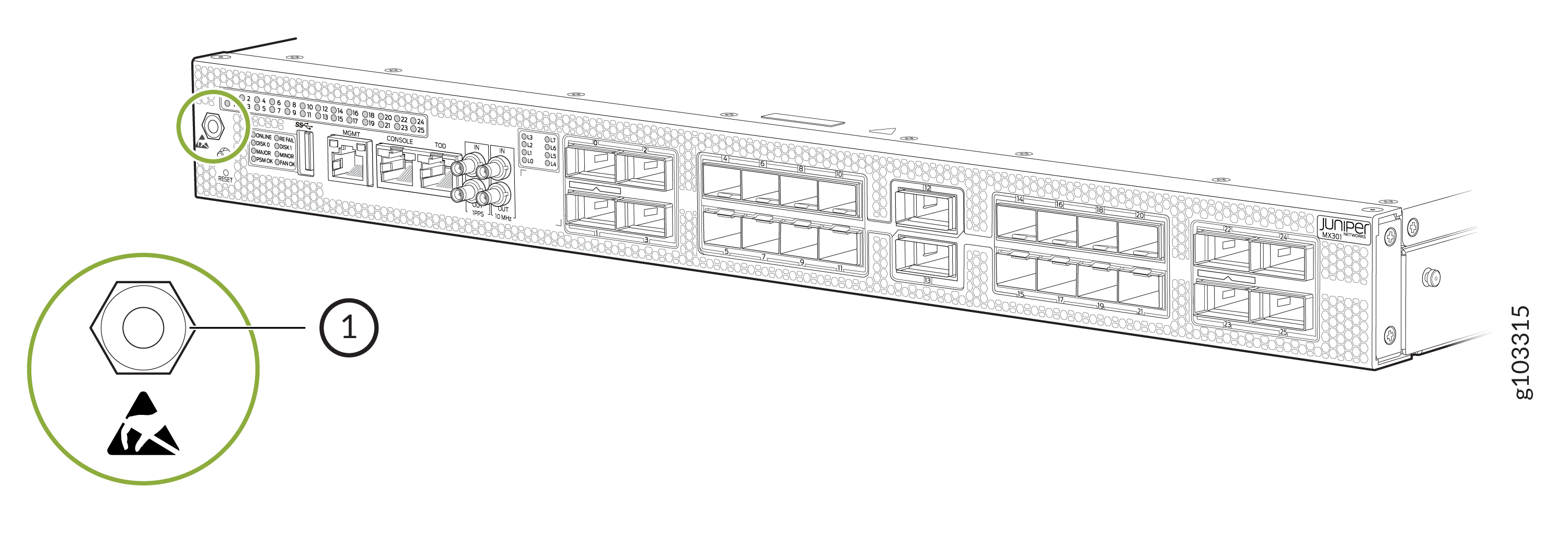 1—
1—ESD point
-
Using the Phillips screwdriver, remove the screws from the chassis grounding
point.
Figure 2: Grounding Point on the MX301 and MX301-M
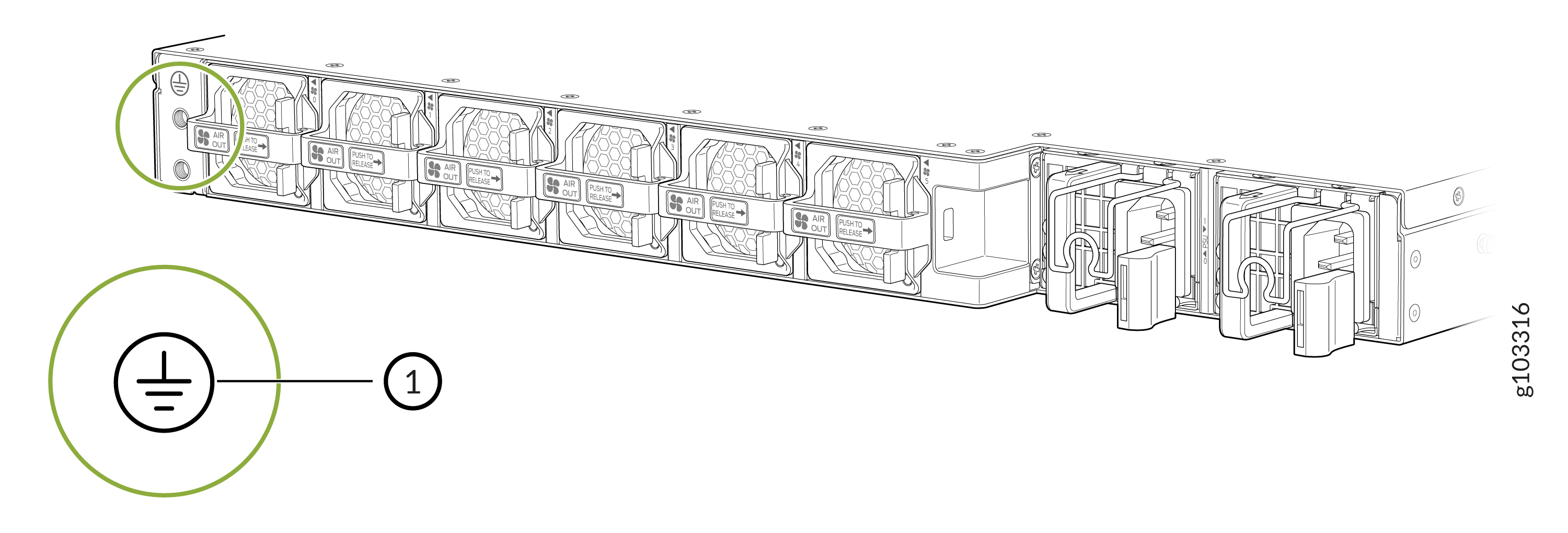 1—
1—Grounding point
-
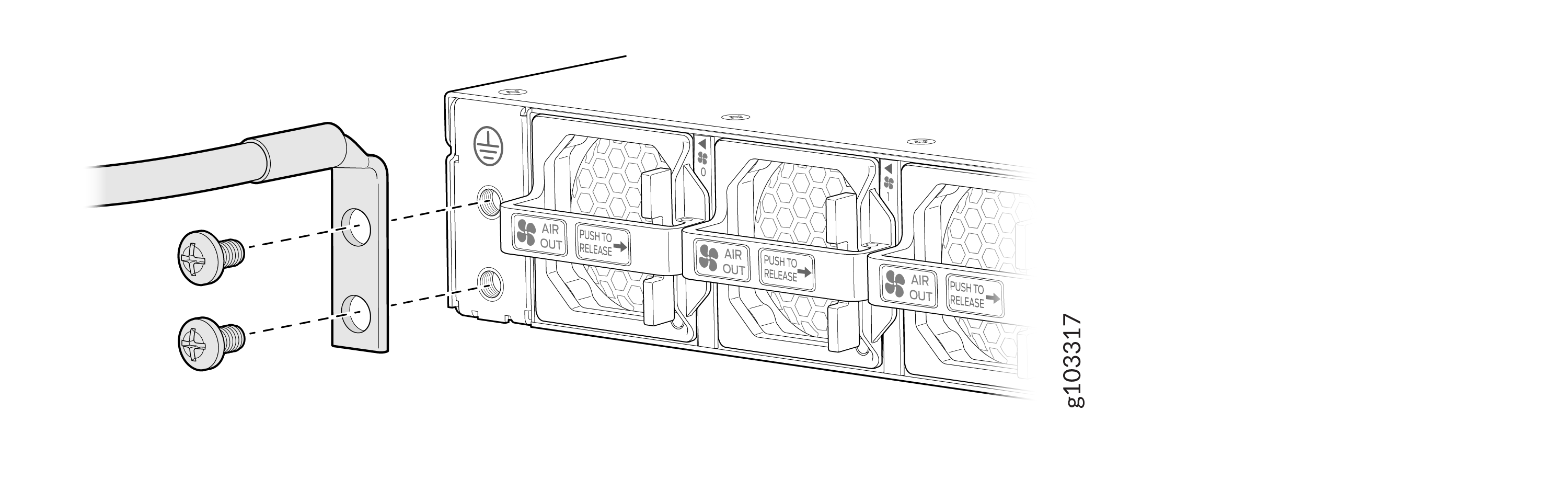
Secure the terminal lug attached to the other end of the ground cable to the
chassis grounding point. Use the screws that you removed from the chassis
grounding point in the earlier step.
Figure 3: Connect the Terminal Lugs to the MX301 and MX301-M
Install Heat-Shrink Tubing on a Power Cable
-
Shrink the tubing with a heat gun. Ensure that you heat all sides of the tubing evenly
so that it shrinks around the cable tightly.
CAUTION:
Do not overheat the tubing.
Figure 4: Install Heat-Shrink Tubing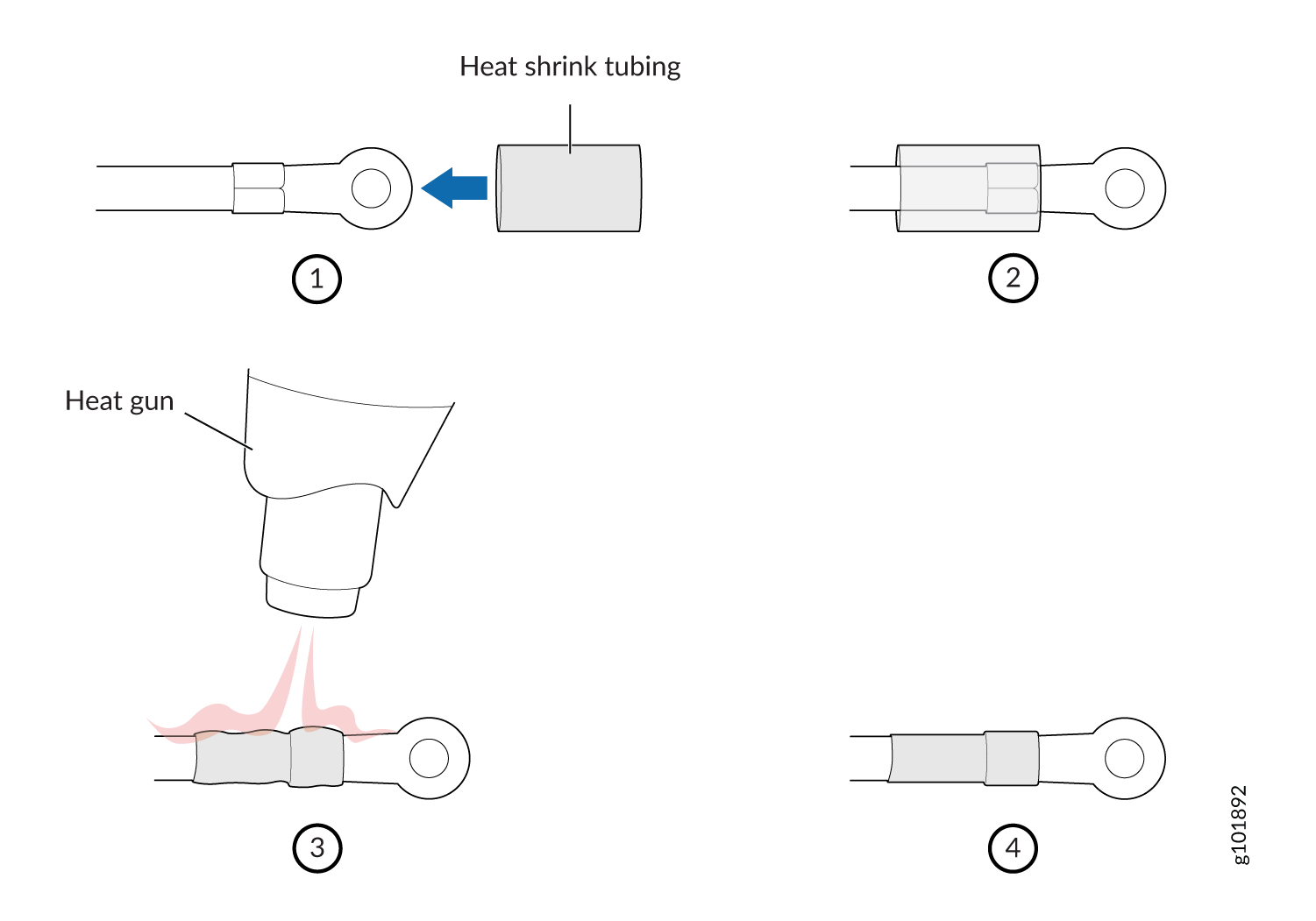
Connect AC Power to the MX301 and MX301-M
Power supply units (PSUs) in the MX301 and MX301-M are hot-removable and hot-insertable field-replaceable units (FRUs) with support for 1+1 redundancy. You can remove and replace a redundant PSU without powering off the MX301 and MX301-M or disrupting the device functions.
Do not mix AC, DC, and HVAC/DC power supplies in the same chassis.
Before you begin to connect AC power to the device:
-
Ensure that you have connected the chassis to an earth ground (see Ground the MX301 and MX301-M).
-
Ensure that you have a power cord appropriate for your geographical location available to connect AC power to the device.
-
Ensure that you familiarize yourself with AC Power Electrical Safety Guidelines and Action to Take After an Electrical Accident.
-
Ensure that you have taken the necessary precautions to prevent electrostatic discharge (ESD) damage.
-
Ensure that you have an ESD grounding strap.
-
If not already installed, install the PSUs in the device (see Replace an AC PSU on the MX301 and MX301-M).
Connect the JPSU-850W-AC-AFO to Power
This topic guides you through the steps to connect the JPSU-850W-AC-AFO AC PSU to power.
To connect the JPSU-850W-AC-AFO to power:
-
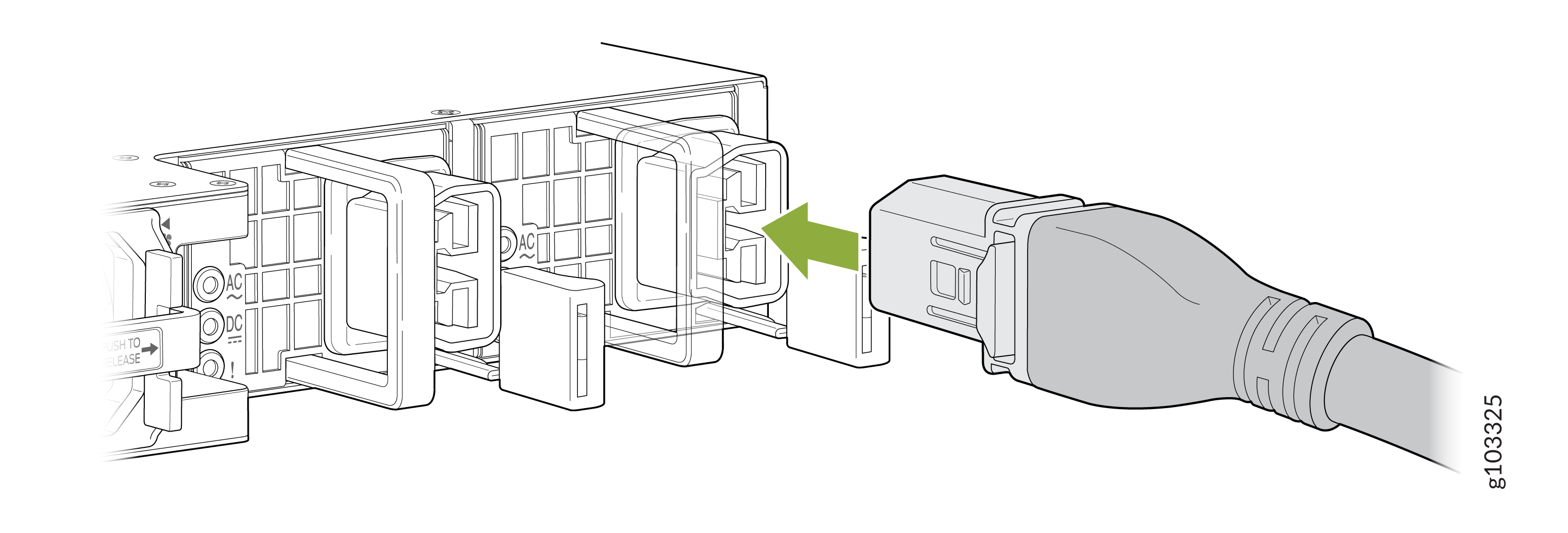
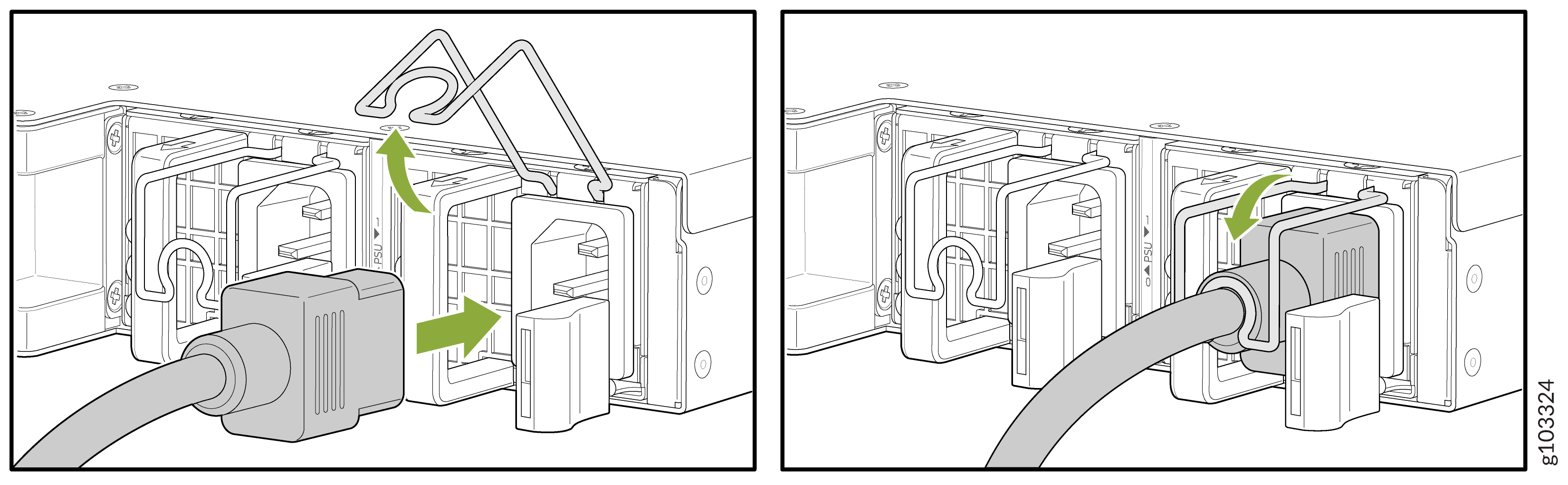
Pull down the power cord retainer onto the power cord.
Figure 5: Connect power cord to the MX301 and MX301-M AC PSU
Connect DC Power to the MX301 and MX301-M
Power supply units (PSUs) in the MX301 and MX301-M are hot-removable and hot-insertable field-replaceable units (FRUs) with support for 1+1 redundancy. You can remove and replace a redundant PSU without powering off the MX301 and MX301-M or disrupting the device functions.
Do not mix AC, DC, and HVAC/DC power supplies in the same chassis.
Before you begin to connect DC power to the device:
-
Ensure that you have connected the chassis to an earth ground (see Ground the MX301 and MX301-M).
-
Ensure that you familiarize yourself with DC Power Electrical Safety Guidelines and Action to Take After an Electrical Accident.
-
Ensure that you have taken the necessary precautions to prevent electrostatic discharge (ESD) damage.
-
Ensure that you have an ESD grounding strap.
-
If not already installed, install the PSUs in the device (see Replace a DC PSU on the MX301 and MX301-M).
You connect DC power to MX301 and MX301-M by attaching power cables from the external DC power sources to the terminal studs on the power supply faceplates. The power cables for the DC PSUs are rated at 14 AWG or as permitted by the local code.
Connect the JPSU-850W-DC-AFO to Power
This topic guides you through the steps to connect the JPSU-850W-DC-AFO DC PSU to power.
To connect the JPSU-850W-DC-AFO to power:
-
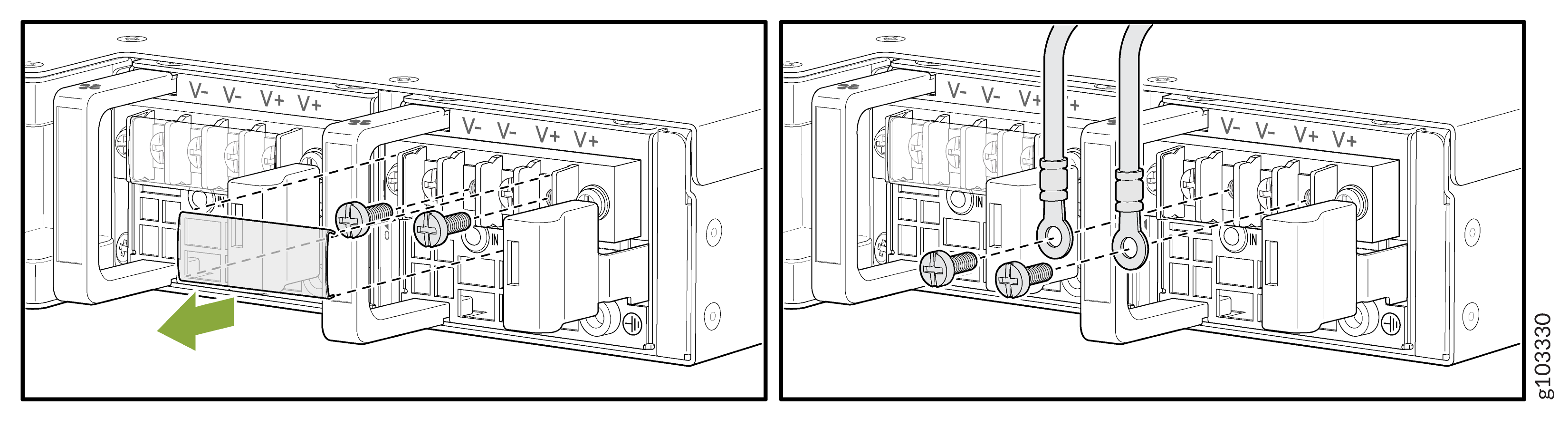
Secure each power cable ring terminal to the terminals with the square washers and the
screws. Apply between 23 in.-lb (2.6 Nm) and 25 in.-lb (2.8 Nm) of torque to each
screw.
Figure 6: Connect Power Cable Ring Terminal to the MX301 and MX301-M DC PSU Terminal
-
Secure each positive (+) DC source power cable lug to an RTN (return) terminal.
-
Secure each negative (–) DC source power cable lug to a -48 V (input) terminal.
Note:Connect each power cable to a dedicated external circuit breaker. We recommend that you use a circuit breaker rated at 20 A through 25 A for 80 VDC, or as permitted by the local code.
-
Connect HVAC/DC Power to the MX301 and MX301-M
Power supply units (PSUs) in the MX301 and MX301-M are hot-removable and hot-insertable field-replaceable units (FRUs) with support for 1+1 redundancy. You can remove and replace a redundant PSU without powering off the MX301 and MX301-M or disrupting the device functions. The HVAC/DC PSU will automatically detect whether there is HVAC or HVDC input voltage and manage the power accordingly.
Do not mix AC, DC, and HVAC/DC power supplies in the same chassis.
Before you begin to connect HVAC or HVDC power to the device:
-
Ensure that you have connected the chassis to an earth ground (see Ground the MX301 and MX301-M).
-
Ensure that you familiarize yourself with Action to Take After an Electrical Accident.
-
Ensure that you have taken the necessary precautions to prevent electrostatic discharge (ESD) damage.
-
Ensure that you have an ESD grounding strap.
-
If not already installed, install the PSUs in the device (see Replace an HVAC/DC PSU on the MX301 and MX301-M).
Connect the JPSU-850W-HV-AFO to Power
This topic guides you through the steps to connect the JPSU-850W-HV-AFO HVAC or HVDC PSU to power.
-
Insert the HVAC/DC power cord firmly into the power inlet of the HVAC/DC PSU.
Figure 7: Connect Power Cord to the MX301 and MX301-M HVAC/DC PSU