
このページで
外部ユーザー認証(CLI手順)
概要
この設定の安全性は高く、ドメインログインと同じユーザー名とパスワードを使用できるほか、ファイアウォール管理者とやり取りすることなく認証情報の変更や復旧も可能です。また、パスワードを頻繁に変更する必要があるため、管理者のワークロードも少なくなります。この設定を使用してユーザーを認証することをお勧めします。
図 1 に示すように、インターフェイス、ゾーン、セキュリティ ポリシーなど、SRX シリーズ ファイアウォールの基本的な設定が完了していることを想定しています。
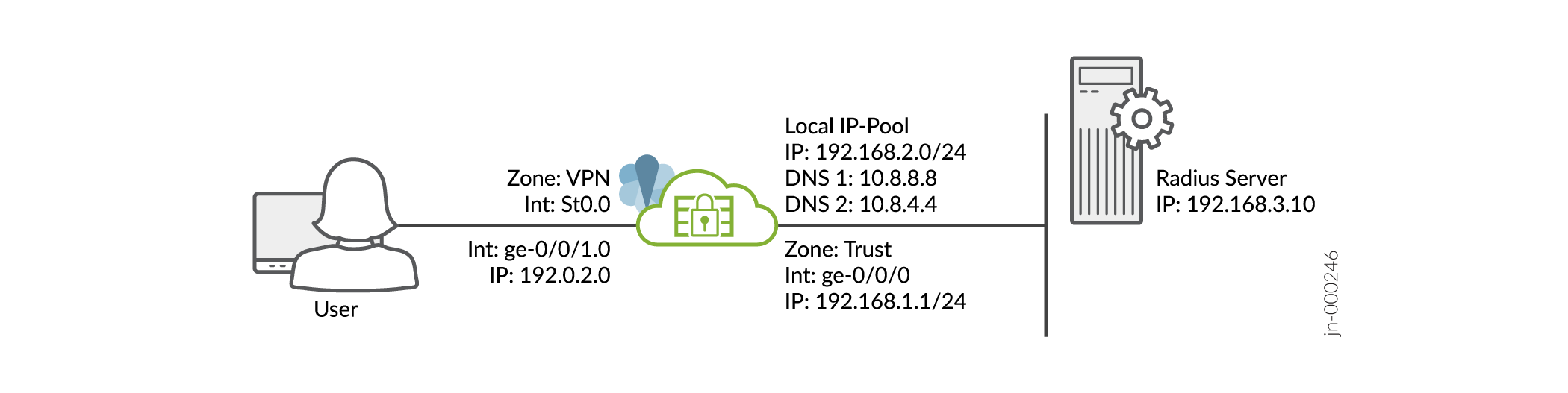
前提条件については、 システム要件を参照してください。
SRXシリーズファイアウォールは、デフォルトのシステム生成証明書の代わりに、署名された証明書または自己署名証明書のいずれかを使用していることを確認する必要があります。Juniper Secure Connectの設定を開始する前に、以下のコマンドを実行して証明書をSRXシリーズファイアウォールにバインドする必要があります。
user@host# set system services web-management https pki-local-certificate <cert_name>
例えば:
user@host# set system services web-management https pki-local-certificate SRX_Certificate
SRX_Certificateが CA または自己署名証明書から取得した証明書です。
CLI クイックコンフィギュレーション
SRX シリーズ ファイアウォールでこの例を迅速に設定するには、以下のコマンドをコピーしてテキスト ファイルに貼り付け、改行を削除し、ネットワーク構成に合わせて必要な詳細を変更した後、[edit] 階層レベルの CLI にコマンドをコピー アンド ペーストします。
[edit]
user@host#
set security ike proposal JUNIPER_SECURE_CONNECT authentication-method pre-shared-keys
set security ike proposal JUNIPER_SECURE_CONNECT dh-group group19

set security ike proposal JUNIPER_SECURE_CONNECT encryption-algorithm aes-256-gcm
set security ike proposal JUNIPER_SECURE_CONNECT lifetime-seconds 28800
set security ike policy JUNIPER_SECURE_CONNECT mode aggressive
set security ike policy JUNIPER_SECURE_CONNECT proposals JUNIPER_SECURE_CONNECT
set security ike policy JUNIPER_SECURE_CONNECT pre-shared-key ascii-text "$9$yYJeMXVwgUjq7-jqmfn6rev"
set security ike gateway JUNIPER_SECURE_CONNECT dynamic hostname ra.example.com
set security ike gateway JUNIPER_SECURE_CONNECT dynamic ike-user-type group-ike-id
set security ike gateway JUNIPER_SECURE_CONNECT ike-policy JUNIPER_SECURE_CONNECT
set security ike gateway JUNIPER_SECURE_CONNECT dead-peer-detection optimized
set security ike gateway JUNIPER_SECURE_CONNECT dead-peer-detection interval 10
set security ike gateway JUNIPER_SECURE_CONNECT dead-peer-detection threshold 5
set security ike gateway JUNIPER_SECURE_CONNECT version v1-only
set security ike gateway JUNIPER_SECURE_CONNECT aaa access-profile Juniper_Secure_Connect
set security ike gateway JUNIPER_SECURE_CONNECT tcp-encap-profile SSL-VPN
set security ike gateway JUNIPER_SECURE_CONNECT external-interface ge-0/0/0
set security ike gateway JUNIPER_SECURE_CONNECT local-address 192.0.2.0

set security ipsec proposal JUNIPER_SECURE_CONNECT encryption-algorithm aes-256-gcm
set security ipsec proposal JUNIPER_SECURE_CONNECT lifetime-seconds 3600
set security ipsec policy JUNIPER_SECURE_CONNECT perfect-forward-secrecy keys group19
set security ipsec policy JUNIPER_SECURE_CONNECT proposals JUNIPER_SECURE_CONNECT
set security ipsec vpn JUNIPER_SECURE_CONNECT bind-interface st0.0

set security ipsec vpn JUNIPER_SECURE_CONNECT ike gateway JUNIPER_SECURE_CONNECT
set security ipsec vpn JUNIPER_SECURE_CONNECT ike ipsec-policy JUNIPER_SECURE_CONNECT
set security ipsec vpn JUNIPER_SECURE_CONNECT traffic-selector ts-1 local-ip 0.0.0.0/0
set security ipsec vpn JUNIPER_SECURE_CONNECT traffic-selector ts-1 remote-ip 0.0.0.0/0
set security remote-access profile ra.example.com ipsec-vpn JUNIPER_SECURE_CONNECT
set security remote-access profile ra.example.com access-profile Juniper_Secure_Connect
set security remote-access profile ra.example.com client-config JUNIPER_SECURE_CONNECT
set security remote-access profile ra.example.com options multi-access
set security remote-access client-config JUNIPER_SECURE_CONNECT connection-mode manual
set security remote-access client-config JUNIPER_SECURE_CONNECT dead-peer-detection interval 60
set security remote-access client-config JUNIPER_SECURE_CONNECT dead-peer-detection threshold 5


set access address-assignment pool Juniper_Secure_Connect_Addr-Pool family inet network 192.168.2.0/24
set access address-assignment pool Juniper_Secure_Connect_Addr-Pool family inet range Range low 192.168.2.11
set access address-assignment pool Juniper_Secure_Connect_Addr-Pool family inet range Range high 192.168.2.100
set access address-assignment pool Juniper_Secure_Connect_Addr-Pool family inet xauth-attributes primary-dns 10.8.8.8/32
set access address-assignment pool Juniper_Secure_Connect_Addr-Pool family inet xauth-attributes primary-wins 192.168.4.10/32
set access profile Juniper_Secure_Connect authentication-order radius
set access profile Juniper_Secure_Connect address-assignment pool Juniper_Secure_Connect_Addr-Pool
set access profile Juniper_Secure_Connect radius-server 192.168.3.10 port 1812
set access profile Juniper_Secure_Connect radius-server 192.168.3.10 secret "$9$JSUi.QF/0BEP5BEcyW8ZUj"
set access profile Juniper_Secure_Connect radius-server 192.168.3.10 timeout 5
set access profile Juniper_Secure_Connect radius-server 192.168.3.10 retry 3
set access firewall-authentication web-authentication default-profile Juniper_Secure_Connect

set services ssl termination profile Juniper_SCC-SSL-Term-Profile server-certificate JUNIPER_SECURE_CONNECT(RSA)
set security tcp-encap profile SSL-VPN ssl-profile Juniper_SCC-SSL-Term-Profile
set security policies from-zone trust to-zone VPN policy JUNIPER_SECURE_CONNECT-1 match source-address any
set security policies from-zone trust to-zone VPN policy JUNIPER_SECURE_CONNECT-1 match destination-address any
set security policies from-zone trust to-zone VPN policy JUNIPER_SECURE_CONNECT-1 match application any
set security policies from-zone trust to-zone VPN policy JUNIPER_SECURE_CONNECT-1 then permit
set security policies from-zone trust to-zone VPN policy JUNIPER_SECURE_CONNECT-1 then log session-close
set security policies from-zone VPN to-zone trust policy JUNIPER_SECURE_CONNECT-2 match source-address any
set security policies from-zone VPN to-zone trust policy JUNIPER_SECURE_CONNECT-2 match destination-address any
set security policies from-zone VPN to-zone trust policy JUNIPER_SECURE_CONNECT-2 match application any
set security policies from-zone VPN to-zone trust policy JUNIPER_SECURE_CONNECT-2 then permit
set security policies from-zone VPN to-zone trust policy JUNIPER_SECURE_CONNECT-2 then log session-close

set interfaces ge-0/0/0 unit 0 family inet address 192.0.2.0/24
set interfaces ge-0/0/1 unit 0 family inet address 198.51.100.0/24
set interfaces st0 unit 0 family inet

set security zones security-zone trust host-inbound-traffic system-services all
set security zones security-zone trust host-inbound-traffic protocols all
set security zones security-zone trust interfaces ge-0/0/0.0
set security zones security-zone vpn host-inbound-traffic system-services all
set security zones security-zone vpn host-inbound-traffic protocols all
set security zones security-zone VPN interface st0.0
set security zones security-zone vpn interfaces ge-0/0/1.0
ステップバイステップの手順
コマンド ライン インターフェイスを使用して VPN 設定を構成するには、次の手順に従います。
動作モードから、 、 show access、 コマンドを入力して設定をshow securityshow services確認します。出力に意図した設定が表示されない場合は、この例の設定手順を繰り返して修正します。
[edit]
user@host> show security
   ike {
       proposal JUNIPER_SECURE_CONNECT {
           authentication-method pre-shared-keys;
           dh-group group19;
           encryption-algorithm aes-256-gcm;
           lifetime-seconds 28800;
       }
       policy JUNIPER_SECURE_CONNECT {
           mode aggressive;
           proposals JUNIPER_SECURE_CONNECT;
           pre-shared-key ascii-text "$9$oWZDk5Qnp0I.P0IEcvMaZU"; ## SECRET-DATA
       }
       gateway JUNIPER_SECURE_CONNECT {
           ike-policy JUNIPER_SECURE_CONNECT;
           dynamic {
               hostname ra.example.com;
               ike-user-type group-ike-id;
           }
           dead-peer-detection {
               optimized;
               interval 10;
               threshold 5;
           }
           external-interface ge-0/0/1;
           aaa {
               access-profile Juniper_Secure_Connect;
           }
           version v1-only;
           tcp-encap-profile SSL-VPN;
       }
   }
   ipsec {
       proposal JUNIPER_SECURE_CONNECT {


           encryption-algorithm aes-256-gcm;
           lifetime-seconds 3600;
       }
       policy JUNIPER_SECURE_CONNECT {
           perfect-forward-secrecy {
               keys group19;
           }
           proposals JUNIPER_SECURE_CONNECT;
       }
       vpn JUNIPER_SECURE_CONNECT {
           bind-interface st0.0;
           ike {
               gateway JUNIPER_SECURE_CONNECT;
               ipsec-policy JUNIPER_SECURE_CONNECT;
           }
           traffic-selector ts-1 {
               local-ip 0.0.0.0/0;
               remote-ip 0.0.0.0/0;
           }
       }
   }
   remote-access {
       profile ra.example.com {

           ipsec-vpn JUNIPER_SECURE_CONNECT;
           access-profile Juniper_Secure_Connect;
           client-config JUNIPER_SECURE_CONNECT;
       }
       client-config JUNIPER_SECURE_CONNECT {
           connection-mode manual;
           dead-peer-detection {
               interval 60;
               threshold 5;
           }
       }

   }
   policies {
       from-zone trust to-zone VPN {
           policy JUNIPER_SECURE_CONNECT-1 {
               match {
                   source-address any;
                   destination-address any;
                   application any;
               }
               then {
                   permit;
                   log {
                       session-close;
                   }
               }
           }
       }
       from-zone VPN to-zone trust {
           policy JUNIPER_SECURE_CONNECT-2 {
               match {
                   source-address any;
                   destination-address any;
                   application any;
               }
               then {
                   permit;
                   log {
                       session-close;
                   }
               }
           }
       }
   }
   tcp-encap {
       profile SSL-VPN {
           ssl-profile Juniper_SCC-SSL-Term-Profile;
       }
   }
[edit]
user@host> show access
  access {
      profile Juniper_Secure_Connect {
          authentication-order radius;
          address-assignment {
              pool Juniper_Secure_Connect_Addr-Pool;
          }
          radius-server {
              192.168.3.10 {
                  port 1812;
                  secret "$9$JSUi.QF/0BEP5BEcyW8ZUj"; ## SECRET-DATA
                  timeout 5;
                  retry 3;
              }
          }
      }
      address-assignment {
          pool Juniper_Secure_Connect_Addr-Pool {
              family inet {
                  network 192.168.2.0/24;
                  range Range {
                      low 192.168.2.11;
                      high 192.168.2.100;
                  }
                  xauth-attributes {
                      primary-dns 10.8.8.8/32;
                      primary-wins 192.168.4.10/32;
                  }
              }
          }
      }
      firewall-authentication {
          web-authentication {
              default-profile Juniper_Secure_Connect;
          }
      }
  }
[edit]
user@host> show services
   ssl {
       termination {
           profile Juniper_SCC-SSL-Term-Profile {
               server-certificate JUNIPER_SECURE_CONNECT(RSA);
           }
       }
   }
SSL 終端プロファイルに添付するサーバー証明書が既に存在することを確認します。
[edit]
user@host> show interfaces
ge-0/0/0 {
    unit 0 {
        family inet {
            address 192.0.2.0/24;
        }
    }
}
ge-0/0/1 {
    unit 0 {
        family inet {
            address 198.51.100.0/24;
        }
    }
}
st0 {
    unit 1 {
        family inet;
    }
}
[edit]
user@host> show security zones
security-zone trust {
    host-inbound-traffic {
        system-services {
            all;
        }
        protocols {
            all;
        }
    }
    interfaces {
        ge-0/0/0.0;
    }
}
security-zone vpn {
    host-inbound-traffic {
        system-services {
            all;
        }
        protocols {
            all;
        }
    }
    interfaces {
        st0.1;
        ge-0/0/1.0;
    }
}
デバイスで機能の設定が完了したら、設定モードからコミットを入力します。