
外部インターフェイス上のデュアルスタックトンネル
IPsec VPNのデュアルスタックトンネルの詳細については、こちらをご覧ください。
デュアルスタックトンネル(ピアへの単一の物理インターフェイスを介したパラレルIPv4およびIPv6トンネル)は、ルートベースのサイト間VPNでサポートされています。IPv4 と IPv6 の両方のアドレスで設定された物理インターフェイスは、同じピア上または異なるピア上の IPv4 および IPv6 ゲートウェイの外部インターフェイスとして同時に使用できます。
VPNトンネルモードについて
VPN トンネル モードでは、IPsec は、元の IP ヘッダーを含む元の IP データグラムを 2 番目の IP データグラム内にカプセル化します。外部 IP ヘッダーにはゲートウェイの IP アドレスが含まれ、内部ヘッダーには最終的な送信元 IP アドレスと宛先 IP アドレスが含まれます。外部および内部の IP ヘッダーは、IPv4 または IPv6 のプロトコル フィールドを持つことができます。SRXシリーズファイアウォールは、ルートベースのサイト間VPN用に4つのトンネルモードをサポートしています。
図 1に示すように、IPv4-in-IPv4トンネルは、IPv4パケットをIPv4パケット内にカプセル化します。外部ヘッダーと内部ヘッダーの両方のプロトコル フィールドは IPv4 です。
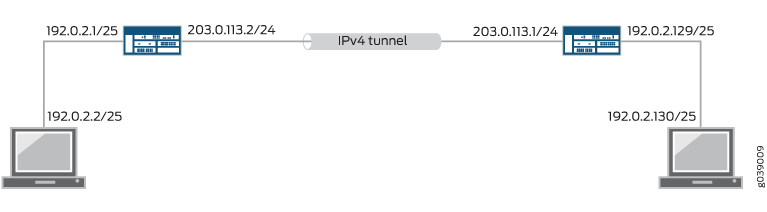
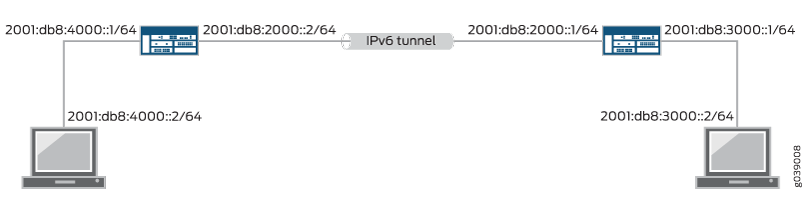
図 2に示すように、IPv6-in-IPv6 トンネルは、IPv6 パケットを IPv6 パケット内にカプセル化します。外部ヘッダーと内部ヘッダーの両方のプロトコル フィールドは IPv6 です。
IPv6-in-IPv4 トンネルは、 図 3 に示すように、IPv6 パケットを IPv4 パケット内にカプセル化します。外部ヘッダーのプロトコル フィールドは IPv4 で、内部ヘッダーのプロトコル フィールドは IPv6 です。
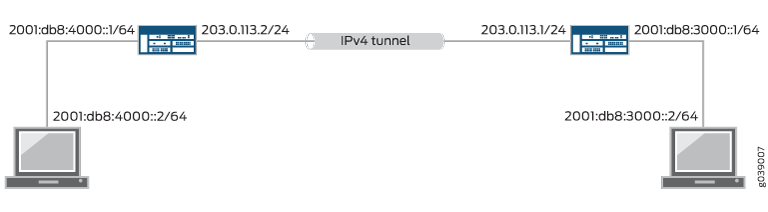
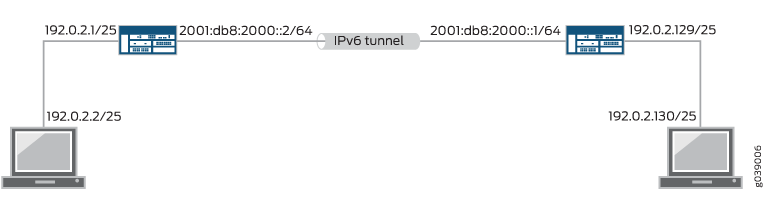
図 4に示すように、IPv4-in-IPv6 トンネルは、IPv4 パケットを IPv6 パケット内にカプセル化します。外部ヘッダーのプロトコル フィールドは IPv6 で、内部ヘッダーのプロトコル フィールドは IPv4 です。
1つのIPsec VPNトンネルで、IPv4とIPv6の両方のトラフィックを伝送できます。例えば、IPv4 トンネルは、IPv4-in-IPv4 トンネルモードと IPv6-in-IPv4 トンネルモードの両方で同時に動作できます。1つのIPsec VPNトンネル上でIPv4とIPv6の両方のトラフィックを許可するには、そのトンネルにバインドされたst0インターフェイスに family inet と family inet6の両方を設定する必要があります。
IPv4とIPv6の両方のアドレスで設定された物理インターフェイスは、ルートベースのサイト間VPNのピアへのパラレルIPv4およびIPv6トンネルの外部インターフェイスとして使用できます。この機能は デュアルスタックトンネル と呼ばれ、トンネルごとに個別のst0インターフェイスが必要です。
ポリシーベースのVPNでは、IPv6-in-IPv6が唯一のトンネルモードとしてサポートされます。IPv6 IPsec VPNを参照してください。
外部インターフェイス上のデュアルスタックトンネルについて
デュアルスタックトンネル(ピアへの単一の物理インターフェイスを介したパラレルIPv4およびIPv6トンネル)は、ルートベースのサイト間VPNでサポートされています。IPv4 と IPv6 の両方のアドレスで設定された物理インターフェイスは、同じピア上または異なるピア上の IPv4 および IPv6 ゲートウェイへの外部インターフェイスとして同時に使用できます。図 5では、物理インターフェイスreth0.0とge-0/0/0.1は、2つのデバイス間のパラレルIPv4およびIPv6トンネルをサポートしています。

図 5では、IPsec VPNトンネルごとに個別のセキュアトンネル(st0)インターフェイスを設定する必要があります。同じ st0 インターフェイスにバインドされているパラレル IPv4 および IPv6 トンネルはサポートされていません。
1つのIPsec VPNトンネルで、IPv4とIPv6の両方のトラフィックを伝送できます。例えば、IPv4 トンネルは、IPv4-in-IPv4 トンネルモードと IPv6-in-IPv4 トンネルモードの両方で同時に動作できます。1つのIPsec VPNトンネル上でIPv4とIPv6の両方のトラフィックを許可するには、そのトンネルにバインドされたst0インターフェイスに family inet と family inet6の両方を設定する必要があります。
VPN ピアへの同じ外部インターフェイスで同じアドレスファミリーの複数のアドレスが設定されている場合は、[edit security ike gateway gateway-name] 階層レベルで local-address を設定することをお勧めします。
local-address が設定されている場合、指定された IPv4 または IPv6 アドレスがローカル ゲートウェイ アドレスとして使用されます。物理外部インターフェイスに 1 つの IPv4 アドレスと 1 つの IPv6 アドレスしか設定されていない場合は、 local-address 設定する必要はありません。
local-address値は、SRXシリーズファイアウォール上のインターフェイスに設定されているIPアドレスである必要があります。local-addressIKEゲートウェイの外部インターフェイスに属することをお勧めします。local-address が IKE ゲートウェイの外部インターフェイスに属していない場合、インターフェイスは IKE ゲートウェイの外部インターフェイスと同じゾーンにあり、トラフィックを許可するようにゾーン内セキュリティ ポリシーを構成する必要があります。
local-address値とリモート IKE ゲートウェイ アドレスは、同じアドレス ファミリー(IPv4 または IPv6)に属している必要があります。
local-addressが設定されていない場合、ローカルゲートウェイアドレスはリモートゲートウェイアドレスに基づきます。リモートゲートウェイアドレスが IPv4 アドレスの場合、ローカルゲートウェイアドレスは外部物理インターフェイスのプライマリ IPv4 アドレスになります。リモートゲートウェイアドレスが IPv6 アドレスの場合、ローカルゲートウェイアドレスは外部物理インターフェイスのプライマリ IPv6 アドレスになります。
関連項目
例:外部インターフェイスを介したデュアルスタックトンネルの設定
この例では、ルートベースのサイト間VPNのために、単一の外部物理インターフェイスを介してピアにパラレルIPv4およびIPv6トンネルを設定する方法を示しています。
要件
始める前に、 VPNトンネルモードについてをお読みください。
この例で示す構成は、ルートベースのサイトツーサイト VPN でのみサポートされています。
概要
この例では、ローカルデバイス上の冗長イーサネットインターフェイスが、ピアデバイスへのパラレル IPv4 および IPv6 トンネルをサポートしています。
IPv4 トンネルは IPv6 トラフィックを伝送します。IPv6-in-IPv4トンネルモードで動作します。IPv4 トンネルにバインドされたセキュア トンネル インターフェイス st0.0 は、ファミリー inet6 でのみ設定されます。
IPv6 トンネルは、IPv4 と IPv6 の両方のトラフィックを伝送します。IPv4-in-IPv6 および IPv6-in-IPv6 の両方のトンネルモードで動作します。IPv6 トンネルにバインドされたセキュア トンネル インターフェイス st0.1 は、ファミリー inet とファミリー inet6 の両方で設定されます。
表 1 は、この例で使用されているフェーズ1のオプションを示しています。フェーズ 1 オプション設定には、IPv6 ピアに対する IKE ゲートウェイ設定と、IPv4 ピアに対する 2 つの IKE ゲートウェイ設定が含まれます。
オプション |
値 |
|---|---|
IKEプロポーザル |
ike_proposal |
認証方法 |
事前共有鍵 |
認証アルゴリズム |
MD5 |
暗号化アルゴリズム |
3DES CBC |
一生 |
3600秒 |
IKEポリシー |
ike_policy |
モード |
アグレッシブ |
IKEプロポーザル |
ike_proposal |
事前共有鍵 |
ASCII テキスト |
IPv6 IKE ゲートウェイ |
ike_gw_v6 |
IKEポリシー |
ike_policy |
ゲートウェイ アドレス |
2000::2 |
外部インターフェイス |
reth1.0 |
IKE バージョン |
IKEv2 |
IPv4 IKE ゲートウェイ |
ike_gw_v4 |
IKEポリシー |
ike_policy |
ゲートウェイ アドレス |
20.0.0.2 |
外部インターフェイス |
reth1.0 |
表 2 は、この例で使用されているフェーズ 2 のオプションを示しています。フェーズ 2 オプション設定には、IPv6 トンネル用と IPv4 トンネル用の 2 つの VPN 構成が含まれます。
オプション |
値 |
|---|---|
IPsecプロポーザル |
ipsec_proposal |
プロトコル |
ESP |
認証アルゴリズム |
HMAC SHA-1 96 |
暗号化アルゴリズム |
3DES CBC |
IPsecポリシー |
ipsec_policy |
プロポーザル |
ipsec_proposal |
IPv6 VPN |
test_s2s_v6 |
バインド インターフェイス |
st0.1 |
IKE ゲートウェイ |
ike_gw_v6 |
IKE IPsecポリシー |
ipsec_policy |
トンネルの確立 |
直ちに |
IPv4 VPN |
test_s2s_v4 |
バインド インターフェイス |
st0.0 |
IKE ゲートウェイ |
ike_gw_4 |
IKE IPsecポリシー |
ipsec_policy |
IPv6 ルーティング テーブルには、以下のスタティック ルートが設定されています。
IPv6トラフィックをst0.0を介して3000::1/128にルーティングします。
IPv6 トラフィックを st0.1 経由で 3000::2/128 にルーティングします。
デフォルト(IPv4)ルーティングテーブルでは、st0.1を介してIPv4トラフィックを30.0.0.0/24にルーティングするために、スタティックルートが設定されています。
IPv6 トラフィックのフローベース処理は、 [edit security forwarding-options family inet6] 階層レベルの mode flow-based設定オプションで有効にする必要があります。
トポロジー
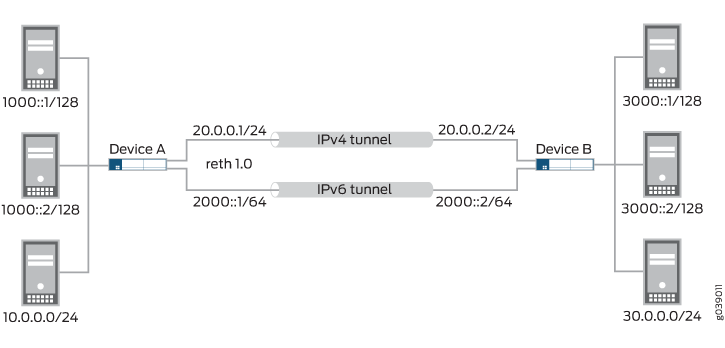
図 6では、SRXシリーズファイアウォールAはデバイスBへのIPv4およびIPv6トンネルをサポートしています。3000::1/128へのIPv6トラフィックはIPv4トンネルを介してルーティングされ、3000::2/128へのIPv6トラフィックおよび30.0.0.0/24へのIPv4トラフィックはIPv6トンネルを介してルーティングされます。
設定
手順
CLIクイック構成
この例を迅速に設定するには、以下のコマンドをコピーして、テキストファイルに貼り付け、改行を削除し、ネットワーク設定に一致させる必要がある詳細情報を変更し、コマンドを [edit] 階層レベルでCLIにコピーアンドペーストして、設定モードから commit を入力します。
set interfaces ge-0/0/1 gigether-options redundant-parent reth1
set interfaces ge-8/0/1 gigether-options redundant-parent reth1
set interfaces reth1 redundant-ether-options redundancy-group 1
set interfaces reth1 unit 0 family inet address 20.0.0.1/24
set interfaces reth1 unit 0 family inet6 address 2000::1/64
set interfaces st0 unit 0 family inet6
set interfaces st0 unit 1 family inet
set interfaces st0 unit 1 family inet6
set security ike proposal ike_proposal authentication-method pre-shared-keys
set security ike proposal ike_proposal authentication-algorithm md5
set security ike proposal ike_proposal encryption-algorithm 3des-cbc
set security ike proposal ike_proposal lifetime-seconds 3600
set security ike policy ike_policy mode aggressive
set security ike policy ike_policy proposals ike_proposal
set security ike policy ike_policy pre-shared-key ascii-text "$ABC123"
set security ike gateway ike_gw_v6 ike-policy ike_policy
set security ike gateway ike_gw_v6 address 2000::2
set security ike gateway ike_gw_v6 external-interface reth1.0
set security ike gateway ike_gw_v6 version v2-only
set security ike gateway ike_gw_v4 ike-policy ike_policy
set security ike gateway ike_gw_v4 address 20.0.0.2
set security ike gateway ike_gw_v4 external-interface reth1.0
set security ipsec proposal ipsec_proposal protocol esp
set security ipsec proposal ipsec_proposal authentication-algorithm hmac-sha1-96
set security ipsec proposal ipsec_proposal encryption-algorithm 3des-cbc
set security ipsec policy ipsec_policy proposals ipsec_proposal
set security ipsec vpn test_s2s_v6 bind-interface st0.1
set security ipsec vpn test_s2s_v6 ike gateway ike_gw_v6
set security ipsec vpn test_s2s_v6 ike ipsec-policy ipsec_policy
set security ipsec vpn test_s2s_v6 establish-tunnels immediately
set security ipsec vpn test_s2s_v4 bind-interface st0.0
set security ipsec vpn test_s2s_v4 ike gateway ike_gw_v4
set security ipsec vpn test_s2s_v4 ike ipsec-policy ipsec_policy
set routing-options rib inet6.0 static route 3000::1/128 next-hop st0.0
set routing-options rib inet6.0 static route 3000::2/128 next-hop st0.1
set routing-options static route 30.0.0.0/24 next-hop st0.1
set security forwarding-options family inet6 mode flow-based
ステップバイステップでの手順
次の例では、設定階層のいくつかのレベルに移動する必要があります。その方法の詳細については、Junos OS CLI ユーザー ガイドの設定モードにおけるCLIエディターの使用を参照してください。
デュアルスタックトンネルを設定するには:
外部インターフェイスを設定します。
[edit interfaces]
user@host# set ge-0/0/1 gigether-options redundant-parent reth1
user@host# set ge-8/0/1 gigether-options redundant-parent reth1
user@host# set reth1 redundant-ether-options redundancy-group 1
user@host# set reth1 unit 0 family inet address 20.0.0.1/24
user@host# set reth1 unit 0 family inet6 address 2000::1/64
セキュアトンネルインターフェイスを設定します。
[edit interfaces]
user@host# set st0 unit 0 family inet6
user@host# set st0 unit 1 family inet
user@host# set st0 unit 1 family inet6
フェーズ1のオプションを設定します。
[edit security ike proposal ike_proposal]
user@host# set authentication-method pre-shared-keys
user@host# set authentication-algorithm md5
user@host# set encryption-algorithm 3des-cbc
user@host# set lifetime-seconds 3600
[edit security ike policy ike_policy]
user@host# set mode aggressive
user@host# set proposals ike_proposal
user@host# set pre-shared-key ascii-text "$ABC123"
[edit security ike gateway ike_gw_v6]
user@host# set ike-policy ike_policy
user@host# set address 2000::2
user@host# set external-interface reth1.0
user@host# set version v2-only
[edit security ike gateway ike_gw_v4]
user@host# set ike-policy ike_policy
user@host# set address 20.0.0.2
user@host# set external-interface reth1.0
フェーズ2のオプションを設定します。
[edit security ipsec proposal ipsec_proposal]
user@host# set protocol esp
user@host# set authentication-algorithm hmac-sha1-96
user@host# set encryption-algorithm 3des-cbc
[edit security ipsec policy ipsec_policy]
user@host# set proposals ipsec_proposal
[edit security ipsec vpn test_s2s_v6 ]
user@host# set bind-interface st0.1
user@host# set ike gateway ike_gw_v6
user@host# set ike ipsec-policy ipsec_policy
user@host# set establish-tunnels immediately
[edit security ipsec vpn test_s2s_v4]
user@host# set bind-interface st0.0
user@host# set ike gateway ike_gw_v4
user@host# set ike ipsec-policy ipsec_policy
スタティックルートを設定します。
[edit routing-options rib inet6.0]
user@host# set static route 3000::1/128 next-hop st0.0
user@host# set static route 3000::2/128 next-hop st0.1
[edit routing-options]
user@host# set static route 30.0.0.0/24 next-hop st0.1
IPv6のフローベース転送を有効にします。
[edit security forwarding-options]
user@host# set family inet6 mode flow-based
結果
コンフィギュレーションモードから、 show routing-options、show interfaces 、show security ikeおよびshow security ipsecとshow security forwarding-optionsコマンドを入力して、コンフィギュレーションを確認します。出力結果に意図した設定内容が表示されない場合は、この例の設定手順を繰り返して設定を修正します。
[edit]
    user@host# show interfaces
    ge-0/0/1 {
        gigether-options {
            redundant-parent reth1;
        }
    }
    ge-8/0/1 {
        gigether-options {
            redundant-parent reth1;
        }
    }
    reth1 {
        redundant-ether-options {
            redundancy-group 1;
        }
        unit 0 {
            family inet {
                address 20.0.0.1/24;
            }
            family inet6 {
                address 2000::1/64;
            }
        }
    }
    st0 {
        unit 0 {
            family inet;
            family inet6;
        }
        unit 1 {
            family inet6;
        }
    }
    [edit]
    user@host# show security ike
    proposal ike_proposal {
        authentication-method pre-shared-keys;
        authentication-algorithm md5;
        encryption-algorithm 3des-cbc;
        lifetime-seconds 3600;
    }
    policy ike_policy {
        mode aggressive;
        proposals ike_proposal;
        pre-shared-key ascii-text "$ABC123"; ## SECRET-DATA
    }
    gateway ike_gw_v6 {
        ike-policy ike_policy;
        address 2000::2;
        external-interface reth1.0;
        version v2-only;
    }
    gateway ike_gw_4 {
        ike-policy ike_policy;
        address 20.0.0.2;
        external-interface reth1.0;
    }
    [edit]
    user@host# show security ipsec
    proposal ipsec_proposal {
        protocol esp;
        authentication-algorithm hmac-sha1-96;
        encryption-algorithm 3des-cbc;
    }
    policy ipsec_policy {
        proposals ipsec_proposal;
    }
    vpn test_s2s_v6 {
        bind-interface st0.1;
        ike {
            gateway ike_gw_v6;
            ipsec-policy ipsec_policy;
        }
        establish-tunnels immediately;
    }
    vpn test_s2s_v4 {
        bind-interface st0.0;
        ike {
            gateway ike_gw_4;
            ipsec-policy ipsec_policy;
        }
    }
    [edit]
    user@host# show routing-options
    rib inet6.0 {
        static {
            route 3000::1/128 next-hop st0.0;
            route 3000::2/128 next-hop st0.1;
        }
    }
    static {
        route 30.0.0.0/24 next-hop st0.1;
    }
    [edit]
user@host# show security forwarding-options
    family {
        inet6 {
            mode flow-based;
        }
    }
デバイスの設定が完了したら、設定モードから commit を入力します。
検証
設定が正常に機能していることを確認します。
IKEフェーズ1ステータスの確認
目的
IKEフェーズ1ステータスを確認します。
アクション
動作モードからshow security ike security-associationsコマンドを入力します。
user@host> show security ike security-associations
Index   State  Initiator cookie  Responder cookie  Mode           Remote Address
1081812113 UP  51d9e6df8a929624  7bc15bb40781a902  IKEv2          2000::2
1887118424 UP  d80b55b949b54f0a  b75ecc815529ae8f  Aggressive     20.0.0.2
意味
show security ike security-associationsコマンドは、すべてのアクティブなIKEフェーズ1のSAを一覧表示します。SAが表示されない場合は、フェーズ1の確立に問題があったことを示しています。設定でIKEポリシー パラメータと外部インターフェイスの設定を確認してください。フェーズ 1 のプロポーザルパラメータは、ピアデバイスで一致する必要があります。
IPsecフェーズ2ステータスの確認
目的
IPsec フェーズ 2 のステータスを確認します。
アクション
動作モードからshow security ipsec security-associationsコマンドを入力します。
user@host> show security ipsec security-associations
  Total active tunnels: 2
  ID    Algorithm       SPI      Life:sec/kb  Mon lsys Port  Gateway
  <131074 ESP:3des/sha1 8828bd36 3571/  unlim     -   root 500   20.0.0.2
  >131074 ESP:3des/sha1 c968afd8 3571/  unlim     -   root 500   20.0.0.2
  <131073 ESP:3des/sha1 8e9e695a 3551/  unlim     -   root 500   2000::2
  >131073 ESP:3des/sha1 b3a254d1 3551/  unlim     -   root 500   2000::2
意味
show security ipsec security-associations コマンドは、すべてのアクティブなIKEフェーズ2のSAを一覧表示します。SA が何も表示されない場合は、フェーズ 2 の確立に問題があったことになります。設定でIKEポリシー パラメータと外部インターフェイスの設定を確認してください。フェーズ 2 のプロポーザルパラメータは、ピアデバイスで一致する必要があります。
ルートの検証
目的
アクティブなルートを確認します。
アクション
動作モードからshow routeコマンドを入力します。
user@host> show route
inet.0: 20 destinations, 20 routes (20 active, 0 holddown, 0 hidden)
+ = Active Route, - = Last Active, * = Both

10.5.0.0/16        *[Static/5] 3d 01:43:23
                    > to 10.157.64.1 via fxp0.0
10.10.0.0/16       *[Static/5] 3d 01:43:23
                    > to 10.157.64.1 via fxp0.0
10.150.0.0/16      *[Static/5] 3d 01:43:23
                    > to 10.157.64.1 via fxp0.0
10.150.48.0/21     *[Static/5] 3d 01:43:23
                    > to 10.157.64.1 via fxp0.0
10.155.0.0/16      *[Static/5] 3d 01:43:23
                    > to 10.157.64.1 via fxp0.0
10.157.64.0/19     *[Direct/0] 3d 01:43:23
                    > via fxp0.0
10.157.72.36/32    *[Local/0] 3d 01:43:23
                      Local via fxp0.0
10.204.0.0/16      *[Static/5] 3d 01:43:23
                    > to 10.157.64.1 via fxp0.0
10.206.0.0/16      *[Static/5] 3d 01:43:23
                    > to 10.157.64.1 via fxp0.0
10.209.0.0/16      *[Static/5] 3d 01:43:23
                    > to 10.157.64.1 via fxp0.0
20.0.0.0/24        *[Direct/0] 03:45:41
                    > via reth1.0
20.0.0.1/32        *[Local/0] 03:45:41
                      Local via reth1.0
30.0.0.0/24        *[Static/5] 00:07:49
                    > via st0.1
50.0.0.0/24        *[Direct/0] 03:45:42
                    > via reth0.0
50.0.0.1/32        *[Local/0] 03:45:42
                      Local via reth0.0
172.16.0.0/12      *[Static/5] 3d 01:43:23
                    > to 10.157.64.1 via fxp0.0
192.168.0.0/16     *[Static/5] 3d 01:43:23
                    > to 10.157.64.1 via fxp0.0
192.168.102.0/23   *[Static/5] 3d 01:43:23
                    > to 10.157.64.1 via fxp0.0
207.17.136.0/24    *[Static/5] 3d 01:43:23
                    > to 10.157.64.1 via fxp0.0
207.17.136.192/32  *[Static/5] 3d 01:43:23
                    > to 10.157.64.1 via fxp0.0

inet6.0: 10 destinations, 14 routes (10 active, 0 holddown, 0 hidden)
+ = Active Route, - = Last Active, * = Both

2000::/64          *[Direct/0] 03:45:41
                    > via reth1.0
2000::1/128        *[Local/0] 03:45:41
                      Local via reth1.0
3000::1/128        *[Static/5] 00:03:45
                    > via st0.0
3000::2/128        *[Static/5] 00:03:45
                    > via st0.1
5000::/64          *[Direct/0] 03:45:42
                    > via reth0.0
5000::1/128        *[Local/0] 03:45:42
                      Local via reth0.0
fe80::/64          *[Direct/0] 03:45:42
                    > via reth0.0
                    [Direct/0] 03:45:41
                    > via reth1.0
                    [Direct/0] 03:45:41
                    > via st0.0
                    [Direct/0] 03:45:13
                    > via st0.1
fe80::210:dbff:feff:1000/128
                   *[Local/0] 03:45:42
                      Local via reth0.0
fe80::210:dbff:feff:1001/128
                   *[Local/0] 03:45:41
                      Local via reth1.0
意味
show route コマンドは、ルーティングテーブル内のアクティブなエントリーを一覧表示します。