
自我驱动型 Marvis 操作
使用自我驱动型 Marvis 操作简化并自动排除故障。
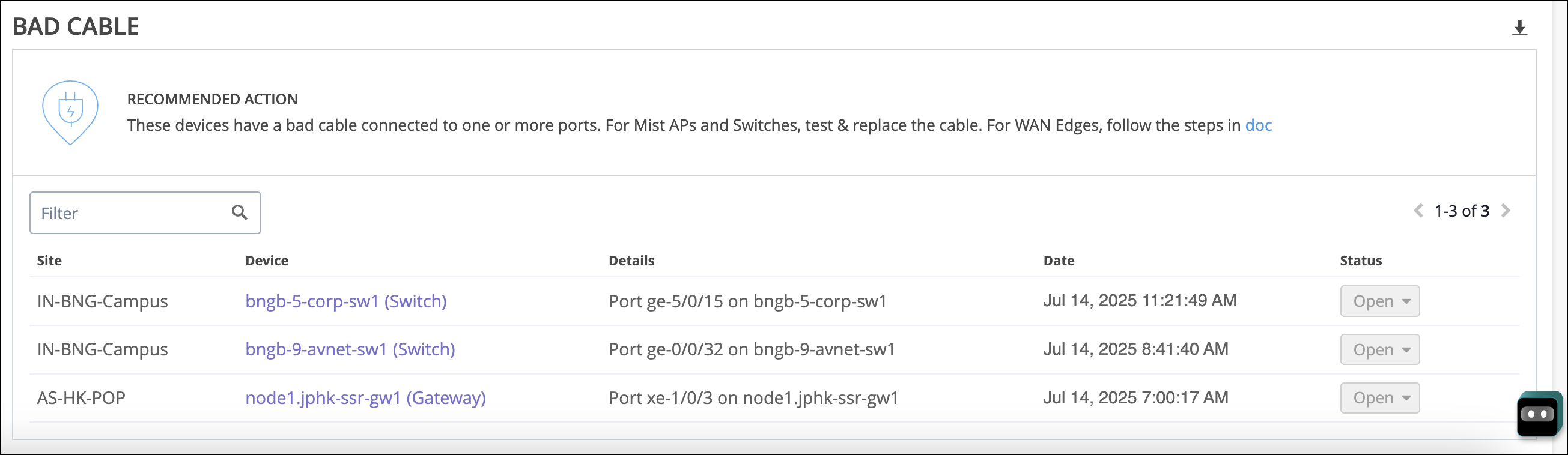
Marvis 操作提供驾驶辅助和自我驱动型操作。驾驶员辅助操作需要用户根据 Marvis 提供的详细信息和建议进行干预。下面是驾驶员辅助操作的示例。Marvis 提供了必要的详细信息来帮助您解决问题。
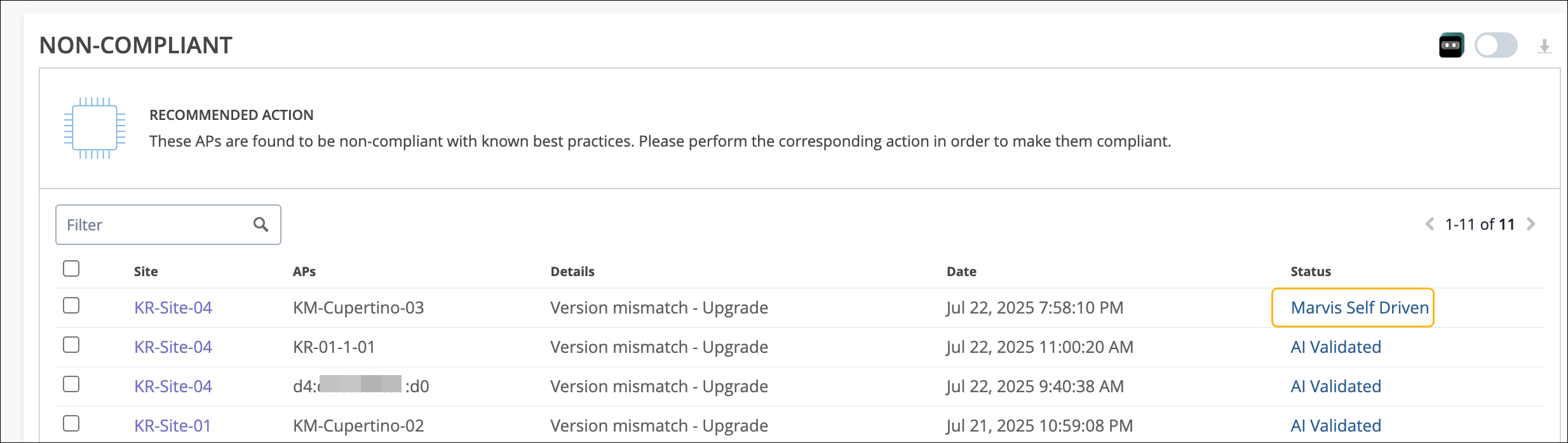
相比之下,当您向 Marvis 授予权限时,它会自动启动自我驱动型操作来执行纠正措施,无需任何用户参与。这有效地自动执行了识别和解决问题的过程。例如,驱动辅助操作涉及网络管理员必须手动升级接入点上的固件。相反,当 Marvis 检测到接入点上的固件 不合规 时,自我驱动型操作会自动启动固件升级。
通过利用自我驱动型功能,您可以自动执行简单的重复性任务,简化故障排除流程,尽可能缩短停机时间,并提高整体网络效率。
HPE Networks delivers real-time AI-native insights with Marvis Actions to power self-driving networks by proactively detecting and resolving issues, it slashes troubleshooting time and effort. In this demo, watch Marvis quickly detect, recommend, and in some cases, when self-driving actions are enabled, automatically remediate critical wired, WAN, and wireless issues. To begin, log into the Juniper Mist AI platform and select Marvis from the left-hand menu.
Select the Marvis Actions. The Marvis Actions dashboard provides visibility into ongoing site-wide network issues. This environment shows a total of 151 actions.
The total is then broken down into categories and can be filtered based on site and time period. Click into the Wired category to view the actions available. Here are 8 wired actions that Marvis has proactively identified.
The Marvis icon next to the Port Stuck action shows that it is self-driving capable, but Marvis Self-Driven is not enabled. Let's enable Marvis Self-Driven. Once enabled, Marvis autonomously initiates self-driving actions to execute corrective measures without any user involvement.
By leveraging these self-driving capabilities, organizations can automate simple, repetitive tasks, streamline troubleshooting, minimize downtime, and enhance overall work efficiency. Enabling all self-driving actions across wireless, wired, and WAN environments maximizes these benefits. The Port Stuck icon now shows as self-driven.
The Port Stuck icon action detects a difference in traffic pattern on an access port of a switch. When Marvis sees a port stuck, it automatically bounces the port to fix it. Scroll down and select View More Details.
Notice, in addition to the port number, Marvis also lists the client, in this case a camera that is connected to the port and the associated VLAN. After the self-driving action fixes the issue, the switch status changes to Marvis Self-Driven. Marvis then runs verification checks.
If the issue isn't observed during the validation period, the action is marked AI Validated. View other self-driven actions that have run in this environment under the WAN category. Clicking into the Intermittent WAN Connectivity, there are four actions.
The Intermittent WAN Connectivity action identifies interface-related issues on WAN Edge devices. These issues can degrade the user experience and result in unhealthy WAN links. When Marvis detects the ISP, ARP, or ISP DHCP failure, it initiates an automatic port bounce to resolve the issue.
If the automatic port bounce fails to resolve the issue, Marvis lists it as an open action. In this case, we can proceed to bounce the port now. The status is now updated to AI Validated.
Let's take one final look at all that Marvis has been self-driving in this environment. After scrolling up to the top and ensuring the site of interest is selected, in this case the entire organization, filter the actions by their status. Then select the AI Validate option.
As the number of self-driven actions grows, HPE Networks gives organizations the easy-to-use tools to create a fully autonomous network that automatically detects, fixes, and confirms issues across wired, wireless, and WAN systems.
通过自我驱动型操作修复问题时,问题的状态将更改为 Marvis 自我驱动型, 如以下示例所示。问题修复后,Marvis 会执行检查以确保问题确实得到解决。如果在验证期间未观察到问题,Marvis 会将状态更改为“ AI 已验证)。验证时间是 Marvis 将打开的 Marvis 操作标记为已通过 AI 验证所花费的时间。
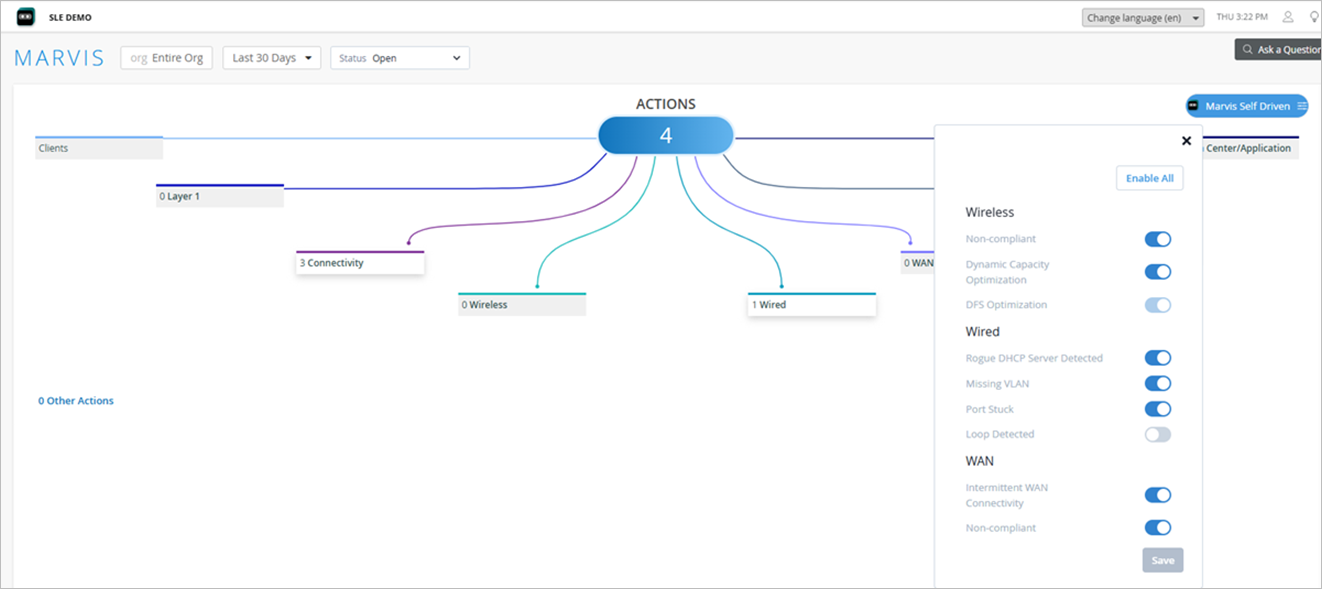
自我驱动型功能可用于执行以下操作:
| 类别 | 具有自我驱动功能的操作 |
|---|---|
| 无线网络 |
不合规 动态容量优化 DFS 优化(默认启用自我驱动功能;无法禁用) |
| 有线 |
端口卡滞(默认启用自我驱动功能) 检测到非法 DHCP 服务器 缺少 VLAN 检测到环路 |
| WAN | 不合规 |
| 间歇性 WAN 连接(默认启用自我驱动型功能) |
如何启用自我驱动操作
要启用自我驱动型操作,您必须使用 Marvis 操作页面上的 Marvis 自我驱动 型按钮授予 Marvis 必要的权限。您可以在组织或站点级别授予权限。在组织级别授予的权限适用于组织中的所有站点。您可以在站点级别更改权限,以覆盖在组织级别授予的权限。
默认情况下,自驱权限处于禁用状态。如果 Marvis 操作禁用了自我驱动权限,Marvis 将不会尝试自动解决问题;相反,它提供了一个选项供您手动启动纠正措施。
具有自我驱动功能的操作会使用 Marvis 图标进行标记,方便您轻松识别自我驱动型操作。
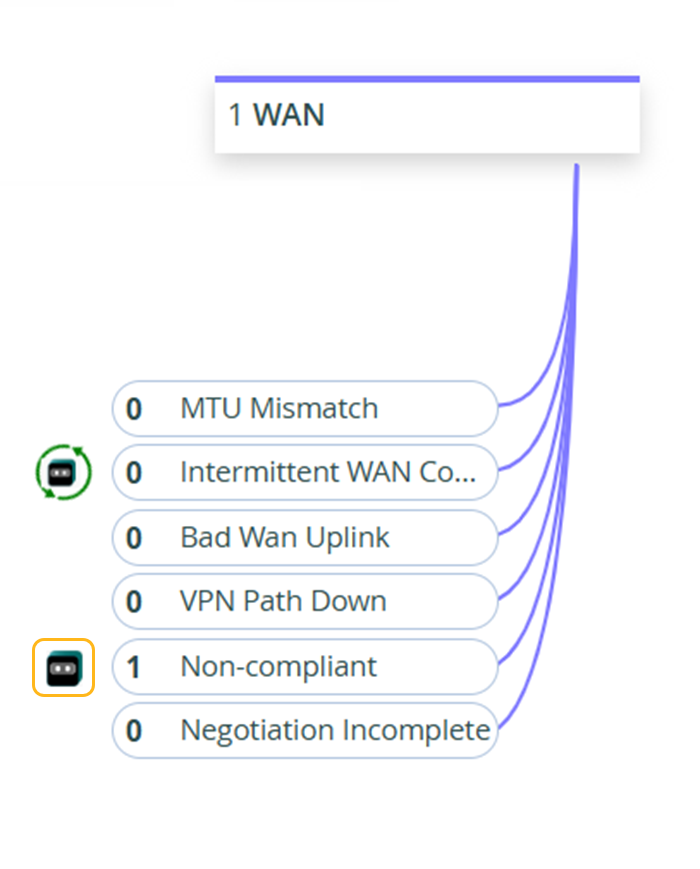
当您为某个操作启用自我驱动型功能时,Marvis 图标将发生变化,如以下示例所示:
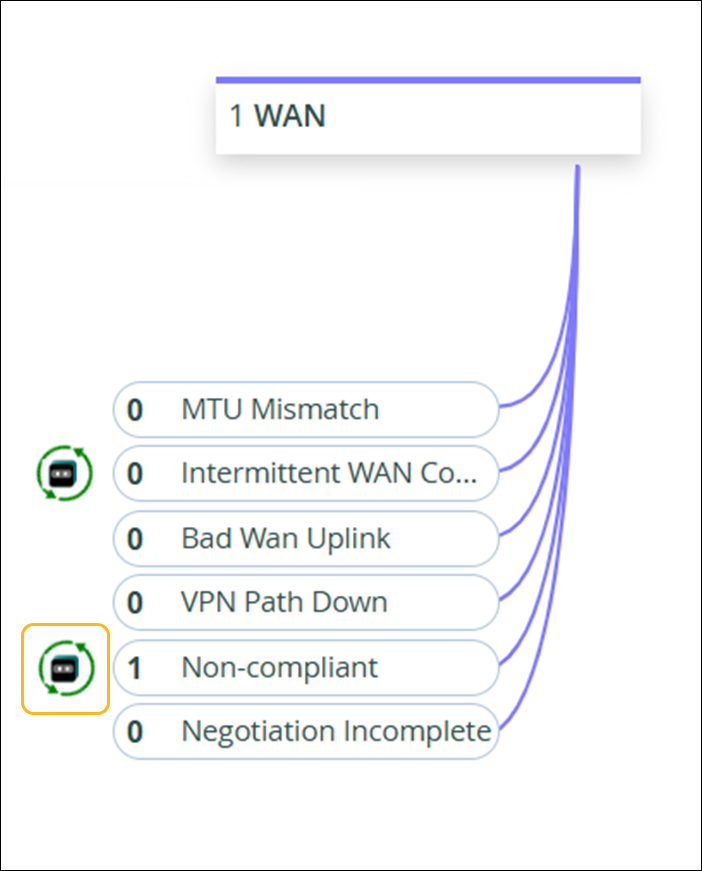
您还可以使用“建议的操作”部分中的切换按钮为特定操作启用自我驱动功能。
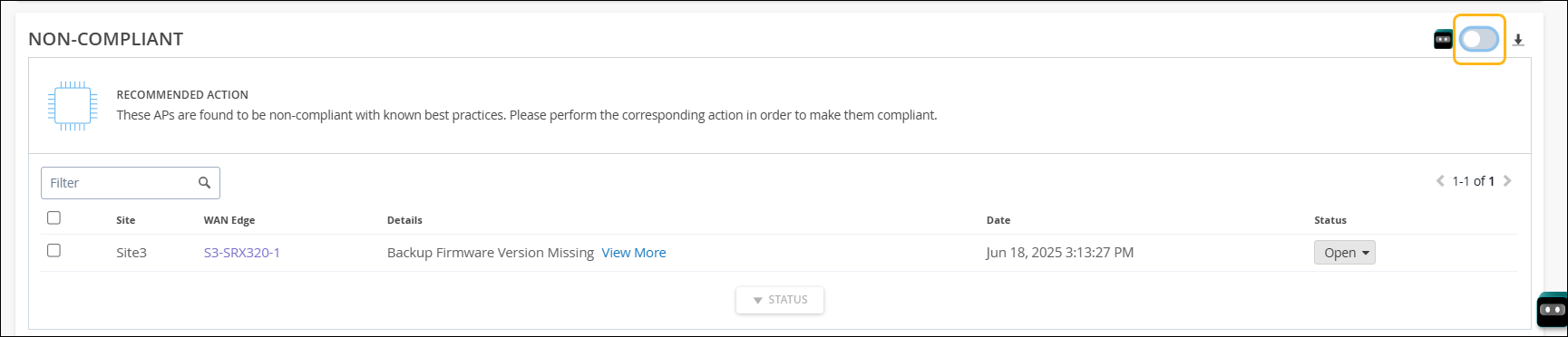
您可以随时禁用操作的自我驱动功能。如果禁用该功能,正在进行的自我驱动型任务将完成,但后续任务将不会是自我驱动型任务。
完成自驱动操作后,可以通过选择“全部”或“自驱动筛选器”选项来查看它。
自我驱动型操作时间序列图
您可以使用 Marvis 操作页面上的时间序列图来查看站点或组织级别自我驱动型操作的历史模式或趋势。该图显示在选定时间范围内为站点或组织生成的自我驱动操作数。
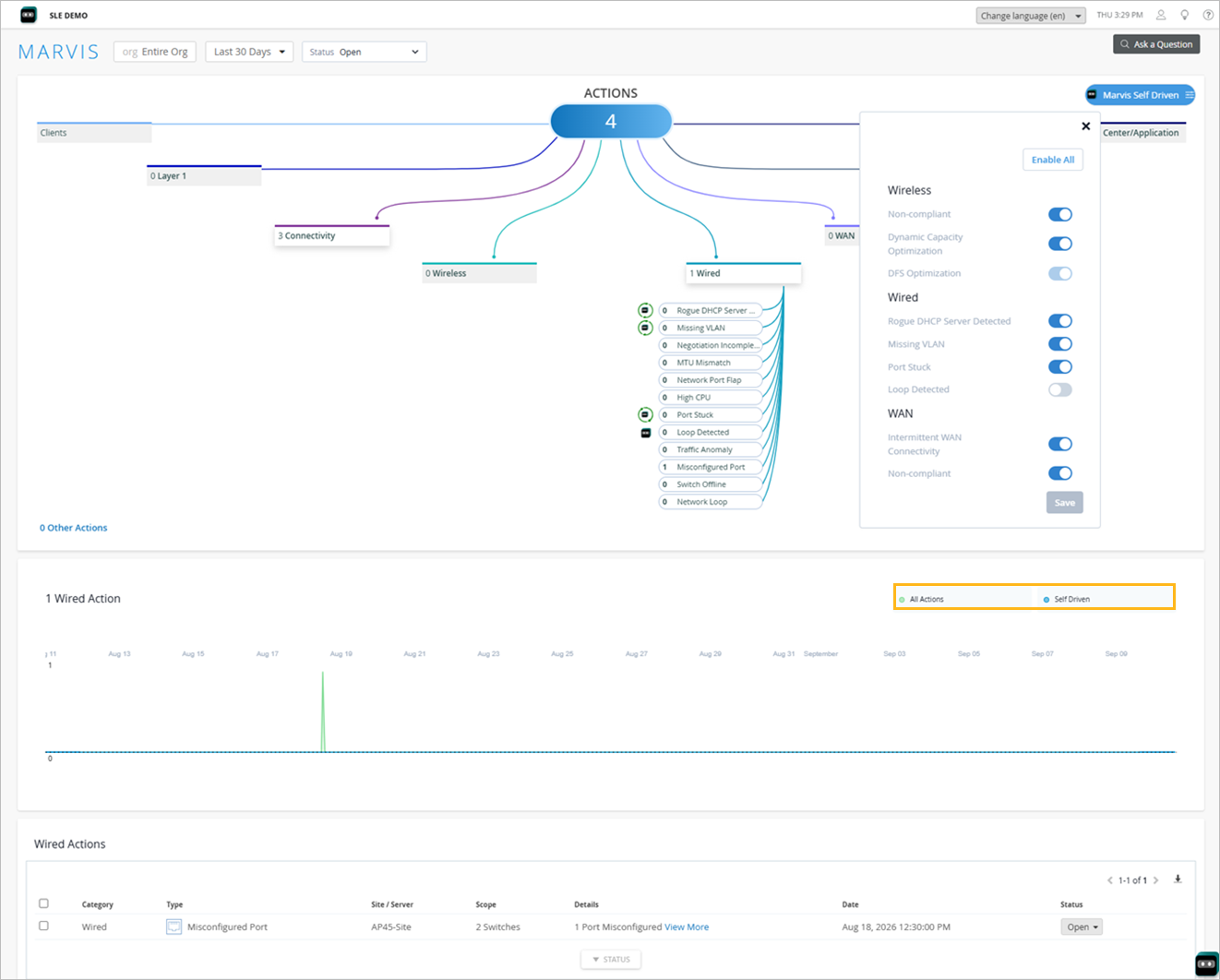
单击 “自我驱动 ”以查看自动解决的问题。请注意,对于没有自我驱动功能的操作,“ 自我驱动” 选项将隐藏。
自我驱动型有线操作
对于交换机,自我驱动功能可用于以下操作:
-
端口卡滞 - 默认情况下,此操作的自我驱动功能处于启用状态。Marvis 会自动退回端口来修复问题。Marvis 将尝试将端口退回三次,如果问题仍未解决,则 Marvis 会将问题状态设置为“未解决”,并提供所采取的自动修复步骤的详细信息。尝试三次后停止自动退回可防止连续的端口退回周期。然后,您可以检查端口卡死问题是否是由连接到交换机端口的设备的硬件问题引起的。
-
检测到恶意 DHCP 服务器 - 如果您为此操作启用了自我驱动功能,则 Marvis 会自动禁用检测到恶意 DHCP 服务器的端口。自我驱动型功能会禁用检测到非法 DHCP 服务器的接入端口。请注意,此操作不适用于连接到中继端口的恶意 DHCP 服务器。
注意:CX 系列交换机不支持此操作。 -
缺少 VLAN — 在此自我驱动型操作中,如果在接入点上配置了 VLAN,但在连接的交换机端口中缺少 VLAN,则该 VLAN 上的客户端可能无法与 DHCP 服务器通信或从 DHCP 服务器获取 IP 地址。在这种情况下,Marvis 会自动将丢失的 VLAN 添加到受影响的交换机端口,从而为受影响的客户端恢复连接。
-
检测到环路 - 如果为此操作启用了自我驱动功能,则 Marvis 会自动禁用检测第 2 层环路的端口。第 2 层环路会导致广播风暴和网络不稳定。STP 会暂时阻止受影响的端口。但是,如果由于电缆损坏、SFP 故障或自动化脚本不断重新启用端口而导致端口反复抖动,则端口每次启动时都可能转换回转发状态。此行为可能会导致间歇性网络问题,包括临时环路。禁用端口有助于停止环路,直到管理员以物理方式卸下环路电缆并手动重新启用端口。
自我驱动型无线操作
对于接入点,自我驱动型功能可用于执行以下操作:
-
不合规 — 如果为此操作启用了自我驱动功能,Marvis 会自动启动接入点上的固件升级。
自动升级是指在站点网络使用率较低的时期,一次升级一个接入点,以最大程度地减少网络停机时间和对用户的影响。因此,如果需要升级多个接入点,这个过程可能需要几天时间,因为 Marvis 会在站点使用率较低的时段内 24 小时内升级一个接入点,以避免造成任何网络覆盖问题。
-
动态容量优化 — 如果为此操作启用了自我驱动功能,Marvis 会根据峰值客户端使用和干扰观察到的可用无线容量自动调整信道频段和带宽。例如,为了增加整体容量,Marvis 可以在接入点上启用双频操作。同样,它可以增加通道宽度以提高吞吐量。
-
DFS 优化 - 默认情况下,DFS 优化操作的自我驱动功能处于启用状态,且无法禁用。DFS 优化增强了对 Mist 无线资源管理 (RRM) 系统如何处理动态频率选择 (DFS) 雷达事件及其对 Wi-Fi 信道分配的影响的可见性。它提供了一个清晰的 7 天洞察,让您了解如何评估受雷达影响的信道,以及该历史记录如何影响持续的信道选择决策。
自我驱动型 WAN 操作
对于 WAN 边缘,自我驱动功能可用于以下操作:
-
不合规 — 如果为此操作启用了自我驱动型功能,Marvis 会自动启动快照设备功能,以更新 SRX 系列设备备份分区上的 Junos OS 版本,使其与当前在主分区上运行的版本匹配。
自动升级是指在站点网络使用率较低的时期,一次升级一台设备,以最大程度地减少网络停机时间和对用户的影响。因此,如果需要升级多台设备,该过程可能需要几天时间,因为 Marvis 会在站点使用率较低的时段内 24 小时内升级一台设备,以避免造成任何网络中断。
-
间歇性 WAN 连接 - 默认情况下,此操作的自我驱动功能处于启用状态。当 Marvis 检测到 WAN Edge 设备上的上行链路端口由于以下原因之一而无法传递流量时,它会自动退回端口以解决问题:
-
对于 ISP 服务器提供的 IP 地址,网关的 ARP 解析失败。
-
上行链路端口未从 ISP 接收 IP 地址。
Marvis 将尝试将端口退回三次,如果问题仍未解决,则 Marvis 会将问题状态设置为“未解决”。
-
使用筛选器查找自我驱动型操作
对于启用了权限的任何自我驱动型操作,Marvis 都会识别问题并通过采取必要的操作来自动修复。问题解决后,问题的状态将更改为 Marvis 自我驱动。然后,Marvis 会验证问题是否再次出现,然后将状态更改为“已 AI 验证)。
您可以通过选择“ Marvis 自我驱动 型”或“ AI 验证” 筛选条件,查看通过自我驱动型操作解决的问题。如果未选择筛选条件,则会列出所有问题,包括任何 Marvis 自我驱动、 AI 验证和 未解决 的问题。
如果通过自我驱动型操作解决的问题再次出现,则 Marvis 会将问题的状态更改为 “未解决”。
您可以单击切换按钮旁边的下载(向下箭头)图标,以 CSV 格式下载组织或站点的问题列表。