
验证访问和身份验证
为确保积极的用户体验并快速解决身份验证问题,请检查连接和故障的客户端设备,识别问题,并从 Marvis 获得有关根本原因和建议操作的指导。
检查连接的客户端设备
- 直接转到“见解”仪表板,从瞻博网络Mist门户的左侧菜单中选择“ 监视>服务级别 ”。然后单击“监控”页面顶部的“ 见解 ”按钮。
图 1:查看 Mist 洞察页面
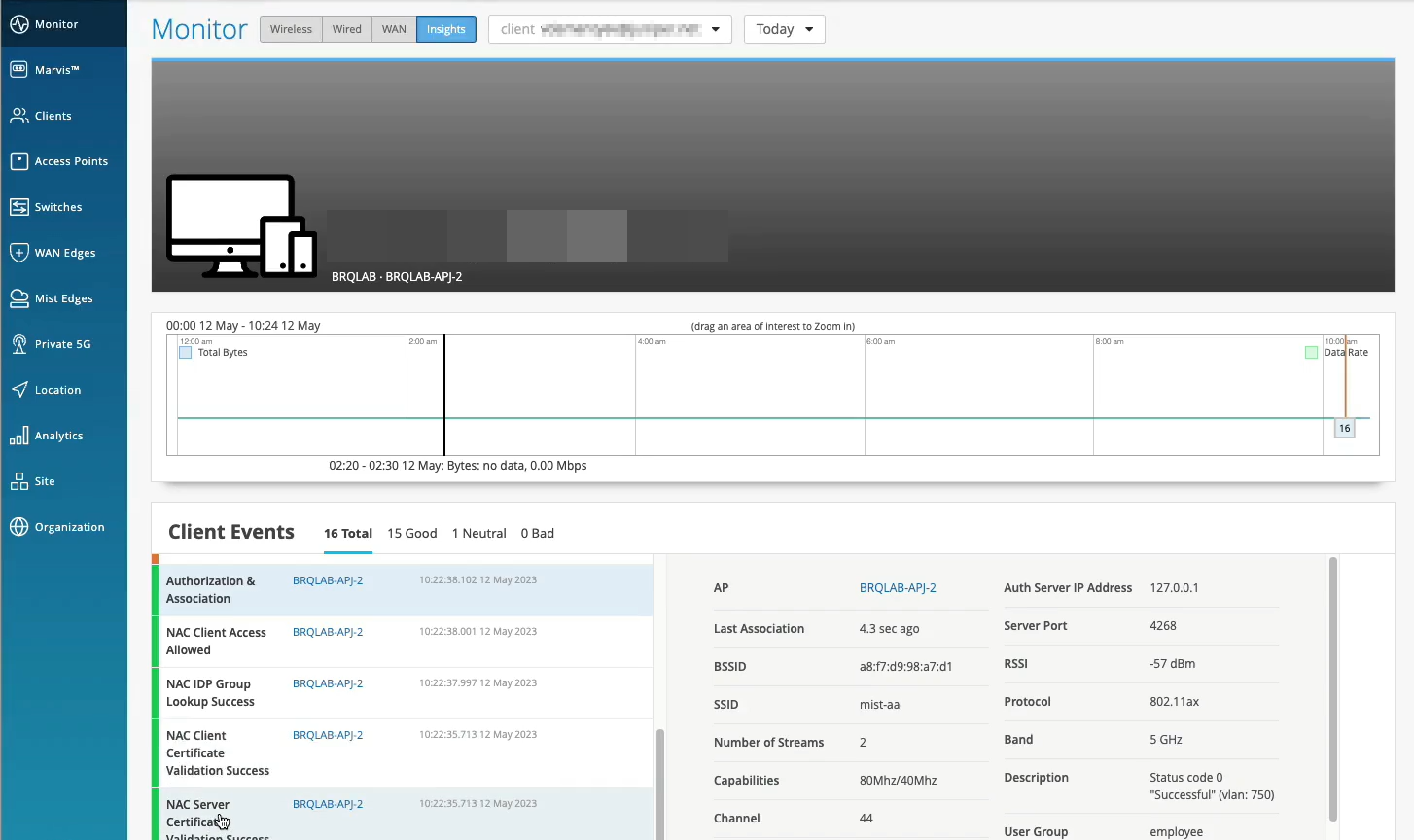
- 在客户端事件块中,您可以查看 Mist PACE 在所选时间范围内为所选站点记录的所有事件的列表。
图 2:查看客户端事件
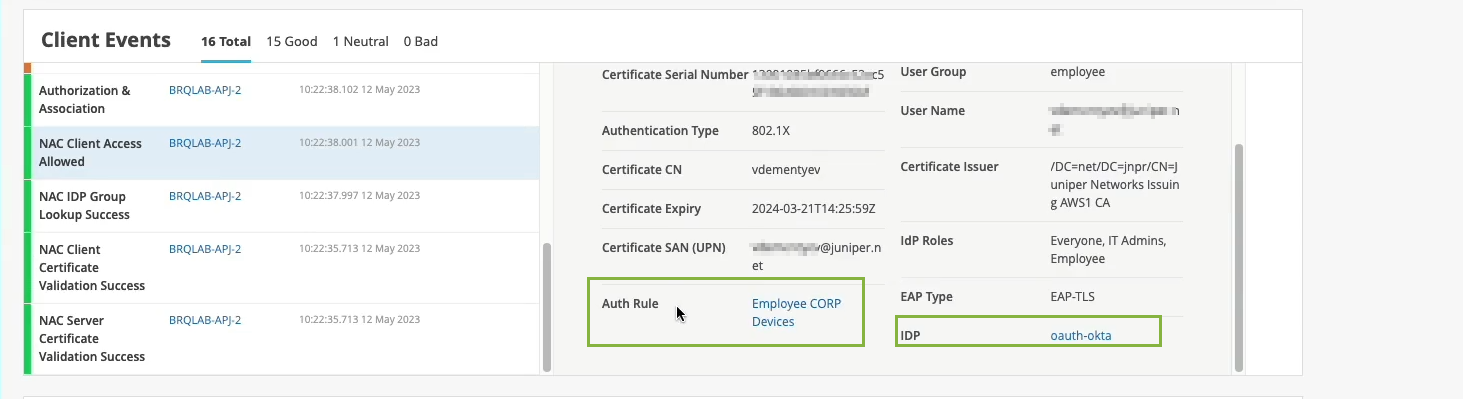
这些事件仅适用于手机和笔记本电脑等无线客户端。从列表中选择事件时,Mist 会在列表右侧显示事件摘要。您可以看到证书详细信息、身份验证类型、VLAN、身份验证规则和身份提供商 (IdP) 等详细信息。
- 单击“ 身份验证规则 ”以在“身份验证策略”页面中打开规则。
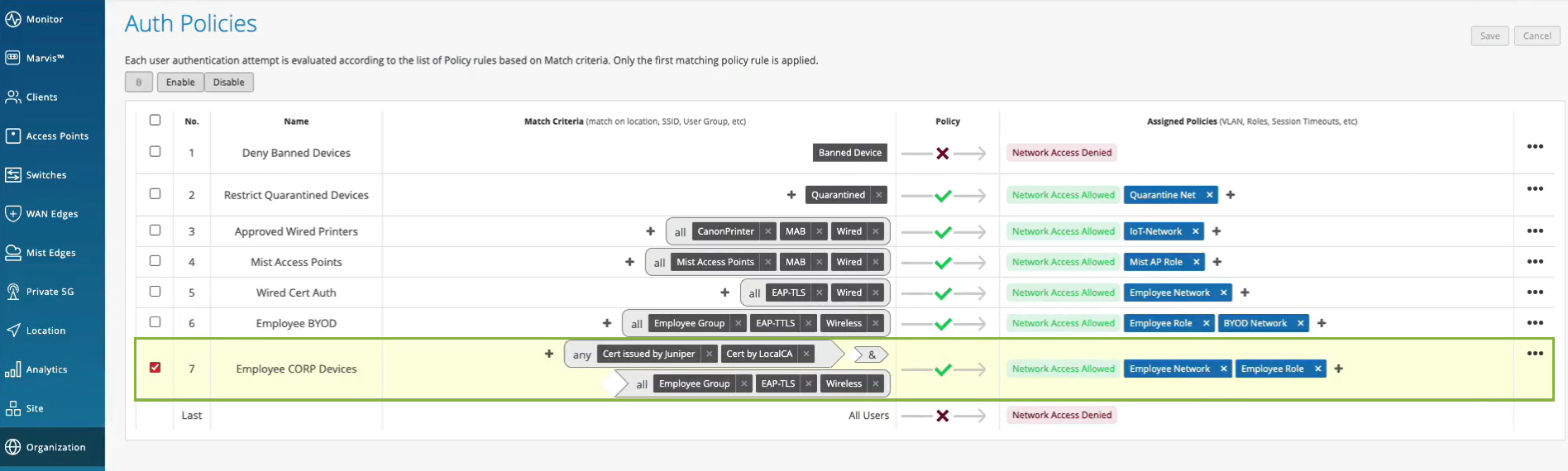
门户将突出显示应用于客户端设备的策略。您可以查看详细信息,例如匹配标准、策略规则和策略操作。
观看以下视频,了解如何验证访问和身份验证配置:
Clients are actually happy and connected and authorized and can actually pass traffic. So let's take a look at one of the clients here that I have as an example. So let's take a look at client insights. What we already see is the client is able to get network connectivity, grab an IP address. It can resolve DNS. We have this information as the client goes through that whole connection process from the network infrastructure, in this particular case from the access point.
But now, we are extending this visibility into the whole NAC authentication and authorization phases. So we know that, OK, client trusted the server cert. Then, actually, we see that it's using certific ate to authenticate. So our service, we're getting all the metadata about the client certificate. We then do an IDP lookup against Okta in our particular scenario. And we know, OK, so this user is actually part of these three groups in the Okta user directory. Great. What's next?
We are actually evaluating whether we should allow or deny this particular client, and what policy we want to assign. So we are saying, oh, client access is allowed, great. We are signing a VLAN. We're signing a role or a user group, employee. But we are also saying, oh, hey, this is the authentication rule that we've hit during the authorization process. So let's take a look. Let's click on it. Oh, voila. So we now can tell you exactly which policy rule triggered during that particular user authentication. So we are seeing not only the authentication experience. We are also seeing the whole end to end connection experience, all the way from the neck, all the way to the client actually being able to pass traffic left and right.
检查故障的客户端设备
- 在瞻博网络Mist门户上,从 瞻博网络 Mist门户的左侧菜单中选择 “监控>服务级别 ”。然后单击“监控”页面顶部的“ 见解 ”按钮。
图 3:查看 Mist 洞察页面
- 在客户端事件块中,您可以查看 Mist PACE 在所选时间范围内为所选站点记录的所有事件的列表。
图 4:查看客户端事件
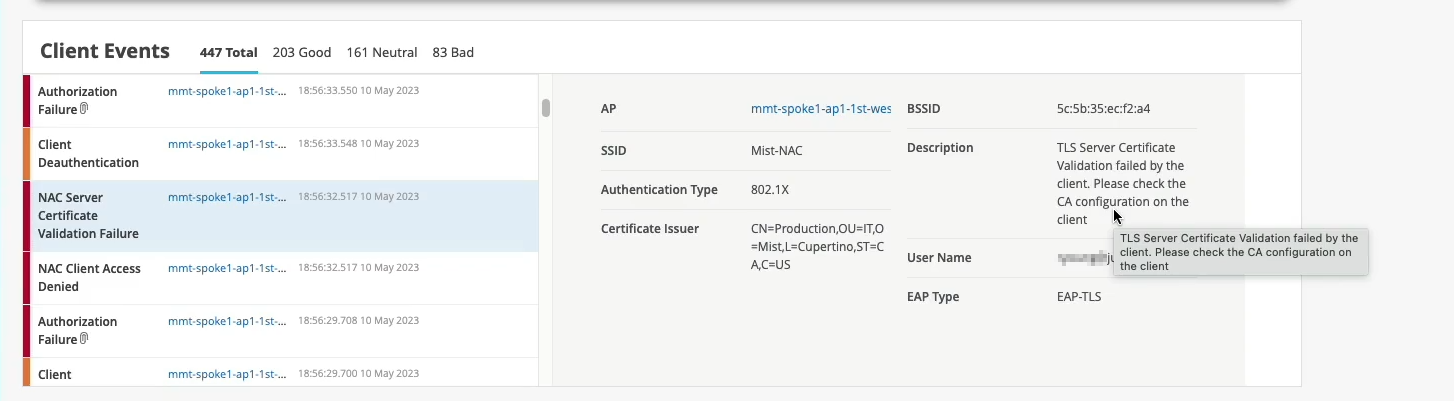
从列表中选择事件时,Mist 会在列表右侧显示事件摘要。您可以在摘要上上下滚动以获取所有详细信息。如果访问失败,您可以检查 描述 字段以了解失败的原因。
观看以下视频,了解如何验证访问和身份验证配置:
Normally, if we would only have the visibility from the network point of view, we would just say, OK, this client failed authorization. It's a .1X failure. But since we don't control the other side of the authentication process, we don't really know what's happening here.
But now, since we've extended this NAC authentication authorization visibility into the Mist cloud, we now can say exactly what happened. So if you look just at the event below, we are saying, oh, actually, the reason for the failure is because the client does not trust the server certificate, right?
So we are now - we now can tell exactly what is the authentication issue that the client has experienced. And this is caused by the client configuration issue that you need to look at. And again, we are providing all the details in here.
So now, we can pinpoint and answer the question, whether it's client config problem, whether it's a network issue and client cannot get network services, or it's an authentication policy issue and we've just configured our policies incorrectly.
Marvis 操作识别身份验证问题
Marvis 操作是一个一站式信息中心,可提供对影响组织用户体验的持续站点范围网络问题的可见性。
您为组织提供的订阅类型决定了 Marvis 操作的使用情况。如需详细信息,请参阅 适用于有线、WAN 和无线保证的 Marvis 操作 。
- 在瞻博网络Mist门户上,从瞻博网络Mist门户的左侧菜单中选择 Marvis™ 。
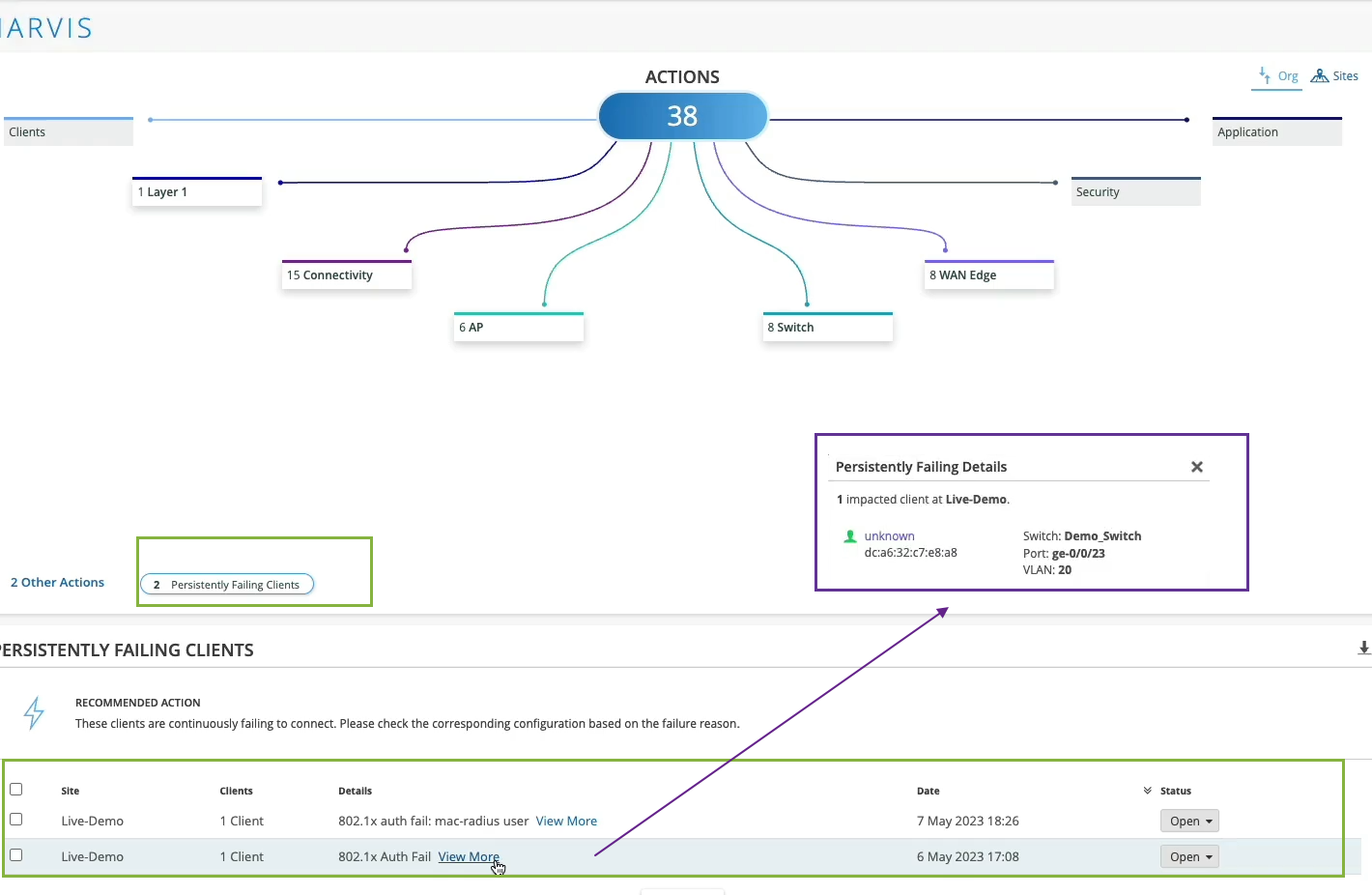
持续失败的客户端操作突出显示由于客户端特定问题而持续无法连接的有线或无线客户端;也就是说,故障范围不是接入点(接入点)、交换机、无线 LAN (WLAN) 或服务器。故障可能是由于输入错误的预共享密钥 (PSK) 导致身份验证失败,也可能是由于不正确的 802.1x 配置导致的故障。Marvis 显示遇到故障的客户端列表以及它们正在尝试连接的 WLAN。
单击 “查看更多” 以获取故障客户端的详细信息。您可以使用此信息,通过精确定位所连接的特定交换机、端口和 VLAN,识别遇到连接问题的用户的位置。
注意:注意:修复此问题后,“持续失败的客户端”操作会在一小时内自动解决。由于此操作被视为低优先级,因此 Marvis 不会在“最新更新”部分或“站点”选项卡上列出“持续失败的客户端”操作。
- 在 MARVIS 页面中,您会注意到该页面在不同的类别下显示信息。Marvis 会指示为某个类别检测到的问题数。例如,在以下屏幕截图中,您会注意到 Marvis 为“连接”类别列出了 15 个问题。
图 5:Marvis 操作页面
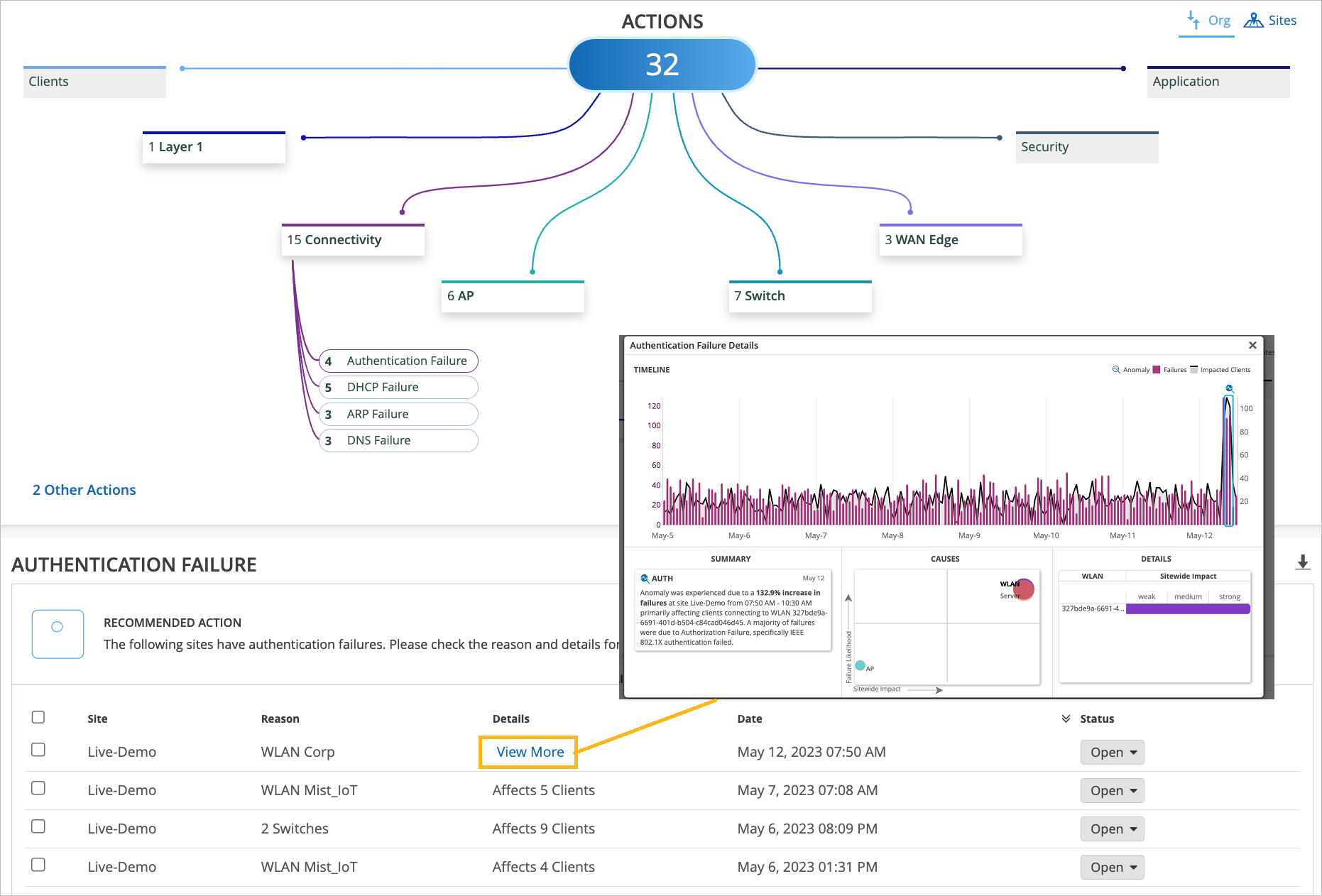 中的连接故障
单击 “查看更多” 以获取故障客户端的详细信息。“身份验证失败详细信息”页面显示问题、原因和详细信息的摘要。屏幕截图显示了 Marvis 操作如何报告 802.1x 身份验证失败的示例。
如果问题与身份验证或授权无关,请查看上层并调查是否存在与网络服务相关的实际问题。例如,您的网关可能没有响应,或者您的 IP 地址可能已用完。
观看以下视频,了解有关验证访问和身份验证配置的 Marvis 操作:
Maybe I don't even want to be reactive. Is there something that can tell me when there is an issue? Is there something that can look at my entire network and figure out if there is an issue that is widespread, maybe it's affecting a specific site, a specific group of access points or switches or anything like that? Well, yes, sure there is. That's why we have Marvis Actions.
In Marvis Actions, we can start slow and we could say, okay, maybe you have some offenders on the network that are consistently trying to connect and they're failing. So let's take a look at them. Let's see what we have there.
Oh, okay. So we have two clients that are failing .1x authentication persistently, consistently, right? And we are saying, okay, let's take a look and maybe at least we can pinpoint where those users are. Well, they are connected to this specific switch and this specific port and this VLAN.
Maybe you want to check and see what's plugged into there that is never able to connect for a long period of time. That's fine. Now, if we look at things at scale, if we look at things holistically, let's say at the whole organization, we can then pinpoint, oh, maybe you have authentication failures that are affecting a specific SSID or specific groups of APs or clients that are more widespread.
This is where we are actually learning what's going on on your network, what's normal, what's not. And whenever there is an anomaly, we would highlight this in the connectivity action in Marvis Action tab. Similarly, if it's not related to authentication or authorization, we can look the layer above and maybe there is an actual network service related issue, maybe your gateway is not responding, maybe you're run out of IP addresses.
The point is all of this information is looked at holistically, right? All the way starting from the NAC authentication authorization now, all the way to client being able to pass traffic and get network services up and running.