使用 Junos XML 协议为配置组和接口范围指定输出格式
<groups>标记元素与[edit groups]配置层次结构相对应。它包含表示配置组的标记元素,每个配置组都包含一组配置语句,这些语句适用于层次结构中的多个位置。您可以使用apply-groups配置语句或<apply-groups>标记元素在相应位置插入配置组,效果与直接插入组中定义的语句相同。应用配置组的配置层次结构部分表示继承了组的语句。
除了在 [edit groups] 层次结构级别定义的组外,Junos OS 还预定义了一个名为的 junos-defaults组。此组包括判断适合任何路由、交换或安全平台上的基本操作的配置语句。默认情况下,此组中的语句不会显示在显示配置的 CLI 命令的输出中,也不会显示在标记元素的 Junos XML 协议服务器返回的 <get-configuration> 输出中。有关用户定义的配置组和组 junos-defaults 的更多信息,请参阅 CLI 用户指南。
<interface-range>标记元素与[edit interfaces interface-range]配置层次结构相对应。接口范围是一组可对其应用通用配置文件的接口。如果接口是某个接口范围的成员,它将继承为该范围设置的配置语句。
以下部分介绍如何显示通过 Junos XML 协议会话请求的配置数据中继承元素中的组和接口范围配置。这些部分还讨论如何查看继承自组或接口范围的配置元素的源组或接口范围。
指定配置组和接口范围是继承还是单独显示
默认情况下,Junos XML 协议服务器将每个用户定义配置组的标记元素显示为标记元素的 <groups> 子项,而不是将其显示为应用这些元素的子元素。同样,服务器将每个用户定义接口范围的标记元素显示为标记元素的 <interface-range> 子级,而不是将这些元素显示为接口范围成员的元素的子级。此显示模式与 CLI 配置模式命令的默认行为平行,CLI 配置模式 show 命令显示 [edit groups] 并 [edit interfaces interface-range] 作为配置中的单独层次结构。
要请求 Junos XML 协议服务器不单独显示 <groups>、 <apply-groups>或 <interface-range> 元素,而是将继承自用户定义的组或接口范围的标记元素括在继承标记元素中,客户端应用程序将属性包含在 inherit="inherit" 标记中 <get-configuration> 。它将请求括在标记元素中 <rpc> :
<rpc>
    <get-configuration inherit="inherit"/>

     <!-- OR -->

    <get-configuration inherit="inherit">
        <!-- tag elements for the configuration elements to return -->
    </get-configuration>
</rpc>
要请求 Junos XML 协议服务器包括继承自该 junos-defaults 组的标记元素以及用户定义的配置组和接口范围,客户端应用程序将属性包含在 inherit="defaults" 标记中 <get-configuration> 。
<rpc>
    <get-configuration inherit="defaults"/>

     <!-- OR -->

    <get-configuration inherit="defaults">
        <!-- tag elements for the configuration elements to return -->
    </get-configuration>
</rpc>
有关要包含在标记元素中的 <get-configuration> 标记元素的信息,请参阅 指定在 Junos XML 协议会话中返回的配置数据的范围。
当客户端包括属性时 inherit="inherit" ,输出将包含与以下 CLI 配置模式命令的输出相同的信息。输出不包括继承自组的配置 junos-defaults 元素。
user@host# show | display inheritance | except ##
当客户端包含属性 inherit="defaults" 时,输出将包含与以下 CLI 配置模式命令的输出相同的信息:
user@host# show | display inheritance defaults | except ##
在这两种情况下,Junos XML 协议服务器会将其输出封装在 <rpc-reply> 标记元素和以下标记元素中,具体取决于请求的格式: <configuration> 标记元素(适用于 Junos XML 标记输出)、 <configuration-text> 标记元素(用于格式化的 ASCII 输出)、 <configuration-set> 标记元素(用于配置模式 set 命令)或 <configuration-json> 标记元素(用于 JSON 格式的数据)。有关打开 <configuration> 标记中属性的信息,请参阅 指定 Junos XML 协议会话中配置信息请求的源。
<rpc-reply xmlns:junos="URL">
    <configuration attributes>
        <!-- Junos XML tag elements representing configuration elements -->
    </configuration>

  <!-- OR -->

    <configuration-text>
        <!-- formatted ASCII configuration statements -->
    </configuration-text>

  <!-- OR -->

    <configuration-set>
        <!-- configuration mode  commands -->
    </configuration-set>

  <!-- OR -->

    <configuration-json>
        <!-- JSON-formatted configuration data -->
    </configuration-json>
</rpc-reply>
该inherit属性可以与标记或打开<get-configuration>标记中的<get-configuration/>一个或多个以下属性组合:
changed(使用 Junos XML 协议请求配置元素的更改指标)中介绍database(指定 Junos XML 协议会话中配置信息请求的来源)中介绍了这一点format中的说明为 Junos XML 协议会话中的配置数据指定输出格式groups中介绍了使用 Junos XML 协议指定配置组和接口范围的输出格式interface-ranges中介绍了使用 Junos XML 协议指定配置组和接口范围的输出格式junos:key,详述 使用 Junos XML 协议请求配置元素的标识符指示器。
应用程序还可以在 inherit 请求标识符指示符(如 使用 Junos XML 协议为配置元素请求标识符指标中所述)后包括属性。
显示继承配置组元素的源组
要请求 Junos XML 协议服务器指示继承每个配置元素的配置组,客户端应用程序将inherit属性与标记中的groups="groups"<get-configuration>属性组合在一起。它将请求括在标记 元素中<rpc>:
<rpc>
    <get-configuration inherit="(defaults | inherit)" groups="groups"/>

    <!-- OR -->

    <get-configuration inherit="(defaults | inherit)" groups="groups">
        <!-- tag elements indicating  the configuration elements to return -->
    </get-configuration>
</rpc>
有关要包含在标记元素中的 <get-configuration> 标记元素的信息,请参阅 指定在 Junos XML 协议会话中返回的配置数据的范围。
在请求中包含属性 inherit 和 groups="groups" 属性时,Junos XML 协议服务器在其继承元素中显示每个配置组元素,继承的元素随后会包含指示源组的信息。输出的格式决定了源组信息在最终配置中的显示方式。
如果输出使用 Junos XML 标记元素(format="xml"包括属性或format省略属性),则 Junos XML 协议服务器将包含在junos:group="source-group"继承自配置组的配置元素的打开标记中的属性。响应包含在和<rpc-reply>标记元素中<configuration>。
<rpc-reply xmlns:junos="URL">
    <configuration attributes>
    <!-- For each inherited element -->
        <!-- opening-tags-for-parents-of-the-element -->
            <inherited-element junos:group="source-group">
                <inherited-child-of-inherited-element junos:group="source-group">
                    <!-- inherited-children-of-child junos:group="source-group" -->
                </inherited-child-of-inherited-element>
            </inherited-element>
        <!-- closing-tags-for-parents-of-the-element -->
    </configuration>
</rpc-reply>
如果输出的格式为 ASCII 文本(包括属性format="text"),则 Junos XML 协议服务器将插入三行带注释的行,其源组将位于每个继承元素的正上方。响应包含在和<rpc-reply>标记元素中<configuration-text>。
<rpc-reply xmlns:junos="URL">
    <configuration-text>
*/ For each inherited element */
        /* parent levels for the element */
            ##
            ## 'inherited-element' was inherited from group 'source-group'
            ##
            inherited-element {
                ##
                ## 'inherited-child' was inherited from group 'source-group'
                ##
                inherited-child {
                    ... child statements of inherited-child ...
                }
            }
        /* closing braces for parent levels of the element */
    </configuration-text>
</rpc-reply>
如果输出采用 JSON 格式(format="json"包括属性),则 Junos XML 协议服务器将属性"junos:group" : "source-group"包含在继承元素的属性列表中。响应包含在和<rpc-reply>标记元素中<configuration-json>。
<rpc-reply xmlns:junos="URL">
  <configuration-json>
  {
      "configuration" : {
          /* JSON objects for parent levels of the element */
              "inherited-child" : {
                  "@" : {
                      "junos:group" : "source-group"
                  },
                  "inherited-object" : [
                  {
                      "@" : {
                          "junos:group" : "source-group"
                      },
                      "name" : "identifier"
                  }
                  ],
                  "@inherited-statement" : {
                      "junos:group" : "source-group"
                  }
              }
          /* closing braces for parent levels of the element */
      }
  }
  </configuration-json>
</rpc-reply>
从 Junos OS 16.1 版开始,运行 Junos OS 的设备会使用新的序列化默认实施发出 JSON 格式的配置数据。新的默认值使用“@”符号而非字段名称“属性”来表示属性。
当属性 groups="groups" 与 inherit="inherit" 属性组合时,XML 输出将包含与以下 CLI 配置模式命令的输出相同的信息。输出不包含继承自组的配置 junos-defaults 元素:
user@host# show | display inheritance | display xml groups
当属性 groups="groups" 与 inherit="defaults" 属性组合时,XML 输出将包含与以下 CLI 配置模式命令的输出相同的信息:
user@host# show | display inheritance defaults | display xml groups
inherit和groups属性可以与标记或打开<get-configuration> 标记中的<get-configuration/>一个或多个以下 其他属性组合:
changed,详述 使用 Junos XML 协议请求配置元素的更改指示器。database,详述于 指定 Junos XML 协议会话中配置信息请求的来源。format,详述了 在 Junos XML 协议会话中指定配置数据的输出格式。应用程序可以请求 Junos XML 标记的格式化 ASCII 或 JSON 输出。interface-ranges,详述使用 Junos XML 协议为配置组和接口范围指定输出格式。junos:key,详述 使用 Junos XML 协议请求配置元素的标识符指示器。
应用程序还可以在 inherit 请求标识符指示符后包括和 groups 属性(如 使用 Junos XML 协议请求配置元素的标识符指标中所述)。
显示继承配置元素的源接口范围
要请求 Junos XML 协议服务器指示继承每个配置元素的接口范围,客户端应用程序将inherit属性与标记中的interface-ranges="interface-ranges"<get-configuration>属性组合在一起。它将请求括在标记元素中<rpc>:
<rpc>
    <get-configuration inherit="inherit" interface-ranges="interface-ranges"/>

  <!-- OR -->

    <get-configuration inherit="inherit" interface-ranges="interface-ranges">
        <!-- tag elements for the configuration elements to return -->
    </get-configuration>
</rpc>
有关要包含在标记元素中的 <get-configuration> 标记元素的信息,请参阅 指定在 Junos XML 协议会话中返回的配置数据的范围。
在请求中包含属性 inherit 和 interface-ranges="interface-ranges" 属性时,Junos XML 协议服务器在其继承元素中显示每个接口范围配置元素,继承的元素随后会包含指示源接口范围的信息。输出的格式决定了源接口范围信息在最终配置中的显示方式。
如果输出使用 Junos XML 标记元素(format="xml"包括属性或format省略属性),则 Junos XML 协议服务器将包含在junos:interface-range="source-interface-range"继承自某个接口范围的配置元素的打开标记中的属性。响应包含在和<rpc-reply>标记元素中<configuration>。
<rpc-reply xmlns:junos="URL">
   <configuration attributes>
       <interfaces>
           <!-- For each inherited element -->
           <interface junos:interface-range="source-interface-range">
               <inherited-element junos:interface-range="source-interface-range">
                   <inherited-child-of-inherited-element
                           junos:interface-range="source-interface-range">
                      <!-- inherited-children-of-child
                              junos:interface-range="source-interface-range" -->
                   </inherited-child-of-inherited-element>
               </inherited-element>
           </interface>
       </interfaces>
   </configuration>
</rpc-reply>
如果输出格式为 ASCII 文本(format="text"包括属性),则 Junos XML 协议服务器将插入三行带注释的行,其源接口范围的信息就在每个继承的元素之上。响应包含在和<rpc-reply>标记元素中<configuration-text>。
<rpc-reply xmlns:junos="URL">
  <configuration-text>
      interfaces {
          <!-- For each inherited element -->
          ##
          ## 'interface-name' was expanded from interface-range 'source-interface-range'
          ##
          interface-name {
              ##
              ## 'inherited-element' was expanded from interface-range 'source-interface-range'
              ##
              inherited-element {
                  inherited-child {
                      ...  child statements of inherited-child ...
                  }
              }
          }
      }
  </configuration-text>
</rpc-reply>
如果输出采用 JSON 格式(format="json"包括属性),则 Junos XML 协议服务器将属性"junos:interface-range" : "source-interface-range"包含在继承元素的属性列表中。响应包含在和<rpc-reply>标记元素中<configuration-json>。
<rpc-reply xmlns:junos="URL">
  <configuration-json>
  {
      "configuration" : {
          /* JSON objects for parent levels of the element */
              "inherited-child" : {
                  "@" : {
                      "junos:interface-range" : "source-interface-range"
                  },
                  "inherited-object" : [
                  {
                      "@" : {
                          "junos:interface-range" : "source-interface-range"
                      },
                      "name" : "identifier"
                  }
                  ],
                  "@inherited-statement" : {
                      "junos:interface-range" : "source-interface-range"
                  }
              }
          /* closing braces for parent levels of the element */
      }
  }
  </configuration-json>
</rpc-reply>
从 Junos OS 16.1 版开始,运行 Junos OS 的设备会使用新的序列化默认实施发出 JSON 格式的配置数据。新的默认值使用“@”符号而非字段名称“属性”来表示属性。
当属性 interface-ranges="interface-ranges" 与 inherit="inherit" 属性组合时,XML 输出将包含与以下 CLI 配置模式命令的输出相同的信息:
user@host# show | display inheritance | display xml interface-ranges
inherit和interface-ranges属性可以与标记或打开<get-configuration> 标记中的<get-configuration/>一个或多个以下 其他属性组合:
changed,详述 使用 Junos XML 协议请求配置元素的更改指示器。database,详述于 指定 Junos XML 协议会话中配置信息请求的来源。format,详述了 在 Junos XML 协议会话中指定配置数据的输出格式。应用程序可以请求 Junos XML 标记的格式化 ASCII 或 JSON 输出。groups,详述使用 Junos XML 协议为配置组和接口范围指定输出格式。junos:key,详述 使用 Junos XML 协议请求配置元素的标识符指示器。
应用程序还可以在 inherit 请求标识符指示符后包括和 interface-ranges 属性(如 使用 Junos XML 协议请求配置元素的标识符指标中所述)。
示例:指定配置组的输出格式
以下示例配置层次结构定义了名为的配置 interface-group组。语句在 apply-groups 层级的组中 [edit interfaces] 应用语句:
[edit]
groups {
    interface-group {
        interfaces {
            so-1/1/1 {
                encapsulation ppp;
            }
        }
    }
}
apply-groups interface-group;
interfaces {
    fxp0 {
        unit 0 {
            family inet {
                address 192.168.4.207/24;
            }
        }
    }
}
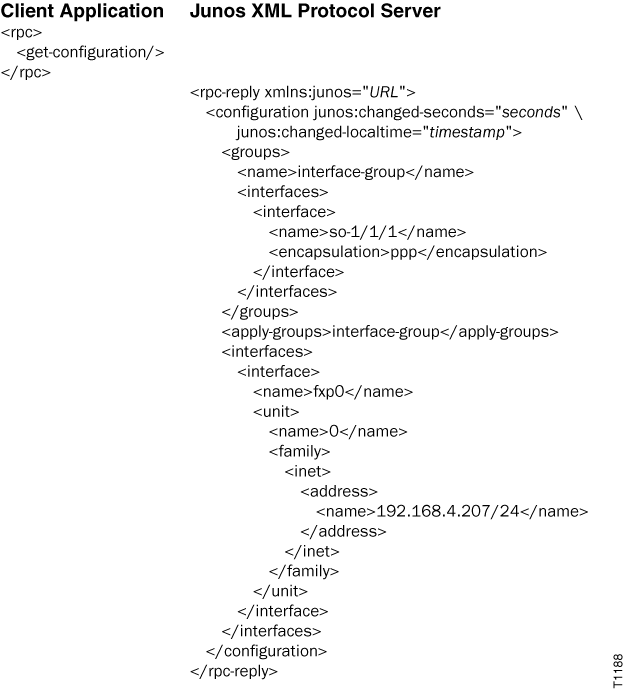
当 inherit 属性未包含在标记中 <get-configuration/> 时,输出将 <groups> 和 <apply-groups> 标记元素作为单独项目包括在内。标记 <groups> 元素将配置组中定义的 interface-group 标记元素括起来。标记元素直接置于 <apply-groups> 标记元素的 <interfaces> 上方表示 [edit interfaces] 层次结构继承了在配置组中定义的 interface-group 语句。
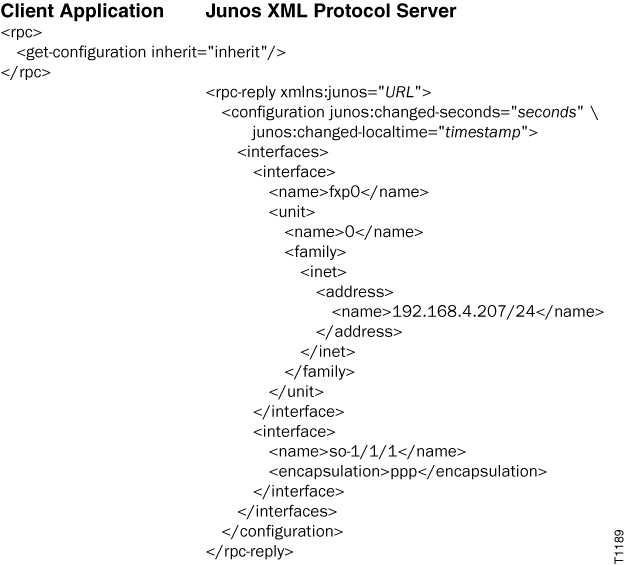
当 inherit 属性包含在标记中 <get-configuration/> 时,标记元素将 <interfaces> 封装在 interface-group 配置组中定义的标记元素。 <groups> 不会 显示和 <apply-groups> 标记元素。
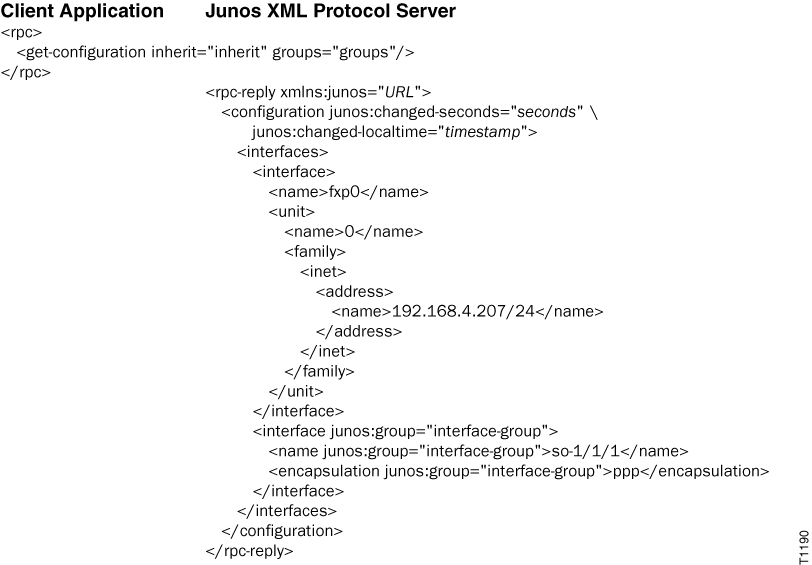
当groups="groups"属性与标记中的<get-configuration/>inherit属性组合时,标记元素将<interfaces>封装在interface-group配置组中定义的标记元素(用junos:group="interface-group"属性标记)。