Request Identifiers for Configuration Elements Using the Junos XML Protocol
Junos XML protocol client applications can request configuration data that indicates which elements are identifiers for configuration objects.
A Junos XML protocol client application can request the identifiers for configuration objects on devices running Junos and devices running Junos OS Evolved. To request that the server indicate whether a child configuration element is an identifier for its parent element, a client application can use one of the following methods:
-
Include the
junos:key="key"attribute in the opening<junoscript>tag for the Junos XML protocol session. -
Include the
junos:key="key"attribute or thekey="key"attribute in the<get-configuration>request tag.
<junoscript version="version" junos:key="key">

    <!-- OR -->

<rpc>
   <get-configuration (junos:key | key)="key">
       <!-- tag elements for the configuration elements to return -->
   </get-configuration>
</rpc>
For more information about the <junoscript> tag, see Start a Junos XML Protocol Session.
When the identifier indicator is requested, the Junos XML protocol server includes
the junos:key="key" attribute in the opening tag for each
identifier. As always, the Junos XML protocol server encloses its response in
<rpc-reply> and <configuration>
tag elements. In the following example, the identifier tag element is called
<name>:
<rpc-reply xmlns:junos="URL">
        <configuration attributes>
            <!-- opening tag for each parent of the object -->

        <!-- For each configuration object with an identifier -->
            <object>
                <name junos:key="key">identifier</name>
                <!-- additional children of object -->
                </object>
            <!-- closing tag for each parent of the object -->

    </configuration>
</rpc-reply>
If the requested output format is JSON, the Junos XML protocol server adds a metadata
object that includes "junos:key" : "key" to indicate the
identifier. If the object uses name for the identifier, a metadata
object "@" is added as a new member of the object. If the object uses an identifier
other than name, the metadata object is added as a sibling
name/value pair that uses "@" concatenated with the identifier name. The response is
enclosed in <configuration-json> and
<rpc-reply> tag elements.
<rpc-reply xmlns:junos="URL">
  <configuration-json>
  {
      "configuration" : {
          /* JSON objects for parent levels of the element */
              "object" : [
              {
                  "@" : {
                      "junos:key" : "key"
                  },
                  "name" : "identifier",
                  "identifier-name" : "identifier-value",
                  "@identifier-name" : {
                      "junos:key" : "key"
                  },
                  /* additional data and child objects */  # if any
              }
              ]
          /* closing braces for parent levels of the element */
      }
  }
  </configuration-json>
</rpc-reply>
In the following output, the combination of name and
next-hop uniquely identify the static route:
{
    "configuration" : {
        "routing-options" : {
            "static" : {
                "route" : [
                {
                    "@" : {
                        "junos:key" : "key"
                    },
                    "name" : "172.16.0.0/12",
                    "next-hop" : ["198.51.100.1"],
                    "@next-hop" : {
                        "junos:key" : "key"
                    },
                    "retain" : [null],
                    "no-readvertise" : [null]
                }
                ]
            }
        }
    }
}
The client application can include one or more of the following attributes in the
<get-configuration> tag when it includes the
junos:key attribute in either the
<junoscript> tag or the
<get-configuration> tag:
-
changed -
commit-scripts -
database -
inheritand optionallygroupsandinterface-ranges
The junos:key="key" attribute appears only in Junos XML output (the
default) and JSON output. Thus, you cannot combine the
junos:key="key" attribute with the
format="text" attribute or with the compare
attribute, which produces only text output.
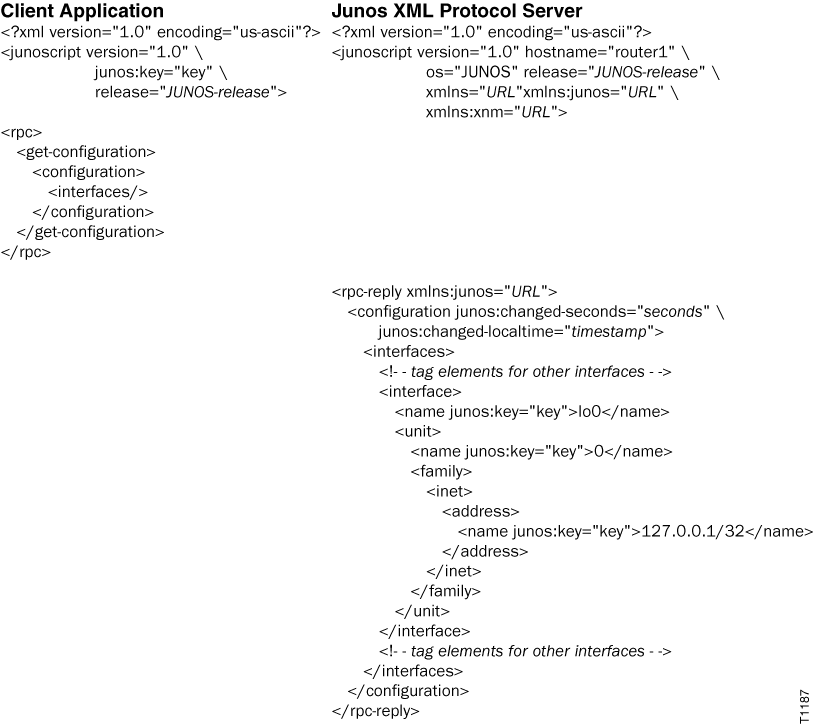
The following example requests indicators for identifiers for elements in the
[edit interfaces] hierarchy level of the candidate
configuration. The output is truncated for brevity.