Request Change Indicators for Configuration Elements Using the Junos XML Protocol
A Junos XML protocol client application can use the
<get-configuration> operation with the
changed="changed" attribute to return configuration data that includes
indicators for changed configuration elements.
A Junos XML protocol client application can use the
<get-configuration> operation to request configuration data from
a device running Junos OS or a device running Junos OS Evolved. A client application can
request configuration data that includes indicators for configuration elements that have
changed since the last commit operation. To request change indicators, the client
application includes the changed="changed" attribute in the
<get-configuration> tag.
<rpc>
    <get-configuration changed="changed"/>

  <!-- OR -->

    <get-configuration changed="changed">
        <!-- tag elements for the configuration elements to return -->
    </get-configuration>
</rpc>
The returned configuration includes the junos:changed="changed"
attribute for changed elements. The device determines which elements to mark as changed
depending on the configuration source. You specify the source by including the
database attribute in the <get-configuration>
tag. The default is candidate, which retrieves the candidate
configuration. The options include:
-
database="candidate"—(Default) The device compares the candidate configuration to the active configuration. The configuration includes thejunos:changed="changed"attribute for elements that were added to the candidate configuration after the last commit operation. -
database="committed"—The device compares the active configuration to the first rollback configuration. The configuration includes thejunos:changed="changed"attribute for elements that were added to the active configuration by the most recent commit.
The server indicates which elements have changed by including the
junos:changed="changed" attribute in the opening tag of every parent
tag element in the path to the changed configuration element. If the changed
configuration element is a single (empty) tag, the tag displays the
junos:changed="changed" attribute. If the changed element is a
container element, the configuration displays the
junos:changed="changed" attribute in the opening container tag and
also in the opening tag for each child tag element enclosed in the container element.
The Junos XML protocol server encloses its response in
<rpc-reply> and
<configuration> elements.
<rpc-reply xmlns:junos="URL">
    <configuration standard-attributes junos:changed="changed">
        <!-- opening-tag-for-each-parent-level junos:changed="changed" -->

      <!-- For each changed element, EITHER -->
        <element junos:changed="changed"/>

      <!-- OR -->

        <element junos:changed="changed">
            <first-child-of-element junos:changed="changed">
            <second-child-of-element junos:changed="changed">
            <!-- additional children of element -->
        </element>

        <!-- closing-tag-for-each-parent-level -->
    </configuration>
</rpc-reply>
If the requested output format is JSON, the server includes the
"junos:changed" : "changed" attribute in the attribute lists for the
same elements as described previously.
When a commit operation succeeds, the Junos XML protocol server removes the
junos:changed="changed" attribute from all tag elements. However,
if the commit generates warnings, the attribute remains. In this case, the
junos:changed="changed" attribute appears on tag elements that
changed before the commit as well as on tag elements that changed after the
commit.
An example of a commit-time warning is the message explaining that a configuration
element does not apply until you reboot the device. The Junos XML protocol server
returns the warning in an <xnm:error> element when it confirms
the success of the commit operation.
To remove the junos:changed="changed" attribute from elements that
changed before the commit, the client application must take the necessary actions to
eliminate the cause of the warning, and then commit the configuration again.
You can combine the changed attribute with one or more of the
following attributes in the <get-configuration> tag:
-
database -
inheritand optionallygroupsandinterface-ranges -
junos:key
The junos:changed="changed" attribute appears only in Junos XML
output (the default) and JSON output. Thus, you cannot combine the
changed attribute with the format="text" attribute
or with the compare attribute, which produces only text output.
When you include the commit-scripts="view" attribute, the
junos:changed="changed" attribute is automatically included in the
output. Thus, you do not need to explicitly include the
changed="changed" attribute in the
<get-configuration> request.
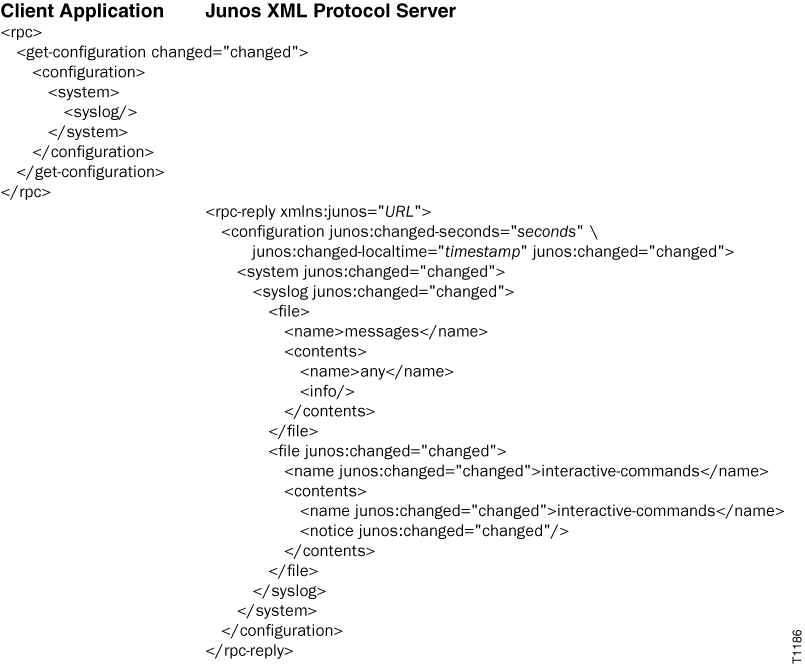
The following example requests change indicators for configuration elements at the
[edit system syslog] hierarchy level in the candidate configuration.
The output indicates that a log file called interactive-commands
has been configured since the last commit.