
Validar acesso e autenticação
Para garantir experiências positivas ao usuário e resolver rapidamente os problemas de autenticação, verifique os dispositivos clientes conectados e com falha, identifique problemas e receba orientações do Marvis sobre as causas-raiz e as ações recomendadas.
Verificar dispositivos de clientes conectados
- Vá diretamente para o painel Insights, selecione Monitorar > níveis de serviço no menu à esquerda do portal Juniper Mist. Em seguida, clique no botão Insights na parte superior da página Monitorar.
Figura 1: Visualizar a página
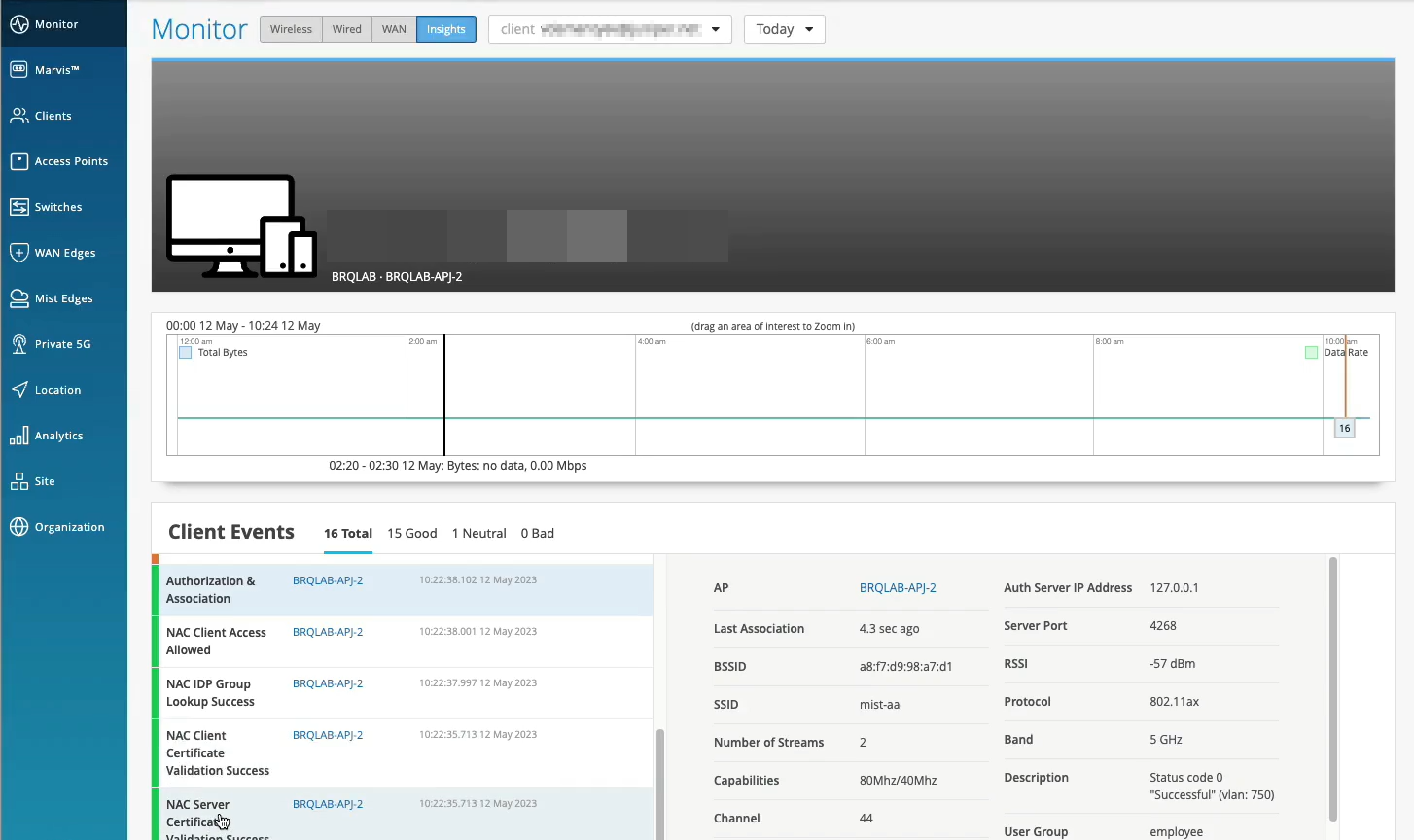 do Mist Insights
- No bloco Eventos do cliente, você pode visualizar uma lista de todos os eventos registrados pelo Mist PACE para o site selecionado durante o período de tempo selecionado.
Figura 2: Exibir eventos
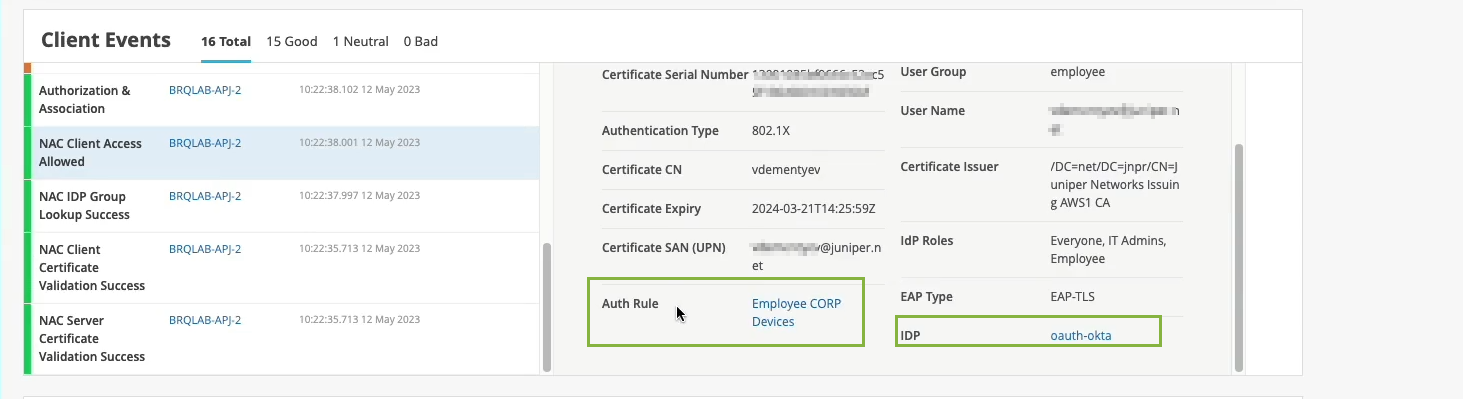 do cliente
Esses eventos se aplicam apenas a clientes sem fio, como telefones celulares e laptops. Quando você seleciona um evento na lista, o Mist mostra um resumo do evento à direita da lista. Você pode ver os detalhes, como detalhes do certificado, tipo de autenticação, VLAN, regra de autenticação e provedor de identidade (IdP).
- Clique na regra de autenticação para abrir a regra na página Políticas de autenticação.
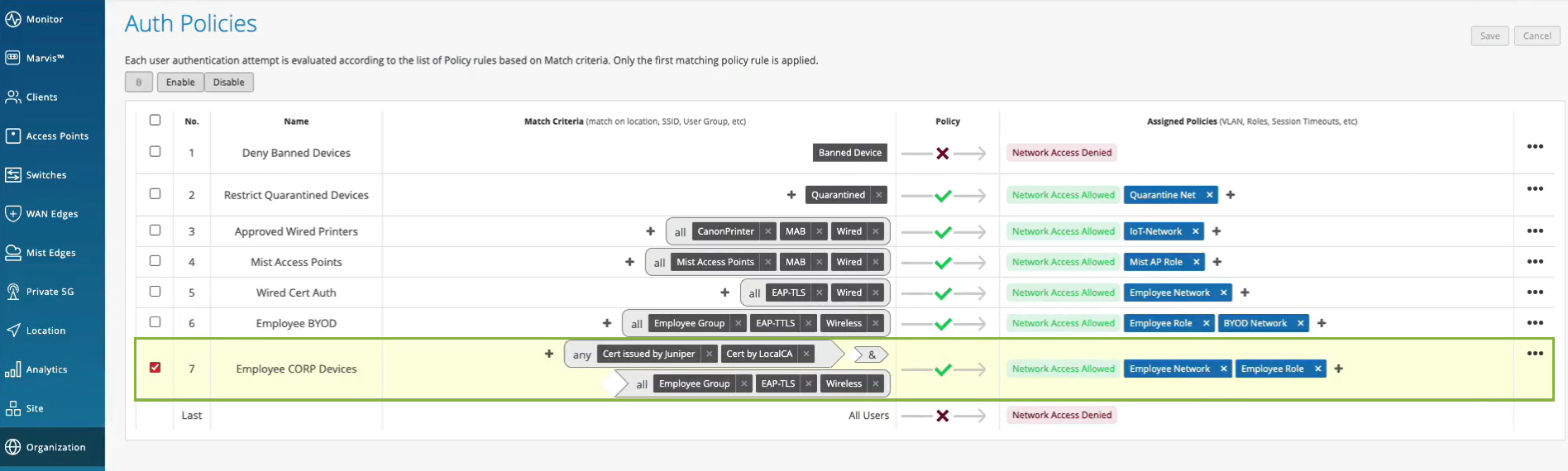
O portal destaca a política que foi aplicada ao dispositivo cliente. Você pode exibir os detalhes, como critérios de correspondência, regra de política e ação de política.
Assista ao vídeo a seguir sobre como validar a configuração de acesso e autenticação:
Clients are actually happy and connected and authorized and can actually pass traffic. So let's take a look at one of the clients here that I have as an example. So let's take a look at client insights. What we already see is the client is able to get network connectivity, grab an IP address. It can resolve DNS. We have this information as the client goes through that whole connection process from the network infrastructure, in this particular case from the access point.
But now, we are extending this visibility into the whole NAC authentication and authorization phases. So we know that, OK, client trusted the server cert. Then, actually, we see that it's using certific ate to authenticate. So our service, we're getting all the metadata about the client certificate. We then do an IDP lookup against Okta in our particular scenario. And we know, OK, so this user is actually part of these three groups in the Okta user directory. Great. What's next?
We are actually evaluating whether we should allow or deny this particular client, and what policy we want to assign. So we are saying, oh, client access is allowed, great. We are signing a VLAN. We're signing a role or a user group, employee. But we are also saying, oh, hey, this is the authentication rule that we've hit during the authorization process. So let's take a look. Let's click on it. Oh, voila. So we now can tell you exactly which policy rule triggered during that particular user authentication. So we are seeing not only the authentication experience. We are also seeing the whole end to end connection experience, all the way from the neck, all the way to the client actually being able to pass traffic left and right.
Verifique dispositivos clientes com falha
- Em Juniper portal Mist, selecione Monitorar > níveis de serviço no menu à esquerda do portal Juniper Mist. Em seguida, clique no botão Insights na parte superior da página Monitorar.
Figura 3: Visualizar a página do Mist Insights
- No bloco Eventos do cliente, você pode visualizar uma lista de todos os eventos registrados pelo Mist PACE para o site selecionado durante o período de tempo selecionado.
Figura 4: Exibir eventos
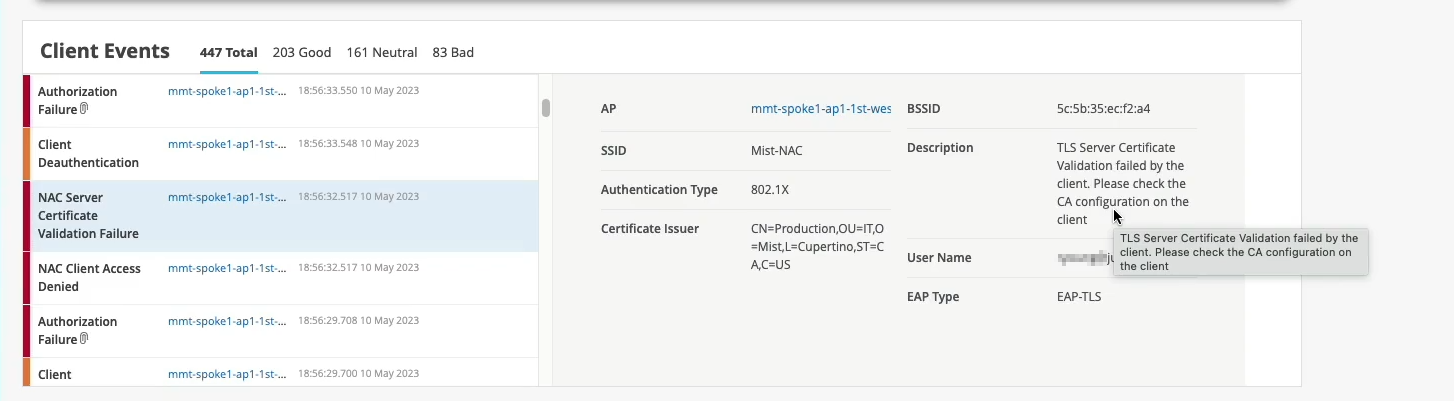 do cliente
Quando você seleciona um evento na lista, o Mist mostra um resumo do evento à direita da lista. Você pode rolar para cima e para baixo no resumo para obter todos os detalhes. Em caso de falha de acesso, você pode verificar o campo Descrição para entender o motivo da falha.
Assista ao vídeo a seguir sobre como validar a configuração de acesso e autenticação:
Normally, if we would only have the visibility from the network point of view, we would just say, OK, this client failed authorization. It's a .1X failure. But since we don't control the other side of the authentication process, we don't really know what's happening here.
But now, since we've extended this NAC authentication authorization visibility into the Mist cloud, we now can say exactly what happened. So if you look just at the event below, we are saying, oh, actually, the reason for the failure is because the client does not trust the server certificate, right?
So we are now - we now can tell exactly what is the authentication issue that the client has experienced. And this is caused by the client configuration issue that you need to look at. And again, we are providing all the details in here.
So now, we can pinpoint and answer the question, whether it's client config problem, whether it's a network issue and client cannot get network services, or it's an authentication policy issue and we've just configured our policies incorrectly.
Marvis Actions para identificar problemas de autenticação
O Marvis Actions é um centro de informações completo que fornece visibilidade de problemas de rede contínuos em todo o local que afetam a experiência do usuário em uma organização.
O tipo de assinatura que você tem para sua organização determina o uso do Marvis Actions. Consulte Marvis Actions para garantia com fio, WAN e sem fio para obter detalhes.
- No portal Juniper Mist, selecione Marvis™ no menu à esquerda do portal Juniper Mist.
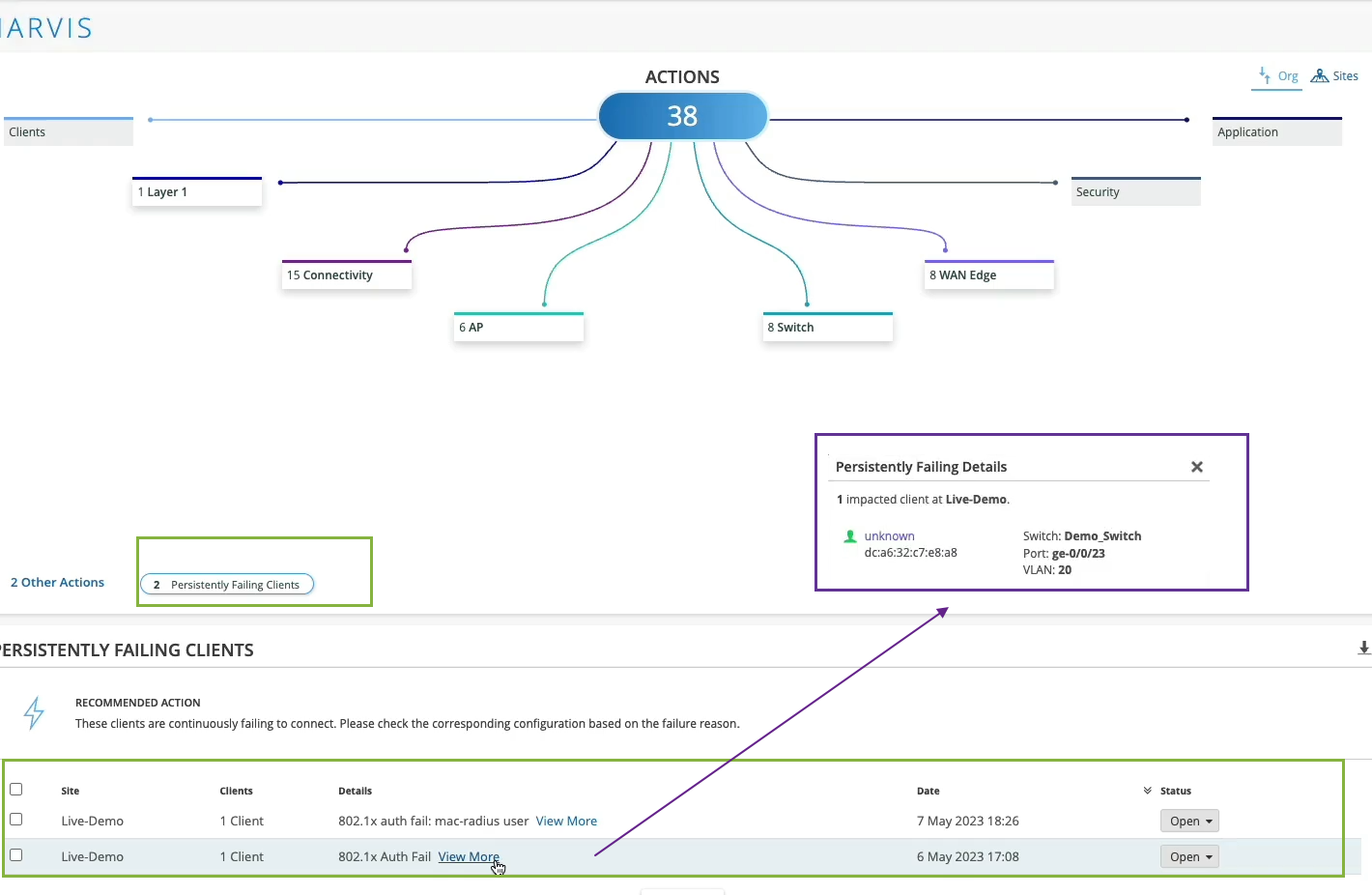
A ação Clientes com Falha Persistente destaca clientes com ou sem fio que falham continuamente ao se conectar devido a um problema específico do cliente; ou seja, o escopo da falha não é o ponto de acesso (AP), switch, LAN sem fio (WLAN) ou servidor. A falha pode ser devido a falhas de autenticação ao inserir a chave pré-compartilhada (PSK) errada ou falhas causadas por configuração incorreta do 802.1x. O Marvis exibe a lista de clientes que estão enfrentando uma falha e as WLANs às quais eles estão tentando se conectar.
Clique em Ver mais para obter os detalhes do cliente com falha. Você pode usar essas informações para identificar a localização dos usuários que estão enfrentando problemas de conectividade, identificando o switch, a porta e a VLAN específicos aos quais eles estão conectados.
Observação: Observação:Depois de corrigir esse problema, a ação Clientes com Falha Persistente é resolvida automaticamente em uma hora. Como essa ação é considerada de baixa prioridade, o Marvis não lista a ação Clientes com Falha Persistente na seção Atualizações Mais Recentes ou na guia Sites.
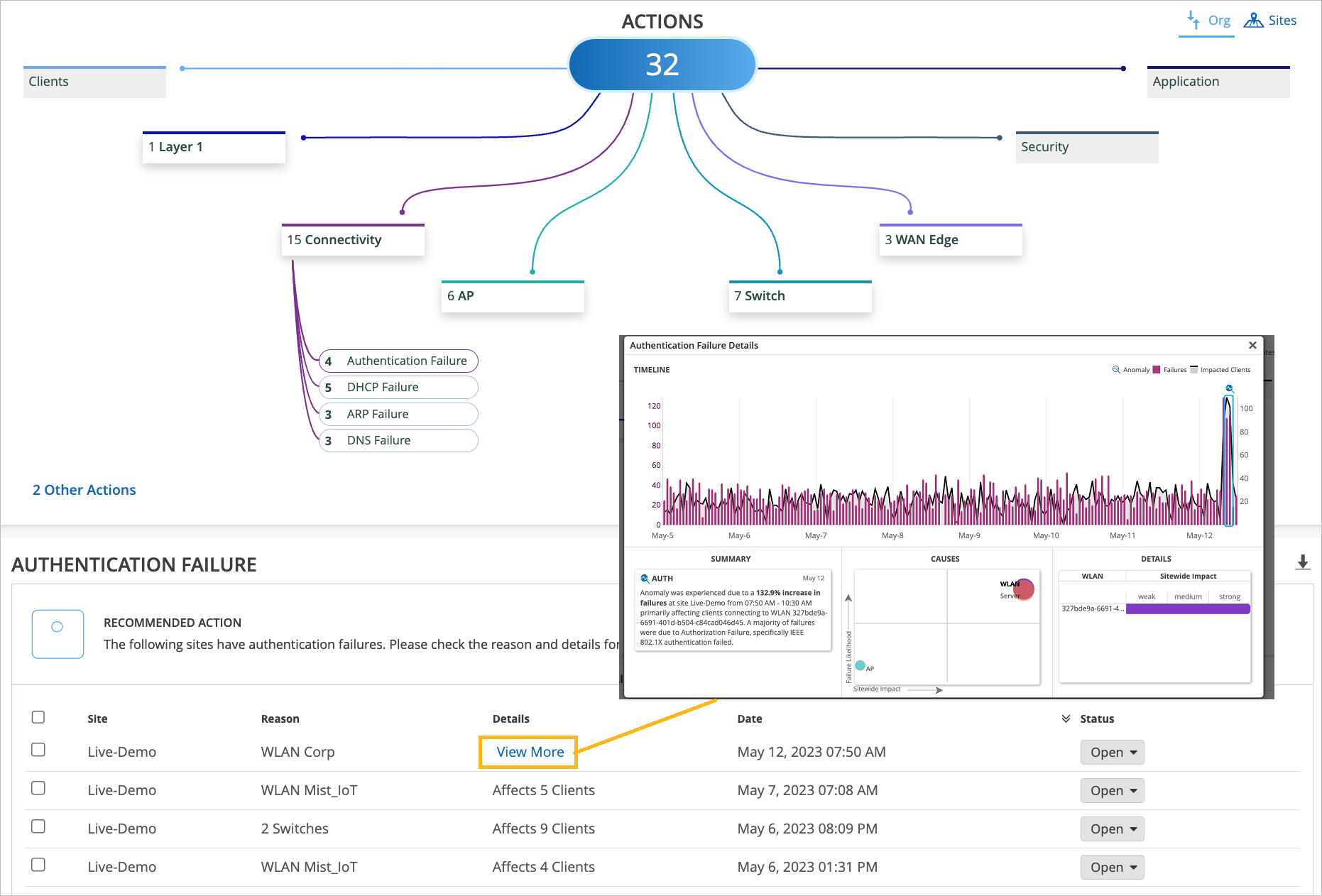
- Na página MARVIS, você notará que a página exibe as informações em diferentes categorias. O Marvis indica o número de problemas detectados para uma categoria. Por exemplo, na captura de tela a seguir, você observará que o Marvis lista 15 problemas para a categoria Conectividade.
Figura 5: Falhas de conectividade na página
 Marvis Actions
Clique em Ver mais para obter os detalhes do cliente com falha. A página Detalhes da falha de autenticação mostrando o resumo do problema, da causa e dos detalhes. A captura de tela mostra um exemplo de como o Marvis Actions relata uma falha de autenticação 802.1x.
Se o problema não estiver relacionado à autenticação ou autorização, observe a camada acima e investigue se há um problema real relacionado ao serviço de rede. Por exemplo, seu gateway pode não estar respondendo ou você pode ter ficado sem endereços IP.
Assista ao vídeo a seguir sobre as ações do Marvis na validação da configuração de acesso e autenticação:
Maybe I don't even want to be reactive. Is there something that can tell me when there is an issue? Is there something that can look at my entire network and figure out if there is an issue that is widespread, maybe it's affecting a specific site, a specific group of access points or switches or anything like that? Well, yes, sure there is. That's why we have Marvis Actions.
In Marvis Actions, we can start slow and we could say, okay, maybe you have some offenders on the network that are consistently trying to connect and they're failing. So let's take a look at them. Let's see what we have there.
Oh, okay. So we have two clients that are failing .1x authentication persistently, consistently, right? And we are saying, okay, let's take a look and maybe at least we can pinpoint where those users are. Well, they are connected to this specific switch and this specific port and this VLAN.
Maybe you want to check and see what's plugged into there that is never able to connect for a long period of time. That's fine. Now, if we look at things at scale, if we look at things holistically, let's say at the whole organization, we can then pinpoint, oh, maybe you have authentication failures that are affecting a specific SSID or specific groups of APs or clients that are more widespread.
This is where we are actually learning what's going on on your network, what's normal, what's not. And whenever there is an anomaly, we would highlight this in the connectivity action in Marvis Action tab. Similarly, if it's not related to authentication or authorization, we can look the layer above and maybe there is an actual network service related issue, maybe your gateway is not responding, maybe you're run out of IP addresses.
The point is all of this information is looked at holistically, right? All the way starting from the NAC authentication authorization now, all the way to client being able to pass traffic and get network services up and running.