
Replace a Switch
Follow these steps to replace a standalone switch from the Juniper Mist™ portal, without disrupting network services.
These instructions apply to the replacement of standalone switches. If you are replacing a Virtual Chassis device, refer to the appropriate topics below:
-
If you want to replace a Virtual Chassis device that uses a virtual device ID (a device ID starting with '0200'), follow the instructions in Replace a Virtual Chassis Member.
-
If you want to replace a Virtual Chassis device that uses a member MAC address as its device identifier, follow the instructions in Replace a Member Whose MAC Address is Used as Virtual Chassis Device ID.
Before replacing a switch, ensure the following:
-
The old switch that needs to be replaced is claimed or adopted by your organization and is assigned to a site. This switch can be in Connected or Disconnected state.
-
The new switch being added is not assigned to any site in the organization. Furthermore, the new switch is listed on the Inventory page with the status Unassigned.
To replace a switch:
-
Select the Replace Switch option from the
Utilities drop-down list on the details.
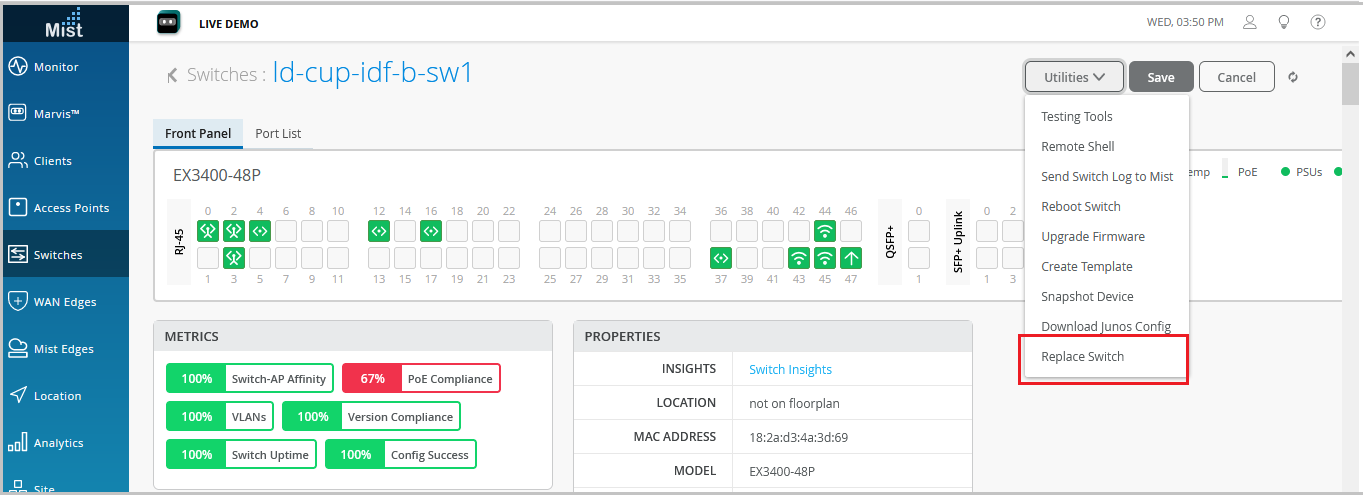
-
From the MAC Address of the unassigned switch drop-down list,
select the MAC address of the unassigned switch. This is the replacement switch—the switch
you will use to replace the switch that you selected in Step 2. If the Mist network
doesn't include any unassigned switches, the Mist portal doesn't display unassigned
switches. In that case, this drop-down list doesn't show any MAC
addresses.
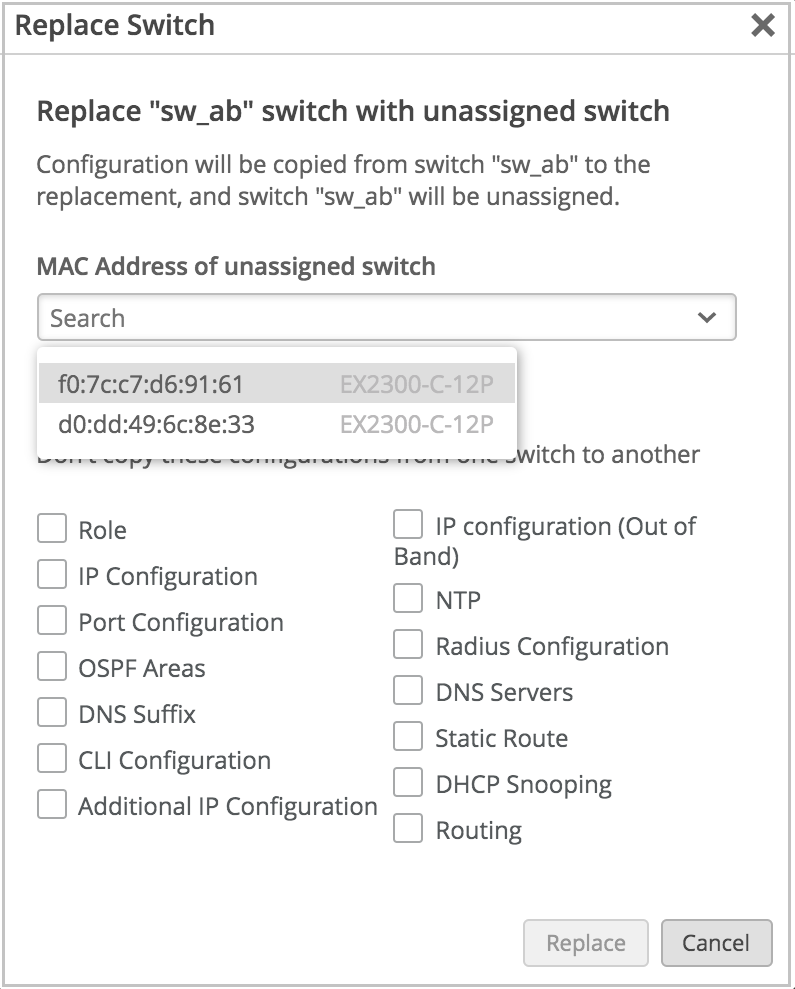
By default, Mist copies the configuration of the existing switch to the new switch. To discard any specific configurations that you don't want to copy to the new switch, select the appropriate check boxes on the Replace Switch window.
If the new switch has a different number of ports than the switch being replaced, Mist discards the port configuration automatically. If the current switch template on the site doesn't cover the configuration requirement of your new switch, we recommend that you assign a different template. Assign your site a template with a configuration that meets the requirements of the new switch. See Configure Switches Using Templates.
To replace a switch using APIs, make a POST API call as shown in the example below:
POST /api/v1/orgs/:org_id/inventory/replace

{
   "site_id": "4ac1dcf4-9d8b-7211-65c4-057819f0862b",
   "mac": "5c5b35000101",
   "inventory_mac": "5c5b35000301",
   "discard": []
}
On the discard list, you can specify the attributes that you do not want to copy to the new switch configuration. If the discard list is blank, Mist copies all the existing switch attributes from the old switch to the new switch.
-
If a switch with a higher number of ports is being replaced with a switch with a lower number of ports, the port configuration is applied only to the ports with overlapping port numbers. The rest of the port configurations are discarded.
-
If a switch with mge ports is being replaced with a switch with ge ports or vice versa, the port configurations are not applied to the switch.