
WAN Assurance Design Quick Start
Use the information in this topic to understand what use case most closely matches your deployment type and navigate to the related content that is provided to learn how to get started.
With Juniper Mist™ WAN Assurance, there are a variety of design options that can be used to provide optimal routing for your specific deployment type. This topic describes some of the most commonly used design topologies for WAN Assurance. Read the information below to see which option best describes your deployment needs. The What Do You Want to Do? table in this topic points you to additional resources that you can use to get started configuring your specific deployment pattern.
Hub and Spoke
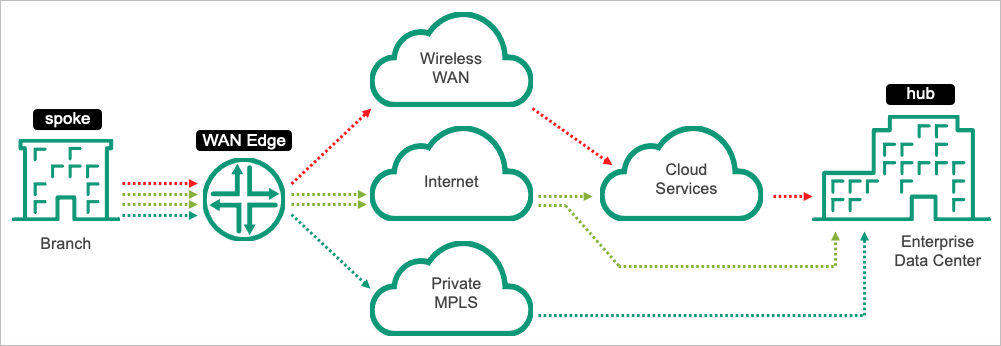
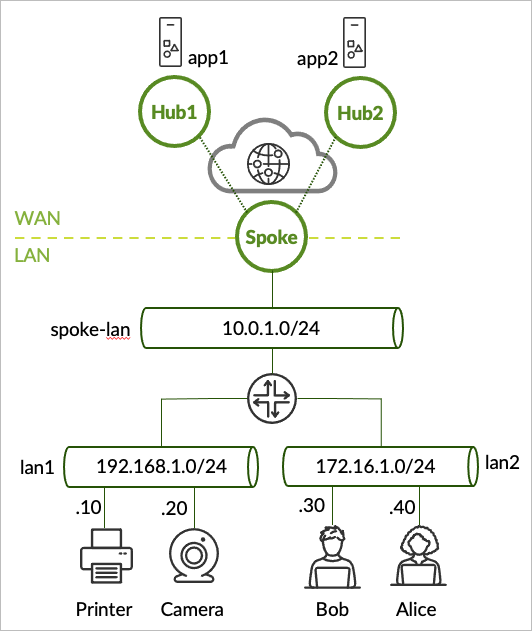
This topology type includes a datacenter or other large site (hub) and branches (spokes). If your Networks, Users, and Applications need different accesses/access policies, this is the topology type you should follow. This requires a Spoke WAN Edge template to be configured where you can configure your hub and spoke topology.
Let's say you have several bank branches (spokes) in your deployment that need to reach out to the datacenter (hub). Each of the teller's desks need access to applications, such as the point of sale system, which is located at the data center, as well as applications that reside on the internet. Or maybe the security cameras from each branch location of your deployment need access to the surveillance system. If this sounds like your deployment, see the following documentation:
Note that Juniper Mist WAN Assurance provides flexibility with regard to the location of your hub. You can have hubs located physically in a datacenter, virtually in cloud environments, or in collocation facilities.
Mesh
A hub and spoke topology tends to cover most use cases. However, for customers who have concerns about latency between sites, a mesh WAN topology can provide interconnectivity across multiple sites and devices with minimal latency. This is ideal for large deployments with various locations to achieve path optimized connectivity. A mesh topology provides lower latency paths by providing more direct connections between sites.
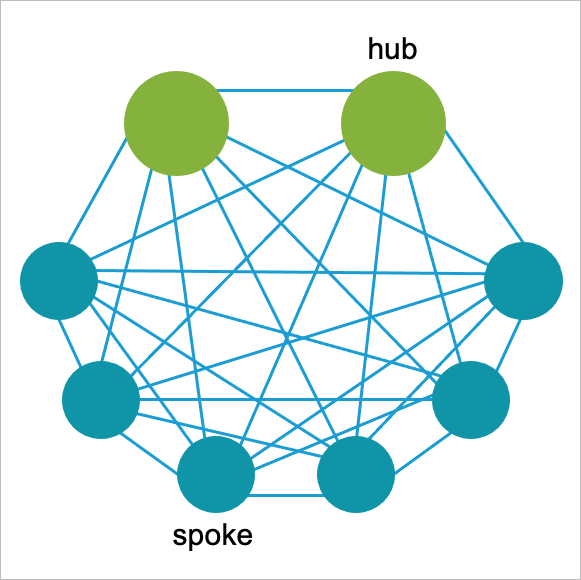
You create hub profiles for WAN Edge devices at hub sites. You create WAN Edge templates for WAN Edge devices at spoke sites. Hub WAN interfaces create overlay endpoints for spokes. Spoke WAN interfaces map the appropriate Hub WAN interfaces, defining the topology. Hub profiles drive the addition and removal of paths on your overlay.
If you need to configure a Mesh topology for SSR devices, see Configure a Mesh WAN Topology (SSR Only).
Security Service Edge in Cloud with Standalone Sites
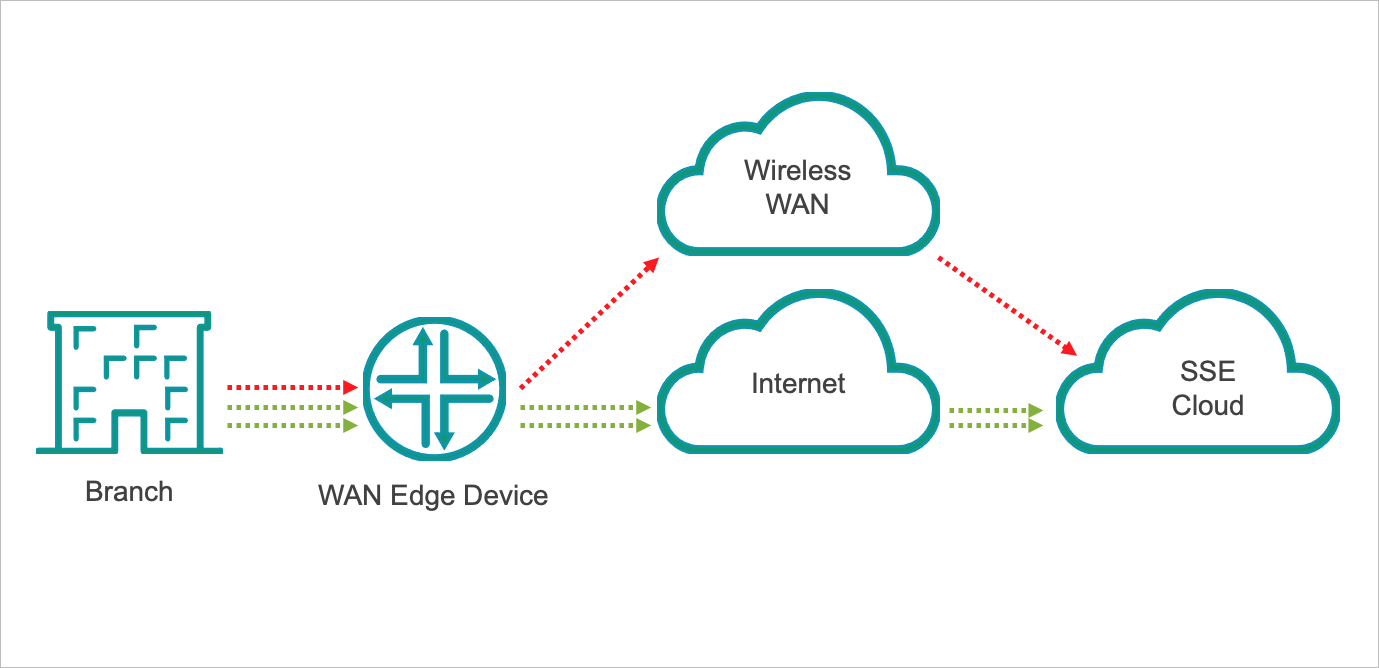
In this topology type, you have standalone sites that need to reach the Security Service Edge (SSE) in the cloud. While your security edge resides in the cloud, you have standalone WAN Edge devices at each of your sites, such as at each of the individual coffee shops in a coffee shop chain. In this scenario, your standalone WAN Edge devices steer applications needing advanced security from the cloud to the SSE in the cloud with the ability to break out other applications directly to the internet.
You must configure a standalone WAN Edge Template to accommodate your standalone WAN Edge devices at your sites. See Configure a WAN Edge Template.
Standalone WAN Edge Devices
In this topology design, there is no hub or cloud that your WAN Edge devices send traffic to, but rather, you use standalone WAN Edge devices at your individual sites and use the on-box security components that come standard on those devices. This deployment type requires you to configure a "Standalone" WAN Edge template. See Configure a WAN Edge Template.
What Do You Want to Do?
|
Design/Topology Type |
Use these resources: |
|---|---|
|
Hub and Spoke Deployment This topology type includes a datacenter or other large site (hub) and branches (spokes). Follow this topology type if your Networks and Users need different accesses. This requires you to configure a Spoke WAN Edge template. |
|
|
Mesh Topology For customers who have concerns about latency between sites, a mesh WAN topology can provide interconnectivity across multiple sites and devices with minimal latency. This is ideal for large deployments with various locations to achieve path optimized connectivity. |
|
|
Security Service Edge in Cloud with Standalone Sites In this topology type, you have standalone sites that need to reach the Security Service Edge (SSE) in the cloud. Your standalone WAN Edge devices steer applications needing advanced security from the cloud to the SSE in the cloud. |
|
|
Standalone WAN Edge Devices In this topology design, there is no hub or cloud that your WAN Edge devices send traffic to, but rather, you use standalone WAN Edge devices at your individual sites and use the on-box security components that come standard on those devices. |