Application SLA and QoS Reference
Use this reference to understand the QoS and SLA behavior based on application traffic types in Mist WAN Assurance.
Juniper Mist WAN Assurance includes a curated set of well-known applications (such as Zoom, Netflix, Microsoft Office 365, and Salesforce) that are pre-classified with default Service Level Agreement (SLA) and Quality of Service (QoS) settings. When an application has the Traffic Type set to Default, best practice settings are applied automatically when an application is referenced in a WAN application policy.
The defaults ensure HPE's recommended per-application quality requirements:
-
SLA thresholds—The maximum acceptable latency, jitter, and packet loss. Used by the SD-WAN engine to select the best WAN path.
-
QoS classification—Traffic class and DSCP marking. Used to prioritize traffic through the network.
API Constant Sources (Authoritative Reference)
The tables in this document are derived from three read-only API constants. These endpoints always reflect the current, deployed values and should be treated as the source of truth whenever values in this document may be stale. These are unauthenticated GET endpoints.
-
Applications—Get Applications—Mist REST API
-
App Categories—List App Category Definitions—Mist API Reference
-
Traffic Types—List Traffic Types—Mist API Reference
How Default SLA and QoS Values are Assigned
The default classification pipeline follows two levels of configuration data, all exposed as read-only constants in the Mist REST API.
| Curated Applications | Each curated application entry maps to a
category name. For example, the Zoom
application maps to the Conferencing category. Then each category
maps to a traffic type name.This document covers the 61 applications that currently meet this criterion. Curated Applications—Default SLA and QoS Reference lists the complete set of curated applications with their resolved traffic type mappings. |
| Application Categories | app-category-definitions constEach category
definition maps a There are 34 categories that currently meet this criterion. Application Categories—Default SLA and QoS Reference lists the complete set of categories with their resolved traffic type mappings. |
| Traffic Types | traffic-types constEach traffic type entry defines the concrete SLA thresholds and QoS settings: traffic class, DSCP value, maximum latency, maximum jitter (where applicable), and maximum packet loss (where applicable). Additionally, each traffic type carries an internal priority rating (not exposed in any API). When multiple applications or application categories are configured within a single application policy, the system resolves the effective traffic type by selecting the application or application category that has the highest priority among all resolved traffic types. An application policy configured with various applications or application categories will resolve to the application or category with the lowest numeric value. The lower the numeric value, the higher the priority is. Table 4 contains the full traffic type reference table. |
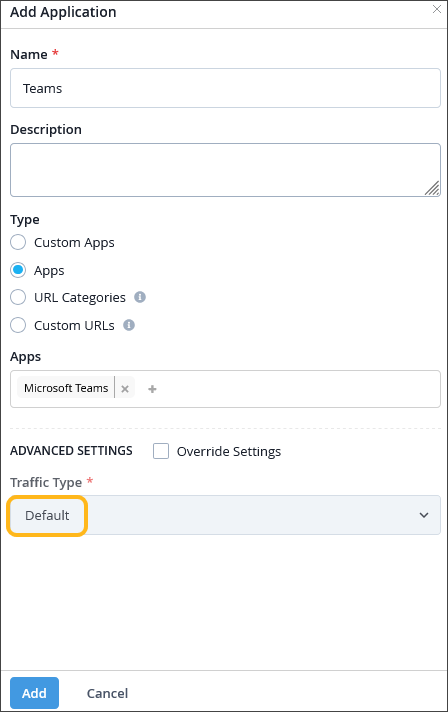
When the Traffic Type field is set to Default in the Application configuration, Mist automatically selects the appropriate SLA thresholds and QoS markings in the application policy where the application is referenced. The defaults are listed in the sections that follow.
To learn how to configure an application, see Define Applications and Networks
For more information on how to configure advanced application settings, see Advanced Settings.
Curated Applications—Default SLA and QoS Reference
The table below covers all applications and their resolved Traffic Type. The SLA and QoS columns (traffic class, DSCP value, maximum latency, maximum jitter, and maximum loss) reflect the values resolved based on Traffic Type. For all other non-curated applications, a default Traffic Type will be set to Data Best Effort.
| Application | Category | Traffic Type | Traffic Class | DSCP | Max Latency | Max Jitter | Max Loss |
|---|---|---|---|---|---|---|---|
| Amazon AWS | Infrastructure | data_best_effort | low | 0 | 1625 ms | 100 ms* | 30% |
| Amazon Video | StreamingMedia | video_streaming_scavenger | best_effort | 8 | 3000 ms | 250 ms | 35% |
| Apple File Services | FileSharing | data_best_effort | low | 0 | 1625 ms | 100 ms* | 30% |
| Apple iTunes | ArtsAndEntertainment | data_best_effort | low | 0 | 1625 ms | 100 ms* | 30% |
| Atlassian | Technology | data_mission_critical | medium | 26 | 750 ms | 100 ms* | 25% |
| Aws-Amazon | Infrastructure | data_best_effort | low | 0 | 1625 ms | 100 ms* | 30% |
| Box | FileSharing | data_best_effort | low | 0 | 1625 ms | 100 ms* | 30% |
| Disney | ArtsAndEntertainment | video_streaming_scavenger | best_effort | 8 | 3000 ms | 250 ms | 35% |
| Disney Plus | StreamingMedia | video_streaming_scavenger | best_effort | 8 | 3000 ms | 250 ms | 35% |
| Dropbox | FileSharing | data_interactive | medium | 18 | 600 ms | 100 ms* | 30% |
| SocialMedia | data_best_effort | low | 0 | 1625 ms | 100 ms* | 30% | |
| Flickr | SocialMedia | data_best_effort | low | 0 | 1625 ms | 100 ms* | 30% |
| GitHub | Technology | data_mission_critical | medium | 26 | 750 ms | 100 ms* | 25% |
| Gmail | Collaboration | data_best_effort | low | 0 | 1625 ms | 100 ms* | 30% |
| GoTo | Business | voip_video | medium | 32 | 1500 ms | 250 ms | 35% |
| Business | data_interactive | medium | 18 | 600 ms | 100 ms* | 30% | |
| Google Cloud | Infrastructure | data_best_effort | low | 0 | 1625 ms | 100 ms* | 30% |
| Google Marketing | Advertisement | data_interactive | medium | 18 | 600 ms | 100 ms* | 30% |
| Google Workspace | Business | data_interactive | medium | 18 | 600 ms | 100 ms* | 30% |
| HBO | StreamingMedia | data_best_effort | low | 0 | 1625 ms | 100 ms* | 30% |
| Hulu | Streaming Media | video_streaming_scavenger | best_effort | 8 | 3000 ms | 250 ms | 35% |
| LINE | Conferencing | voip_video | medium | 32 | 1500 ms | 250 ms | 35% |
| SocialMedia | data_best_effort | low | 0 | 1625 ms | 100 ms* | 30% | |
| Meta | SocialMedia | data_best_effort | low | 0 | 1625 ms | 100 ms* | 30% |
| Microsoft | Business | data_interactive | medium | 18 | 600 ms | 100 ms* | 30% |
| Microsoft Azure | Infrastructure | data_best_effort | low | 0 | 1625 ms | 100 ms* | 30% |
| Microsoft Ds | Business | data_interactive | medium | 18 | 600 ms | 100 ms* | 30% |
| Microsoft Office | Business | data_interactive | medium | 18 | 600 ms | 100 ms* | 30% |
| Microsoft SharePoint | Business | data_interactive | medium | 18 | 600 ms | 100 ms* | 30% |
| Microsoft Teams | Business | voip_video | medium | 32 | 1500 ms | 250 ms | 35% |
| Mixer | Games | gaming | medium | 18 | 500 ms | 200 ms | 25% |
| Netflix | StreamingMedia | video_streaming_scavenger | best_effort | 8 | 3000 ms | 250 ms | 35% |
| O365-Common | Business | data_interactive | medium | 18 | 600 ms | 100 ms* | 30% |
| O365-Exchange | Business | data_interactive | medium | 18 | 600 ms | 100 ms* | 30% |
| O365-SharePoint | Business | data_interactive | medium | 18 | 600 ms | 100 ms* | 30% |
| O365-Skype | Business | voip_video | medium | 32 | 1500 ms | 250 ms | 35% |
| Okta | Business | data_mission_critical | medium | 26 | 750 ms | 100 ms* | 25% |
| Oracle | Business | data_mission_critical | medium | 26 | 750 ms | 100 ms* | 25% |
| Pandora | StreamingMedia | data_scavenger | best_effort | 8 | 1625 ms | 100 ms* | 30% |
| SocialMedia | data_scavenger | best_effort | 8 | 1625 ms | 100 ms* | 30% | |
| RingCentral | Conferencing | voip_video | medium | 32 | 1500 ms | 250 ms | 35% |
| SAP | Business | data_mission_critical | medium | 26 | 750 ms | 100 ms* | 25% |
| ServiceNow | Business | data_mission_critical | medium | 26 | 750 ms | 100 ms* | 25% |
| Slack | Business | data_interactive | medium | 18 | 600 ms | 100 ms* | 30% |
| Snapchat | Collaboration | data_scavenger | best_effort | 8 | 1625 ms | 100 ms* | 30% |
| Spotify | StreamingMedia | data_scavenger | best_effort | 8 | 1625 ms | 100 ms* | 30% |
| Stack Overflow | NewsAndReference | data_best_effort | low | 0 | 1625 ms | 100 ms* | 30% |
| TeamViewer | RemoteDesktop | remote_desktop | medium | 32 | 1300 ms | 500 ms | 25% |
| TikTok | SocialMedia | data_scavenger | best_effort | 8 | 1625 ms | 100 ms* | 30% |
| Twitch | StreamingMedia | video_streaming_scavenger | best_effort | 8 | 3000 ms | 250 ms | 35% |
| SocialMedia | data_best_effort | low | 0 | 1625 ms | 100 ms* | 30% | |
| Vimeo | StreamingMedia | video_streaming_scavenger | best_effort | 8 | 3000 ms | 250 ms | 35% |
| Webex | Conferencing | voip_video | medium | 32 | 1500 ms | 250 ms | 35% |
| Collaboration | data_best_effort | low | 0 | 1625 ms | 100 ms* | 30% | |
| Wikipedia | NewsAndReference | data_best_effort | low | 0 | 1625 ms | 100 ms* | 30% |
| Workday | Business | data_best_effort | low | 0 | 1625 ms | 100 ms* | 30% |
| Yahoo Mail | Collaboration | data_best_effort | low | 0 | 1625 ms | 100 ms* | 30% |
| Yelp | Recreation | data_best_effort | low | 0 | 1625 ms | 100 ms* | 30% |
| YouTube | StreamingMedia | video_streaming_scavenger | best_effort | 8 | 3000 ms | 250 ms | 35% |
| Zoom | Conferencing | voip_video | medium | 32 | 1500 ms | 250 ms | 35% |
| Zoom Video | Conferencing | voip_video | medium | 32 | 1500 ms | 250 ms | 35% |
Application Categories—Default SLA and QoS Reference
The table below covers all 34 categories and their resolved Traffic Type. The SLA and QoS columns reflect the values resolved as described in How Default SLA and QoS Values are Assigned. For all other categories, a default Traffic Type will be set to Data Best Effort.
*Where max jitter is not defined for that traffic type, the SSR system default of 100 ms is used.
**Where max loss is not defined for that traffic type, the SSR system default of 0.5% is used.
| Category | Traffic Type | Traffic Class | DSCP | Max Latency | Max Jitter | Max Loss |
|---|---|---|---|---|---|---|
| Adult | data_best_effort | low | 0 | 1625 ms | 100 ms* | 30% |
| Advertisement | data_best_effort | low | 0 | 1625 ms | 100 ms* | 30% |
| ArtsAndEntertainment | video_streaming | medium | 26 | 3000 ms | 200 ms | 30% |
| Business | data_mission_critical | medium | 26 | 750 ms | 100 ms* | 25% |
| CareerAndEducation | data_best_effort | low | 0 | 1625 ms | 100 ms* | 30% |
| Collaboration | data_interactive | medium | 18 | 600 ms | 100 ms* | 30% |
| Conferencing | voip_video | medium | 32 | 1500 ms | 250 ms | 35% |
| DeviceIoT | data_mission_critical | medium | 26 | 750 ms | 100 ms* | 25% |
| FileSharing | data_interactive | medium | 18 | 600 ms | 100 ms* | 30% |
| Financial | data_mission_critical | medium | 26 | 750 ms | 100 ms* | 25% |
| Gambling | data_best_effort | low | 0 | 1625 ms | 100 ms* | 30% |
| Games | gaming | medium | 18 | 500 ms | 200 ms | 25% |
| Government | data_best_effort | low | 0 | 1625 ms | 100 ms* | 30% |
| Healthcare | data_mission_critical | medium | 26 | 750 ms | 100 ms* | 25% |
| Infrastructure | management_interactive | medium | 16 | 650 ms | 100 ms* | 25% |
| Malware | data_scavenger | best_effort | 8 | 1625 ms | 100 ms* | 30% |
| Miscellaneous | data_best_effort | low | 0 | 1625 ms | 100 ms* | 30% |
| Networking | management_m2m | medium | 16 | 1000 ms | 100 ms* | 0.5%** |
| NewsAndReference | data_best_effort | low | 0 | 1625 ms | 100 ms* | 30% |
| Recreation | data_best_effort | low | 0 | 1625 ms | 100 ms* | 30% |
| RemoteDesktop | remote_desktop | medium | 32 | 1300 ms | 500 ms | 25% |
| Search | data_best_effort | low | 0 | 1625 ms | 100 ms* | 30% |
| Security | management_m2m | medium | 16 | 1000 ms | 100 ms* | 0.5%** |
| Shopping | data_best_effort | low | 0 | 1625 ms | 100 ms* | 30% |
| SocialMedia | data_best_effort | low | 0 | 1625 ms | 100 ms* | 30% |
| SoftwareUpdates | data_best_effort | low | 0 | 1625 ms | 100 ms* | 30% |
| Sports | data_best_effort | low | 0 | 1625 ms | 100 ms* | 30% |
| StreamingMedia | video_streaming_scavenger | best_effort | 8 | 3000 ms | 250 ms | 35% |
| Technology | data_best_effort | low | 0 | 1625 ms | 100 ms* | 30% |
| Travel | data_best_effort | low | 0 | 1625 ms | 100 ms* | 30% |
| Uncategorized | data_best_effort | low | 0 | 1625 ms | 100 ms* | 30% |
| Illegal | data_best_effort | low | 0 | 1625 ms | 100 ms* | 30% |
| Violence | data_best_effort | low | 0 | 1625 ms | 100 ms* | 30% |
| Weapons | data_best_effort | low | 0 | 1625 ms | 100 ms* | 30% |
Traffic Type Reference (SSR Only)
The following table lists all traffic types defined in the Mist traffic-types constant. The traffic types are listed in order of their priority rating, with their full SLA and QoS settings. These apply to SSR only.
When a single application policy is defined with multiple applications (for example, an application policy that has both Microsoft Teams and Microsoft Office defined for its applications), sessions matching the entire policy are given the Traffic Type of the application with the highest ranking Traffic Type. The Traffic Types listed in the Table 4 table are ordered by ranking from highest to lowest.
*Where max jitter is not defined for that traffic type, the SSR system default of 100 ms is used.
**Where max loss is not defined for that traffic type, the SSR system default of 0.5% is used.
| Traffic Type | Traffic Class | DSCP | Max Latency | Max Jitter | Max Loss |
|---|---|---|---|---|---|
| VoIP Audio | high | 46 | 150 ms | 30 ms | 35% |
| Data Mission Critical | medium | 26 | 750 ms | 100 ms* | 25% |
| VoIP Video | medium | 32 | 1500 ms | 250 ms | 35% |
| Data Interactive | medium | 18 | 600 ms | 100 ms* | 30% |
| Remote Desktop | medium | 32 | 1300 ms | 500 ms | 25% |
| Video Streaming | medium | 26 | 3000 ms | 200 ms | 30% |
| Management Interactive | medium | 16 | 650 ms | 100 ms* | 25% |
| Gaming | medium | 18 | 500 ms | 200 ms | 25% |
| VoIP Signaling | medium | 40 | 250 ms | 100 ms* | 0.5%** |
| Management M2M | medium | 16 | 1000 ms | 100 ms* | 0.5%** |
| Data Best Effort | low | 0 | 1625 ms | 100 ms* | 30% |
| Video Streaming Scavenger | best_effort | 8 | 3000 ms | 250 ms | 35% |
| Data Scavenger | best_effort | 8 | 1625 ms | 100 ms* | 30% |
Traffic Class Reference (SRX Only)
The SRX Series Firewall supports the following traffic classes. These apply to SRX Series Firewalls only. For more information, see Understanding Class of Service.
-
voip_audio
-
voip_video
-
data_interactive
-
data_mission_critical
-
management_interactive
-
network_control
-
voip_signaling
-
data_best_effort
Override the Defaults
The defaults described above are HPE's recommended settings and are appropriate for most deployments. However, they can be overridden at any time on a per-application basis:
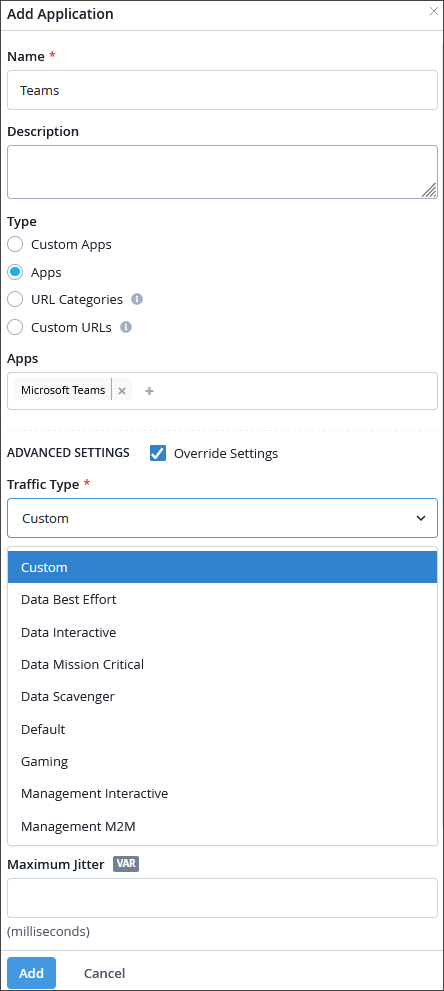
| Preset traffic type | First enable Override Settings by selecting the checkbox in the Advanced Settings section of the Applications side-panel. Then, select one of the built-in traffic types (for example, VoIP Audio, or Data Mission Critical) to replace the category default. |
| Custom traffic type | Select the Custom option, choose a Traffic Class, and specify individual values for DSCP, Maximum Latency, Maximum Jitter, and Maximum Loss. |