
ON THIS PAGE
LDP Overview
LDP Introduction
The Label Distribution Protocol (LDP) is a protocol for distributing labels in non-traffic-engineered applications. LDP allows routers to establish label-switched paths (LSPs) through a network by mapping network-layer routing information directly to data link layer-switched paths.
These LSPs might have an endpoint at a directly attached neighbor (comparable to IP hop-by-hop forwarding), or at a network egress node, enabling switching through all intermediary nodes. LSPs established by LDP can also traverse traffic-engineered LSPs created by RSVP.
LDP associates a forwarding equivalence class (FEC) with each LSP it creates. The FEC associated with an LSP specifies which packets are mapped to that LSP. LSPs are extended through a network as each router chooses the label advertised by the next hop for the FEC and splices it to the label it advertises to all other routers. This process forms a tree of LSPs that converge on the egress router.
Understanding the LDP Signaling Protocol
LDP is a signaling protocol that runs on a device configured for MPLS support. The successful configuration of both MPLS and LDP initiates the exchange of TCP packets across the LDP interfaces. The packets establish TCP-based LDP sessions for the exchange of MPLS information within the network. Enabling both MPLS and LDP on the appropriate interfaces is sufficient to establish LSPs.
LDP is a simple, fast-acting signaling protocol that automatically establishes LSP adjacencies within an MPLS network. Routers then share LSP updates such as hello packets and LSP advertisements across the adjacencies. Because LDP runs on top of an IGP such as IS-IS or OSPF, you must configure LDP and the IGP on the same set of interfaces. After both are configured, LDP begins transmitting and receiving LDP messages through all LDP-enabled interfaces. Because of LDP's simplicity, it cannot perform the true traffic engineering which RSVP can perform. LDP does not support bandwidth reservation or traffic constraints.
When you configure LDP on a label-switching router (LSR), the router begins sending LDP discovery messages out all LDP-enabled interfaces. When an adjacent LSR receives LDP discovery messages, it establishes an underlying TCP session. An LDP session is then created on top of the TCP session. The TCP three-way handshake ensures that the LDP session has bidirectional connectivity. After they establish the LDP session, the LDP neighbors maintain, and terminate, the session by exchanging messages. LDP advertisement messages allow LSRs to exchange label information to determine the next hops within a particular LSP. Any topology changes, such as a router failure, generate LDP notifications that can terminate the LDP session or generate additional LDP advertisements to propagate an LSP change.
Starting in Junos OS Release 20.3R1, support for MPLS to provide LDP signaling protocol configuration with the control plane functionality.
Example: Configuring LDP-Signaled LSPs
This example shows how to create and configure LDP instances within an MPLS network.
Requirements
Before you begin:
Configure network interfaces. See Interfaces User Guide for Security Devices.
Configure an IGP across your network. (The LDP configuration is added to the existing IGP configuration and included in the MPLS configuration.)
Configure a network to use LDP for LSP establishment by enabling MPLS on all transit interfaces in the MPLS network.
Note:Because LDP runs on top of an IGP such as IS-IS or OSPF, you must configure LDP and the IGP on the same set of interfaces.
Overview
To configure LDP-signaled LSPs, you must enable the MPLS family
on all transit interfaces in the MPLS network and include all the
transit interfaces under the [protocols mpls] and [protocols ldp] hierarchy levels.
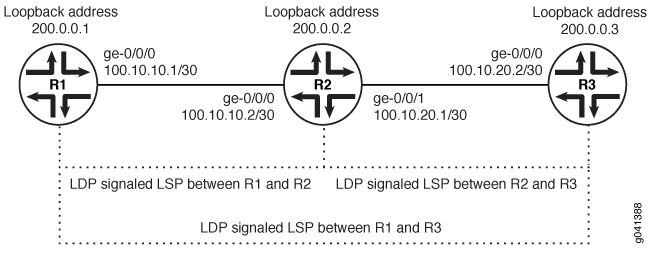
In this example, you enable the MPLS family and create an LDP instance on all the transit interfaces. Additionally, you enable the MPLS process on all the transit interfaces in the MPLS network. In this example, you configure a sample network as shown in Figure 1.
Configuration
Procedure
CLI Quick Configuration
To quickly configure this example, copy the
following commands, paste them into a text file, remove any line breaks,
change any details necessary to match your network configuration,
copy and paste the commands into the CLI at the [edit] hierarchy
level and then enter commit from configuration mode.
R1
set interfaces ge-0/0/0 unit 0 family mpls
set protocols mpls ge-0/0/0 unit 0
set protocols ldp interface ge-0/0/0 unit 0
R2
set interfaces ge-0/0/0 unit 0 family mpls
set protocols mpls ge-0/0/0 unit 0
set protocols ldp interface ge-0/0/0 unit 0
set interfaces ge-0/0/1 unit 0 family mpls
set protocols mpls ge-0/0/1 unit 0
set protocols ldp interface ge-0/0/1 unit 0
R3
set interfaces ge-0/0/0 unit 0 family mpls
set protocols mpls ge-0/0/0 unit 0
set protocols ldp interface ge-0/0/0 unit 0
Step-by-Step Procedure
To enable LDP instances within an MPLS network:
Enable the MPLS family on the transit interface on Router R1.
[edit]
user@R1# set interfaces ge-0/0/0 unit 0 family mpls
Enable the MPLS process on the transit interface.
[edit]
user@R1# set protocols mpls interface ge-0/0/0 unit 0
Create the LDP instance on the transit interface.
[edit]
user@R1# set protocols ldp interface ge-0/0/0 unit 0
Results
Confirm your configuration by entering the show command from configuration mode. If the output does not display
the intended configuration, repeat the configuration instructions
in this example to correct it.
For brevity, this show output includes only the configuration
that is relevant to this example. Any other configuration on the system
has been replaced with ellipses (...).
user@R1# show
...
    interfaces {
        ge-0/0/0 {
            unit 0 {
                family inet {
                    address 10.100.37.20/24;
                }
                family mpls;
            }
        }
        }
    ...
        protocols {
            mpls {
                interface all;
            }
            ldp {
                interface ge-0/0/0.0;
            }
        }
If you are done configuring the device, enter the commit command from the configuration mode to activate the configuration.
Junos OS LDP Protocol Implementation
The Junos OS implementation of LDP supports LDP version 1. The Junos OS supports a simple mechanism for tunneling between routers in an interior gateway protocol (IGP), to eliminate the required distribution of external routes within the core. The Junos OS allows an MPLS tunnel next hop to all egress routers in the network, with only an IGP running in the core to distribute routes to egress routers. Edge routers run BGP but do not distribute external routes to the core. Instead, the recursive route lookup at the edge resolves to an LSP switched to the egress router. No external routes are necessary on the transit LDP routers.
LDP Operation
You must configure LDP for each interface on which you want LDP to run. LDP creates LSP trees rooted at each egress router for the router ID address that is the subsequent BGP next hop. The ingress point is at every router running LDP. This process provides an inet.3 route to every egress router. If BGP is running, it will attempt to resolve next hops by using the inet.3 table first, which binds most, if not all, of the BGP routes to MPLS tunnel next hops.
Two adjacent routers running LDP become neighbors. If the two routers are connected by more than one interface, they become neighbors on each interface. When LDP routers become neighbors, they establish an LDP session to exchange label information. If per-router labels are in use on both routers, only one LDP session is established between them, even if they are neighbors on multiple interfaces. For this reason, an LDP session is not related to a particular interface.
LDP operates in conjunction with a unicast routing protocol. LDP installs LSPs only when both LDP and the routing protocol are enabled. For this reason, you must enable both LDP and the routing protocol on the same set of interfaces. If this is not done, LSPs might not be established between each egress router and all ingress routers, which might result in loss of BGP-routed traffic.
You can apply policy filters to labels received from and distributed to other routers through LDP. Policy filters provide you with a mechanism to control the establishment of LSPs.
For LDP to run on an interface, MPLS must be enabled on a logical interface on that interface. For more information, see the Logical Interfaces.
LDP Message Types
LDP uses the message types described in the following sections to establish and remove mappings and to report errors. All LDP messages have a common structure that uses a type, length, and value (TLV) encoding scheme.
Discovery Messages
Discovery messages announce and maintain the presence of a router in a network. Routers indicate their presence in a network by sending hello messages periodically. Hello messages are transmitted as UDP packets to the LDP port at the group multicast address for all routers on the subnet.
LDP uses the following discovery procedures:
Basic discovery—A router periodically sends LDP link hello messages through an interface. LDP link hello messages are sent as UDP packets addressed to the LDP discovery port. Receipt of an LDP link hello message on an interface identifies an adjacency with the LDP peer router.
Extended discovery—LDP sessions between routers not directly connected are supported by LDP extended discovery. A router periodically sends LDP targeted hello messages to a specific address. Targeted hello messages are sent as UDP packets addressed to the LDP discovery port at the specific address. The targeted router decides whether to respond to or ignore the targeted hello message. A targeted router that chooses to respond does so by periodically sending targeted hello messages to the initiating router.
Session Messages
Session messages establish, maintain, and terminate sessions between LDP peers. When a router establishes a session with another router learned through the hello message, it uses the LDP initialization procedure over TCP transport. When the initialization procedure is completed successfully, the two routers are LDP peers and can exchange advertisement messages.
Advertisement Messages
Advertisement messages create, change, and delete label mappings for forwarding equivalence classes (FECs). Requesting a label or advertising a label mapping to a peer is a decision made by the local router. In general, the router requests a label mapping from a neighboring router when it needs one and advertises a label mapping to a neighboring router when it wants the neighbor to use a label.
Notification Messages
Notification messages provide advisory information and signal error information. LDP sends notification messages to report errors and other events of interest. There are two kinds of LDP notification messages:
Error notifications, which signal fatal errors. If a router receives an error notification from a peer for an LDP session, it terminates the LDP session by closing the TCP transport connection for the session and discarding all label mappings learned through the session.
Advisory notifications, which pass information to a router about the LDP session or the status of some previous message received from the peer.
Tunneling LDP LSPs in RSVP LSPs
You can tunnel LDP LSPs over RSVP LSPs. The following sections describe how tunneling of LDP LSPs in RSVP LSPs works:
Tunneling LDP LSPs in RSVP LSPs Overview
If you are using RSVP for traffic engineering, you can run LDP simultaneously to eliminate the distribution of external routes in the core. The LSPs established by LDP are tunneled through the LSPs established by RSVP. LDP effectively treats the traffic-engineered LSPs as single hops.
When you configure the router to run LDP across RSVP-established LSPs, LDP automatically establishes sessions with the router at the other end of the LSP. LDP control packets are routed hop-by-hop, rather than carried through the LSP. This routing allows you to use simplex (one-way) traffic-engineered LSPs. Traffic in the opposite direction flows through LDP-established LSPs that follow unicast routing rather than through traffic-engineered tunnels.
If you configure LDP over RSVP LSPs, you can still configure multiple OSPF areas and IS-IS levels in the traffic engineered core and in the surrounding LDP cloud.
Beginning with Junos OS Release 15.1, multi-instance support is extended to LDP over RSVP tunneling for a virtual router routing instance. This allows splitting of a single routing and MPLS domain into multiple domains so that each domain can be scaled independently. BGP labeled unicast can be used to stitch these domains for service forwarding equivalence classes (FECs). Each domain uses intra-domain LDP-over-RSVP LSP for MPLS forwarding.
With the introduction of the multi-instance support for LDP-over-RSVP
LSPs, you cannot enable MPLS on an interface that is already assigned
to another routing instance. Adding an interface that is part of another
routing instance at the [edit protocols mpls] hierarchy
level, throws a configuration error at the time of commit.
Benefits of Tunneling LDP LSPs in RSVP LSPs
Tunneling LDP LSPs in RSVP LSPs provides the following benefits:
Provides convergence of different traffic types such as IPv4, IPv6, unicast, and multicast across Layer 2 and Layer 3 VPNs.
Enables flexible access connectivity options that can accommodate multiple topologies, different protocols, and multiple administrative boundaries.
Enables secure interworking among multiple providers.
Enables provision of differentiated services on a per customer basis because RSVP-TE supports traffic engineering, bandwidth guarantees, and link and node redundancy capabilities.
Reduces the number of LSPs required in the core, which reduces the resource requirements of the protocols and routers as well as reducing convergence time.
Provides cost-efficient rollouts with minimal network disruption because the LSPs are built using point-to-point TE tunnels to directly attached neighbors. These TE tunnels only go to the next hop, not end to end. Then when LDP is run over those tunnels, the sessions are built to the directly connected neighbor. When there is a change in the network, such as adding a new node, the directly connected neighbors of the new node have RSVP and LDP sessions. Thus, the RSVP LSPs are only to the next hop, and LDP takes care of advertising labels for the new addresses.
Tunneling LDP over SR-TE
Learn about the benefits and get an overview of tunneling LDP over SR-TE.
Benefits of Tunneling LDP over SR-TE
Enables seamless integration of LDP over SR-TE in the core network.
Provides flexible connectivity options to accommodate multiple topologies, protocols, and domains.
Enables interoperability between LDP and SR capable devices.
Leverages SR-TE load sharing capabilities.
Provides faster restoration of network connectivity using Topology Independent Loop-Free Alternate (TI-LFA) within the SR-TE domain. SR using TI-LFA routes the traffic instantly to a backup or an alternate path if the primary path fails or becomes unavailable.
Tunneling LDP over SR-TE Overview
It’s common for service providers to use the LDP signaling protocol with MPLS transport at the edges of their networks. LDP offers the advantage of being simple, but LDP lacks traffic engineering (TE) and sophisticated path repair capabilities that are often desired in the network’s core. Many service providers are migrating from RSVP to segment routing traffic engineering (SR-TE) in the core. SR-TE is also referred to as source routing in packet networks (SPRING).
It’s possible that the routers running LDP at the edge may not support SR capabilities. The service provider may wish to continue using LDP on these routers to avoid the need for an upgrade. In such scenarios, the LDP over SR-TE tunneling feature provides the ability to integrate routers that are not SR capable (running LDP) with routers that are SR capable (running SR-TE).
The LDP LSPs are tunneled through the SR-TE network, enabling interworking of LDP LSPs with SR-TE LSPs. For example, if you have LDP domains on the provider edge network and SR-TE in the core network, then you can connect the LDP domains over SR-TE, as shown in Figure 2.
Tunneling LDP over SR-TE supports co-existence of both LDP LSPs and SR-TE LSPs.

You can also tunnel LDP over SR-TE between LDP domains connected to inter-region core networks. For example, if you have multiple regional LDP domains connected to the inter-region SR-TE core networks, you can tunnel LDP across the inter-region SR-TE core network, as shown in Figure 3.
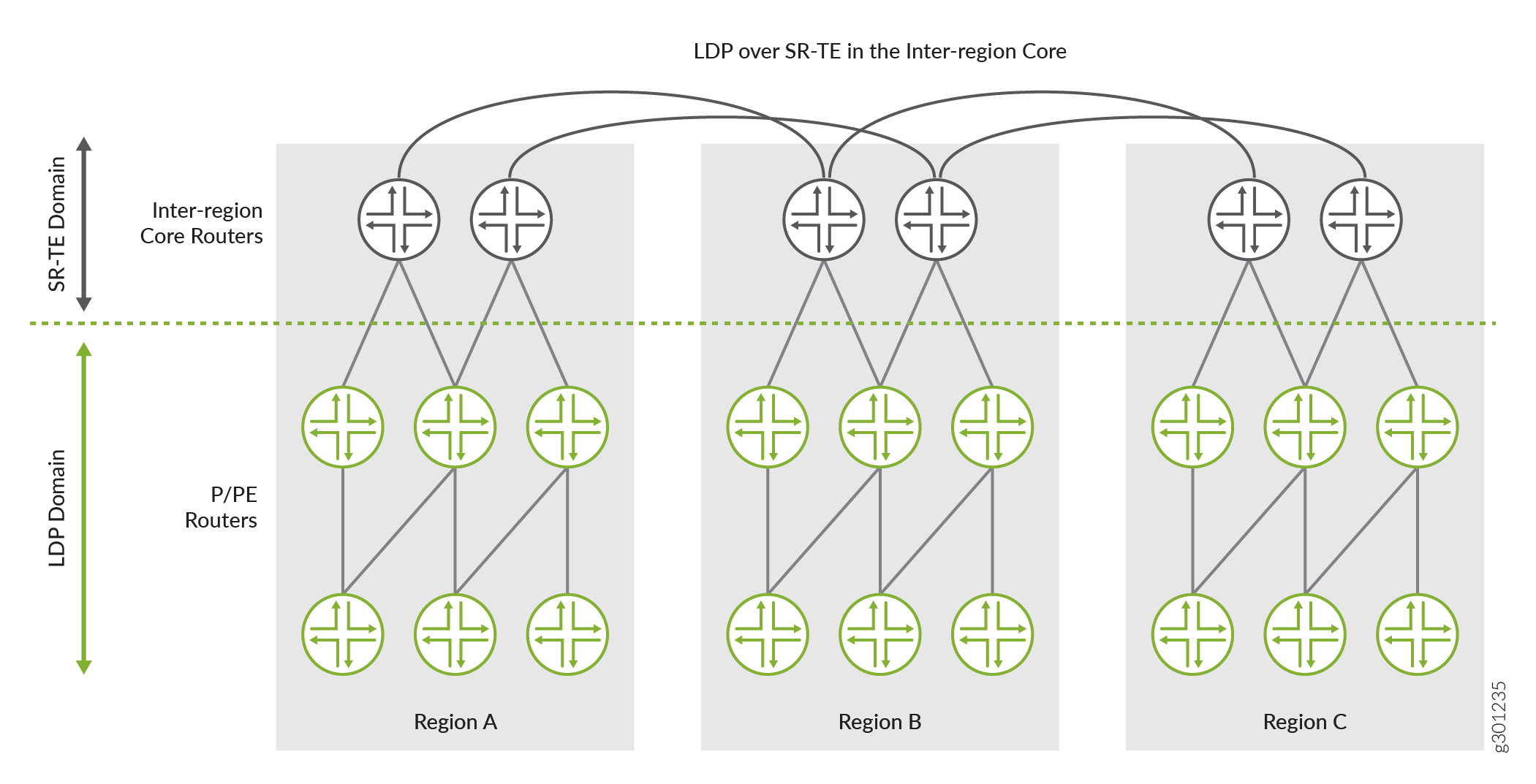
In Figure 3, you have three regional networks (A, B, and C) running LDP. These regional LDP domains are connected to their respective regional core networks running SR-TE. The regional SR-TE core networks are further interconnected to other regional SR-TE core networks (inter-region core network). You can tunnel LDP over these inter-region SR-TE core networks and deploy services, such as Layer 3 VPNs, seamlessly. This scenario could be used in a mobile backhaul network, where the core aggregation layer runs LDP tunneled over SR-TE while the access layer runs LDP only.
To enable LDP tunneling over SR-TE in IS-IS networks, you need to configure the following configuration statements:
-
ldp-tunnelingat the [edit protocols source-packet-routing source-routing-path source-routing-path-name] hierarchy level to enable LDP tunneling over SR-TE. -
spring-teat the [edit protocols isis traffic-engineering tunnel-source-protocol] hierarchy level selects LDP over SR-TE LSPs as the tunnel source protocol.
To enable LDP tunneling over SR-TE in OSPF networks, you need to configure the following configuration statements:
-
ldp-tunnelingat the [edit protocols source-packet-routing source-routing-path source-routing-path-name] hierarchy level to enable LDP tunneling over SR-TE. -
spring-teat the [edit protocols ospf traffic-engineering tunnel-source-protocol] hierarchy level selects LDP over SR-TE LSPs as the tunnel source protocol.
You can configure more than one tunnel source protocol for
IGPs (IS-IS
and OSPF) to create shortcut routes. When more than one tunnel
source protocol is configured and if the tunnels from more than one protocol are
available to a destination, the tunnel with the most preferred route is established.
For example, if the core network has both RSVP LSPs and SR-TE LSPs and LDP tunneling
is enabled for both RSVP and SR-TE LSPs, then the
tunnel-source-protocol configuration selects the tunnel based
on the preference value. The tunnel with the lowest preference value is most
preferred. You can override this route preference with a specific protocol for all
destinations by configuring the preference value, as shown in the following
example:
[edit]
user@host#set protocols isis traffic-engineering tunnel-source-protocol spring-te preference 2
user@host#set protocols isis traffic-engineering tunnel-source-protocol rsvp preference 5
[edit]
user@host#set protocols ospf traffic-engineering tunnel-source-protocol spring-te preference 2
user@host#set protocols ospf traffic-engineering tunnel-source-protocol rsvp preference 5
In this example, you can see the preference value configured for the SR-TE tunnel source protocol is 2 and the preference value for RSVP tunnel source protocol is 5. In this case, the SR-TE tunnel are preferred because they have the lowest preference value as compared to RSVP tunnel source protocol.
It is not mandatory to configure the tunnel source protocol preference value. If more than one tunnel source protocol has the same preference value, then the tunnel is established based on the preferred route to the destination.
The targeted LDP session is established and is triggered when the SR-TE LSP comes up.
The LSP session remains established until the LDP tunneling
(ldp-tunneling) configuration is removed, or the SR-TE LSP is
removed from the configuration.
Junos OS currently does not support LDP over colored SR-TE LSPs.
Example: Tunneling LDP over SR-TE in IS-IS Network
Use this example to learn how to tunnel LDP LSPs over SR-TE in your core network.
Our content testing team has validated and updated this example.
Requirements
This example uses the following hardware and software components:
MX Series routers as CE, PE, and core routers.
-
Junos OS Release 20.3R1 or later running on all devices.
-
Updated and revalidated using vMX on Junos OS Release 21.1R1.
-
Are you interested in getting hands-on experience on this feature?
Visit Juniper vLabs to reserve your pre-configured vLab Sandbox: Segment Routing - Basic and try it out for free!
Overview
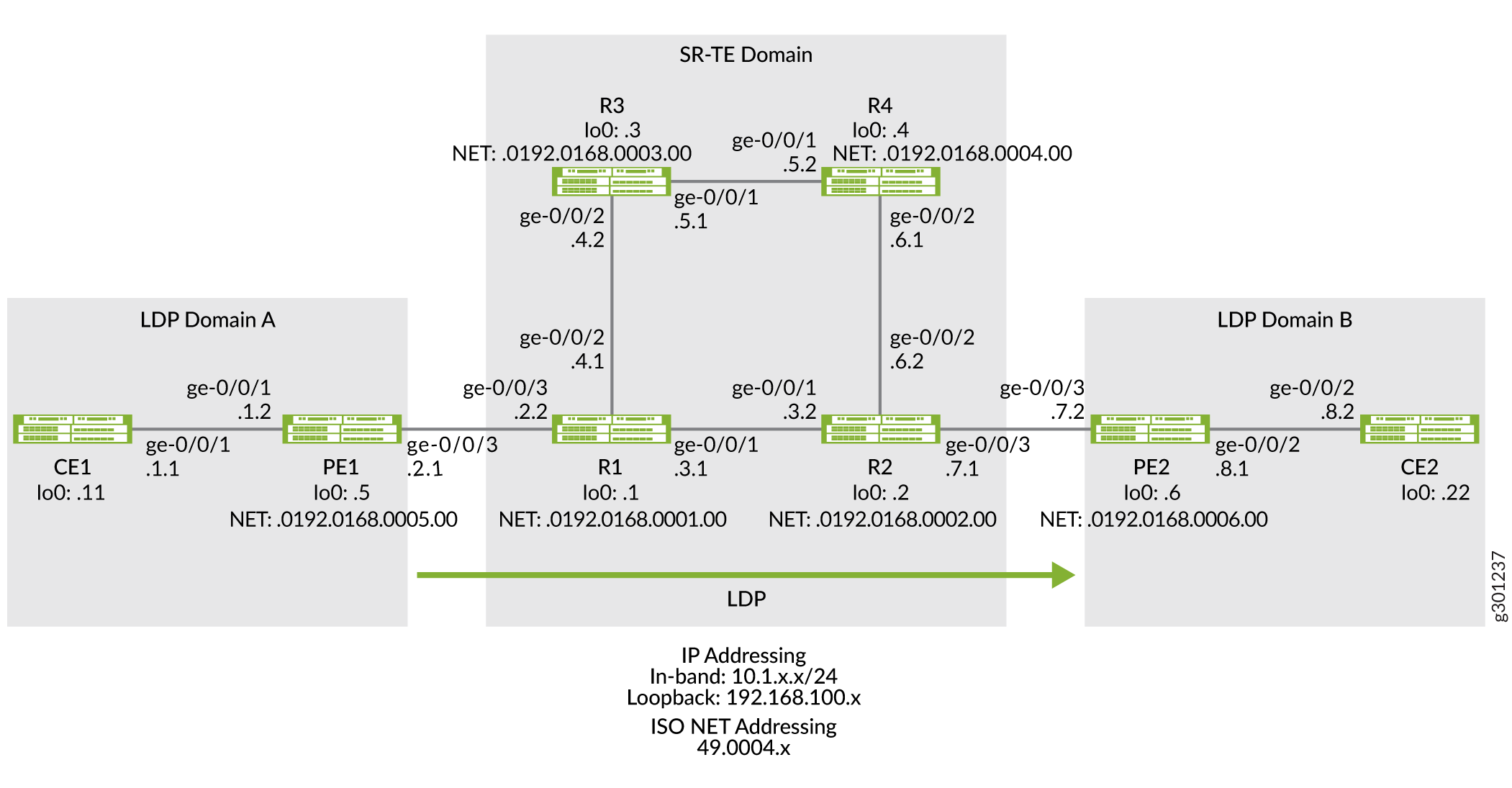
The following topology (Figure 4) shows two LDP domains (LDP Domain A and LDP Domain B) connected to the SR-TE core network, which extends the LSP session over the core by tunneling them over SR-TE.
Topology
Configuration
To tunnel LDP LSP over SR-TE in your core network, perform these tasks:
CLI Quick Configuration
To quickly configure this example, copy the
following commands, paste them into a text file, remove any line breaks,
change any details necessary to match your network configuration,
copy and paste the commands into the CLI at the [edit] hierarchy
level, and then enter commit from configuration mode.
Device CE1
set chassis network-services enhanced-ip
set interfaces ge-0/0/1 description CE1-to-PE1
set interfaces ge-0/0/1 unit 0 family inet address 10.1.1.1/24
set interfaces lo0 unit 0 family inet address 192.168.100.11/32
set protocols ospf area 0.0.0.0 interface ge-0/0/1.0
set protocols ospf area 0.0.0.0 interface lo0.0 passive
set routing-options router-id 192.168.100.11
Device PE1
set chassis network-services enhanced-ip
set interfaces ge-0/0/1 description PE1-to-CE1
set interfaces ge-0/0/1 unit 0 family inet address 10.1.1.2/24
set interfaces ge-0/0/1 unit 0 family iso
set interfaces ge-0/0/3 description PE1-to-R1
set interfaces ge-0/0/3 unit 0 family inet address 10.1.2.1/24
set interfaces ge-0/0/3 unit 0 family iso
set interfaces ge-0/0/3 unit 0 family mpls
set interfaces lo0 unit 0 family inet address 192.168.100.5/32
set interfaces lo0 unit 0 family iso address 49.0004.0192.0168.0005.00
set interfaces lo0 unit 0 family mpls
set policy-options policy-statement export_bgp term a from protocol bgp
set policy-options policy-statement export_bgp term a from protocol direct
set policy-options policy-statement export_bgp term a then accept
set routing-instances CE1_vpn1 instance-type vrf
set routing-instances CE1_vpn1 protocols ospf area 0.0.0.0 interface ge-0/0/1.0
set routing-instances CE1_vpn1 protocols ospf export export_bgp
set routing-instances CE1_vpn1 interface ge-0/0/1.0
set routing-instances CE1_vpn1 route-distinguisher 192.168.100.5:1
set routing-instances CE1_vpn1 vrf-target target:100:4
set routing-instances CE1_vpn1 vrf-table-label
set protocols bgp group ibgp1 type internal
set protocols bgp group ibgp1 local-address 192.168.100.5
set protocols bgp group ibgp1 family inet unicast
set protocols bgp group ibgp1 family inet-vpn unicast
set protocols bgp group ibgp1 neighbor 192.168.100.6
set protocols isis interface ge-0/0/3.0 point-to-point
set protocols isis interface lo0.0 passive
set protocols ldp interface ge-0/0/3.0
set protocols ldp interface lo0.0
set protocols mpls interface ge-0/0/3.0
set protocols mpls interface lo0.0
set routing-options router-id 192.168.100.5
set routing-options autonomous-system 65410
Device R1
set chassis network-services enhanced-ip
set interfaces ge-0/0/1 description R1-to-R2
set interfaces ge-0/0/1 unit 0 family inet address 10.1.3.1/24
set interfaces ge-0/0/1 unit 0 family iso
set interfaces ge-0/0/1 unit 0 family mpls maximum-labels 8
set interfaces ge-0/0/2 description R1-to-R3
set interfaces ge-0/0/2 unit 0 family inet address 10.1.4.1/24
set interfaces ge-0/0/2 unit 0 family iso
set interfaces ge-0/0/2 unit 0 family mpls maximum-labels 8
set interfaces ge-0/0/3 description R1-to-PE1
set interfaces ge-0/0/3 unit 0 family inet address 10.1.2.2/24
set interfaces ge-0/0/3 unit 0 family iso
set interfaces ge-0/0/3 unit 0 family mpls maximum-labels 8
set interfaces lo0 unit 0 family inet address 192.168.100.1/32
set interfaces lo0 unit 0 family iso address 49.0004.0192.0168.0001.00
set interfaces lo0 unit 0 family mpls
set protocols isis interface ge-0/0/1.0 level 2 ipv4-adjacency-segment protected index 108
set protocols isis interface ge-0/0/1.0 level 2 ipv4-adjacency-segment unprotected index 110
set protocols isis interface ge-0/0/1.0 level 2 ipv6-adjacency-segment protected index 109
set protocols isis interface ge-0/0/1.0 level 2 ipv6-adjacency-segment unprotected index 111
set protocols isis interface ge-0/0/1.0 level 2 post-convergence-lfa
set protocols isis interface ge-0/0/1.0 point-to-point
set protocols isis interface ge-0/0/2.0 level 2 ipv4-adjacency-segment protected index 104
set protocols isis interface ge-0/0/2.0 level 2 ipv4-adjacency-segment unprotected index 106
set protocols isis interface ge-0/0/2.0 level 2 ipv6-adjacency-segment protected index 105
set protocols isis interface ge-0/0/2.0 level 2 ipv6-adjacency-segment unprotected index 107
set protocols isis interface ge-0/0/2.0 level 2 post-convergence-lfa
set protocols isis interface ge-0/0/2.0 point-to-point
set protocols isis interface ge-0/0/3.0 level 2 ipv4-adjacency-segment protected index 100
set protocols isis interface ge-0/0/3.0 level 2 ipv4-adjacency-segment unprotected index 102
set protocols isis interface ge-0/0/3.0 level 2 ipv6-adjacency-segment protected index 101
set protocols isis interface ge-0/0/3.0 level 2 ipv6-adjacency-segment unprotected index 103
set protocols isis interface ge-0/0/3.0 level 2 post-convergence-lfa
set protocols isis interface ge-0/0/3.0 point-to-point
set protocols isis interface lo0.0 passive
set protocols isis source-packet-routing srgb start-label 80000
set protocols isis source-packet-routing srgb index-range 50000
set protocols isis source-packet-routing node-segment ipv4-index 5001
set protocols isis source-packet-routing node-segment ipv6-index 5501
set protocols isis level 1 disable
set protocols isis backup-spf-options use-post-convergence-lfa
set protocols isis backup-spf-options use-source-packet-routing
set protocols isis traffic-engineering l3-unicast-topology
set protocols isis traffic-engineering credibility-protocol-preference
set protocols isis traffic-engineering tunnel-source-protocol spring-te
set protocols ldp auto-targeted-session
set protocols ldp preference 1
set protocols ldp interface ge-0/0/1.0
set protocols ldp interface ge-0/0/3.0
set protocols ldp interface lo0.0
set protocols mpls interface ge-0/0/1.0
set protocols mpls interface ge-0/0/2.0
set protocols mpls interface ge-0/0/3.0
set protocols mpls interface lo0.0
set protocols source-packet-routing segment-list seg1 inherit-label-nexthops
set protocols source-packet-routing segment-list seg1 auto-translate
set protocols source-packet-routing segment-list seg1 hop1 ip-address 10.1.4.2
set protocols source-packet-routing segment-list seg1 hop2 ip-address 10.1.5.2
set protocols source-packet-routing segment-list seg1 hop3 ip-address 10.1.6.2
set protocols source-packet-routing source-routing-path sr_static_r5 ldp-tunneling
set protocols source-packet-routing source-routing-path sr_static_r5 to 192.168.100.2
set protocols source-packet-routing source-routing-path sr_static_r5 binding-sid 1003001
set protocols source-packet-routing source-routing-path sr_static_r5 primary seg1
set routing-options router-id 192.168.100.1
Device R2
set chassis network-services enhanced-ip
set interfaces ge-0/0/1 description R2-to-R1
set interfaces ge-0/0/1 unit 0 family inet address 10.1.3.2/24
set interfaces ge-0/0/1 unit 0 family iso
set interfaces ge-0/0/1 unit 0 family mpls maximum-labels 8
set interfaces ge-0/0/2 description R2-to-R4
set interfaces ge-0/0/2 unit 0 family inet address 10.1.6.2/24
set interfaces ge-0/0/2 unit 0 family iso
set interfaces ge-0/0/2 unit 0 family mpls maximum-labels 8
set interfaces ge-0/0/3 description R2-to-PE2
set interfaces ge-0/0/3 unit 0 family inet address 10.1.7.1/24
set interfaces ge-0/0/3 unit 0 family iso
set interfaces ge-0/0/3 unit 0 family mpls maximum-labels 8
set interfaces lo0 unit 0 family inet address 192.168.100.2/32
set interfaces lo0 unit 0 family iso address 49.0004.0192.0168.0002.00
set interfaces lo0 unit 0 family mpls
set protocols isis interface ge-0/0/1.0 level 2 ipv4-adjacency-segment protected index 500
set protocols isis interface ge-0/0/1.0 level 2 ipv4-adjacency-segment unprotected index 502
set protocols isis interface ge-0/0/1.0 level 2 ipv6-adjacency-segment protected index 501
set protocols isis interface ge-0/0/1.0 level 2 ipv6-adjacency-segment unprotected index 503
set protocols isis interface ge-0/0/1.0 level 2 post-convergence-lfa
set protocols isis interface ge-0/0/1.0 point-to-point
set protocols isis interface ge-0/0/2.0 level 2 ipv4-adjacency-segment protected index 504
set protocols isis interface ge-0/0/2.0 level 2 ipv4-adjacency-segment unprotected index 506
set protocols isis interface ge-0/0/2.0 level 2 ipv6-adjacency-segment protected index 505
set protocols isis interface ge-0/0/2.0 level 2 ipv6-adjacency-segment unprotected index 507
set protocols isis interface ge-0/0/2.0 level 2 post-convergence-lfa
set protocols isis interface ge-0/0/2.0 point-to-point
set protocols isis interface ge-0/0/3.0 level 2 ipv4-adjacency-segment protected index 508
set protocols isis interface ge-0/0/3.0 level 2 ipv4-adjacency-segment unprotected index 510
set protocols isis interface ge-0/0/3.0 level 2 ipv6-adjacency-segment protected index 509
set protocols isis interface ge-0/0/3.0 level 2 ipv6-adjacency-segment unprotected index 511
set protocols isis interface ge-0/0/3.0 level 2 post-convergence-lfa
set protocols isis interface ge-0/0/3.0 point-to-point
set protocols isis interface lo0.0 passive
set protocols isis source-packet-routing srgb start-label 80000
set protocols isis source-packet-routing srgb index-range 50000
set protocols isis source-packet-routing node-segment ipv4-index 5005
set protocols isis source-packet-routing node-segment ipv6-index 5505
set protocols isis source-packet-routing traffic-statistics statistics-granularity per-interface
set protocols isis level 1 disable
set protocols isis backup-spf-options use-post-convergence-lfa
set protocols isis backup-spf-options use-source-packet-routing
set protocols isis traffic-engineering l3-unicast-topology
set protocols isis traffic-engineering credibility-protocol-preference
set protocols isis traffic-engineering tunnel-source-protocol spring-te
set protocols ldp interface ge-0/0/1.0
set protocols ldp interface ge-0/0/3.0
set protocols ldp interface lo0.0
set protocols mpls interface ge-0/0/1.0
set protocols mpls interface ge-0/0/2.0
set protocols mpls interface ge-0/0/3.0
set protocols mpls interface lo0.0
set protocols source-packet-routing segment-list seg1 inherit-label-nexthops
set protocols source-packet-routing segment-list seg1 auto-translate
set protocols source-packet-routing segment-list seg1 hop1 ip-address 10.1.6.1
set protocols source-packet-routing segment-list seg1 hop2 ip-address 10.1.5.1
set protocols source-packet-routing segment-list seg1 hop3 ip-address 10.1.4.1
set protocols source-packet-routing source-routing-path sr_static_r1 ldp-tunneling
set protocols source-packet-routing source-routing-path sr_static_r1 to 192.168.100.1
set protocols source-packet-routing source-routing-path sr_static_r1 binding-sid 1003001
set protocols source-packet-routing source-routing-path sr_static_r1 primary seg1
set routing-options router-id 192.168.100.2
Device R3
set chassis network-services enhanced-ip
set interfaces ge-0/0/1 description R3-to-R4
set interfaces ge-0/0/1 unit 0 family inet address 10.1.5.1/24
set interfaces ge-0/0/1 unit 0 family iso
set interfaces ge-0/0/1 unit 0 family mpls
set interfaces ge-0/0/2 description R3-to-R1
set interfaces ge-0/0/2 unit 0 family inet address 10.1.4.2/24
set interfaces ge-0/0/2 unit 0 family iso
set interfaces ge-0/0/2 unit 0 family mpls
set interfaces lo0 unit 0 family inet address 192.168.100.3/32
set interfaces lo0 unit 0 family iso address 49.0004.0192.0168.0003.00
set interfaces lo0 unit 0 family mpls
set protocols isis interface ge-0/0/1.0 level 2 ipv4-adjacency-segment protected index 204
set protocols isis interface ge-0/0/1.0 level 2 ipv4-adjacency-segment unprotected index 206
set protocols isis interface ge-0/0/1.0 level 2 ipv6-adjacency-segment protected index 205
set protocols isis interface ge-0/0/1.0 level 2 ipv6-adjacency-segment unprotected index 207
set protocols isis interface ge-0/0/1.0 level 2 post-convergence-lfa
set protocols isis interface ge-0/0/1.0 point-to-point
set protocols isis interface ge-0/0/2.0 level 2 ipv4-adjacency-segment protected index 200
set protocols isis interface ge-0/0/2.0 level 2 ipv4-adjacency-segment unprotected index 202
set protocols isis interface ge-0/0/2.0 level 2 ipv6-adjacency-segment protected index 201
set protocols isis interface ge-0/0/2.0 level 2 ipv6-adjacency-segment unprotected index 203
set protocols isis interface ge-0/0/2.0 level 2 post-convergence-lfa
set protocols isis interface ge-0/0/2.0 point-to-point
set protocols isis interface lo0.0 passive
set protocols isis source-packet-routing srgb start-label 80000
set protocols isis source-packet-routing srgb index-range 50000
set protocols isis source-packet-routing node-segment ipv4-index 5003
set protocols isis source-packet-routing node-segment ipv6-index 5503
set protocols isis level 1 disable
set protocols isis backup-spf-options use-post-convergence-lfa
set protocols isis backup-spf-options use-source-packet-routing
set protocols isis traffic-engineering l3-unicast-topology
set protocols isis traffic-engineering credibility-protocol-preference
set protocols mpls interface ge-0/0/1.0
set protocols mpls interface ge-0/0/2.0
set protocols mpls interface lo0.0
set routing-options router-id 192.168.100.3
Device R4
set chassis network-services enhanced-ip
set interfaces ge-0/0/1 description R4-to-R3
set interfaces ge-0/0/1 unit 0 family inet address 10.1.5.2/24
set interfaces ge-0/0/1 unit 0 family iso
set interfaces ge-0/0/1 unit 0 family mpls
set interfaces ge-0/0/2 description R4-to-R2
set interfaces ge-0/0/2 unit 0 family inet address 10.1.6.1/24
set interfaces ge-0/0/2 unit 0 family iso
set interfaces ge-0/0/2 unit 0 family mpls
set interfaces lo0 unit 0 family inet address 192.168.100.4/32
set interfaces lo0 unit 0 family iso address 49.0004.0192.0168.0004.00
set interfaces lo0 unit 0 family mpls
set protocols isis interface ge-0/0/1.0 level 2 ipv4-adjacency-segment protected index 300
set protocols isis interface ge-0/0/1.0 level 2 ipv4-adjacency-segment unprotected index 302
set protocols isis interface ge-0/0/1.0 level 2 ipv6-adjacency-segment protected index 301
set protocols isis interface ge-0/0/1.0 level 2 ipv6-adjacency-segment unprotected index 303
set protocols isis interface ge-0/0/1.0 level 2 post-convergence-lfa
set protocols isis interface ge-0/0/1.0 point-to-point
set protocols isis interface ge-0/0/2.0 level 2 ipv4-adjacency-segment protected index 304
set protocols isis interface ge-0/0/2.0 level 2 ipv4-adjacency-segment unprotected index 306
set protocols isis interface ge-0/0/2.0 level 2 ipv6-adjacency-segment protected index 305
set protocols isis interface ge-0/0/2.0 level 2 ipv6-adjacency-segment unprotected index 307
set protocols isis interface ge-0/0/2.0 level 2 post-convergence-lfa
set protocols isis interface ge-0/0/2.0 point-to-point
set protocols isis interface lo0.0 passive
set protocols isis source-packet-routing srgb start-label 80000
set protocols isis source-packet-routing srgb index-range 50000
set protocols isis source-packet-routing node-segment ipv4-index 5004
set protocols isis source-packet-routing node-segment ipv6-index 5504
set protocols isis source-packet-routing traffic-statistics statistics-granularity per-interface
set protocols isis level 1 disable
set protocols isis backup-spf-options use-post-convergence-lfa
set protocols isis backup-spf-options use-source-packet-routing
set protocols isis traffic-engineering l3-unicast-topology
set protocols isis traffic-engineering credibility-protocol-preference
set protocols mpls interface ge-0/0/1.0
set protocols mpls interface ge-0/0/2.0
set protocols mpls interface lo0.0
set routing-options router-id 192.168.100.4
Device PE2
set chassis network-services enhanced-ip
set interfaces ge-0/0/2 description PE2-to-CE2
set interfaces ge-0/0/2 unit 0 family inet address 10.1.8.1/24
set interfaces ge-0/0/2 unit 0 family iso
set interfaces ge-0/0/2 unit 0 family mpls maximum-labels 8
set interfaces ge-0/0/3 description PE2-to-R2
set interfaces ge-0/0/3 unit 0 family inet address 10.1.7.2/24
set interfaces ge-0/0/3 unit 0 family iso
set interfaces ge-0/0/3 unit 0 family mpls maximum-labels 8
set interfaces lo0 unit 0 family inet address 192.168.100.6/32
set interfaces lo0 unit 0 family iso address 49.0004.0192.0168.0006.00
set interfaces lo0 unit 0 family mpls
set policy-options policy-statement export_bgp term a from protocol bgp
set policy-options policy-statement export_bgp term a from protocol direct
set policy-options policy-statement export_bgp term a then accept
set routing-instances CE2_vpn1 instance-type vrf
set routing-instances CE2_vpn1 protocols ospf area 0.0.0.0 interface ge-0/0/2.0
set routing-instances CE2_vpn1 protocols ospf export export_bgp
set routing-instances CE2_vpn1 interface ge-0/0/2.0
set routing-instances CE2_vpn1 route-distinguisher 192.168.100.6:1
set routing-instances CE2_vpn1 vrf-target target:100:4
set routing-instances CE2_vpn1 vrf-table-label
set protocols bgp group ibgp1 type internal
set protocols bgp group ibgp1 local-address 192.168.100.6
set protocols bgp group ibgp1 family inet unicast
set protocols bgp group ibgp1 family inet-vpn unicast
set protocols bgp group ibgp1 neighbor 192.168.100.5
set protocols isis interface ge-0/0/3.0 point-to-point
set protocols isis interface lo0.0 passive
set protocols ldp interface ge-0/0/3.0
set protocols ldp interface lo0.0
set protocols mpls interface ge-0/0/3.0
set protocols mpls interface lo0.0
set routing-options router-id 192.168.100.6
set routing-options autonomous-system 65410
Device CE2
set chassis network-services enhanced-ip
set interfaces ge-0/0/1 description CE2-to-PE2
set interfaces ge-0/0/2 unit 0 family inet address 10.1.8.2/24
set interfaces lo0 unit 0 family inet address 192.168.100.22/32
set protocols ospf area 0.0.0.0 interface ge-0/0/2.0
set protocols ospf area 0.0.0.0 interface lo0.0 passive
set routing-options router-id 192.168.100.22
Configuring PE1
Step-by-Step Procedure
The following example requires you to navigate various levels in the configuration hierarchy. For information about navigating the CLI, see Using the CLI Editor in Configuration Mode in the CLI User Guide.
To configure device PE1:
Configure the network services mode as Enhanced IP. Enhanced IP sets the router's network services to enhanced Internet Protocol and uses enhanced mode capabilities.
[edit chassis]
user@PE1#set network-services enhanced-ip
After you configure the
enhanced-ipstatement and commit the configuration, the following warning message appears prompting you to reboot the router:'chassis' WARNING: Chassis configuration for network services has been changed. A system reboot is mandatory. Please reboot the system NOW. Continuing without a reboot might result in unexpected system behavior. commit complete
The reboot brings up the FPCs on the router.
-
Configure the device's interfaces.
[edit interfaces]
user@PE1#set ge-0/0/1 description PE1-to-CE1
user@PE1#set ge-0/0/1 unit 0 family inet address 10.1.1.2/24
user@PE1#set ge-0/0/1 unit 0 family iso

user@PE1#set ge-0/0/3 description PE1-to-R1
user@PE1#set ge-0/0/3 unit 0 family inet address 10.1.2.1/24
user@PE1#set ge-0/0/3 unit 0 family iso
user@PE1#set ge-0/0/3 unit 0 family mpls

user@PE1#set lo0 unit 0 family inet address 192.168.100.5/32
user@PE1#set lo0 unit 0 family iso address 49.0004.0192.0168.0005.00
user@PE1#set lo0 unit 0 family mpls
-
Configure policy options to export BGP routes to the CE router, which runs the OSPF protocol in this example.
[edit policy-options]
user@PE1#set policy-statement export_bgp term a from protocol bgp
user@PE1#set policy-statement export_bgp term a from protocol direct
user@PE1#set policy-statement export_bgp term a then accept
-
Configure a Layer 3 VPN routing instance to support the OSPF-based CE1 device.
[edit routing-instances]
user@PE1#set CE1_vpn1 instance-type vrf
user@PE1#set CE1_vpn1 protocols ospf area 0.0.0.0 interface ge-0/0/1.0
user@PE1#set CE1_vpn1 protocols ospf export export_bgp
user@PE1#set CE1_vpn1 interface ge-0/0/1.0
user@PE1#set CE1_vpn1 route-distinguisher 192.168.100.5:1
user@PE1#set CE1_vpn1 vrf-target target:100:4
user@PE1#set CE1_vpn1 vrf-table-label
-
Configure the router ID and autonomous system number for Device PE1.
[edit routing-options]
user@PE1#set router-id 192.168.100.5
userPE1# set autonomous-system 65410
-
Configure IS-IS, LDP, and MPLS on the interfaces connected to the core network.
[edit protocols]
user@PE1#set isis interface ge-0/0/3.0 point-to-point
user@PE1#set isis interface lo0.0 passive

user@PE1#set ldp interface ge-0/0/3.0
user@PE1#set ldp interface lo0.0

user@PE1#set mpls interface ge-0/0/3.0
user@PE1#set mpls interface lo0.0
-
Configure BGP between the PE devices.
[edit protocols]
user@PE1#set bgp group ibgp1 type internal
user@PE1#set bgp group ibgp1 local-address 192.168.100.5
user@PE1#set bgp group ibgp1 family inet unicast
user@PE1#set bgp group ibgp1 family inet-vpn unicast
user@PE1#set bgp group ibgp1 neighbor 192.168.100.6
Results
From configuration mode, confirm your configuration
by entering the show chassis, show interfaces, show policy-options, show routing-instances,show routing-options, and show protocols commands.
If the output does not display the intended configuration, repeat
the instructions in this example to correct the configuration.
user@PE1#show chassis
network-services enhanced-ip;
user@PE1#show interfaces
ge-0/0/1 {
    description PE1-to-CE1;
    unit 0 {
        family inet {
            address 10.1.1.2/24;
        }
        family iso;
    }
}
ge-0/0/3 {
    description PE1-to-R1;
    unit 0 {
        family inet {
            address 10.1.2.1/24;
        }
        family iso;
        family mpls;
    }
}
lo0 {
    unit 0 {
        family inet {
            address 192.168.100.5/32;
        }
        family iso {
            address 49.0004.0192.0168.0005.00;
        }
        family mpls;
    }
}
user@PE1#show policy-options
policy-statement export_bgp {
    term a {
        from protocol [ bgp direct ];
        then accept;
    }
}
user@PE1#show routing-instances
CE1_vpn1 {
    instance-type vrf;
    protocols {
        ospf {
            area 0.0.0.0 {
                interface ge-0/0/1.0;
            }
            export export_bgp;
        }
    }
    interface ge-0/0/1.0;
    route-distinguisher 192.168.100.5:1;
    vrf-target target:100:4;
    vrf-table-label;
}user@PE1#show routing-options router-id 192.168.100.5; autonomous-system 65410;
user@PE1#show protocols
bgp {
    group ibgp1 {
        type internal;
        local-address 192.168.100.5;
        family inet {
            unicast;
        }
        family inet-vpn {
            unicast;
        }
        neighbor 192.168.100.6;
    }
}
isis {
    interface ge-0/0/3.0 {
        point-to-point;
    }
    interface lo0.0 {
        passive;
    }
}
ldp {
    interface ge-0/0/3.0;
    interface lo0.0;
}
mpls {
    interface ge-0/0/3.0;
    interface lo0.0;
}
Configuring R1 Device
Step-by-Step Procedure
The following example requires you to navigate various levels in the configuration hierarchy. For information about navigating the CLI, see Using the CLI Editor in Configuration Mode in the CLI User Guide.
To configure device R1:
Configure the network services mode as Enhanced IP. Enhanced IP sets the router's network services to enhanced Internet Protocol and uses enhanced mode capabilities.
[edit chassis]
user@R1#set network-services enhanced-ip
After you configure the
enhanced-ipstatement and commit the configuration, the following warning message appears prompting you to reboot the router:'chassis' WARNING: Chassis configuration for network services has been changed. A system reboot is mandatory. Please reboot the system NOW. Continuing without a reboot might result in unexpected system behavior. commit complete
The reboot brings up the FPCs on the router.
-
Configure the device's interfaces.
[edit interfaces]
user@R1#set ge-0/0/1 description R1-to-R2
user@R1#set ge-0/0/1 unit 0 family inet address 10.1.3.1/24
user@R1#set ge-0/0/1 unit 0 family iso
user@R1#set ge-0/0/1 unit 0 family mpls maximum-labels 8

user@R1#set ge-0/0/2 description R1-to-R3
user@R1#set ge-0/0/2 unit 0 family inet address 10.1.4.1/24
user@R1#set ge-0/0/2 unit 0 family iso
user@R1#set ge-0/0/2 unit 0 family mpls maximum-labels 8

user@R1#set ge-0/0/3 description R1-to-PE1
user@R1#set ge-0/0/3 unit 0 family inet address 10.1.2.2/24
user@R1#set ge-0/0/3 unit 0 family iso
user@R1#set ge-0/0/3 unit 0 family mpls maximum-labels 8

user@R1#set lo0 unit 0 family inet address 192.168.100.1/32
user@R1#set lo0 unit 0 family iso address 49.0004.0192.0168.0001.00
user@R1#set lo0 unit 0 family mpls
Configure routing options to identify the router in the domain.
[edit routing-options]
user@R1#set router-id 192.168.100.1
-
Configure IS-IS adjacency SIDs on the interfaces and allocate SRGB labels to enable segment routing. The labels in the entire SRGB are available for IS-IS. Prefix SIDs (and Node SIDs) are indexed from the SRGB.
[edit protocols]
user@R1#set isis interface ge-0/0/1.0 level 2 ipv4-adjacency-segment protected index 108
user@R1#set isis interface ge-0/0/1.0 level 2 ipv4-adjacency-segment unprotected index 110
user@R1#set isis interface ge-0/0/1.0 level 2 ipv6-adjacency-segment protected index 109
user@R1#set isis interface ge-0/0/1.0 level 2 ipv6-adjacency-segment unprotected index 111
user@R1#set isis interface ge-0/0/1.0 level 2 post-convergence-lfa
user@R1#set isis interface ge-0/0/1.0 point-to-point

user@R1#set isis interface ge-0/0/2.0 level 2 ipv4-adjacency-segment protected index 104
user@R1#set isis interface ge-0/0/2.0 level 2 ipv4-adjacency-segment unprotected index 106
user@R1#set isis interface ge-0/0/2.0 level 2 ipv6-adjacency-segment protected index 105
user@R1#set isis interface ge-0/0/2.0 level 2 ipv6-adjacency-segment unprotected index 107
user@R1#set isis interface ge-0/0/2.0 level 2 post-convergence-lfa
user@R1#set isis interface ge-0/0/2.0 point-to-point

user@R1#set isis interface ge-0/0/3.0 level 2 ipv4-adjacency-segment protected index 100
user@R1#set isis interface ge-0/0/3.0 level 2 ipv4-adjacency-segment unprotected index 102
user@R1#set isis interface ge-0/0/3.0 level 2 ipv6-adjacency-segment protected index 101
user@R1#set isis interface ge-0/0/3.0 level 2 ipv6-adjacency-segment unprotected index 103
user@R1#set isis interface ge-0/0/3.0 level 2 post-convergence-lfa
user@R1#set isis interface ge-0/0/3.0 point-to-point

user@R1#set isis interface lo0.0 passive

user@R1#set isis source-packet-routing srgb start-label 80000
user@R1#set isis source-packet-routing srgb index-range 50000
user@R1#set isis source-packet-routing node-segment ipv4-index 5001
user@R1#set isis source-packet-routing node-segment ipv6-index 5501
user@R1#set isis level 1 disable
Configure TI-LFA to enable protection against link and node failures. SR using TI-LFA provides faster restoration of network connectivity by routing the traffic instantly to a backup or an alternate path if the primary path fails or becomes unavailable.
[edit protocols]
user@R1#set isis backup-spf-options use-post-convergence-lfa
user@R1#set isis backup-spf-options use-source-packet-routing
Configure IS-IS traffic engineering parameters.
[edit protocols]
user@R1#set isis traffic-engineering l3-unicast-topology
user@R1#set isis traffic-engineering credibility-protocol-preference
Enable LDP tunneling over SR-TE.
[edit protocols]
user@R1#set isis traffic-engineering tunnel-source-protocol spring-te
Configure MPLS and LDP protocols on the interfaces in the LDP domain to exchange labels in the LDP domain.
[edit protocols]
user@R1#set ldp preference 1
user@R1#set ldp interface ge-0/0/3.0
user@R1#set ldp interface lo0.0

user@R1#set mpls interface ge-0/0/1.0
user@R1#set mpls interface ge-0/0/2.0
user@R1#set mpls interface ge-0/0/3.0
user@R1#set mpls interface lo0.0
Enable targeted LDP session between the edge routers in the LDP domain.
[edit protocols]
user@R1#set ldp auto-targeted-session
Configure a segment list to route the traffic to a specific path.
[edit protocols]
user@R1#set source-packet-routing segment-list seg1 inherit-label-nexthops
user@R1#set source-packet-routing segment-list seg1 auto-translate
user@R1#set source-packet-routing segment-list seg1 hop1 ip-address 192.168.4.2
user@R1#set source-packet-routing segment-list seg1 hop2 ip-address 192.168.5.2
user@R1#set source-packet-routing segment-list seg1 hop3 ip-address 192.168.6.2
Configure SR-TE LSP to the remote edge routers to enable LDP tunneling over SR-TE.
[edit protocols]
user@R1#set source-packet-routing source-routing-path sr_static_r5 ldp-tunneling
user@R1#set source-packet-routing source-routing-path sr_static_r5 to 192.168.66.66
user@R1#set source-packet-routing source-routing-path sr_static_r5 binding-sid 1003001
user@R1#set source-packet-routing source-routing-path sr_static_r5 primary seg1
Results
From configuration mode, confirm your configuration
by entering the show chassis, show interfaces, show routing-options, and show protocols commands.
If the output does not display the intended configuration, repeat
the instructions in this example to correct the configuration.
user@R1#show chassis
network-services enhanced-ip;
user@R1#show interfaces
ge-0/0/1 {
    description R1-to-R2;
    unit 0 {
        family inet {
            address 10.1.3.1/24;
        }
        family iso;
        family mpls {
            maximum-labels 8;
        }
    }
}
ge-0/0/2 {
    description R1-to-R3;
    unit 0 {
        family inet {
            address 10.1.4.1/24;
        }
        family iso;
        family mpls {
            maximum-labels 8;
        }
    }
}
ge-0/0/3 {
    description R1-to-PE1;
    unit 0 {
        family inet {
            address 10.1.2.2/24;
        }
        family iso;
        family mpls {
            maximum-labels 8;
        }
    }
}
lo0 {
    unit 0 {
        family inet {
            address 192.168.100.1/32;
        }
        family iso {
            address 49.0004.0192.0168.0001.00;
        }
        family mpls;
    }
}user@R1#show protocols
isis {
interface ge-0/0/1.0 {
level 2 {
ipv4-adjacency-segment {
protected index 108;
unprotected index 110;
}
ipv6-adjacency-segment {
protected index 109;
unprotected index 111;
}
post-convergence-lfa;
}
point-to-point;
}
interface ge-0/0/2.0 {
level 2 {
ipv4-adjacency-segment {
protected index 104;
unprotected index 106;
}
ipv6-adjacency-segment {
protected index 105;
unprotected index 107;
}
post-convergence-lfa;
}
point-to-point;
}
interface ge-0/0/3.0 {
level 2 {
ipv4-adjacency-segment {
protected index 100;
unprotected index 102;
}
ipv6-adjacency-segment {
protected index 101;
unprotected index 103;
}
post-convergence-lfa;
}
point-to-point;
}
interface lo0.0 {
passive;
}
source-packet-routing {
srgb start-label 80000 index-range 50000;
node-segment {
ipv4-index 5001;
ipv6-index 5501;
}
}
level 1 disable;
backup-spf-options {
use-post-convergence-lfa;
use-source-packet-routing;
}
traffic-engineering {
l3-unicast-topology;
credibility-protocol-preference;
tunnel-source-protocol {
spring-te;
}
}
}
ldp {
auto-targeted-session;
preference 1;
interface ge-0/0/3.0;
interface lo0.0;
}
mpls {
interface ge-0/0/1.0;
interface ge-0/0/2.0;
interface ge-0/0/3.0;
interface lo0.0;
}
source-packet-routing {
segment-list seg1 {
inherit-label-nexthops;
auto-translate;
hop1 ip-address 10.1.4.2;
hop2 ip-address 10.1.5.2;
hop3 ip-address 10.1.6.2;
}
source-routing-path sr_static_r5 {
ldp-tunneling;
to 192.168.100.4;
binding-sid 1003001;
primary {
seg1;
}
}
}user@R1#show routing-options router-id 192.168.100.1;
Verification
To confirm that the configuration is working properly, perform the following tasks:
- Verifying LDP Tunneling over SR-TE
- Verify LDP Forwarding to the Remote PE Device
- Verifying the Advertised Label
Verifying LDP Tunneling over SR-TE
Purpose
Verify that the LDP over SR-TE tunnel is enabled and the LDP tunnel to the remote edge router is taking the right path.
Action
From operational mode, run the show spring-traffic-engineering
lsp detail command.
On R1
user@R1>show spring-traffic-engineering lsp detail
Name: sr_static_r5
  Tunnel-source: Static configuration
  To: 192.168.100.2
  State: Up
  LDP-tunneling enabled
    Path: seg1
    Outgoing interface: NA
    Auto-translate status: Enabled Auto-translate result: Success
    Compute Status:Disabled , Compute Result:N/A , Compute-Profile Name:N/A
    BFD status: N/A BFD name: N/A
    ERO Valid: true
      SR-ERO hop count: 3
        Hop 1 (Strict):
          NAI: IPv4 Adjacency ID, 0.0.0.0 -> 10.1.4.2
          SID type: 20-bit label, Value: 80104
        Hop 2 (Strict):
          NAI: IPv4 Adjacency ID, 0.0.0.0 -> 10.1.5.2
          SID type: 20-bit label, Value: 80204
        Hop 3 (Strict):
          NAI: IPv4 Adjacency ID, 0.0.0.0 -> 10.1.6.2
          SID type: 20-bit label, Value: 80304


Total displayed LSPs: 1 (Up: 1, Down: 0)
On R2
user@R2>show spring-traffic-engineering lsp detail

Name: sr_static_r1
  Tunnel-source: Static configuration
  To: 192.168.100.1
  State: Up
  LDP-tunneling enabled
    Path: seg1
    Outgoing interface: NA
    Auto-translate status: Enabled Auto-translate result: Success
    Compute Status:Disabled , Compute Result:N/A , Compute-Profile Name:N/A
    BFD status: N/A BFD name: N/A
    ERO Valid: true
      SR-ERO hop count: 3
        Hop 1 (Strict):
          NAI: IPv4 Adjacency ID, 0.0.0.0 -> 10.1.6.1
          SID type: 20-bit label, Value: 80504
        Hop 2 (Strict):
          NAI: IPv4 Adjacency ID, 0.0.0.0 -> 10.1.5.1
          SID type: 20-bit label, Value: 80300
        Hop 3 (Strict):
          NAI: IPv4 Adjacency ID, 0.0.0.0 -> 10.1.4.1
          SID type: 20-bit label, Value: 80200


Total displayed LSPs: 1 (Up: 1, Down: 0)
Meaning
On R1, the LDP tunnel is established with the remote edge router 192.168.100.2 in the SR-TE core network. You can also see the SID label values 80104, 80204, 80304 in the output.
On R2, the LDP tunnel is established with the remote edge router 192.168.100.1 in the SR-TE core network. You can also see the SID label values 80504, 80300, 80200 in the output.
Verify LDP Forwarding to the Remote PE Device
Purpose
Verify that the route to the remote PE router uses LDP forwarding and is tunneled over SR-TE.
Action
From operational mode, run the show route destination-prefix
command.
On R1
Verify that the route to the remote PE (PE2) router is through LDP over SR-TE tunnel.
user@R1>show route 192.168.100.6

inet.0: 24 destinations, 24 routes (24 active, 0 holddown, 0 hidden)
+ = Active Route, - = Last Active, * = Both

192.168.100.6/32   *[IS-IS/18] 5d 13:10:09, metric 20
                    >  to 10.1.3.2 via ge-0/0/1.0

inet.3: 8 destinations, 13 routes (5 active, 0 holddown, 6 hidden)
+ = Active Route, - = Last Active, * = Both

192.168.100.6/32   *[LDP/1] 5d 13:10:09, metric 1
                    >  to 10.1.4.2 via ge-0/0/2.0, Push 16, Push 80304, Push 80204(top)
                       to 10.1.3.2 via ge-0/0/1.0, Push 16, Push 80304, Push 80204, Push 85003, Push 85004(top)
On R2
Verify that the route to the remote PE (PE1) router is through LDP over SR-TE tunnel.
user@R2>show route 192.168.100.5

inet.0: 24 destinations, 24 routes (24 active, 0 holddown, 0 hidden)
+ = Active Route, - = Last Active, * = Both

192.168.100.5/32   *[IS-IS/18] 5d 13:20:15, metric 20
                    >  to 10.1.3.1 via ge-0/0/1.0

inet.3: 8 destinations, 13 routes (5 active, 0 holddown, 6 hidden)
+ = Active Route, - = Last Active, * = Both

192.168.100.5/32   *[LDP/9] 5d 13:20:15, metric 1
                    >  to 10.1.6.1 via ge-0/0/2.0, Push 16, Push 80200, Push 80300(top)
                       to 10.1.3.1 via ge-0/0/1.0, Push 16, Push 80200, Push 80300, Push 85004, Push 85003(top)
On PE1
Verify that the route to the remote PE (PE2) router is through a targeted LDP session to the remote PE.
user@PE1>show route 192.168.100.6

inet.0: 22 destinations, 22 routes (22 active, 0 holddown, 0 hidden)
+ = Active Route, - = Last Active, * = Both

192.168.100.6/32   *[IS-IS/18] 1w3d 15:58:20, metric 30
                    >  to 10.1.2.2 via ge-0/0/3.0

inet.3: 3 destinations, 3 routes (3 active, 0 holddown, 0 hidden)
+ = Active Route, - = Last Active, * = Both

192.168.100.6/32   *[LDP/9] 1w0d 16:00:05, metric 1
                    >  to 10.1.2.2 via ge-0/0/3.0, Push 18
On PE2
Verify that the route to the remote PE (PE1) router is through a targeted LDP session to the remote PE.
user@PE2>show route 192.168.100.5

inet.0: 22 destinations, 22 routes (22 active, 0 holddown, 0 hidden)
+ = Active Route, - = Last Active, * = Both

192.168.100.5/32   *[IS-IS/18] 1w3d 15:59:19, metric 30
                    >  to 10.1.7.1 via ge-0/0/3.0

inet.3: 3 destinations, 3 routes (3 active, 0 holddown, 0 hidden)
+ = Active Route, - = Last Active, * = Both

192.168.100.5/32   *[LDP/9] 1w0d 16:01:14, metric 1
                    >  to 10.1.7.1 via ge-0/0/3.0, Push 18
Meaning
On R1, you can see the LDP label as 16 and the SR-TE label stacks as 80304, 80204, 85003, 85004.
On R2, you can see the LDP label as 16 and the SR-TE label stacks as 80200, 80300, 85004, 85003.
On PE1 and PE2, you can see the LDP label as 18 and 19, respectively.
Verifying the Advertised Label
Purpose
Verify the labels advertised for the forwarding equivalence class (FEC).
Action
From operational mode, run the show ldp database command.
On R1
Verify the labels advertised towards the directly connected PE (PE1) and the labels received from remote edge router (R2).
user@R1>show ldp database

Input label database, 192.168.100.1:0--192.168.100.2:0
Labels received: 4
  Label     Prefix
     17      192.168.100.1/32
      3      192.168.100.2/32
     18      192.168.100.5/32
     16      192.168.100.6/32

Output label database, 192.168.100.1:0--192.168.100.2:0
Labels advertised: 4
  Label     Prefix
      3      192.168.100.1/32
     17      192.168.100.2/32
     16      192.168.100.5/32
     18      192.168.100.6/32

Input label database, 192.168.100.1:0--192.168.100.5:0
Labels received: 4
  Label     Prefix
     17      192.168.100.1/32
     18      192.168.100.2/32
      3      192.168.100.5/32
     19      192.168.100.6/32

Output label database, 192.168.100.1:0--192.168.100.5:0
Labels advertised: 4
  Label     Prefix
      3      192.168.100.1/32
     17      192.168.100.2/32
     16      192.168.100.5/32
     18      192.168.100.6/32
On R2
Verify the labels advertised towards the directly connected PE (PE2) and the labels received from remote edge router (R1).
user@R2>show ldp database

Input label database, 192.168.100.2:0--192.168.100.1:0
Labels received: 4
  Label     Prefix
      3      192.168.100.1/32
     17      192.168.100.2/32
     16      192.168.100.5/32
     18      192.168.100.6/32

Output label database, 192.168.100.2:0--192.168.100.1:0
Labels advertised: 4
  Label     Prefix
     17      192.168.100.1/32
      3      192.168.100.2/32
     18      192.168.100.5/32
     16      192.168.100.6/32

Input label database, 192.168.100.2:0--192.168.100.6:0
Labels received: 4
  Label     Prefix
     18      192.168.100.1/32
     17      192.168.100.2/32
     19      192.168.100.5/32
      3      192.168.100.6/32

Output label database, 192.168.100.2:0--192.168.100.6:0
Labels advertised: 4
  Label     Prefix
     17      192.168.100.1/32
      3      192.168.100.2/32
     18      192.168.100.5/32
     16      192.168.100.6/32
On PE1
Verify the label for the remote PE (PE2) device's loopback address is advertised by edge device R1 to the local PE (PE1) device.
user@PE1>show ldp database

Input label database, 192.168.100.5:0--192.168.100.1:0
Labels received: 4
  Label     Prefix
      3      192.168.100.1/32
     17      192.168.100.2/32
     16      192.168.100.5/32
     18      192.168.100.6/32

Output label database, 192.168.100.5:0--192.168.100.1:0
Labels advertised: 4
  Label     Prefix
     17      192.168.100.1/32
     18      192.168.100.2/32
      3      192.168.100.5/32
     19      192.168.100.6/32
On PE2
Verify the label for the remote PE (PE1) device's loopback address is advertised by edge device R2 to the local PE (PE2) device.
user@PE2>show ldp database

Input label database, 192.168.100.6:0--192.168.100.2:0
Labels received: 4
  Label     Prefix
     17      192.168.100.1/32
      3      192.168.100.2/32
     18      192.168.100.5/32
     16      192.168.100.6/32

Output label database, 192.168.100.6:0--192.168.100.2:0
Labels advertised: 4
  Label     Prefix
     18      192.168.100.1/32
     17      192.168.100.2/32
     19      192.168.100.5/32
      3      192.168.100.6/32
Meaning
On R1, you can see label 18 is advertised towards the directly connected PE (PE1) and the label 19 is received from remote edge router (R2).
On R2, you can see label 17 is advertised towards the directly connected PE (PE2) and the label 19 is received from remote edge router (R1).
On PE1, you can see label 18 is received from the local edge router (R1).
On PE2, you can see label 17 is received from the local edge router (R2).
Label Operations
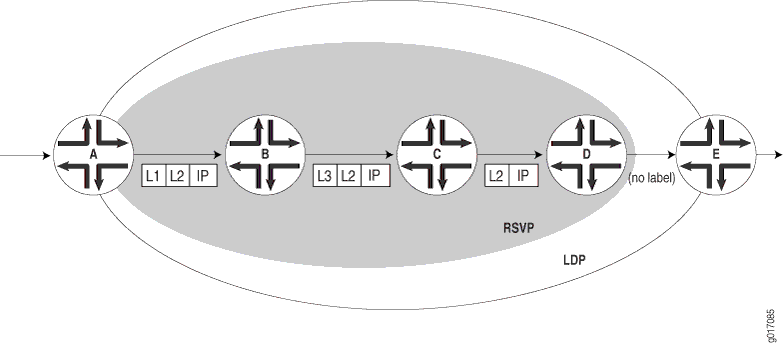
Figure 5 depicts an LDP LSP being tunneled through an RSVP LSP. (For definitions of label operations, see MPLS Label Overview.) The shaded inner oval represents the RSVP domain, whereas the outer oval depicts the LDP domain. RSVP establishes an LSP through routers B, C, D, and E, with the sequence of labels L3, L4. LDP establishes an LSP through Routers A, B, E, F, and G, with the sequence of labels L1, L2, L5. LDP views the RSVP LSP between Routers B and E as a single hop.
When the packet arrives at Router A, it enters the LSP established by LDP, and a label (L1) is pushed onto the packet. When the packet arrives at Router B, the label (L1) is swapped with another label (L2). Because the packet is entering the traffic-engineered LSP established by RSVP, a second label (L3) is pushed onto the packet.
This outer label (L3) is swapped with a new label (L4) at the intermediate router (C) within the RSVP LSP tunnel, and when the penultimate router (D) is reached, the top label is popped. Router E swaps the label (L2) with a new label (L5), and the penultimate router for the LDP-established LSP (F) pops the last label.
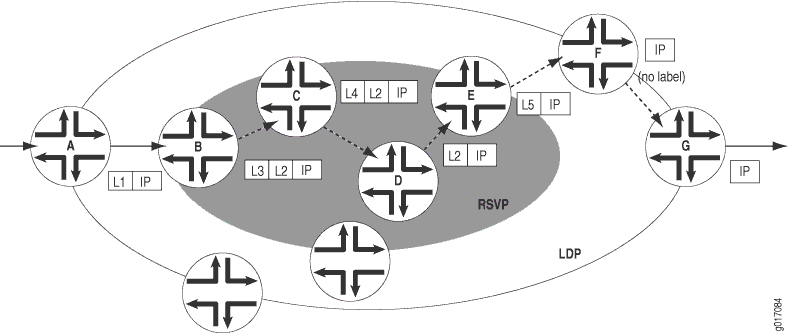
Figure 6 depicts a double push label operation (L1L2). A double push label operation is used when the ingress router (A) for both the LDP LSP and the RSVP LSP tunneled through it is the same device. Note that Router D is the penultimate hop for the LDP-established LSP, so L2 is popped from the packet by Router D.
LDP Session Protection
LDP session protection is based on the LDP targeted hello functionality defined in RFC 5036, LDP Specification, and is supported by the Junos OS as well as the LDP implementations of most other vendors. It involves sending unicast User Datagram Protocol (UDP) hello packets to a remote neighbor address and receiving similar packets from the neighbor router.
If you configure LDP session protection on a router, the LDP sessions are maintained as follows:
An LDP session is established between a router and a remote neighboring router.
If all of the direct links between the routers go down, the LDP session remains up so long as there is IP connectivity between the routers based on another connection over the network.
When the direct link between the routers is reestablished, the LDP session is not restarted. The routers simply exchange LDP hellos with each other over the direct link. They can then begin forwarding LDP-signaled MPLS packets using the original LDP session.
By default, LDP targeted hellos are set to the remote neighbor so long as the LDP session is up, even if there are no more link neighbors to that router. You can also specify the duration you would like to maintain the remote neighbor connection in the absence of link neighbors. When the last link neighbor for a session goes down, the Junos OS starts an LDP session protection timer. If this timer expires before any of the link neighbors come back up, the remote neighbor connection is taken down and the LDP session is terminated. If you configure a different value for the timer while it is currently running, the Junos OS updates the timer to the specified value without disrupting the current state of the LDP session.
LDP Native IPv6 Support Overview
IPv6 connectivity often relies on tunneling IPv6 over an IPv4 MPLS core with IPv4-signaled MPLS label-switched paths (LSPs). This requires the IPv4-signaled LSPs to be configured statically or established dynamically by IPv6 provider edge routers. Because of the growing demand of IPv6, it has become imperative to deploy an IPv6 MPLS core with an IPv6-signaled LSP to provide IPv6 connectivity. In Junos OS, LDP is supported in an IPv6 network only, and in an IPv6/IPv4 dual-stack network as described in RFC 7552. Apart from providing a single session for both IPv4 and IPv6 networks, Junos OS LDP supports separate IPv4 sessions for IPv4 only, and IPv6 sessions for IPv6 only.
You can configure the address family as inet for
IPv4 or inet6 for IPv6, or both. If the family address
is not configured, then the default address of family inet is enabled.
When both IPv4 and IPv6 are configured, you can use the transport-preference statement to configure the prefered transport to be either IPv4 or IPv6. Based on the preference, LDP attempts
to establish a TCP connection using IPv4 or IPv6. By default, IPv6
is selected. The dual-transport statement allows Junos
OS LDP to establish the TCP connection over IPv4 with IPv4 neighbors,
and over IPv6 with IPv6 neighbors as a single-stack LSR. The inet-lsr-id and inet6-lsr-id IDs are the two LSR
IDs that have to be configured to establish an LDP session over IPv4
and IPv6 TCP transport. These two IDs should be non-zero and must
be configured with different values.
Longest Match Support for LDP Overview
LDP is often used to establish MPLS label-switched paths
(LSPs) throughout a complete network domain using an IGP such as OSPF
or IS-IS. In such a network, all links in the domain have IGP adjacencies
as well as LDP adjacencies. LDP establishes the LSPs on the shortest
path to a destination as determined by IGP. In Junos OS, the LDP implementation
does an exact match lookup on the IP address of the forwarding equivalence
class (FEC) in the routing information base (RIB) or IGP routes for
label mapping. This exact mapping requires MPLS end-to-end LDP endpoint
IP addresses to be configured in all the label edge routers (LERs).
This defeats the purpose of IP hierarchical design or default routing
in access devices. Configuring longest-match allows LDP
to set up LSP based on the routes aggregated or summarized across
OSPF areas or IS-IS levels in the inter-domain.
Change History Table
Feature support is determined by the platform and release you are using. Use Feature Explorer to determine if a feature is supported on your platform.