
Conditional Route Advertisement over Redundant Ethernet Interfaces
This topic describes conditional route advertising, which allows you to define criteria that routes meet before they are installed in the route table or advertised to peers and neighbors.
In a chassis cluster, the conditional route advertising ensures that inbound traffic from the upstream network is sent to the node hosting the currently active redundant Ethernet interface.
Conditional Route Advertisement
Route advertisement over redundant Ethernet interfaces in a chassis cluster is complex because the active node can change dynamically. Conditional route advertising addresses this challenge by advertising routes in a way that attracts inbound traffic from the core network. to the Border Gateway Protocol (BGP) interface located on the same node as the currently active redundant Ethernet interface.
This ensures that traffic is processed locally on the active node and does not traverse the fabric link between nodes. This behavior is achieved by manipulating the BGP attributes at the time routes are advertised. To understand this mechanism, it is important to note that, in a chassis cluster, each node maintains its own set of interfaces.
See Also
Example: Configure Conditional Route Advertisement
This example shows how to configure conditional route advertisement in a chassis cluster to ensure that inbound traffic from the upstream network arrives on the node that is on the currently active redundant Ethernet interface.
Requirements
Before you begin, understand conditional route advertising in a chassis cluster. See Understanding Conditional Route Advertising in a Chassis Cluster.
Overview
As illustrated in Figure 1, routing prefixes learned from the redundant Ethernet interface through the IGP are advertised toward the network core using BGP. Two BGP sessions are maintained for multihoming—one from interface ge-0/0/0 on node 0 and one from ge-1/0/0 on node 1.
All routing prefixes are advertised over both BGP sessions. For a route learned over a redundant Ethernet interface, if the active redundant Ethernet interface resides on the same node as the BGP session advertising the route, the route is advertised with a “good” BGP attribute.
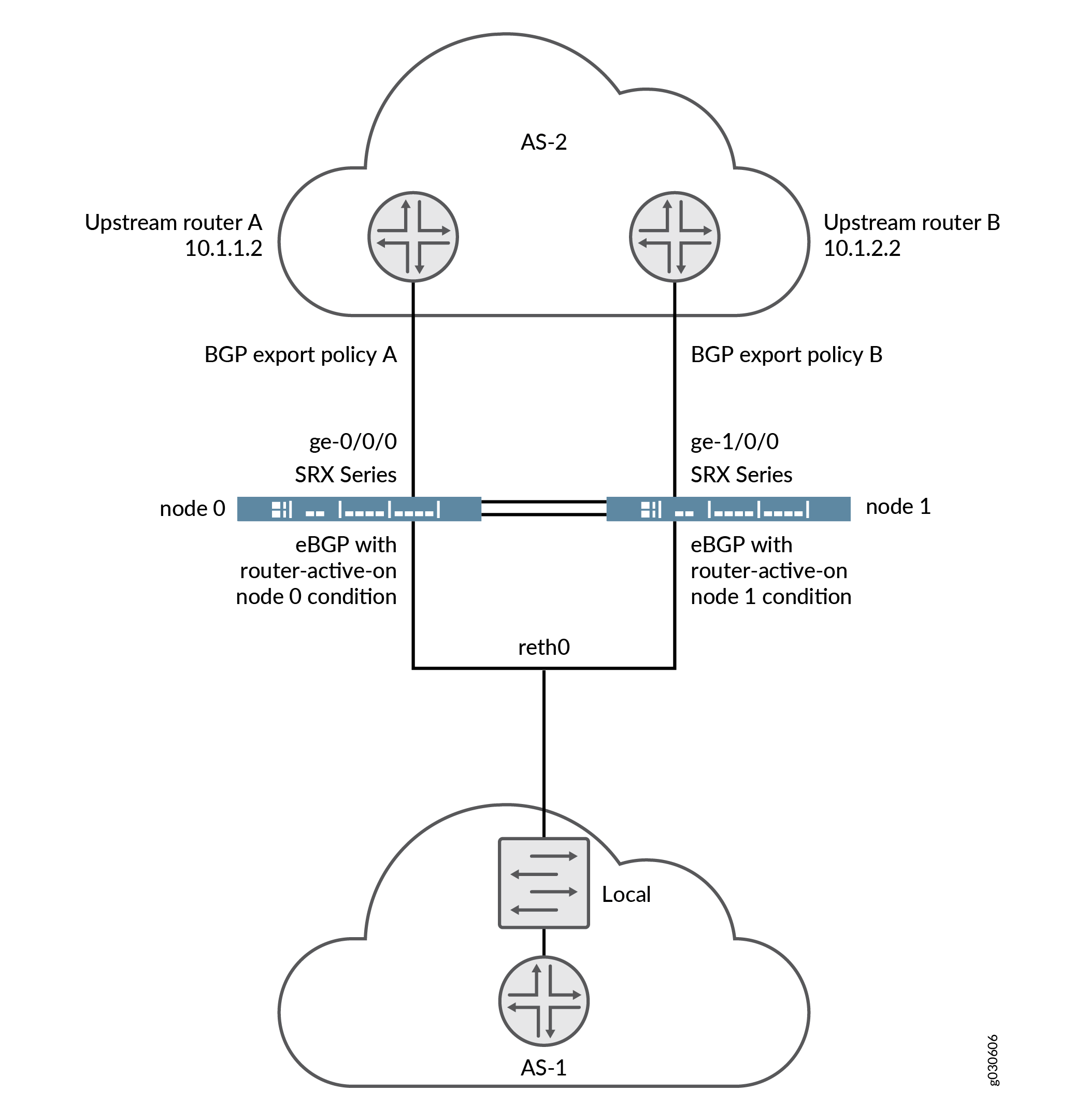
To achieve this behavior, you apply an export policy to BGP before advertising routes. An additional term in the policy match conditions determines whether the next hop corresponds to the current active child interface of the redundant Ethernet interface before a routing decision is made. When the active status of a redundant Ethernet child interface changes, BGP reevaluates the export policy for all affected routes.
The condition statement in this configuration works as follows. Routes evaluated against this condition are accepted only if the following criteria are met:
-
The routes have a redundant Ethernet interface as their next-hop interface.
-
The current child interface of the redundant Ethernet interface is active at node 0 (as specified by the
route-active-on node0keyword).{primary:node0}[edit] user@host# set policy-options condition reth-nh-active-on-0 route-active-on node0
Note that a route might have multiple equal-cost next hops, which may include redundant Ethernet interfaces, regular interfaces, or a combination of both. In such cases, the route still meets the the requirement of having a redundant Ethernet interface as one of its next hops.
If you apply the BGP export policy configured for node 0 in the previous example, only OSPF routes that meet the following criteria are advertised over thatBGP session:
-
The OSPF routes have a redundant Ethernet interface as its next hop.
-
The current active child interface of the redundant Ethernet interface resides on node 0.
You must create and apply a separate policy statement for the other BGP session by following the same process.
In addition to the BGP MED attribute, you can configure
other
BGP attributes, such as
origin-code,
as-path,
and
community.
Configuration
Procedure
CLI Quick Configuration
To quickly configure this example, copy the
following commands, paste them into a text file, remove any line breaks,
change any details necessary to match your network configuration,
copy and paste the commands into the CLI at the [edit] hierarchy
level, and then enter commit from configuration mode.
{primary:node0}[edit]
set policy-options policy-statement reth-nh-active-on-0 term ospf-on-0 from protocol ospf
set policy-options policy-statement reth-nh-active-on-0 term ospf-on-0 from condition reth-nh-active-on-0
 set policy-options policy-statement reth-nh-active-on-0 term ospf-on-0 then metric 10
 set policy-options policy-statement reth-nh-active-on-0 term ospf-on-0 then accept
 set policy-options condition reth-nh-active-on-0 route-active-on node0
Step-by-Step Procedure
To configure conditional route advertising:
-
Create the export policies with the created condition using the
conditionstatement.{primary:node0}[edit] user@host# set policy-options policy-statement reth-nh-active-on-0 term ospf-on-0 from protocol ospf {primary:node0}[edit] user@host# set policy-options policy-statement reth-nh-active-on-0 term ospf-on-0 from condition reth-nh-active-on-0 {primary:node0}[edit] user@host# set policy-options policy-statement reth-nh-active-on-0 term ospf-on-0 then metric 10 {primary:node0}[edit] user@host# set policy-options policy-statement reth-nh-active-on-0 term ospf-on-0 then accept {primary:node0}[edit] user@host# set policy-options condition reth-nh-active-on-0 route-active-on node0
Results
From configuration mode, confirm your configuration
by entering the show policy-options command. If the output
does not display the intended configuration, repeat the configuration
instructions in this example to correct it.
{primary:node0}[edit]
    user@host# show policy-options
    policy-statement reth-nh-active-on-0 {
        term ospf-on-0 {
            from {
                protocol ospf;
                condition reth-nh-active-on-0;
            }
            then {
                metric 10;
                accept;
            }
        }
}
    condition reth-nh-active-on-0 route-active-on node0;
If you are done configuring the device, enter commit from configuration mode.