
ON THIS PAGE
Configure Junos OS on the SRX4120
This topic guides you through the initial configuration of your SRX4120 by using Juniper® Mist, Juniper® Security Director on Premise, Juniper® Security Director Cloud, the J-Web GUI, and the CLI.
We ship the SRX4120 with preinstalled Junos OS, which is ready to be configured when you power on the device. You can use Juniper® Mist, Juniper® Security Director on Premise, Juniper® Security Director Cloud, the J-Web GUI, or the CLI to perform the initial configuration.
Access the CLI on the SRX4120
Configure Root Authentication and Management Interface from the CLI
Gather the following information before configuring the device:
-
Root authentication
-
IP address of the management interface
-
IP address of the default gateway
-
IP address of a DNS server
To configure root authentication and the management interface:
Configure the SRX4120 Using J-Web
The J-Web interface is a Web-based graphical interface that allows you to operate a device without commands.
To access the J-Web interface on a new device that has the factory-default configuration:
-
Open a browser and enter
https://192.168.1.1
in the address bar.
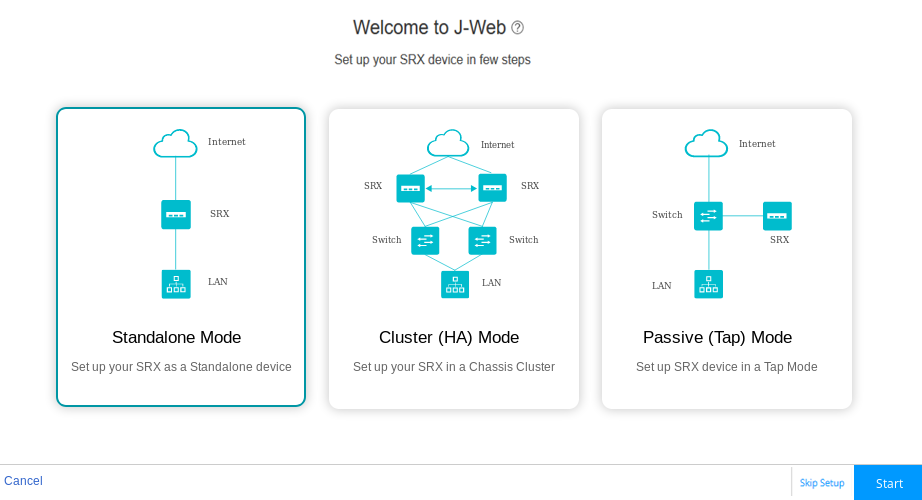
The J-Web Setup page opens. You can choose one of the following setup modes to configure the device:
-
Standalone mode—In this mode, you can configure the basic settings such as device credentials, time, management interface, zones and interfaces, and DNS servers and default gateways.
-
Cluster (HA) mode—In cluster mode, a pair of devices are connected and configured to operate like a single node, providing device-, interface-, and service-level redundancy.
-
Passive (Tap) mode—Tap mode allows you to passively monitor traffic flows across a network. If intrusion prevention system (IPS) is enabled, then the tap mode inspects the incoming and outgoing traffic to detect the number of threats.
-
Configure the SRX4120 Using Juniper Mist
You can configure and manage your device using the Mist cloud portal. If you have a Mist WAN Assurance license, follow the instructions in the Cloud-Ready SRX Series Firewalls with Mist.
If you don't have a license, use the CLI to configure your system.
Configure the SRX4120 Using Juniper Security Director On-Premise
Juniper® Security Director is an on-premises management solution that allows you to manage your firewalls through a centralized web interface.
Follow the instructions in the Onboard SRX Series Firewalls to Security Director guide to configure your device.
Configure the SRX4120 Using Juniper Security Director Cloud
Juniper® Security Director Cloud is a cloud-based software as a solution (SaaS) portal that helps you securely migrate your network to a Secure Access Service Edge (SASE) architecture.
Follow the instructions in the Onboard SRX Series Firewalls to Security Director Cloud guide to configure your device.