
BGP 최적 경로 리플렉션
BGP 최적 경로 리플렉션 이해
BGP는 최적 경로 선택을 수행할 때 정의된 순서대로 여러 속성을 평가합니다. 이러한 단계 중 하나는 메트릭이 가장 낮은 IGP를 통해 다음 홉이 확인되는 경로를 선호하는 것입니다. 이 비교는 경로 선택 결정을 내리는 라우터의 관점에서 수행됩니다.
BGP 경로 선택에 대한 자세한 내용은 BGP 경로 선택 이해를 참조하십시오.
경로 리플렉터가 POP(Point of Presence)별로 배포되는 네트워크에서 이 동작은 일반적으로 원하는 전달 결과를 생성합니다. 각 경로 리플렉터는 클라이언트의 포워딩 토폴로지와 밀접하게 일치하는 IGP 비용을 기반으로 클라이언트에 대한 경로를 반영합니다.
그러나 대규모 네트워크에서 경로 리플렉터는 여러 지리적 위치에 분산된 클라이언트 및 비클라이언트 피어에 서비스를 제공할 수 있습니다. 이러한 구축에서 BGP 경로 선택 중에 사용되는 IGP 메트릭은 수신 클라이언트의 관점이 아닌 경로 리플렉터 위치의 토폴로지를 반영합니다.
결과적으로, 경로 리플렉터에 최적으로 보이는 경로가 모든 클라이언트에 대한 최상의 전달 경로를 나타내지 않을 수 있습니다. 이러한 불일치는 BGP 경로 선택이 올바르게 작동하더라도 최적이 아닌 트래픽 포워딩으로 이어질 수 있습니다.
BGP 최적 경로 리플렉션은 경로 리플렉터의 로컬 보기에만 의존하지 않고 반사된 경로를 수신하는 클라이언트의 IGP 토폴로지와 경로 선택이 더 잘 정렬되도록 허용하여 이러한 제한을 해결합니다.
RFC 9107에 설명된 BGP-ORR(BGP Optimal Route Reflection)을 경로 리플렉터의 내부 게이트웨이 프로토콜(IGP)으로 사용하여 BGP-ORR 클라이언트 그룹에 최적의 경로를 보급할 수 있습니다. 이는 경로 리플렉터의 관점 대신 클라이언트의 관점에서 가장 짧은 IGP 메트릭을 사용하여 수행됩니다.
동일하거나 유사한 IGP 토폴로지를 공유하는 클라이언트 그룹은 하나의 BGP 피어 그룹으로 그룹화할 수 있습니다. 해당 BGP 피어 그룹에서 BGP-ORR을 활성화하도록 구성할 optimal-route-reflection 수 BGP 피어 그룹. 또한 리플렉터 노드 중 하나를 BGP 피어 그룹의 기본 노드(igp-primary)로 구성하여 해당 기본 노드의 IGP 메트릭을 사용하여 최상의 경로를 선택하고 이를 동일한 BGP 피어 그룹의 클라이언트에 알릴 수 있습니다. 선택적으로 다른 리플렉터 노드를 백업 노드(igp-backup)로 선택할 수도 있으며, 이는 기본 리플렉터 노드(igp-primary)가 다운되거나 연결할 수 없을 때 사용됩니다.
BGP-ORR을 활성화하려면 [edit protocols bgp group group-name] 계층 수준에서 문을 포함 optimal-route-reflection 합니다.
BGP-ORR은 IGP가 BGP 경로 해결에 사용될 때만 작동합니다. 경로 해결에 MPLS/LDP/RSVP가 사용되는 경우에는 BGP-ORR이 작동하지 않습니다.
BGP-ORR이 작동하려면 BGP 접두사가 IGP를 통해 해결되어야 합니다. 일반적인 레이어 3 VPN, 레이어 2 VPN, VPLS, MVPN 또는 EVPN 시나리오에서는 접두사가 inet.3을 통해 해결됩니다. inet.3에서 접두사의 protocol-next-hop에 대한 기본 경로는 RSVP 또는 LDP입니다(IS-IS 또는 OSPF와 같은 IGP 프로토콜이 아님). BGP-ORR이 작동하려면 레이어 3 VPN, 레이어 2 VPN, VPLS, MVPN 또는 EVPN 접두사의 route-resolution에 inet.0을 사용하도록 라우터를 구성해야 합니다. 다음 명령을 통해 이 작업을 수행할 수 있습니다.
-
레이어 3 VPN 접두사의 경우:
user@host# set routing-options resolution rib bgp.l3vpn.0 resolution-ribs inet.0
-
레이어 2 VPN 또는 VPLS 접두사의 경우:
user@host# set routing-options resolution rib bgp.l2vpn.0 resolution-ribs inet.0
-
EVPN 접두사의 경우:
user@host# set routing-options resolution rib bgp.evpn.0 resolution-ribs inet.0
-
MVPN 접두사의 경우:
user@host# set routing-options resolution rib bgp.mvpn.0 resolution-ribs inet.0
또 다른 방법은 IGP 경로를 inet.3으로 유출하여 inet.3에서 기본 경로로 만드는 것입니다.
BGP-ORR을 구성하려면 다음 CLI 계층을 사용하십시오.
[edit protocols bgp]
group group-name{
    optimal-route-reflection {
        igp-primary ipv4-address;
        igp-backup ipv4-address;
    }
}
또한보십시오
최적 경로를 보급하기 위한 경로 리플렉터에서의 BGP 최적 경로 반영 구성
IS-IS와 최단 경로 우선(OSPF)을 사용하여 경로 리플렉터의 IGP(Interior Gateway Protocol)로 BGP-ORR(BGP Optimal Route Reflection)을 구성하여 BGP-ORR 클라이언트 그룹에 최적의 경로를 보급할 수 있습니다. 이는 경로 리플렉터의 관점 대신 클라이언트의 관점에서 가장 짧은 IGP 메트릭을 사용하여 수행됩니다.
BGP-ORR을 활성화하려면 [edit protocols bgp group group-name] 계층 수준에서 문을 포함 optimal-route-reflection 합니다.
동일하거나 유사한 IGP 토폴로지를 공유하는 클라이언트 그룹은 하나의 BGP 피어 그룹으로 그룹화할 수 있습니다. 해당 BGP 피어 그룹에서 BGP-ORR을 활성화하도록 구성할 optimal-route-reflection 수 BGP 피어 그룹.
BGP-ORR을 구성하려면:
다음 CLI 명령을 사용하여 BGP-ORR 구성을 모니터링하고 문제를 해결합니다.
show bgp group—BGP-ORR의 기본 및 백업 구성을 봅니다.show isis bgp-orr—IS-IS BGP-ORR 메트릭(RIB)을 봅니다.show ospf bgp-orr—OSPF BGP-ORR 메트릭(RIB)을 봅니다.show ospf route—OSPF 라우팅 테이블의 항목을 봅니다show route- 라우팅 테이블의 활성 항목을 봅니다.show route advertising protocol bgp peer—BGP-ORR 규칙에 따라 경로가 보급되고 있는지 확인합니다.
또한보십시오
예: BGP 네트워크에서 최적의 경로 리플렉션 구성
이 예에서는 경로 리플렉터에서 최적 경로 우선(OSPF)을 내부 게이트웨이 프로토콜(IGP)으로 사용하여 최적의 경로 리플렉션을 구성하여 BGP 클라이언트 그룹에 최적의 경로를 광고합니다. 경로 리플렉터는 클라이언트의 관점에서 최단 IGP 메트릭을 사용하여 최적의 경로를 계산합니다.
당사 콘텐츠 테스트 팀은 이 예제를 검증했습니다.
| 읽기성 점수 |
64.26 |
| 읽기 시간 |
30분 |
| 구성 시간 |
30분 |
- 사전 요구 사항 예
- 시작하기 전에
- 기능 개요
- 토폴로지 개요
- 토폴로지 일러스트레이션
- RR에서 최적의 경로 반영 구성
- 검증
- 모든 디바이스에서 명령 설정
- 모든 디바이스에서 구성 출력 표시
사전 요구 사항 예
| 하드웨어 요구 사항 |
5개의 MX 시리즈 라우터. |
| 소프트웨어 요구 사항 |
Junos OS 릴리스 15.2R1 이상 |
시작하기 전에
| 이점 |
|
| 자세히 알아보기 |
|
| 실습 경험 |
|
| 자세히 알아보기 |
기능 개요
동일한 BGP AS(Autonomous System)의 라우터는 일반적으로 서로 경로를 교환합니다. IBGP에는 풀 메시 연결이 필요하며 이는 번거롭고 느립니다. 풀 메시를 유지해도 대규모 구축에서는 제대로 확장되지 않습니다. 풀 메시를 생성하는 대신 경로 리플렉터는 내부 피어에서 학습한 경로를 다른 내부 피어로 다시 보급하므로 풀 메시 구성이 간소화됩니다. 경로 리플렉션을 사용하려면 경로 리플렉터가 모든 내부 피어와 완전히 연결되어야 합니다. 유사한 IGP 토폴로지를 공유하는 클라이언트 그룹은 하나의 BGP 피어 그룹으로 그룹화할 수 있습니다. 리플렉터 노드 중 하나를 BGP 피어 그룹의 기본 노드 및 선택적 백업 노드로 구성합니다. 최적의 경로 리플렉션은 IGP에서만 작동하며, 경로 확인에 MPLSLDP 또는 RSVP를 사용할 때는 작동하지 않습니다.
| 사용된 기술 |
라우팅 프로토콜: OSPF, BGP |
| 기본 검증 작업 |
|
토폴로지 개요
디바이스 RR은 ORR(Optimal Route Reflection)을 사용하는 경로 리플렉터입니다. 디바이스 R1은 수신 PE이고 디바이스 R2 및 R3은 송신 PE입니다. ORR이 구성된 경우, RR은 자체 보기가 아닌 수신 PE(R1)의 보기를 기반으로 경로를 최적으로 반영합니다. 최단 경로 우선(OSPF)는 IGP로 구성되며 디바이스 간에는 IBGP 피어링이 있습니다.
설명을 위해 R1-to-R3 메트릭을 100으로 늘리고 디바이스 R2 및 R3이 동일한 접두사 10.10.10.0/24를 보급하도록 합니다. R1에서 'show route' 출력에는 프로토콜 다음 홉(송신 PE)으로 R2가 있어야 합니다. RR에서 BGP-ORR 구성을 비활성화하고 동일한 단계를 반복하면 R3이 보급된 접두사의 송신 PE임을 알 수 있습니다.
| 호스트 이름 |
역할 |
기능 |
|---|---|---|
| RR | RR은 경로 리플렉터로 구성되며 최적의 경로 리플렉션으로 구성됩니다. | RR은 OSPF 및 내부 BGP로 구성됩니다. RR은 자체 보기가 아닌 R1의 보기를 기반으로 경로를 최적으로 반영합니다. |
| R1 | 디바이스는 수신 PE입니다 | OSPF는 IGP로 구성되고 BGP는 디바이스 간의 내부 BGP 피어링을 위해 구성됩니다. |
| R2, R3 및 R11 |
이러한 디바이스가 송신 PE입니다. |
최단 경로 우선(OSPF)는 IGP 및 내부 BGP로 구성됩니다. |
토폴로지 일러스트레이션
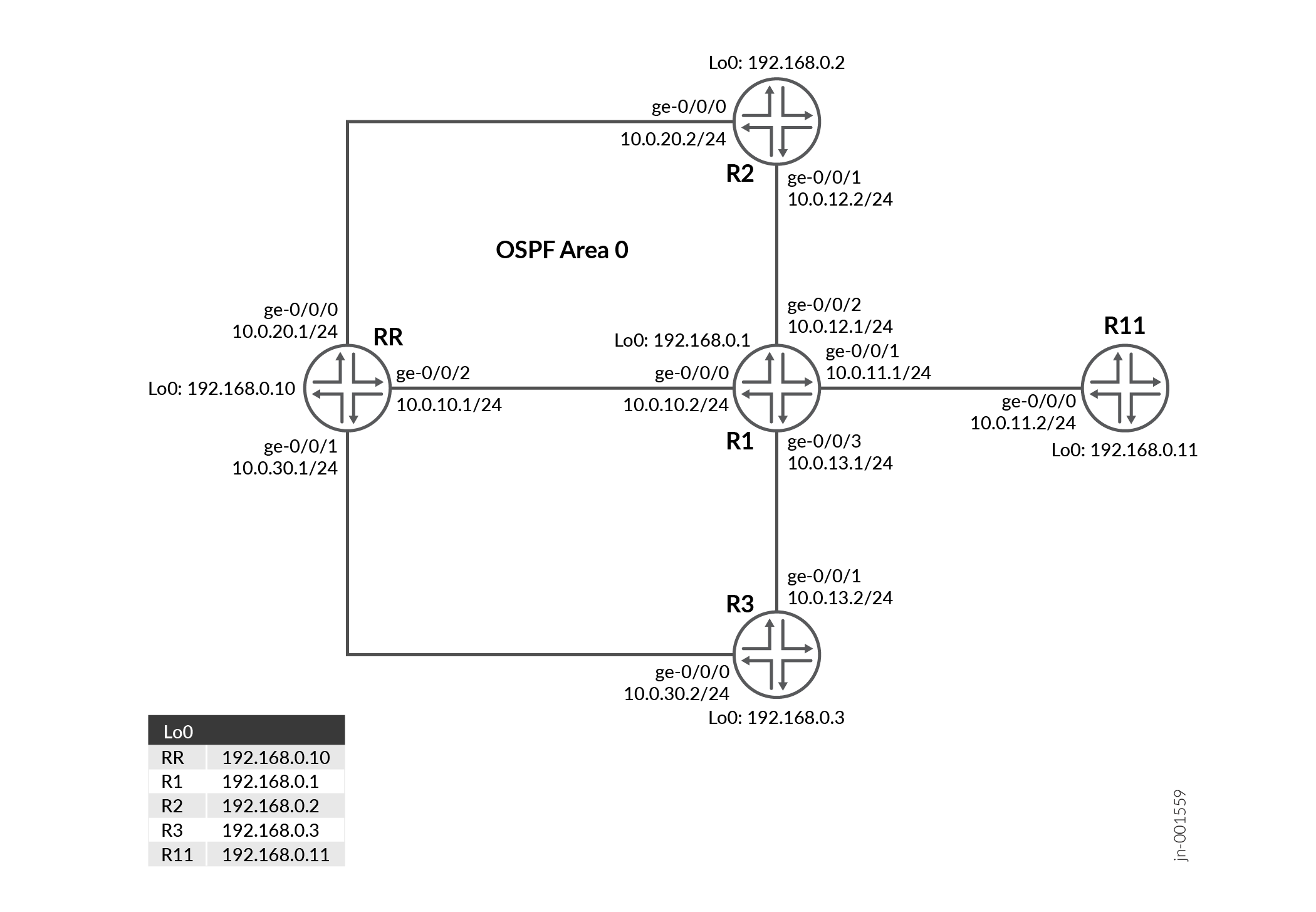
RR에서 최적의 경로 반영 구성
검증
| 명령 | 검증 작업 |
|---|---|
| show bgp group | 할당된 BGP-Optimal 경로 리플렉터 확인 |
| show ospf bgp-orr | 구성된 OSPF BGP-최적 경로 리플렉터 메트릭 확인 |
| show route advertising-protocol bgp | 경로가 경로 리플렉터에 의해 최적으로 보급되는지 확인합니다 |
할당된 BGP-ORR을 확인합니다
목적
BGP-ORR에 대해 기본 및 백업으로 할당된 구성된 BGP 그룹 및 디바이스를 봅니다.
작업
운영 모드에서 명령을 실행 show bgp group 하여 할당된 BGP-ORR을 확인합니다.
View the configured BGP group and devices assigned as primary and backup for BGP-ORR.
user@RR> show bgp group
Group Type: Internal    AS: 65412                  Local AS: 65412
  Name: Client          Index: 0                   Flags: <>
  Options: <Cluster>
  Options: <GracefulShutdownRcv>
  Holdtime: 90 Preference: 0
  Graceful Shutdown Receiver local-preference: 0
  Optimal route reflection: igp-primary 192.168.0.1 igp-backup 192.168.0.11
  Total peers: 4        Established: 4
  192.168.0.1+59852
  192.168.0.2+56933
  192.168.0.3+52883
  192.168.0.11+65170
  inet.0: 1/2/2/0
Default eBGP mode: advertise - accept, receive - accept

Groups: 1  Peers: 4    External: 0    Internal: 4    Down peers: 0   Flaps: 0
Table          Tot Paths  Act Paths Suppressed    History Damp State    Pending
inet.0
                       2          1          0          0          0          0
의미
출력에는 구성된 기본 및 백업 최적 경로 리플렉터와 해당 루프백 주소가 포함됩니다.
라우팅 정보 베이스(RIB)에서 구성된 OSPF BGP-ORR 메트릭을 확인합니다
목적
라우팅 정보 베이스(RIB)에서 구성된 OSPF BGP-ORR 메트릭을 확인합니다
작업
운영 모드에서 명령을 실행합니다 show ospf bgp-orr .
user@RR> show ospf bgp-orr
Topology default Route Table:

BGP ORR Peer Group: Client
  Primary: 192.168.0.1, active
  Backup: 192.168.0.11
Prefix             Path  Route      Metric
                   Type  Type
192.168.0.2        Intra Router          1
192.168.0.3        Intra Router          2
192.168.0.10       Intra Router          1
192.168.0.11       Intra Router          1
10.0.10.0/24       Intra Network         1
10.0.11.0/24       Intra Network         1
10.0.12.0/24       Intra Network         1
10.0.13.0/24       Intra Network         3
10.0.20.0/24       Intra Network         2
10.0.30.0/24       Intra Network         2
192.168.0.1/32     Intra Network         0
192.168.0.2/32     Intra Network         1
192.168.0.3/32     Intra Network         2
192.168.0.10/32    Intra Network         1
192.168.0.11/32    Intra Network         1
의미
출력에는 기본 및 백업 최적 경로 리플렉터의 할당된 메트릭이 표시됩니다.
경로가 경로 리플렉터에 의해 최적으로 보급되는지 확인합니다
목적
BGP-ORR 규칙에 따라 경로가 보급되고 있는지 확인합니다.
작업
운영 모드에서 명령을 실행합니다 show route advertising-protocol bgp .
user@RR> show route advertising-protocol bgp 192.168.0.1

inet.0: 22 destinations, 23 routes (22 active, 0 holddown, 0 hidden)
  Prefix                  Nexthop              MED     Lclpref    AS path
* 10.10.10.0/24           192.168.0.2                  100        I


user@R1> show route 10.10.10.0/24

inet.0: 23 destinations, 24 routes (23 active, 0 holddown, 0 hidden)
+ = Active Route, - = Last Active, * = Both

10.10.10.0/24      *[BGP/170] 00:01:38, localpref 100, from 192.168.0.10
                      AS path: I, validation-state: unverified
                    >  to 10.0.12.2 via ge-0/0/2.0
의미
출력은 BGP ORR이 RR에서 활성화될 때 디바이스 R2의 IP 주소가 다음 홉으로 선택된다는 것을 보여줍니다.
RR에서 BGP ORR 구성을 비활성화하면 디바이스 R3이 디바이스 R1에 도달하기 위해 선택된 송신 PE로 선택됩니다.
[edit]
user@RR# show | compare rollback 1
[edit protocols bgp group Client]
!      inactive: optimal-route-reflection { ... }

user@R1> show route 10.10.10.0/24

inet.0: 22 destinations, 22 routes (22 active, 0 holddown, 0 hidden)
+ = Active Route, - = Last Active, * = Both

10.10.10.0/24      *[BGP/170] 00:00:01, localpref 100, from 192.168.0.10
                      AS path: I, validation-state: unverified
                    >  to 10.0.13.2 via ge-0/0/3.0
의미
출력은 BGP ORR이 RR에서 비활성화될 때 디바이스 R3의 IP 주소가 다음 홉으로 선택됨을 보여줍니다.
모든 디바이스에서 명령 설정
이 예제를 빠르게 구성하려면 다음 명령을 복사하여 텍스트 파일에 붙여 넣고 줄 바꿈을 제거한 다음 네트워크 구성과 일치하는 데 필요한 세부 정보를 변경한 다음 명령을 복사하여 [edit] 계층 수준의 CLI에 붙여넣습니다.
RR
set system host-name RR
set system ports console log-out-on-disconnect
set interfaces ge-0/0/0 unit 0 description "Connected to R2"
set interfaces ge-0/0/0 unit 0 family inet address 10.0.20.1/24
set interfaces ge-0/0/1 unit 0 description "Connected to R3"
set interfaces ge-0/0/1 unit 0 family inet address 10.0.30.1/24
set interfaces ge-0/0/2 unit 0 description "Connected to R1"
set interfaces ge-0/0/2 unit 0 family inet address 10.0.10.1/24
set interfaces lo0 unit 0 family inet address 192.168.0.10/32
set routing-options router-id 192.168.0.10
set routing-options autonomous-system 65412
set protocols bgp group Client type internal
set protocols bgp group Client local-address 192.168.0.10
set protocols bgp group Client family inet unicast
set protocols bgp group Client cluster 192.168.0.10
set protocols bgp group Client peer-as 65412
set protocols bgp group Client optimal-route-reflection igp-primary 192.168.0.1
set protocols bgp group Client optimal-route-reflection igp-backup 192.168.0.11
set protocols bgp group Client neighbor 192.168.0.1
set protocols bgp group Client neighbor 192.168.0.2
set protocols bgp group Client neighbor 192.168.0.3
set protocols bgp group Client neighbor 192.168.0.11
set protocols ospf area 0.0.0.0 interface all
set protocols ospf area 0.0.0.0 interface fxp0.0 disable
R1(수신 PE)
set system host-name R1
set interfaces ge-0/0/0 unit 0 description "Connected to RR"
set interfaces ge-0/0/0 unit 0 family inet address 10.0.10.2/24
set interfaces ge-0/0/1 unit 0 description "Connected to R11"
set interfaces ge-0/0/1 unit 0 family inet address 10.0.11.1/24
set interfaces ge-0/0/2 unit 0 description "Connected to R2"
set interfaces ge-0/0/2 unit 0 family inet address 10.0.12.1/24
set interfaces ge-0/0/3 unit 0 description "Connected to R3"
set interfaces ge-0/0/3 unit 0 family inet address 10.0.13.1/24
set interfaces lo0 unit 0 family inet address 192.168.0.1/32
set routing-options router-id 192.168.0.1
set routing-options autonomous-system 65412
set protocols bgp group Client type internal
set protocols bgp group Client local-address 192.168.0.1
set protocols bgp group Client family inet unicast
set protocols bgp group Client neighbor 192.168.0.10 peer-as 65412
set protocols ospf area 0.0.0.0 interface all
set protocols ospf area 0.0.0.0 interface fxp0.0 disable
set protocols ospf area 0.0.0.0 interface ge-0/0/3.0 metric 100
R2
set system host-name R2
set interfaces ge-0/0/0 unit 0 description "Connected to RR"
set interfaces ge-0/0/0 unit 0 family inet address 10.0.20.2/24
set interfaces ge-0/0/1 unit 0 description "Connected to R1"
set interfaces ge-0/0/1 unit 0 family inet address 10.0.12.2/24
set interfaces lo0 unit 0 family inet address 192.168.0.2/32
set policy-options policy-statement export-static term 1 from protocol static
set policy-options policy-statement export-static term 1 from route-filter 10.10.10.0/24 exact
set policy-options policy-statement export-static term 1 then accept
set routing-options router-id 192.168.0.2
set routing-options autonomous-system 65412
set routing-options static route 10.10.10.0/24 discard
set protocols bgp group Client type internal
set protocols bgp group Client local-address 192.168.0.2
set protocols bgp group Client family inet unicast
set protocols bgp group Client export export-static
set protocols bgp group Client neighbor 192.168.0.10 peer-as 65412
set protocols ospf area 0.0.0.0 interface all
set protocols ospf area 0.0.0.0 interface fxp0.0 disable
R3
set system host-name R3
set interfaces ge-0/0/0 unit 0 description "Connected to RR"
set interfaces ge-0/0/0 unit 0 family inet address 10.0.30.2/24
set interfaces ge-0/0/1 unit 0 description "Connected to R1"
set interfaces ge-0/0/1 unit 0 family inet address 10.0.13.2/24
set interfaces lo0 unit 0 family inet address 192.168.0.3/32
set policy-options policy-statement export-static term 1 from protocol static
set policy-options policy-statement export-static term 1 from route-filter 10.10.10.0/24 exact
set policy-options policy-statement export-static term 1 then accept
set routing-options router-id 192.168.0.3
set routing-options autonomous-system 65412
set routing-options static route 10.10.10.0/24 discard
set protocols bgp group Client type internal
set protocols bgp group Client local-address 192.168.0.3
set protocols bgp group Client family inet unicast
set protocols bgp group Client export export-static
set protocols bgp group Client neighbor 192.168.0.10 peer-as 65412
set protocols ospf area 0.0.0.0 interface all
set protocols ospf area 0.0.0.0 interface fxp0.0 disable
R11
set system host-name R11
set interfaces ge-0/0/0 unit 0 description "Connected to R1"
set interfaces ge-0/0/0 unit 0 family inet address 10.0.11.2/24
set interfaces lo0 unit 0 family inet address 192.168.0.11/32
set routing-options router-id 192.168.0.11
set routing-options autonomous-system 65412
set protocols bgp group Client type internal
set protocols bgp group Client local-address 192.168.0.11
set protocols bgp group Client family inet unicast
set protocols bgp group Client neighbor 192.168.0.10 peer-as 65412
set protocols ospf area 0.0.0.0 interface all
set protocols ospf area 0.0.0.0 interface fxp0.0 disable
모든 디바이스에서 구성 출력 표시
RR 및 기타 디바이스에서 명령 출력을 표시합니다.
RR
interfaces {
    ge-0/0/0 {
        unit 0 {
            description "Connected to R2";
            family inet {
                address 10.0.20.1/24;
            }
        }
    }
    ge-0/0/1 {
        unit 0 {
            description "Connected to R3";
            family inet {
                address 10.0.30.1/24;
            }
        }
    }
    ge-0/0/2 {
        unit 0 {
            description "Connected to R1";
            family inet {
                address 10.0.10.1/24;
            }
        }
    }
    lo0 {
        unit 0 {
            family inet {
                address 192.168.0.10/32;
            }
        }
    }
}
routing-options {
    router-id 192.168.0.10;
    autonomous-system 65412;
}
protocols {
    bgp {
        group Client {
            type internal;
            local-address 192.168.0.10;
            family inet {
                unicast;
            }
            cluster 192.168.0.10;
            peer-as 65412;
            optimal-route-reflection {
                igp-primary 192.168.0.1;
                igp-backup 192.168.0.11;
            }
            neighbor 192.168.0.1;
            neighbor 192.168.0.2;
            neighbor 192.168.0.3;
            neighbor 192.168.0.11;
        }
    }
    ospf {
        area 0.0.0.0 {
            interface all;
            interface fxp0.0 {
                disable;
            }
        }
    }
}
수신 디바이스 R1
R1
interfaces {
    ge-0/0/0 {
        unit 0 {
            description "Connected to RR";
            family inet {
                address 10.0.10.2/24;
            }
        }
    }
    ge-0/0/1 {
        unit 0 {
            description "Connected to R11";
            family inet {
                address 10.0.11.1/24;
            }
        }
    }
    ge-0/0/2 {
        unit 0 {
            description "Connected to R2";
            family inet {
                address 10.0.12.1/24;
            }
        }
    }
    ge-0/0/3 {
        unit 0 {
            description "Connected to R3";
            family inet {
                address 10.0.13.1/24;
            }
        }
    }
    lo0 {
        unit 0 {
            family inet {
                address 192.168.0.1/32;
            }
        }
    }
}
routing-options {
    router-id 192.168.0.1;
    autonomous-system 65412;
}
protocols {
    bgp {
        group Client {
            type internal;
            local-address 192.168.0.1;
            family inet {
                unicast;
            }
            neighbor 192.168.0.10 {
                peer-as 65412;
            }
        }
    }
    ospf {
        area 0.0.0.0 {
            interface all;
            interface fxp0.0 {
                disable;
            }
            interface ge-0/0/3.0 {
                metric 100;
            }
        }
    }
}
디바이스 R2
R2
interfaces {
    ge-0/0/0 {
        unit 0 {
            description "Connected to RR";
            family inet {
                address 10.0.20.2/24;
            }
        }
    }
    ge-0/0/1 {
        unit 0 {
            description "Connected to R1";
            family inet {
                address 10.0.12.2/24;
            }
        }
    }
    lo0 {
        unit 0 {
            family inet {
                address 192.168.0.2/32;
            }
        }
    }
}
policy-options {
    policy-statement export-static {
        term 1 {
            from {
                protocol static;
                route-filter 10.10.10.0/24 exact;
            }
            then accept;
        }
    }
}
routing-options {
    router-id 192.168.0.2;
    autonomous-system 65412;
    static {
        route 10.10.10.0/24 discard;
    }
}
protocols {
    bgp {
        group Client {
            type internal;
            local-address 192.168.0.2;
            family inet {
                unicast;
            }
            export export-static;
            neighbor 192.168.0.10 {
                peer-as 65412;
            }
        }
    }
    ospf {
        area 0.0.0.0 {
            interface all;
            interface fxp0.0 {
                disable;
            }
        }
    }
}
디바이스 R3
R3
interfaces {
    ge-0/0/0 {
        unit 0 {
            description "Connected to RR";
            family inet {
                address 10.0.30.2/24;
            }
        }
    }
    ge-0/0/1 {
        unit 0 {
            description "Connected to R1";
            family inet {
                address 10.0.13.2/24;
            }
        }
    }
    lo0 {
        unit 0 {
            family inet {
                address 192.168.0.3/32;
            }
        }
    }
}
policy-options {
    policy-statement export-static {
        term 1 {
            from {
                protocol static;
                route-filter 10.10.10.0/24 exact;
            }
            then accept;
        }
    }
}
routing-options {
    router-id 192.168.0.3;
    autonomous-system 65412;
    static {
        route 10.10.10.0/24 discard;
    }
}
protocols {
    bgp {
        group Client {
            type internal;
            local-address 192.168.0.3;
            family inet {
                unicast;
            }
            export export-static;
            neighbor 192.168.0.10 {
                peer-as 65412;
            }
        }
    }
    ospf {
        area 0.0.0.0 {
            interface all;
            interface fxp0.0 {
                disable;
            }
        }
    }
}
디바이스 R11
R11
interfaces {
    ge-0/0/0 {
        unit 0 {
            description "Connected to R1";
            family inet {
                address 10.0.11.2/24;
            }
        }
    }
    lo0 {
        unit 0 {
            family inet {
                address 192.168.0.11/32;
            }
        }
    }
}
routing-options {
    router-id 192.168.0.11;
    autonomous-system 65412;
}
protocols {
    bgp {
        group Client {
            type internal;
            local-address 192.168.0.11;
            family inet {
                unicast;
            }
            neighbor 192.168.0.10 {
                peer-as 65412;
            }
        }
    }
    ospf {
        area 0.0.0.0 {
            interface all;
            interface fxp0.0 {
                disable;
            }
        }
    }
}