
BGPコミュニティのルーティングポリシー
ルーティングポリシーの一致条件としてのBGPコミュニティ、拡張コミュニティ、大規模コミュニティを理解する
BGPコミュニティは、共通のプロパティを共有する宛先のグループです。コミュニティ情報は、BGP更新メッセージのパス属性として含まれています。この情報によりコミュニティーメンバーが識別され、各メンバーについて詳しく説明しなくてもグループに対してアクションを実行できます。コミュニティ属性と拡張コミュニティ属性を使用して、受け入れ、拒否、優先、再配布などのルーティング決定をトリガーできます。
コミュニティタグは、設定(スタティックルート、集約ルート、生成ルート)またはインポートルーティングポリシーを介して、非 BGP ルートに割り当てることができます。これらのタグは、BGPがルートをエクスポートするときに照合できます。
コミュニティ値は、2 つの主要なセクションに分かれた 32 ビット フィールドです。値の最初の 16 ビットはコミュニティを発信したネットワークの AS 番号をエンコードし、最後の 16 ビットは AS によって割り当てられた一意の番号を伝えます。このシステムは、インターネット内の各 AS に対して、グローバルに一意のコミュニティ値のセットを保証しようとします。Junos OS では、各値が 10 進数である as-number:community-value の表記を使用します。AS値の0および65,535は予約されており、それらのAS番号内のすべてのコミュニティ値も予約されています。各コミュニティ(またはコミュニティのセット)には、 [edit policy-options] 設定階層内で名前が付けられます。コミュニティの名前は、ルーティングデバイスに対してそれを一意に識別し、ルートを分類する方法として機能します。例えば、コミュニティ値が64510:1111のルートは、 AS64510-routesという名前のコミュニティに属している可能性があります。コミュニティ名は、ルーティングポリシー内で一致基準またはアクションとしても使用されます。コミュニティを作成するためのコマンド構文は、policy-options community name members [community-ids]です。 community-ids は、単一のコミュニティ値または複数のコミュニティ値のいずれかです。コミュニティ名に複数の値が割り当てられている場合、ルーティングデバイスはこれをコミュニティ値の論理的なANDとして解釈します。つまり、コミュニティ名が割り当てられる前に、ルートが設定された値すべてを持っている必要があります。
通常のコミュニティ属性は 4 オクテットです。VPN などのネットワーク拡張機能には、コミュニティなどの属性によって満たすことができる機能要件があります。ただし、4オクテットのコミュニティ値は、VPN要件に対応するのに十分な拡張性と柔軟性を提供しません。これが拡張コミュニティの創造につながります。拡張コミュニティは8オクテット値であり、2つの主要なセクションに分かれています。コミュニティの最初の 2 オクテットは type フィールドをエンコードし、最後の 6 オクテットは type フィールドで定義された形式で一意のデータ セットを伝送します。拡張コミュニティでは、コミュニティをグループ化または分類する範囲が広がります。
BGP拡張コミュニティ属性フォーマットには、 type:administrator:assigned-numberの3つのフィールドがあります。ルーティング デバイスは、タイプ フィールドを表すために target または origin という単語を使用することを想定しています。管理者フィールドはASまたはIPv4アドレスに10進数を使用しますが、割り当てられた番号フィールドはフィールドのサイズ(2オクテットで65,535、4オクテットで4,294,967,295)以下の10進数を想定します。
標準および拡張コミュニティ属性にコミュニティIDを指定する場合、UNIXスタイルの正規表現を使用できます。唯一の例外はVPNインポートポリシー(vrf-import)で、拡張コミュニティ属性の正規表現をサポートしていません。
通常の BGP コミュニティ属性は、16 ビット値に分割された 1 つ以上の 4 バイト値のセットで構成される可変長属性です。最上位ワードはAS番号として解釈され、最下位ワードはASの運用担当者によって割り当てられたローカル定義値です。4バイトASNの採用以降、4バイトBGP通常コミュニティと6バイトBGP拡張コミュニティは、BGPコミュニティ属性をサポートしられなくなりました。オペレーターは多くの場合、AS 番号を BGP コミュニティのローカル部分でエンコードします。つまり、コミュニティの形式が ASN:ASN である場合もあります。4バイトASNでは、エンコードに8バイトが必要です。BGP拡張コミュニティでは、グローバル管理者フィールドとして4バイトのASをエンコードできますが、ローカル管理者フィールドには2バイトの空き領域しかありません。したがって、6バイト拡張コミュニティ属性も適していません。これを克服するために、Junos OSでは、オプションの推移的パス属性、つまり12バイトのBGPラージコミュニティを設定し、グローバル管理者として自律システム番号をエンコードするための最上位の4バイト値と、RFC 8092で定義されているローカル値をエンコードするための残りの2つの4バイト割り当て番号を提供します。大規模なコミュニティBGP [edit policy-options community community-name members] および [edit routing-options static route ip-address community] 階層レベルで設定できます。BGP大規模なコミュニティ属性フォーマットには、 large:global administrator:assigned number:assigned numberの4つのフィールドがあります。
BGP IPv6 ユニキャストアドレス固有の拡張コミュニティは、20 バイト値のセットとしてエンコードされます。20バイトの値は、以下の形式で解釈されます。
-
最上位 2 バイトは、タイプとサブタイプの値 (高値 (最上位バイト) と低値 (2 番目最上位バイト)) をエンコードします。
-
次の16バイトで、IPv6ユニキャストアドレスをエンコードします。これは、IETF RFC のグローバル管理者です。
-
最後の 2 バイトは、運用担当者定義のローカル値をエンコードします。IETF RFCではローカル管理者です。
IPv6 ユニキャスト アドレス固有のBGP拡張コミュニティ属性は、キーワード ipv6-target、 ipv6-origin、または ipv6-extended の後に IPv6 とローカル管理者が続き、<、>、で区切って表されます。
BGPの大規模コミュニティ属性値の長さは、12のゼロ以外の倍数である必要があります。
関連項目
例:特定のコミュニティタグを持つBGPルートをIS-ISに再配布するルーティングポリシーの設定
この例では、 Edu コミュニティからBGPルートを取得し、メトリック63 のIS-ISに配置するポリシーを定義します。
要件
この例を設定する前に、デバイスの初期化以外の特別な設定を行う必要はありません。
概要
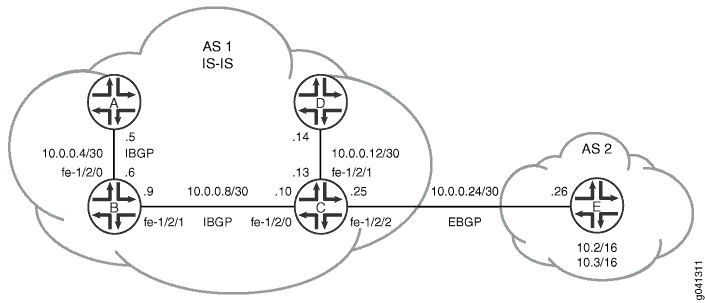
図1 は、この例で使用されているトポロジーを示しています。
 に再配布する
この例では、デバイスA、デバイスB、デバイスC、デバイスDは自律システム(AS)1に属し、IS-ISを実行しています。デバイス D を除くすべての AS 1 デバイスは、内部 BGP(IBGP)を実行しています。
デバイス E は AS 2 に存在し、デバイス C と外部 BGP(EBGP)ピアリング セッションを持っています。デバイス E には、10.2.0.0/16 と 10.3.0.0/16 の 2 つのスタティック ルートがあります。これらのルートは、Edu 2:5コミュニティ属性でタグ付けされ、EBGPを介してデバイスCにアドバタイズされます。
デバイスCは、Edu 2:5コミュニティ属性でタグ付けされたBGPルートを受信し、ルートをIS-ISに再配布し、これらのルートに63のIS-ISメトリックを適用します。
CLIクイックコンフィグレーション は、 図1に示すすべてのデバイスの構成を示しています。セクション #d10e65__d10e386 では、デバイスCとデバイスEの手順を説明しています。
設定
手順
CLIクイックコンフィグレーション
この例をすばやく設定するには、以下のコマンドをコピーしてテキストファイルに貼り付け、改行を削除して、ネットワーク構成に合わせて必要な詳細を変更してから、コマンドを [edit] 階層レベルのCLIにコピー&ペーストします。
デバイスA
set interfaces fe-1/2/0 unit 0 family inet address 10.0.0.5/30
set interfaces fe-1/2/0 unit 0 family iso
set interfaces lo0 unit 0 family inet address 192.168.0.1/32
set interfaces lo0 unit 0 family iso address 49.0002.0192.0168.0001.00
set protocols bgp group int type internal
set protocols bgp group int local-address 192.168.0.1
set protocols bgp group int neighbor 192.168.0.2
set protocols bgp group int neighbor 192.168.0.3
set protocols isis interface fe-1/2/0.0 level 1 disable
set protocols isis interface lo0.0
set routing-options router-id 192.168.0.1
set routing-options autonomous-system 1
デバイスB
set interfaces fe-1/2/0 unit 0 family inet address 10.0.0.6/30
set interfaces fe-1/2/0 unit 0 family iso
set interfaces fe-1/2/1 unit 0 family inet address 10.0.0.9/30
set interfaces fe-1/2/1 unit 0 family iso
set interfaces lo0 unit 0 family inet address 192.168.0.2/32
set interfaces lo0 unit 0 family iso address 49.0002.0192.0168.0002.00
set protocols bgp group int type internal
set protocols bgp group int local-address 192.168.0.2
set protocols bgp group int neighbor 192.168.0.1
set protocols bgp group int neighbor 192.168.0.3
set protocols isis interface fe-1/2/0.0 level 1 disable
set protocols isis interface fe-1/2/1.0 level 1 disable
set protocols isis interface lo0.0
set routing-options router-id 192.168.0.2
set routing-options autonomous-system 1
デバイスC
set interfaces fe-1/2/0 unit 0 family inet address 10.0.0.10/30
set interfaces fe-1/2/0 unit 0 family iso
set interfaces fe-1/2/1 unit 0 family inet address 10.0.0.13/30
set interfaces fe-1/2/1 unit 0 family iso
set interfaces fe-1/2/2 unit 0 family inet address 10.0.0.25/30
set interfaces fe-1/2/2 unit 0 family iso
set interfaces lo0 unit 0 family inet address 192.168.0.3/32
set interfaces lo0 unit 0 family iso address 49.0002.0192.0168.0003.00
set protocols bgp group int type internal
set protocols bgp group int local-address 192.168.0.3
set protocols bgp group int neighbor 192.168.0.1
set protocols bgp group int neighbor 192.168.0.2
set protocols bgp group external-peers type external
set protocols bgp group external-peers export send-isis-and-direct
set protocols bgp group external-peers peer-as 2
set protocols bgp group external-peers neighbor 10.0.0.26
set protocols isis export Edu-to-isis
set protocols isis interface fe-1/2/0.0 level 1 disable
set protocols isis interface fe-1/2/1.0 level 1 disable
set protocols isis interface fe-1/2/2.0 level 1 disable
set protocols isis interface fe-1/2/2.0 level 2 passive
set protocols isis interface lo0.0
set policy-options policy-statement Edu-to-isis term 1 from protocol bgp
set policy-options policy-statement Edu-to-isis term 1 from community Edu
set policy-options policy-statement Edu-to-isis term 1 then metric 63
set policy-options policy-statement Edu-to-isis term 1 then accept
set policy-options policy-statement send-isis-and-direct term 1 from protocol isis
set policy-options policy-statement send-isis-and-direct term 1 from protocol direct
set policy-options policy-statement send-isis-and-direct term 1 from route-filter 10.0.0.0/16 orlonger
set policy-options policy-statement send-isis-and-direct term 1 from route-filter 192.168.0.0/16 orlonger
set policy-options policy-statement send-isis-and-direct term 1 then accept
set policy-options community Edu members 2:5
set routing-options router-id 192.168.0.3
set routing-options autonomous-system 1
デバイスD
set interfaces fe-1/2/0 unit 0 family inet address 10.0.0.14/30
set interfaces fe-1/2/0 unit 0 family iso
set interfaces lo0 unit 0 family inet address 192.168.0.4/32
set interfaces lo0 unit 0 family iso address 49.0002.0192.0168.0004.00
set protocols isis interface fe-1/2/0.0 level 1 disable
set protocols isis interface lo0.0
set routing-options router-id 192.168.0.4
set routing-options autonomous-system 1
デバイスE
set interfaces fe-1/2/0 unit 0 family inet address 10.0.0.26/30
set interfaces lo0 unit 7 family inet address 192.168.0.5/32 primary
set interfaces lo0 unit 7 family inet address 10.2.0.1/32
set interfaces lo0 unit 7 family inet address 10.3.0.1/32
set protocols bgp group external-peers type external
set protocols bgp group external-peers export statics
set protocols bgp group external-peers peer-as 1
set protocols bgp group external-peers neighbor 10.0.0.25
set policy-options policy-statement statics from protocol static
set policy-options policy-statement statics then community add Edu
set policy-options policy-statement statics then accept
set policy-options community Edu members 2:5
set routing-options static route 10.2.0.0/16 reject
set routing-options static route 10.2.0.0/16 install
set routing-options static route 10.3.0.0/16 reject
set routing-options static route 10.3.0.0/16 install
set routing-options router-id 192.168.0.5
set routing-options autonomous-system 2
ステップバイステップの手順
次の例では、設定階層のさまざまなレベルに移動する必要があります。CLIのナビゲーションについては、『CLIユーザーガイド』の「設定モードでのCLIエディターの使用」を参照してください。
デバイスEを設定するには:
インターフェイスを設定します。
[edit interfaces]
user@E# set fe-1/2/0 unit 0 family inet address 10.0.0.26/30
user@E# set lo0 unit 7 family inet address 192.168.0.5/32 primary
user@E# set lo0 unit 7 family inet address 10.2.0.1/32
user@E# set lo0 unit 7 family inet address 10.3.0.1/32
スタティックルートに
Eduコミュニティ属性を追加するstaticsポリシーを設定します。[edit policy-options] user@E# set policy-statement statics from protocol static user@E# set policy-statement statics then community add Edu user@E# set policy-statement statics then accept user@E# set community Edu members 2:5
EBGPを設定し、
staticsポリシーを適用します。[edit protocols bgp group external-peers] user@E# set type external user@E# set export statics user@E# set peer-as 1 user@E# set protocols bgp group external-peers neighbor 10.0.0.25
静的ルートを設定します。
[edit routing-options static]
user@E# set route 10.2.0.0/16 reject
user@E# set route 10.2.0.0/16 install
user@E# set route 10.3.0.0/16 reject
user@E# set route 10.3.0.0/16 install
ルーターIDとAS番号を設定します。
[edit routing-options]
user@E# set router-id 192.168.0.5
user@E# set autonomous-system 2
ステップバイステップの手順
次の例では、設定階層のさまざまなレベルに移動する必要があります。CLIのナビゲーションについては、『CLIユーザーガイド』の「設定モードでのCLIエディターの使用」を参照してください。
デバイスCを設定するには:
インターフェイスを設定します。
[edit interfaces]
user@C# set fe-1/2/0 unit 0 family inet address 10.0.0.10/30
user@C# set fe-1/2/0 unit 0 family iso
user@C# set fe-1/2/1 unit 0 family inet address 10.0.0.13/30
user@C# set fe-1/2/1 unit 0 family iso
user@C# set fe-1/2/2 unit 0 family inet address 10.0.0.25/30
user@C# set fe-1/2/2 unit 0 family iso
user@C# set lo0 unit 0 family inet address 192.168.0.3/32
user@C# set lo0 unit 0 family iso address 49.0002.0192.0168.0003.00
IBGPを設定します。
[edit protocols bgp group int]
user@C# set type internal
user@C# set local-address 192.168.0.3
user@C# set neighbor 192.168.0.1
user@C# set neighbor 192.168.0.2
デバイス E から学習した Edu タグ付き BGP ルートを再分配し、メトリック 63 を適用する Edu-to-isis ポリシーを設定します。
[edit policy-options]
user@C# set policy-statement Edu-to-isis term 1 from protocol bgp
user@C# set policy-statement Edu-to-isis term 1 from community Edu
user@C# set policy-statement Edu-to-isis term 1 then metric 63
user@C# set policy-statement Edu-to-isis term 1 then accept
user@C# set community Edu members 2:5
インターフェイスで IS-IS を有効にし、Edu-to-isポリシーを適用します。
[edit protocols isis]
user@C# set export Edu-to-isis
user@C# set interface fe-1/2/0.0 level 1 disable
user@C# set interface fe-1/2/1.0 level 1 disable
user@C# set interface fe-1/2/2.0 level 1 disable
user@C# set interface fe-1/2/2.0 level 2 passive
user@C# set interface lo0.0
EBGPを介してデバイスEへのルートを再分配するsend-isis-and-directポリシーを設定します。
このポリシーがなければ、デバイスEはAS 1のネットワークに接続できません。
[edit policy-options policy-statement send-isis-and-direct term 1]
user@C# set from protocol isis
user@C# set from protocol direct
user@C# set from route-filter 10.0.0.0/16 orlonger
user@C# set from route-filter 192.168.0.0/16 orlonger
user@C# set then accept
EBGPを設定し、send-isis-and-directポリシーを適用します。
[edit protocols bgp group external-peers]
user@C# set type external
user@C# set export send-isis-and-direct
user@C# set peer-as 2
user@C# set neighbor 10.0.0.26
ルーターIDと自律システム(AS)番号を設定します。
[edit routing-options]
user@C# set router-id 192.168.0.3
user@C# set autonomous-system 1
結果
設定モードから、 show interfaces、 show protocols、 show policy-options、および show routing-options コマンドを入力して設定を確認します。出力に意図した設定が表示されない場合は、この例の手順を繰り返して設定を修正します。
デバイスE
user@E# show interfaces
fe-1/2/0 {
    unit 0 {
        family inet {
            address 10.0.0.26/30;
        }
    }
}
lo0 {
    unit 0 {
        family inet {
            address 192.168.0.5/32 {
                primary;
            }
            address 10.2.0.1/32;
            address 10.3.0.1/32;
        }
    }
}
user@E# show protocols
bgp {
    group external-peers {
        type external;
        export statics;
        peer-as 1;
        neighbor 10.0.0.25;
    }
}
user@E# show policy-options
policy-statement statics {
    from protocol static;
    then {
        community add Edu;
        accept;
    }
}
community Edu members 2:5;
user@E# show routing-options
static {
    route 10.2.0.0/16 {
        reject;
        install;
    }
    route 10.3.0.0/16 {
        reject;
        install;
    }
}
router-id 192.168.0.5;
autonomous-system 2;
デバイスC
user@C# show interfaces
fe-1/2/0 {
    unit 0 {
        family inet {
            address 10.0.0.10/30;
        }
        family iso;
    }
}
fe-1/2/1 {
    unit 0 {
        family inet {
            address 10.0.0.13/30;
        }
        family iso;
    }
}
fe-1/2/2 {
    unit 0 {
        family inet {
            address 10.0.0.25/30;
        }
        family iso;
    }
}
lo0 {
    unit 0 {
        family inet {
            address 192.168.0.3/32;
        }
        family iso {
            address 49.0002.0192.0168.0003.00;
        }
    }
}
user@C# show protocols
bgp {
    group int {
        type internal;
        local-address 192.168.0.3;
        neighbor 192.168.0.1;
        neighbor 192.168.0.2;
    }
    group external-peers {
        type external;
        export send-isis-and-direct;
        peer-as 2;
        neighbor 10.0.0.26;
    }
}
isis {
    export Edu-to-isis;
    interface fe-1/2/0.0 {
        level 1 disable;
    }
    interface fe-1/2/1.0 {
        level 1 disable;
    }
    interface fe-1/2/2.0 {
        level 1 disable;
        level 2 passive;
    }
    interface lo0.0;
}
user@C# show policy-options
policy-statement Edu-to-isis {
    term 1 {
        from {
            protocol bgp;
            community Edu;
        }
        then {
            metric 63;
            accept;
        }
    }
}
policy-statement send-isis-and-direct {
    term 1 {
        from {
            protocol [ isis direct ];
            route-filter 10.0.0.0/16 orlonger;
            route-filter 192.168.0.0/16 orlonger;
        }
        then accept;
    }
}
community Edu members 2:5;
user@C# show routing-options
router-id 192.168.0.3;
autonomous-system 1;
デバイスの設定が完了したら、設定モードから commit を入力します。
検証
設定が正常に機能していることを確認します。
IS-ISネイバーの検証
目的
デバイス E からの BGP ルートが AS 1 の IS-IS ネットワーク上で通信されていることを確認します。
アクション
動作モードから、 show route protocol isis コマンドを入力します。
user@D> show route protocol isis
inet.0: 11 destinations, 11 routes (11 active, 0 holddown, 0 hidden)
+ = Active Route, - = Last Active, * = Both

10.0.0.4/30        *[IS-IS/18] 22:30:53, metric 30
                    > to 10.0.0.13 via fe-1/2/0.0
10.0.0.8/30        *[IS-IS/18] 22:30:53, metric 20
                    > to 10.0.0.13 via fe-1/2/0.0
10.0.0.24/30       *[IS-IS/18] 03:31:21, metric 20
                    > to 10.0.0.13 via fe-1/2/0.0
10.2.0.0/16        *[IS-IS/165] 02:36:31, metric 73
                    > to 10.0.0.13 via fe-1/2/0.0
10.3.0.0/16        *[IS-IS/165] 02:36:31, metric 73
                    > to 10.0.0.13 via fe-1/2/0.0
192.168.0.1/32     *[IS-IS/18] 03:40:28, metric 30
                    > to 10.0.0.13 via fe-1/2/0.0
192.168.0.2/32     *[IS-IS/18] 22:30:53, metric 20
                    > to 10.0.0.13 via fe-1/2/0.0
192.168.0.3/32     *[IS-IS/18] 22:30:53, metric 10
                    > to 10.0.0.13 via fe-1/2/0.0

iso.0: 1 destinations, 1 routes (1 active, 0 holddown, 0 hidden)
意味
予想通り、10.2.0.0/16および10.3.0.0/16ルートは、メトリックが73のIS-IS外部ルートとしてデバイスDのルーティングテーブルにあります。デバイス C がメトリックに 63 を追加していない場合、デバイス D はこれらのルートのメトリック 10 を持つことになります。
例:BGPコミュニティを削除するルーティングポリシーの設定
この例では、BGPルートを受け入れるが、ルートからBGPコミュニティを削除するポリシーを作成する方法を示します。
要件
この例を設定する前に、デバイスの初期化以外の特別な設定は必要ありません。
概要
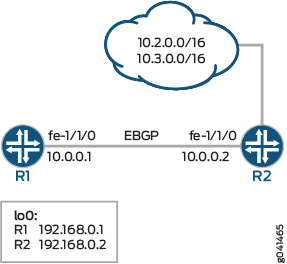
この例では、外部 BGP(EBGP)接続を持つ 2 つのルーティング デバイスを示しています。デバイスR2は、BGPセッションを使用して、デバイスR1に2つのスタティックルートを送信します。デバイスR1では、インポートポリシーで、すべてのBGPコミュニティをルートから削除する必要があることが指定されています。
デフォルトでは、EBGPピアでコミュニティが設定されると、コミュニティが送信され、受け入れられます。ネイバーから受信したコミュニティの受け入れを抑制するには、すべてのコミュニティまたは指定されたコミュニティのセットを削除します。ポリシーの結果がコミュニティの空のセットである場合、コミュニティ属性は含まれません。すべてのコミュニティを削除するには、まずコミュニティのワイルドカードセットを定義します(ここでは、コミュニティの名前 はwild)。
[edit policy-options]
community wild members "* : *";
次に、ルーティングポリシーステートメントで、 community delete アクションを指定します。
[edit policy-options]
policy-statement policy-name {
    term term-name {
        then community delete wild;
    }
}
自律システム(AS)から特定のコミュニティを抑制するには、コミュニティを community wild members "*:community-value"として定義します。
設定
CLIクイックコンフィグレーション
この例をすばやく設定するには、以下のコマンドをコピーしてテキストファイルに貼り付け、改行を削除して、ネットワーク構成に合わせて必要な詳細を変更してから、コマンドを [edit] 階層レベルのCLIにコピー&ペーストします。
デバイスR1
set interfaces fe-1/1/0 unit 0 description to-R2
set interfaces fe-1/1/0 unit 0 family inet address 10.0.0.1/30
set interfaces lo0 unit 0 family inet address 192.168.0.1/32
set protocols bgp group external-peers type external
set protocols bgp group external-peers peer-as 2
set protocols bgp group external-peers neighbor 10.0.0.2 import remove-communities
set policy-options policy-statement remove-communities term 1 from protocol bgp
set policy-options policy-statement remove-communities term 1 then community delete wild
set policy-options policy-statement remove-communities term 1 then accept
set policy-options policy-statement remove-communities term 2 then reject
set policy-options community wild members *:*
set routing-options router-id 192.168.0.1
set routing-options autonomous-system 1
デバイスR2
set interfaces fe-1/1/0 unit 0 description to-R1
set interfaces fe-1/1/0 unit 0 family inet address 10.0.0.2/30
set interfaces lo0 unit 0 family inet address 192.168.0.2/32
set protocols bgp group external-peers type external
set protocols bgp group external-peers export statics
set protocols bgp group external-peers peer-as 1
set protocols bgp group external-peers neighbor 10.0.0.1
set policy-options policy-statement statics from protocol static
set policy-options policy-statement statics then community add 1
set policy-options policy-statement statics then accept
set policy-options community 1 members 2:1
set policy-options community 1 members 2:2
set policy-options community 1 members 2:3
set policy-options community 1 members 2:4
set policy-options community 1 members 2:5
set policy-options community 1 members 2:6
set policy-options community 1 members 2:7
set policy-options community 1 members 2:8
set policy-options community 1 members 2:9
set policy-options community 1 members 2:10
set routing-options static route 10.2.0.0/16 reject
set routing-options static route 10.2.0.0/16 install
set routing-options static route 10.3.0.0/16 reject
set routing-options static route 10.3.0.0/16 install
set routing-options router-id 192.168.0.3
set routing-options autonomous-system 2
手順
ステップバイステップの手順
次の例では、設定階層内のさまざまなレベルに移動する必要があります。CLIのナビゲーションについては、『Junos OS CLIユーザーガイド』の「設定モードでのCLIエディターの使用」を参照してください。
デバイスR1を設定するには:
インターフェイスを設定します。
[edit interfaces]
user@R1# set fe-1/1/0 unit 0 description to-R2
user@R1# set fe-1/1/0 unit 0 family inet address 10.0.0.1/30
user@R1# set lo0 unit 0 family inet address 192.168.0.1/32
BGPを設定します。
デバイスR2とのBGPピアリングセッションにインポートポリシーを適用します。
[edit protocols bgp group external-peers]
user@R1# set type external
user@R1# set peer-as 2
user@R1# set neighbor 10.0.0.2 import remove-communities
コミュニティを削除するルーティングポリシーを設定します。
[edit policy-options policy-statement remove-communities]
user@R1# set term 1 from protocol bgp
user@R1# set term 1 then community delete wild
user@R1# set term 1 then accept
user@R1# set term 2 then reject
自律システム(AS)番号とルーターIDを設定します。
[edit routing-options ]
user@R1# set router-id 192.168.0.1
user@R1# set autonomous-system 1
ステップバイステップの手順
次の例では、設定階層内のさまざまなレベルに移動する必要があります。CLIのナビゲーションについては、『Junos OS CLIユーザーガイド』の「設定モードでのCLIエディタの使用」を参照してください。
デバイスR2を設定するには:
インターフェイスを設定します。
[edit interfaces]
user@R2# set fe-1/1/0 unit 0 description to-R1
user@R2# set fe-1/1/0 unit 0 family inet address 10.0.0.2/30
user@R2# set lo0 unit 0 family inet address 192.168.0.2/32
ルーターIDと自律システム(AS)番号を設定します。
[edit routing-options]
user@R2# set router-id 192.168.0.3
user@R2# set autonomous-system 2
BGPを設定します。
[edit  protocols bgp group external-peers]
user@R2# set type external
user@R2# set peer-as 1
user@R2# set neighbor 10.0.0.1
複数のコミュニティを設定するか、複数のメンバーを持つ単一のコミュニティを設定します。
[edit policy-options community 1]
user@R2# set members 2:1
user@R2# set members 2:2
user@R2# set members 2:3
user@R2# set members 2:4
user@R2# set members 2:5
user@R2# set members 2:6
user@R2# set members 2:7
user@R2# set members 2:8
user@R2# set members 2:9
user@R2# set members 2:10
静的ルートを設定します。
[edit routing-options static]
user@R2# set route 10.2.0.0/16 reject
user@R2# set route 10.2.0.0/16 install
user@R2# set route 10.3.0.0/16 reject
user@R2# set route 10.3.0.0/16 install
静的ルートをBGPにアドバタイズし、ルートにBGPコミュニティを追加するルーティングポリシーを設定します。
[edit policy-options policy-statement statics]
user@R2# set from protocol static
user@R2# set then community add 1
user@R2# set then accept
エクスポートポリシーを適用します。
[edit protocols bgp group external-peers]
user@R2# set export statics
結果
設定モードから、 show interfaces、 show protocols、 show policy-options、および show routing-options コマンドを入力して設定を確認します。出力に意図した設定が表示されない場合は、この例の手順を繰り返して設定を修正します。
デバイスR1
user@R1# show interfaces
fe-1/1/0 {
    unit 0{
        description to-R2;
        family inet {
            address 10.0.0.1/30;
        }
    }
}
lo0 {
    unit 0 {
        family inet {
            address 192.168.0.1/32;
        }
    }
}
user@R1# show protocols
bgp {
    group external-peers {
        type external;
        peer-as 2;
        neighbor 10.0.0.2 {
            import remove-communities;
        }
    }
}
user@R1# show policy-options
policy-statement remove-communities {
    term 1 {
        from protocol bgp;
        then {
            community delete wild;
            accept;
        }
    }
    term 2 {
        then reject;
    }
}
community wild members *:*;
user@R1# show routing-options
router-id 192.168.0.1;
autonomous-system 1;
デバイスR2
user@R2# show interfaces
fe-1/1/0 {
    unit 0 {
        description to-R1;
        family inet {
            address 10.0.0.2/30;
        }
    }
}
lo0 {
    unit 0 {
        family inet {
            address 192.168.0.2/32;
        }
    }
}
user@R2# show protocols
bgp {
    group external-peers {
        type external;
        export statics;
        peer-as 1;
        neighbor 10.0.0.1;
    }
}
user@R2# show policy-options
policy-statement statics {
    from protocol static;
    then {
        community add 1;
        accept;
    }
}
community 1 members [ 2:1 2:2 2:3 2:4 2:5 2:6 2:7 2:8 2:9 2:10 ];
user@R2# show routing-options
static {
    route 10.2.0.0/16 {
        reject;
        install;
    }
    route 10.3.0.0/16 {
        reject;
        install;
    }
}
router-id 192.168.0.3;
autonomous-system 2;
デバイスの設定が完了したら、設定モードから commit を入力します。
検証
設定が正常に機能していることを確認します。
BGPルートの検証
目的
デバイスR1のルーティングテーブルにBGPコミュニティが含まれていないことを確認します。
アクション
デバイスR1で、
show route protocols bgp extensiveコマンドを実行します。user@R1> show route protocols bgp extensive inet.0: 5 destinations, 5 routes (5 active, 0 holddown, 0 hidden) 10.2.0.0/16 (1 entry, 1 announced) TSI: KRT in-kernel 10.2.0.0/16 -> {10.0.0.2} *BGP Preference: 170/-101 Next hop type: Router, Next hop index: 671 Address: 0x9458270 Next-hop reference count: 4 Source: 10.0.0.2 Next hop: 10.0.0.2 via lt-1/1/0.5, selected Session Id: 0x100001 State: <Active Ext> Local AS: 1 Peer AS: 2 Age: 20:39:01 Validation State: unverified Task: BGP_2.10.0.0.2+179 Announcement bits (1): 0-KRT AS path: 2 I Accepted Localpref: 100 Router ID: 192.168.0.3 10.3.0.0/16 (1 entry, 1 announced) TSI: KRT in-kernel 10.3.0.0/16 -> {10.0.0.2} *BGP Preference: 170/-101 Next hop type: Router, Next hop index: 671 Address: 0x9458270 Next-hop reference count: 4 Source: 10.0.0.2 Next hop: 10.0.0.2 via lt-1/1/0.5, selected Session Id: 0x100001 State: <Active Ext> Local AS: 1 Peer AS: 2 Age: 20:39:01 Validation State: unverified Task: BGP_2.10.0.0.2+179 Announcement bits (1): 0-KRT AS path: 2 I Accepted Localpref: 100 Router ID: 192.168.0.3デバイスR1で、インポートポリシーの
community remove設定を無効にします。[edit policy-options policy-statement remove-communities term 1] user@R1# deactivate then community delete wild user@R1# commit
デバイスR1で、
show route protocols bgp extensiveコマンドを実行して、アドバタイズされたコミュニティを表示します。user@R1> show route protocols bgp extensive inet.0: 5 destinations, 5 routes (5 active, 0 holddown, 0 hidden) 10.2.0.0/16 (1 entry, 1 announced) TSI: KRT in-kernel 10.2.0.0/16 -> {10.0.0.2} *BGP Preference: 170/-101 Next hop type: Router, Next hop index: 671 Address: 0x9458270 Next-hop reference count: 4 Source: 10.0.0.2 Next hop: 10.0.0.2 via lt-1/1/0.5, selected Session Id: 0x100001 State: <Active Ext> Local AS: 1 Peer AS: 2 Age: 20:40:53 Validation State: unverified Task: BGP_2.10.0.0.2+179 Announcement bits (1): 0-KRT AS path: 2 I Communities: 2:1 2:2 2:3 2:4 2:5 2:6 2:7 2:8 2:9 2:10 Accepted Localpref: 100 Router ID: 192.168.0.3 10.3.0.0/16 (1 entry, 1 announced) TSI: KRT in-kernel 10.3.0.0/16 -> {10.0.0.2} *BGP Preference: 170/-101 Next hop type: Router, Next hop index: 671 Address: 0x9458270 Next-hop reference count: 4 Source: 10.0.0.2 Next hop: 10.0.0.2 via lt-1/1/0.5, selected Session Id: 0x100001 State: <Active Ext> Local AS: 1 Peer AS: 2 Age: 20:40:53 Validation State: unverified Task: BGP_2.10.0.0.2+179 Announcement bits (1): 0-KRT AS path: 2 I Communities: 2:1 2:2 2:3 2:4 2:5 2:6 2:7 2:8 2:9 2:10 Accepted Localpref: 100 Router ID: 192.168.0.3
意味
出力は、デバイスR1のルーティングテーブルで、デバイスR2から送信されたBGPルートでコミュニティが抑制されていることを示しています。デバイスR1のインポートポリシーの community remove 設定が無効になると、コミュニティは抑制されなくなります。
例:BGPコミュニティ数に基づくルーティングポリシーの設定
この例では、BGPコミュニティの数に基づいてBGPルートを受け入れるBGPルートを受け入れるポリシーを作成する方法を示します。
要件
この例を設定する前に、デバイスの初期化以外の特別な設定は必要ありません。
概要
この例では、外部 BGP(EBGP)接続を持つ 2 つのルーティング デバイスを示しています。デバイスR2は、BGPセッションを使用して、デバイスR1に2つのスタティックルートを送信します。デバイスR1では、インポートポリシーで、BGP受信ルートに最大5つのコミュニティを含めることができ、一致と見なされることができるように指定されています。例えば、ルートに 3 つのコミュニティが含まれている場合、それは一致しているとみなされ、受け入れられます。ルートに 6 つ以上のコミュニティが含まれている場合、そのルートは不一致と見なされて拒否されます。
EBGPのデフォルトポリシーは、すべてのルートを受け入れることであることを覚えておくことが重要です。一致しないルートを確実に拒否するには、ポリシー定義の最後に then reject アクションを含める必要があります。
設定
CLIクイックコンフィグレーション
この例をすばやく設定するには、以下のコマンドをコピーしてテキストファイルに貼り付け、改行を削除して、ネットワーク構成に合わせて必要な詳細を変更してから、コマンドを [edit] 階層レベルのCLIにコピー&ペーストします。
デバイスR1
set interfaces fe-1/1/0 unit 0 description to-R2
set interfaces fe-1/1/0 unit 0 family inet address 10.0.0.1/30
set interfaces lo0 unit 0 family inet address 192.168.0.1/32
set protocols bgp group external-peers type external
set protocols bgp group external-peers peer-as 2
set protocols bgp group external-peers neighbor 10.0.0.2 import import-communities
set policy-options policy-statement import-communities term 1 from protocol bgp
set policy-options policy-statement import-communities term 1 from community-count 5 orlower
set policy-options policy-statement import-communities term 1 then accept
set policy-options policy-statement import-communities term 2 then reject
set routing-options router-id 192.168.0.1
set routing-options autonomous-system 1
デバイスR2
set interfaces fe-1/1/0 unit 0 description to-R1
set interfaces fe-1/1/0 unit 0 family inet address 10.0.0.2/30
set interfaces lo0 unit 0 family inet address 192.168.0.2/32
set protocols bgp group external-peers type external
set protocols bgp group external-peers export statics
set protocols bgp group external-peers peer-as 1
set protocols bgp group external-peers neighbor 10.0.0.1
set policy-options policy-statement statics from protocol static
set policy-options policy-statement statics then community add 1
set policy-options policy-statement statics then accept
set policy-options community 1 members 2:1
set policy-options community 1 members 2:2
set policy-options community 1 members 2:3
set policy-options community 1 members 2:4
set policy-options community 1 members 2:5
set policy-options community 1 members 2:6
set policy-options community 1 members 2:7
set policy-options community 1 members 2:8
set policy-options community 1 members 2:9
set policy-options community 1 members 2:10
set routing-options static route 10.2.0.0/16 reject
set routing-options static route 10.2.0.0/16 install
set routing-options static route 10.3.0.0/16 reject
set routing-options static route 10.3.0.0/16 install
set routing-options router-id 192.168.0.3
set routing-options autonomous-system 2
手順
ステップバイステップの手順
次の例では、設定階層内のさまざまなレベルに移動する必要があります。CLIのナビゲーションについては、『Junos OS CLIユーザーガイド』の「設定モードでのCLIエディターの使用」を参照してください。
デバイスR1を設定するには:
インターフェイスを設定します。
[edit interfaces]
user@R1# set fe-1/1/0 unit 0 description to-R2
user@R1# set fe-1/1/0 unit 0 family inet address 10.0.0.1/30
user@R1# set lo0 unit 0 family inet address 192.168.0.1/32
BGPを設定します。
デバイスR2とのBGPピアリングセッションにインポートポリシーを適用します。
[edit protocols bgp group external-peers]
user@R1# set type external
user@R1# set peer-as 2
user@R1# set neighbor 10.0.0.2 import import-communities
直接ルートを送信するルーティングポリシーを設定します。
[edit policy-options policy-statement import-communities]
user@R1# set term 1 from protocol bgp
user@R1# set term 1 from community-count 5 orlower
user@R1# set term 1 then accept
user@R1# set term 2 then reject
自律システム(AS)番号とルーターIDを設定します。
[edit routing-options ]
user@R1# set router-id 192.168.0.1
user@R1# set autonomous-system 1
ステップバイステップの手順
次の例では、設定階層内のさまざまなレベルに移動する必要があります。CLIのナビゲーションについては、『Junos OS CLIユーザーガイド』の「設定モードでのCLIエディタの使用」を参照してください。
デバイスR2を設定するには:
インターフェイスを設定します。
[edit interfaces]
user@R2# set fe-1/1/0 unit 0 description to-R1
user@R2# set fe-1/1/0 unit 0 family inet address 10.0.0.2/30
user@R2# set lo0 unit 0 family inet address 192.168.0.2/32
ルーターIDと自律システム(AS)番号を設定します。
[edit routing-options]
user@R2# set router-id 192.168.0.3
user@R2# set autonomous-system 2
BGPを設定します。
[edit  protocols bgp group external-peers]
user@R2# set type external
user@R2# set peer-as 1
user@R2# set neighbor 10.0.0.1
複数のコミュニティを設定するか、複数のメンバーを持つ単一のコミュニティを設定します。
[edit policy-options community 1]
user@R2# set members 2:1
user@R2# set members 2:2
user@R2# set members 2:3
user@R2# set members 2:4
user@R2# set members 2:5
user@R2# set members 2:6
user@R2# set members 2:7
user@R2# set members 2:8
user@R2# set members 2:9
user@R2# set members 2:10
静的ルートを設定します。
[edit routing-options static]
user@R2# set route 10.2.0.0/16 reject
user@R2# set route 10.2.0.0/16 install
user@R2# set route 10.3.0.0/16 reject
user@R2# set route 10.3.0.0/16 install
静的ルートをBGPにアドバタイズし、ルートにBGPコミュニティを追加するルーティングポリシーを設定します。
[edit policy-options policy-statement statics]
user@R2# set from protocol static
user@R2# set then community add 1
user@R2# set then accept
エクスポートポリシーを適用します。
[edit protocols bgp group external-peers]
user@R2# set export statics
結果
設定モードから、 show interfaces、 show protocols、 show policy-options、および show routing-options コマンドを入力して設定を確認します。出力に意図した設定が表示されない場合は、この例の手順を繰り返して設定を修正します。
デバイスR1
user@R1# show interfaces
fe-1/1/0 {
    unit 0{
        description to-R2;
        family inet {
            address 10.0.0.1/30;
        }
    }
}
lo0 {
    unit 0 {
        family inet {
            address 192.168.0.1/32;
        }
    }
}
}
user@R1# show protocols
bgp {
    group external-peers {
        type external;
        peer-as 2;
        neighbor 10.0.0.2 {
            import import-communities;
        }
    }
}
user@R1# show policy-options
policy-statement import-communities {
    term 1 {
        from {
            protocol bgp;
            community-count 5 orlower;
        }
        then accept;
    }
    term 2 {
        then reject;
    }
}
user@R1# show routing-options
router-id 192.168.0.1;
autonomous-system 1;
デバイスR2
user@R2# show interfaces
fe-1/1/0 {
    unit 0 {
        description to-R1;
        family inet {
            address 10.0.0.2/30;
        }
    }
}
lo0 {
    unit 0 {
        family inet {
            address 192.168.0.2/32;
        }
    }
}
user@R2# show protocols
bgp {
    group external-peers {
        type external;
        export statics;
        peer-as 1;
        neighbor 10.0.0.1;
    }
}
user@R2# show policy-options
policy-statement statics {
    from protocol static;
    then {
        community add 1;
        accept;
    }
}
community 1 members [ 2:1 2:2 2:3 2:4 2:5 2:6 2:7 2:8 2:9 2:10 ];
user@R2# show routing-options
static {
    route 10.2.0.0/16 {
        reject;
        install;
    }
    route 10.3.0.0/16 {
        reject;
        install;
    }
}
router-id 192.168.0.3;
autonomous-system 2;
デバイスの設定が完了したら、設定モードから commit を入力します。
検証
設定が正常に機能していることを確認します。
BGPルートの検証
目的
デバイスR1のルーティングテーブルに、予想されるBGPルートが含まれていることを確認します。
アクション
デバイスR1で、
show route protocols bgpコマンドを実行します。user@R1> show route protocols bgp inet.0: 5 destinations, 5 routes (3 active, 0 holddown, 2 hidden)
デバイスR1で、インポートポリシーで
community-count設定を変更します。[edit policy-options policy-statement import-communities term 1] user@R1# set from community-count 5 orhigher user@R1# commit
デバイスR1で、
show route protocols bgpコマンドを実行します。user@R1> show route protocols bgp inet.0: 5 destinations, 5 routes (5 active, 0 holddown, 0 hidden) + = Active Route, - = Last Active, * = Both 10.2.0.0/16 *[BGP/170] 18:29:53, localpref 100 AS path: 2 I, validation-state: unverified > to 10.0.0.2 via fe-1/1/0.0 10.3.0.0/16 *[BGP/170] 18:29:53, localpref 100 AS path: 2 I, validation-state: unverified > to 10.0.0.2 via fe-1/1/0.0デバイスR1で、
show route protocols bgp extensiveコマンドを実行して、アドバタイズされたコミュニティを表示します。user@R1> show route protocols bgp extensive inet.0: 5 destinations, 5 routes (5 active, 0 holddown, 0 hidden) 10.2.0.0/16 (1 entry, 1 announced) TSI: KRT in-kernel 10.2.0.0/16 -> {10.0.0.2} *BGP Preference: 170/-101 Next hop type: Router, Next hop index: 671 Address: 0x9458270 Next-hop reference count: 4 Source: 10.0.0.2 Next hop: 10.0.0.2 via fe-1/1/0.0, selected Session Id: 0x100001 State: <Active Ext> Local AS: 1 Peer AS: 2 Age: 18:56:10 Validation State: unverified Task: BGP_2.10.0.0.2+179 Announcement bits (1): 0-KRT AS path: 2 I Communities: 2:1 2:2 2:3 2:4 2:5 2:6 2:7 2:8 2:9 2:10 Accepted Localpref: 100 Router ID: 192.168.0.3 10.3.0.0/16 (1 entry, 1 announced) TSI: KRT in-kernel 10.3.0.0/16 -> {10.0.0.2} *BGP Preference: 170/-101 Next hop type: Router, Next hop index: 671 Address: 0x9458270 Next-hop reference count: 4 Source: 10.0.0.2 Next hop: 10.0.0.2 via fe-1/1/0.0, selected Session Id: 0x100001 State: <Active Ext> Local AS: 1 Peer AS: 2 Age: 18:56:10 Validation State: unverified Task: BGP_2.10.0.0.2+179 Announcement bits (1): 0-KRT AS path: 2 I Communities: 2:1 2:2 2:3 2:4 2:5 2:6 2:7 2:8 2:9 2:10 Accepted Localpref: 100 Router ID: 192.168.0.3
意味
出力は、デバイスR1のルーティングテーブルで、デバイスR2から送信されたBGPルートが非表示になっていることを示しています。デバイスR1のインポートポリシーの community-count 設定を変更すると、BGPルートは非表示にはなりません。