
例:ルーティングポリシーでの拡張コミュニティの設定
拡張コミュニティは、ほとんどの点で、通常のコミュニティと類似しています。VPN(仮想プライベートネットワーク)などの一部のネットワーク実装では、拡張コミュニティを使用します。4オクテットの正規コミュニティ値では十分な拡張性と柔軟性が得られないためです。拡張コミュニティーは、2 つの主要なセクションに分割された 8 オクテット値です。
要件
この例を設定する前に、デバイス初期化以外の特別な設定を行う必要はありません。
概要
この例では、デバイスR1とデバイスR2は自律システム(AS)64510のOSPFネイバーです。デバイスR3には、デバイスR1への外部BGP(EBGP)接続があります。デバイスR2の172.16/16アドレス空間に顧客ネットワークがあり、ループバックインターフェイス(lo0)上のアドレスでシミュレートされます。デバイスR1には、複数の172.16.xへのスタティックルートがあります。ネットワーク/24し、これらのルートに通常のコミュニティ値を割り当てます。次に、デバイスR1はエクスポートポリシーを使用してデバイスR3にルートをアドバタイズします。デバイスR3はこれらのルートを受信し、インポートポリシーを使用して拡張コミュニティ値をルートに追加します。
トポロジー
図 1は、サンプルのネットワークを示しています。
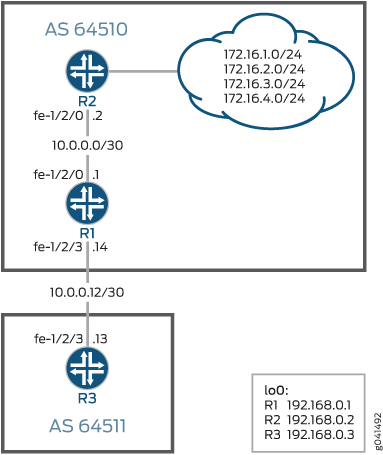
CLIクイック構成は、図 1でのすべてのデバイスの設定を示しています。
セクション#configuration587__policy-extended-community-stは、デバイス R3 の手順を説明します。
設定
CLIクイック構成
この例をすばやく設定するには、次のコマンドをコピーしてテキストファイルに貼り付け、改行を削除して、ネットワーク構成に合わせて必要な詳細を変更し、[edit]階層レベルのCLIにコマンドをコピー&ペーストしてください。
デバイスR1
set interfaces fe-1/2/0 unit 0 family inet address 10.0.0.1/30
set interfaces fe-1/2/3 unit 0 family inet address 10.0.0.14/30
set interfaces lo0 unit 0 family inet address 192.168.0.1/32 primary
set protocols bgp group ext type external
set protocols bgp group ext export send-static
set protocols bgp group ext peer-as 64511
set protocols bgp group ext neighbor 10.0.0.13
set protocols ospf area 0.0.0.0 interface fe-1/2/0.0
set protocols ospf area 0.0.0.0 interface lo0.0 passive
set policy-options policy-statement send-static term 1 from protocol static
set policy-options policy-statement send-static term 1 then accept
set routing-options static route 172.16.1.0/24 next-hop 10.0.0.2
set routing-options static route 172.16.1.0/24 community 64510:1
set routing-options static route 172.16.2.0/24 next-hop 10.0.0.2
set routing-options static route 172.16.2.0/24 community 64510:2
set routing-options static route 172.16.3.0/24 next-hop 10.0.0.2
set routing-options static route 172.16.3.0/24 community 64510:3
set routing-options static route 172.16.4.0/24 next-hop 10.0.0.2
set routing-options static route 172.16.4.0/24 community 64510:4
set routing-options router-id 192.168.0.1
set routing-options autonomous-system 64510
デバイスR2
set interfaces fe-1/2/0 unit 0 family inet address 10.0.0.2/30
set interfaces lo0 unit 0 family inet address 192.168.0.2/32
set interfaces lo0 unit 0 family inet address 172.16.1.1/32
set interfaces lo0 unit 0 family inet address 172.16.2.2/32
set interfaces lo0 unit 0 family inet address 172.16.3.3/32
set interfaces lo0 unit 0 family inet address 172.16.4.4/32
set protocols ospf area 0.0.0.0 interface fe-1/2/0.0
set protocols ospf area 0.0.0.0 interface lo0.0 passive
set routing-options router-id 192.168.0.2
set routing-options autonomous-system 64510
デバイスR3
set interfaces fe-1/2/3 unit 0 family inet address 10.0.0.13/30
set interfaces lo0 unit 0 family inet address 192.168.0.3/32
set protocols bgp group to-R1 type external
set protocols bgp group to-R1 import set-ext-comms
set protocols bgp group to-R1 peer-as 64510
set protocols bgp group to-R1 neighbor 10.0.0.14
set policy-options policy-statement set-ext-comms term route-1 from route-filter 172.16.1.0/24 exact
set policy-options policy-statement set-ext-comms term route-1 then community add target-as
set policy-options policy-statement set-ext-comms term route-1 then accept
set policy-options policy-statement set-ext-comms term route-2 from route-filter 172.16.2.0/24 exact
set policy-options policy-statement set-ext-comms term route-2 then community add target-ip
set policy-options policy-statement set-ext-comms term route-2 then accept
set policy-options policy-statement set-ext-comms term route-3 from route-filter 172.16.3.0/24 exact
set policy-options policy-statement set-ext-comms term route-3 then community add origin-as
set policy-options policy-statement set-ext-comms term route-3 then accept
set policy-options policy-statement set-ext-comms term route-4 from route-filter 172.16.4.0/24 exact
set policy-options policy-statement set-ext-comms term route-4 then community add origin-ip
set policy-options policy-statement set-ext-comms term route-4 then accept
set policy-options community origin-as members origin:64511:3
set policy-options community origin-ip members origin:172.16.7.7:4
set policy-options community target-as members target:64511:1
set policy-options community target-ip members target:172.16.7.7:2
set routing-options router-id 192.168.0.3
set routing-options autonomous-system 64511
手順
ステップバイステップでの手順
次の例では、設定階層内のさまざまなレベルに移動する必要があります。CLIのナビゲーションについては、Junos OS CLIユーザーガイドの「設定モードでのCLIエディターの使用」を参照してください。
デバイス R3 を設定するには:
インターフェイスを設定します。
[edit interfaces]
user@R3# set fe-1/2/3 unit 0 family inet address 10.0.0.13/30
user@R3# set lo0 unit 0 family inet address 192.168.0.3/32
デバイスR1へのEBGP接続を設定します。
[edit protocols bgp group to-R1]
user@R3# set type external
user@R3# set import set-ext-comms
user@R3# set peer-as 64510
user@R3# set neighbor 10.0.0.14
-
デバイスR1から受信したルートに拡張コミュニティ値を追加するポリシーを設定します。
拡張コミュニティでは、
type:administrator:assigned-numberという表記を使用します。特定のコミュニティ値は、 community (Policy Options) で説明されているように、特定のパラメーター内で管理目標を達成するものであれば何でもかまいません。
[edit policy-options policy-statement set-ext-comms]
user@R3# set term route-1 from route-filter 172.16.1.0/24 exact
user@R3# set term route-1 then community add target-as
user@R3# set term route-1 then accept
user@R3# set term route-2 from route-filter 172.16.2.0/24 exact
user@R3# set term route-2 then community add target-ip
user@R3# set term route-2 then accept
user@R3# set term route-3 from route-filter 172.16.3.0/24 exact
user@R3# set term route-3 then community add origin-as
user@R3# set term route-3 then accept
user@R3# set term route-4 from route-filter 172.16.4.0/24 exact
user@R3# set term route-4 then community add origin-ip
user@R3# set term route-4 then accept
[edit policy-options]
user@R3# set community origin-as members origin:64511:3
user@R3# set community origin-ip members origin:172.16.7.7:4
user@R3# set community target-as members target:64511:1
user@R3# set community target-ip members target:172.16.7.7:2
自律システム(AS)番号とルーターIDを設定します。
[edit routing-options]
user@R3# set router-id 192.168.0.3
user@R3# set autonomous-system 64511
結果
設定モードから、show interfaces 、show protocols、show policy-options、およびshow routing-options のコマンドを入力して設定を確認します。出力結果に意図した設定内容が表示されない場合は、この例の手順を繰り返して設定を修正します。
user@R3# show interfaces
fe-1/2/3 {
    unit 0 {
        family inet {
            address 10.0.0.13/30;
        }
    }
}
lo0 {
    unit 0 {
        family inet {
            address 192.168.0.3/32;
        }
    }
}
user@R3# show protocols
bgp {
    group to-R1 {
        type external;
        import set-ext-comms;
        peer-as 64510;
        neighbor 10.0.0.14;
    }
}
user@R3# show policy-options
policy-statement set-ext-comms {
    term route-1 {
        from {
            route-filter 172.16.1.0/24 exact;
        }
        then {
            community add target-as;
            accept;
        }
    }
    term route-2 {
        from {
            route-filter 172.16.2.0/24 exact;
        }
        then {
            community add target-ip;
            accept;
        }
    }
    term route-3 {
        from {
            route-filter 172.16.3.0/24 exact;
        }
        then {
            community add origin-as;
            accept;
        }
    }
    term route-4 {
        from {
            route-filter 172.16.4.0/24 exact;
        }
        then {
            community add origin-ip;
            accept;
        }
    }
}
community origin-as members origin:64511:3;
community origin-ip members origin:172.16.7.7:4;
community target-as members target:64511:1;
community target-ip members target:172.16.7.7:2;
user@R3# show routing-options
router-id 192.168.0.3;
autonomous-system 64511;
デバイスの設定が完了したら、設定モードから commit を入力します。
検証
設定が正常に機能していることを確認します。
デバイスR1でルートを検証する
目的
デバイスR1で、172.16を確認します。ルーティングテーブル内のルート。
アクション
user@R1> show route protocol static match-prefix 172.16.* detail

inet.0: 15 destinations, 15 routes (15 active, 0 holddown, 0 hidden)
172.16.1.0/24 (1 entry, 1 announced)
        *Static Preference: 5
                Next hop type: Router, Next hop index: 835
                Address: 0x9260250
                Next-hop reference count: 19
                Next hop: 10.0.0.2 via fe-1/2/0.0, selected
                State: <Active Int Ext>
                Local AS: 64510
                Age: 2:06:08
                Task: RT
                Announcement bits (2): 2-KRT 3-BGP_RT_Background
                AS path: I
                Communities: 64510:1

172.16.2.0/24 (1 entry, 1 announced)
        *Static Preference: 5
                Next hop type: Router, Next hop index: 835
                Address: 0x9260250
                Next-hop reference count: 19
                Next hop: 10.0.0.2 via fe-1/2/0.0, selected
                State: <Active Int Ext>
                Local AS: 64510
                Age: 2:06:08
                Task: RT
                Announcement bits (2): 2-KRT 3-BGP_RT_Background
                AS path: I
                Communities: 64510:2

172.16.3.0/24 (1 entry, 1 announced)
        *Static Preference: 5
                Next hop type: Router, Next hop index: 835
                Address: 0x9260250
                Next-hop reference count: 19
                Next hop: 10.0.0.2 via fe-1/2/0.0, selected
                State: <Active Int Ext>
                Local AS: 64510
                Age: 2:06:08
                Task: RT
                Announcement bits (2): 2-KRT 3-BGP_RT_Background
                AS path: I
                Communities: 64510:3

172.16.4.0/24 (1 entry, 1 announced)
        *Static Preference: 5
                Next hop type: Router, Next hop index: 835
                Address: 0x9260250
                Next-hop reference count: 19
                Next hop: 10.0.0.2 via fe-1/2/0.0, selected
                State: <Active Int Ext>
                Local AS: 64510
                Age: 2:06:08
                Task: RT
                Announcement bits (2): 2-KRT 3-BGP_RT_Background
                AS path: I
                Communities: 64510:4
意味
出力からは、通常のコミュニティ値がルートに付加されていることがわかります。
コミュニティはスタティックルートに接続されており、コミュニティをBGP以外のルートに接続できることを示しています。
デバイスR3でルートを検証する
目的
デバイスR3で、172.16を確認します。ルーティングテーブル内のルート。
アクション
user@R3> show route protocol bgp match-prefix 172.16.* detail
betsy@tp5# run show route protocol bgp match-prefix 172.16.* detail logical-system R3

inet.0: 7 destinations, 7 routes (7 active, 0 holddown, 0 hidden)
172.16.1.0/24 (1 entry, 1 announced)
        *BGP    Preference: 170/-101
                Next hop type: Router, Next hop index: 611
                Address: 0x9260130
                Next-hop reference count: 8
                Source: 10.0.0.14
                Next hop: 10.0.0.14 via fe-1/2/3.0, selected
                State: <Active Ext>
                Local AS: 64511 Peer AS: 64510
                Age: 1:57:27
                Task: BGP_64510.10.0.0.14+54618
                Announcement bits (1): 0-KRT
                AS path: 64510 I
                Communities: 64510:1 target:64511:1
                Accepted
                Localpref: 100
                Router ID: 192.168.0.1

172.16.2.0/24 (1 entry, 1 announced)
        *BGP    Preference: 170/-101
                Next hop type: Router, Next hop index: 611
                Address: 0x9260130
                Next-hop reference count: 8
                Source: 10.0.0.14
                Next hop: 10.0.0.14 via fe-1/2/3.0, selected
                State: <Active Ext>
                Local AS: 64511 Peer AS: 64510
                Age: 1:57:27
                Task: BGP_64510.10.0.0.14+54618
                Announcement bits (1): 0-KRT
                AS path: 64510 I
                Communities: 64510:2 target:172.16.7.7:2
                Accepted
                Localpref: 100
                Router ID: 192.168.0.1

172.16.3.0/24 (1 entry, 1 announced)
        *BGP    Preference: 170/-101
                Next hop type: Router, Next hop index: 611
                Address: 0x9260130
                Next-hop reference count: 8
                Source: 10.0.0.14
                Next hop: 10.0.0.14 via fe-1/2/3.0, selected
                State: <Active Ext>
                Local AS: 64511 Peer AS: 64510
                Age: 1:57:27
                Task: BGP_64510.10.0.0.14+54618
                Announcement bits (1): 0-KRT
                AS path: 64510 I
                Communities: 64510:3 origin:64511:3
                Accepted
                Localpref: 100
                Router ID: 192.168.0.1

172.16.4.0/24 (1 entry, 1 announced)
        *BGP    Preference: 170/-101
                Next hop type: Router, Next hop index: 611
                Address: 0x9260130
                Next-hop reference count: 8
                Source: 10.0.0.14
                Next hop: 10.0.0.14 via fe-1/2/3.0, selected
                State: <Active Ext>
                Local AS: 64511 Peer AS: 64510
                Age: 1:57:27
                Task: BGP_64510.10.0.0.14+54618
                Announcement bits (1): 0-KRT
                AS path: 64510 I
                Communities: 64510:4 origin:172.16.7.7:4
                Accepted
                Localpref: 100
                Router ID: 192.168.0.1
意味
出力からは、通常のコミュニティ値がルートに付加されたままで、拡張コミュニティ値が追加されていることがわかります。