
Juniper Mist Standortservices Überblick
Machen Sie sich mit den wichtigsten Komponenten standortbasierter Dienste vertraut, um zu verstehen, wie Juniper Mist™ die Standortgenauigkeit für die Navigationshilfe, die Asset-Sichtbarkeit und die Benutzerbindung gewährleistet.
Virtual Bluetooth LE (vBLE) ist eine patentierte Technologie für Standortservices im Innenbereich, die virtuelle Beacons verwendet, um BLE-Geräte mit hoher Präzision zu orten. Die Access Points (APs) von Juniper Networks verwenden ein dynamisches 8-Richtungsantennen-Array, das einen Bereich mit BLE-Signalen abdeckt und sowohl BLE-Signale senden als auch empfangen kann.
Virtuelle Beacons sind im Vergleich zu physischen Beacons eine effiziente Alternative in Bezug auf Zeit- und Kosteneinsparungen. Mit virtuellen Beacons müssen keine physischen Beacons installiert und konfiguriert werden, keine Standortanalysen durchgeführt werden und keine zusätzliche Hardware eingesetzt werden. Dies sorgt für einfachere und effizientere Bereitstellungen und macht das Hinzufügen und Verschieben von vBeacons zu einem problemlosen Vorgang, da Sie alles über das Juniper Mist-Portal™ konfigurieren.
Indoor location services provide a huge opportunity to engage with employees, guests, and customers while optimizing resources to save time and money. But widespread adoption of these services has been limited by physical beacons and costly site surveys. They just don't scale.
This all changes with MIST. With the invention of scalable enterprise-grade BLE, we flipped the model by virtualizing the indoor location experience. Here's how.
Our patented BLE directional antenna array enables all MIST endpoints to blanket an entire location with BLE. Location is computed in the MIST Intelligent Cloud. This lets you go beyond just listening to a tag to interacting with an entire space.
With this new model, beacons are completely virtual. Create as many as you want, wherever you want, and change them as often as you want. Without the hassle and cost of physical beacons.
With machine learning, manual calibration and site surveys are a thing of the past. The MIST platform also includes comprehensive zone analytics, like visits and dwell times, providing rich insight into personnel and resource utilization. The world is ready for new indoor location experiences.
Now you are too. MIST. Smart wireless for the smart device era.
Funktionsweise: vBLE-Antennen-Array
Juniper Mist-APs übertragen BLE-Signale mithilfe eines vBLE-Antennen-Arrays mit 8 Elementen.
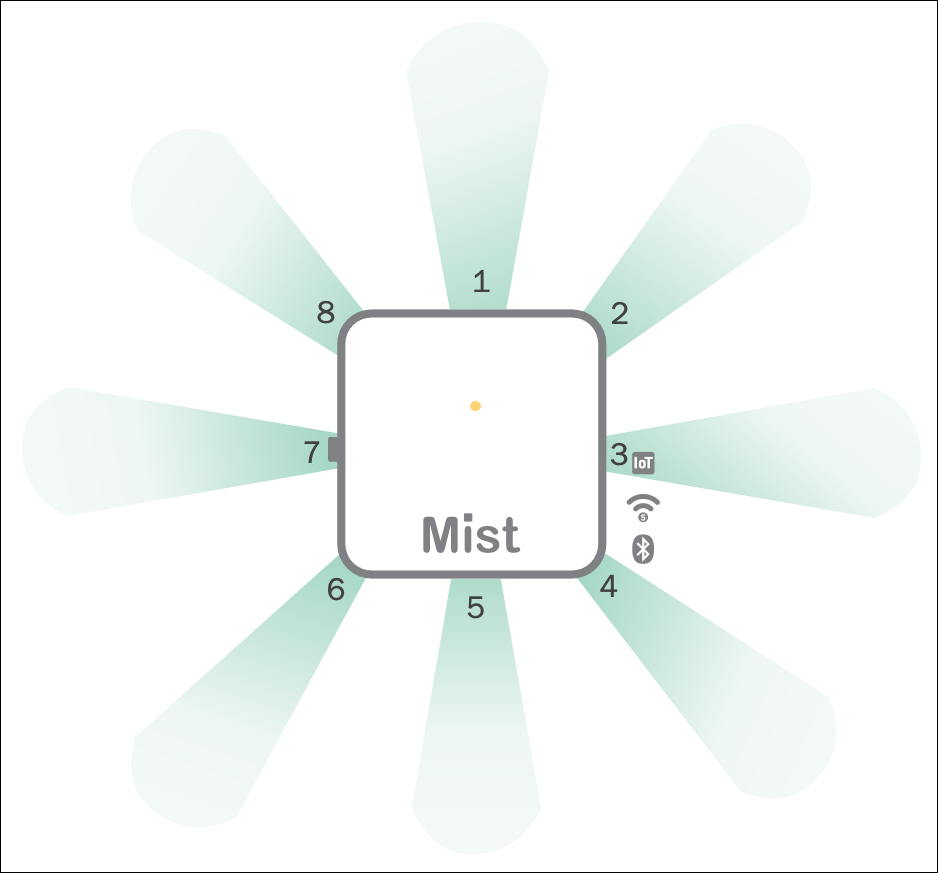
So the MIST Mobile SDK is responsible for receiving the BLE RSSI information and combining it with sensor data from the mobile device and sending that back to the cloud every second while the mobile device is moving. The MIST machine learning system continuously adapts to changing RF environments without the need for site surveys. Unlike single antenna BLE designs, MIST uses a single transmitter to drive eight unique directional antennas.
Each beam contributes to the likely location of the device. The MIST technology examines all the probability surfaces, one for each directional beam, and combines them to find the most likely point in the map where the device is located. So two terms of importance are PLE and intercept.
PLE is the path loss exponent. MIST uses this formula to determine the expected signal strength at various locations on a map based on a gain at that direction from the antenna, taking into account orientation and ceiling height. The intercept is another constant that must be derived.
It is much like the intercept of a line and indicates the expected power at one meter from the antenna. Individual RF environments and even device types have different optimal PLE and intercept values. This ensures the RF model adapts to the RF environment as it changes and accounts for the differences between mobile device types, providing a consistent user experience.
The essential element behind MIST machine learning is to seek the maximum agreement between the results of increasingly many location estimates. From that, construct individualized path loss formulas. As the machine learning algorithm begins, it's using the default PLF for a device type, meaning an iPad, an iPhone 6, an iPhone 6S.
Machine learning is running continuously. The only time you would see an AP at zero learning is when it was just added to the map or something has been changed in its configuration regarding ceiling height, orientation, etc. The thing to look for here is to make sure all of your APs are learning.
To reach level one usually only takes a couple minutes for a device, and that's the most important level because 95% of the work is done reaching level one learning. After that, the algorithm is looking for new unique data points. We have created this visual to help you quickly understand the status of location machine learning.
If an AP is not learned on a device, it will be gray. When all the devices are learned, they will show green. So what is going on here? Using the show all button, you can see the raw data, and note you can also choose to expose just a single device.
What the UI has done is to add up the PLE and intercept. Then a median value is derived per device, and per AP, a variance from that median is shown. In a normal environment, we would expect this variance not to be more than one or two.
If it is three or four, the tile will show yellow, and more than five will be red. This is to alert you to take a look at why this AP may be so different from the others. So in this case, this is what I would expect.
If you saw a five or a six, something that is kind of radically different from the others, immediately I would go look at the floor plan and see if that AP is in a strange spot that would justify it having a much different PLF than the rest of the APs.
Funktionsweise: Wahrscheinlichkeitsflächen
Wenn Ihr Kunde oder Besucher Ihre Juniper Mist SDK-fähige Anwendung verwendet, verwendet die Juniper Mist Cloud Wahrscheinlichkeitsflächen, um den Standort des Benutzers zu bestimmen. Wahrscheinlichkeitsflächen bieten die bestmögliche Positionsgenauigkeit mit einer Latenz von weniger als einer Sekunde.
Die Juniper Mist Cloud verwendet die vom SDK-Client gesendeten RF-Fingerabdrücke, um Wahrscheinlichkeitsflächen zu erstellen. Dazu wird der Grundriss in 1-Meter-Quadrate aufgeteilt und die geschätzten RF-Fingerabdrücke für jedes Quadrat berechnet.
Jeder der acht gerichteten Strahlen des AP trägt zur wahrscheinlichen Position des Client-Geräts bei, indem er alle Wahrscheinlichkeitsflächen (eine für jeden Strahl) untersucht und kombiniert, um den wahrscheinlichen Punkt auf der Karte zu finden, an dem sich das Gerät befindet.
In diesem Beispiel ist die Mitte des roten Bereichs die Spitze der Oberfläche und die höchste Wahrscheinlichkeit für den Standort des Clients. Der blaue Bereich stellt den untersten Bereich der Oberfläche und die geringste Wahrscheinlichkeit für den Standort des Kunden dar.
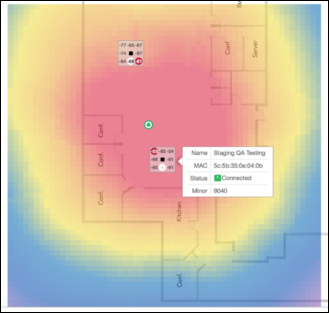
Wenn der SDK-Client RF-Fingerabdrücke an die Juniper Mist Cloud sendet, gelangt Juniper Mist in den maschinellen Lernprozess, und das Standortmodell wird für dieses Gerät optimiert.
Funktionsweise: Innenbereiche
Das Juniper Mist SDK bietet die Tools, die Sie zum Erstellen von kundenorientierten Anwendungen benötigen, die Standortservices für Innenbereiche bereitstellen. Wenn Sie das Juniper Mist SDK in Juniper Mist WLAN- und standortbasierte Dienste integrieren, können Sie mit der patentierten vBLE-Technologie von Juniper Mist den Standort eines Benutzers bestimmen und näherungsbasierte Benachrichtigungen liefern.
SDK-integrierte Mobilgeräte lauschen und empfangen die von den APs übertragenen Bluetooth Low Energy (BLE)-Pakete. Die Informationen in diesen Paketen werden vom SDK-Client verpackt und an die Juniper Mist Cloud gesendet. Schließlich gibt die Cloud die XY-Koordinaten jede Sekunde an das mobile Gerät zurück, basierend auf den erhaltenen Informationen.
Weitere Informationen finden Sie unter Juniper Mist SDK.
Ihre Anwendung verwendet diese Informationen, um relevante Erfahrungen bereitzustellen, z. B. Wegbeschreibungen und Pushbenachrichtigungen.
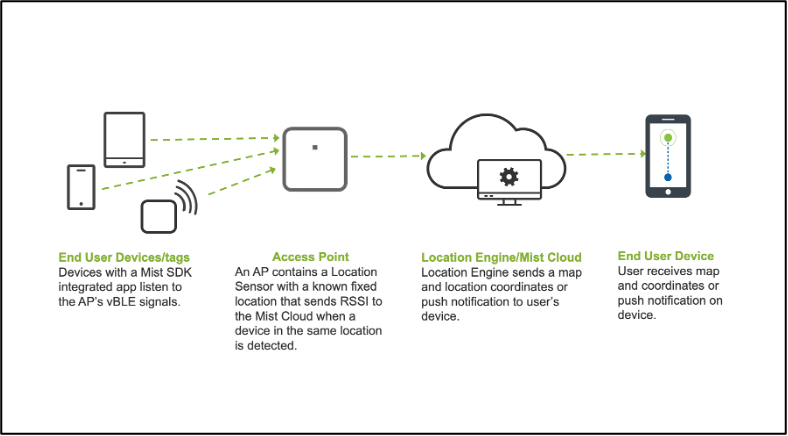 anzeigt
Anwendungsfälle
Juniper Mist unterstützt viele standortbasierte Anwendungsszenarien. Im Folgenden werden einige Möglichkeiten beschrieben.
Navigationshilfe
Die Navigationshilfe ist genau wie die Google- und Apple Maps-Erfahrung, die Sie von Punkt A nach Punkt B navigiert.
Stellen Sie sich einen Einzelhandelsstandort vor. Ein Kunde kauft in einem Geschäft ein und hat die mobile Anwendung des Einzelhändlers auf seinem Mobiltelefon. APs, die BLE übertragen, sind über den ganzen Laden verteilt. Wenn Sie das SDK in Ihre kundenorientierte App integrieren, können Sie die Navigationshilfe unterstützen. Der Einzelhandelskunde kann nach einem Artikel suchen und wird dann Zug für Zug zum Standort des Artikels innerhalb des Geschäfts geführt.
Weitere Informationen finden Sie unter Anwendungsszenario für die Navigationshilfe.
This is a great example of an indoor wayfinding experience. Here they just want to find the business center. A customer used the Myst SDK to create a mobile app for their visitors.
Start walking, but since these are long hallways they probably won't be staring at the phone the entire time. And there you go.
Asset-Sichtbarkeit
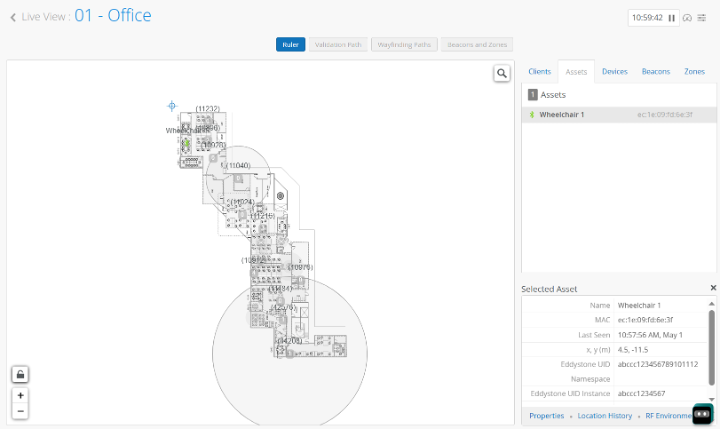
Schnelles Auffinden von Assets wie Elektronik und Geräten. Um die Asset-Verfolgung zu unterstützen, fügen Sie den Assets, die Sie verfolgen möchten, BLE-Beacon-Tags hinzu. Wenn der AP die BLE-Übertragung vom Tag hört, lokalisiert er diese Ressource in der Live-Ansicht im Juniper Mist Portal. Das Personal eines Krankenhauses kann diese Funktion nutzen, um den Standort von medizinischen Geräten, wie z. B. Rollstühlen, aufzuspüren.
Weitere Informationen finden Sie unter Anwendungsszenario für Geräte finden.
So let's go into some of the enterprise use cases. What do we see in the enterprise? Again, the theme is very similar. It's all about wayfinding. It's all about for better associated experiences. It's all about asset visibility around guest management with the management. It's all about occupancy, and it's still very relevant about proximity tracing.
We still have a lot of customers as they're opening up the enterprise office again with the pandemic numbers looking better in the right direction. They are looking to enable solutions in their network that can enable all of these four use cases, and in addition to that, get benefits from our simplified network operations, leveraging Marvis and AI-Ops. In the enterprise space, we have a lot of partners.
I'll call out one here specifically Inpixon, which has Jibestream mapping system, as well as the CX app enterprise platform that enables room booking that interacts with the Active Directory system for employees and enables the wayfinding and push notification experience that we're seeing a lot of traction with. So in healthcare, Bob, would you like to talk about some of the healthcare use cases that we see? Yeah, I mean, as I mentioned, healthcare is like where indoor location actually started a few years ago, and so probably my favorite indoor location right now is really around what I call Uber Health. This is really where hospitals are looking at trying to help vets or patients who actually need wheelchairs, right? So this is almost like a checkout procedure, right, where you need to check out, and they need to take you to the front door in a wheelchair, and you're sitting there waiting for the wheelchair to arrive.
So I've been working with a couple hospitals on how do you make that patient experience nicer so at least when they're waiting there, they have a sense that, yes, the wheelchair is on arrival, and this is why I call it the Uber thing, right? You know that the wheelchair is on its way, and how long it's going to take you there. The other use case I've seen in healthcare, and this may apply to other businesses, is really just around asset tracking, you know, where they have to basically identify or locate all their assets every year on an annual basis, or they have high-value assets. I've worked with a couple of hospitals.
It's amazing, even vacuum cleaners, how much stuff gets... It doesn't get stolen, but it gets lost quite, you know, it tends to get misplaced and lost by a regular. So those are some of the more typical use cases I've seen in the healthcare space, along with kind of the wayfinding through the mazes. You know, some of these hospitals I've been in, like, you can't actually get lost in them.
You know, I bet there's a famous story of someone who was, like, looking for her mother in a hospital. It was, like, midnight, you know, and she's wandering the hospital trying to find help on finding out, you know, where her mother's room was. So that's typical healthcare space use cases.
And Bob, you want to talk a little bit about that door control system, the enabled leveraging location and our IoT hub on the access points for one of our... Oh, yeah, yeah, yeah. This is for, you know, Alzheimer patients. You know, you're in a hospital where they really want to make sure that if anyone approached a door, the door would automatically lock, right? And so this is making sure if you're in a hospital or healthcare space where you're dealing with patients who have, you know, memory issues, you don't want them wandering off.
So this is kind of where we actually use the IoT port on AP to actually lock the door in conjunction with the virtual BLE when someone got too close to the door type of patient. And that was a very interesting use case where we're using location along with our IoT port to enable an outcome of locking the door based on who was in proximity of that door. In higher Ed, again, the theme is the same, mobile app engagement asset visibility, but here it's all about wayfinding for students, for students with visiting families.
Push notifications are really key when you're doing events in the stadiums, when you're doing, you know, visiting guest speaker lectures. In fact, we work with a very famous university here in the Bay Area where they wanted to enable wayfinding for visiting faculty. And as the visiting faculty or the students went from one auditorium to another, while they were passing that room, they wanted to enable push notifications to let them know what is the session that's going on in that room right now so that you could drive more attendance into those areas.
And then again, from an asset visibility perspective, whether it's tracking chairs in a conference room, whether it's tracking, now we see a lot more IT assets also, for example, with Chromebooks and iPads being given to students, being able to track that. And then even in the higher Ed university use case, we're seeing Bluetooth being used for asset visibility from an IT management perspective. Yeah, I mean, here's a good question.
I think we probably should wrap up. We only have a few minutes left here. It's really around random MACs and, you know, what does random MACs mean for Wi-Fi locations? And that's a great question.
So, random MACs were always a problem statement in the unconnected Wi-Fi world where we were seeing a lot of random Macs and we would discard the random Macs due to sort of the occupancy and density of spaces being utilized and traffic flows. Now we're also seeing random MACs show up in the connected Wi-Fi world. And that is again, where for customers who now are looking at people counting solutions, especially in retail or in the enterprise space, we sort of talk a little bit more about leveraging the mobile app or the badge as a way to get that data, which is relying on Wi-Fi to count devices because of the random MAC phenomena.
And the random MAC again is driven by privacy. So, I would say the short answer on the random MAC is it's kind of eliminated the ability to do history. I mean, we used to be able to track, you know, how many times you showed up in a coffee shop or something. All that's pretty much been eliminated now with the random MAC. And the last use case around retail, and we just spoke about that. So again, here we know big box retail, we know malls, they want to deploy, you know, turn-by-turn navigation.
Some of our customers also want to make sure that if you're at the pharmacy section, you get a push notification show up on when your prescription will be ready, or if you're in the store and not visiting pharmacy, remind you that, hey, your prescription will be ready if you're here to pick it up. So a lot of use cases around push notification and retail, around wayfinding and big box retail, pristine malls, and all enabled by the Mist SDK and the Mist platform. Hand in hand with that is the Engagement and Occupancy analytics, because the number one thing that we always get back is, hey, just based on the Wi-Fi data today, can I do some sort of analysis on trends of which areas are visited with being visited more, what's less, what part of day, what day of week, what is my average? Well, again, not a people-to-contact solution, but still gives you a very good idea of how our spaces are utilized in terms of density and dwell time in the retail space.
Benutzer-Engagement
Wenn ein Standortbesucher den Abdeckungsbereich eines virtuellen Beacons betritt, sendet die Standort-Engine eine Push-Benachrichtigung, um eine Begrüßung anzuzeigen. Ein Beispiel dafür ist, wenn eine Person durch die Eingangstür eines Bürogebäudes eintritt und ein Weiterleitungslink zur Unternehmenshomepage an ihr Gerät gesendet wird.
Now, to show you in real-time how we deliver people tracking with our user engagement solution stack, we'll give you a demo of a corporate space with real-time wayfinding, as well as a warehouse space where we are tracking people for analytics, but also delivering real-time wayfinding with the use case being imagine a runner coming to pick an order in a store and not knowing where things are because they're not the store employee. This is the Juniper EBC. We're using our device to navigate to the Thomas Edison room.
We use a device map to begin our walk. What is far more interesting is what's going on behind the scenes. A missed access point is a platform that not only provides Wi-Fi but also high accuracy location services.
In the wayfinding use case, we use the 16 antenna directional Bluetooth array as unique transmitters. What we see here is RF glasses, a troubleshooting microservice spun up that let us see inside the device. Note the different estimates calculated to provide a high-quality blue dot.
Also note, MIST is measuring the amount of beams it hears over time, as well as speed and direction directly from the device sensors to fuse this data into a great wayfinding experience. How cool and easy are push notifications? These can be created, enabled, disabled by an API based on time, time of day, or anything you want. How cool is that? Here is a high ceiling warehouse example using the MIST experience app.
We have enabled some debugging features like breadcrumbs and arrows showing which way the device is actually pointed in space. Looking behind the scenes, we use RF glasses to see what the device actually sees. Here are the beams it hears the loudest during this interval from multiple MIST access point platforms.
We can see the beams heard over time as well as getting information on speed and direction directly from the device sensors as well as network round-trip time. This demonstrates the versatility of the access point as a platform and the multiple types of high accuracy location-based services.
Was kommt als nächstes?
-
Besorgen und aktivieren Sie Ihre Abonnements. Weitere Informationen finden Sie unter Aktivieren von Abonnements.
-
Wählen Sie Ihre APs aus. Siehe APs für Standortservices.
-
Platzieren Sie Ihre APs, um eine vollständige BLE-Abdeckung zu gewährleisten. Weitere Informationen finden Sie unter AP-Platzierung für Standortservices.
-
Richten Sie Ihren Grundriss ein, um die Genauigkeit des Standorts zu gewährleisten. Siehe Übersicht über die Grundrisseinrichtung.
-
Implementieren Sie Ihre Anwendungsfälle.
Siehe zum Beispiel: