
使用 EAP-TLS 身份验证进行基于证书的验证(CLI 过程)
概述
在此配置中,您可以使用 EAP-TLS 身份验证方法来验证用户证书。您可以继续使用用户名和密码进行外部用户身份验证,通过 RADIUS 服务器从 SRX 系列防火墙下载初始配置。
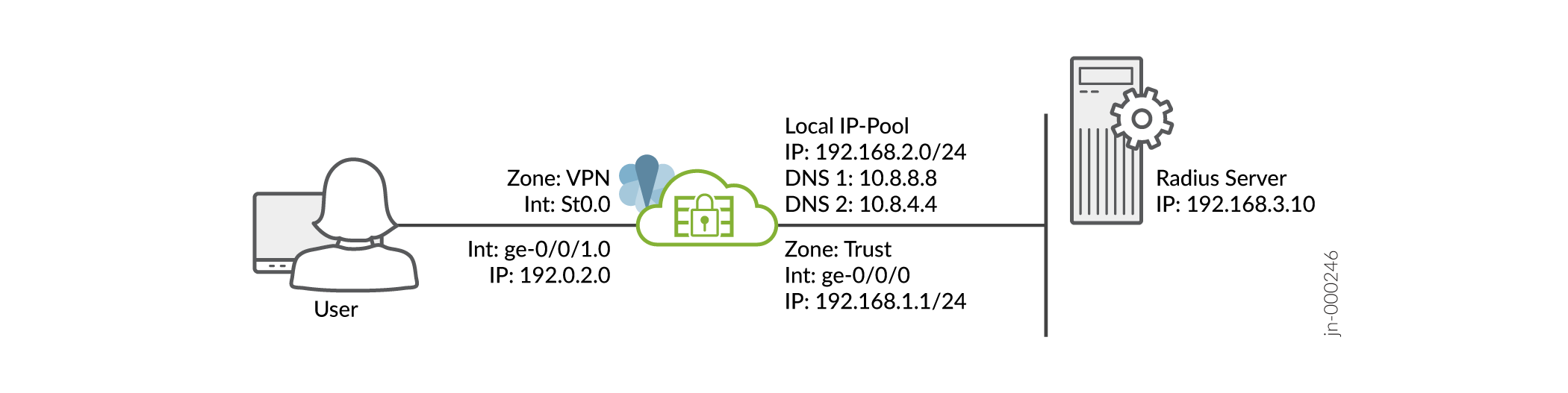
我们假设您已经完成了 SRX 系列防火墙的基本设置,包括接口、区域和安全策略,如 图 1 所示。
图 1:拓扑
有关先决条件的信息,请参阅 瞻博网络安全连接的系统要求。
确保已将公钥基础架构 (PKI) 配置为后端身份验证。在这种情况下,您需要在每个客户端上安装 CA 的根证书,并在每个客户端设备上安装特定于用户的证书。请注意,此方案不支持本地身份验证。
您必须确保 SRX 系列防火墙使用签名证书或自签名证书,而不是默认的系统生成的证书。开始配置瞻博网络安全连接之前,必须通过执行以下命令将证书绑定到 SRX 系列防火墙:
user@host# set system services web-management https pki-local-certificate <cert_name>
例如:
user@host# set system services web-management https pki-local-certificate SRX_Certificate
其中 SRX_Certificate 是自签名证书。
CLI 快速配置
要在 SRX 系列防火墙上快速配置此示例,请复制以下命令,将其粘贴到文本文件中,删除所有换行符,更改详细信息,以便与网络配置匹配,然后将命令复制并粘贴到 [编辑] 层级的 CLI 中。
[edit]
user@host#
set security ike proposal JUNIPER_SECURE_CONNECT authentication-method rsa-signatures
set security ike proposal JUNIPER_SECURE_CONNECT dh-group group19
set security ike proposal JUNIPER_SECURE_CONNECT encryption-algorithm aes-256-gcm
set security ike proposal JUNIPER_SECURE_CONNECT lifetime-seconds 28800
set security ike policy JUNIPER_SECURE_CONNECT mode main
set security ike policy JUNIPER_SECURE_CONNECT proposals JUNIPER_SECURE_CONNECT
set security ike policy JUNIPER_SECURE_CONNECT certificate local-certificate SRX_Certificate

set security ike gateway JUNIPER_SECURE_CONNECT dynamic hostname ra.example.com
set security ike gateway JUNIPER_SECURE_CONNECT dynamic ike-user-type shared-ike-id
set security ike gateway JUNIPER_SECURE_CONNECT ike-policy JUNIPER_SECURE_CONNECT
set security ike gateway JUNIPER_SECURE_CONNECT dead-peer-detection optimized
set security ike gateway JUNIPER_SECURE_CONNECT dead-peer-detection interval 10
set security ike gateway JUNIPER_SECURE_CONNECT dead-peer-detection threshold 5
set security ike gateway JUNIPER_SECURE_CONNECT version v2-only
set security ike gateway JUNIPER_SECURE_CONNECT aaa access-profile Juniper_Secure_Connect
set security ike gateway JUNIPER_SECURE_CONNECT tcp-encap-profile SSL-VPN
set security ike gateway JUNIPER_SECURE_CONNECT external-interface ge-0/0/0
set security ike gateway JUNIPER_SECURE_CONNECT local-address 192.0.2.0
set security ipsec proposal JUNIPER_SECURE_CONNECT encryption-algorithm aes-256-gcm
set security ipsec proposal JUNIPER_SECURE_CONNECT lifetime-seconds 3600
set security ipsec policy JUNIPER_SECURE_CONNECT perfect-forward-secrecy keys group19
set security ipsec policy JUNIPER_SECURE_CONNECT proposals JUNIPER_SECURE_CONNECT

set security ipsec vpn JUNIPER_SECURE_CONNECT bind-interface st0.0

set security ipsec vpn JUNIPER_SECURE_CONNECT ike gateway JUNIPER_SECURE_CONNECT
set security ipsec vpn JUNIPER_SECURE_CONNECT ike ipsec-policy JUNIPER_SECURE_CONNECT
set security ipsec vpn JUNIPER_SECURE_CONNECT traffic-selector ts-1 local-ip 0.0.0.0/0
set security ipsec vpn JUNIPER_SECURE_CONNECT traffic-selector ts-1 remote-ip 0.0.0.0/0

set security remote-access profile ra.example.com ipsec-vpn JUNIPER_SECURE_CONNECT
set security remote-access profile ra.example.com access-profile Juniper_Secure_Connect
set security remote-access profile ra.example.com client-config JUNIPER_SECURE_CONNECT
set security remote-access client-config JUNIPER_SECURE_CONNECT connection-mode manual
set security remote-access client-config JUNIPER_SECURE_CONNECT dead-peer-detection interval 60
set security remote-access client-config JUNIPER_SECURE_CONNECT dead-peer-detection threshold 5
set security remote-access client-config JUNIPER_SECURE_CONNECT certificate warn-before-expiry 60


set access address-assignment pool Juniper_Secure_Connect_Addr-Pool family inet network 192.168.2.0/24
set access address-assignment pool Juniper_Secure_Connect_Addr-Pool family inet range Range low 192.168.2.11
set access address-assignment pool Juniper_Secure_Connect_Addr-Pool family inet range Range high 192.168.2.100
set access address-assignment pool Juniper_Secure_Connect_Addr-Pool family inet xauth-attributes primary-dns 10.8.8.8/32
set access address-assignment pool Juniper_Secure_Connect_Addr-Pool family inet xauth-attributes primary-wins 192.168.4.10/32
set access profile Juniper_Secure_Connect authentication-order radius
set access profile Juniper_Secure_Connect address-assignment pool Juniper_Secure_Connect_Addr-Pool
set access profile Juniper_Secure_Connect radius-server 192.168.3.10 port 1812
set access profile Juniper_Secure_Connect radius-server 192.168.3.10 secret "$9$ggaGjmfzCtOHqtO1RlegoJ"
set access profile Juniper_Secure_Connect radius-server 192.168.3.10 timeout 5
set access profile Juniper_Secure_Connect radius-server 192.168.3.10 retry 3
set access firewall-authentication web-authentication default-profile Juniper_Secure_Connect

set security pki ca-profile jweb-CA ca-identity jweb-CA
set security pki ca-profile jweb-CA enrollment url http://juniper-ca.example.com/certsrv/
set security pki ca-profile jweb-CA enrollment retry 0
set security pki ca-profile jweb-CA enrollment retry-interval 0
set security pki ca-profile jweb-CA revocation-check disable

set services ssl termination profile Juniper_SCC-SSL-Term-Profile server-certificate JUNIPER_SECURE_CONNECT(RSA)
set security tcp-encap profile SSL-VPN ssl-profile Juniper_SCC-SSL-Term-Profile

set security policies from-zone trust to-zone VPN policy JUNIPER_SECURE_CONNECT-1 match source-address any
set security policies from-zone trust to-zone VPN policy JUNIPER_SECURE_CONNECT-1 match destination-address any
set security policies from-zone trust to-zone VPN policy JUNIPER_SECURE_CONNECT-1 match application any
set security policies from-zone trust to-zone VPN policy JUNIPER_SECURE_CONNECT-1 then permit
set security policies from-zone trust to-zone VPN policy JUNIPER_SECURE_CONNECT-1 then log session-close
set security policies from-zone VPN to-zone trust policy JUNIPER_SECURE_CONNECT-2 match source-address any
set security policies from-zone VPN to-zone trust policy JUNIPER_SECURE_CONNECT-2 match destination-address any
set security policies from-zone VPN to-zone trust policy JUNIPER_SECURE_CONNECT-2 match application any
set security policies from-zone VPN to-zone trust policy JUNIPER_SECURE_CONNECT-2 then permit
set security policies from-zone VPN to-zone trust policy JUNIPER_SECURE_CONNECT-2 then log session-close

set interfaces ge-0/0/0 unit 0 family inet address 192.0.2.0/24
set interfaces ge-0/0/1 unit 0 family inet address 198.51.100.0/24
set interfaces st0 unit 0 family inet

set security zones security-zone trust host-inbound-traffic system-services all
set security zones security-zone trust host-inbound-traffic protocols all
set security zones security-zone trust interfaces ge-0/0/0.0
set security zones security-zone vpn host-inbound-traffic system-services all
set security zones security-zone vpn host-inbound-traffic protocols all
set security zones security-zone VPN interface st0.0
set security zones security-zone vpn interfaces ge-0/0/1.0
循序渐进的过程
要使用命令行界面配置 VPN 设置,请执行以下作:
结果
在作模式下,输入show securityshow access、和show security pki命令,以确认您的配置。如果输出未显示预期的配置,请重复此示例中的配置说明,以便进行更正。
[edit]
user@host> show security
   ike {
       proposal JUNIPER_SECURE_CONNECT {

           authentication-method rsa-signatures;
           dh-group group19;           encryption-algorithm aes-256-gcm;
           lifetime-seconds 28800;
       }
       policy JUNIPER_SECURE_CONNECT {
           mode main;
 ;
           proposals JUNIPER_SECURE_CONNECT;
           certificate {
               local-certificate SRX_Certificate;
           }
       }
       gateway JUNIPER_SECURE_CONNECT {
           ike-policy JUNIPER_SECURE_CONNECT;
           dynamic {
               hostname ra.example.com;
               ike-user-type shared-ike-id;
           }
           dead-peer-detection {
               optimized;
               interval 10;
               threshold 5;
           }
           external-interface ge-0/0/1;

           aaa {
               access-profile Juniper_Secure_Connect;
           }
           version v2-only;

           tcp-encap-profile SSL-VPN;
       }
   }
   ipsec {
       proposal JUNIPER_SECURE_CONNECT {


           encryption-algorithm aes-256-gcm;
           lifetime-seconds 3600;
       }
       policy JUNIPER_SECURE_CONNECT {

           perfect-forward-secrecy {
               keys group19;
           }
           proposals JUNIPER_SECURE_CONNECT;
       }
       vpn JUNIPER_SECURE_CONNECT {
           bind-interface st0.0;
           ike {
               gateway JUNIPER_SECURE_CONNECT;
               ipsec-policy JUNIPER_SECURE_CONNECT;
           }
           traffic-selector ts-1 {
               local-ip 0.0.0.0/0;
               remote-ip 0.0.0.0/0;
           }
       }
   }
   remote-access {
       profile ra.example.com {

           ipsec-vpn JUNIPER_SECURE_CONNECT;
           access-profile Juniper_Secure_Connect;
           client-config JUNIPER_SECURE_CONNECT;
       }
       client-config JUNIPER_SECURE_CONNECT {
           connection-mode manual;
           dead-peer-detection {
               interval 60;
               threshold 5;
           }
           certificate {
               warn-before-expiry 60;
           }
       }
          }

   policies {
       from-zone trust to-zone VPN {
           policy JUNIPER_SECURE_CONNECT-1 {
               match {
                   source-address any;
                   destination-address any;
                   application any;
               }
               then {
                   permit;
                   log {
                       session-close;
                   }
               }
           }
       }
       from-zone VPN to-zone trust {
           policy JUNIPER_SECURE_CONNECT-2 {
               match {
                   source-address any;
                   destination-address any;
                   application any;
               }
               then {
                   permit;
                   log {
                       session-close;
                   }
               }
           }
       }
   }
[edit]
user@host> show access
  access {
      profile Juniper_Secure_Connect {
          authentication-order radius;
          address-assignment {
              pool Juniper_Secure_Connect_Addr-Pool;
          }
          radius-server {
              192.168.3.10 {
                  port 1812;
                  secret "$9$/2EhAuBcyKxNbIENbs2GU/Ct"; ## SECRET-DATA
                  timeout 5;
                  retry 3;
              }
          }
      }
      address-assignment {
          pool Juniper_Secure_Connect_Addr-Pool {
              family inet {
                  network 192.168.2.0/24;
                  range Range {
                      low 192.168.2.11;
                      high 192.168.2.100;
                  }
                  xauth-attributes {
                      primary-dns 10.8.8.8/32;
                      primary-wins 192.168.4.10/32;
                  }
              }
          }
      }
      firewall-authentication {
          web-authentication {
              default-profile Juniper_Secure_Connect;
          }
      }
  }
[edit]
user@host> show security pki
   pki {
       ca-profile jweb-CA {
           ca-identity jweb-CA;
           enrollment {
               url http://juniper-ca.example.com/certsrv/;
               retry 0;
               retry-interval 0;
           }
           revocation-check {
               disable;
           }
       }
   }
[edit]
user@host> show interfaces
ge-0/0/0 {
    unit 0 {
        family inet {
            address 192.0.2.0/24;
        }
    }
}
ge-0/0/1 {
    unit 0 {
        family inet {
            address 198.51.100.0/24;
        }
    }
}
st0 {
    unit 1 {
        family inet;
    }
}
[edit]
user@host> show security zones
security-zone trust {
    host-inbound-traffic {
        system-services {
            all;
        }
        protocols {
            all;
        }
    }
    interfaces {
        ge-0/0/0.0;
    }
}
security-zone vpn {
    host-inbound-traffic {
        system-services {
            all;
        }
        protocols {
            all;
        }
    }
    interfaces {
        st0.1;
        ge-0/0/1.0;
    }
}
在设备上配置完该功能后,从配置模式进入提交。