
外部接口上的双栈隧道
了解 IPsec VPN 中的双栈隧道。
基于路由的站点到站点 VPN 支持双堆栈隧道,即通过单个物理接口到对等方的并行 IPv4 和 IPv6 隧道。配置了 IPv4 和 IPv6 地址的物理接口可用作同一对等方或同时不同对等方上 IPv4 和 IPv6 网关的外部接口。
了解 VPN 隧道模式
在 VPN 隧道模式下,IPsec 将原始 IP 数据报(包括原始 IP 报头)封装在第二个 IP 数据报中。外部 IP 标头包含网关的 IP 地址,而内部标头包含最终源和目标 IP 地址。外部和内部 IP 报头的协议字段可以是 IPv4 或 IPv6。SRX 系列防火墙支持基于路由的站点到站点 VPN 的四种隧道模式。
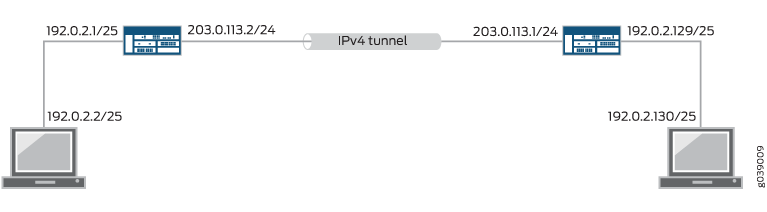
IPv4-in-IPv4 隧道将 IPv4 数据包封装在 IPv4 数据包内,如 图 1所示。外部标头和内部标头的协议字段均为 IPv4。
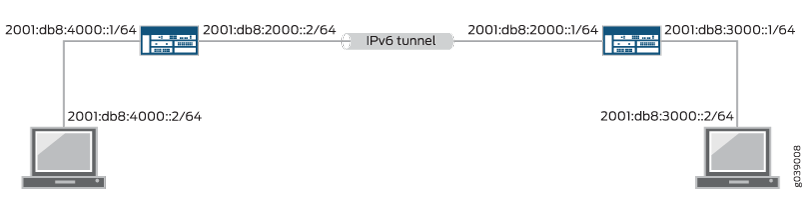
IPv6-in-IPv6 隧道将 IPv6 数据包封装在 IPv6 数据包内,如 图 2所示。外部和内部标头的协议字段均为 IPv6。
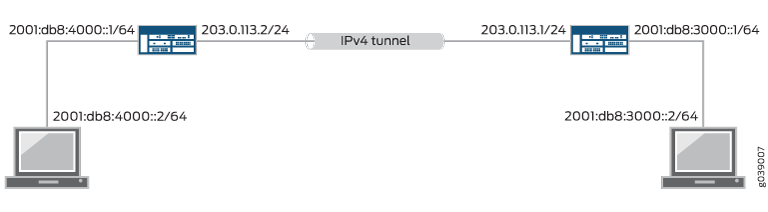
IPv6-in-IPv4 隧道将 IPv6 数据包封装在 IPv4 数据包内,如 图 3所示。外部标头的协议字段为 IPv4,内部标头的协议字段为 IPv6。
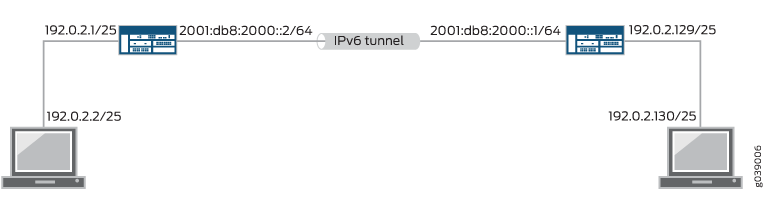
IPv4-in-IPv6 隧道将 IPv4 数据包封装在 IPv6 数据包内,如 图 4所示。外部标头的协议字段为 IPv6,内部标头的协议字段为 IPv4。
单个 IPsec VPN 隧道可以同时传输 IPv4 和 IPv6 流量。例如,IPv4 隧道可以同时在 IPv4 in-IPv4 和 IPv6-in-IPv4 隧道模式下运行。要允许通过单个 IPsec VPN 隧道的 IPv4 和 IPv6 流量,绑定到该隧道的 st0 接口必须同时 family inet 配置和 family inet6。
配置了 IPv4 和 IPv6 地址的物理接口可用作在基于路由的站点到站点 VPN 中与对等方建立并行 IPv4 和 IPv6 隧道的外部接口。此功能称为 双堆栈隧道 ,每个隧道都需要单独的 st0 接口。
对于基于策略的 VPN,IPv6-in-IPv6 是唯一受支持的隧道模式。请参阅 IPv6 IPsec VPN。
了解通过外部接口建立的双栈隧道
基于路由的站点到站点 VPN 支持双堆栈隧道,即通过单个物理接口到对等方的并行 IPv4 和 IPv6 隧道。配置了 IPv4 和 IPv6 地址的物理接口可用作同一对等方或不同对等方上 IPv4 和 IPv6 网关的外部接口。在 中 图 5,物理接口 reth0.0 和 ge-0/0/0.1 支持两个设备之间的并行 IPv4 和 IPv6 隧道。

在 中 图 5,必须为每个 IPsec VPN 隧道配置单独的安全隧道 (st0) 接口。不支持绑定到同一 st0 接口的并行 IPv4 和 IPv6 隧道。
单个 IPsec VPN 隧道可以同时传输 IPv4 和 IPv6 流量。例如,IPv4 隧道可以同时在 IPv4 in-IPv4 和 IPv6-in-IPv4 隧道模式下运行。要允许通过单个 IPsec VPN 隧道的 IPv4 和 IPv6 流量,绑定到该隧道的 st0 接口必须同时 family inet 配置和 family inet6。
如果在 VPN 对等方的同一外部接口上配置了同一地址族中的多个地址,我们建议您在 [edit security ike gateway gateway-name] 层次结构级别进行配置local-address。
如果配置了,则 local-address 指定的 IPv4 或 IPv6 地址将用作本地网关地址。如果在物理外部接口上仅配置了一个 IPv4 和一个 IPv6 地址, local-address 则不需要配置。
该 local-address 值必须是在 SRX 系列防火墙上的接口上配置的 IP 地址。我们建议属于 local-address IKE 网关的外部接口。如果不属于 IKE 网关的外部接口,则该 local-address 接口必须与 IKE 网关的外部接口位于同一区域中,并且必须将区域内安全策略配置为允许流量。
该 local-address 值和远程 IKE 网关地址必须位于同一地址族中,即 IPv4 或 IPv6。
如果未配置,则 local-address 本地网关地址基于远程网关地址。如果远程网关地址是 IPv4 地址,则本地网关地址是外部物理接口的主 IPv4 地址。如果远程网关地址是 IPv6 地址,则本地网关地址是外部物理接口的主 IPv6 地址。
另请参阅
示例:通过外部接口配置双堆栈隧道
此示例说明如何为基于路由的站点到站点 VPN 配置通过单个外部物理接口到对等方的并行 IPv4 和 IPv6 隧道。
要求
开始之前,请阅读 了解 VPN 隧道模式。
此示例中显示的配置仅支持基于路由的站点到站点 VPN。
概述
在此示例中,本地设备上的冗余以太网接口支持与对等设备的并行 IPv4 和 IPv6 隧道:
IPv4 隧道承载 IPv6 流量;它在 IPv6-in-IPv4 隧道模式下运行。绑定到 IPv4 隧道的安全隧道接口 st0.0 仅配置了系列 inet6。
IPv6 隧道同时承载 IPv4 和 IPv6 流量;它可以在 IPv4-in-IPv6 和 IPv6-in-IPv6 隧道模式下运行。绑定到 IPv6 隧道的安全隧道接口 st0.1 配置了族 inet 和族 inet6。
表 1 显示了此示例中使用的第 1 阶段选项。第 1 阶段选项配置包括两个 IKE 网关配置,一个用于 IPv6 对等方,另一个用于 IPv4 对等方。
选项 |
value |
|---|---|
IKE 提案 |
ike_proposal |
身份验证方法 |
预共享密钥 |
身份验证算法 |
MD5 |
加密算法 |
3DES 全血细胞计数 |
辈子 |
3600 秒 |
IKE 策略 |
ike_policy |
模式 |
积极 |
IKE 提案 |
ike_proposal |
预共享密钥 |
ASCII 文本 |
IPv6 IKE 网关 |
ike_gw_v6 |
IKE 策略 |
ike_policy |
网关地址 |
2000::2 |
外部接口 |
reth1.0 |
IKE 版本 |
IKEv2 |
IPv4 IKE 网关 |
ike_gw_v4 |
IKE 策略 |
ike_policy |
网关地址 |
20.0.0.2 |
外部接口 |
reth1.0 |
表 2 显示了此示例中使用的第 2 阶段选项。第 2 阶段选项配置包括两个 VPN 配置,一个用于 IPv6 隧道,另一个用于 IPv4 隧道。
选项 |
value |
|---|---|
IPsec 提议 |
ipsec_proposal |
协议 |
ESP |
身份验证算法 |
HMAC SHA-1 96 |
加密算法 |
3DES 全血细胞计数 |
IPsec 策略 |
ipsec_policy |
提议 |
ipsec_proposal |
IPv6 VPN |
test_s2s_v6 |
绑定接口 |
st0.1 |
IKE 网关 |
ike_gw_v6 |
IKE IPsec 策略 |
ipsec_policy |
建立隧道 |
马上 |
IPv4 VPN |
test_s2s_v4 |
绑定接口 |
st0.0 |
IKE 网关 |
ike_gw_4 |
IKE IPsec 策略 |
ipsec_policy |
IPv6 路由表中配置了以下静态路由:
通过 st0.0 将 IPv6 流量路由到 3000::1/128。
通过 st0.1 将 IPv6 流量路由到 3000::2/128。
默认 (IPv4) 路由表中配置了静态路由,用于通过 st0.1 将 IPv4 流量路由到 30.0.0.0/24。
必须在 [edit security forwarding-options family inet6] 层级使用配置选项启用mode flow-based基于流的 IPv6 流量处理。
拓扑学
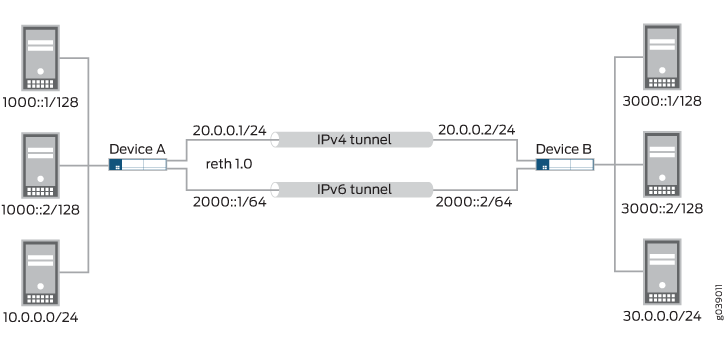
在 中 图 6,SRX 系列防火墙 A 支持与设备 B 建立 IPv4 和 IPv6 隧道。发往 3000::1/128 的 IPv6 流量通过 IPv4 隧道路由,而发往 3000::2/128 的 IPv6 流量和发往 30.0.0.0/24 的 IPv4 流量通过 IPv6 隧道进行路由。
配置
程序
CLI 快速配置
要快速配置此示例,请复制以下命令,将其粘贴到文本文件中,删除所有换行符,更改详细信息,以便与网络配置匹配,将命令复制并粘贴到 [edit] 层级的 CLI 中,然后从配置模式进入 commit 。
set interfaces ge-0/0/1 gigether-options redundant-parent reth1
set interfaces ge-8/0/1 gigether-options redundant-parent reth1
set interfaces reth1 redundant-ether-options redundancy-group 1
set interfaces reth1 unit 0 family inet address 20.0.0.1/24
set interfaces reth1 unit 0 family inet6 address 2000::1/64
set interfaces st0 unit 0 family inet6
set interfaces st0 unit 1 family inet
set interfaces st0 unit 1 family inet6
set security ike proposal ike_proposal authentication-method pre-shared-keys
set security ike proposal ike_proposal authentication-algorithm md5
set security ike proposal ike_proposal encryption-algorithm 3des-cbc
set security ike proposal ike_proposal lifetime-seconds 3600
set security ike policy ike_policy mode aggressive
set security ike policy ike_policy proposals ike_proposal
set security ike policy ike_policy pre-shared-key ascii-text "$ABC123"
set security ike gateway ike_gw_v6 ike-policy ike_policy
set security ike gateway ike_gw_v6 address 2000::2
set security ike gateway ike_gw_v6 external-interface reth1.0
set security ike gateway ike_gw_v6 version v2-only
set security ike gateway ike_gw_v4 ike-policy ike_policy
set security ike gateway ike_gw_v4 address 20.0.0.2
set security ike gateway ike_gw_v4 external-interface reth1.0
set security ipsec proposal ipsec_proposal protocol esp
set security ipsec proposal ipsec_proposal authentication-algorithm hmac-sha1-96
set security ipsec proposal ipsec_proposal encryption-algorithm 3des-cbc
set security ipsec policy ipsec_policy proposals ipsec_proposal
set security ipsec vpn test_s2s_v6 bind-interface st0.1
set security ipsec vpn test_s2s_v6 ike gateway ike_gw_v6
set security ipsec vpn test_s2s_v6 ike ipsec-policy ipsec_policy
set security ipsec vpn test_s2s_v6 establish-tunnels immediately
set security ipsec vpn test_s2s_v4 bind-interface st0.0
set security ipsec vpn test_s2s_v4 ike gateway ike_gw_v4
set security ipsec vpn test_s2s_v4 ike ipsec-policy ipsec_policy
set routing-options rib inet6.0 static route 3000::1/128 next-hop st0.0
set routing-options rib inet6.0 static route 3000::2/128 next-hop st0.1
set routing-options static route 30.0.0.0/24 next-hop st0.1
set security forwarding-options family inet6 mode flow-based
分步过程
下面的示例要求您在各个配置层级中进行导航。有关如何执行此操作的说明,请参阅 Junos OS CLI 用户指南中的在配置模式下使用 CLI 编辑器。
要配置双堆栈隧道:
配置外部接口。
[edit interfaces]
user@host# set ge-0/0/1 gigether-options redundant-parent reth1
user@host# set ge-8/0/1 gigether-options redundant-parent reth1
user@host# set reth1 redundant-ether-options redundancy-group 1
user@host# set reth1 unit 0 family inet address 20.0.0.1/24
user@host# set reth1 unit 0 family inet6 address 2000::1/64
配置安全隧道接口。
[edit interfaces]
user@host# set st0 unit 0 family inet6
user@host# set st0 unit 1 family inet
user@host# set st0 unit 1 family inet6
配置第 1 阶段选项。
[edit security ike proposal ike_proposal]
user@host# set authentication-method pre-shared-keys
user@host# set authentication-algorithm md5
user@host# set encryption-algorithm 3des-cbc
user@host# set lifetime-seconds 3600
[edit security ike policy ike_policy]
user@host# set mode aggressive
user@host# set proposals ike_proposal
user@host# set pre-shared-key ascii-text "$ABC123"
[edit security ike gateway ike_gw_v6]
user@host# set ike-policy ike_policy
user@host# set address 2000::2
user@host# set external-interface reth1.0
user@host# set version v2-only
[edit security ike gateway ike_gw_v4]
user@host# set ike-policy ike_policy
user@host# set address 20.0.0.2
user@host# set external-interface reth1.0
配置第 2 阶段选项。
[edit security ipsec proposal ipsec_proposal]
user@host# set protocol esp
user@host# set authentication-algorithm hmac-sha1-96
user@host# set encryption-algorithm 3des-cbc
[edit security ipsec policy ipsec_policy]
user@host# set proposals ipsec_proposal
[edit security ipsec vpn test_s2s_v6 ]
user@host# set bind-interface st0.1
user@host# set ike gateway ike_gw_v6
user@host# set ike ipsec-policy ipsec_policy
user@host# set establish-tunnels immediately
[edit security ipsec vpn test_s2s_v4]
user@host# set bind-interface st0.0
user@host# set ike gateway ike_gw_v4
user@host# set ike ipsec-policy ipsec_policy
配置静态路由。
[edit routing-options rib inet6.0]
user@host# set static route 3000::1/128 next-hop st0.0
user@host# set static route 3000::2/128 next-hop st0.1
[edit routing-options]
user@host# set static route 30.0.0.0/24 next-hop st0.1
启用基于 IPv6 流的转发。
[edit security forwarding-options]
user@host# set family inet6 mode flow-based
结果
在配置模式下,输入 show interfaces、 show security ike、 show routing-optionsshow security ipsec和show security forwarding-options命令来确认您的配置。如果输出未显示预期的配置,请重复此示例中的配置说明,以便进行更正。
[edit]
    user@host# show interfaces
    ge-0/0/1 {
        gigether-options {
            redundant-parent reth1;
        }
    }
    ge-8/0/1 {
        gigether-options {
            redundant-parent reth1;
        }
    }
    reth1 {
        redundant-ether-options {
            redundancy-group 1;
        }
        unit 0 {
            family inet {
                address 20.0.0.1/24;
            }
            family inet6 {
                address 2000::1/64;
            }
        }
    }
    st0 {
        unit 0 {
            family inet;
            family inet6;
        }
        unit 1 {
            family inet6;
        }
    }
    [edit]
    user@host# show security ike
    proposal ike_proposal {
        authentication-method pre-shared-keys;
        authentication-algorithm md5;
        encryption-algorithm 3des-cbc;
        lifetime-seconds 3600;
    }
    policy ike_policy {
        mode aggressive;
        proposals ike_proposal;
        pre-shared-key ascii-text "$ABC123"; ## SECRET-DATA
    }
    gateway ike_gw_v6 {
        ike-policy ike_policy;
        address 2000::2;
        external-interface reth1.0;
        version v2-only;
    }
    gateway ike_gw_4 {
        ike-policy ike_policy;
        address 20.0.0.2;
        external-interface reth1.0;
    }
    [edit]
    user@host# show security ipsec
    proposal ipsec_proposal {
        protocol esp;
        authentication-algorithm hmac-sha1-96;
        encryption-algorithm 3des-cbc;
    }
    policy ipsec_policy {
        proposals ipsec_proposal;
    }
    vpn test_s2s_v6 {
        bind-interface st0.1;
        ike {
            gateway ike_gw_v6;
            ipsec-policy ipsec_policy;
        }
        establish-tunnels immediately;
    }
    vpn test_s2s_v4 {
        bind-interface st0.0;
        ike {
            gateway ike_gw_4;
            ipsec-policy ipsec_policy;
        }
    }
    [edit]
    user@host# show routing-options
    rib inet6.0 {
        static {
            route 3000::1/128 next-hop st0.0;
            route 3000::2/128 next-hop st0.1;
        }
    }
    static {
        route 30.0.0.0/24 next-hop st0.1;
    }
    [edit]
user@host# show security forwarding-options
    family {
        inet6 {
            mode flow-based;
        }
    }
如果完成设备配置,请从配置模式输入 commit。
验证
确认配置工作正常。
验证 IKE 第 1 阶段状态
目的
验证 IKE 第 1 阶段状态。
操作
在操作模式下,输入 show security ike security-associations 命令。
user@host> show security ike security-associations
Index   State  Initiator cookie  Responder cookie  Mode           Remote Address
1081812113 UP  51d9e6df8a929624  7bc15bb40781a902  IKEv2          2000::2
1887118424 UP  d80b55b949b54f0a  b75ecc815529ae8f  Aggressive     20.0.0.2
意义
该 show security ike security-associations 命令会列出所有活动的 IKE 第 1 阶段 SA。如果未列出任何 SA,则第 1 阶段建立存在问题。检查配置中的 IKE 策略参数和外部接口设置。对等设备上的第 1 阶段提议参数必须匹配。
验证 IPsec 第 2 阶段状态
目的
验证 IPsec 第 2 阶段状态。
操作
在操作模式下,输入 show security ipsec security-associations 命令。
user@host> show security ipsec security-associations
  Total active tunnels: 2
  ID    Algorithm       SPI      Life:sec/kb  Mon lsys Port  Gateway
  <131074 ESP:3des/sha1 8828bd36 3571/  unlim     -   root 500   20.0.0.2
  >131074 ESP:3des/sha1 c968afd8 3571/  unlim     -   root 500   20.0.0.2
  <131073 ESP:3des/sha1 8e9e695a 3551/  unlim     -   root 500   2000::2
  >131073 ESP:3des/sha1 b3a254d1 3551/  unlim     -   root 500   2000::2
意义
该 show security ipsec security-associations 命令将列出所有活动的 IKE 第 2 阶段 SA。如果未列出任何 SA,则第 2 阶段建立存在问题。检查配置中的 IKE 策略参数和外部接口设置。第 2 阶段提议参数必须在对等设备上匹配。
验证路由
目的
验证活动路由。
操作
在操作模式下,输入 show route 命令。
user@host> show route
inet.0: 20 destinations, 20 routes (20 active, 0 holddown, 0 hidden)
+ = Active Route, - = Last Active, * = Both

10.5.0.0/16        *[Static/5] 3d 01:43:23
                    > to 10.157.64.1 via fxp0.0
10.10.0.0/16       *[Static/5] 3d 01:43:23
                    > to 10.157.64.1 via fxp0.0
10.150.0.0/16      *[Static/5] 3d 01:43:23
                    > to 10.157.64.1 via fxp0.0
10.150.48.0/21     *[Static/5] 3d 01:43:23
                    > to 10.157.64.1 via fxp0.0
10.155.0.0/16      *[Static/5] 3d 01:43:23
                    > to 10.157.64.1 via fxp0.0
10.157.64.0/19     *[Direct/0] 3d 01:43:23
                    > via fxp0.0
10.157.72.36/32    *[Local/0] 3d 01:43:23
                      Local via fxp0.0
10.204.0.0/16      *[Static/5] 3d 01:43:23
                    > to 10.157.64.1 via fxp0.0
10.206.0.0/16      *[Static/5] 3d 01:43:23
                    > to 10.157.64.1 via fxp0.0
10.209.0.0/16      *[Static/5] 3d 01:43:23
                    > to 10.157.64.1 via fxp0.0
20.0.0.0/24        *[Direct/0] 03:45:41
                    > via reth1.0
20.0.0.1/32        *[Local/0] 03:45:41
                      Local via reth1.0
30.0.0.0/24        *[Static/5] 00:07:49
                    > via st0.1
50.0.0.0/24        *[Direct/0] 03:45:42
                    > via reth0.0
50.0.0.1/32        *[Local/0] 03:45:42
                      Local via reth0.0
172.16.0.0/12      *[Static/5] 3d 01:43:23
                    > to 10.157.64.1 via fxp0.0
192.168.0.0/16     *[Static/5] 3d 01:43:23
                    > to 10.157.64.1 via fxp0.0
192.168.102.0/23   *[Static/5] 3d 01:43:23
                    > to 10.157.64.1 via fxp0.0
207.17.136.0/24    *[Static/5] 3d 01:43:23
                    > to 10.157.64.1 via fxp0.0
207.17.136.192/32  *[Static/5] 3d 01:43:23
                    > to 10.157.64.1 via fxp0.0

inet6.0: 10 destinations, 14 routes (10 active, 0 holddown, 0 hidden)
+ = Active Route, - = Last Active, * = Both

2000::/64          *[Direct/0] 03:45:41
                    > via reth1.0
2000::1/128        *[Local/0] 03:45:41
                      Local via reth1.0
3000::1/128        *[Static/5] 00:03:45
                    > via st0.0
3000::2/128        *[Static/5] 00:03:45
                    > via st0.1
5000::/64          *[Direct/0] 03:45:42
                    > via reth0.0
5000::1/128        *[Local/0] 03:45:42
                      Local via reth0.0
fe80::/64          *[Direct/0] 03:45:42
                    > via reth0.0
                    [Direct/0] 03:45:41
                    > via reth1.0
                    [Direct/0] 03:45:41
                    > via st0.0
                    [Direct/0] 03:45:13
                    > via st0.1
fe80::210:dbff:feff:1000/128
                   *[Local/0] 03:45:42
                      Local via reth0.0
fe80::210:dbff:feff:1001/128
                   *[Local/0] 03:45:41
                      Local via reth1.0
意义
该命令会 show route 列出路由表中的活动条目。