
配置 OSPFv2 伪装链路
OSPFv2 伪装链路概述
您可以在两个提供商边缘 (PE) 路由设备之间创建区域内链路或假链路,以便 VPN 主干网优先于后门链路。后门链路是一种备用链路,用于在 VPN 主干网不可用时连接客户边缘 (CE) 设备。当此类备份链路可用且 CE 设备位于同一 OSPF 区域时,默认行为是优先选择此备份链路,而不是 VPN 主干网。这是因为备份链路被视为区域内链路,而 VPN 骨干网始终被视为区域间链路。区域内链接始终优先于区域间链接。
假链路是 PE 设备之间未编号的点对点区域内链路。当 VPN 主干网具有假区域内链路时,如果假链路的 OSPF 指标低于备份链路,则此假链路可优先于备份链路。
使用类型 1 链路状态播发 (LSA) 播发虚假链路。假链路仅对路由实例和 OSPFv2 有效。
每个虚假链路都由本地端点地址和远程端点地址的组合来标识。 图 1 显示了 OSPFv2 假链路。路由器 CE1 和路由器 CE2 位于同一个 OSPFv2 区域。这些客户边缘 (CE) 路由设备通过路由器 PE1 和路由器 PE2 上的第 3 层 VPN 连接在一起。此外,路由器 CE1 和路由器 CE2 通过用作备份的区域内链路连接。
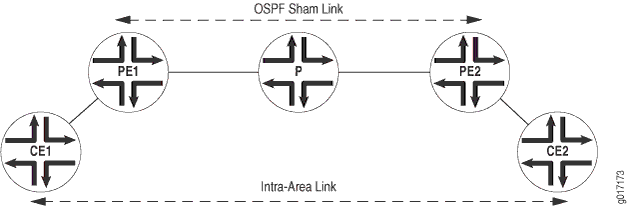
OSPFv2 将通过第 3 层 VPN 的链路视为区域间链路。默认情况下,OSPFv2 优先选择区域内链路而不是区域间链路,因此 OSPFv2 选择备份区域内链路作为活动路径。如果区域内链路不是 CE 路由设备之间流量的预期主路径,则这是不可接受的。您可以配置假链路的指标,以确保第 3 层 VPN 上的路径优先于连接 CE 路由设备的区域内链路上的备用路径。
对于远程终端节点,您可以将 OSPFv2 接口配置为按需电路,配置 IPsec 身份验证(单独配置实际 IPsec 身份验证),并定义衡量指标值。
在以下情况下,应配置 OSPFv2 假链接:
两台 CE 路由设备通过第 3 层 VPN 连接在一起。
这些 CE 路由设备位于同一 OSPFv2 区域中。
在两台 CE 路由设备之间配置区域内链路。
如果 CE 路由设备之间没有区域内链路,则无需配置 OSPFv2 假链路。
在 Junos OS 9.6 及更高版本中,OSPFv2 假链路会作为隐藏路由安装在路由表中。此外,如果相应的 OSPF 假链路可用,则不会将 BGP 路由导出到 OSPFv2。
在 Junos OS 16.1 及更高版本中,默认实例支持 OSPF 假链接。如果用户未在 sham-link 上配置任何指标,则 sham-link 的成本将动态设置为 BGP 路由的 aigp 指标。如果 BGP 路由中不存在 aigp 指标,则假链路成本默认为 1。
示例:配置 OSPFv2 伪装链路
此示例说明如何在 PE 路由设备上启用 OSPFv2 假链路。
要求
配置此示例之前,不需要除设备初始化之外的特殊配置。
概述
假链路是一种未编号的点对点区域内链路,通过 1 类链路状态通告 (LSA) 进行播发。假链路仅对路由实例和 OSPFv2 有效。
每个假链路都由本地端点地址、远程端点地址及其所属的 OSPFv2 区域组合来标识。您需要在两个 PE 设备之间手动配置假链路,这两个设备都位于同一个 VPN 路由和转发 (VRF) 路由实例中,并指定假链路的本地端点地址。此地址用作假链路数据包的源,也被远程 PE 路由设备用作假链路远程端点。您还可以包括可选 metric 选项,以便为远程端点设置指标值。指标值指定使用链路的成本。总路径指标较低的路由优先于路径指标较高的路由。
要在 PE 路由设备上启用 OSPFv2 假链路,请执行以下作:
在 PE 路由设备上配置额外的环路接口。
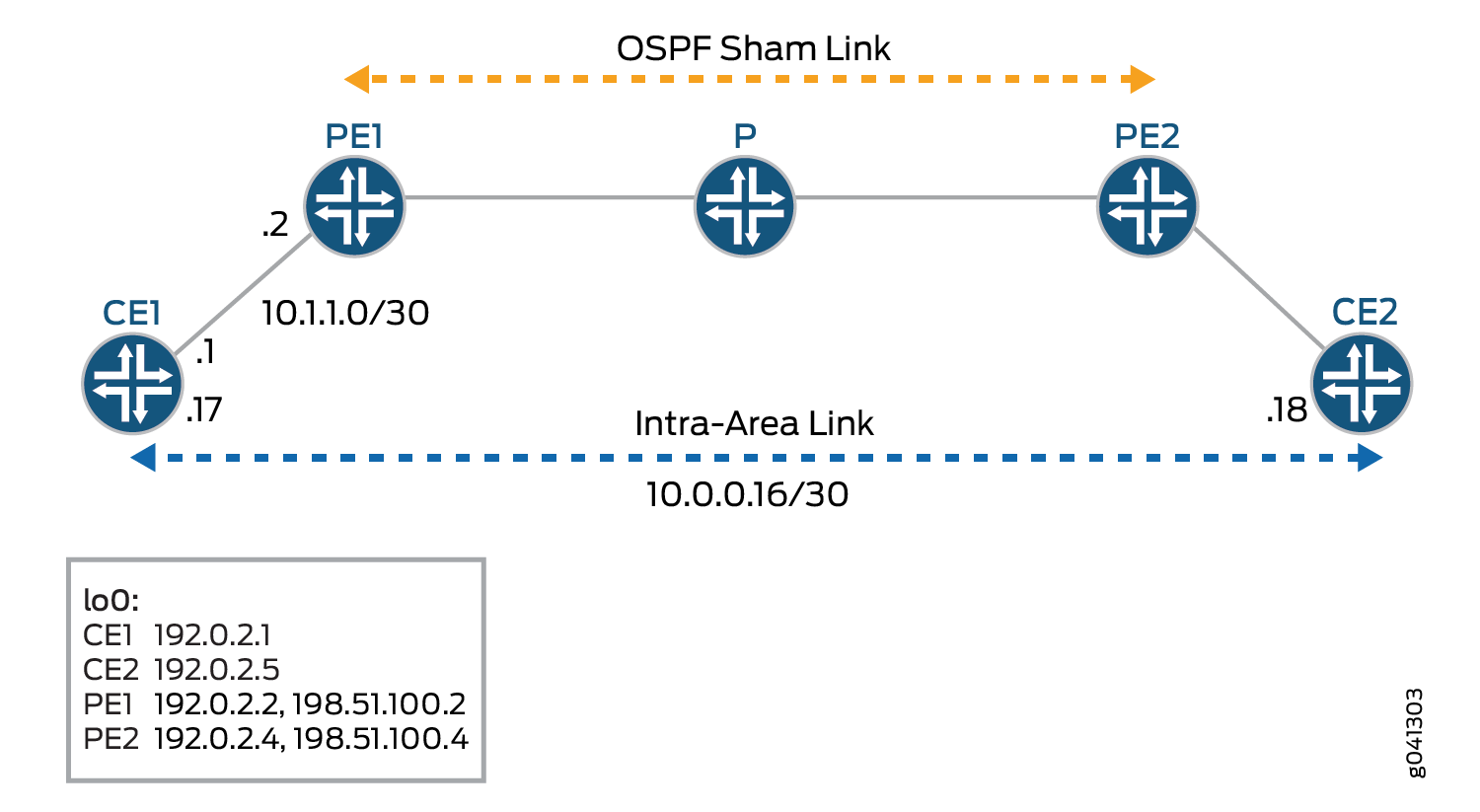
在 PE 路由设备上配置支持第 3 层 VPN 的 VRF 路由实例,并将假链路与现有 OSPF 区域进行关联。OSPFv2 假链路配置也包含在路由实例中。您可以配置假链路的本地端点地址(即本地 VPN 的环路地址)和远程端点地址(即远程 VPN 的环路地址)。在此示例中,VRF 路由实例被命名为 red。
图 2 显示了 OSPFv2 假链路。
配置
程序
CLI 快速配置
要快速配置此示例,请复制以下命令,将其粘贴到文本文件中,删除所有换行符,更改详细信息,以便与网络配置匹配,然后将命令复制并粘贴到层 [edit] 级的 CLI 中。
CE1
set interfaces fe-1/2/0 unit 0 family inet address 10.1.1.1/30
set interfaces fe-1/2/0 unit 0 family mpls
set interfaces fe-1/2/1 unit 0 family inet address 10.0.0.17/30
set interfaces lo0 unit 0 family inet address 192.0.2.1/24
set protocols ospf area 0.0.0.0 interface fe-1/2/0.0
set protocols ospf area 0.0.0.0 interface lo0.0 passive
set protocols ospf area 0.0.0.0 interface fe-1/2/1.0 metric 100
set policy-options policy-statement send-direct from protocol direct
set policy-options policy-statement send-direct then accept
set routing-options router-id 192.0.2.1
set routing-options autonomous-system 1
PE1型
set interfaces fe-1/2/0 unit 0 family inet address 10.1.1.2/30
set interfaces fe-1/2/0 unit 0 family mpls
set interfaces fe-1/2/1 unit 0 family inet address 10.1.1.5/30
set interfaces fe-1/2/1 unit 0 family mpls
set interfaces lo0 unit 0 family inet address 192.0.2.2/24
set interfaces lo0 unit 1 family inet address 198.51.100.2/24
set protocols mpls interface fe-1/2/1.0
set protocols bgp group toR4 type internal
set protocols bgp group toR4 local-address 192.0.2.2
set protocols bgp group toR4 family inet-vpn unicast
set protocols bgp group toR4 neighbor 192.0.2.4
set protocols ospf area 0.0.0.0 interface fe-1/2/1.0
set protocols ospf area 0.0.0.0 interface lo0.0 passive
set protocols ldp interface fe-1/2/1.0
set protocols ldp interface lo0.0
set policy-options policy-statement bgp-to-ospf term 1 from protocol bgp
set policy-options policy-statement bgp-to-ospf term 1 then accept
set policy-options policy-statement bgp-to-ospf term 2 then reject
set routing-instances red instance-type vrf
set routing-instances red interface fe-1/2/0.0
set routing-instances red interface lo0.1
set routing-instances red route-distinguisher 2:1
set routing-instances red vrf-target target:2:1
set routing-instances red protocols ospf export bgp-to-ospf
set routing-instances red protocols ospf sham-link local 198.51.100.2
set routing-instances red protocols ospf area 0.0.0.0 sham-link-remote 198.51.100.4 metric 10
set routing-instances red protocols ospf area 0.0.0.0 interface fe-1/2/0.0
set routing-instances red protocols ospf area 0.0.0.0 interface lo0.1
set routing-options router-id 192.0.2.2
set routing-options autonomous-system 2
P
set interfaces fe-1/2/0 unit 0 family inet address 10.1.1.6/30
set interfaces fe-1/2/0 unit 0 family mpls
set interfaces fe-1/2/1 unit 0 family inet address 10.1.1.9/30
set interfaces fe-1/2/1 unit 0 family mpls
set interfaces lo0 unit 3 family inet address 192.0.2.3/24
set protocols mpls interface all
set protocols ospf area 0.0.0.0 interface lo0.3 passive
set protocols ospf area 0.0.0.0 interface all
set protocols ldp interface all
set routing-options router-id 192.0.2.3
PE2
set interfaces fe-1/2/0 unit 0 family inet address 10.1.1.10/30
set interfaces fe-1/2/0 unit 0 family mpls
set interfaces fe-1/2/1 unit 0 family inet address 10.1.1.13/30
set interfaces fe-1/2/1 unit 0 family mpls
set interfaces lo0 unit 0 family inet address 192.0.2.4/32
set interfaces lo0 unit 1 family inet address 198.51.100.4/32
set protocols mpls interface fe-1/2/0.0
set protocols bgp group toR2 type internal
set protocols bgp group toR2 local-address 192.0.2.4
set protocols bgp group toR2 family inet-vpn unicast
set protocols bgp group toR2 neighbor 192.0.2.2
set protocols ospf area 0.0.0.0 interface lo0.0 passive
set protocols ospf area 0.0.0.0 interface fe-1/2/0.0
set protocols ldp interface fe-1/2/0.0
set protocols ldp interface lo0.0
set policy-options policy-statement bgp-to-ospf term 1 from protocol bgp
set policy-options policy-statement bgp-to-ospf term 1 then accept
set policy-options policy-statement bgp-to-ospf term 2 then reject
set routing-instances red instance-type vrf
set routing-instances red interface fe-1/2/1.0
set routing-instances red interface lo0.1
set routing-instances red route-distinguisher 2:1
set routing-instances red vrf-target target:2:1
set routing-instances red protocols ospf export bgp-to-ospf
set routing-instances red protocols ospf sham-link local 198.51.100.4
set routing-instances red protocols ospf area 0.0.0.0 sham-link-remote 198.51.100.2 metric 10
set routing-instances red protocols ospf area 0.0.0.0 interface fe-1/2/1.0
set routing-instances red protocols ospf area 0.0.0.0 interface lo0.1
set routing-options router-id 192.0.2.4
set routing-options autonomous-system 2
CE2 认证
set interfaces fe-1/2/0 unit 14 family inet address 10.1.1.14/30
set interfaces fe-1/2/0 unit 14 family mpls
set interfaces fe-1/2/0 unit 18 family inet address 10.0.0.18/30
set interfaces lo0 unit 5 family inet address 192.0.2.5/24
set protocols ospf area 0.0.0.0 interface fe-1/2/0.14
set protocols ospf area 0.0.0.0 interface lo0.5 passive
set protocols ospf area 0.0.0.0 interface fe-1/2/0.18
set policy-options policy-statement send-direct from protocol direct
set policy-options policy-statement send-direct then accept
set routing-options router-id 192.0.2.5
set routing-options autonomous-system 3
分步过程
下面的示例要求您在各个配置层级中进行导航。有关导航 CLI 的信息,请参阅在 CLI 用户指南中修改 Junos OS 配置。
要在每个 PE 设备上配置 OSPFv2 假链路,请执行以下作:
-
配置接口,包括两个环路接口。
[edit interfaces]
user@PE1# set fe-1/2/0 unit 0 family inet address 10.1.1.2/30
user@PE1# set fe-1/2/0 unit 0 family mpls
user@PE1# set fe-1/2/1 unit 0 family inet address 10.1.1.5/30
user@PE1# set fe-1/2/1 unit 0 family mpls
user@PE1# set lo0 unit 0 family inet address 192.0.2.2/24
user@PE1# set lo0 unit 1 family inet address 198.51.100.2/24
-
在面向核心的接口上配置 MPLS。
[edit protocols mpls]
user@PE1# set interface fe-1/2/1.0
-
配置内部 BGP (IBGP)。
[edit ]
user@PE1# set protocols bgp group toR4 type internal
user@PE1# set protocols bgp group toR4 local-address 192.0.2.2
user@PE1# set protocols bgp group toR4 family inet-vpn unicast
user@PE1# set protocols bgp group toR4 neighbor 192.0.2.4
-
在面向核心的接口和主实例中使用的环路接口上配置 OSPF。
[edit protocols ospf area 0.0.0.0]
user@PE1# set interface fe-1/2/1.0
user@PE1# set interface lo0.0 passive
-
在面向核心的接口和主实例中使用的环路接口上配置 LDP 或 RSVP。
[edit protocols ldp]
user@PE1# set interface fe-1/2/1.0
user@PE1# set interface lo0.0
-
配置在路由实例中使用的路由策略。
[edit policy-options policy-statement bgp-to-ospf]
user@PE1# set term 1 from protocol bgp
user@PE1# set term 1 then accept
user@PE1# set term 2 then reject
-
配置路由实例。
[edit routing-instances red]
user@PE1# set instance-type vrf
user@PE1# set interface fe-1/2/0.0
user@PE1# set route-distinguisher 2:1
user@PE1# set vrf-target target:2:1
user@PE1# set protocols ospf export bgp-to-ospf
user@PE1# set protocols ospf area 0.0.0.0 interface fe-1/2/0.0
-
配置 OSPFv2 假链路。
在路由实例和 OSPF 配置中包括额外的环路接口。
请注意,sham-link 接口上的指标设置为 10。在设备 CE1 的备份 OSPF 链路上,指标设置为 100。这会导致虚假链接成为首选链接。
[edit routing-instances red]
user@PE1# set interface lo0.1
user@PE1# set protocols ospf sham-link local 198.51.100.2
user@PE1# set protocols ospf area 0.0.0.0 sham-link-remote 198.51.100.4 metric 10
user@PE1# set protocols ospf area 0.0.0.0 interface lo0.1
-
配置自治系统 (AS) 编号和路由器 ID。
[edit routing-options]
user@PE1# set router-id 192.0.2.2
user@PE1# set autonomous-system 2
-
如果完成设备配置,请提交配置。
[edit]
user@R1# commit
结果
输入 show interfaces 和 命令 show routing-instances ,以确认您的配置。如果输出未显示预期的配置,请重复此示例中的说明以更正配置。
PE1 的输出:
user@PE1# show interfaces
fe-1/2/0 {
    unit 0{
        family inet {
            address 10.1.1.2/30;
        }
        family mpls;
    }
}
fe-1/2/1 {
    unit 0 {
        family inet {
            address 10.1.1.5/30;
        }
        family mpls;
    }
}
lo0 {
    unit 0 {
        family inet {
            address 192.0.2.2/24;
        }
    }
    unit 1 {
        family inet {
            address 198.51.100.2/24;
        }
    }
}
user@PE1# show protocols
mpls {
    interface fe-1/2/1.0;
}
bgp {
    group toR4 {
        type internal;
        local-address 192.0.2.2;
        family inet-vpn {
            unicast;
        }
        neighbor 192.0.2.4;
    }
}
ospf {
    area 0.0.0.0 {
        interface fe-1/2/1.0;
        interface lo0.0 {
            passive;
        }
    }
}
ldp {
    interface fe-1/2/1.0;
    interface lo0.0;
}
user@PE1# show policy-options
policy-statement bgp-to-ospf {
    term 1 {
        from protocol bgp;
        then accept;
    }
    term 2 {
        then reject;
    }
}
user@PE1# show routing-instances
red {
    instance-type vrf;
    interface fe-1/2/0.0;
    interface lo0.1;
    route-distinguisher 2:1;
    vrf-target target:2:1;
    protocols {
        ospf {
            export bgp-to-ospf;
            sham-link local 198.51.100.2;
            area 0.0.0.0 {
                sham-link-remote 198.51.100.4 metric 10;
                interface fe-1/2/0.0;
                interface lo0.1;
            }
        }
    }
}
user@PE1# show routing-options
router-id 192.0.2.2;
autonomous-system 2;
验证
确认配置工作正常。
验证假链路接口
目的
验证假链路接口。在 OSPFv2 中,假链路被视为一个接口,命名的显示为 shamlink.<unique identifier>,其中唯一标识符是一个数字。例如, shamlink.0.假链接显示为点对点接口。
行动
在作模式下,输入 show ospf interface instance instance-name 命令。
user@PE1> show ospf interface instance red
Interface           State   Area            DR ID           BDR ID          Nbrs
lo0.1              DR      0.0.0.0         198.51.100.2         0.0.0.0            0
fe-1/2/0.0          PtToPt  0.0.0.0         0.0.0.0         0.0.0.0            1
shamlink.0          PtToPt  0.0.0.0         0.0.0.0         0.0.0.0            1
验证伪装链路的本地和远程端点
目的
验证假链路的本地和远程端点。假链路接口的 MTU 始终为零。
行动
在作模式下,输入 show ospf interface instance instance-name detail 命令。
user@PE1> show ospf interface shamlink.0 instance red
Interface           State   Area            DR ID           BDR ID          Nbrs
shamlink.0          PtToPt  0.0.0.0         0.0.0.0         0.0.0.0            1
  Type: P2P, Address: 0.0.0.0, Mask: 0.0.0.0, MTU: 0, Cost: 10
  Local: 198.51.100.2, Remote: 198.51.100.4
  Adj count: 1
  Hello: 10, Dead: 40, ReXmit: 5, Not Stub
  Auth type: None
  Protection type: None, No eligible backup
  Topology default (ID 0) -> Cost: 10
验证伪装链路邻接
目的
验证配置的假链路之间的邻接关系。
行动
在作模式下,输入 show ospf neighbor instance instance-name 命令。
user@PE1> show ospf neighbor instance red
Address          Interface              State     ID               Pri  Dead
10.1.1.1         fe-1/2/0.0             Full      192.0.2.1          128    35
198.51.100.4          shamlink.0             Full      198.51.100.4            0    31
验证链路状态通告
目的
验证实例发起的路由器 LSA 是否将假链路邻接作为未编号的点对点链路携带。虚假链接的链路数据是从 0x80010000 到 0x8001ffff 不等的数字。
行动
在作模式下,输入 show ospf database instance instance-name 命令。
user@PE1> show ospf database instance red

    OSPF database, Area 0.0.0.0
 Type       ID               Adv Rtr           Seq      Age  Opt  Cksum  Len
Router   192.0.2.1          192.0.2.1          0x80000009  1803  0x22 0x6ec7  72
Router   192.0.2.5          192.0.2.5          0x80000007    70  0x22 0x2746  72
Router  *198.51.100.2          198.51.100.2          0x80000006    55  0x22 0xda6b  60
Router   198.51.100.4          198.51.100.4          0x80000005    63  0x22 0xb19   60
Network  10.0.0.18        192.0.2.5          0x80000002    70  0x22 0x9a71  32
    OSPF AS SCOPE link state database
 Type       ID               Adv Rtr           Seq      Age  Opt  Cksum  Len
Extern   198.51.100.2          198.51.100.4          0x80000002    72  0xa2 0x343   36
Extern  *198.51.100.4          198.51.100.2          0x80000002    71  0xa2 0xe263  36
验证路径选择
目的
验证是否使用了第 3 层 VPN 路径而不是备份路径。
行动
在作模式下,从设备 CE1 到设备 CE2 输入 traceroute 命令。
user@CE1> traceroute 192.0.2.5

traceroute to 192.0.2.5 (192.0.2.5), 30 hops max, 40 byte packets
 1  10.1.1.2 (10.1.1.2)  1.930 ms  1.664 ms  1.643 ms
 2  * * *
 3  10.1.1.10 (10.1.1.10)  2.485 ms  1.435 ms  1.422 ms
     MPLS Label=299808 CoS=0 TTL=1 S=1
 4  192.0.2.5 (192.0.2.5)  1.347 ms  1.362 ms  1.329 ms
意义
traceroute作显示第 3 层 VPN 是首选路径。如果要删除虚假链接,或者要修改 OSPF 指标以首选该备份路径,则 traceroute 将显示备用路径是首选。