
本页内容
示例:在默认网关部署中配置多节点高可用性
本文介绍如何在主动/备份模式下为默认网关(第 2 层)部署配置多节点高可用性 (MNHA)。组织可以在不中断客户端通信的情况下,通过自动将活动服务和流量引导功能转移到备份节点,来保持业务连续性。
|
可读性分数 |
Flesch 阅读轻松程度:45-50(大学水平) Flesch-Kincaid 年级:12-14 |
|
阅读时间 |
15-20分钟(平均阅读速度) |
|
配置时间 |
90-120 分钟(测试台上经验丰富的工程师) |
先决条件示例
|
硬件要求 |
SRX 系列防火墙和 EX9214 以太网交换机 |
|
软件要求 |
|
|
其他要求 |
|
开始之前
|
优势 |
|
|
了解更多 |
|
|
实践经验 |
|
|
了解更多 |
功能概述
| 多节点高可用性 | 在 SRX-01 和 SRX-02 防火墙上以交换模式配置主动/被动 MNHA 部署。SRX-01 配置为主服务器,活动优先级为 200 并启用了抢占,而 SRX-02 用作备份,优先级为 1。 |
| 机箱之间链路 (ICL) 加密 | 名为 IPSEC_VPN_ICL 的 IPsec 加密配置文件应用于两个节点之间的高可用性控制链路 (ge-0/0/2)。 |
| 虚拟 IP 地址 (VIP) | 为故障切换配置了两个虚拟 IP 地址:信任区域接口上的 10.1.0.200/16 (ge-0/0/3.0) 和防火墙上的非信任区域接口 (ge-0/0/4.0) 上的 10.2.0.200/16,无需更改 IP 地址即可提供无缝故障切换。 |
| 接口监控 | 在两个 SRX 系列防火墙上为接口 ge-0/0/3(信任)和 ge-0/0/4(不信任)配置运行状况监控,以便在检测到接口故障时触发故障切换事件。 |
| 虚拟 MAC 地址 | 两个 SRX 系列防火墙上的虚拟 MAC 地址会自动分配给信任和不信任接口,以确保在高可用性故障切换事件期间 MAC 寻址一致。 |
| 主要验证任务 | 验证 SRX-01 和 SRX-02 之间的 MNHA 状态以及同步情况。使用正确的优先级设置确认主动/备份角色,并在 ICL 上验证 IPsec 加密。 |
拓扑图示
图 1 显示了此示例中使用的拓扑。
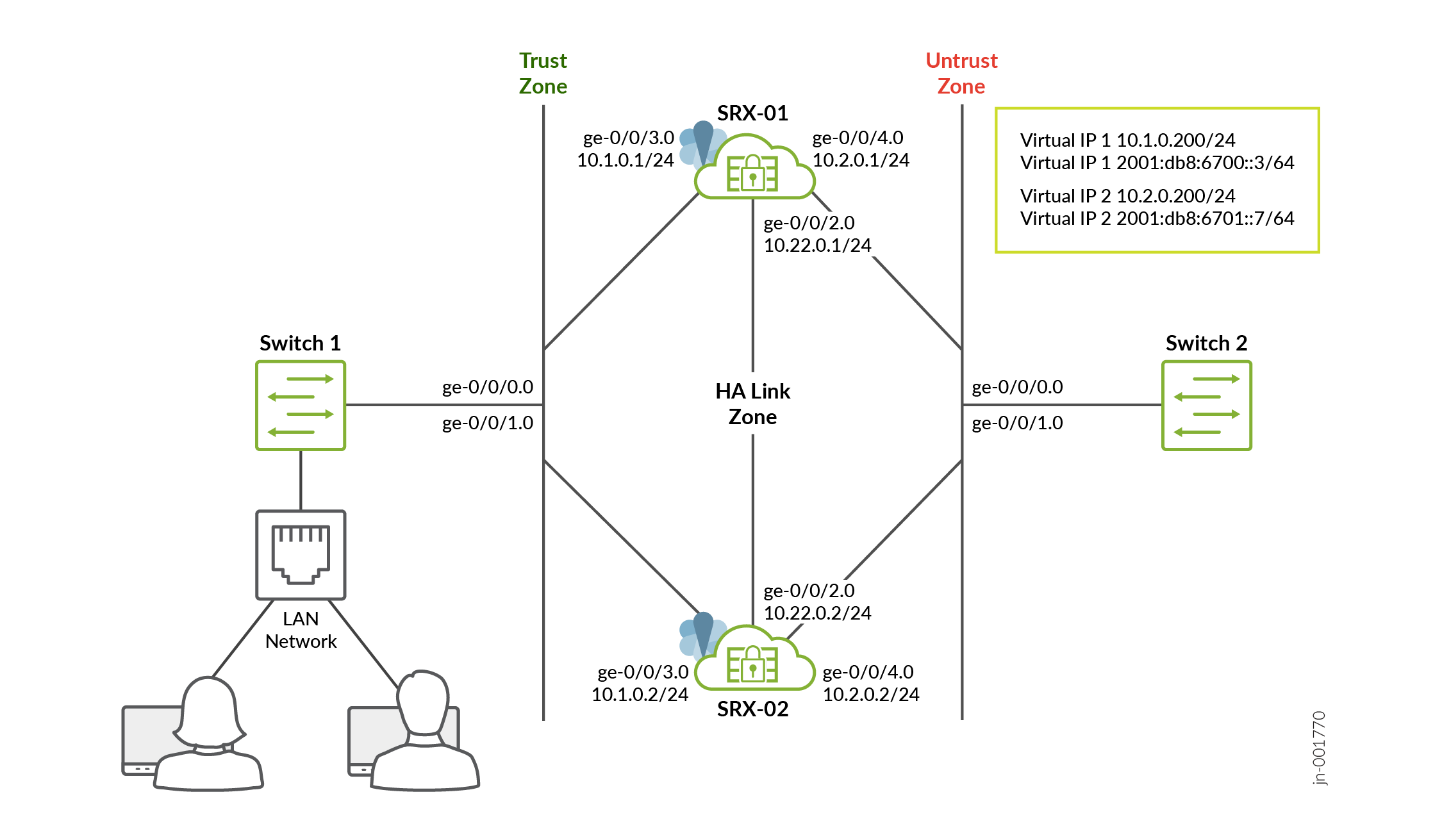 中的多节点高可用性
在此拓扑中,LAN 中的客户端将流量发送到默认网关(VIP)。交换机会将此流量转发到两个 SRX 系列防火墙节点,但只有该 SRG 的活动节点(例如,图中的 SRX-01)拥有 VIP 并处理数据包。活动节点执行安全检查,创建会话,并将流量转发到不信任端。同时,它通过 ICL 链路与备份节点同步会话信息,以便对等方随时准备接管。
如果活动节点或其路径发生故障,备份节点将迅速接管 VIP 和 vMAC。然后,来自 LAN 和非信任端的流量将重定向到新的活动节点,而无需对主机进行任何更改。由于会话已同步,因此大多数流量能够继续,中断最小,从而在网络中实现无缝故障切换。
为简单起见,此示例使用 SRX 系列防火墙和交换机之间的直接连接;特别是,高可用性链路区域中的 ICL 是使用 ge-0/0/2.0 接口直接在设备之间建立的。但是,在生产部署中,这些链路也可以遍历中间路由网络。
拓扑概述
| 设备 | 接口 | 区域 | IP 地址 | 配置为 |
|---|---|---|---|---|
| SRX-01 | ge-0/0/2.0 | HALINK | 10.22.0.1/24 | 机箱之间链路 (ICL) |
| ge-0/0/3.0 | 信任 | 10.1.0.1/24 | 连接到 Switch-01 | |
| ge-0/0/4.0 | 不信任 | 10.2.0.1/24 | 连接到 Switch-02 | |
| SRX-02 | ge-0/0/2.0 | HALINK | 10.22.0.2/24 | 机箱之间链路 (ICL) |
| ge-0/0/3.0 | 信任 | 10.1.0.2/24 | 连接到 Switch-01 | |
| ge-0/0/4.0 | 不信任 | 10.2.0.2/24 | 连接到 Switch-02 |
您将执行以下任务来构建 MNHA 设置:
- 通过分配 ID 将一对防火墙配置为本地节点和对等节点。
- 配置服务冗余组 (SRG)。
- 配置虚拟 IP 地址以确定和实施活动性。在此示例中,使用多个
ip语句为单个虚拟 IP 配置了 IPv4 和 IPv6 地址,以启用双堆栈支持。 - 使用 IKEv2 为高可用性 (ICL) 流量配置 VPN 配置文件。
- 配置适当的安全策略来管理网络中的流量。
- 根据网络要求配置接口和区域。您必须允许用于链路加密的 IKE 和用于配置同步的 SSH 等服务作为与 ICL 关联的安全区域上的主机入站系统服务。
配置
- 第 1 步:配置物理接口
- 第 2 步:配置安全性区域
- 步骤 3:配置高可用性链路加密的 IKE 提议(SRX-01 和 SRX-02)
- 步骤 4:配置 IKE 策略和网关(SRX-01 和 SRX-02)
- 步骤 5:配置 IPsec 提议和策略(SRX-01 和 SRX-02)
- 步骤 6:为高可用性链路加密配置 IPsec VPN(SRX-01 和 SRX-02)
- 步骤 7:配置安全性策略(SRX-01 和 SRX-02)
- 步骤 8:配置机箱高可用性本地身份
- 步骤 9:配置机箱高可用性对等方身份
- 步骤 10:配置服务冗余组
- 步骤 11:提交配置
第 1 步:配置物理接口
配置将参与高可用性设置的物理接口,包括高可用性链路、信任区域接口和非信任区域接口。
-
SRX-01
[edit]
  user@host# set interfaces ge-0/0/2 description ha_link
  user@host# set interfaces ge-0/0/2 unit 0 family inet address 10.22.0.1/24
  user@host# set interfaces ge-0/0/3 description trust
  user@host# set interfaces ge-0/0/3 unit 0 family inet address 10.1.0.1/24
  user@host# set interfaces ge-0/0/4 description untrust
  user@host# set interfaces ge-0/0/4 unit 0 family inet address 10.2.0.1/24
- SRX-02
[edit]
  user@host# set interfaces ge-0/0/2 description ha_link
  user@host# set interfaces ge-0/0/2 unit 0 family inet address 10.22.0.2/24
  user@host# set interfaces ge-0/0/3 description trust
  user@host# set interfaces ge-0/0/3 unit 0 family inet address 10.1.0.2/24
  user@host# set interfaces ge-0/0/4 description untrust
  user@host# set interfaces ge-0/0/4 unit 0 family inet address 10.2.0.2/24
接口配置为 MNKA 建立了三个关键网段。接口 ge-0/0/2 用作专用高可用性链路。接口 ge-0/0/3 连接到信任区域,处理内部网络流量。接口 ge-0/0/4 连接到不信任区域,用于管理外部网络流量。
第 2 步:配置安全性区域
定义安全区域,并将接口分配到具有所需主机入站流量服务和协议的适当区域。
- SRX-01
[edit]
  user@host# set security zones security-zone untrust host-inbound-traffic system-services ike
  user@host# set security zones security-zone untrust host-inbound-traffic system-services ping
  user@host# set security zones security-zone untrust host-inbound-traffic system-services ssh
  user@host# set security zones security-zone untrust host-inbound-traffic protocols bfd
  user@host# set security zones security-zone untrust host-inbound-traffic protocols bgp
  user@host# set security zones security-zone untrust interfaces ge-0/0/4.0
  user@host# set security zones security-zone trust host-inbound-traffic system-services ike
  user@host# set security zones security-zone trust host-inbound-traffic system-services ping
  user@host# set security zones security-zone trust host-inbound-traffic system-services ssh
  user@host# set security zones security-zone trust host-inbound-traffic protocols bgp
  user@host# set security zones security-zone trust host-inbound-traffic protocols bfd
  user@host# set security zones security-zone trust interfaces ge-0/0/3.0
  user@host# set security zones security-zone halink host-inbound-traffic system-services ike
  user@host# set security zones security-zone halink host-inbound-traffic system-services ping
  user@host# set security zones security-zone halink host-inbound-traffic system-services high-availability
  user@host# set security zones security-zone halink host-inbound-traffic system-services ssh
  user@host# set security zones security-zone halink host-inbound-traffic protocols bfd
  user@host# set security zones security-zone halink host-inbound-traffic protocols bgp
  user@host# set security zones security-zone halink interfaces ge-0/0/2.0
- SRX-02
[edit]
  user@host# set security zones security-zone untrust host-inbound-traffic system-services ike
  user@host# set security zones security-zone untrust host-inbound-traffic system-services ping
  user@host# set security zones security-zone untrust host-inbound-traffic system-services ssh
  user@host# set security zones security-zone untrust host-inbound-traffic protocols bfd
  user@host# set security zones security-zone untrust host-inbound-traffic protocols bgp
  user@host# set security zones security-zone untrust interfaces ge-0/0/4.0
  user@host# set security zones security-zone trust host-inbound-traffic system-services ike
  user@host# set security zones security-zone trust host-inbound-traffic system-services ping
  user@host# set security zones security-zone trust host-inbound-traffic system-services ssh
  user@host# set security zones security-zone trust host-inbound-traffic protocols bgp
  user@host# set security zones security-zone trust host-inbound-traffic protocols bfd
  user@host# set security zones security-zone trust interfaces ge-0/0/3.0
  user@host# set security zones security-zone halink host-inbound-traffic system-services ike
  user@host# set security zones security-zone halink host-inbound-traffic system-services ping
  user@host# set security zones security-zone halink host-inbound-traffic system-services high-availability
  user@host# set security zones security-zone halink host-inbound-traffic system-services ssh
  user@host# set security zones security-zone halink host-inbound-traffic protocols bfd
  user@host# set security zones security-zone halink host-inbound-traffic protocols bgp
  user@host# set security zones security-zone halink interfaces ge-0/0/2.0
安全性区域可对网络流量进行分段并实施安全策略。不信任和信任区域允许用于连接、管理和路由的 IKE、ping、SSH 和 BGP/BFD 服务,而 halink 区域专门用于高可用性。
对于 MNHA 设置,此配置通常包括允许 IKE、BGP 和 BFD。始终根据您的网络和安全要求定制安全规则。
步骤 3:配置高可用性链路加密的 IKE 提议(SRX-01 和 SRX-02)
创建 IKE 第 1 阶段提议,用于定义加密 高可用性链路隧道的加密参数。
[edit]
user@host# set security ike proposal MNHA_IKE_PROP description mnha_link_encr_tunnel
user@host# set security ike proposal MNHA_IKE_PROP authentication-method pre-shared-keys
user@host# set security ike proposal MNHA_IKE_PROP dh-group group14
user@host# set security ike proposal MNHA_IKE_PROP authentication-algorithm sha-256
user@host# set security ike proposal MNHA_IKE_PROP encryption-algorithm aes-256-cbc
user@host# set security ike proposal MNHA_IKE_PROP lifetime-seconds 3600
IKE 提议使用预共享密钥、DH 组 14、SHA-256 和 AES-256-CBC 定义了安全高可用性链路通信,有效期为 1 小时。两个 MNHA 节点上的设置必须匹配,才能成功进行 IKE 协商
步骤 4:配置 IKE 策略和网关(SRX-01 和 SRX-02)
定义引用提议的IKE策略,并为高可用性链路加密配置IKE网关。
[edit security ike]
user@host# set security ike policy MNHA_IKE_POL description mnha_link_encr_tunnel
user@host# set security ike policy MNHA_IKE_POL proposals MNHA_IKE_PROP
user@host# set security ike policy MNHA_IKE_POL pre-shared-key ascii-text "$ABC123"
user@host# set security ike gateway MNHA_IKE_GW ike-policy MNHA_IKE_POL
user@host# set security ike gateway MNHA_IKE_GW version v2-only
IKE 策略将加密提议与身份验证凭据相链接,而 IKE 网关仅使用 IKEv2 来安全高效地建立隧道。稍后,IPsec VPN 会引用此网关,以保护 MNHA 成员之间的高可用性同步流量。
步骤 5:配置 IPsec 提议和策略(SRX-01 和 SRX-02)
创建 IPsec 第 2 阶段提议和策略,用于定义 高可用性链路隧道的数据平面加密参数。
[edit]
user@host# set security ipsec proposal MNHA_IPSEC_PROP description mnha_link_encr_tunnel
user@host# set security ipsec proposal MNHA_IPSEC_PROP protocol esp
user@host# set security ipsec proposal MNHA_IPSEC_PROP encryption-algorithm aes-256-gcm
user@host# set security ipsec proposal MNHA_IPSEC_PROP lifetime-seconds 3600
user@host# set security ipsec policy MNHA_IPSEC_POL description mnha_link_encr_tunnel
user@host# set security ipsec policy MNHA_IPSEC_POL proposals MNHA_IPSEC_PROP
IPsec 提议使用 ESP 和 AES-256-GCM 保护高可用性流量,以实现有效的加密和完整性保护。IPsec 策略封装这些设置,并由 VPN 配置引用。
步骤 6:为高可用性链路加密配置 IPsec VPN(SRX-01 和 SRX-02)
创建专门用于高可用性链路加密的 IPsec VPN 配置文件。
[edit]
user@host# set security ipsec vpn IPSEC_VPN_ICL ha-link-encryption
user@host# set security ipsec vpn IPSEC_VPN_ICL ike gateway MNHA_IKE_GW
user@host# set security ipsec vpn IPSEC_VPN_ICL ike ipsec-policy MNHA_IPSEC_POL
IPsec VPN 结合 IKE 网关和 IPsec 策略以创建加密的高可用性隧道。该 ha-link-encryption 选项指定用于安全高可用性通信的 VPN。
步骤 7:配置安全性策略(SRX-01 和 SRX-02)
为通过防火墙的流量处理建立默认安全策略。
[edit security policies]
user@host# set default-policy permit-all
默认的“全部允许”策略允许区域之间的流量,而无需明确的安全规则。它对于实验室或初始部署很有用,但在生产环境中应替换为限制性策略。
步骤 8:配置机箱高可用性本地身份
在高可用性设置中定义本地设备的身份。
- SRX-01
[edit]
  user@host# set chassis high-availability local-id 1
  user@host# set chassis high-availability local-id local-ip 10.22.0.1
- SRX-02
[edit]
  user@host# set chassis high-availability local-id 2
  user@host# set chassis high-availability local-id local-ip 10.22.0.2
本地 ID 和本地 IP 可唯一标识此 MNHA 成员。本地 ID (1) 将其与对等方区分开来,而本地 IP (10.22.0.2) 用于高可用性通信。
步骤 9:配置机箱高可用性对等方身份
在高可用性中定义对等设备的身份和连接参数。
- SRX-01
[edit]
user@host# set chassis high-availability peer-id 2 peer-ip 10.22.0.2
user@host# set chassis high-availability peer-id 2 interface ge-0/0/2.0
user@host# set chassis high-availability peer-id 2 vpn-profile IPSEC_VPN_ICL
user@host# set chassis high-availability peer-id 2 liveness-detection minimum-interval 200
user@host# set chassis high-availability peer-id 2 liveness-detection multiplier 3
- SRX-02
[edit]
user@host# set chassis high-availability peer-id 1 peer-ip 10.22.0.1
user@host# set chassis high-availability peer-id 1 interface ge-0/0/2.0
user@host# set chassis high-availability peer-id 1 vpn-profile IPSEC_VPN_ICL
user@host# set chassis high-availability peer-id 1 liveness-detection minimum-interval 200
user@host# set chassis high-availability peer-id 1 liveness-detection multiplier 3
对等配置可识别远程高可用性成员,并通过专用 高可用性 链路实现安全高可用性通信。将 IPsec VPN 配置文件IPSEC_VPN_ICL连接到对等节点。您需要此配置在节点之间建立安全的 ICL 链路。活动检测每 200 毫秒发送一次检测信号,并在 3 次错过检测信号后声明对等方关闭,从而允许快速故障切换检测。
步骤 10:配置服务冗余组
创建和配置管理虚拟 IP 和故障切换行为的服务冗余组。
- SRX-01
[edit]
user@host# set chassis high-availability services-redundancy-group 1 deployment-type switching
user@host# set chassis high-availability services-redundancy-group 1 peer-id 2
user@host# set chassis high-availability services-redundancy-group 1 preemption
user@host# set chassis high-availability services-redundancy-group 1 activeness-priority 200
user@host# set chassis high-availability services-redundancy-group 1 virtual-ip 1 ip 10.1.0.200/24
user@host# set chassis high-availability services-redundancy-group 1 virtual-ip 1 ip 2001:db8:6700::3/64
user@host# set chassis high-availability services-redundancy-group 1 virtual-ip 1 interface ge-0/0/3.0
user@host# set chassis high-availability services-redundancy-group 1 virtual-ip 1 use-virtual-mac
user@host# set chassis high-availability services-redundancy-group 1 virtual-ip 2 ip 10.2.0.200/24
user@host# set chassis high-availability services-redundancy-group 1 virtual-ip 2 ip 2001:db8:6701::7/64
user@host# set chassis high-availability services-redundancy-group 1 virtual-ip 2 interface ge-0/0/4.0
user@host# set chassis high-availability services-redundancy-group 1 virtual-ip 2 use-virtual-mac
user@host# set chassis high-availability services-redundancy-group 1 monitor interface ge-0/0/3
user@host# set chassis high-availability services-redundancy-group 1 monitor interface ge-0/0/4
- SRX-02
[edit]
user@host# set chassis high-availability services-redundancy-group 1 deployment-type switching
user@host# set chassis high-availability services-redundancy-group 1 peer-id 1
user@host# set chassis high-availability services-redundancy-group 1 activeness-priority 1
user@host# set chassis high-availability services-redundancy-group 1 virtual-ip 1 ip 10.1.0.200/24
user@host# set chassis high-availability services-redundancy-group 1 virtual-ip 1 ip 2001:db8:6700::3/64
user@host# set chassis high-availability services-redundancy-group 1 virtual-ip 1 interface ge-0/0/3.0
user@host# set chassis high-availability services-redundancy-group 1 virtual-ip 1 use-virtual-mac
user@host# set chassis high-availability services-redundancy-group 1 virtual-ip 2 ip 10.2.0.200/24
user@host# set chassis high-availability services-redundancy-group 1 virtual-ip 2 ip 2001:db8:6701::7/64
user@host# set chassis high-availability services-redundancy-group 1 virtual-ip 2 interface ge-0/0/4.0
user@host# set chassis high-availability services-redundancy-group 1 virtual-ip 2 use-virtual-mac
user@host# set chassis high-availability services-redundancy-group 1 monitor interface ge-0/0/3
user@host# set chassis high-availability services-redundancy-group 1 monitor interface ge-0/0/4
注意:在大多数情况下,建议配置该use-virtual-mac选项,除非周围基础架构除本地 MAC 地址外,还不支持在端口上激活移动的虚拟 MAC 地址。 - 服务冗余组在高可用性设置中启用主动/被动故障切换。
- 交换模式用于第 2 层相邻高可用性部署。
- 在故障切换期间,虚拟 IP (VIP) 在高可用性成员之间移动。
- 虚拟 MAC (VMAC) 可与 VIP 一起移动,从而防止 ARP 问题并实现无缝故障切换。
- 接口监控可跟踪关键接口,并在接口发生故障时触发故障切换。
- 抢占允许更高优先级的设备在恢复后恢复活动状态。
- 活动性优先级 200 可确保此设备在 MNHA 启动和恢复期间成为活动节点。
步骤 11:提交配置
如果完成设备配置,请从配置模式进入。commit
user@host# commit
warning: High Availability Mode changed, please reboot the device to avoid undesirable behavior
commit complete
验证
| 命令 | 验证任务 |
| 显示机箱高可用性信息 |
验证活动节点和备份节点上的整体高可用性(高可用性)状态,包括是否启用了高可用性、节点角色和核心高可用性运行状况指标。 |
| 显示机箱高可用性 peer-info |
确认对等节点可访问。 |
| 显示机箱高可用性服务冗余组 |
验证冗余组状态、优先级、抢占行为和故障切换就绪情况。 |
| 显示接口简洁 |
验证接口上是否安装了虚拟 IP 地址。 |
| 显示安全 IPsec 安全关联 ha-link-encryption 详细信息 |
确认已建立高可用性链路加密 IPsec SA(IKE/IPsec 已为 高可用性路径开启)。 |
验证高可用性形成和对等体连接
目的
验证 MNHA 是否正确形成,两个节点均联机,对等方发现是否成功,以及节点之间的加密控制通道是否正常运行。此验证确认了所有高可用性操作的基础,包括状态同步和故障切换功能。
行动
SRX-01
user@host> show chassis high-availability information
Node failure codes:
    HW  Hardware monitoring    LB  Loopback monitoring
    MB  Mbuf monitoring        SP  SPU monitoring
    CS  Cold Sync monitoring   SU  Software Upgrade

Node Status: ONLINE
Grid-id: 0
Local-id: 1
Local-IP: 10.22.0.1
HA Peer Information:

    Peer Id: 2        IP address: 10.22.0.2     Interface: ge-0/0/2.0
    Routing Instance: default
    Encrypted: YES    Conn State: UP
    Configured BFD Detection Time: 3 * 200ms
    Cold Sync Status: COMPLETE

SRG failure event codes:
    BF  BFD monitoring
    IP  IP monitoring
    IF  Interface monitoring
    CP  Control Plane monitoring

Services Redundancy Group: 1
        Deployment Type: SWITCHING
        Status: ACTIVE
        Activeness Priority: 200
        Preemption: ENABLED
        Process Packet In Backup State: NO
        Control Plane State: READY
        System Integrity Check: N/A
        Failure Events: NONE
        Peer Information:
          Peer Id: 2
          Status : BACKUP
          Health Status: HEALTHY
          Failover Readiness: READY
SRX-02
user@host> show chassis high-availability information
Node failure codes:
    HW  Hardware monitoring    LB  Loopback monitoring
    MB  Mbuf monitoring        SP  SPU monitoring
    CS  Cold Sync monitoring   SU  Software Upgrade

Node Status: ONLINE
Grid-id: 0
Local-id: 2
Local-IP: 10.22.0.2
HA Peer Information:

    Peer Id: 1        IP address: 10.22.0.1     Interface: ge-0/0/2.0
    Routing Instance: default
    Encrypted: YES    Conn State: UP
    Configured BFD Detection Time: 3 * 200ms
    Cold Sync Status: COMPLETE

SRG failure event codes:
    BF  BFD monitoring
    IP  IP monitoring
    IF  Interface monitoring
    CP  Control Plane monitoring

Services Redundancy Group: 1
        Deployment Type: SWITCHING
        Status: BACKUP
        Activeness Priority: 1
        Preemption: DISABLED
        Process Packet In Backup State: NO
        Control Plane State: READY
        System Integrity Check: COMPLETE
        Failure Events: NONE
        Peer Information:
          Peer Id: 1
          Status : ACTIVE
          Health Status: HEALTHY
          Failover Readiness: N/A
意义
Node Status: ONLINE确认本地节点正在运行并参与高可用性设置。Local-id: 1并Peer Id: 2验证高可用性成员资格所需的唯一节点标识。-
Conn State UP指示已建立到对等方的高可用性链路(通过 ge-0/0/2.0 的 10.22.0.1 或 10.22.0.2)。 -
Encrypted: YES确认 IPsec 加密正在保护接口上的高可用性控制流量。 -
Deployment Type: SWITCHING表示默认网关(交换)模式配置,即网络两端连接了交换机(第 2 层网络)。 -
Services Redundancy Group: 1显示Status: ACTIVE或Status: BACKUP显示 SRG 的当前状态。 Cold Sync Status: COMPLETE验证初始配置同步是否已成功完成,这是 SRG 故障切换就绪的先决条件。
验证高可用性对等方通信详细信息和数据包交换
目的
确认内部安全隧道参数并验证高可用性对等方之间的双向数据包交换。此验证可确保控制平面通信基础架构运行良好,并且能够支持状态同步和故障切换消息传递。
行动
SRX-01
user@host> show chassis high-availability peer-info
HA Peer Information:

   Peer-ID: 2        IP address: 10.22.0.2     Interface: ge-0/0/2.0
   Routing Instance: default
   Encrypted: YES    Conn State: UP
   Cold Sync Status: COMPLETE
   Internal Interface: st0.16000
   Internal Local-IP: 180.100.1.1
   Internal Peer-IP: 180.100.1.2
   Internal Routing-instance: __juniper_private1__
Packet Statistics:
        Receive Error : 0        Send Error : 0

        Packet-type            Sent       Received
        SRG Status Msg            3              5
        SRG Status Ack            4              2
        Attribute Msg             3              2
        Attribute Ack             2              2
        Pkt Req                   0              0
        Pkt Req Ack               0              0
SRX-02
user@host> show chassis high-availability peer-info
 HA Peer Information:

   Peer-ID: 1        IP address: 10.22.0.1     Interface: ge-0/0/2.0
   Routing Instance: default
   Encrypted: YES    Conn State: UP
   Cold Sync Status: COMPLETE
   Internal Interface: st0.16000
   Internal Local-IP: 180.100.1.2
   Internal Peer-IP: 180.100.1.1
   Internal Routing-instance: __juniper_private1__
Packet Statistics:
        Receive Error : 0        Send Error : 0

        Packet-type            Sent       Received
        SRG Status Msg            5              2
        SRG Status Ack            2              4
        Attribute Msg             3              2
        Attribute Ack             2              2
        Pkt Req                   0              0
        Pkt Req Ack               0              0
意义
Conn State UP确认高可用性对等连接已建立且运行状况良好。注意:命令输出中显示的 IP 范围 (180.100.1.x) 用作 ICL IPsec 流量选择器。系统会动态分配此 IP 范围,因此不能更改或修改它。此外,BFD(双向转发检测)将自动启用,以覆盖更广泛的 180.x.x.x IP 范围。Internal Routing-instance: juniper_private1是系统生成的 VRF,用于将高可用性控制流量与用户数据平面隔离开来- 零
Send Error和Receive Error报告,表示高可用性控制平面通信干净。
验证服务冗余组状态和角色分配
目的
验证 SRG 操作状态、活动/备份角色分配以及两个高可用性节点的故障切换就绪情况。此验证可确认资源所有权正确,并确保高可用性可以在需要时执行故障切换。
行动
SRX-01
user@host> show chassis high-availability services-redundancy-group 1
SRG failure event codes:
    BF  BFD monitoring
    IP  IP monitoring
    IF  Interface monitoring
    CP  Control Plane monitoring

Services Redundancy Group: 1
        Deployment Type: SWITCHING
        Status: ACTIVE
        Activeness Priority: 200
        Preemption: ENABLED
        Process Packet In Backup State: NO
        Control Plane State: READY
        System Integrity Check: N/A
        Failure Events: NONE
        Peer Information:
          Peer Id: 2
          Status : BACKUP
          Health Status: HEALTHY
          Failover Readiness: READY

        Virtual IP Info:
          Index: 2
          IP: 2001:db8:6701::7/64
          IP2: 10.2.0.200/24
          VMAC: 00:10:db:fe:01:02
          Interface: ge-0/0/4.0
          Status: INSTALLED

          Index: 1
          IP: 2001:db8:6700::3/64
          IP2: 10.1.0.200/24
          VMAC: 00:10:db:fe:01:01
          Interface: ge-0/0/3.0
          Status: INSTALLED

        Split-brain Prevention Probe Info:
          DST-IP: 2001:db8:6700::3
          Routing Instance: default
          Type: ICMP Probe
          Status: NOT RUNNING
          Result: N/A           Reason: N/A


          DST-IP: 10.1.0.200
          Routing Instance: default
          Type: ICMP Probe
          Status: NOT RUNNING
          Result: N/A           Reason: N/A


        Interface Monitoring:
      Status: UP

          IF Name: ge-0/0/4     State: Up

          IF Name: ge-0/0/3     State: Up


IP SRGID Table:
        SRGID    IP Prefix                                   Routing Table
        1        10.2.0.200/32                               default

        1        2001:db8:6701::7/128                        default

        1        10.1.0.200/32                               default

        1        2001:db8:6700::3/128                        default
SRX-02
user@host> show chassis high-availability services-redundancy-group 1

SRG failure event codes:
    BF  BFD monitoring
    IP  IP monitoring
    IF  Interface monitoring
    CP  Control Plane monitoring

Services Redundancy Group: 1
        Deployment Type: SWITCHING
        Status: BACKUP
        Activeness Priority: 1
        Preemption: DISABLED
        Process Packet In Backup State: NO
        Control Plane State: READY
        System Integrity Check: COMPLETE
        Failure Events: NONE
        Peer Information:
          Peer Id: 1
          Status : ACTIVE
          Health Status: HEALTHY
          Failover Readiness: N/A

        Virtual IP Info:
          Index: 2
          IP: 2001:db8:6701::7/64
          IP2: 10.2.0.200/24
          VMAC: N/A
          Interface: ge-0/0/4.0
          Status: NOT INSTALLED

          Index: 1
          IP: 2001:db8:6700::3/64
          IP2: 10.1.0.200/24
          VMAC: 00:10:db:fe:01:01
          Interface: ge-0/0/3.0
          Status: NOT INSTALLED

        Split-brain Prevention Probe Info:
          DST-IP: 2001:db8:6700::3
          Routing Instance: default
          Type: ICMP Probe
          Status: NOT RUNNING
          Result: N/A           Reason: N/A


          DST-IP: 10.1.0.200
          Routing Instance: default
          Type: ICMP Probe
          Status: NOT RUNNING
          Result: N/A           Reason: N/A


        Interface Monitoring:
      Status: UP

          IF Name: ge-0/0/4     State: Up

          IF Name: ge-0/0/3     State: Up


IP SRGID Table:
        SRGID    IP Prefix                                   Routing Table
        1        10.2.0.200/32                               default

        1        2001:db8:6701::7/128                        default

        1        10.1.0.200/32                               default

        1        2001:db8:6700::3/128                        default
意义
Status: ACTIVE在节点 1 和Status: BACKUP节点 2 上确认 SRG 1 的正确角色分配。这表示对等方运行正常且处于就绪备份状态,表示具有故障切换能力。Virtual IP Info: INSTALLED指示活动节点上显示 VIP。显示 as 在备份节点节点Virtual IP Info: NOT INSTALLED上。VMAC: 00:10:db:fe:01:02并VMAC: 00:10:db:fe:01:01与活动节点上的虚拟 IP 相关联。Virtual IP Info: IP: 2001:db8:6701::7/64并IP2: 10.2.0.200/24确认双堆栈支持,同时支持 IPv4 和 IPv6 VIP 存在。Preemption: ENABLED意味着它在故障恢复后将恢复活动状态Preemption: DISABLED可防止在节点 1 重新联机时发生不必要的故障转移Failure Events: NONE确认两个节点上均未出现监控故障(BFD、IP、接口、控制平面)Health Status: HEALTHY并Failover Readiness: READY指示备份节点可以在需要时立即承担活动角色System Integrity Check: COMPLETE备份时,确认配置和状态同步是最新的Interface Monitoring Status: UP确认监控子系统正在主动跟踪接口运行状况State: Up对于两个受监控的接口,意味着未检测到会触发 SRG 故障切换的链路故障
验证接口上的 IP 地址安装
目的验证接口上是否安装了虚拟 IP 地址。
行动在操作模式下,运行以下命令:
SRX-01
user@host> show interfaces terse | no-more
Interface               Admin Link Proto    Local                 Remote
ge-0/0/0                up    up
gr-0/0/0                up    up
ip-0/0/0                up    up
lsq-0/0/0               up    up
lt-0/0/0                up    up
mt-0/0/0                up    up
sp-0/0/0                up    up
sp-0/0/0.0              up    up   inet
                                   inet6
sp-0/0/0.16383          up    up   inet
ge-0/0/1                up    up
ge-0/0/2                up    up
ge-0/0/2.0              up    up   inet     10.22.0.1/24
ge-0/0/3                up    up
ge-0/0/3.0              up    up   inet     10.1.0.1/24
                                            10.1.0.200/24
                                   inet6    2001:db8:6700::3/64
                                            fe80::5604:1aff:fe00:4882/64
ge-0/0/4                up    up
ge-0/0/4.0              up    up   inet     10.2.0.1/24
                                            10.2.0.200/24
                                   inet6    2001:db8:6701::7/64
                                            fe80::5604:1aff:fe00:7541/64


...
SRX-02
user@host> show interfaces terse | no-more
Interface               Admin Link Proto    Local                 Remote
ge-0/0/0                up    up
gr-0/0/0                up    up
ip-0/0/0                up    up
lsq-0/0/0               up    up
lt-0/0/0                up    up
mt-0/0/0                up    up
sp-0/0/0                up    up
sp-0/0/0.0              up    up   inet
                                   inet6
sp-0/0/0.16383          up    up   inet
ge-0/0/1                up    up
ge-0/0/2                up    up
ge-0/0/2.0              up    up   inet     10.22.0.2/24
ge-0/0/3                up    up
ge-0/0/3.0              up    up   inet     10.1.0.2/24
ge-0/0/4                up    up
ge-0/0/4.0              up    up   inet     10.2.0.2/24
dsc                     up    up

...
为简洁起见,show 命令输出被截短以仅显示几个样本。
意义
命令输出提供以下信息:
- 在活动节点上,该接口同时显示双栈虚拟 IP
10.1.0.200/16,这些22001:db8:6700::3/64IP 分别安装在 VIP 索引 1 的接口 ge-0/0/3.0 上和10.2.0.200/162001:db8:6701::7/64并安装在 VIP 索引 2 的接口 ge-0/0/4.0 上。 - 在备份节点上,仅存在本地接口 IP 地址,未安装 VIP。
此输出可确保只有活动节点处理流量。在故障切换期间,VIP 会从活动节点移动到备份节点,从而保持 IPv4 和 IPv6 流量的服务连续性
验证 高可用性链路加密的 IPsec 安全性关联
目的
验证是否使用正确的加密参数建立了保护高可用性控制流量的 IPsec 隧道,并正在积极处理流量。此验证可确保高可用性节点之间配置同步和状态更新的机密性和完整性。
行动
user@host> show security ipsec security-associations ha-link-encryption detail
ID: 495005 Virtual-system: root, VPN Name: IPSEC_VPN_ICL
  Local Gateway: 10.22.0.1, Remote Gateway: 10.22.0.2
  Traffic Selector Name: __IPSEC_VPN_ICL__ICL__2__0__multi_node__
  Local Identity: ipv4(180.100.1.1-180.100.1.1)
  Remote Identity: ipv4(180.100.1.2-180.100.1.2)
  TS Type: traffic-selector
  Version: IKEv2
  Quantum Secured: No
  Hardware Offloaded: No
  PFS group: N/A, Packet Encapsulation: None, Dest port: 0
  Passive mode tunneling: Disabled
  DF-bit: clear, Copy-Outer-DSCP: Disabled, Bind-interface: st0.16000, Policy-name: MNHA_IPSEC_POL
  Port: 500, Nego#: 0, Fail#: 0, Def-Del#: 0 Flag: 0
  HA Link Encryption Mode: Inter-Chassis-Link
  Location: FPC -, PIC -
  Anchorship: Thread -
  Distribution-Profile: default-profile
  Direction: inbound, SPI: 0x0008a5a8, AUX-SPI: 0
                              , VPN Monitoring: UP Mode: Always-Send Interval: 10secs Threshold: 10
    Hard lifetime: Expires in 3392 seconds
    Lifesize Remaining:  Unlimited
    Soft lifetime: Expires in 2774 seconds
    Mode: Tunnel(0 0), Type: dynamic, State: installed
    Protocol: ESP, Authentication: aes256-gcm, Encryption: aes-gcm (256 bits)
    Anti-replay service: counter-based enabled, Replay window size: 64
    Extended-Sequence-Number: Disabled
    tunnel-establishment: establish-tunnels-immediately
    Location: FPC 0, PIC 0
    Anchorship: Thread 0
    IKE SA Index: 16776197
  Direction: outbound, SPI: 0x00065b1f, AUX-SPI: 0
                              , VPN Monitoring: UP Mode: Always-Send Interval: 10secs Threshold: 10
    Hard lifetime: Expires in 3392 seconds
    Lifesize Remaining:  Unlimited
    Soft lifetime: Expires in 2774 seconds
    Mode: Tunnel(0 0), Type: dynamic, State: installed
    Protocol: ESP, Authentication: aes256-gcm, Encryption: aes-gcm (256 bits)
    Anti-replay service: counter-based enabled, Replay window size: 64
    Extended-Sequence-Number: Disabled
    tunnel-establishment: establish-tunnels-immediately
    Location: FPC 0, PIC 0
    Anchorship: Thread 0
    IKE SA Index: 16776197
意义
Local Gateway: 10.22.0.1并Remote Gateway: 10.22.0.2确认隧道端点与高可用性对等方地址匹配。HA Link Encryption Mode: Inter-Chassis-Link确认这是专用的高可用性加密隧道。IPSEC_VPN_ICL显示所用 IPsec VPN 配置文件的名称。注意:命令输出中显示的 IP 范围 (180.100.1.x) 用作 ICL IPsec 流量选择器。系统会动态分配此 IP 范围,因此不能更改或修改它。此外,BFD(双向转发检测)将自动启用,以覆盖更广泛的 180.x.x.x IP 范围。
附录 1:在所有设备上设置命令
要快速配置此示例,请复制以下命令,将其粘贴到文本文件中,删除所有换行符,更改详细信息,以便与网络配置匹配。接下来,将命令复制并粘贴到层次结构级别的 [edit] CLI 中,然后从配置模式进入 commit 。
这些配置是从实验室环境中捕获的,仅供参考。实际配置可能因环境要求而异。
在 SRX-01 上
set chassis high-availability local-id 1
set chassis high-availability local-id local-ip 10.22.0.1
set chassis high-availability peer-id 2 peer-ip 10.22.0.2
set chassis high-availability peer-id 2 interface ge-0/0/2.0
set chassis high-availability peer-id 2 vpn-profile IPSEC_VPN_ICL
set chassis high-availability peer-id 2 liveness-detection minimum-interval 200
set chassis high-availability peer-id 2 liveness-detection multiplier 3
set chassis high-availability services-redundancy-group 1 deployment-type switching
set chassis high-availability services-redundancy-group 1 peer-id 2
set chassis high-availability services-redundancy-group 1 virtual-ip 1 ip 10.1.0.200/24
set chassis high-availability services-redundancy-group 1 virtual-ip 1 ip 2001:db8:6700::3/64
set chassis high-availability services-redundancy-group 1 virtual-ip 1 interface ge-0/0/3.0
set chassis high-availability services-redundancy-group 1 virtual-ip 1 use-virtual-mac
set chassis high-availability services-redundancy-group 1 virtual-ip 2 ip 10.2.0.200/24
set chassis high-availability services-redundancy-group 1 virtual-ip 2 ip 2001:db8:6701::7/64
set chassis high-availability services-redundancy-group 1 virtual-ip 2 interface ge-0/0/4.0
set chassis high-availability services-redundancy-group 1 virtual-ip 2 use-virtual-mac
set chassis high-availability services-redundancy-group 1 monitor interface ge-0/0/3
set chassis high-availability services-redundancy-group 1 monitor interface ge-0/0/4
set chassis high-availability services-redundancy-group 1 preemption
set chassis high-availability services-redundancy-group 1 activeness-priority 200
set security ike proposal MNHA_IKE_PROP description mnha_link_encr_tunnel
set security ike proposal MNHA_IKE_PROP authentication-method pre-shared-keys
set security ike proposal MNHA_IKE_PROP dh-group group14
set security ike proposal MNHA_IKE_PROP authentication-algorithm sha-256
set security ike proposal MNHA_IKE_PROP encryption-algorithm aes-256-cbc
set security ike proposal MNHA_IKE_PROP lifetime-seconds 3600
set security ike policy MNHA_IKE_POL description mnha_link_encr_tunnel
set security ike policy MNHA_IKE_POL proposals MNHA_IKE_PROP
set security ike policy MNHA_IKE_POL pre-shared-key ascii-text "$ABC123"
set security ike gateway MNHA_IKE_GW ike-policy MNHA_IKE_POL
set security ike gateway MNHA_IKE_GW version v2-only
set security ipsec proposal MNHA_IPSEC_PROP description mnha_link_encr_tunnel
set security ipsec proposal MNHA_IPSEC_PROP protocol esp
set security ipsec proposal MNHA_IPSEC_PROP encryption-algorithm aes-256-gcm
set security ipsec proposal MNHA_IPSEC_PROP lifetime-seconds 3600
set security ipsec policy MNHA_IPSEC_POL description mnha_link_encr_tunnel
set security ipsec policy MNHA_IPSEC_POL proposals MNHA_IPSEC_PROP
set security ipsec vpn IPSEC_VPN_ICL ha-link-encryption
set security ipsec vpn IPSEC_VPN_ICL ike gateway MNHA_IKE_GW
set security ipsec vpn IPSEC_VPN_ICL ike ipsec-policy MNHA_IPSEC_POL
set security zones security-zone untrust host-inbound-traffic system-services ike
set security zones security-zone untrust host-inbound-traffic system-services ping
set security zones security-zone untrust host-inbound-traffic system-services ssh
set security zones security-zone untrust host-inbound-traffic protocols bfd
set security zones security-zone untrust host-inbound-traffic protocols bgp
set security zones security-zone untrust interfaces lo0.0
set security zones security-zone untrust interfaces ge-0/0/4.0
set security zones security-zone trust host-inbound-traffic system-services ike
set security zones security-zone trust host-inbound-traffic system-services ping
set security zones security-zone trust host-inbound-traffic system-services ssh
set security zones security-zone trust host-inbound-traffic protocols bgp
set security zones security-zone trust host-inbound-traffic protocols bfd
set security zones security-zone trust interfaces ge-0/0/3.0
set security zones security-zone halink host-inbound-traffic system-services ike
set security zones security-zone halink host-inbound-traffic system-services ping
set security zones security-zone halink host-inbound-traffic system-services high-availability
set security zones security-zone halink host-inbound-traffic system-services ssh
set security zones security-zone halink host-inbound-traffic protocols bfd
set security zones security-zone halink host-inbound-traffic protocols bgp
set security zones security-zone halink interfaces ge-0/0/2.0
set security policies default-policy permit-all
set interfaces ge-0/0/2 description ha_link
set interfaces ge-0/0/2 unit 0 family inet address 10.22.0.1/24
set interfaces ge-0/0/3 description trust
set interfaces ge-0/0/3 unit 0 family inet address 10.1.0.1/24
set interfaces ge-0/0/4 description untrust
set interfaces ge-0/0/4 unit 0 family inet address 10.2.0.1/24
在 SRX-02 上
set chassis high-availability local-id 2
set chassis high-availability local-id local-ip 10.22.0.2
set chassis high-availability peer-id 1 peer-ip 10.22.0.1
set chassis high-availability peer-id 1 interface ge-0/0/2.0
set chassis high-availability peer-id 1 vpn-profile IPSEC_VPN_ICL
set chassis high-availability peer-id 1 liveness-detection minimum-interval 200
set chassis high-availability peer-id 1 liveness-detection multiplier 3
set chassis high-availability services-redundancy-group 1 deployment-type switching
set chassis high-availability services-redundancy-group 1 peer-id 1
set chassis high-availability services-redundancy-group 1 virtual-ip 1 ip 10.1.0.200/24
set chassis high-availability services-redundancy-group 1 virtual-ip 1 ip 2001:db8:6700::3/64
set chassis high-availability services-redundancy-group 1 virtual-ip 1 interface ge-0/0/3.0
set chassis high-availability services-redundancy-group 1 virtual-ip 1 use-virtual-mac
set chassis high-availability services-redundancy-group 1 virtual-ip 2 ip 10.2.0.200/24
set chassis high-availability services-redundancy-group 1 virtual-ip 2 ip 2001:db8:6701::7/64
set chassis high-availability services-redundancy-group 1 virtual-ip 2 interface ge-0/0/4.0
set chassis high-availability services-redundancy-group 1 monitor interface ge-0/0/3
set chassis high-availability services-redundancy-group 1 monitor interface ge-0/0/4
set chassis high-availability services-redundancy-group 1 activeness-priority 1
set security ike proposal MNHA_IKE_PROP description mnha_link_encr_tunnel
set security ike proposal MNHA_IKE_PROP authentication-method pre-shared-keys
set security ike proposal MNHA_IKE_PROP dh-group group14
set security ike proposal MNHA_IKE_PROP authentication-algorithm sha-256
set security ike proposal MNHA_IKE_PROP encryption-algorithm aes-256-cbc
set security ike proposal MNHA_IKE_PROP lifetime-seconds 3600
set security ike policy MNHA_IKE_POL description mnha_link_encr_tunnel
set security ike policy MNHA_IKE_POL proposals MNHA_IKE_PROP
set security ike policy MNHA_IKE_POL pre-shared-key ascii-text "$ABC123"
set security ike gateway MNHA_IKE_GW ike-policy MNHA_IKE_POL
set security ike gateway MNHA_IKE_GW version v2-only
set security ipsec proposal MNHA_IPSEC_PROP description mnha_link_encr_tunnel
set security ipsec proposal MNHA_IPSEC_PROP protocol esp
set security ipsec proposal MNHA_IPSEC_PROP encryption-algorithm aes-256-gcm
set security ipsec proposal MNHA_IPSEC_PROP lifetime-seconds 3600
set security ipsec policy MNHA_IPSEC_POL description mnha_link_encr_tunnel
set security ipsec policy MNHA_IPSEC_POL proposals MNHA_IPSEC_PROP
set security ipsec vpn IPSEC_VPN_ICL ha-link-encryption
set security ipsec vpn IPSEC_VPN_ICL ike gateway MNHA_IKE_GW
set security ipsec vpn IPSEC_VPN_ICL ike ipsec-policy MNHA_IPSEC_POL
set security zones security-zone untrust host-inbound-traffic system-services ike
set security zones security-zone untrust host-inbound-traffic system-services ping
set security zones security-zone untrust host-inbound-traffic system-services ssh
set security zones security-zone untrust host-inbound-traffic protocols bfd
set security zones security-zone untrust host-inbound-traffic protocols bgp
set security zones security-zone untrust interfaces lo0.0
set security zones security-zone untrust interfaces ge-0/0/4.0
set security zones security-zone trust host-inbound-traffic system-services ike
set security zones security-zone trust host-inbound-traffic system-services ping
set security zones security-zone trust host-inbound-traffic system-services ssh
set security zones security-zone trust host-inbound-traffic system-services all
set security zones security-zone trust host-inbound-traffic protocols bgp
set security zones security-zone trust host-inbound-traffic protocols bfd
set security zones security-zone trust host-inbound-traffic protocols all
set security zones security-zone trust interfaces ge-0/0/3.0
set security zones security-zone halink host-inbound-traffic system-services ike
set security zones security-zone halink host-inbound-traffic system-services ping
set security zones security-zone halink host-inbound-traffic system-services high-availability
set security zones security-zone halink host-inbound-traffic system-services ssh
set security zones security-zone halink host-inbound-traffic protocols bfd
set security zones security-zone halink host-inbound-traffic protocols bgp
set security zones security-zone halink interfaces ge-0/0/2.0
set security policies default-policy permit-all
set interfaces ge-0/0/2 description ha_link
set interfaces ge-0/0/2 unit 0 family inet address 10.22.0.2/24
set interfaces ge-0/0/3 description trust
set interfaces ge-0/0/3 unit 0 family inet address 10.1.0.2/24
set interfaces ge-0/0/4 description untrust
set interfaces ge-0/0/4 unit 0 family inet address 10.2.0.2/24
以下章节显示了在网络中设置 MNHA 设置所需的交换机上的配置片段。
在交换机 -01 上
set interfaces ge-0/0/0 description to-vsrx-1
set interfaces ge-0/0/0 mtu 9192
set interfaces ge-0/0/0 unit 0 family ethernet-switching interface-mode access
set interfaces ge-0/0/0 unit 0 family ethernet-switching vlan members lan
set interfaces ge-0/0/1 description to-vsrx-2
set interfaces ge-0/0/1 mtu 9192
set interfaces ge-0/0/1 unit 0 family ethernet-switching interface-mode access
set interfaces ge-0/0/1 unit 0 family ethernet-switching vlan members lan
set interfaces ge-0/0/2 description lan
set interfaces ge-0/0/2 mtu 9192
set interfaces ge-0/0/2 unit 0 family ethernet-switching interface-mode access
set interfaces ge-0/0/2 unit 0 family ethernet-switching vlan members lan
set vlans lan vlan-id 1001
在交换机 -02 上
set interfaces ge-0/0/0 description to-vsrx-1
set interfaces ge-0/0/0 mtu 9192
set interfaces ge-0/0/0 unit 0 family ethernet-switching interface-mode access
set interfaces ge-0/0/0 unit 0 family ethernet-switching vlan members lan
set interfaces ge-0/0/1 description to-vsrx-2
set interfaces ge-0/0/1 mtu 9192
set interfaces ge-0/0/1 unit 0 family ethernet-switching interface-mode access
set interfaces ge-0/0/1 unit 0 family ethernet-switching vlan members lan
set vlans lan vlan-id 1001
附录 2:显示配置输出
结果 (SRX-01)
在配置模式下,输入以下命令以确认您的配置。如果输出未显示预期的配置,请重复此示例中的配置说明进行更正。
[edit]
user@host# show chassis high-availability
local-id {
    1;
    local-ip 10.22.0.1;
}
peer-id 2 {
    peer-ip 10.22.0.2;
    interface ge-0/0/2.0;
    vpn-profile IPSEC_VPN_ICL;
    liveness-detection {
        minimum-interval 200;
        multiplier 3;
    }
}
services-redundancy-group 1 {
    deployment-type switching;
    peer-id {
        2;
    }
    virtual-ip 1 {
        ip 2001:db8:6700::3/64;
        ip 10.1.0.200/24;
        interface ge-0/0/3.0;
        use-virtual-mac;
    }
    virtual-ip 2 {
        ip 2001:db8:6701::7/64;
        ip 10.2.0.200/24;
        interface ge-0/0/4.0;
        use-virtual-mac;
    }
    monitor {
        interface {
            ge-0/0/3;
            ge-0/0/4;
        }
    }
    preemption;
    activeness-priority 200;
}
[edit]
user@host# show security ike
       proposal MNHA_IKE_PROP {
            description "mnha_link_encr_tunnel";
            authentication-method pre-shared-keys;
            dh-group group14;
            authentication-algorithm sha-256;
            encryption-algorithm aes-256-cbc;
            lifetime-seconds 3600;
        }
        policy MNHA_IKE_POL {
            description "mnha_link_encr_tunnel";
            proposals MNHA_IKE_PROP;
            pre-shared-key {
                ascii-text "$ABC123";
            }
        }
        gateway MNHA_IKE_GW {
            ike-policy MNHA_IKE_POL;
            version v2-only;
        }
    }
[edit]
user@host# show security ipsec
        proposal MNHA_IPSEC_PROP {
            description "mnha_link_encr_tunnel";
            protocol esp;
            encryption-algorithm aes-256-gcm;
            lifetime-seconds 3600;
        }
        policy MNHA_IPSEC_POL {
            description "mnha_link_encr_tunnel";
            proposals MNHA_IPSEC_PROP;
        }
        vpn IPSEC_VPN_ICL {
            ha-link-encryption;
            ike {
                gateway MNHA_IKE_GW;
                ipsec-policy MNHA_IPSEC_POL;
            }
        }
[edit]
user@host# show security zones
security-zone untrust {
    host-inbound-traffic {
        system-services {
            ike;
            ping;
            ssh;
        }
        protocols {
            bfd;
            bgp;
        }
    }
    interfaces {
        ge-0/0/4.0;
    }
}
security-zone trust {
    host-inbound-traffic {
        system-services {
            ike;
            ping;
            ssh;
        }
        protocols {
            bgp;
            bfd;
        }
    }
    interfaces {
        ge-0/0/3.0;
    }
}
security-zone halink {
    host-inbound-traffic {
        system-services {
            ike;
            ping;
            high-availability;
            ssh;
        }
        protocols {
            bfd;
            bgp;
        }
    }
    interfaces {
        ge-0/0/2.0;
    }
}
[edit]
user@host# show interfaces
ge-0/0/2 {
    description ha_link;
    unit 0 {
        family inet {
            address 10.22.0.1/24;
        }
    }
}
ge-0/0/3 {
    description trust;
    unit 0 {
        family inet {
            address 10.1.0.1/24;
        }
    }
}
ge-0/0/4 {
    description untrust;
    unit 0 {
        family inet {
            address 10.2.0.1/24;
        }
    }
}
如果完成设备配置,请从配置模式进入。commit
结果 (SRX-02)
在配置模式下,输入以下命令以确认您的配置。如果输出未显示预期的配置,请重复此示例中的配置说明进行更正。
[edit]
user@host# show chassis high-availability
local-id {
    2;
    local-ip 10.22.0.1;
}
peer-id 1 {
    peer-ip 10.22.0.2;
    interface ge-0/0/2.0;
    vpn-profile IPSEC_VPN_ICL;
    liveness-detection {
        minimum-interval 200;
        multiplier 3;
    }
}
services-redundancy-group 1 {
    deployment-type switching;
    peer-id {
        1;
    }
    virtual-ip 1 {
        ip 10.1.0.200/16;
        ip 2001:db8:6700::3/64;
        interface ge-0/0/3.0;
        use-virtual-mac;
    }
    virtual-ip 2 {
        ip 10.2.0.200/16;
        ip 2001:db8:6701::7/64;
        interface ge-0/0/4.0;
        use-virtual-mac;
    }
    monitor {
        interface {
            ge-0/0/3;
            ge-0/0/4;
        }
    }
    activeness-priority 1;
}
[edit]
user@host# show security ike
        proposal MNHA_IKE_PROP {
            description "mnha_link_encr_tunnel";
            authentication-method pre-shared-keys;
            dh-group group14;
            authentication-algorithm sha-256;
            encryption-algorithm aes-256-cbc;
            lifetime-seconds 3600;
        }
        policy MNHA_IKE_POL {
            description "mnha_link_encr_tunnel";
            proposals MNHA_IKE_PROP;
            pre-shared-key {
                ascii-text "$ABC123";
            }
        }
        gateway MNHA_IKE_GW {
            ike-policy MNHA_IKE_POL;
            version v2-only;
        }
[edit]
user@host# show security ipsec
        proposal MNHA_IPSEC_PROP {
            description "mnha_link_encr_tunnel";
            protocol esp;
            encryption-algorithm aes-256-gcm;
            lifetime-seconds 3600;
        }
        policy MNHA_IPSEC_POL {
            description "mnha_link_encr_tunnel";
            proposals MNHA_IPSEC_PROP;
        }
        vpn IPSEC_VPN_ICL {
            ha-link-encryption;
            ike {
                gateway MNHA_IKE_GW;
                ipsec-policy MNHA_IPSEC_POL;
            }
        }
[edit]
user@host# show security zones
security-zone untrust {
    host-inbound-traffic {
        system-services {
            ike;
            ping;
            ssh;
        }
        protocols {
            bfd;
            bgp;
        }
    }
    interfaces {
        ge-0/0/4.0;
    }
}
security-zone trust {
    host-inbound-traffic {
        system-services {
            ike;
            ping;
            ssh;
            all;
        }
        protocols {
            bgp;
            bfd;
            all;
        }
    }
    interfaces {
        ge-0/0/3.0;
    }
}
security-zone halink {
    host-inbound-traffic {
        system-services {
            ike;
            ping;
            high-availability;
            ssh;
        }
        protocols {
            bfd;
            bgp;
        }
    }
    interfaces {
        ge-0/0/2.0;
    }
}
[edit]
user@host# show interfaces
ge-0/0/2 {
    description ha_link;
    unit 0 {
        family inet {
            address 10.22.0.2/24;
        }
    }
}
ge-0/0/3 {
    description trust;
    unit 0 {
        family inet {
            address 10.1.0.2/24;
        }
    }
}
ge-0/0/4 {
    description untrust;
    unit 0 {
        family inet {
            address 10.2.0.2/24;
        }
    }
}