
机箱群集冗余以太网接口
使用 功能浏览器 确认平台和版本对特定功能的支持。
查看 特定于平台的冗余以太网接口行为 部分,了解与您的平台相关的说明。
有关详细信息,请参阅 “其他平台信息” 部分。
冗余以太网 (reth) 接口是一种伪接口,至少包括一个来自群集每个节点的物理接口。活动节点的 reth 接口负责在机箱群集设置中传递流量。有关更多信息,请参阅以下主题:
了解机箱群集冗余以太网接口
冗余以太网接口必须至少包含一对快速以太网接口或一对千兆以太网接口,这些接口称为冗余以太网接口(冗余父接口)的子接口。如果将每个节点中的两个或多个子接口分配给冗余以太网接口,则可以形成冗余以太网接口链路聚合组。单个冗余以太网接口必须包含来自节点 0 和节点 1 的相同速度或类型的以太网接口:快速以太网或千兆以太网。SRX 系列防火墙不支持单个捆绑包中的混合类型的以太网接口。
冗余以太网接口在配置命令中称为。reth
作为子接口配置的一部分,冗余以太网接口的子接口与冗余以太网接口相关联。冗余以太网接口子接口的大部分配置都继承自其父接口。
可配置的最大冗余以太网接口数因所使用的设备类型而异,如 其他平台信息中所示。配置的冗余以太网接口数量决定了可在 SRX 系列防火墙中配置的冗余组的数量。
您可以在冗余以太网接口上启用混合模式。在第 3 层以太网接口上启用混合模式时,接口上接收到的所有数据包都将发送到中心点或服务处理单元 (SPU),而不考虑数据包的目标 MAC 地址。如果在冗余以太网接口上启用混合模式,则会在任何子物理接口上启用混合模式。
要在冗余以太网接口上启用混合模式, promiscuous-mode 请在 [edit interfaces] 层次结构中使用语句。
冗余以太网接口从它所属的冗余组 x 继承其故障切换属性。只要冗余以太网接口的主子接口可用或处于活动状态,冗余以太网接口就会保持活动状态。例如,如果 reth0 与冗余组 1 相关联,并且冗余组 1 在节点 0 上处于活动状态,则 reth0 只要的 reth0 节点 0 子节点处于 up 状态,就会处于 up 状态。
在机箱群集模式下使用 SRX 系列防火墙时,不建议配置任何本地接口(或本地接口组合)以及冗余以太网接口。
例如:
具有冗余以太网接口的机箱群集的以下配置,其中接口配置为本地接口:
ge-2/0/2 {
    unit 0 {
        family inet {
            address 10.1.1.1/24;
        }
    }
}
支持以下机箱群集冗余以太网接口配置,其中接口配置为冗余以太网接口的一部分:
interfaces {
    ge-2/0/2 {
        gigether-options {
            redundant-parent reth2;
        }
    }
    reth2 {
        redundant-ether-options {
            redundancy-group 1;
        }
        unit 0 {
            family inet {
                address 10.1.1.1/24;
            }
        }
    }
}
您可以在冗余以太网接口上启用混合模式。在第 3 层以太网接口上启用混合模式时,接口上接收到的所有数据包都将发送到中心点或服务处理单元 (SPU),而不考虑数据包的目标 MAC 地址。如果在冗余以太网接口上启用混合模式,则会在任何子物理接口上启用混合模式。
要在冗余以太网接口上启用混合模式, promiscuous-mode 请在 [edit interfaces] 层次结构中使用语句。
IP-over-IP 隧道
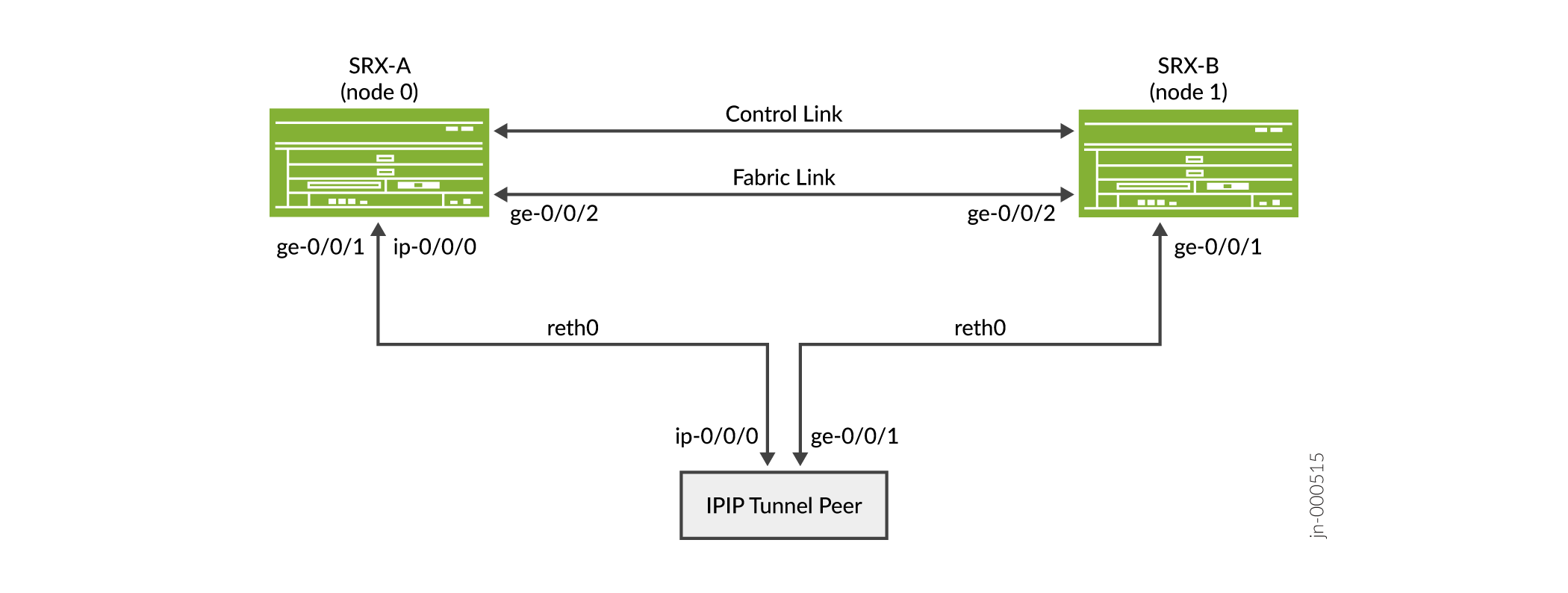
在 SRX 机箱群集配置中,可通过 reth 接口支持 IP-over-IP 隧道。隧道允许将一个 IP 数据包封装在另一个 IP 数据包上。
隧道配置会在主设备和辅助设备上创建。通过 IP-IP 隧道的流量将从主设备同步到辅助设备。辅助设备上的隧道配置被视为备用设备,当主设备发生故障时处于活动状态。如果主设备发生故障,流量将在辅助设备上恢复。
在 SRX 系列防火墙上,通用路由封装 (GRE) 和 IP-IP 隧道分别使用内部接口 gr-0/0/0 和 ip-0/0/0。Junos OS 在系统启动时创建这些接口;它们不与物理接口关联。
另见
示例:配置机箱群集冗余以太网接口
此示例说明如何配置机箱群集冗余以太网接口。冗余以太网接口是一种伪接口,包含两个或更多物理接口,群集的每个节点至少有一个物理接口。
要求
开始之前:
了解如何设置机箱群集节点 ID 和群集 ID。请参阅 示例:设置机箱群集节点 ID 和群集 ID。
设置冗余以太网接口的数量。
了解如何设置机箱群集交换矩阵。请参阅 示例:配置机箱群集交换矩阵接口。
了解如何设置机箱群集节点冗余组。请参阅 示例:配置机箱群集冗余组。
概述
将物理接口分配给冗余以太网接口后,您可以在冗余以太网接口级别设置与其相关的配置,每个子接口将继承该配置。
如果存在多个子接口,则所有子接口的速度必须相同。
冗余以太网接口在配置命令中称为 reth。
您可以在冗余以太网接口上启用混合模式。在第 3 层以太网接口上启用混合模式时,无论数据包的目标 MAC 地址如何,接口上接收到的所有数据包都将发送到中心点或服务处理单元。如果在冗余以太网接口上启用混合模式,则会在任何子物理接口上启用混合模式。
要在冗余以太网接口上启用混合模式,请在 [edit interfaces] 层次结构中使用混合模式语句。
配置
为 IPv4 地址配置机箱群集冗余以太网接口
CLI 快速配置
要快速配置此示例,请复制以下命令,将其粘贴到文本文件中,删除所有换行符,更改详细信息,以便与网络配置匹配,将命令复制并粘贴到层 [edit] 级的 CLI 中,然后从配置模式进入 commit 。
{primary:node0}[edit]
set interfaces ge-0/0/0 gigether-options redundant-parent reth1
set interfaces ge-7/0/0 gigether-options redundant-parent reth1
set interfaces fe-1/0/0 fast-ether-options redundant-parent reth2
set interfaces fe-8/0/0 fast-ether-options redundant-parent reth2
set interfaces reth1 redundant-ether-options redundancy-group 1
set interfaces reth1 unit 0 family inet mtu 1500
set interfaces reth1 unit 0 family inet address 10.1.1.3/24
set security zones security-zone Trust interfaces reth1.0
分步过程
要为 IPv4 配置冗余以太网接口,请执行以下作:
将冗余子物理接口绑定到 reth1。
{primary:node0}[edit]
user@host# set interfaces ge-0/0/0 gigether-options redundant-parent reth1
user@host# set interfaces ge-7/0/0 gigether-options redundant-parent reth1
将冗余子物理接口绑定到 reth2。
{primary:node0}[edit]
user@host# set interfaces fe-1/0/0 fast-ether-options redundant-parent reth2
user@host# set interfaces fe-8/0/0 fast-ether-options redundant-parent reth2
将 reth1 添加到冗余组 1。
{primary:node0}[edit]
user@host# set interfaces reth1 redundant-ether-options redundancy-group 1
设置 MTU 大小。
{primary:node0}[edit]
user@host# set interfaces reth1 unit 0 family inet mtu 1500
reth 接口上设置的最大传输单元 (MTU) 可以不同于子接口上的 MTU。
为 reth1 分配一个 IP 地址。
{primary:node0}[edit]
user@host# set interfaces reth1 unit 0 family inet address 10.1.1.3/24
将 reth1.0 关联到信任安全区域。
{primary:node0}[edit]
user@host# set security zones security-zone Trust interfaces reth1.0
为 IPv6 地址配置机箱群集冗余以太网接口
CLI 快速配置
要快速配置此示例,请复制以下命令,将其粘贴到文本文件中,删除所有换行符,更改详细信息,以便与网络配置匹配,将命令复制并粘贴到层 [edit] 级的 CLI 中,然后从配置模式进入 commit 。
{primary:node0}[edit]
set interfaces ge-0/0/0 gigether-options redundant-parent reth1
set interfaces ge-7/0/0 gigether-options redundant-parent reth1
set interfaces fe-1/0/0 fast-ether-options redundant-parent reth2
set interfaces fe-8/0/0 fast-ether-options redundant-parent reth2
set interfaces reth2 redundant-ether-options redundancy-group 1
set interfaces reth2 unit 0 family inet6 mtu 1500
set interfaces reth2 unit 0 family inet6 address 2010:2010:201::2/64
set security zones security-zone Trust interfaces reth2.0
分步过程
要为 IPv6 配置冗余以太网接口:
将冗余子物理接口绑定到 reth1。
{primary:node0}[edit]
user@host# set interfaces ge-0/0/0 gigether-options redundant-parent reth1
user@host# set interfaces ge-7/0/0 gigether-options redundant-parent reth1
将冗余子物理接口绑定到 reth2。
{primary:node0}[edit]
user@host# set interfaces fe-1/0/0 fast-ether-options redundant-parent reth2
user@host# set interfaces fe-8/0/0 fast-ether-options redundant-parent reth2
将 reth2 添加到冗余组 1。
{primary:node0}[edit]
user@host# set interfaces reth2 redundant-ether-options redundancy-group 1
设置 MTU 大小。
{primary:node0}[edit]
user@host# set interfaces reth2 unit 0 family inet6 mtu 1500
为 reth2 分配一个 IP 地址。
{primary:node0}[edit]
user@host# set interfaces reth2 unit 0 family inet6 address 2010:2010:201::2/64
将 reth2.0 关联到信任安全区域。
{primary:node0}[edit]
user@host# set security zones security-zone Trust interfaces reth2.0
分步过程
要设置机箱群集的冗余以太网接口数量:
指定冗余以太网接口的数量:
{primary:node0}[edit]

user@host# set chassis cluster reth-count 2
结果
在配置模式下,输入 show interfaces 命令以确认您的配置。如果输出未显示预期的配置,请重复此示例中的配置说明,以便进行更正。
为简洁起见,此 show 命令输出仅包含与此示例相关的配置。系统上的任何其他配置都已替换为省略号 (...)。
{primary:node0}[edit]
user@host# show interfaces
interfaces {
    ...
    fe-1/0/0 {
        fastether-options {
            redundant-parent reth2;
        }
    }
    fe-8/0/0 {
        fastether-options {
            redundant-parent reth2;
        }
    }
    ge-0/0/0 {
        gigether-options {
            redundant-parent reth1;
        }
    }
    ge-7/0/0 {
        gigether-options {
            redundant-parent reth1;
        }
    }
    reth1 {
        redundant-ether-options {
            redundancy-group 1;
        }
        unit 0 {
            family inet {
                mtu 1500;
                address 10.1.1.3/24;
            }
        }
    }
    reth2 {
        redundant-ether-options {
            redundancy-group 1;
        }
        unit 0 {
            family inet6 {
                mtu 1500;
                address 2010:2010:201::2/64;
            }
        }
    }
    ...
}
如果完成设备配置,请从配置模式输入 commit 。
验证
确认配置工作正常。
验证机箱群集冗余以太网接口
目的
验证机箱群集冗余以太网接口的配置。
行动
在作模式下,输入 show interfaces terse | match reth1 命令:
{primary:node0}
user@host> show interfaces terse | match reth1

ge-0/0/0.0             up    up   aenet    --> reth1.0
ge-7/0/0.0             up    up   aenet    --> reth1.0
reth1                  up    up
reth1.0                up    up   inet     10.1.1.3/24
验证机箱群集控制链路
目的
验证有关机箱群集配置中的控制接口的信息。
行动
在作模式下,输入 show chassis cluster interfaces 命令:
{primary:node0}
user@host> show chassis cluster interfaces
Control link status: Up

Control interfaces:
    Index   Interface   Monitored-Status   Internal-SA   Security
    0       em0         Up                 Disabled      Disabled
    1       em1         Up                 Disabled      Disabled

Fabric link status: Up

Fabric interfaces:
    Name    Child-interface    Status                    Security
                               (Physical/Monitored)
    fab0    xe-3/0/6           Up   / Up                 Enabled
    fab0
    fab1    xe-9/0/6           Up   / Up                 Enabled
    fab1

Redundant-ethernet Information:
    Name         Status      Redundancy-group
    reth0        Up          1
    reth1        Up          1
示例:在SRX4600上配置机箱群集冗余以太网接口
此示例说明如何在机箱群集模式下SRX4600设备上配置子链路或物理链路。
要求
开始之前:
了解如何设置机箱群集节点 ID 和群集 ID。请参阅 示例:设置机箱群集节点 ID 和群集 ID。
了解如何设置机箱群集节点冗余组。请参阅 示例:配置机箱群集冗余组。
概述
对于每个机箱的 SRX4600 台设备上的 reth 束,您最多可以为八个子链路。
配置
CLI 快速配置
要快速配置此示例,请复制以下命令,将其粘贴到文本文件中,删除所有换行符,更改详细信息,以便与网络配置匹配,将命令复制并粘贴到层 [edit] 级的 CLI 中,然后从配置模式进入 commit 。
{primary:node0}[edit]
set interfaces xe-1/0/0:0 gigether-options redundant-parent reth0
set interfaces xe-1/0/0:1 gigether-options redundant-parent reth0
set interfaces xe-1/0/0:2 gigether-options redundant-parent reth0
set interfaces xe-1/0/0:3 gigether-options redundant-parent reth0
set interfaces xe-1/0/1:0 gigether-options redundant-parent reth0
set interfaces xe-1/0/1:1 gigether-options redundant-parent reth0
set interfaces xe-1/0/1:2 gigether-options redundant-parent reth0
set interfaces xe-1/0/1:3 gigether-options redundant-parent reth0
set interfaces xe-1/1/0 gigether-options redundant-parent reth1
set interfaces xe-1/1/1 gigether-options redundant-parent reth1
set interfaces reth0 redundant-ether-options redundancy-group 1
set interfaces reth0 unit 0 family inet address 192.0.2.1/24
set interfaces reth1 redundant-ether-options redundancy-group 1
set interfaces reth1 redundant-ether-options lacp active
set interfaces reth1 unit 0 family inet address 198.51.100.1/24
set security zones security-zone Trust-zone interfaces reth0.0
set security zones security-zone Untrust-zone interfaces reth1.0
set chassis cluster reth-count 10
配置冗余以太网接口
分步过程
要配置冗余以太网接口,请执行以下作:
将 8 个冗余子物理接口绑定到 reth0。
{primary:node0}[edit]
user@host# set interfaces xe-1/0/0:0 gigether-options redundant-parent reth0
user@host# set interfaces xe-1/0/0:1 gigether-options redundant-parent reth0
user@host# set interfaces xe-1/0/0:2 gigether-options redundant-parent reth0
user@host# set interfaces xe-1/0/0:3 gigether-options redundant-parent reth0
user@host# set interfaces xe-1/0/1:0 gigether-options redundant-parent reth0
user@host# set interfaces xe-1/0/1:1 gigether-options redundant-parent reth0
user@host# set interfaces xe-1/0/1:2 gigether-options redundant-parent reth0
user@host# set interfaces xe-1/0/1:3 gigether-options redundant-parent reth0
将冗余子物理接口绑定到 reth1。
{primary:node0}[edit]
user@host# set interfaces xe-1/1/0 gigether-options redundant-parent reth1
user@host# set interfaces xe-1/1/1 gigether-options redundant-parent reth1
指定冗余以太网接口的数量:
{primary:node0}[edit]

user@host# set chassis cluster reth-count 10
将 reth0 添加到冗余组 1。
{primary:node0}[edit]
user@host# set interfaces reth0 redundant-ether-options redundancy-group 1
为 reth0 分配一个 IP 地址。
{primary:node0}[edit]
user@host# set interfaces reth0 unit 0 family inet address 192.0.2.1/24
将 reth1 添加到冗余组 1。
{primary:node0}[edit]
user@host# set interfaces reth1 redundant-ether-options redundancy-group 1
user@host# set interfaces reth1 redundant-ether-options lacp active
为 reth1 分配一个 IP 地址。
{primary:node0}[edit]
user@host# set interfaces reth1 unit 0 family inet address 198.51.100.1/24
将 reth0.0 关联到信任安全区域。
{primary:node0}[edit]
user@host# set security zones security-zone Trust-zone interfaces reth0.0
将 reth1.0 关联到不信任安全区域。
{primary:node0}[edit]
user@host# set security zones security-zone Untrust-zone interfaces reth1.0
结果
在配置模式下,输入 show interfaces 命令以确认您的配置。如果输出未显示预期的配置,请重复此示例中的配置说明,以便进行更正。
为简洁起见,此 show 命令输出仅包含与此示例相关的配置。系统上的任何其他配置都已替换为省略号 (...)。
{primary:node0}[edit]
user@host# show interfaces
xe-1/0/0:0 {
    gigether-options {
        redundant-parent reth0;
    }
}
xe-1/0/0:1 {
    gigether-options {
        redundant-parent reth0;
    }
}
xe-1/0/0:2 {
    gigether-options {
        redundant-parent reth0;
    }
}
xe-1/0/0:3 {
    gigether-options {
        redundant-parent reth0;
    }
}
xe-1/0/1:0 {
    gigether-options {
        redundant-parent reth0;
    }
}
xe-1/0/1:1 {
    gigether-options {
        redundant-parent reth0;
    }
}
xe-1/0/1:2 {
    gigether-options {
        redundant-parent reth0;
    }
}
xe-1/0/1:3 {
    gigether-options {
        redundant-parent reth0;
    }
}
xe-1/1/0 {
    gigether-options {
        redundant-parent reth1;
    }
}
xe-1/1/1 {
    gigether-options {
        redundant-parent reth1;
    }
}
reth0 {
    redundant-ether-options {
        redundancy-group 1;
    }
    unit 0 {
        family inet {
            address 192.0.2.1/24;
        }
    }
}
reth1 {
    redundant-ether-options {
        redundancy-group 1;
        lacp {
            active;
        }
    }
    unit 0 {
        family inet {
            address 198.51.100.1/24;
        }
    }
}
如果完成设备配置,请从配置模式输入 commit 。
验证
确认配置工作正常。
验证机箱群集冗余以太网接口
目的
验证设备上机箱群集冗余以太网接口SRX4600配置。
行动
在作模式下,输入 show interfaces terse | match reth0 命令:
{primary:node0}
user@host> show interfaces terse | match reth0

xe-1/0/0:0.0            up    down aenet    --> reth0.0
xe-1/0/0:1.0            up    down aenet    --> reth0.0
xe-1/0/0:2.0            up    down aenet    --> reth0.0
xe-1/0/0:3.0            up    down aenet    --> reth0.0
xe-1/0/1:0.0            up    down aenet    --> reth0.0
xe-1/0/1:1.0            up    down aenet    --> reth0.0
xe-1/0/1:2.0            up    down aenet    --> reth0.0
xe-1/0/1:3.0            up    down aenet    --> reth0.0
reth0                   up    down
reth0.0                 up    down inet     192.0.2.1/24
意义
您可以在一个机箱中查看 reth 捆绑包的最大配置子链路接口数从 4 到 8。
验证机箱群集控制链路
目的
验证有关机箱群集配置中的控制接口的信息。
行动
在作模式下,输入 show chassis cluster interfaces 命令:
{primary:node0}
user@host> show chassis cluster interfaces

Control link status: Down

Control interfaces:
    Index   Interface   Monitored-Status   Internal-SA   Security
    0       em0         Down               Disabled      Disabled
    1       em1         Down               Disabled      Disabled

Fabric link status: Down

Fabric interfaces:
    Name    Child-interface    Status                    Security
                               (Physical/Monitored)
    fab0    xe-0/0/2           Up   / Down               Disabled
    fab0

Redundant-ethernet Information:
    Name         Status      Redundancy-group
    reth0        Down        1
    reth1        Up          1
    reth2        Down        Not configured
    reth3        Down        Not configured
    reth4        Down        Not configured
    reth5        Down        Not configured
    reth6        Down        Not configured
    reth7        Down        Not configured
    reth8        Down        Not configured
    reth9        Down        Not configured

Redundant-pseudo-interface Information:
    Name         Status      Redundancy-group
    lo0          Up          0
示例:在 SRX 系列防火墙上配置 IP-over-IP 隧道
此示例说明如何创建具有转发下一跃点的 IP-IP 隧道,以便通过隧道传递 IPv4 流量,并将配置从主设备同步到辅助设备。
要求
开始之前:
-
了解如何设置机箱群集节点 ID 和群集 ID。请参阅 示例:设置机箱群集节点 ID 和群集 ID。
此示例使用以下硬件和软件组件:
-
Junos OS 23.1R1 或更高版本。
-
SRX345 设备
概述
数据包被路由到内部接口,在该接口上用 IP 数据包封装,然后转发到封装数据包的目标地址。IP-IP 接口仅是内部接口,不与物理接口关联。您必须为其配置接口才能执行 IP 隧道。
拓扑学
图 1展示了在机箱群集模式下运行的 SRX 系列防火墙的 IP-over-IP 场景。
配置
配置带有机箱群集的 IP-IP 隧道 IPv4 地址冗余以太网接口
CLI 快速配置
要快速配置此示例,请复制以下命令,将其粘贴到文本文件中,删除所有换行符,更改详细信息,以便与网络配置匹配,将命令复制并粘贴到层 [edit] 级的 CLI 中,然后从配置模式进入 commit 。
{primary:node0}[edit]
set chassis cluster reth-count 2


                     set chassis cluster redundancy-group 0 node 0 priority 100


                     set chassis cluster redundancy-group 0 node 1 priority 1


                     set chassis cluster redundancy-group 1 node 0 priority 100


                     set chassis cluster redundancy-group 1 node 1 priority 1


                     set interfaces reth0 redundant-ether-options redundancy-group 1


                     set interfaces reth1 redundant-ether-options redundancy-group 1


                     set interfaces reth0 unit 0 family inet address 22.0.0.254/24


                     set interfaces reth1 unit 0 family inet address 1.0.0.254/24


                     set interfaces ip-0/0/0 unit 0 tunnel source 22.0.0.254


                     set interfaces ip-0/0/0 unit 0 tunnel destination 22.0.0.200


                     set interfaces ip-0/0/0 unit 0 family inet address 33.0.0.254/24


                     set interfaces ge-0/0/1 gigether-options redundant-parent reth0


                     set interfaces ge-0/0/2 gigether-options redundant-parent reth1


                     set interfaces ge-7/0/1 gigether-options redundant-parent reth0


                     set interfaces ge-7/0/2 gigether-options redundant-parent reth1


                     set interfaces fab0 fabric-options member-interfaces ge-0/0/0


                     set interfaces fab1 fabric-options member-interfaces ge-7/0/0
{peer}
set interfaces ip-0/0/0 unit 0 tunnel source 22.0.0.200


                     set interfaces ip-0/0/0 unit 0 tunnel destination 22.0.0.254


                     set interfaces ip-0/0/0 unit 0 family inet address 33.0.0.200/24


                     set interfaces ge-0/0/1 unit 0 family inet address 22.0.0.200/24


                     set interfaces ge-0/0/2 unit 0 family inet address 2.0.0.200/24


                     set routing-options static route 1.0.0.0/24 next-hop ip-0/0/0.0
分步过程
要为 IPv4 配置冗余以太网接口,请执行以下作:
-
为路由引擎故障切换属性设置冗余组 0,并设置冗余组 1(此例中所有接口都在一个冗余组中),以便为冗余以太网接口定义故障切换属性。
{primary:node0}[edit] user@host# set chassis cluster redundancy-group 0 node 0 priority 100 user@host# set chassis cluster redundancy-group 0 node 1 priority 1 user@host# set chassis cluster redundancy-group 1 node 0 priority 100 user@host# set chassis cluster redundancy-group 1 node 1 priority 1 -
设置冗余以太网 (reth) 接口。
{primary:node0}[edit] user@host# set chassis cluster reth-count 2 user@host# set interfaces ge-0/0/1 gigether-options redundant-parent reth0 user@host# set interfaces ge-0/0/2 gigether-options redundant-parent reth1 user@host# set interfaces ge-7/0/1 gigether-options redundant-parent reth0 user@host# set interfaces ge-7/0/2 gigether-options redundant-parent reth1 user@host# set interfaces reth0 redundant-ether-options redundancy-group 1 user@host# set interfaces reth0 unit 0 family inet address 22.0.0.254/24 user@host# set interfaces reth1 redundant-ether-options redundancy-group 1 user@host# set interfaces reth1 unit 0 family inet address 1.0.0.254/24 -
在两个节点上配置基于冗余以太网接口的隧道。
{primary:node0}[edit] user@host# set interfaces ip-0/0/0 unit 0 tunnel source 22.0.0.254 user@host# set interfaces ip-0/0/0 unit 0 tunnel destination 22.0.0.200 user@host# set interfaces ip-0/0/0 unit 0 family inet address 33.0.0.254/24 -
在对等方上配置隧道会话。
{peer} user@host# set interfaces ip-0/0/0 unit 0 tunnel source 22.0.0.200 user@host# set interfaces ip-0/0/0 unit 0 tunnel destination 22.0.0.254 user@host# set interfaces ip-0/0/0 unit 0 family inet address 33.0.0.200/24 user@host# set interfaces ge-0/0/1 unit 0 family inet address 22.0.0.200/24 user@host# set interfaces ge-0/0/2 unit 0 family inet address 2.0.0.200/24 user@host# set routing-options static route 1.0.0.0/24 next-hop ip-0/0/0.0 -
在两个节点上配置路由选项:
{primary:node0} set routing-options static route 2.0.0.0/24 next-hop ip-0/0/0.0 -
在两个节点上配置交换矩阵接口。
{primary:node0}[edit]
user@host# set interfaces fab0 fabric-options member-interfaces ge-0/0/0
user@host# set interfaces fab1 fabric-options member-interfaces ge-7/0/0
结果
在配置模式下,输入 show interfaces 命令以确认您的配置。如果输出未显示预期的配置,请重复此示例中的配置说明,以便进行更正。
为简洁起见,此 show 命令输出仅包含与此示例相关的配置。系统上的任何其他配置都已替换为省略号 (...)。
{primary:node0}[edit]
user@host# show interfaces
ip-0/0/0 {
    unit 0 {
        tunnel {
            source 22.0.0.254;
            destination 22.0.0.200;
        }
        family inet {
            address 33.0.0.254/24;
        }
    }
}
ge-0/0/1 {
    gigether-options {
        redundant-parent reth0;
    }
}
ge-0/0/2 {
    gigether-options {
        redundant-parent reth1;
    }
}
ge-7/0/1 {
    gigether-options {
        redundant-parent reth0;
    }
}
ge-7/0/2 {
    gigether-options {
        redundant-parent reth1;
    }
}
fab0 {
    fabric-options {
        member-interfaces {
            ge-0/0/0;
        }
    }
}
fab1 {
    fabric-options {
        member-interfaces {
            ge-7/0/0;
        }
    }
}
reth0 {
    redundant-ether-options {
        redundancy-group 1;
    }
    unit 0 {
        family inet {
            address 22.0.0.254/24;
        }
    }
}
reth1 {
    redundant-ether-options {
        redundancy-group 1;
    }
    unit 0 {
        family inet {
            address 1.0.0.254/24;
        }
    }
}
验证
目的
显示有关机箱群集接口和状态的信息。
行动
在作模式下,输入、show chassis cluster interfacesshow chassis cluster status和show security flow session命令。
{primary:node0}
user@host> show chassis cluster interfaces
Control link status: Up

Control interfaces:
    Index   Interface   Monitored-Status   Internal-SA   Security
    0       fxp1        Up                 Disabled      Disabled

Fabric link status: Down

Fabric interfaces:
    Name    Child-interface    Status                    Security
                               (Physical/Monitored)
    fab0    ge-0/0/0          Up   / Up                 Disabled
    fab0
    fab1    ge-0/0/7          Up   / Up                 Disabled
    fab1

Redundant-ethernet Information:
    Name         Status      Redundancy-group
    reth0        Up          1
    reth1        Up          1

Redundant-pseudo-interface Information:
    Name         Status      Redundancy-group
    lo0          Up          0
{primary:node0}
user@host> show chassis cluster status
Monitor Failure codes:
    CS  Cold Sync monitoring        FL  Fabric Connection monitoring
    GR  GRES monitoring             HW  Hardware monitoring
    IF  Interface monitoring        IP  IP monitoring
    LB  Loopback monitoring         MB  Mbuf monitoring
    NH  Nexthop monitoring          NP  NPC monitoring
    SP  SPU monitoring              SM  Schedule monitoring
    CF  Config Sync monitoring      RE  Relinquish monitoring
    IS  IRQ storm

Cluster ID: 1
Node   Priority Status               Preempt Manual   Monitor-failures

Redundancy group: 0 , Failover count: 1
node0  200      primary              no      no       None
node1  100      secondary            no      no       None

Redundancy group: 1 , Failover count: 1
node0  200      primary              no      no       None
node1  100      secondary            no      no       None
{primary:node0}
user@host> show security flow session
node0:
--------------------------------------------------------------------------

Session ID: 6323, Policy name: N/A, HA State: Active, Timeout: N/A, Session State: Valid
  In: 2012::2:2/1 --> 2012::2:1/1;ipip, Conn Tag: 0x0, If: reth1.0, Pkts: 0, Bytes: 0,

Session ID: 6324, Policy name: N/A, HA State: Active, Timeout: N/A, Session State: Valid
  In: 2012::2:2/1 --> 2012::2:1/1;ipv6, Conn Tag: 0x0, If: reth1.0, Pkts: 0, Bytes: 0,

Session ID: 6361, Policy name: self-traffic-policy/1, HA State: Active, Timeout: 56, Session State: Valid
  In: fe80::2:2/1 --> ff02::5/1;ospf, Conn Tag: 0x0, If: ip-0/0/0.1, Pkts: 153842, Bytes: 12371296,
  Out: ff02::5/1 --> fe80::2:2/1;ospf, Conn Tag: 0x0, If: .local..0, Pkts: 0, Bytes: 0,

Session ID: 6362, Policy name: self-traffic-policy/1, HA State: Active, Timeout: 52, Session State: Valid
  In: 100.0.2.2/1 --> 224.0.0.5/1;ospf, Conn Tag: 0x0, If: ip-0/0/0.1, Pkts: 152030, Bytes: 12178352,
  Out: 224.0.0.5/1 --> 100.0.2.2/1;ospf, Conn Tag: 0x0, If: .local..0, Pkts: 0, Bytes: 0,

Session ID: 6363, Policy name: self-traffic-policy/1, HA State: Active, Timeout: 60, Session State: Valid
  In: 100.0.2.2/49152 --> 100.0.2.1/3784;udp, Conn Tag: 0x0, If: ip-0/0/0.1, Pkts: 1509142, Bytes: 78475384,
  Out: 100.0.2.1/3784 --> 100.0.2.2/49152;udp, Conn Tag: 0x0, If: .local..0, Pkts: 0, Bytes: 0,

Session ID: 6364, Policy name: self-traffic-policy/1, HA State: Active, Timeout: 60, Session State: Valid
  In: fe80::2:2/49152 --> fe80::2:1/3784;udp, Conn Tag: 0x0, If: ip-0/0/0.1, Pkts: 1509355, Bytes: 108673560,
  Out: fe80::2:1/3784 --> fe80::2:2/49152;udp, Conn Tag: 0x0, If: .local..0, Pkts: 0, Bytes: 0,
Total sessions: 6

node1:
--------------------------------------------------------------------------

Session ID: 1304, Policy name: N/A, HA State: Backup, Timeout: N/A, Session State: Valid
  In: 2012::2:2/1 --> 2012::2:1/1;ipip, Conn Tag: 0x0, If: reth1.0, Pkts: 0, Bytes: 0,

Session ID: 1305, Policy name: N/A, HA State: Backup, Timeout: N/A, Session State: Valid
  In: 2012::2:2/1 --> 2012::2:1/1;ipv6, Conn Tag: 0x0, If: reth1.0, Pkts: 0, Bytes: 0,

Session ID: 1306, Policy name: self-traffic-policy/1, HA State: Backup, Timeout: 1482, Session State: Valid
  In: 100.0.2.2/49152 --> 100.0.2.1/3784;udp, Conn Tag: 0x0, If: ip-0/0/0.1, Pkts: 0, Bytes: 0,
  Out: 100.0.2.1/3784 --> 100.0.2.2/49152;udp, Conn Tag: 0x0, If: .local..0, Pkts: 0, Bytes: 0,

Session ID: 1307, Policy name: self-traffic-policy/1, HA State: Backup, Timeout: 1538, Session State: Valid
  In: fe80::2:2/49152 --> fe80::2:1/3784;udp, Conn Tag: 0x0, If: ip-0/0/0.1, Pkts: 0, Bytes: 0,
  Out: fe80::2:1/3784 --> fe80::2:2/49152;udp, Conn Tag: 0x0, If: .local..0, Pkts: 0, Bytes: 0,
Total sessions: 4
{primary:node0}
user@host> show security flow statistics
node0:
--------------------------------------------------------------------------
    Current sessions: 6
    Packets received: 12528819
    Packets transmitted: 12523469
    Packets forwarded/queued: 44
    Packets copied: 0
    Packets dropped: 5306
    Services-offload packets processed: 0
    Fragment packets: 0
    Pre fragments generated: 0
    Post fragments generated: 0

node1:
--------------------------------------------------------------------------
    Current sessions: 4
    Packets received: 1608551
    Packets transmitted: 1588679
    Packets forwarded/queued: 0
    Packets copied: 0
    Packets dropped: 19874
    Services-offload packets processed: 0
    Fragment packets: 0
    Pre fragments generated: 0
    Post fragments generated: 0
意义
机箱群集配置将 reth 接口显示为绑定接口,以便通过 IP-over-IP 隧道交换路由。
特定于平台的 冗余以太网接口 行为
使用 功能浏览器 确认平台和版本对特定功能的支持。
使用下表查看您的平台特定于平台的行为。
| 平台 |
差异 |
|---|---|
| SRX 系列 |
|
其他平台信息
使用 功能浏览器 确认平台和版本对特定功能的支持。
可能支持其他平台。
| 平台 |
冗余以太网 (reth) 接口 |
|---|---|
| SRX4100和SRX4200 |
10 千兆以太网 (xe) |
| SRX5600和SRX5800 |
10 千兆以太网 (xe) 40 千兆以太网 100 千兆位以太网 |
| 平台 |
reth 接口上的逻辑接口 |
|---|---|
| SRX300 系列、SRX1500、SRX1600、SRX2300、SRX4120、SRX4100、SRX4200和SRX4300 |
1024 |
| SRX4600 和 SRX5000 系列 |
4096 |
| 平台 |
最大 reth 接口数 |
|---|---|
| SRX300 系列 |
128 |
| SRX1500 |
128 |
| SRX1600 |
128 |
| SRX2300,SRX4120 |
128 |
| SRX4100、SRX4200和SRX4300 |
128 |
| SRX4600 |
128 |
| SRX5000 系列 |
128 |
变更历史表
是否支持某项功能取决于您使用的平台和版本。使用 功能浏览器 查看您使用的平台是否支持某项功能。