
用于 BGP 会话的自治系统
了解 BGP 本地 AS 属性
当互联网服务提供商 (ISP) 获取属于不同自治系统 (AS) 的网络时,没有一种无缝方法可将所获取网络的 BGP 对等方移动到获取 ISP 的 AS。使用新的 AS 编号配置 BGP 对等方的过程可能既耗时又繁琐。有时客户不想或无法立即修改其对等方安排或配置。在这种过渡期间,可以在新的 AS 中配置支持 BGP 的设备,以便在 BGP 更新中使用之前的 AS 编号。之前的 AS 编号称为 本地 AS。
使用本地 AS 编号让所获取网络中的路由设备看起来好像仍属于之前的 AS。
例如,AS 为 65200 的 ISP A 获取 AS 为 65250 的 ISP B。ISP B 的客户 ISP C 不想更改其配置。ISP B 成为 ISP A 的一部分后,将配置本地 AS 编号 65250,用于与 ISP C 的 EBGP 对等会话。因此,在用于将路由导出到 ISP C 中的直接外部对等方的 AS 路径中,本地 AS 编号 65250 将被前置或用来代替全局 AS 编号 65200。
如果路由是从内部 BGP (IBGP) 对等方接收的,则 AS 路径将包含在全局 AS 编号之前附加的本地 AS 编号。
如果路由是外部路由(例如导入到 BGP 中的静态路由或内部网关协议 (IGP) 路由),则使用本地 AS 编号而不是全局 AS 编号。如果路由是外部的,并且您希望将全局 AS 编号包含在 AS 路径中,则可以应用使用或 的路由策略。 as-path-expand as-path-prepend使用策略 as-path-expand 操作将全局 AS 编号置于本地 AS 编号后面。使用策略 as-path-prepend 操作将全局 AS 编号置于本地 AS 编号前面。
例如:
user@R2# show policy-options
policy-statement prepend-global {
    term 1 {
        from protocol static;
        then {
            as-path-prepend 65200; # or use as-path-expand
            accept;
        }
    }
}
user@R2# show protocols bgp
group ext {
    export prepend-global;
    type external;
    local-as 65250;
    neighbor 10.0.0.1 {
        peer-as 65100;
    }
    neighbor 10.1.0.2 {
        peer-as 65300;
    }
}
user@R2# show routing-options
static {
    route 10.1.1.1/32 next-hop 10.0.0.1;
}
autonomous-system 65200;
user@R3# run show route 10.1.1.1 protocol bgp
inet.0: 6 destinations, 6 routes (6 active, 0 holddown, 0 hidden)
+ = Active Route, - = Last Active, * = Both

10.1.1.1/32         *[BGP/170] 00:05:11, localpref 100
                      AS path: 65200 65250 I, validation-state: unverified
                    > to 10.1.0.1 via lt-1/2/0.4
在第 3 层 VPN 场景中,提供商边缘 (PE) 设备使用外部 BGP (EBGP) 与客户边缘 (客户边缘) 设备对等, local-as 该语句的行为与非 VPN 场景不同。在 VPN 场景中,默认情况下,在主实例中定义的全局 AS 编号会前置到 AS 路径。要覆盖此行为,可以在 PE 设备上的路由实例 BGP 配置中配置, no-prepend-global-as 如下所示:
user@R2# show routing-instances
red {
    instance-type vrf;
    interface fe-1/2/0.2;
    route-distinguisher 10:1;
    vrf-target target:10:1;
    protocols {
        bgp {
            group toR1 {
                type external;
                peer-as 65001;
                local-as 65200 no-prepend-global-as;
                neighbor 10.1.1.1;
            }
        }
    }
}
本地 AS 属性的 Junos 操作系统 (Junos OS) 实施支持以下选项:
-
Local AS with private option— 使用该
private选项时,将在与 EBGP 邻接方建立 BGP 会话期间使用本地 AS,但会在发送至其他 IBGP 和 EBGP 对等方的 AS 路径中隐藏本地 AS。发送至外部对等方的 AS 路径中仅包含全局 AS。该
private选项可用于与仍配置之前的 AS 的路由设备建立本地对等关系,或者与尚未修改其对等方安排的特定客户建立对等关系。本地 AS 用于建立与 EBGP 邻接方的 BGP 会话,但会在发送至其他 AS 中外部对等方的 AS 路径中隐藏。包括该
private选项,以便在发送至外部对等方的 AS 路径中,本地 AS 不会在全局 AS 之前附加。指定该private选项时,本地 AS 只会前置在发送至 EBGP 邻接方的 AS 路径中。例如,在 图 1 中,路由器 1 和路由器 2 位于 AS 64496 中,路由器 4 位于 AS 64511 中,路由器 3 位于 AS 64510 中。路由器 2 之前属于 AS 64497,后者已与其他网络合并,现在属于 AS 64496。由于路由器 3 仍与路由器 2 使用其之前的AS (64497) 对等,因此需要为路由器 2 配置本地AS 64497,以便与路由器 3 保持对等。配置本地 AS 64497 将允许路由器 2 在向路由器 3 播发路由时添加 AS 64497。路由器 3 看到前缀 10/8 的 AS 路径为 64497 64496。
图 1:本地 AS 配置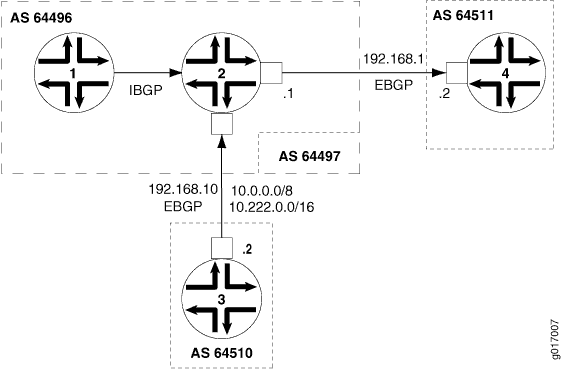
要防止路由器 2 在其向其他对等方的通告中添加本地 AS 编号,请使用该
local-as 64497 private语句。此语句将路由器 2 配置为当向路由器 1 和路由器 4 通告路由时,不包含本地 AS 64497。在这种情况下,路由器 4 会看到前缀 10.222/16 的 AS 路径 64496 64510。 -
Local AS with alias option— 在 Junos OS 9.5 及更高版本中,您可以将本地 AS 配置为别名。在建立BGP开放会话期间,开放消息中使用的AS在本地AS和全局AS之间交替。如果使用本地 AS 与 EBGP 邻接方连接,则在建立 BGP 对等体会话时,只会将本地 AS 前置到 AS 路径。如果使用全局 AS 与 EBGP 邻接方连接,则在建立 BGP 对等体会话时,只会将全局 AS 前置到 AS 路径。使用此
alias选项还意味着,对于从该 EBGP 邻接方获知的任何路由,本地 AS 不会前置到 AS 路径中。因此,本地 AS 对其他外部对等方保持隐藏。将已获取的网络中的路由设备迁移到新的 AS 时,使用该
alias选项配置本地 AS 特别有用。在迁移过程中,某些路由设备可能配置了新的 AS,而其他设备仍配置之前的 AS。例如,最好先迁移到新的 AS,其中有路由设备充当路由反射器。但是,当您以增量方式迁移路由反射器客户端时,每个路由反射器都必须与配置了之前的 AS 的路由设备对等,还必须与配置了新 AS 的路由设备对等。要建立本地对等会话,网络中的 BGP 对等方同时使用本地 AS 和全局 AS 会很有用。同时,您希望对外部对等方隐藏此本地 AS,并在将路由导出到其他 AS 时,仅在 AS 路径中使用全局 AS。在这种情况下,请配置该alias选项。包括以下选项
alias以将本地 AS 配置为在层次结构级别上[edit routing-options]配置的全局 AS 的别名。将本地 AS 配置为别名时,在建立 BGP 开放式会话期间,开放式消息中使用的 AS 在本地 AS 和全局 AS 之间交替。只有当使用本地 AS 与 EBGP 邻接方建立对等会话时,本地 AS 才会前置到 AS 路径。在发送至任何其他外部对等方的 AS 路径中,本地 AS 将会隐藏。当使用全局AS建立BGP会话时,仅将全局AS前置到AS路径。注意:和
privatealias选项是互斥的。您不能使用同一个local-as语句配置这两个选项。 -
Local AS with option not to prepend the global AS— 在 Junos OS 9.6 及更高版本 中,您可以使用不前置全局 AS 的选项配置本地 AS。发送至外部对等方的 AS 路径中仅包含本地 AS。
如果要在虚拟专用网 (VPN) 方案中从出站 BGP 更新中去除全局 AS 编号,请使用该
no-prepend-global-as选项。在 VPN 场景中,当您想对 VPN 隐藏全局 AS 时,此选项很有用。包括以下
no-prepend-global-as选项以从发送至外部对等方的 AS 路径中移除在层次结构级别上[edit routing-options]配置的全局 AS。使用此选项时,对于发送至客户边缘 (客户边缘) 设备的路由,AS路径中仅包含本地AS。 -
Number of loops option— 本地 AS 功能还支持指定在 AS_PATH 属性中检测到 AS 编号导致路由被丢弃或隐藏的次数。例如,如果配置
loops 1,则当在路径中检测到 AS 编号一次或多次时,路由将被隐藏。这是默认行为。如果配置loops 2,则当在路径中检测到 AS 编号两次或以上时,路由将被隐藏。对于语句,
loops number您可以配置 1 到 10。注意:如果为任何 BGP 组配置本地 AS 值,则将使用所有 BGP 组的 AS 值和本地 AS 值来检测路由环路。
如果 EBGP 或 IBGP 对等方的本地 AS 与当前 AS 相同,则不要使用该
local-as语句指定本地 AS 编号。在 VRF 中配置本地 AS 时,这会影响 AS 路径环路检测机制。设备上配置的所有
local-as语句都是单个 AS 域的一部分。AS 路径环路检测机制基于寻找域中存在的匹配 AS。
也可以看看
示例:为 EBGP 会话配置本地 AS
此示例说明了如何为 BGP 对等体配置本地自治系统 (AS),以便在 BGP 入站和出站更新中使用全局 AS 和本地 AS。
要求
配置此示例之前,不需要除设备初始化之外的特殊配置。
概述
当 ISP 合并并希望保留客户的配置时,特别是客户被配置为要与之建立对等关系的 AS,请使用该 local-as 语句。该 local-as 语句模拟客户路由器中已有的 AS 编号,即使 ISP 的路由器已迁移到其他 AS。
此示例说明了如何使用语句配置 local-as 本地 AS。 local-as 该语句在全局、组和邻居层次结构级别的 BGP 受支持。
配置 local-as 语句时,必须指定 AS 编号。可以指定一个从 1 到 4,294,967,295 的纯 数字格式的数字。在 Junos OS 9.1 及更高版本 中,如 RFC 4893 中所定义的 AS 编号范围得到了扩展,可为 4 字节 AS 编号提供 BGP 支持,四 字节 AS 编号空间的 BGP 支持。在 Junos OS 9.3 及更高版本 中,您还可以使用以下AS点符号格式(两个整数值加一个句点)配置 4 字节AS编号:<16-bit high-order value in decimal>.<16-bit low-order value in decimal>。例如,以纯数字格式表示的 4 字节 AS 编号 65,546 如果以 AS 点符号格式表示,则为 1.10。您可以使用 AS 点符号格式指定一个从 0.0 到 65535.65535 的 值。Junos OS 继续支持 2 字节 AS 编号。2 字节 AS 编号范围为 1 到 65535(这是 4 字节范围的一个子集)。
图 2 显示了示例拓扑。
 的拓扑
的拓扑
在此示例中,设备 R2 原来属于 AS 250,现在属于 AS 200。设备 R1 和设备 R3 配置为与 AS 250 对等,而非与新的 AS 编号 (AS 200) 对等。设备 R2 具有使用 autonomous-system 200 语句配置的新 AS 编号。为了使对等会话能够正常工作,需要将该 local-as 250 语句添加到 BGP 配置中。由于已配置,设备 local-as 250 R2 在其 BGP 入站和出站更新中包括了全局 AS (200) 和本地 AS (250)。
配置
CLI 快速配置
要快速配置此示例,请复制以下命令,将其粘贴到文本文件中,删除所有换行符,更改详细信息,以便与网络配置匹配,然后将命令复制并粘贴到层次结构级别的 [edit] CLI 中。
设备 R1
set interfaces fe-1/2/0 unit 1 family inet address 10.0.0.1/30
set interfaces lo0 unit 1 family inet address 192.168.0.1/32
set protocols bgp group ext type external
set protocols bgp group ext export send-direct
set protocols bgp group ext export send-static
set protocols bgp group ext peer-as 250
set protocols bgp group ext neighbor 10.0.0.2
set policy-options policy-statement send-direct term 1 from protocol direct
set policy-options policy-statement send-direct term 1 then accept
set policy-options policy-statement send-static term 1 from protocol static
set policy-options policy-statement send-static term 1 then accept
set routing-options static route 10.1.0.0/30 next-hop 10.0.0.2
set routing-options autonomous-system 100
设备 R2
set interfaces fe-1/2/0 unit 2 family inet address 10.0.0.2/30
set interfaces fe-1/2/1 unit 3 family inet address 10.1.0.1/30
set interfaces lo0 unit 2 family inet address 192.168.0.2/32
set protocols bgp group ext type external
set protocols bgp group ext export send-direct
set protocols bgp group ext export send-static
set protocols bgp group ext local-as 250
set protocols bgp group ext neighbor 10.0.0.1 peer-as 100
set protocols bgp group ext neighbor 10.1.0.2 peer-as 300
set policy-options policy-statement send-direct term 1 from protocol direct
set policy-options policy-statement send-direct term 1 then accept
set policy-options policy-statement send-static term 1 from protocol static
set policy-options policy-statement send-static term 1 then accept
set routing-options autonomous-system 200
设备 R3
set interfaces fe-1/2/0 unit 4 family inet address 10.1.0.2/30
set interfaces lo0 unit 3 family inet address 192.168.0.3/32
set protocols bgp group ext type external
set protocols bgp group ext export send-direct
set protocols bgp group ext export send-static
set protocols bgp group ext peer-as 250
set protocols bgp group ext neighbor 10.1.0.1
set policy-options policy-statement send-direct term 1 from protocol direct
set policy-options policy-statement send-direct term 1 then accept
set policy-options policy-statement send-static term 1 from protocol static
set policy-options policy-statement send-static term 1 then accept
set routing-options static route 10.0.0.0/30 next-hop 10.1.0.1
set routing-options autonomous-system 300
配置设备 R1
分步程序
下面的示例要求您在各个配置层级中进行导航。有关导航CLI的信息,请参阅《Junos OS CLI 用户指南》中的在配置模式下使用CLI编辑器。
要配置设备 R1:
配置接口。
[edit interfaces]
user@R1# set fe-1/2/0 unit 1 family inet address 10.0.0.1/30
user@R1# set lo0 unit 1 family inet address 192.168.0.1/32
配置外部 BGP (EBGP)。
[edit protocols bgp group ext]
user@R1# set type external
user@R1# set export send-direct
user@R1# set export send-static
user@R1# set peer-as 250
user@R1# set neighbor 10.0.0.2
配置路由策略。
[edit policy-options]
user@R1# set policy-statement send-direct term 1 from protocol direct
user@R1# set policy-statement send-direct term 1 then accept
user@R1# set policy-statement send-static term 1 from protocol static
user@R1# set policy-statement send-static term 1 then accept
在设备 R2 和设备 R3 之间配置到远程网络的静态路由。
[edit routing-options]
user@R1# set static route 10.1.0.0/30 next-hop 10.0.0.2
配置全局 AS 编号。
[edit routing-options]
user@R1# set autonomous-system 100
结果
在配置模式下,输入 show interfaces、 show policy-options、 show protocols和 show routing-options 命令以确认您的配置。如果输出未显示预期的配置,请重复此示例中的说明以更正配置。
user@R1# show interfaces
fe-1/2/0 {
    unit 1 {
        family inet {
            address 10.0.0.1/30;
        }
    }
}
lo0 {
    unit 1 {
        family inet {
            address 192.168.0.1/32;
        }
    }
}
user@R1# show policy-options
policy-statement send-direct {
    term 1 {
        from protocol direct;
        then accept;
    }
}
policy-statement send-static {
    term 1 {
        from protocol static;
        then accept;
    }
}
user@R1# show protocols
bgp {
    group ext {
        type external;
        export [ send-direct send-static ];
        peer-as 250;
        neighbor 10.0.0.2;
    }
}
user@R1# show routing-options
static {
    route 10.1.0.0/30 next-hop 10.0.0.2;
}
autonomous-system 100;
完成设备配置后,从配置模式进入。commit
配置设备 R2
分步程序
下面的示例要求您在各个配置层级中进行导航。有关导航CLI的信息,请参阅《Junos OS CLI 用户指南》中的在配置模式下使用CLI编辑器。
要配置设备 R2:
配置接口。
[edit interfaces]
user@R2# set fe-1/2/0 unit 2 family inet address 10.0.0.2/30
user@R2# set fe-1/2/1 unit 3 family inet address 10.1.0.1/30
user@R2# set lo0 unit 2 family inet address 192.168.0.2/32
配置 EBGP。
[edit protocols bgp group ext]
user@R2# set type external
user@R2# set export send-direct
user@R2# set export send-static
user@R2# set neighbor 10.0.0.1 peer-as 100
user@R2# set neighbor 10.1.0.2 peer-as 300
配置本地自治系统 (AS) 编号。
[edit protocols bgp group ext]
user@R2# set local-as 250
配置全局 AS 编号。
[edit routing-options]
user@R2# set autonomous-system 200
配置路由策略。
[edit policy-options]
user@R2# set policy-statement send-direct term 1 from protocol direct
user@R2# set policy-statement send-direct term 1 then accept
user@R2# set policy-statement send-static term 1 from protocol static
user@R2# set policy-statement send-static term 1 then accept
结果
在配置模式下,输入 show interfaces、 show policy-options、 show protocols和 show routing-options 命令以确认您的配置。如果输出未显示预期的配置,请重复此示例中的说明以更正配置。
user@R2# show interfaces
fe-1/2/0 {
    unit 2 {
        family inet {
            address 10.0.0.2/30;
        }
    }
}
fe-1/2/1 {
    unit 3 {
        family inet {
            address 10.1.0.1/30;
        }
    }
}
lo0 {
    unit 2 {
        family inet {
            address 192.168.0.2/32;
        }
    }
}
user@R2# show policy-options
policy-statement send-direct {
    term 1 {
        from protocol direct;
        then accept;
    }
}
policy-statement send-static {
    term 1 {
        from protocol static;
        then accept;
    }
}
user@R2# show protocols
bgp {
    group ext {
        type external;
        export [ send-direct send-static ];
        local-as 250;
        neighbor 10.0.0.1 {
            peer-as 100;
        }
        neighbor 10.1.0.2 {
            peer-as 300;
        }
    }
}
user@R2# show routing-options
autonomous-system 200;
完成设备配置后,从配置模式进入。commit
配置设备 R3
分步程序
下面的示例要求您在各个配置层级中进行导航。有关导航CLI的信息,请参阅《Junos OS CLI 用户指南》中的在配置模式下使用CLI编辑器。
要配置设备 R3:
配置接口。
[edit interfaces]
user@R3# set fe-1/2/0 unit 4 family inet address 10.1.0.2/30
user@R3# set lo0 unit 3 family inet address 192.168.0.3/32
配置 EBGP。
[edit protocols bgp group ext]
user@R3# set type external
user@R3# set export send-direct
user@R3# set export send-static
user@R3# set peer-as 250
user@R3# set neighbor 10.1.0.1
配置全局自治系统 (AS) 编号。
[edit routing-options]
user@R3# set autonomous-system 300
在设备 R1 和设备 R2 之间配置到远程网络的静态路由。
[edit routing-options]
user@R3# set static route 10.0.0.0/30 next-hop 10.1.0.1
配置路由策略。
[edit policy-options]
user@R3# set policy-statement send-direct term 1 from protocol direct
user@R3# set policy-statement send-direct term 1 then accept
user@R3# set policy-statement send-static term 1 from protocol static
user@R3# set policy-statement send-static term 1 then accept
结果
在配置模式下,输入 show interfaces、 show policy-options、 show protocols和 show routing-options 命令以确认您的配置。如果输出未显示预期的配置,请重复此示例中的说明以更正配置。
user@R3# show interfaces
fe-1/2/0 {
    unit 4 {
        family inet {
            address 10.1.0.2/30;
        }
    }
}
lo0 {
    unit 3 {
        family inet {
            address 192.168.0.3/32;
        }
    }
}
user@R3# show policy-options
policy-statement send-direct {
    term 1 {
        from protocol direct;
        then accept;
    }
}
policy-statement send-static {
    term 1 {
        from protocol static;
        then accept;
    }
}
user@R3# show protocols
bgp {
    group ext {
        type external;
        export [ send-direct send-static ];
        peer-as 250;
        neighbor 10.1.0.1;
    }
}
user@R3# show routing-options
static {
    route 10.0.0.0/30 next-hop 10.1.0.1;
}
autonomous-system 300;
完成设备配置后,从配置模式进入。commit
验证
确认配置工作正常。
检查本地和全局 AS 设置
目的
确保设备 R2 已配置本地和全局 AS 设置。
行动
在操作模式下,输入命令 show bgp neighbors 。
user@R2> show bgp neighbors
Peer: 10.0.0.1+179 AS 100      Local: 10.0.0.2+61036 AS 250
  Type: External    State: Established    Flags: <Sync>
  Last State: OpenConfirm   Last Event: RecvKeepAlive
  Last Error: None
  Export: [ send-direct send-static ]
  Options: <Preference PeerAS LocalAS Refresh>
  Holdtime: 90 Preference: 170 Local AS: 250 Local System AS: 200
  Number of flaps: 0
  Peer ID: 192.168.0.1     Local ID: 192.168.0.2       Active Holdtime: 90
  Keepalive Interval: 30         Peer index: 0
  BFD: disabled, down
  Local Interface: fe-1/2/0.2
  NLRI for restart configured on peer: inet-unicast
  NLRI advertised by peer: inet-unicast
  NLRI for this session: inet-unicast
  Peer supports Refresh capability (2)
  Stale routes from peer are kept for: 300
  Peer does not support Restarter functionality
  NLRI that restart is negotiated for: inet-unicast
  NLRI of received end-of-rib markers: inet-unicast
  NLRI of all end-of-rib markers sent: inet-unicast
  Peer supports 4 byte AS extension (peer-as 100)
  Peer does not support Addpath
  Table inet.0 Bit: 10000
    RIB State: BGP restart is complete
    Send state: in sync
    Active prefixes:              1
    Received prefixes:            3
    Accepted prefixes:            2
    Suppressed due to damping:    0
    Advertised prefixes:          4
  Last traffic (seconds): Received 6    Sent 14   Checked 47
  Input messages:  Total 258    Updates 3       Refreshes 0     Octets 4969
  Output messages: Total 258    Updates 2       Refreshes 0     Octets 5037
  Output Queue[0]: 0

Peer: 10.1.0.2+179 AS 300      Local: 10.1.0.1+52296 AS 250
  Type: External    State: Established    Flags: <Sync>
  Last State: OpenConfirm   Last Event: RecvKeepAlive
  Last Error: None
  Export: [ send-direct send-static ]
  Options: <Preference PeerAS LocalAS Refresh>
  Holdtime: 90 Preference: 170 Local AS: 250 Local System AS: 200
  Number of flaps: 0
  Peer ID: 192.168.0.3     Local ID: 192.168.0.2       Active Holdtime: 90
  Keepalive Interval: 30         Peer index: 1
  BFD: disabled, down
  Local Interface: fe-1/2/1.3
  NLRI for restart configured on peer: inet-unicast
  NLRI advertised by peer: inet-unicast
  NLRI for this session: inet-unicast
  Peer supports Refresh capability (2)
  Stale routes from peer are kept for: 300
  Peer does not support Restarter functionality
  NLRI that restart is negotiated for: inet-unicast
  NLRI of received end-of-rib markers: inet-unicast
  NLRI of all end-of-rib markers sent: inet-unicast
  Peer supports 4 byte AS extension (peer-as 300)
  Peer does not support Addpath
  Table inet.0 Bit: 10000
    RIB State: BGP restart is complete
    Send state: in sync
    Active prefixes:              1
    Received prefixes:            3
    Accepted prefixes:            2
    Suppressed due to damping:    0
    Advertised prefixes:          4
  Last traffic (seconds): Received 19   Sent 26   Checked 9
  Input messages:  Total 256    Updates 3       Refreshes 0     Octets 4931
  Output messages: Total 256    Updates 2       Refreshes 0     Octets 4999
  Output Queue[0]: 0
意义
本地 AS:250 和本地系统 AS:200 输出显示设备 R2 具有预期的设置。此外,输出显示选项列表包括 LocalAS。
检查 BGP 对等会话
目的
确保已建立会话并显示本地 AS 编号 250。
行动
在操作模式下,输入命令 show bgp summary 。
user@R1> show bgp summary
Groups: 1 Peers: 1 Down peers: 0
Table          Tot Paths  Act Paths Suppressed    History Damp State    Pending
inet.0                 4          2          0          0          0          0
Peer                     AS      InPkt     OutPkt    OutQ   Flaps Last Up/Dwn State|#Active/Received/Accepted/Damped...
10.0.0.2                250        232        233       0       4     1:42:37 2/4/4/0              0/0/0/0
user@R3> show bgp summary
Groups: 1 Peers: 1 Down peers: 0
Table          Tot Paths  Act Paths Suppressed    History Damp State    Pending
inet.0                 4          2          0          0          0          0
Peer                     AS      InPkt     OutPkt    OutQ   Flaps Last Up/Dwn State|#Active/Received/Accepted/Damped...
10.1.0.1                250        235        236       0       4     1:44:25 2/4/4/0              0/0/0/0
意义
设备 R1 和设备 R3 似乎与 AS 250 中的设备对等,即使设备 R2 实际上在 AS 200 中。
验证 BGP AS 路径
目的
请确保路由在路由表中,并且 AS 路径显示本地 AS 编号 250。
行动
从配置模式,输入命令 set route protocol bgp 。
user@R1> show route protocol bgp
inet.0: 6 destinations, 8 routes (6 active, 0 holddown, 0 hidden)
+ = Active Route, - = Last Active, * = Both

10.0.0.0/30         [BGP/170] 01:46:44, localpref 100
                      AS path: 250 I
                    > to 10.0.0.2 via fe-1/2/0.1
10.1.0.0/30         [BGP/170] 01:46:44, localpref 100
                      AS path: 250 I
                    > to 10.0.0.2 via fe-1/2/0.1
192.168.0.2/32     *[BGP/170] 01:46:44, localpref 100
                      AS path: 250 I
                    > to 10.0.0.2 via fe-1/2/0.1
192.168.0.3/32     *[BGP/170] 01:46:40, localpref 100
                      AS path: 250 300 I
                    > to 10.0.0.2 via fe-1/2/0.1
user@R3> show route protocol bgp

inet.0: 6 destinations, 8 routes (6 active, 0 holddown, 0 hidden)
+ = Active Route, - = Last Active, * = Both

10.0.0.0/30         [BGP/170] 01:47:10, localpref 100
                      AS path: 250 I
                    > to 10.1.0.1 via fe-1/2/0.4
10.1.0.0/30         [BGP/170] 01:47:10, localpref 100
                      AS path: 250 I
                    > to 10.1.0.1 via fe-1/2/0.4
192.168.0.1/32     *[BGP/170] 01:47:10, localpref 100
                      AS path: 250 100 I
                    > to 10.1.0.1 via fe-1/2/0.4
192.168.0.2/32     *[BGP/170] 01:47:10, localpref 100
                      AS path: 250 I
                    > to 10.1.0.1 via fe-1/2/0.4
意义
输出显示设备 R1 和设备 R3 的路由似乎包括了含有 AS 250 的 AS 路径,尽管设备 R2 实际处于 AS 200 中。
示例:为 EBGP 会话配置本地专用 AS
此示例说明了如何配置专用本地自治系统 (AS) 编号。本地 AS 被视为专用,因为它会播发给使用本地 AS 编号进行对等连接的对等方,但会在向可以使用全局 AS 编号进行对等连接的对等方通告中隐藏。
要求
配置此示例之前,不需要除设备初始化之外的特殊配置。
概述
当 ISP 合并并希望保留客户的配置时,特别是客户被配置为要与之建立对等关系的 AS,请使用该 local-as 语句。该 local-as 语句模拟客户路由器中已有的 AS 编号,即使 ISP 的路由器已迁移到其他 AS。
使用该 private 选项时,将在与外部BGP (EBGP) 邻接方建立BGP会话期间使用本地AS,但会在发送至其他 EBGP 对等方的AS路径中隐藏本地。发送至外部对等方的 AS 路径中仅包含全局 AS。
该 private 选项可用于与仍配置之前的 AS 的路由设备建立本地对等关系,或者与尚未修改其对等方安排的特定客户建立对等关系。本地 AS 用于建立与 EBGP 邻接方的 BGP 会话,但会在发送至其他 AS 中外部对等方的 AS 路径中隐藏。
包括该 private 选项,以便在发送至外部对等方的 AS 路径中,本地 AS 不会在全局 AS 之前附加。指定该 private 选项时,本地 AS 只会前置在发送至 EBGP 邻接方的 AS 路径中。
图 3 显示了示例拓扑。
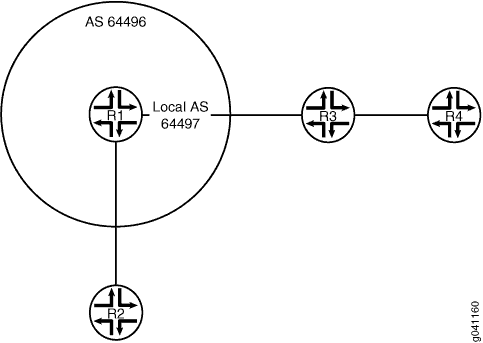 的拓扑
的拓扑
设备 R1 在 AS 64496 中。设备 R2 在 AS 64510 中。设备 R3 在 AS 64511 中。设备 R4 在 AS 64512 中。设备 R1 之前属于 AS 64497,后者已与其他网络合并,现在属于 AS 64496。由于设备 R3 仍然与设备 R1(使用其之前的 AS 64497)对等,因此设备 R1 需要配置编号为 64497 的本地 AS,以便与设备 R3 保持对等。配置本地 AS 64497 将允许设备 R1 在向设备 R3 播发路由时添加 AS 64497。设备 R3 看到前缀 10.1.1.2/32 的 AS 路径为 64497 64496,即设备 R2 的环路接口。设备 R4 位于设备 R3 后面,可看到到设备 R2 环路接口的 AS 路径 64511 64497 64496 64510。为防止设备 R1 在其向其他对等方的通告中添加本地 AS 编号,此示例包含该 local-as 64497 private 语句。该 private 选项会将设备 R1 配置为当向设备 R2 通告路由时不包含本地 AS 64497。设备 R2 看到:到设备 R3 的 AS 路径为 64496 64511,到设备 R4 的 AS 路径为 64496 64511 64512。 private 设备 R1 配置中的选项会导致设备 R1 向设备 R2 重新播发的 AS 路径中缺少 AS 编号 64497。
设备 R1 对所有路由器隐藏专用本地 AS,设备 R3 除外。该 private 选项适用于设备 R1 从设备 R3 接收(学习)以及设备 R1 向其他路由器重新播发的路由。当设备 R1 向设备 R2 重新播发从设备 R3 获知的这些路由时,向设备 R2 播发的 AS 路径中没有专用本地 AS。
配置
CLI 快速配置
要快速配置此示例,请复制以下命令,将其粘贴到文本文件中,删除所有换行符,更改详细信息,以便与网络配置匹配,然后将命令复制并粘贴到层次结构级别的 [edit] CLI 中。
设备 R1
set interfaces fe-1/2/0 unit 3 family inet address 192.168.1.1/24
set interfaces fe-1/2/1 unit 5 family inet address 192.168.10.1/24
set interfaces lo0 unit 2 family inet address 10.1.1.1/32
set protocols bgp group external-AS64511 type external
set protocols bgp group external-AS64511 peer-as 64511
set protocols bgp group external-AS64511 local-as 64497
set protocols bgp group external-AS64511 local-as private
set protocols bgp group external-AS64511 neighbor 192.168.1.2
set protocols bgp group external-AS64510 type external
set protocols bgp group external-AS64510 peer-as 64510
set protocols bgp group external-AS64510 neighbor 192.168.10.2
set policy-options policy-statement send-direct term 1 from protocol direct
set policy-options policy-statement send-direct term 1 then accept
set routing-options autonomous-system 64496
设备 R2
set interfaces fe-1/2/0 unit 6 family inet address 192.168.10.2/24
set interfaces lo0 unit 3 family inet address 10.1.1.2/32
set protocols bgp group external type external
set protocols bgp group external export send-direct
set protocols bgp group external peer-as 64496
set protocols bgp group external neighbor 192.168.10.1
set policy-options policy-statement send-direct term 1 from protocol direct
set policy-options policy-statement send-direct term 1 then accept
set routing-options autonomous-system 64510
设备 R3
set interfaces fe-1/2/0 unit 4 family inet address 192.168.1.2/24
set interfaces fe-1/2/1 unit 7 family inet address 192.168.5.1/24
set interfaces lo0 unit 4 family inet address 10.1.1.3/32
set protocols bgp group external type external
set protocols bgp group external export send-direct
set protocols bgp group external neighbor 192.168.1.1 peer-as 64497
set protocols bgp group external neighbor 192.168.5.2 peer-as 64512
set policy-options policy-statement send-direct term 1 from protocol direct
set policy-options policy-statement send-direct term 1 then accept
set routing-options autonomous-system 64511
设备 R4
set interfaces fe-1/2/0 unit 8 family inet address 192.168.5.2/24
set interfaces lo0 unit 5 family inet address 10.1.1.4/32
set protocols bgp group external type external
set protocols bgp group external export send-direct
set protocols bgp group external peer-as 64511
set protocols bgp group external neighbor 192.168.5.1
set policy-options policy-statement send-direct term 1 from protocol direct
set policy-options policy-statement send-direct term 1 then accept
set routing-options autonomous-system 64512
配置设备 R1
分步程序
下面的示例要求您在各个配置层级中进行导航。有关导航CLI的信息,请参阅《Junos OS CLI 用户指南》中的在配置模式下使用CLI编辑器。
要配置设备 R1:
-
配置接口。
[edit interfaces fe-1/2/0 unit 3]
user@R1# set family inet address 192.168.1.1/24
[edit interfaces fe-1/2/1 unit 5]
user@R1# set family inet address 192.168.10.1/24
[edit interfaces lo0 unit 2]
user@R1# set family inet address 10.1.1.1/32
-
配置与设备 R2 的 EBGP 对等会话。
[edit protocols bgp group external-AS64510]
user@R1# set type external
user@R1# set peer-as 64510
user@R1# set neighbor 192.168.10.2
-
配置与设备 R3 的 EBGP 对等会话。
[edit protocols bgp group external-AS64511]
user@R1# set type external
user@R1# set peer-as 64511
user@R1# set local-as 64497
user@R1# set local-as private
user@R1# set neighbor 192.168.1.2
-
配置路由策略。
[edit policy-options policy-statement send-direct term 1]
user@R1# set from protocol direct
user@R1# set then accept
-
配置全局自治系统 (AS) 编号。
[edit routing-options]
user@R1# set autonomous-system 64496
结果
在配置模式下,输入 show interfaces、 show policy-options、 show protocols和 show routing-options 命令以确认您的配置。如果输出未显示预期的配置,请重复此示例中的说明以更正配置。
user@R1# show interfaces
fe-1/2/0 {
    unit 3 {
        family inet {
            address 192.168.1.1/24;
        }
    }
}
fe-1/2/1 {
    unit 5 {
        family inet {
            address 192.168.10.1/24;
        }
    }
}
lo0 {
    unit 2 {
        family inet {
            address 10.1.1.1/32;
        }
    }
}
user@R1# show policy-options
policy-statement send-direct {
    term 1 {
        from protocol direct;
        then accept;
    }
}
user@R1# show protocols
bgp {
    group external-AS64511 {
        type external;
        peer-as 64511;
        local-as 64497 private;
        neighbor 192.168.1.2;
    }
    group external-AS64510 {
        type external;
        peer-as 64510;
        neighbor 192.168.10.2;
    }
}
user@R1# show routing-options
autonomous-system 64496;
如果完成设备配置,请从配置模式进入。commit
根据需要对拓扑中的其他设备重复配置。
验证
确认配置工作正常。
检查设备 R2 的 AS 路径
目的
确保设备 R2 在到设备 R3 和设备 R4 的 AS 路径中没有 AS 64497。
行动
在操作模式下,输入命令 show route protocol bgp 。
user@R2> show route protocol bgp
inet.0: 6 destinations, 6 routes (6 active, 0 holddown, 0 hidden)
+ = Active Route, - = Last Active, * = Both

10.1.1.3/32        *[BGP/170] 01:33:11, localpref 100
                      AS path: 64496 64511 I
                    > to 192.168.10.1 via fe-1/2/0.6
10.1.1.4/32        *[BGP/170] 01:33:11, localpref 100
                      AS path: 64496 64511 64512 I
                    > to 192.168.10.1 via fe-1/2/0.6
192.168.5.0/24     *[BGP/170] 01:49:15, localpref 100
                      AS path: 64496 64511 I
                    > to 192.168.10.1 via fe-1/2/0.6
意义
设备 R2 的 AS 路径不包括 AS 64497。
检查设备 R3 的 AS 路径
目的
确保本地 AS 64497 仅前置在发送至 EBGP 邻接方 R3 的 AS 路径中。设备 R3 看到前缀 10.1.1.2/32 的 AS 路径为 64497 64496,即设备 R2 的环路接口。
行动
在操作模式下,输入命令 show route protocol bgp 。
user@R3> show route protocol bgp
inet.0: 7 destinations, 8 routes (7 active, 0 holddown, 0 hidden)
+ = Active Route, - = Last Active, * = Both

10.1.1.2/32        *[BGP/170] 01:35:11, localpref 100
                      AS path: 64497 64496 64510 I
                    > to 192.168.1.1 via fe-1/2/0.4
10.1.1.4/32        *[BGP/170] 01:35:11, localpref 100
                      AS path: 64512 I
                    > to 192.168.5.2 via fe-1/2/1.7
192.168.5.0/24      [BGP/170] 01:51:15, localpref 100
                      AS path: 64512 I
                    > to 192.168.5.2 via fe-1/2/1.7
意义
设备 R3 到设备 R2 的路由(前缀 10.1.1.2)包括设备 R1 上配置的本地和全局 AS(分别为 64497 和 64496)。
了解 BGP 的累积 IGP 属性
内部网关协议 (IGP) 旨在处理单个域或一个自治系统 (AS) 内的路由。每个链接都分配了一个称为指标的特定值。两个节点之间的距离计算为沿路径链路的所有度量值的总和。IGP 根据距离选择两个节点之间的最短路径。
BGP 旨在为大量独立的 AS 提供路由,这些 AS 各自的管理之间的协调有限或是没有协调。BGP 在路径选择决策中不使用指标。
BGP 的累积 IGP (AIGP) 指标属性支持单个管理部门可以运行多个连续 BGP AS 的部署。此类部署允许 BGP 根据 IGP 指标做出路由决策。在此类网络中,BGP 可以像 IGP 一样根据指标选择路径。在这种情况下,BGP 选择两个节点之间的最短路径,即使这些节点可能位于两个不同的 AS 中。
AIGP 属性在使用隧道将数据包传送到其 BGP 下一跃点的网络中特别有用。瞻博网络® Junos® 操作系统 (Junos OS) 当前支持两个 BGP 地址族 family inet labeled-unicast 的 AIGP 属性,以及 family inet6 labeled-unicast。
AIGP 会影响 BGP 最佳路由决策过程。AIGP 属性优先级规则在本地优先级规则之后应用。将 AIGP 距离比作打破平局。如果解析下一跃点具有 AIGP 属性,则 BGP 最佳路由决策过程还会影响内部成本规则的应用方式。在未启用 AIGP 的情况下,路由的内部成本基于对路由下一跃点的指标的计算。启用 AIGP 后,解析 AIGP 距离将添加到内部成本中。
从 20.2R1 版开始,Junos OS 支持将 AIGP 指标转换为 MED。当您希望 MED 携带端到端 AIGP 指标值(用于选择最佳路径)时,可以启用此功能。这在 AS 间 MPLS VPN 解决方案中尤其有用,其中客户站点通过两个不同的服务提供商进行连接,而客户边缘路由器希望做出基于 IGP 度量的决策。您可以配置 ,minimum-aigp以防止当有效 aigp 更改超过先前已知的最低值时不必要的路由更新。有效 AIGP 是随路由通告的 AIGP 值加上到达下一跃点的 IGP 成本。您可以在 effective-aigp 和 [edit policy-options policy-statement <name> then metric] 层次结构级别配置 [edit protocols bgp group <group-name> metric-out] 和 minimum-effective-aigp 语句。
AIGP 属性是可选的非传递 BGP 路径属性,在互联网草案 draft-ietf-idr-aigp-06( BGP 的累积 IGP 指标属性)中指定。
也可以看看
示例:为 BGP 配置累积 IGP 属性
此示例说明如何为 BGP 配置累积 IGP (AIGP) 指标属性。
要求
此示例使用以下硬件和软件组件:
-
七个 BGP 通话设备。
-
Junos OS 12.1 或更高版本。
概述
AIGP 属性支持在其中,单个管理部门可以运行多个连续的 BGP 自治系统 (AS) 的部署。此类部署允许 BGP 根据 IGP 指标做出路由决策。启用 AIGP 后,BGP 可以根据 IGP 指标选择路径。这样可以让 BGP 选择两个节点之间的最短路径,即使这些节点可能位于不同的 AS 中。AIGP 属性在使用隧道将数据包传送到其 BGP 下一跃点的网络中特别有用。此示例显示了配置了 MPLS 标签交换路径的 AIGP。
要启用 AIGP,请基于协议家族将该 aigp 语句包含在 BGP 配置中。在特定家族上配置 AIGP 可以发送和接收该家族上的 AIGP 属性。默认情况下,AIGP 处于禁用状态。禁用 AIGP 的邻接方不会发送 AIGP 属性,并以静默方式丢弃收到的 AIGP 属性。
Junos OS 支持适用于 family inet6 labeled-unicast和 的 AIGP。family inet labeled-unicast可以在全局 BGP、组或邻居级别为给定家族配置该aigp语句。
默认情况下,本地前缀的 AIGP 属性值为零。启用了 AIGP 的邻接方可以使用策略操作, aigp-originate 通过导出策略为给定前缀发起 AIGP 属性。AIGP 属性的值反映了 IGP 到前缀的距离。或者,您可以使用策略操作指定值 aigp-originate distance distance 。可配置范围为 0 到 4,294,967,295。只有一个节点需要发起 AIGP 属性。如果邻接方在 BGP 配置中使用语句启用 aigp 了 AIGP,则 AIGP 属性将被保留并重新播发。
发起 AIGP 属性的策略操作具有以下要求:
-
邻接方必须启用 AIGP。
-
策略必须作为导出策略来应用。
-
前缀不能有当前的 AIGP 属性。
-
前缀必须使用下一跃点 self 导出。
-
前缀必须驻留在 AIGP 域中。通常,环路 IP 地址是发起前缀。
如果不满足这些要求,则忽略策略。
拓扑图
图 4 显示了此示例中使用的拓扑。OSPF 用作内部网关协议 (IGP)。内部 BGP (IBGP) 配置在设备 PE1 和设备 PE4 之间。外部 BGP (EBGP) 配置在设备 PE7 和设备 PE1 之间、设备 PE4 和设备 PE3 之间以及设备 PE4 和设备 PE2 之间。设备 PE4、PE2 和 PE3 配置为多跃点。设备 PE4 根据 AIGP 值选择路径,然后根据 AIGP 和策略配置重新播发 AIGP 值。设备 PE1 将 AIGP 值重新播发至其他管理域中的设备 PE7。每台设备都有两个环路接口地址:10.9.9.x 用于 BGP 对等和路由器 ID,10.100.1.x 用于 BGP 下一跃点。
设备 PE1 和 PE3 之间的网络具有 IBGP 对等互连和多个 OSPF 区域。设备 PE7 的外部链路配置为显示 AIGP 属性已重新播发至管理域外部的邻接方(如果该邻接方启用了 AIGP)。
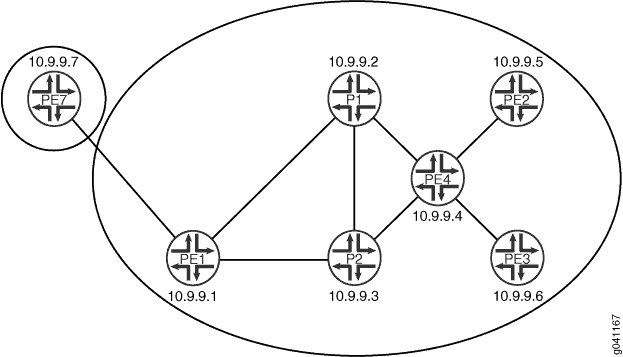 中多路径的播发
对于 AIGP 属性的发起,BGP 下一跃点必须是自身。如果 BGP 下一跃点保持不变,则接收到的 AIGP 属性将按原样重新播发至另一个 AIGP 邻接方。如果下一跃点发生变化,接收到的 AIGP 属性将重新播发,并将增加值重新播发至另一个 AIGP 邻接方。值的增加反映了 IGP 到前一个 BGP 下一跃点的距离。为了演示,此示例将环路接口地址用于设备 PE4 与设备 PE2 和设备 PE3 的 EBGP 对等会话。在这些会话上启用多跃点,以便执行递归查找以确定点对点接口。由于下一跃点发生变化,因此 IGP 距离将添加到 AIGP 距离中。
配置
CLI 快速配置
要快速配置此示例,请复制以下命令,将其粘贴到文本文件中,删除所有换行符,更改详细信息,以便与网络配置匹配,然后将命令复制并粘贴到层次结构级别的 [edit] CLI 中。
设备 P1
set interfaces fe-1/2/0 unit 1 description P1-to-PE1
set interfaces fe-1/2/0 unit 1 family inet address 10.0.0.2/30
set interfaces fe-1/2/0 unit 1 family mpls
set interfaces fe-1/2/1 unit 4 description P1-to-P2
set interfaces fe-1/2/1 unit 4 family inet address 10.0.0.29/30
set interfaces fe-1/2/1 unit 4 family mpls
set interfaces fe-1/2/2 unit 8 description P1-to-PE4
set interfaces fe-1/2/2 unit 8 family inet address 10.0.0.17/30
set interfaces fe-1/2/2 unit 8 family mpls
set interfaces lo0 unit 3 family inet address 10.9.9.2/32
set interfaces lo0 unit 3 family inet address 10.100.1.2/32
set protocols rsvp interface fe-1/2/0.1
set protocols rsvp interface fe-1/2/2.8
set protocols rsvp interface fe-1/2/1.4
set protocols mpls label-switched-path P1-to-P2 to 10.9.9.3
set protocols mpls label-switched-path P1-to-PE1 to 10.9.9.1
set protocols mpls label-switched-path P1-to-PE4 to 10.9.9.4
set protocols mpls interface fe-1/2/0.1
set protocols mpls interface fe-1/2/2.8
set protocols mpls interface fe-1/2/1.4
set protocols bgp group internal type internal
set protocols bgp group internal local-address 10.9.9.2
set protocols bgp group internal family inet labeled-unicast aigp
set protocols bgp group internal neighbor 10.9.9.1
set protocols bgp group internal neighbor 10.9.9.3
set protocols bgp group internal neighbor 10.9.9.4
set protocols ospf area 0.0.0.1 interface fe-1/2/0.1 metric 1
set protocols ospf area 0.0.0.1 interface fe-1/2/1.4 metric 1
set protocols ospf area 0.0.0.0 interface fe-1/2/2.8 metric 1
set protocols ospf area 0.0.0.0 interface 10.9.9.2 passive
set protocols ospf area 0.0.0.0 interface 10.9.9.2 metric 1
set protocols ospf area 0.0.0.0 interface 10.100.1.2 passive
set protocols ospf area 0.0.0.0 interface 10.100.1.2 metric 1
set routing-options router-id 10.9.9.2
set routing-options autonomous-system 13979
设备 P2
set interfaces fe-1/2/0 unit 3 description P2-to-PE1
set interfaces fe-1/2/0 unit 3 family inet address 10.0.0.6/30
set interfaces fe-1/2/0 unit 3 family mpls
set interfaces fe-1/2/1 unit 5 description P2-to-P1
set interfaces fe-1/2/1 unit 5 family inet address 10.0.0.30/30
set interfaces fe-1/2/1 unit 5 family mpls
set interfaces fe-1/2/2 unit 6 description P2-to-PE4
set interfaces fe-1/2/2 unit 6 family inet address 10.0.0.13/30
set interfaces fe-1/2/2 unit 6 family mpls
set interfaces lo0 unit 5 family inet address 10.9.9.3/32
set interfaces lo0 unit 5 family inet address 10.100.1.3/32
set protocols rsvp interface fe-1/2/1.5
set protocols rsvp interface fe-1/2/2.6
set protocols rsvp interface fe-1/2/0.3
set protocols mpls label-switched-path P2-to-PE1 to 10.9.9.1
set protocols mpls label-switched-path P2-to-P1 to 10.9.9.2
set protocols mpls label-switched-path P2-to-PE4 to 10.9.9.4
set protocols mpls interface fe-1/2/1.5
set protocols mpls interface fe-1/2/2.6
set protocols mpls interface fe-1/2/0.3
set protocols bgp group internal type internal
set protocols bgp group internal local-address 10.9.9.3
set protocols bgp group internal family inet labeled-unicast aigp
set protocols bgp group internal neighbor 10.9.9.1
set protocols bgp group internal neighbor 10.9.9.2
set protocols bgp group internal neighbor 10.9.9.4
set protocols ospf area 0.0.0.0 interface fe-1/2/2.6 metric 1
set protocols ospf area 0.0.0.0 interface 10.9.9.3 passive
set protocols ospf area 0.0.0.0 interface 10.9.9.3 metric 1
set protocols ospf area 0.0.0.0 interface 10.100.1.3 passive
set protocols ospf area 0.0.0.0 interface 10.100.1.3 metric 1
set routing-options router-id 10.9.9.3
set routing-options autonomous-system 13979
设备 PE4
set interfaces fe-1/2/0 unit 7 description PE4-to-P2
set interfaces fe-1/2/0 unit 7 family inet address 10.0.0.14/30
set interfaces fe-1/2/0 unit 7 family mpls
set interfaces fe-1/2/1 unit 9 description PE4-to-P1
set interfaces fe-1/2/1 unit 9 family inet address 10.0.0.18/30
set interfaces fe-1/2/1 unit 9 family mpls
set interfaces fe-1/2/2 unit 10 description PE4-to-PE2
set interfaces fe-1/2/2 unit 10 family inet address 10.0.0.21/30
set interfaces fe-1/2/2 unit 10 family mpls
set interfaces fe-1/0/2 unit 12 description PE4-to-PE3
set interfaces fe-1/0/2 unit 12 family inet address 10.0.0.25/30
set interfaces fe-1/0/2 unit 12 family mpls
set interfaces lo0 unit 7 family inet address 10.9.9.4/32
set interfaces lo0 unit 7 family inet address 10.100.1.4/32
set protocols rsvp interface fe-1/2/0.7
set protocols rsvp interface fe-1/2/1.9
set protocols rsvp interface fe-1/2/2.10
set protocols rsvp interface fe-1/0/2.12
set protocols mpls label-switched-path PE4-to-PE2 to 10.9.9.5
set protocols mpls label-switched-path PE4-to-PE3 to 10.9.9.6
set protocols mpls label-switched-path PE4-to-P1 to 10.9.9.2
set protocols mpls label-switched-path PE4-to-P2 to 10.9.9.3
set protocols mpls interface fe-1/2/0.7
set protocols mpls interface fe-1/2/1.9
set protocols mpls interface fe-1/2/2.10
set protocols mpls interface fe-1/0/2.12
set protocols bgp export next-hop
set protocols bgp export aigp
set protocols bgp group internal type internal
set protocols bgp group internal local-address 10.9.9.4
set protocols bgp group internal family inet labeled-unicast aigp
set protocols bgp group internal neighbor 10.9.9.1
set protocols bgp group internal neighbor 10.9.9.3
set protocols bgp group internal neighbor 10.9.9.2
set protocols bgp group external type external
set protocols bgp group external multihop ttl 2
set protocols bgp group external local-address 10.9.9.4
set protocols bgp group external family inet labeled-unicast aigp
set protocols bgp group external peer-as 7018
set protocols bgp group external neighbor 10.9.9.5
set protocols bgp group external neighbor 10.9.9.6
set protocols ospf area 0.0.0.0 interface fe-1/2/1.9 metric 1
set protocols ospf area 0.0.0.0 interface fe-1/2/0.7 metric 1
set protocols ospf area 0.0.0.0 interface 10.9.9.4 passive
set protocols ospf area 0.0.0.0 interface 10.9.9.4 metric 1
set protocols ospf area 0.0.0.0 interface 10.100.1.4 passive
set protocols ospf area 0.0.0.0 interface 10.100.1.4 metric 1
set protocols ospf area 0.0.0.2 interface fe-1/2/2.10 metric 1
set protocols ospf area 0.0.0.3 interface fe-1/0/2.12 metric 1
set policy-options policy-statement aigp term 10 from protocol static
set policy-options policy-statement aigp term 10 from route-filter 44.0.0.0/24 exact
set policy-options policy-statement aigp term 10 then aigp-originate distance 200
set policy-options policy-statement aigp term 10 then next-hop 10.100.1.4
set policy-options policy-statement aigp term 10 then accept
set policy-options policy-statement next-hop term 10 from protocol bgp
set policy-options policy-statement next-hop term 10 then next-hop 10.100.1.4
set policy-options policy-statement next-hop term 10 then accept
set policy-options policy-statement next-hop term 20 from protocol direct
set policy-options policy-statement next-hop term 20 from route-filter 10.9.9.4/32 exact
set policy-options policy-statement next-hop term 20 from route-filter 10.100.1.4/32 exact
set policy-options policy-statement next-hop term 20 then next-hop 10.100.1.4
set policy-options policy-statement next-hop term 20 then accept
set routing-options static route 44.0.0.0/24 discard
set routing-options router-id 10.9.9.4
set routing-options autonomous-system 13979
设备 PE1
set interfaces fe-1/2/0 unit 0 description PE1-to-P1
set interfaces fe-1/2/0 unit 0 family inet address 10.0.0.1/30
set interfaces fe-1/2/0 unit 0 family mpls
set interfaces fe-1/2/1 unit 2 description PE1-to-P2
set interfaces fe-1/2/1 unit 2 family inet address 10.0.0.5/30
set interfaces fe-1/2/1 unit 2 family mpls
set interfaces fe-1/2/2 unit 14 description PE1-to-PE7
set interfaces fe-1/2/2 unit 14 family inet address 10.0.0.9/30
set interfaces lo0 unit 1 family inet address 10.9.9.1/32
set interfaces lo0 unit 1 family inet address 10.100.1.1/32
set protocols rsvp interface fe-1/2/0.0
set protocols rsvp interface fe-1/2/1.2
set protocols rsvp interface fe-1/2/2.14
set protocols mpls label-switched-path PE1-to-P1 to 10.9.9.2
set protocols mpls label-switched-path PE1-to-P2 to 10.9.9.3
set protocols mpls interface fe-1/2/0.0
set protocols mpls interface fe-1/2/1.2
set protocols mpls interface fe-1/2/2.14
set protocols bgp group internal type internal
set protocols bgp group internal local-address 10.9.9.1
set protocols bgp group internal family inet labeled-unicast aigp
set protocols bgp group internal export SET_EXPORT_ROUTES
set protocols bgp group internal vpn-apply-export
set protocols bgp group internal neighbor 10.9.9.4
set protocols bgp group internal neighbor 10.9.9.2
set protocols bgp group internal neighbor 10.9.9.3
set protocols bgp group external type external
set protocols bgp group external family inet labeled-unicast aigp
set protocols bgp group external export SET_EXPORT_ROUTES
set protocols bgp group external peer-as 7019
set protocols bgp group external neighbor 10.0.0.10
set protocols ospf area 0.0.0.1 interface fe-1/2/0.0 metric 1
set protocols ospf area 0.0.0.1 interface fe-1/2/1.2 metric 1
set protocols ospf area 0.0.0.1 interface 10.9.9.1 passive
set protocols ospf area 0.0.0.1 interface 10.9.9.1 metric 1
set protocols ospf area 0.0.0.1 interface 10.100.1.1 passive
set protocols ospf area 0.0.0.1 interface 10.100.1.1 metric 1
set policy-options policy-statement SET_EXPORT_ROUTES term 10 from protocol direct
set policy-options policy-statement SET_EXPORT_ROUTES term 10 from protocol bgp
set policy-options policy-statement SET_EXPORT_ROUTES term 10 then next-hop 10.100.1.1
set policy-options policy-statement SET_EXPORT_ROUTES term 10 then accept
set routing-options router-id 10.9.9.1
set routing-options autonomous-system 13979
设备 PE2
set interfaces fe-1/2/0 unit 11 description PE2-to-PE4
set interfaces fe-1/2/0 unit 11 family inet address 10.0.0.22/30
set interfaces fe-1/2/0 unit 11 family mpls
set interfaces lo0 unit 9 family inet address 10.9.9.5/32 primary
set interfaces lo0 unit 9 family inet address 10.100.1.5/32
set protocols rsvp interface fe-1/2/0.11
set protocols mpls label-switched-path PE2-to-PE4 to 10.9.9.4
set protocols mpls interface fe-1/2/0.11
set protocols bgp group external type external
set protocols bgp group external multihop ttl 2
set protocols bgp group external local-address 10.9.9.5
set protocols bgp group external family inet labeled-unicast aigp
set protocols bgp group external export next-hop
set protocols bgp group external export aigp
set protocols bgp group external export SET_EXPORT_ROUTES
set protocols bgp group external vpn-apply-export
set protocols bgp group external peer-as 13979
set protocols bgp group external neighbor 10.9.9.4
set protocols ospf area 0.0.0.2 interface 10.9.9.5 passive
set protocols ospf area 0.0.0.2 interface 10.9.9.5 metric 1
set protocols ospf area 0.0.0.2 interface 10.100.1.5 passive
set protocols ospf area 0.0.0.2 interface 10.100.1.5 metric 1
set protocols ospf area 0.0.0.2 interface fe-1/2/0.11 metric 1
set policy-options policy-statement SET_EXPORT_ROUTES term 10 from protocol direct
set policy-options policy-statement SET_EXPORT_ROUTES term 10 from protocol static
set policy-options policy-statement SET_EXPORT_ROUTES term 10 from protocol bgp
set policy-options policy-statement SET_EXPORT_ROUTES term 10 then next-hop 10.100.1.5
set policy-options policy-statement SET_EXPORT_ROUTES term 10 then accept
set policy-options policy-statement aigp term 10 from route-filter 55.0.0.0/24 exact
set policy-options policy-statement aigp term 10 then aigp-originate distance 20
set policy-options policy-statement aigp term 10 then next-hop 10.100.1.5
set policy-options policy-statement aigp term 10 then accept
set policy-options policy-statement aigp term 20 from route-filter 99.0.0.0/24 exact
set policy-options policy-statement aigp term 20 then aigp-originate distance 30
set policy-options policy-statement aigp term 20 then next-hop 10.100.1.5
set policy-options policy-statement aigp term 20 then accept
set policy-options policy-statement next-hop term 10 from protocol bgp
set policy-options policy-statement next-hop term 10 then next-hop 10.100.1.5
set policy-options policy-statement next-hop term 10 then accept
set policy-options policy-statement next-hop term 20 from protocol direct
set policy-options policy-statement next-hop term 20 from route-filter 10.9.9.5/32 exact
set policy-options policy-statement next-hop term 20 from route-filter 10.100.1.5/32 exact
set policy-options policy-statement next-hop term 20 then next-hop 10.100.1.5
set policy-options policy-statement next-hop term 20 then accept
set routing-options static route 99.0.0.0/24 discard
set routing-options static route 55.0.0.0/24 discard
set routing-options router-id 10.9.9.5
set routing-options autonomous-system 7018
设备 PE3
set interfaces fe-1/2/0 unit 13 description PE3-to-PE4
set interfaces fe-1/2/0 unit 13 family inet address 10.0.0.26/30
set interfaces fe-1/2/0 unit 13 family mpls
set interfaces lo0 unit 11 family inet address 10.9.9.6/32
set interfaces lo0 unit 11 family inet address 10.100.1.6/32
set protocols rsvp interface fe-1/2/0.13
set protocols mpls label-switched-path PE3-to-PE4 to 10.9.9.4
set protocols mpls interface fe-1/2/0.13
set protocols bgp group external type external
set protocols bgp group external multihop ttl 2
set protocols bgp group external local-address 10.9.9.6
set protocols bgp group external family inet labeled-unicast aigp
set protocols bgp group external export next-hop
set protocols bgp group external export SET_EXPORT_ROUTES
set protocols bgp group external vpn-apply-export
set protocols bgp group external peer-as 13979
set protocols bgp group external neighbor 10.9.9.4
set protocols ospf area 0.0.0.3 interface 10.9.9.6 passive
set protocols ospf area 0.0.0.3 interface 10.9.9.6 metric 1
set protocols ospf area 0.0.0.3 interface 10.100.1.6 passive
set protocols ospf area 0.0.0.3 interface 10.100.1.6 metric 1
set protocols ospf area 0.0.0.3 interface fe-1/2/0.13 metric 1
set policy-options policy-statement SET_EXPORT_ROUTES term 10 from protocol direct
set policy-options policy-statement SET_EXPORT_ROUTES term 10 from protocol static
set policy-options policy-statement SET_EXPORT_ROUTES term 10 from protocol bgp
set policy-options policy-statement SET_EXPORT_ROUTES term 10 then next-hop 10.100.1.6
set policy-options policy-statement SET_EXPORT_ROUTES term 10 then accept
set policy-options policy-statement next-hop term 10 from protocol bgp
set policy-options policy-statement next-hop term 10 then next-hop 10.100.1.6
set policy-options policy-statement next-hop term 10 then accept
set policy-options policy-statement next-hop term 20 from protocol direct
set policy-options policy-statement next-hop term 20 from route-filter 10.9.9.6/32 exact
set policy-options policy-statement next-hop term 20 from route-filter 10.100.1.6/32 exact
set policy-options policy-statement next-hop term 20 then next-hop 10.100.1.6
set policy-options policy-statement next-hop term 20 then accept
set routing-options router-id 10.9.9.6
set routing-options autonomous-system 7018
设备 PE7
set interfaces fe-1/2/0 unit 15 description PE7-to-PE1
set interfaces fe-1/2/0 unit 15 family inet address 10.0.0.10/30
set interfaces lo0 unit 13 family inet address 10.9.9.7/32
set interfaces lo0 unit 13 family inet address 10.100.1.7/32
set protocols bgp group external type external
set protocols bgp group external family inet labeled-unicast aigp
set protocols bgp group external export SET_EXPORT_ROUTES
set protocols bgp group external peer-as 13979
set protocols bgp group external neighbor 10.0.0.9
set policy-options policy-statement SET_EXPORT_ROUTES term 10 from protocol direct
set policy-options policy-statement SET_EXPORT_ROUTES term 10 from protocol bgp
set policy-options policy-statement SET_EXPORT_ROUTES term 10 then next-hop 10.100.1.7
set policy-options policy-statement SET_EXPORT_ROUTES term 10 then accept
set routing-options router-id 10.9.9.7
set routing-options autonomous-system 7019
配置设备 P1
分步程序
下面的示例要求您在各个配置层级中进行导航。有关导航CLI的信息,请参阅《Junos OS CLI 用户指南》中的在配置模式下使用CLI编辑器。
要配置设备 P1:
-
配置接口。
[edit interfaces]
user@P1# set fe-1/2/0 unit 1 description P1-to-PE1
user@P1# set fe-1/2/0 unit 1 family inet address 10.0.0.2/30
user@P1# set fe-1/2/0 unit 1 family mpls
user@P1# set fe-1/2/1 unit 4 description P1-to-P2
user@P1# set fe-1/2/1 unit 4 family inet address 10.0.0.29/30
user@P1# set fe-1/2/1 unit 4 family mpls
user@P1# set fe-1/2/2 unit 8 description P1-to-PE4
user@P1# set fe-1/2/2 unit 8 family inet address 10.0.0.17/30
user@P1# set fe-1/2/2 unit 8 family mpls
user@P1# set lo0 unit 3 family inet address 10.9.9.2/32
user@P1# set lo0 unit 3 family inet address 10.100.1.2/32
-
配置 MPLS 和信令协议,如 RSVP 或 LDP。
[edit protocols]
user@P1# set rsvp interface fe-1/2/0.1
user@P1# set rsvp interface fe-1/2/2.8
user@P1# set rsvp interface fe-1/2/1.4
user@P1# set mpls label-switched-path P1-to-P2 to 10.9.9.3
user@P1# set mpls label-switched-path P1-to-PE1 to 10.9.9.1
user@P1# set mpls label-switched-path P1-to-PE4 to 10.9.9.4
user@P1# set mpls interface fe-1/2/0.1
user@P1# set mpls interface fe-1/2/2.8
user@P1# set mpls interface fe-1/2/1.4
-
配置 BGP。
[edit protocols bgp group internal]
user@P1# set type internal
user@P1# set local-address 10.9.9.2
user@P1# set neighbor 10.9.9.1
user@P1# set neighbor 10.9.9.3
user@P1# set neighbor 10.9.9.4
-
启用 AIGP。
[edit protocols bgp group internal]
user@P1# set family inet labeled-unicast aigp
-
配置 IGP,例如 OSPF、RIP 或 IS-IS。
[edit protocols ospf]
user@P1# set area 0.0.0.1 interface fe-1/2/0.1 metric 1
user@P1# set area 0.0.0.1 interface fe-1/2/1.4 metric 1
user@P1# set area 0.0.0.0 interface fe-1/2/2.8 metric 1
user@P1# set area 0.0.0.0 interface 10.9.9.2 passive
user@P1# set area 0.0.0.0 interface 10.9.9.2 metric 1
user@P1# set area 0.0.0.0 interface 10.100.1.2 passive
user@P1# set area 0.0.0.0 interface 10.100.1.2 metric 1
-
配置路由器 ID 和自治系统编号。
[edit routing-options]
user@P1# set router-id 10.9.9.2
user@P1# set autonomous-system 13979
-
如果完成设备配置,请提交配置。
user@P1# commit
结果
在配置模式下,输入 show interfaces、 show protocols和 show routing-options 命令以确认您的配置。如果输出未显示预期的配置,请重复此示例中的说明以更正配置。
user@P1# show interfaces
fe-1/2/0 {
    unit 1 {
        description P1-to-PE1;
        family inet {
            address 10.0.0.2/30;
        }
        family mpls;
    }
}
fe-1/2/1 {
    unit 4 {
        description P1-to-P2;
        family inet {
            address 10.0.0.29/30;
        }
        family mpls;
    }
}
fe-1/2/2 {
    unit 8 {
        description P1-to-PE4;
        family inet {
            address 10.0.0.17/30;
        }
        family mpls;
    }
}
lo0 {
    unit 3 {
        family inet {
            address 10.9.9.2/32;
            address 10.100.1.2/32;
        }
    }
}
user@P1# show protocols
rsvp {
    interface fe-1/2/0.1;
    interface fe-1/2/2.8;
    interface fe-1/2/1.4;
}
mpls {
    label-switched-path P1-to-P2 {
        to 10.9.9.3;
    }
    label-switched-path P1-to-PE1 {
        to 10.9.9.1;
    }
    label-switched-path P1-to-PE4 {
        to 10.9.9.4;
    }
    interface fe-1/2/0.1;
    interface fe-1/2/2.8;
    interface fe-1/2/1.4;
}
bgp {
    group internal {
        type internal;
        local-address 10.9.9.2;
        family inet {
            labeled-unicast {
                aigp;
            }
        }
        neighbor 10.9.9.1;
        neighbor 10.9.9.3;
        neighbor 10.9.9.4;
    }
}
ospf {
    area 0.0.0.1 {
        interface fe-1/2/0.1 {
            metric 1;
        }
        interface fe-1/2/1.4 {
            metric 1;
        }
    }
    area 0.0.0.0 {
        interface fe-1/2/2.8 {
            metric 1;
        }
        interface 10.9.9.2 {
            passive;
            metric 1;
        }
        interface 10.100.1.2 {
            passive;
            metric 1;
        }
    }
}
user@P1# show routing-options
router-id 10.9.9.2;
autonomous-system 13979;
配置设备 P2
分步程序
下面的示例要求您在各个配置层级中进行导航。有关导航CLI的信息,请参阅《Junos OS CLI 用户指南》中的在配置模式下使用CLI编辑器。
要配置设备 P2:
-
配置接口。
[edit interfaces]
user@P2# set fe-1/2/0 unit 3 description P2-to-PE1
user@P2# set fe-1/2/0 unit 3 family inet address 10.0.0.6/30
user@P2# set fe-1/2/0 unit 3 family mpls
user@P2# set fe-1/2/1 unit 5 description P2-to-P1
user@P2# set fe-1/2/1 unit 5 family inet address 10.0.0.30/30
user@P2# set fe-1/2/1 unit 5 family mpls
user@P2# set fe-1/2/2 unit 6 description P2-to-PE4
user@P2# set fe-1/2/2 unit 6 family inet address 10.0.0.13/30
user@P2# set fe-1/2/2 unit 6 family mpls
user@P2# set lo0 unit 5 family inet address 10.9.9.3/32
user@P2# set lo0 unit 5 family inet address 10.100.1.3/32
-
配置 MPLS 和信令协议,如 RSVP 或 LDP。
[edit protocols]
user@P2# set rsvp interface fe-1/2/1.5
user@P2# set rsvp interface fe-1/2/2.6
user@P2# set rsvp interface fe-1/2/0.3
user@P2# set mpls label-switched-path P2-to-PE1 to 10.9.9.1
user@P2# set mpls label-switched-path P2-to-P1 to 10.9.9.2
user@P2# set mpls label-switched-path P2-to-PE4 to 10.9.9.4
user@P2# set mpls interface fe-1/2/1.5
user@P2# set mpls interface fe-1/2/2.6
user@P2# set mpls interface fe-1/2/0.3
-
配置 BGP。
[edit protocols bgp group internal]
user@P2# set type internal
user@P2# set local-address 10.9.9.3
user@P2# set neighbor 10.9.9.1
user@P2# set neighbor 10.9.9.2
user@P2# set neighbor 10.9.9.4
-
启用 AIGP。
[edit protocols bgp group internal]
user@P2# set family inet labeled-unicast aigp
-
配置 IGP,例如 OSPF、RIP 或 IS-IS。
[edit protocols ospf]
user@P2# set area 0.0.0.0 interface fe-1/2/2.6 metric 1
user@P2# set area 0.0.0.0 interface 10.9.9.3 passive
user@P2# set area 0.0.0.0 interface 10.9.9.3 metric 1
user@P2# set area 0.0.0.0 interface 10.100.1.3 passive
user@P2# set area 0.0.0.0 interface 10.100.1.3 metric 1
-
配置路由器 ID 和自治系统编号。
[edit routing-options]
user@P2# set router-id 10.9.9.3
user@P2# set autonomous-system 13979
-
如果完成设备配置,请提交配置。
user@P2# commit
结果
在配置模式下,输入 show interfaces、 show protocols和 show routing-options 命令以确认您的配置。如果输出未显示预期的配置,请重复此示例中的说明以更正配置。
user@P2# show interfaces
fe-1/2/0 {
    unit 3 {
        description P2-to-PE1;
        family inet {
            address 10.0.0.6/30;
        }
        family mpls;
    }
}
fe-1/2/1 {
    unit 5 {
        description P2-to-P1;
        family inet {
            address 10.0.0.30/30;
        }
        family mpls;
    }
}
fe-1/2/2 {
    unit 6 {
        description P2-to-PE4;
        family inet {
            address 10.0.0.13/30;
        }
        family mpls;
    }
}
lo0 {
    unit 5 {
        family inet {
            address 10.9.9.3/32;
            address 10.100.1.3/32;
        }
    }
}
user@P2# show protocols
rsvp {
    interface fe-1/2/1.5;
    interface fe-1/2/2.6;
    interface fe-1/2/0.3;
}
mpls {
    label-switched-path P2-to-PE1 {
        to 10.9.9.1;
    }
    label-switched-path P2-to-P1 {
        to 10.9.9.2;
    }
    label-switched-path P2-to-PE4 {
        to 10.9.9.4;
    }
    interface fe-1/2/1.5;
    interface fe-1/2/2.6;
    interface fe-1/2/0.3;
}
bgp {
    group internal {
        type internal;
        local-address 10.9.9.3;
        family inet {
            labeled-unicast {
                aigp;
            }
        }
        neighbor 10.9.9.1;
        neighbor 10.9.9.2;
        neighbor 10.9.9.4;
    }
}
ospf {
    area 0.0.0.0 {
        interface fe-1/2/2.6 {
            metric 1;
        }
        interface 10.9.9.3 {
            passive;
            metric 1;
        }
        interface 10.100.1.3 {
            passive;
            metric 1;
        }
    }
}
user@P2# show routing-options
router-id 10.9.9.3;
autonomous-system 13979;
配置设备 PE4
分步程序
下面的示例要求您在各个配置层级中进行导航。有关导航CLI的信息,请参阅《Junos OS CLI 用户指南》中的在配置模式下使用CLI编辑器。
要配置设备 PE4:
-
配置接口。
[edit interfaces]
user@PE4# set fe-1/2/0 unit 7 description PE4-to-P2
user@PE4# set fe-1/2/0 unit 7 family inet address 10.0.0.14/30
user@PE4# set fe-1/2/0 unit 7 family mpls
user@PE4# set fe-1/2/1 unit 9 description PE4-to-P1
user@PE4# set fe-1/2/1 unit 9 family inet address 10.0.0.18/30
user@PE4# set fe-1/2/1 unit 9 family mpls
user@PE4# set fe-1/2/2 unit 10 description PE4-to-PE2
user@PE4# set fe-1/2/2 unit 10 family inet address 10.0.0.21/30
user@PE4# set fe-1/2/2 unit 10 family mpls
user@PE4# set fe-1/0/2 unit 12 description PE4-to-PE3
user@PE4# set fe-1/0/2 unit 12 family inet address 10.0.0.25/30
user@PE4# set fe-1/0/2 unit 12 family mpls
user@PE4# set lo0 unit 7 family inet address 10.9.9.4/32
user@PE4# set lo0 unit 7 family inet address 10.100.1.4/32
-
配置 MPLS 和信令协议,如 RSVP 或 LDP。
[edit protocols]
user@PE4# set rsvp interface fe-1/2/0.7
user@PE4# set rsvp interface fe-1/2/1.9
user@PE4# set rsvp interface fe-1/2/2.10
user@PE4# set rsvp interface fe-1/0/2.12
user@PE4# set mpls label-switched-path PE4-to-PE2 to 10.9.9.5
user@PE4# set mpls label-switched-path PE4-to-PE3 to 10.9.9.6
user@PE4# set mpls label-switched-path PE4-to-P1 to 10.9.9.2
user@PE4# set mpls label-switched-path PE4-to-P2 to 10.9.9.3
user@PE4# set mpls interface fe-1/2/0.7
user@PE4# set mpls interface fe-1/2/1.9
user@PE4# set mpls interface fe-1/2/2.10
user@PE4# set mpls interface fe-1/0/2.12
-
配置 BGP。
[edit protocols bgp]
user@PE4# set export next-hop
user@PE4# set export aigp
user@PE4# set group internal type internal
user@PE4# set group internal local-address 10.9.9.4
user@PE4# set group internal neighbor 10.9.9.1
user@PE4# set group internal neighbor 10.9.9.3
user@PE4# set group internal neighbor 10.9.9.2
user@PE4# set group external type external
user@PE4# set group external multihop ttl 2
user@PE4# set group external local-address 10.9.9.4
user@PE4# set group external peer-as 7018
user@PE4# set group external neighbor 10.9.9.5
user@PE4# set group external neighbor 10.9.9.6
-
启用 AIGP。
[edit protocols bgp]
user@PE4# set group external family inet labeled-unicast aigp
user@PE4# set group internal family inet labeled-unicast aigp
-
发起前缀并配置 AIGP 距离。
默认情况下,前缀使用当前 IGP 距离源自。或者,您可以使用以下
distance选项为 AIGP 属性配置距离,如下所示。[edit policy-options policy-statement aigp term 10] user@PE4# set from protocol static user@PE4# set from route-filter 44.0.0.0/24 exact user@PE4# set then aigp-originate distance 200 user@PE4# set then next-hop 10.100.1.4 user@PE4# set then accept
-
启用策略。
[edit policy-options policy-statement next-hop]
user@PE4# set term 10 from protocol bgp
user@PE4# set term 10 then next-hop 10.100.1.4
user@PE4# set term 10 then accept
user@PE4# set term 20 from protocol direct
user@PE4# set term 20 from route-filter 10.9.9.4/32 exact
user@PE4# set term 20 from route-filter 10.100.1.4/32 exact
user@PE4# set term 20 then next-hop 10.100.1.4
user@PE4# set term 20 then accept
-
配置静态路由。
[edit routing-options]
user@PE4# set static route 44.0.0.0/24 discard
-
配置 IGP,例如 OSPF、RIP 或 IS-IS。
[edit protocols ospf]
user@PE4# set area 0.0.0.0 interface fe-1/2/1.9 metric 1
user@PE4# set area 0.0.0.0 interface fe-1/2/0.7 metric 1
user@PE4# set area 0.0.0.0 interface 10.9.9.4 passive
user@PE4# set area 0.0.0.0 interface 10.9.9.4 metric 1
user@PE4# set area 0.0.0.0 interface 10.100.1.4 passive
user@PE4# set area 0.0.0.0 interface 10.100.1.4 metric 1
user@PE4# set area 0.0.0.2 interface fe-1/2/2.10 metric 1
user@PE4# set area 0.0.0.3 interface fe-1/0/2.12 metric 1
-
配置路由器 ID 和自治系统编号。
[edit routing-options]
user@PE4# set router-id 10.9.9.4
user@PE4# set autonomous-system 13979
-
如果完成设备配置,请提交配置。
user@PE4# commit
结果
在配置模式下,输入 show interfaces、 show policy-options、 show protocols和 show routing-options 命令以确认您的配置。如果输出未显示预期的配置,请重复此示例中的说明以更正配置。
user@PE4# show interfaces
fe-1/0/2 {
    unit 12 {
        description PE4-to-PE3;
        family inet {
            address 10.0.0.25/30;
        }
        family mpls;
    }
}
fe-1/2/0 {
    unit 7 {
        description PE4-to-P2;
        family inet {
            address 10.0.0.14/30;
        }
        family mpls;
    }
}
fe-1/2/1 {
    unit 9 {
        description PE4-to-P1;
        family inet {
            address 10.0.0.18/30;
        }
        family mpls;
    }
}
fe-1/2/2 {
    unit 10 {
        description PE4-to-PE2;
        family inet {
            address 10.0.0.21/30;
        }
        family mpls;
    }
}
lo0 {
    unit 7 {
        family inet {
            address 10.9.9.4/32;
            address 10.100.1.4/32;
        }
    }
}
user@PE4# show policy-options
policy-statement aigp {
    term 10 {
        from {
            protocol static;
            route-filter 44.0.0.0/24 exact;
        }
        then {
            aigp-originate distance 200;
            next-hop 10.100.1.4;
            accept;
        }
    }
}
policy-statement next-hop {
    term 10 {
        from protocol bgp;
        then {
            next-hop 10.100.1.4;
            accept;
        }
    }
    term 20 {
        from {
            protocol direct;
            route-filter 10.9.9.4/32 exact;
            route-filter 10.100.1.4/32 exact;
        }
        then {
            next-hop 10.100.1.4;
            accept;
        }
    }
}
user@PE4# show protocols
rsvp {
    interface fe-1/2/0.7;
    interface fe-1/2/1.9;
    interface fe-1/2/2.10;
    interface fe-1/0/2.12;
}
mpls {
    label-switched-path PE4-to-PE2 {
        to 10.9.9.5;
    }
    label-switched-path PE4-to-PE3 {
        to 10.9.9.6;
    }
    label-switched-path PE4-to-P1 {
        to 10.9.9.2;
    }
    label-switched-path PE4-to-P2 {
        to 10.9.9.3;
    }
    interface fe-1/2/0.7;
    interface fe-1/2/1.9;
    interface fe-1/2/2.10;
    interface fe-1/0/2.12;
}
bgp {
    export [ next-hop aigp ];
    group internal {
        type internal;
        local-address 10.9.9.4;
        family inet {
            labeled-unicast {
                aigp;
            }
        }
        neighbor 10.9.9.1;
        neighbor 10.9.9.3;
        neighbor 10.9.9.2;
    }
    group external {
        type external;
        multihop {
            ttl 2;
        }
        local-address 10.9.9.4;
        family inet {
            labeled-unicast {
                aigp;
            }
        }
        peer-as 7018;
        neighbor 10.9.9.5;
        neighbor 10.9.9.6;
    }
}
ospf {
    area 0.0.0.0 {
        interface fe-1/2/1.9 {
            metric 1;
        }
        interface fe-1/2/0.7 {
            metric 1;
        }
        interface 10.9.9.4 {
            passive;
            metric 1;
        }
        interface 10.100.1.4 {
            passive;
            metric 1;
        }
    }
    area 0.0.0.2 {
        interface fe-1/2/2.10 {
            metric 1;
        }
    }
    area 0.0.0.3 {
        interface fe-1/0/2.12 {
            metric 1;
        }
    }
}
user@PE4# show routing-options
static {
    route 44.0.0.0/24 discard;
}
router-id 10.9.9.4;
autonomous-system 13979;
配置设备 PE1
分步程序
下面的示例要求您在各个配置层级中进行导航。有关导航CLI的信息,请参阅《Junos OS CLI 用户指南》中的在配置模式下使用CLI编辑器。
要配置设备 PE1:
-
配置接口。
[edit interfaces]
user@PE1# set fe-1/2/0 unit 0 description PE1-to-P1
user@PE1# set fe-1/2/0 unit 0 family inet address 10.0.0.1/30
user@PE1# set fe-1/2/0 unit 0 family mpls
user@PE1# set fe-1/2/1 unit 2 description PE1-to-P2
user@PE1# set fe-1/2/1 unit 2 family inet address 10.0.0.5/30
user@PE1# set fe-1/2/1 unit 2 family mpls
user@PE1# set fe-1/2/2 unit 14 description PE1-to-PE7
user@PE1# set fe-1/2/2 unit 14 family inet address 10.0.0.9/30
user@PE1# set lo0 unit 1 family inet address 10.9.9.1/32
user@PE1# set lo0 unit 1 family inet address 10.100.1.1/32
-
配置 MPLS 和信令协议,如 RSVP 或 LDP。
[edit protocols]
user@PE1# set rsvp interface fe-1/2/0.0
user@PE1# set rsvp interface fe-1/2/1.2
user@PE1# set rsvp interface fe-1/2/2.14
user@PE1# set mpls label-switched-path PE1-to-P1 to 10.9.9.2
user@PE1# set mpls label-switched-path PE1-to-P2 to 10.9.9.3
user@PE1# set mpls interface fe-1/2/0.0
user@PE1# set mpls interface fe-1/2/1.2
user@PE1# set mpls interface fe-1/2/2.14
-
配置 BGP。
[edit protocols bgp]
user@PE1# set group internal type internal
user@PE1# set group internal local-address 10.9.9.1
user@PE1# set group internal export SET_EXPORT_ROUTES
user@PE1# set group internal vpn-apply-export
user@PE1# set group internal neighbor 10.9.9.4
user@PE1# set group internal neighbor 10.9.9.2
user@PE1# set group internal neighbor 10.9.9.3
user@PE1# set group external type external
user@PE1# set group external export SET_EXPORT_ROUTES
user@PE1# set group external peer-as 7019
user@PE1# set group external neighbor 10.0.0.10
-
启用 AIGP。
[edit protocols bgp]
user@PE1# set group internal family inet labeled-unicast aigp
user@PE1# set group external family inet labeled-unicast aigp
-
启用策略。
[edit policy-options policy-statement SET_EXPORT_ROUTES term 10]
user@PE1# set from protocol direct
user@PE1# set from protocol bgp
user@PE1# set then next-hop 10.100.1.1
user@PE1# set then accept
-
配置 IGP,例如 OSPF、RIP 或 IS-IS。
[edit protocols ospf area 0.0.0.1]
user@PE1# set interface fe-1/2/0.0 metric 1
user@PE1# set interface fe-1/2/1.2 metric 1
user@PE1# set interface 10.9.9.1 passive
user@PE1# set interface 10.9.9.1 metric 1
user@PE1# set interface 10.100.1.1 passive
user@PE1# set interface 10.100.1.1 metric 1
-
配置路由器 ID 和自治系统编号。
[edit routing-options]
user@PE1# set router-id 10.9.9.1
user@PE1# set autonomous-system 13979
-
如果完成设备配置,请提交配置。
user@PE1# commit
结果
在配置模式下,输入 show interfaces、 show policy-options、 show protocols和 show routing-options 命令以确认您的配置。如果输出未显示预期的配置,请重复此示例中的说明以更正配置。
user@PE1# show interfaces
fe-1/2/0 {
    unit 0 {
        description PE1-to-P1;
        family inet {
            address 10.0.0.1/30;
        }
        family mpls;
    }
}
fe-1/2/1 {
    unit 2 {
        description PE1-to-P2;
        family inet {
            address 10.0.0.5/30;
        }
        family mpls;
    }
}
fe-1/2/2 {
    unit 14 {
        description PE1-to-PE7;
        family inet {
            address 10.0.0.9/30;
        }
    }
}
lo0 {
    unit 1 {
        family inet {
            address 10.9.9.1/32;
            address 10.100.1.1/32;
        }
    }
}
user@PE1# show policy-options
policy-statement SET_EXPORT_ROUTES {
    term 10 {
        from protocol [ direct bgp ];
        then {
            next-hop 10.100.1.1;
            accept;
        }
    }
}
user@PE1# show protocols
rsvp {
    interface fe-1/2/0.0;
    interface fe-1/2/1.2;
    interface fe-1/2/2.14;
}
mpls {
    label-switched-path PE1-to-P1 {
        to 10.9.9.2;
    }
    label-switched-path PE1-to-P2 {
        to 10.9.9.3;
    }
    interface fe-1/2/0.0;
    interface fe-1/2/1.2;
    interface fe-1/2/2.14;
}
bgp {
    group internal {
        type internal;
        local-address 10.9.9.1;
        family inet {
            labeled-unicast {
                aigp;
            }
        }
        export SET_EXPORT_ROUTES;
        vpn-apply-export;
        neighbor 10.9.9.4;
        neighbor 10.9.9.2;
        neighbor 10.9.9.3;
    }
    group external {
        type external;
        family inet {
            labeled-unicast {
                aigp;
            }
        }
        export SET_EXPORT_ROUTES;
        peer-as 7019;
        neighbor 10.0.0.10;
    }
}
ospf {
    area 0.0.0.1 {
        interface fe-1/2/0.0 {
            metric 1;
        }
        interface fe-1/2/1.2 {
            metric 1;
        }
        interface 10.9.9.1 {
            passive;
            metric 1;
        }
        interface 10.100.1.1 {
            passive;
            metric 1;
        }
    }
}
user@PE1# show routing-options
router-id 10.9.9.1;
autonomous-system 13979;
配置设备 PE2
分步程序
下面的示例要求您在各个配置层级中进行导航。有关导航CLI的信息,请参阅《Junos OS CLI 用户指南》中的在配置模式下使用CLI编辑器。
要配置设备 PE2:
-
配置接口。
[edit interfaces]
user@PE2# set fe-1/2/0 unit 11 description PE2-to-PE4
user@PE2# set fe-1/2/0 unit 11 family inet address 10.0.0.22/30
user@PE2# set fe-1/2/0 unit 11 family mpls
user@PE2# set lo0 unit 9 family inet address 10.9.9.5/32 primary
user@PE2# set lo0 unit 9 family inet address 10.100.1.5/32
-
配置 MPLS 和信令协议,如 RSVP 或 LDP。
[edit protocols]
user@PE2# set rsvp interface fe-1/2/0.11
user@PE2# set mpls label-switched-path PE2-to-PE4 to 10.9.9.4
user@PE2# set mpls interface fe-1/2/0.11
-
配置 BGP。
[edit protocols bgp]
user@PE2# set group external type external
user@PE2# set group external multihop ttl 2
user@PE2# set group external local-address 10.9.9.5
user@PE2# set group external export next-hop
user@PE2# set group external export aigp
user@PE2# set group external export SET_EXPORT_ROUTES
user@PE2# set group external vpn-apply-export
user@PE2# set group external peer-as 13979
user@PE2# set group external neighbor 10.9.9.4
-
启用 AIGP。
[edit protocols bgp]
user@PE2# set group external family inet labeled-unicast aigp
-
发起前缀并配置 AIGP 距离。
默认情况下,前缀使用当前 IGP 距离源自。或者,您可以使用以下
distance选项为 AIGP 属性配置距离,如下所示。[edit policy-options policy-statement aigp] user@PE2# set term 10 from route-filter 55.0.0.0/24 exact user@PE2# set term 10 then aigp-originate distance 20 user@PE2# set term 10 then next-hop 10.100.1.5 user@PE2# set term 10 then accept user@PE2# set term 20 from route-filter 99.0.0.0/24 exact user@PE2# set term 20 then aigp-originate distance 30 user@PE2# set term 20 then next-hop 10.100.1.5 user@PE2# set term 20 then accept
-
启用策略。
[edit policy-options]
user@PE2# set policy-statement SET_EXPORT_ROUTES term 10 from protocol direct
user@PE2# set policy-statement SET_EXPORT_ROUTES term 10 from protocol static
user@PE2# set policy-statement SET_EXPORT_ROUTES term 10 from protocol bgp
user@PE2# set policy-statement SET_EXPORT_ROUTES term 10 then next-hop 10.100.1.5
user@PE2# set policy-statement SET_EXPORT_ROUTES term 10 then accept
user@PE2# set policy-statement next-hop term 10 from protocol bgp
user@PE2# set policy-statement next-hop term 10 then next-hop 10.100.1.5
user@PE2# set policy-statement next-hop term 10 then accept
user@PE2# set policy-statement next-hop term 20 from protocol direct
user@PE2# set policy-statement next-hop term 20 from route-filter 10.9.9.5/32 exact
user@PE2# set policy-statement next-hop term 20 from route-filter 10.100.1.5/32 exact
user@PE2# set policy-statement next-hop term 20 then next-hop 10.100.1.5
user@PE2# set policy-statement next-hop term 20 then accept
-
启用一些静态路由。
[edit routing-options]
user@PE2# set static route 99.0.0.0/24 discard
user@PE2# set static route 55.0.0.0/24 discard
-
配置 IGP,例如 OSPF、RIP 或 IS-IS。
[edit protocols ospf area 0.0.0.2]
user@PE2# set interface 10.9.9.5 passive
user@PE2# set interface 10.9.9.5 metric 1
user@PE2# set interface 10.100.1.5 passive
user@PE2# set interface 10.100.1.5 metric 1
user@PE2# set interface fe-1/2/0.11 metric 1
-
配置路由器 ID 和自治系统编号。
[edit routing-options]
user@PE2# set router-id 10.9.9.5
user@PE2# set autonomous-system 7018
-
如果完成设备配置,请提交配置。
user@PE2# commit
结果
在配置模式下,输入 show interfaces、 show policy-options、 show protocols和 show routing-options 命令以确认您的配置。如果输出未显示预期的配置,请重复此示例中的说明以更正配置。
user@PE2# show interfaces
fe-1/2/0 {
    unit 11 {
        description PE2-to-PE4;
        family inet {
            address 10.0.0.22/30;
        }
        family mpls;
    }
}
lo0 {
    unit 9 {
        family inet {
            address 10.9.9.5/32 {
                primary;
            }
            address 10.100.1.5/32;
        }
    }
}
user@PE2# show policy-options
policy-statement SET_EXPORT_ROUTES {
    term 10 {
        from protocol [ direct static bgp ];
        then {
            next-hop 10.100.1.5;
            accept;
        }
    }
}
policy-statement aigp {
    term 10 {
        from {
            route-filter 55.0.0.0/24 exact;
        }
        then {
            aigp-originate distance 20;
            next-hop 10.100.1.5;
            accept;
        }
    }
    term 20 {
        from {
            route-filter 99.0.0.0/24 exact;
        }
        then {
            aigp-originate distance 30;
            next-hop 10.100.1.5;
            accept;
        }
    }
}
policy-statement next-hop {
    term 10 {
        from protocol bgp;
        then {
            next-hop 10.100.1.5;
            accept;
        }
    }
    term 20 {
        from {
            protocol direct;
            route-filter 10.9.9.5/32 exact;
            route-filter 10.100.1.5/32 exact;
        }
        then {
            next-hop 10.100.1.5;
            accept;
        }
    }
}
user@PE2# show protocols
rsvp {
    interface fe-1/2/0.11;
}
mpls {
    label-switched-path PE2-to-PE4 {
        to 10.9.9.4;
    }
    interface fe-1/2/0.11;
}
bgp {
    group external {
        type external;
        multihop {
            ttl 2;
        }
        local-address 10.9.9.5;
        family inet {
            labeled-unicast {
                aigp;
            }
        }
        export [ next-hop aigp SET_EXPORT_ROUTES ];
        vpn-apply-export;
        peer-as 13979;
        neighbor 10.9.9.4;
    }
}
ospf {
    area 0.0.0.2 {
        interface 10.9.9.5 {
            passive;
            metric 1;
        }
        interface 10.100.1.5 {
            passive;
            metric 1;
        }
        interface fe-1/2/0.11 {
            metric 1;
        }
    }
}
user@PE2# show routing-options
static {
    route 99.0.0.0/24 discard;
    route 55.0.0.0/24 discard;
}
router-id 10.9.9.5;
autonomous-system 7018;
配置设备 PE3
分步程序
下面的示例要求您在各个配置层级中进行导航。有关导航CLI的信息,请参阅《Junos OS CLI 用户指南》中的在配置模式下使用CLI编辑器。
要配置设备 PE3:
-
配置接口。
[edit interfaces]
user@PE3# set fe-1/2/0 unit 13 description PE3-to-PE4
user@PE3# set fe-1/2/0 unit 13 family inet address 10.0.0.26/30
user@PE3# set fe-1/2/0 unit 13 family mpls
user@PE3# set lo0 unit 11 family inet address 10.9.9.6/32
user@PE3# set lo0 unit 11 family inet address 10.100.1.6/32
-
配置 MPLS 和信令协议,如 RSVP 或 LDP。
[edit protocols]
user@PE3# set rsvp interface fe-1/2/0.13
user@PE3# set mpls label-switched-path PE3-to-PE4 to 10.9.9.4
user@PE3# set mpls interface fe-1/2/0.13
-
配置 BGP。
[edit protocols bgp group external]
user@PE3# set type external
user@PE3# set multihop ttl 2
user@PE3# set local-address 10.9.9.6
user@PE3# set export next-hop
user@PE3# set export SET_EXPORT_ROUTES
user@PE3# set vpn-apply-export
user@PE3# set peer-as 13979
user@PE3# set neighbor 10.9.9.4
-
启用 AIGP。
[edit protocols bgp group external]
user@PE3# set family inet labeled-unicast aigp
-
启用策略。
[edit policy-options]
user@PE3# set policy-statement SET_EXPORT_ROUTES term 10 from protocol direct
user@PE3# set policy-statement SET_EXPORT_ROUTES term 10 from protocol static
user@PE3# set policy-statement SET_EXPORT_ROUTES term 10 from protocol bgp
user@PE3# set policy-statement SET_EXPORT_ROUTES term 10 then next-hop 10.100.1.6
user@PE3# set policy-statement SET_EXPORT_ROUTES term 10 then accept
user@PE3# set policy-statement next-hop term 10 from protocol bgp
user@PE3# set policy-statement next-hop term 10 then next-hop 10.100.1.6
user@PE3# set policy-statement next-hop term 10 then accept
user@PE3# set policy-statement next-hop term 20 from protocol direct
user@PE3# set policy-statement next-hop term 20 from route-filter 10.9.9.6/32 exact
user@PE3# set policy-statement next-hop term 20 from route-filter 10.100.1.6/32 exact
user@PE3# set policy-statement next-hop term 20 then next-hop 10.100.1.6
user@PE3# set policy-statement next-hop term 20 then accept
-
配置 IGP,例如 OSPF、RIP 或 IS-IS。
[edit protocols ospf area 0.0.0.3]
user@PE3# set interface 10.9.9.6 passive
user@PE3# set interface 10.9.9.6 metric 1
user@PE3# set interface 10.100.1.6 passive
user@PE3# set interface 10.100.1.6 metric 1
user@PE3# set interface fe-1/2/0.13 metric 1
-
配置路由器 ID 和自治系统编号。
[edit routing-options]
user@PE3# set router-id 10.9.9.6
user@PE3# set autonomous-system 7018
-
如果完成设备配置,请提交配置。
user@PE3# commit
结果
在配置模式下,输入 show interfaces、 show policy-options、 show protocols和 show routing-options 命令以确认您的配置。如果输出未显示预期的配置,请重复此示例中的说明以更正配置。
user@PE3# show interfaces
fe-1/2/0 {
    unit 13 {
        description PE3-to-PE4;
        family inet {
            address 10.0.0.26/30;
        }
        family mpls;
    }
}
lo0 {
    unit 11 {
        family inet {
            address 10.9.9.6/32;
            address 10.100.1.6/32;
        }
    }
}
user@PE3# show policy-options
policy-statement SET_EXPORT_ROUTES {
    term 10 {
        from protocol [ direct static bgp ];
        then {
            next-hop 10.100.1.6;
            accept;
        }
    }
}
policy-statement next-hop {
    term 10 {
        from protocol bgp;
        then {
            next-hop 10.100.1.6;
            accept;
        }
    }
    term 20 {
        from {
            protocol direct;
            route-filter 10.9.9.6/32 exact;
            route-filter 10.100.1.6/32 exact;
        }
        then {
            next-hop 10.100.1.6;
            accept;
        }
    }
}
user@PE3# show protocols
rsvp {
    interface fe-1/2/0.13;
}
mpls {
    label-switched-path PE3-to-PE4 {
        to 10.9.9.4;
    }
    interface fe-1/2/0.13;
}
bgp {
    group external {
        type external;
        multihop {
            ttl 2;
        }
        local-address 10.9.9.6;
        family inet {
            labeled-unicast {
                aigp;
            }
        }
        export [ next-hop SET_EXPORT_ROUTES ];
        vpn-apply-export;
        peer-as 13979;
        neighbor 10.9.9.4;
    }
}
ospf {
    area 0.0.0.3 {
        interface 10.9.9.6 {
            passive;
            metric 1;
        }
        interface 10.100.1.6 {
            passive;
            metric 1;
        }
        interface fe-1/2/0.13 {
            metric 1;
        }
    }
}
user@PE3# show routing-options
router-id 10.9.9.6;
autonomous-system 7018;
配置设备 PE7
分步程序
下面的示例要求您在各个配置层级中进行导航。有关导航CLI的信息,请参阅《Junos OS CLI 用户指南》中的在配置模式下使用CLI编辑器。
要配置设备 PE7,请执行以下操作:
-
配置接口。
[edit interfaces]
user@PE7# set fe-1/2/0 unit 15 description PE7-to-PE1
user@PE7# set fe-1/2/0 unit 15 family inet address 10.0.0.10/30
user@PE7# set lo0 unit 13 family inet address 10.9.9.7/32
user@PE7# set lo0 unit 13 family inet address 10.100.1.7/32
-
配置 BGP。
[edit protocols bgp group external]
user@PE7# set type external
user@PE7# set export SET_EXPORT_ROUTES
user@PE7# set peer-as 13979
user@PE7# set neighbor 10.0.0.9
-
启用 AIGP。
[edit protocols bgp group external]
user@PE7# set family inet labeled-unicast aigp
-
配置路由策略。
[edit policy-options policy-statement SET_EXPORT_ROUTES term 10]
user@PE7# set from protocol direct
user@PE7# set from protocol bgp
user@PE7# set then next-hop 10.100.1.7
user@PE7# set then accept
-
配置路由器 ID 和自治系统编号。
[edit routing-options]
user@PE7# set router-id 10.9.9.7
user@PE7# set autonomous-system 7019
-
如果完成设备配置,请提交配置。
user@PE7# commit
结果
在配置模式下,输入 show interfaces、 show policy-options、 show protocols和 show routing-options 命令以确认您的配置。如果输出未显示预期的配置,请重复此示例中的说明以更正配置。
user@PE7# show interfaces
interfaces {
    fe-1/2/0 {
        unit 15 {
            description PE7-to-PE1;
            family inet {
                address 10.0.0.10/30;
            }
        }
    }
    lo0 {
        unit 13 {
            family inet {
                address 10.9.9.7/32;
                address 10.100.1.7/32;
            }
        }
    }
}
user@PE7# show policy-options
policy-statement SET_EXPORT_ROUTES {
    term 10 {
        from protocol [ direct bgp ];
        then {
            next-hop 10.100.1.7;
            accept;
        }
    }
}
user@PE7# show protocols
bgp {
    group external {
        type external;
        family inet {
            labeled-unicast {
                aigp;
            }
        }
        export SET_EXPORT_ROUTES;
        peer-as 13979;
        neighbor 10.0.0.9;
    }
}
user@PE7# show routing-options
router-id 10.9.9.7;
autonomous-system 7019;
验证
确认配置工作正常。
- 验证设备 PE4 是否正在从其 EBGP 邻接方 PE2 接收 AIGP 属性
- 检查 IGP 指标
- 验证设备 PE4 是否已将 IGP 指标添加到 AIGP 属性
- 验证设备 PE7 是否正在从其 EBGP 邻接方 PE1 接收 AIGP 属性
- 验证可解析的 AIGP 指标
- 验证 BGP 更新中是否存在 AIGP 属性
验证设备 PE4 是否正在从其 EBGP 邻接方 PE2 接收 AIGP 属性
目的
确保设备 PE2 上的 AIGP 策略正常工作。
行动
user@PE4> show route receive-protocol bgp 10.9.9.5 extensive
* 55.0.0.0/24 (1 entry, 1 announced)
     Accepted
     Route Label: 299888
     Nexthop: 10.100.1.5
     AS path: 7018 I
     AIGP: 20

* 99.0.0.0/24 (1 entry, 1 announced)
     Accepted
     Route Label: 299888
     Nexthop: 10.100.1.5
     AS path: 7018 I
     AIGP: 30
意义
在设备 PE2 上,语 aigp-originate 句配置的距离为 20 (aigp-originate distance 20)。此语句适用于路由 55.0.0.0/24。同样,该 aigp-originate distance 30 语句将应用于路由 99.0.0.0/24。因此,当设备 PE4 收到这些路由时,AIGP 属性会与配置的指标一起附加。
检查 IGP 指标
目的
在设备 PE4 中,检查下一跃点 10.100.1.5 BGP的IGP指标。
行动
user@PE4> show route 10.100.1.5
inet.0: 30 destinations, 40 routes (30 active, 0 holddown, 0 hidden)
+ = Active Route, - = Last Active, * = Both

10.100.1.5/32      *[OSPF/10] 05:35:50, metric 2
                    > to 10.0.0.22 via fe-1/2/2.10
                    [BGP/170] 03:45:07, localpref 100, from 10.9.9.5
                      AS path: 7018 I
                    > to 10.0.0.22 via fe-1/2/2.10
意义
此路由的 IGP 指标为 2。
验证设备 PE4 是否已将 IGP 指标添加到 AIGP 属性
目的
确保设备 PE4 在向其 IBGP 邻接方设备 PE1 重新播发路由时,将 IGP 指标添加到 AIGP 属性中。
行动
user@PE4> show route advertising-protocol bgp 10.9.9.1 extensive

* 55.0.0.0/24 (1 entry, 1 announced)
 BGP group internal type Internal
     Route Label: 300544
     Nexthop: 10.100.1.4
     Flags: Nexthop Change
     Localpref: 100
     AS path: [13979] 7018 I
     AIGP: 22

* 99.0.0.0/24 (1 entry, 1 announced)
 BGP group internal type Internal
     Route Label: 300544
     Nexthop: 10.100.1.4
     Flags: Nexthop Change
     Localpref: 100
     AS path: [13979] 7018 I
     AIGP: 32
意义
IGP 指标将添加到 AIGP 指标中(20 + 2 = 22 和 30 + 2 = 32),因为这些路由的下一跃点已更改。
验证设备 PE7 是否正在从其 EBGP 邻接方 PE1 接收 AIGP 属性
目的
确保设备 PE1 上的 AIGP 策略正常工作。
行动
user@PE7> show route receive-protocol bgp 10.0.0.9 extensive
* 44.0.0.0/24 (1 entry, 1 announced)
     Accepted
     Route Label: 300096
     Nexthop: 10.0.0.9
     AS path: 13979 I
     AIGP: 203

* 55.0.0.0/24 (1 entry, 1 announced)
     Accepted
     Route Label: 300112
     Nexthop: 10.0.0.9
     AS path: 13979 7018 I
     AIGP: 25

* 99.0.0.0/24 (1 entry, 1 announced)
     Accepted
     Route Label: 300112
     Nexthop: 10.0.0.9
     AS path: 13979 7018 I
     AIGP: 35
意义
44.0.0.0/24 路由源自设备 PE4。55.0.0.0/24 和 99.0.0.0/24 路由源自设备 PE2。IGP 距离将添加到配置的 AIGP 距离中。
验证可解析的 AIGP 指标
目的
确认如果前缀是通过递归解析的,并且递归下一跃点具有 AIGP 指标,则前缀具有递归 BGP 下一跃点上的 AIGP 值之和。
行动
-
将静态路由添加到 66.0.0.0/24。
[edit routing-options]
user@PE2# set static route 66.0.0.0/24 discard
-
删除设备 PE2 上策略语句中的
aigp现有术语。[edit policy-options policy-statement aigp] user@PE2# delete term 10 user@PE2# delete term 20
-
为到 66.0.0.0 的路由配置递归路由查找。
策略显示前缀 66.0.0.0/24(无)及其递归下一跃点的 AIGP 指标。前缀 66.0.0.0/24 由 55.0.0.1 解析。前缀 66.0.0.0/24 没有自己的 AIGP 指标,但其递归下一跃点 55.0.0.1 具有 AIGP 值。
[edit policy-options policy-statement aigp]
user@PE2# set term 10 from route-filter 55.0.0.1/24 exact
user@PE2# set term 10 then aigp-originate distance 20
user@PE2# set term 10 then next-hop 10.100.1.5
user@PE2# set term 10 then accept
user@PE2# set term 20 from route-filter 66.0.0.0/24 exact
user@PE2# set term 20 then next-hop 55.0.0.1
user@PE2# set term 20 then accept
-
在设备 PE4 上,运行命令
show route 55.0.0.0 extensive。Metric2 的值是 BGP 下一跃点的 IGP 指标。当设备 PE4 将这些路由重新播发到其 IBGP 对等方设备 PE1 时,AIGP 指标是 AIGP + 其解析 AIGP 指标 + 指标 2 的总和。
前缀 55.0.0.0 显示自己的 IGP 指标 20,由设备 PE2 定义和播发。它不会显示解析 AIGP 值,因为它没有递归 BGP 下一跃点。Metric2 的值为 2。
user@PE4> show route 55.0.0.0 extensive inet.0: 31 destinations, 41 routes (31 active, 0 holddown, 0 hidden) 55.0.0.0/24 (1 entry, 1 announced) TSI: KRT in-kernel 55.0.0.0/24 -> {indirect(262151)} Page 0 idx 0 Type 1 val 928d1b8 Flags: Nexthop Change Nexthop: 10.100.1.4 Localpref: 100 AS path: [13979] 7018 I Communities: AIGP: 22 Path 55.0.0.0 from 10.9.9.5 Vector len 4. Val: 0 *BGP Preference: 170/-101 Next hop type: Indirect Address: 0x925da38 Next-hop reference count: 4 Source: 10.9.9.5 Next hop type: Router, Next hop index: 1004 Next hop: 10.0.0.22 via fe-1/2/2.10, selected Label operation: Push 299888 Label TTL action: prop-ttl Protocol next hop: 10.100.1.5 Push 299888 Indirect next hop: 93514d8 262151 State: <Active Ext> Local AS: 13979 Peer AS: 7018 Age: 22:03:26 Metric2: 2 AIGP: 20 Task: BGP_7018.10.9.9.5+58560 Announcement bits (3): 3-KRT 4-BGP_RT_Background 5-Resolve tree 1 AS path: 7018 I Accepted Route Label: 299888 Localpref: 100 Router ID: 10.9.9.5 Indirect next hops: 1 Protocol next hop: 10.100.1.5 Metric: 2 Push 299888 Indirect next hop: 93514d8 262151 Indirect path forwarding next hops: 1 Next hop type: Router Next hop: 10.0.0.22 via fe-1/2/2.10 10.100.1.5/32 Originating RIB: inet.0 Metric: 2 Node path count: 1 Forwarding nexthops: 1 Nexthop: 10.0.0.22 via fe-1/2/2.10 -
在设备 PE4 上,运行命令
show route 66.0.0.0 extensive。前缀 66.0.0.0/24 显示正在解析的 AIGP,这是其自己的 AIGP 指标与其递归 BGP 下一跃点的总和:
66.0.0.1 = 0, 55.0.0.1 = 20, 0+20 = 20
user@PE4> show route 66.0.0.0 extensive
inet.0: 31 destinations, 41 routes (31 active, 0 holddown, 0 hidden)
66.0.0.0/24 (1 entry, 1 announced)
TSI:
KRT in-kernel 66.0.0.0/24 -> {indirect(262162)}
Page 0 idx 0 Type 1 val 928cefc
    Flags: Nexthop Change
    Nexthop: 10.100.1.4
    Localpref: 100
    AS path: [13979] 7018 I
    Communities:
Path 66.0.0.0 from 10.9.9.5 Vector len 4.  Val: 0
        *BGP    Preference: 170/-101
                Next hop type: Indirect
                Address: 0x925d4e0
                Next-hop reference count: 4
                Source: 10.9.9.5
                Next hop type: Router, Next hop index: 1006
                Next hop: 10.0.0.22 via fe-1/2/2.10, selected
                Label operation: Push 299888, Push 299888(top)
                Label TTL action: prop-ttl, prop-ttl(top)
                Protocol next hop: 55.0.0.1
                Push 299888
                Indirect next hop: 9353e88 262162
                State: <Active Ext>
                Local AS: 13979 Peer AS:  7018
                Age: 31:42      Metric2: 2


                        Resolving-AIGP: 20
                Task: BGP_7018.10.9.9.5+58560
                Announcement bits (3): 3-KRT 4-BGP_RT_Background 5-Resolve tree 1
                AS path: 7018 I
                Accepted
                Route Label: 299888
                Localpref: 100
                Router ID: 10.9.9.5
                Indirect next hops: 1
                        Protocol next hop: 55.0.0.1 Metric: 2 AIGP: 20
                        Push 299888
                        Indirect next hop: 9353e88 262162
                        Indirect path forwarding next hops: 1
                                Next hop type: Router
                                Next hop: 10.0.0.22 via fe-1/2/2.10
                        55.0.0.0/24 Originating RIB: inet.0
                          Metric: 2                       Node path count: 1
                          Indirect nexthops: 1
                                Protocol Nexthop: 10.100.1.5 Metric: 2 Push 299888
                                Indirect nexthop: 93514d8 262151
                                Indirect path forwarding nexthops: 1
                                        Nexthop: 10.0.0.22 via fe-1/2/2.10
                                10.100.1.5/32 Originating RIB: inet.0
                                  Metric: 2                               Node path count: 1
                                  Forwarding nexthops: 1
                                        Nexthop: 10.0.0.22 via fe-1/2/2.10
验证 BGP 更新中是否存在 AIGP 属性
目的
如果未在 BGP(或层groupneighbor次结构)下启用 AIGP 属性,则会以静默方式丢弃 AIGP 属性。启用traceoptions该标志并将其包含在packets配置的选项中detail,以确认传输或接收的 BGP 更新中是否存在 AIGP 属性。这在调试 AIGP 问题时很有用。
行动
-
配置设备 PE2 和设备 PE4 。traceoptions
user@host> show protocols bgp traceoptions { file bgp size 1m files 5; flag packets detail; } -
检查设备 PE2 上的文件 traceoptions 。
以下示例显示了设备 PE2 向设备 PE4 (10.9.9.4) 播发前缀 99.0.0.0/24,AIGP 指标为 20:
user@PE2> show log bgp
Mar 22 09:27:18.982150 BGP SEND 10.9.9.5+49652 -> 10.9.9.4+179
Mar 22 09:27:18.982178 BGP SEND message type 2 (Update) length 70
Mar 22 09:27:18.982198 BGP SEND Update PDU length 70
Mar 22 09:27:18.982248 BGP SEND flags 0x40 code Origin(1): IGP
Mar 22 09:27:18.982273 BGP SEND flags 0x40 code ASPath(2) length 6: 7018
Mar 22 09:27:18.982295 BGP SEND flags 0x80 code AIGP(26): AIGP: 20
Mar 22 09:27:18.982316 BGP SEND flags 0x90 code MP_reach(14): AFI/SAFI 1/4
Mar 22 09:27:18.982341 BGP SEND         nhop 10.100.1.5 len 4
Mar 22 09:27:18.982372 BGP SEND         99.0.0.0/24 (label 301664)
Mar 22 09:27:33.665412 bgp_send: sending 19 bytes to abcd::10:255:170:84 (External AS 13979)
-
验证是否已使用命令在 show route receive-protocol 设备 PE4 上接收到路由。
设备 PE4 上未启用 AIGP,因此对于前缀 99.0.0.0/24,AIGP 属性将被静默丢弃,并且不会显示在以下输出中:
user@PE4> show route receive-protocol bgp 10.9.9.5 extensive | find 55.0.0.0 * 99.0.0.0/24 (2 entries, 1 announced) Accepted Route Label: 301728 Nexthop: 10.100.1.5 AS path: 7018 I -
检查设备 PE4 上的文件 traceoptions 。
日志中的 traceoptions 以下输出显示,收到的前缀 99.0.0.0/24 附加了 AIGP 属性:
user@PE4> show log bgp
Mar 22 09:41:39.650295 BGP RECV 10.9.9.5+64690 -> 10.9.9.4+179
Mar 22 09:41:39.650331 BGP RECV message type 2 (Update) length 70
Mar 22 09:41:39.650350 BGP RECV Update PDU length 70
Mar 22 09:41:39.650370 BGP RECV flags 0x40 code Origin(1): IGP
Mar 22 09:41:39.650394 BGP RECV flags 0x40 code ASPath(2) length 6: 7018
Mar 22 09:41:39.650415 BGP RECV flags 0x80 code AIGP(26): AIGP: 20
Mar 22 09:41:39.650436 BGP RECV flags 0x90 code MP_reach(14): AFI/SAFI 1/4
Mar 22 09:41:39.650459 BGP RECV         nhop 10.100.1.5 len 4
Mar 22 09:41:39.650495 BGP RECV         99.0.0.0/24 (label 301728)
Mar 22 09:41:39.650574 bgp_rcv_nlri: 99.0.0.0/24
Mar 22 09:41:39.650607 bgp_rcv_nlri: 99.0.0.0/24 belongs to meshgroup
Mar 22 09:41:39.650629 bgp_rcv_nlri: 99.0.0.0/24 qualified bnp->ribact 0x0 l2afcb 0x0
意义
执行此验证有助于解决 AIGP 故障排除和调试问题。您可以通过该工具验证网络中的哪些设备可以发送和接收 AIGP 属性。
了解 AS 覆盖
AS 覆盖功能允许提供商边缘 (PE) 路由器更改客户边缘 (客户边缘) 设备在 VPN 路由和转发 (VRF) 接入链路上运行的外部 BGP (EBGP) 会话上使用的专用自治系统 (AS) 编号。专用 AS 编号将更改为 PE AS 编号。连接到另一台 PE 设备的另一台 客户边缘 设备会看到来自第一个站点的 EBGP 路由,其AS路径为提供商-ASN 提供商-ASN,而非提供商-ASN 站点 1-ASN。这使得企业网络能够在所有站点上使用相同的专用 ASN。
AS 覆盖功能为服务提供商提供了明显的管理优势,因为默认情况下,BGP 不接受具有包含本地 AS 编号的 AS 路径属性的 BGP 路由。
在有多个站点的企业网络中,您可能希望跨站点使用单个 AS 编号。例如,假设两台客户边缘设备位于 AS 64512 中,而提供商网络处于 AS 65534 中。
当服务提供商使用此设置配置第 3 层 VPN 时,即使 MPLS 网络有指向设备 CE1 和设备 CE2 的路由,设备 CE1 和设备 CE2 彼此之间也没有路由,因为 AS 路径属性将显示为 64512 65534 64512。BGP 使用 AS 路径属性作为其环路避免机制。如果站点在 AS 路径中多次看到自己的 AS 编号,则路由被视为无效。
克服这一困难的一种方法是使用 as-override 语句,该语句应用于 PE 设备。该 as-override 语句将客户边缘设备的 AS 编号替换为 PE 设备的编号,从而防止客户 AS 编号在 AS 路径属性中出现多次。
如果客户使用 AS 路径前置来降低某些路径的可取性,而服务提供商使用 AS 覆盖,则 AS 路径中出现的每个客户边缘 AS 编号都将更改为服务提供商 AS 编号。例如,假设所有客户站点使用相同的 AS 编号,如 64512。如果 ISP 使用 AS 编号 65534,则一个客户站点会看到至其他站点的路径为 65534 65534。如果客户在特定路径上前附加 64512 以降低其理想性,则其他客户站点会将该路径视为 65534 65534 65534。
也可以看看
示例:使用路由反射和 AS 覆盖配置第 3 层 VPN
假设您是提供基于 MPLS 的托管第 3 层 VPN 服务的服务提供商。您的客户有多个站点,需要将 BGP 路由到每个站点的客户边缘 (客户边缘) 设备。
要求
配置此示例之前,不需要除设备初始化之外的特殊配置。
概述
此示例有两个客户边缘设备、两个提供商边缘 (PE) 设备和多个提供商核心设备。提供商网络还使用 IS-IS 来支持 LDP 和 BGP 环路可达性 设备 P2 充当路由反射器 (RR)。两个客户边缘设备均在自治系统 (AS) 64512 中。提供商网络在 AS 65534 中。
该 as-override 语句将应用于 PE 设备,从而将客户边缘设备的 AS 编号替换为 PE 设备的 AS 编号。这可以防止客户 AS 编号在 AS 路径属性中出现多次。
图 5 显示了此示例中使用的拓扑。
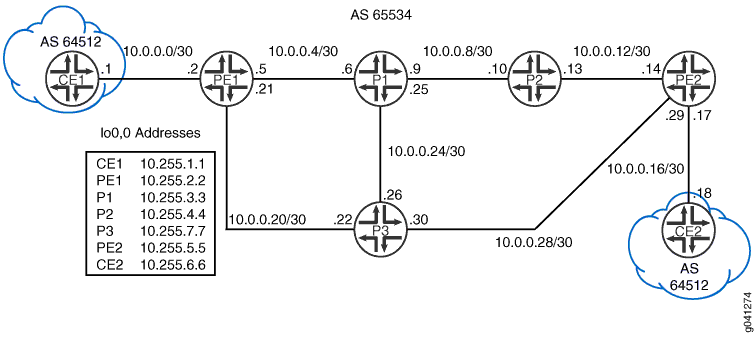
CLI 快速配置 显示了图 5 中所有设备的配置。分 步过程部分 介绍了设备 PE1 上的步骤。
拓扑结构
配置
过程
CLI 快速配置
要快速配置此示例,请复制以下命令,将其粘贴到文本文件中,删除所有换行符,更改详细信息,以便与网络配置匹配,然后将命令复制并粘贴到层次结构级别的 [edit] CLI 中。
设备 CE1
set interfaces ge-1/2/0 unit 0 family inet address 10.0.0.1/30
set interfaces ge-1/2/0 unit 0 family iso
set interfaces lo0 unit 0 family inet address 10.255.1.1/32
set interfaces lo0 unit 0 family iso address 49.0001.0010.0000.0101.00
set protocols bgp group PE type external
set protocols bgp group PE family inet unicast
set protocols bgp group PE export ToBGP
set protocols bgp group PE peer-as 65534
set protocols bgp group PE neighbor 10.0.0.2
set policy-options policy-statement ToBGP term Direct from protocol direct
set policy-options policy-statement ToBGP term Direct then accept
set routing-options router-id 10.255.1.1
set routing-options autonomous-system 64512
设备 P1
set interfaces ge-1/2/0 unit 0 family inet address 10.0.0.6/30
set interfaces ge-1/2/0 unit 0 family iso
set interfaces ge-1/2/0 unit 0 family mpls
set interfaces ge-1/2/1 unit 0 family inet address 10.0.0.9/30
set interfaces ge-1/2/1 unit 0 family iso
set interfaces ge-1/2/1 unit 0 family mpls
set interfaces ge-1/2/2 unit 0 family inet address 10.0.0.25/30
set interfaces ge-1/2/2 unit 0 family iso
set interfaces ge-1/2/2 unit 0 family mpls
set interfaces lo0 unit 0 family inet address 10.255.3.3/32
set interfaces lo0 unit 0 family iso address 49.0001.0010.0000.0303.00
set protocols mpls interface all
set protocols mpls interface fxp0.0 disable
set protocols bgp group l3vpn type internal
set protocols bgp group l3vpn local-address 10.255.3.3
set protocols bgp group l3vpn family inet-vpn unicast
set protocols bgp group l3vpn peer-as 65534
set protocols bgp group l3vpn local-as 65534
set protocols bgp group l3vpn neighbor 10.255.4.4
set protocols isis interface all level 2 metric 10
set protocols isis interface all level 1 disable
set protocols isis interface fxp0.0 disable
set protocols isis interface lo0.0 level 2 metric 0
set protocols ldp deaggregate
set protocols ldp interface all
set protocols ldp interface fxp0.0 disable
set routing-options router-id 10.255.3.3
设备 P2
set interfaces ge-1/2/0 unit 0 family inet address 10.0.0.10/30
set interfaces ge-1/2/0 unit 0 family iso
set interfaces ge-1/2/0 unit 0 family mpls
set interfaces ge-1/2/1 unit 0 family inet address 10.0.0.13/30
set interfaces ge-1/2/1 unit 0 family iso
set interfaces ge-1/2/1 unit 0 family mpls
set interfaces lo0 unit 0 family inet address 10.255.4.4/32
set interfaces lo0 unit 0 family iso address 49.0001.0010.0000.0404.00
set protocols mpls interface all
set protocols mpls interface fxp0.0 disable
set protocols bgp group Core-RRClients type internal
set protocols bgp group Core-RRClients local-address 10.255.4.4
set protocols bgp group Core-RRClients family inet-vpn unicast
set protocols bgp group Core-RRClients cluster 10.255.4.4
set protocols bgp group Core-RRClients peer-as 65534
set protocols bgp group Core-RRClients neighbor 10.255.3.3
set protocols bgp group Core-RRClients neighbor 10.255.7.7
set protocols bgp group Core-RRClients neighbor 10.255.2.2
set protocols bgp group Core-RRClients neighbor 10.255.5.5
set protocols isis interface all level 2 metric 10
set protocols isis interface all level 1 disable
set protocols isis interface fxp0.0 disable
set protocols isis interface lo0.0 level 2 metric 0
set protocols ldp deaggregate
set protocols ldp interface all
set protocols ldp interface fxp0.0 disable
set routing-options router-id 10.255.4.4
set routing-options autonomous-system 65534
设备 P3
set interfaces ge-1/2/0 unit 0 family inet address 10.0.0.22/30
set interfaces ge-1/2/0 unit 0 family iso
set interfaces ge-1/2/0 unit 0 family mpls
set interfaces ge-1/2/1 unit 0 family inet address 10.0.0.26/30
set interfaces ge-1/2/1 unit 0 family iso
set interfaces ge-1/2/1 unit 0 family mpls
set interfaces ge-1/2/2 unit 0 family inet address 10.0.0.30/30
set interfaces ge-1/2/2 unit 0 family iso
set interfaces ge-1/2/2 unit 0 family mpls
set interfaces lo0 unit 0 family inet address 10.255.7.7/32
set interfaces lo0 unit 0 family iso address 49.0001.0010.0000.0707.00
set protocols mpls interface all
set protocols mpls interface fxp0.0 disable
set protocols bgp group l3vpn type internal
set protocols bgp group l3vpn local-address 10.255.7.7
set protocols bgp group l3vpn family inet-vpn unicast
set protocols bgp group l3vpn peer-as 65534
set protocols bgp group l3vpn local-as 65534
set protocols bgp group l3vpn neighbor 10.255.4.4
set protocols isis interface all level 2 metric 10
set protocols isis interface all level 1 disable
set protocols isis interface fxp0.0 disable
set protocols isis interface lo0.0 level 2 metric 0
set protocols ldp deaggregate
set protocols ldp interface all
set protocols ldp interface fxp0.0 disable
set routing-options router-id 10.255.7.7
设备 PE1
set interfaces ge-1/2/0 unit 0 family inet address 10.0.0.2/30
set interfaces ge-1/2/0 unit 0 family iso
set interfaces ge-1/2/0 unit 0 family mpls
set interfaces ge-1/2/1 unit 0 family inet address 10.0.0.5/30
set interfaces ge-1/2/1 unit 0 family iso
set interfaces ge-1/2/1 unit 0 family mpls
set interfaces ge-1/2/2 unit 0 family inet address 10.0.0.21/30
set interfaces ge-1/2/2 unit 0 family iso
set interfaces ge-1/2/2 unit 0 family mpls
set interfaces lo0 unit 0 family inet address 10.255.2.2/32
set interfaces lo0 unit 0 family iso address 49.0001.0010.0000.0202.00
set protocols mpls interface ge-1/2/2.0
set protocols mpls interface ge-1/2/1.0
set protocols mpls interface lo0.0
set protocols mpls interface fxp0.0 disable
set protocols bgp group l3vpn type internal
set protocols bgp group l3vpn local-address 10.255.2.2
set protocols bgp group l3vpn family inet-vpn unicast
set protocols bgp group l3vpn peer-as 65534
set protocols bgp group l3vpn local-as 65534
set protocols bgp group l3vpn neighbor 10.255.4.4
set protocols isis interface ge-1/2/1.0 level 2 metric 10
set protocols isis interface ge-1/2/1.0 level 1 disable
set protocols isis interface ge-1/2/2.0 level 2 metric 10
set protocols isis interface ge-1/2/2.0 level 1 disable
set protocols isis interface fxp0.0 disable
set protocols isis interface lo0.0 level 2 metric 0
set protocols ldp deaggregate
set protocols ldp interface ge-1/2/1.0
set protocols ldp interface ge-1/2/2.0
set protocols ldp interface fxp0.0 disable
set protocols ldp interface lo0.0
set routing-instances VPN-A instance-type vrf
set routing-instances VPN-A interface ge-1/2/0.0
set routing-instances VPN-A route-distinguisher 65534:1234
set routing-instances VPN-A vrf-target target:65534:1234
set routing-instances VPN-A protocols bgp group CE type external
set routing-instances VPN-A protocols bgp group CE family inet unicast
set routing-instances VPN-A protocols bgp group CE neighbor 10.0.0.1 peer-as 64512
set routing-instances VPN-A protocols bgp group CE neighbor 10.0.0.1 as-override
set routing-options router-id 10.255.2.2
set routing-options autonomous-system 65534
设备 PE2
set interfaces ge-1/2/0 unit 0 family inet address 10.0.0.14/30
set interfaces ge-1/2/0 unit 0 family iso
set interfaces ge-1/2/0 unit 0 family mpls
set interfaces ge-1/2/1 unit 0 family inet address 10.0.0.17/30
set interfaces ge-1/2/1 unit 0 family iso
set interfaces ge-1/2/2 unit 0 family inet address 10.0.0.29/30
set interfaces ge-1/2/2 unit 0 family iso
set interfaces ge-1/2/2 unit 0 family mpls
set interfaces lo0 unit 0 family inet address 10.255.5.5/32
set interfaces lo0 unit 0 family iso address 49.0001.0010.0000.0505.00
set protocols mpls interface ge-1/2/0.0
set protocols mpls interface ge-1/2/2.0
set protocols mpls interface lo0.0
set protocols mpls interface fxp0.0 disable
set protocols bgp group l3vpn type internal
set protocols bgp group l3vpn local-address 10.255.5.5
set protocols bgp group l3vpn family inet-vpn unicast
set protocols bgp group l3vpn peer-as 65534
set protocols bgp group l3vpn local-as 65534
set protocols bgp group l3vpn neighbor 10.255.4.4
set protocols isis interface ge-1/2/0.0 level 2 metric 10
set protocols isis interface ge-1/2/0.0 level 1 disable
set protocols isis interface ge-1/2/2.0 level 2 metric 10
set protocols isis interface ge-1/2/2.0 level 1 disable
set protocols isis interface fxp0.0 disable
set protocols isis interface lo0.0 level 2 metric 0
set protocols ldp deaggregate
set protocols ldp interface ge-1/2/0.0
set protocols ldp interface ge-1/2/2.0
set protocols ldp interface fxp0.0 disable
set protocols ldp interface lo0.0
set routing-instances VPN-A instance-type vrf
set routing-instances VPN-A interface ge-1/2/1.0
set routing-instances VPN-A route-distinguisher 65534:1234
set routing-instances VPN-A vrf-target target:65534:1234
set routing-instances VPN-A protocols bgp group CE type external
set routing-instances VPN-A protocols bgp group CE family inet unicast
set routing-instances VPN-A protocols bgp group CE neighbor 10.0.0.18 peer-as 64512
set routing-instances VPN-A protocols bgp group CE neighbor 10.0.0.18 as-override
set routing-options router-id 10.255.5.5
set routing-options autonomous-system 65534
设备 CE2
set interfaces ge-1/2/0 unit 0 family inet address 10.0.0.18/30
set interfaces ge-1/2/0 unit 0 family iso
set interfaces lo0 unit 0 family inet address 10.255.6.6/32
set interfaces lo0 unit 0 family iso address 49.0001.0010.0000.0606.00
set protocols bgp group PE type external
set protocols bgp group PE family inet unicast
set protocols bgp group PE export ToBGP
set protocols bgp group PE peer-as 65534
set protocols bgp group PE neighbor 10.0.0.17
set policy-options policy-statement ToBGP term Direct from protocol direct
set policy-options policy-statement ToBGP term Direct then accept
set routing-options router-id 10.255.6.6
set routing-options autonomous-system 64512
分步程序
下面的示例要求您在各个配置层级中进行导航。有关导航 CLI 的信息,请参阅 《CLI 用户指南》中的在配置模式下使用 CLI 编辑器。
要配置 AS 覆盖:
-
配置接口。
要启用 MPLS,请在接口上包含协议家族,以便接口不会丢弃传入的 MPLS 流量。
[edit interfaces]
user@PE1# set ge-1/2/0 unit 0 family inet address 10.0.0.2/30
user@PE1# set ge-1/2/0 unit 0 family iso
user@PE1# set ge-1/2/0 unit 0 family mpls
user@PE1# set ge-1/2/1 unit 0 family inet address 10.0.0.5/30
user@PE1# set ge-1/2/1 unit 0 family iso
user@PE1# set ge-1/2/1 unit 0 family mpls
user@PE1# set ge-1/2/2 unit 0 family inet address 10.0.0.21/30
user@PE1# set ge-1/2/2 unit 0 family iso
user@PE1# set ge-1/2/2 unit 0 family mpls
user@PE1# set lo0 unit 0 family inet address 10.255.2.2/32
user@PE1# set lo0 unit 0 family iso address 49.0001.0010.0000.0202.00
-
将接口添加到 MPLS 协议以建立控制平面级别的连接。
设置 IGP,以便提供商设备可以相互通信。
要建立分发 MPLS 标签的机制,请启用 LDP。或者,对于 LDP,启用转发等效类 (FEC) 解聚,从而实现更快的全局融合。
[edit protocols]
user@PE1# set mpls interface ge-1/2/2.0
user@PE1# set mpls interface ge-1/2/1.0
user@PE1# set mpls interface lo0.0
user@PE1# set mpls interface fxp0.0 disable
user@PE1# set isis interface ge-1/2/1.0 level 2 metric 10
user@PE1# set isis interface ge-1/2/1.0 level 1 disable
user@PE1# set isis interface ge-1/2/2.0 level 2 metric 10
user@PE1# set isis interface ge-1/2/2.0 level 1 disable
user@PE1# set isis interface fxp0.0 disable
user@PE1# set isis interface lo0.0 level 2 metric 0
user@PE1# set ldp deaggregate
user@PE1# set ldp interface ge-1/2/1.0
user@PE1# set ldp interface ge-1/2/2.0
user@PE1# set ldp interface fxp0.0 disable
user@PE1# set ldp interface lo0.0
-
启用内部 BGP (IBGP) 连接,仅使用 IPv4 VPN 单播地址族与 RR 对等。
[edit protocols bgp group l3vpn]
user@PE1# set type internal
user@PE1# set local-address 10.255.2.2
user@PE1# set family inet-vpn unicast
user@PE1# set peer-as 65534
user@PE1# set local-as 65534
user@PE1# set neighbor 10.255.4.4
-
配置路由实例,包括
as-override语句。在 PE 设备上创建路由实例 (VRF),将 BGP 配置设置为与设备 CE1 对等。
[edit routing-instances VPN-A]
user@PE1# set instance-type vrf
user@PE1# set interface ge-1/2/0.0
user@PE1# set route-distinguisher 65534:1234
user@PE1# set vrf-target target:65534:1234
user@PE1# set protocols bgp group CE type external
user@PE1# set protocols bgp group CE family inet unicast
user@PE1# set protocols bgp group CE neighbor 10.0.0.1 peer-as 64512
user@PE1# set protocols bgp group CE neighbor 10.0.0.1 as-override
-
配置路由器 ID 和 AS 编号。
[edit routing-options]
user@PE1# set router-id 10.255.2.2
user@PE1# set autonomous-system 65534
结果
在配置模式下,输入 show interfaces、 show protocols、 show routing-instances和 show routing-options 命令以确认您的配置。如果输出未显示预期的配置,请重复此示例中的配置说明进行更正。
user@PE1# show interfaces
ge-1/2/0 {
    unit 2 {
        family inet {
            address 10.0.0.2/30;
        }
        family iso;
        family mpls;
    }
}
ge-1/2/1 {
    unit 5 {
        family inet {
            address 10.0.0.5/30;
        }
        family iso;
        family mpls;
    }
}
ge-1/2/2 {
    unit 21 {
        family inet {
            address 10.0.0.21/30;
        }
        family iso;
        family mpls;
    }
}
lo0 {
    unit 0 {
        family inet {
            address 10.255.2.2/32;
        }
        family iso {
            address 49.0001.0010.0000.0202.00;
        }
    }
}
user@PE1# show protocols
mpls {
    interface ge-1/2/2.0;
    interface ge-1/2/1.0;
    interface lo0.0;
    interface fxp0.0 {
        disable;
    }
}
bgp {
    group l3vpn {
        type internal;
        local-address 10.255.2.2;
        family inet-vpn {
            unicast;
        }
        peer-as 65534;
        local-as 65534;
        neighbor 10.255.4.4;
    }
}
isis {
    interface ge-1/2/1.0 {
        level 2 metric 10;
        level 1 disable;
    }
    interface ge-1/2/2.0 {
        level 2 metric 10;
        level 1 disable;
    }
    interface fxp0.0 {
        disable;
    }
    interface lo0.0 {
        level 2 metric 0;
    }
}
ldp {
    deaggregate;
    interface ge-1/2/1.0;
    interface ge-1/2/2.0;
    interface fxp0.0 {
        disable;
    }
    interface lo0.0;
}
user@PE1# show routing-instances
VPN-A {
    instance-type vrf;
    interface ge-1/2/0.0;
    route-distinguisher 65534:1234;
    vrf-target target:65534:1234;
    protocols {
        bgp {
            group CE {
                type external;
                family inet {
                    unicast;
                }
                neighbor 10.0.0.1 {
                    peer-as 64512;
                    as-override;
                }
            }
        }
    }
}
user@PE1# show routing-options
router-id 10.255.2.2;
autonomous-system 65534;
如果完成设备配置,请从配置模式进入。commit
验证
确认配置工作正常。
检查到客户边缘设备的 AS 路径
目的
在设备 PE1 上显示有关至设备 CE2 环路接口路由的 AS 路径属性的信息。
行动
在设备 PE1 上,在操作模式下,输入 show route table VPN-A.inet.0 10.255.6.6 命令。
user@PE1> show route table VPN-A.inet.0 10.255.6.6


VPN-A.inet.0: 5 destinations, 6 routes (5 active, 0 holddown, 0 hidden)
+ = Active Route, - = Last Active, * = Both

10.255.6.6/32      *[BGP/170] 02:19:35, localpref 100, from 10.255.4.4
                      AS path: 64512 I, validation-state: unverified
                    > to 10.0.0.22 via ge-1/2/2.0, Push 300032, Push 299776(top)
意义
输出显示设备 PE1 具有来自AS 64512 的 10.255.6.6/32 AS路径。
检查到设备 CE2 的路由如何播发
目的
确保将到设备 CE2 的路由播发至设备 CE1,就好像它来自 MPLS 核心一样。
行动
在设备 PE1 上,在操作模式下,输入 show route advertising-protocol bgp 10.0.0.1 命令。
user@PE1> show route advertising-protocol bgp 10.0.0.1

VPN-A.inet.0: 5 destinations, 6 routes (5 active, 0 holddown, 0 hidden)
  Prefix                  Nexthop              MED     Lclpref    AS path
* 10.0.0.16/30            Self                                    I
* 10.255.1.1/32           10.0.0.1                                65534 I
* 10.255.6.6/32           Self                                    65534 I
意义
输出指示设备 PE1 在AS路径中仅播发自己的AS号。
检查设备 CE1 上的路由
目的
确保设备 CE1 在到设备 CE2 的路由的 AS 路径中仅包含提供商 AS 编号。
行动
在操作模式下,输入命令 show route table inet.0 terse 10.255.6.6 。
user@CE1> show route table inet.0 terse 10.255.6.6

inet.0: 5 destinations, 6 routes (5 active, 0 holddown, 1 hidden)
+ = Active Route, - = Last Active, * = Both

A V Destination        P Prf   Metric 1   Metric 2  Next hop        AS path
* ? 10.255.6.6/32      B 170        100                             65534 65534 I
  unverified                                       >10.0.0.2
意义
输出指示设备 CE1 具有到设备 CE2 的路由。使用语句可以 as-override 解决循环问题。
一个路由在客户边缘设备上隐藏。这是因为 Junos OS 不执行 BGP 水平分割。通常,BGP 中的水平分割是不必要的,因为由于 AS 路径长度(对于 EBGP)、AS 路径环路检测 (IBGP) 或其他 BGP 指标,发起方可能接收回的任何路由都不太受欢迎。将路由播发到从中获知路由的邻接方对路由器的性能影响可以忽略不计,这是正确的做法。
示例:启用 BGP 路由通告
Junos OS 不会将从一个 EBGP 对等方获知的路由播发至同一外部 BGP (EBGP) 对等方。此外,无论路由实例如何,软件都不会将这些路由播发至与始发对等方相同的自治系统 (AS) 中的任何 EBGP 对等方。您可以通过在配置中包含 advertise-peer-as 语句来修改此行为。
如果在配置中包含该 advertise-peer-as 语句,则无论此检查如何,BGP 都会播发路由。
要恢复默认行为,请在配置中包含该 no-advertise-peer-as 语句:
no-advertise-peer-as;
如果配置中包含该语句,则as-override路由抑制默认行为将被禁用。如果在配置中同时包含 and no-advertise-peer-as 语 as-override 句,则会忽略该no-advertise-peer-as语句。
要求
配置此示例之前,不需要除设备初始化之外的特殊配置。
此示例在 Junos 21.2R1 版上进行了更新和重新验证。
概述
此示例显示了三个具有外部 BGP (EBGP) 连接的路由设备。设备 R2 有一个到设备 R1 的 EBGP 连接,另一个到设备 R3 的 EBGP 连接。尽管被位于 AS 64511 中的设备 R2 分隔,但设备 R1 和设备 R3 在同一 AS (AS 64512) 中。设备 R1 和设备 R3 播发到各自环路接口地址的 BGP 直接路由中。
设备 R2 接收这些环路接口路由,该 advertise peer-as 语句允许设备 R2 播发这些路由。具体而言,设备 R1 将 192.168.0.1 路由发送至设备 R2,由于设备 R2 已配置, advertise peer-as 设备 R2 可以将 192.168.0.1 路由发送至设备 R3。同样,设备 R3 会将 192.168.0.3 路由发送到设备 R2,并 advertise peer-as 使设备 R2 能够将路由转发至设备 R1。
要让设备 R1 和设备 R3 接受在 AS 路径中包含其 AS 编号的路由,需要对设备 R1 和设备 R3 使用该 loops 2 语句。
拓扑结构
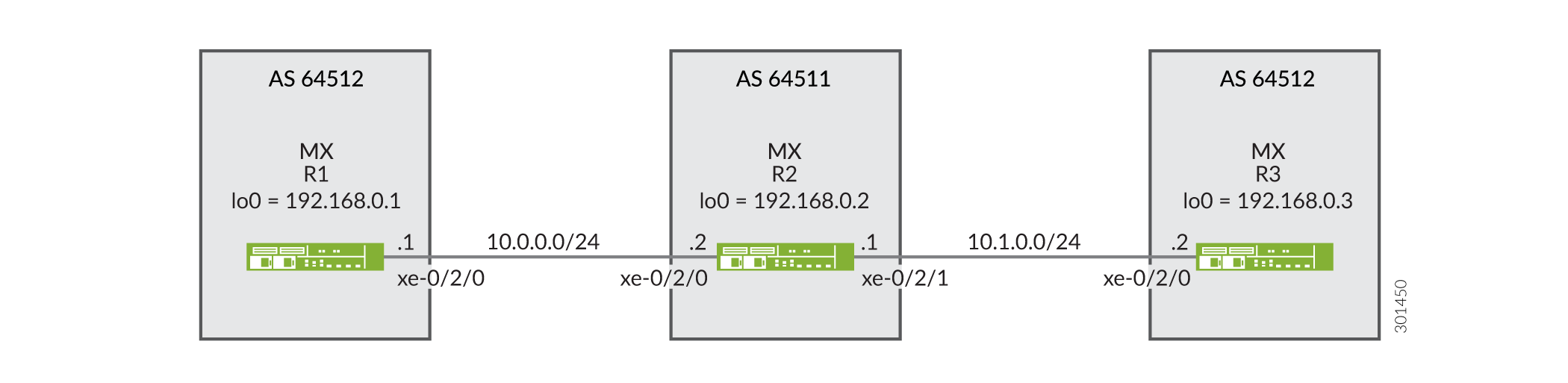 的 BGP 拓扑
配置
CLI 快速配置
要快速配置此示例,请复制以下命令,将其粘贴到文本文件中,删除所有换行符,更改详细信息,以便与网络配置匹配,然后将命令复制并粘贴到层次结构级别的 [edit] CLI 中。
设备 R1
set interfaces xe-0/2/0 description R1-to-R2
set interfaces xe-0/2/0 unit 0 family inet address 10.0.0.1/30
set interfaces lo0 unit 0 family inet address 192.168.0.1/32
set protocols bgp family inet unicast loops 2
set protocols bgp group ext type external
set protocols bgp group ext export send-direct
set protocols bgp group ext peer-as 64511
set protocols bgp group ext neighbor 10.0.0.2
set policy-options policy-statement send-direct term 1 from protocol direct
set policy-options policy-statement send-direct term 1 then accept
set routing-options autonomous-system 64512
设备 R2
set interfaces xe-0/2/0 description R2-to-R1
set interfaces xe-0/2/0 unit 0 family inet address 10.0.0.2/30
set interfaces xe-0/2/1 description R2-to-R3
set interfaces xe-0/2/1 unit 0 family inet address 10.1.0.1/30
set interfaces lo0 unit 0 family inet address 192.168.0.2/32
set protocols bgp group ext type external
set protocols bgp group ext advertise-peer-as
set protocols bgp group ext export send-direct
set protocols bgp group ext neighbor 10.0.0.1 peer-as 64512
set protocols bgp group ext neighbor 10.1.0.2 peer-as 64512
set policy-options policy-statement send-direct term 1 from protocol direct
set policy-options policy-statement send-direct term 1 then accept
set routing-options autonomous-system 64511
设备 R3
set interfaces xe-0/2/0 description R3-to-R2
set interfaces xe-0/2/0 unit 0 family inet address 10.1.0.2/30
set interfaces lo0 unit 0 family inet address 192.168.0.3/32
set protocols bgp family inet unicast loops 2
set protocols bgp group ext type external
set protocols bgp group ext export send-direct
set protocols bgp group ext peer-as 64511
set protocols bgp group ext neighbor 10.1.0.1
set policy-options policy-statement send-direct term 1 from protocol direct
set policy-options policy-statement send-direct term 1 then accept
set routing-options autonomous-system 64512
过程
分步程序
下面的示例要求您在各个配置层级中进行导航。有关导航CLI的信息,请参阅《Junos OS CLI 用户指南》中的在配置模式下使用CLI编辑器。
要配置设备 R1:
-
配置设备接口。
[edit interfaces]
user@R1# set xe-0/2/0 description R1-to-R2
user@R1# set xe-0/2/0 unit 0 family inet address 10.0.0.1/30
user@R1# set lo0 unit 0 family inet address 192.168.0.1/32
-
配置 BGP。
[edit protocols bgp group ext]
user@R1# set type external
user@R1# set peer-as 64511
user@R1# set neighbor 10.0.0.2
-
通过包含
loops 2语句,防止设备 R3 的路由在设备 R1 上隐藏。该
loops 2语句意味着,本地设备自己的 AS 编号最多可在 AS 路径中出现一次才不会导致路由被隐藏。如果在路径中检测到本地设备的 AS 编号两次或以上,路由将被隐藏。[edit protocols bgp family inet unicast] user@R1# set loops 2
-
配置发送直接路由的路由策略。
[edit policy-options policy-statement send-direct term 1]
user@R1# set from protocol direct
user@R1# set then accept
-
将导出策略应用于与设备 R2 的 BGP 对等会话。
[edit protocols bgp group ext]
user@R1# set export send-direct
-
配置自治系统 (AS) 编号。
[edit routing-options ]
user@R1# set autonomous-system 64512
分步程序
要配置设备 R2:
-
配置设备接口。
[edit interfaces]
user@R2# set xe-0/2/0 description R2-to-R1
user@R2# set xe-0/2/0 unit 0 family inet address 10.0.0.2/30
user@R2# set xe-0/2/1 description R2-to-R3
user@R2# set xe-0/2/1 unit 0 family inet address 10.1.0.1/30
user@R2# set lo0 unit 0 family inet address 192.168.0.2/32
-
配置 BGP。
[edit  protocols bgp group ext]
user@R2# set type external
user@R2# set neighbor 10.0.0.1 peer-as 64512
user@R2# set neighbor 10.1.0.2 peer-as 64512
-
配置设备 R2,以从一个 EBGP 对等方获知的路由播发至同一 AS 中的另一个 EBGP 对等方。
换句话说,播发至从设备 R3 获知的设备 R1 路由(反之亦然),即使设备 R1 和设备 R3 在同一 AS 中。
[edit  protocols bgp group ext]
user@R2# set advertise-peer-as
-
配置发送直接路由的路由策略。
[edit policy-options policy-statement send-direct term 1]
user@R2# set from protocol direct
user@R2# set then accept
-
应用导出策略。
[edit protocols bgp group ext]
user@R2# set export send-direct
-
配置 AS 编号。
[edit routing-options]
user@R2# set autonomous-system 64511
结果
在配置模式下,输入 show interfaces、 show protocols、 show policy-options和 show routing-options 命令以确认您的配置。如果输出未显示预期的配置,请重复此示例中的说明以更正配置。
设备 R1
user@R1# show interfaces
xe-0/2/0 {
    description R1-to-R2;
    unit 0 {
        family inet {
            address 10.0.0.1/30;
        }
    }
}
lo0 {
    unit 0 {
        family inet {
            address 192.168.0.1/32;
        }
    }
}
user@R1# show protocols
bgp {
    family inet {
        unicast {
            loops 2;
        }
    }
    group ext {
        type external;
        export send-direct;
        peer-as 64511;
        neighbor 10.0.0.2;
    }
}
user@R1# show policy-options
policy-statement send-direct {
    term 1 {
        from protocol direct;
        then accept;
    }
}
user@R1# show routing-options
autonomous-system 64512;
设备 R2
user@R2# show interfaces
xe-0/2/0 {
    description R2-to-R1;
    unit 0 {
        family inet {
            address 10.0.0.2/30;
        }
    }
}
xe-0/2/1 {
    description R2-to-R3;
    unit 0 {
        family inet {
            address 10.1.0.1/30;
        }
    }
}
lo0 {
    unit 0 {
        family inet {
            address 192.168.0.2/32;
        }
    }
}
user@R2# show protocols
bgp {
    group ext {
        type external;
        advertise-peer-as;
        export send-direct;
        neighbor 10.0.0.1 {
            peer-as 64512;
        }
        neighbor 10.1.0.2 {
            peer-as 64512;
        }
    }
}
user@R2# show policy-options
policy-statement send-direct {
    term 1 {
        from protocol direct;
        then accept;
    }
}
user@R2# show routing-options
autonomous-system 64511;
如果完成设备配置,请从配置模式进入。commit
验证
确认配置工作正常。
验证 BGP 路由
目的
确保设备 R1 和设备 R3 上的路由表包含预期的路由。
行动
-
在设备 R2 上,停用
advertise-peer-asBGP 配置中的语句。[edit protocols bgp group ext] user@R2# deactivate advertise-peer-as user@R2# commit
-
在设备 R3 上,停用
loopsBGP 配置中的语句。[edit protocols bgp family inet unicast ] user@R3# deactivate unicast loops user@R3# commit
-
在设备 R1 上,检查向设备 R2 播发了哪些路由。
user@R1> show route advertising-protocol bgp 10.0.0.2
inet.0: 5 destinations, 6 routes (5 active, 0 holddown, 0 hidden)
  Prefix                  Nexthop              MED     Lclpref    AS path
* 10.0.0.0/30             Self                                    I
* 192.168.0.1/32          Self                                    I
-
在设备 R2 上,检查从设备 R1 接收了哪些路由。
user@R2> show route receive-protocol bgp 10.0.0.1
inet.0: 7 destinations, 9 routes (7 active, 0 holddown, 0 hidden)
  Prefix                  Nexthop              MED     Lclpref    AS path
  10.0.0.0/30             10.0.0.1                                64512 I
* 192.168.0.1/32          10.0.0.1                                64512 I
-
在设备 R2 上,检查向设备 R3 播发了哪些路由。
user@R2> show route advertising-protocol bgp 10.1.0.2
inet.0: 7 destinations, 9 routes (7 active, 0 holddown, 0 hidden)
  Prefix                  Nexthop              MED     Lclpref    AS path
* 10.0.0.0/30             Self                                    I
* 10.1.0.0/30             Self                                    I
* 192.168.0.2/32          Self                                    I
-
在设备 R2 上,激活
advertise-peer-asBGP 配置中的语句。[edit protocols bgp group ext] user@R2# activate advertise-peer-as user@R2# commit
-
在设备 R2 上,重新检查向设备 R3 播发的路由。
user@R2> show route advertising-protocol bgp 10.1.0.2
inet.0: 7 destinations, 9 routes (7 active, 0 holddown, 0 hidden)
  Prefix                  Nexthop              MED     Lclpref    AS path
* 10.0.0.0/30             Self                                    I
* 10.1.0.0/30             Self                                    I
* 192.168.0.1/32          Self             64512 I
* 192.168.0.2/32          Self                                    I
* 192.168.0.3/32          10.1.0.2         64512 I
-
在设备 R3 上,检查从设备 R2 接收的路由。
user@R3> show route receive-protocol bgp 10.1.0.1
inet.0: 5 destinations, 6 routes (5 active, 0 holddown, 0 hidden)
  Prefix                  Nexthop              MED     Lclpref    AS path
* 10.0.0.0/30             10.1.0.1                                64511 I
  10.1.0.0/30             10.1.0.1                                64511 I
* 192.168.0.2/32          10.1.0.1                                64511 I
-
在设备 R3 上,激活
loopsBGP 配置中的语句。[edit protocols bgp family inet unicast ] user@R3# activate unicast loops user@R3# commit
-
在设备 R3 上,重新检查从设备 R2 接收的路由。
user@R3> show route receive-protocol bgp 10.1.0.1 inet.0: 6 destinations, 8 routes (6 active, 0 holddown, 1 hidden) Prefix Nexthop MED Lclpref AS path * 10.0.0.0/30 10.1.0.1 64511 I 10.1.0.0/30 10.1.0.1 64511 I * 192.168.0.1/32 10.1.0.1 64511 64512 I * 192.168.0.2/32 10.1.0.1 64511 I
意义
首先 advertise-peer-as ,停用语句和 loops 语句,以便检查默认行为。设备 R1 向设备 R2 发送到设备 R1 的环路接口地址 192.168.0.1/32 的路由。设备 R2 不会将此路由播发至设备 R3。激活语 advertise-peer-as 句后,设备 R2 会将 192.168.0.1/32 路由播发至设备 R3。设备 R3 在激活语句之前 loops 不接受此路由。
禁用独立 AS 域的属性集消息,以便进行 BGP 环路检测
特定路由的 BGP 环路检测会将本地自治系统 (AS) 域用于路由实例。默认情况下,所有路由实例都属于在全局层次结构 routing-options下配置的单个主路由实例域。因此,BGP 环路检测使用所有路由实例上配置的本地 AS。根据您的网络配置,此默认行为可能会导致路由被循环和隐藏。为简洁起见,我们将“本地 AS”称为特定路由实例的 AS,将“全局 AS”称为全局配置或主路由实例。
要限制主路由实例中的本地 AS,可以为路由实例配置独立 AS 域。独立域独立于主路由实例,可防止独立域的 AS 路径与其他域的 AS 路径和 AS 路径属性共享。
默认情况下,独立域使用传递路径属性 128(属性集)消息通过内部 BGP (IBGP) 核心隧道传输独立域的 BGP 属性。但是,在许多情况下,独立域的属性集消息行为是不需要的。如果您只想配置独立域来保持路由实例中本地 AS 的独立性,并且仅对路由实例中指定的本地 AS 执行 BGP 环路检测,则可以禁用属性集消息。
要在独立域上禁用属性集消息,请包含以下 independent-domain no-attrset 语句:
为独立域指定路由实例后,本地 AS 只会与该路由实例相关联。这意味着 BGP 环路检测仅使用路由实例中定义的本地 AS。
也可以看看
示例:选择最佳路径时忽略 AS 路径属性
如果存在到同一目标的多个 BGP 路由,则 BGP 会根据路径的路由属性选择最佳路径。影响最佳路径决策的路由属性之一是每个路由的 AS 路径长度。AS 路径更短的路由优先于 AS 路径更长的路由。尽管通常不实用,某些情景可能要求在路由选择过程中忽略 AS 路径长度。此示例说明了如何配置路由设备以忽略 AS 路径属性。
要求
配置此示例之前,不需要除设备初始化之外的特殊配置。
概述
在外部连接的路由设备上,跳过 AS 路径比较的目的可能是强制外部 BGP (EBGP) 与内部 BGP (IBGP) 决策尽快从网络中移除流量。在内部连接的路由设备上,您可能希望仅支持 IBGP 的路由器默认使用本地外部连接的网关。仅支持 IBGP 的本地(内部)路由器会跳过 AS 路径比较,并在决策树中向下移动,以使用最近的内部网关协议 (IGP) 网关(最低 IGP 指标)。这样做可能是强制这些路由器使用 LAN 连接而不是其 WAN 连接的有效方法。
在网络中的路由设备上添加该 as-path-ignore 语句时,您可能需要将其包含在网络中所有其他支持 BGP 的设备上,以防止路由环路和融合问题。对于 IBGP 路径比较尤其如此。
在此示例中,设备 R2 正在从设备 R1 和设备 R3 学习设备 R4 (10.4.4.4/32) 上的环路接口地址。设备 R1 播发 10.4.4.4/32,AS 路径为 65001 65005 65004,设备 R3 播发 10.4.4.4/32,AS 路径为 65003 65004。设备 R2 选择设备 R3 中的 10.4.4.4/32 路径作为最佳路径,因为 AS 路径比设备 R1 的 AS 路径短。
此示例修改设备 R2 上的 BGP 配置,以便在最佳路径选择中不使用 AS 路径长度。
设备 R1 的路由器 ID (10.1.1.1) 低于设备 R3 (10.3.3.3)。如果所有其他路径选择标准都相等(或如本例中忽略),则使用从设备 R1 获知的路由。由于 AS 路径属性会被忽略,因此最佳路径是指向设备 R1,因为它的路由器 ID 值较低。
图 7 显示了示例拓扑。
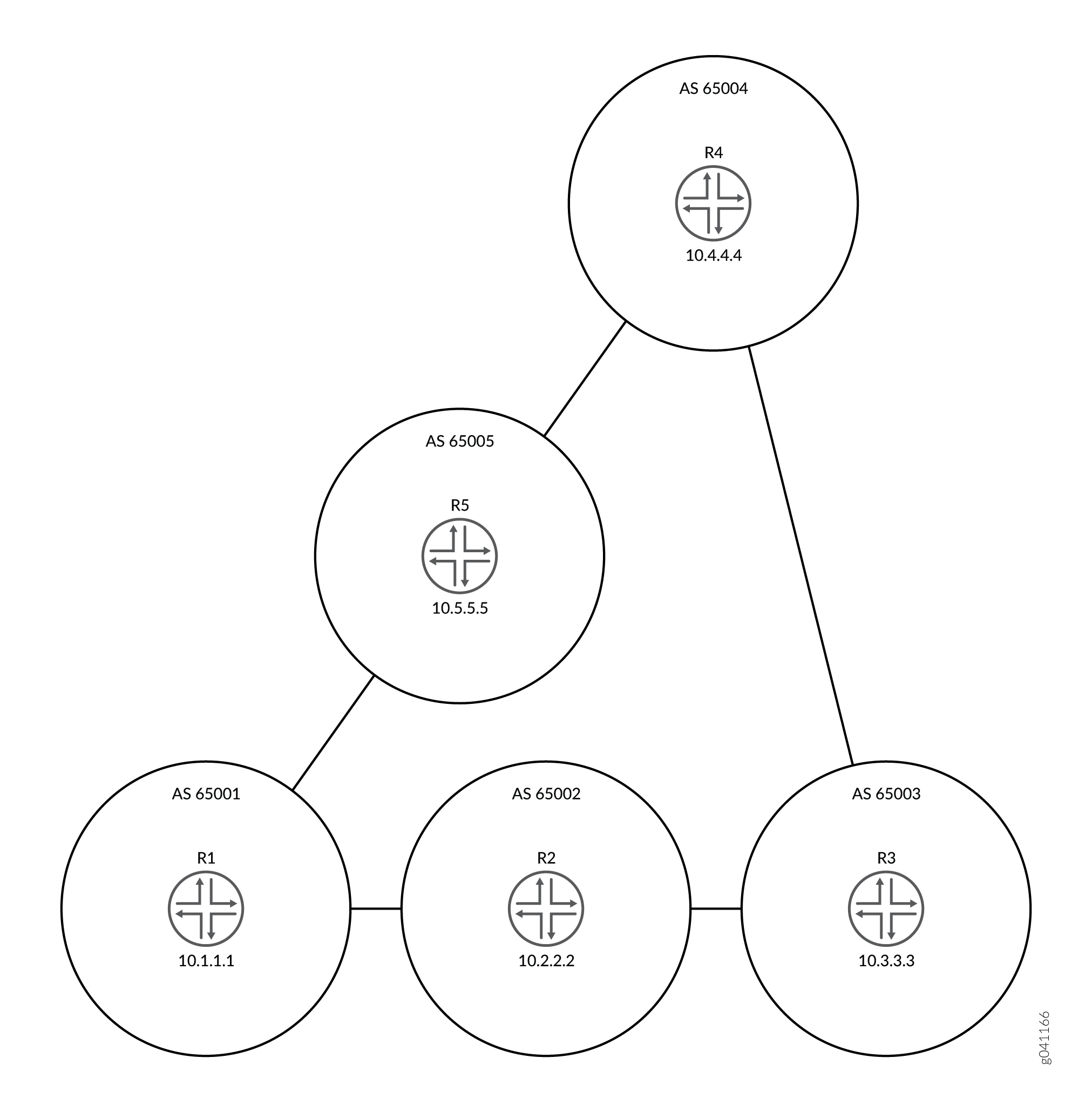 的拓扑
的拓扑
配置
CLI 快速配置
要快速配置此示例,请复制以下命令,将其粘贴到文本文件中,删除所有换行符,更改详细信息,以便与网络配置匹配,然后将命令复制并粘贴到层次结构级别的 [edit] CLI 中。
设备 R1
set interfaces fe-1/2/0 unit 1 family inet address 192.168.10.1/24 set interfaces fe-1/2/1 unit 10 family inet address 192.168.50.2/24 set interfaces lo0 unit 1 family inet address 10.1.1.1/32 set protocols bgp group ext type external set protocols bgp group ext export send-direct set protocols bgp group ext export send-static set protocols bgp group ext export send-local set protocols bgp group ext neighbor 192.168.10.2 peer-as 65002set protocols bgp group ext neighbor 192.168.50.1 peer-as 65005 set policy-options policy-statement send-direct term 1 from protocol direct set policy-options policy-statement send-direct term 1 then accept set policy-options policy-statement send-local term 1 from protocol local set policy-options policy-statement send-local term 1 then accept set policy-options policy-statement send-static term 1 from protocol static set policy-options policy-statement send-static term 1 then accept set routing-options static route 192.168.20.0/24 next-hop 192.168.10.2 set routing-options static route 192.168.30.0/24 next-hop 192.168.10.2 set routing-options static route 192.168.40.0/24 next-hop 192.168.50.1 set routing-options router-id 10.1.1.1 set routing-options autonomous-system 65001
设备 R2
set interfaces fe-1/2/0 unit 2 family inet address 192.168.10.2/24 set interfaces fe-1/2/1 unit 3 family inet address 192.168.20.2/24 set interfaces lo0 unit 2 family inet address 10.2.2.2/32 set protocols bgp path-selection as-path-ignore set protocols bgp group ext type external set protocols bgp group ext export send-direct set protocols bgp group ext export send-static set protocols bgp group ext export send-local set protocols bgp group ext neighbor 192.168.10.1 peer-as 65001 set protocols bgp group ext neighbor 192.168.20.1 peer-as 65003 set policy-options policy-statement send-direct term 1 from protocol direct set policy-options policy-statement send-direct term 1 then accept set policy-options policy-statement send-local term 1 from protocol local set policy-options policy-statement send-local term 1 then accept set policy-options policy-statement send-static term 1 from protocol static set policy-options policy-statement send-static term 1 then accept set routing-options static route 192.168.50.0/24 next-hop 192.168.10.1 set routing-options static route 192.168.40.0/24 next-hop 192.168.10.1 set routing-options static route 192.168.30.0/24 next-hop 192.168.20.1 set routing-options router-id 10.2.2.2 set routing-options autonomous-system 65002
设备 R3
set interfaces fe-1/2/0 unit 4 family inet address 192.168.20.1/24 set interfaces fe-1/2/1 unit 5 family inet address 192.168.30.1/24 set interfaces lo0 unit 3 family inet address 10.3.3.3/32 set protocols bgp group ext type external set protocols bgp group ext export send-direct set protocols bgp group ext export send-static set protocols bgp group ext export send-local set protocols bgp group ext neighbor 192.168.20.2 peer-as 65002 set protocols bgp group ext neighbor 192.168.30.2 peer-as 65004 set policy-options policy-statement send-direct term 1 from protocol direct set policy-options policy-statement send-direct term 1 then accept set policy-options policy-statement send-local term 1 from protocol local set policy-options policy-statement send-local term 1 then accept set policy-options policy-statement send-static term 1 from protocol static set policy-options policy-statement send-static term 1 then accept set routing-options static route 192.168.10.0/24 next-hop 192.168.20.2 set routing-options static route 192.168.50.0/24 next-hop 192.168.20.2 set routing-options static route 192.168.40.0/24 next-hop 192.168.30.2 set routing-options router-id 10.3.3.3 set routing-options autonomous-system 65003
设备 R4
set interfaces fe-1/2/0 unit 6 family inet address 192.168.30.2/24
set interfaces fe-1/2/1 unit 7 family inet address 192.168.40.1/24
set interfaces lo0 unit 4 family inet address 10.4.4.4/32
set protocols bgp group ext type external
set protocols bgp group ext export send-direct
set protocols bgp group ext export send-static
set protocols bgp group ext export send-local
set protocols bgp group ext neighbor 192.168.30.1 peer-as 65003
set protocols bgp group ext neighbor 192.168.40.2 peer-as 65005
set policy-options policy-statement send-direct term 1 from protocol direct
set policy-options policy-statement send-direct term 1 then accept
set policy-options policy-statement send-local term 1 from protocol local
set policy-options policy-statement send-local term 1 then accept
set policy-options policy-statement send-static term 1 from protocol static
set policy-options policy-statement send-static term 1 then accept
set routing-options static route 192.168.10.0/24 next-hop 192.168.40.2
set routing-options static route 192.168.50.0/24 next-hop 192.168.40.2
set routing-options static route 192.168.40.0/24 next-hop 192.168.30.1
set routing-options router-id 10.4.4.4
set routing-options autonomous-system 65004
设备 R5
set interfaces fe-1/2/0 unit 8 family inet address 192.168.40.2/24 set interfaces fe-1/2/1 unit 9 family inet address 192.168.50.1/24 set interfaces lo0 unit 5 family inet address 10.5.5.5/32 set protocols bgp group ext type external set protocols bgp group ext export send-direct set protocols bgp group ext export send-static set protocols bgp group ext export send-local set protocols bgp group ext neighbor 192.168.40.1 peer-as 65004 set protocols bgp group ext neighbor 192.168.50.2 peer-as 65001 set policy-options policy-statement send-direct term 1 from protocol direct set policy-options policy-statement send-direct term 1 then accept set policy-options policy-statement send-local term 1 from protocol local set policy-options policy-statement send-local term 1 then accept set policy-options policy-statement send-static term 1 from protocol static set policy-options policy-statement send-static term 1 then accept set routing-options static route 192.168.10.0/24 next-hop 192.168.50.2 set routing-options static route 192.168.20.0/24 next-hop 192.168.50.2 set routing-options static route 192.168.30.0/24 next-hop 192.168.40.1 set routing-options router-id 10.5.5.5 set routing-options autonomous-system 65005
配置设备 R2
分步程序
下面的示例要求您在各个配置层级中进行导航。有关导航CLI的信息,请参阅《Junos OS CLI 用户指南》中的在配置模式下使用CLI编辑器。
要配置设备 R2:
-
配置接口。
[edit interfaces] user@R2# set fe-1/2/0 unit 2 family inet address 192.168.10.2/24 user@R2# set fe-1/2/1 unit 3 family inet address 192.168.20.2/24 user@R2# set lo0 unit 2 family inet address 10.2.2.2/32
-
配置 EBGP。
[edit protocols bgp group ext] user@R2# set type external user@R2# set export send-direct user@R2# set export send-static user@R2# set export send-local user@R2# set neighbor 192.168.10.1 peer-as 65001 user@R2# set neighbor 192.168.20.1 peer-as 65003
-
配置在Junos OS路径选择算法中要忽略的自治系统 (AS) 路径属性。
[edit protocols bgp] user@R2# set path-selection as-path-ignore
-
配置路由策略。
[edit policy-options] user@R2# set policy-statement send-direct term 1 from protocol direct user@R2# set policy-statement send-direct term 1 then accept user@R2# set policy-statement send-local term 1 from protocol local user@R2# set policy-statement send-local term 1 then accept user@R2# set policy-statement send-static term 1 from protocol static user@R2# set policy-statement send-static term 1 then accept
-
配置一些静态路由。
[edit routing-options static] user@R2# set route 192.168.50.0/24 next-hop 192.168.10.1 user@R2# set route 192.168.40.0/24 next-hop 192.168.10.1 user@R2# set route 192.168.30.0/24 next-hop 192.168.20.1
-
配置自治系统 (AS) 编号和路由器 ID。
[edit routing-options] user@R2# set router-id 10.2.2.2 user@R2# set autonomous-system 65002
结果
在配置模式下,输入 show interfaces、 show policy-options、 show protocols和 show routing-options 命令以确认您的配置。如果输出未显示预期的配置,请重复此示例中的说明以更正配置。
user@R2# show interfaces
fe-1/2/0 {
unit 2 {
family inet {
address 192.168.10.2/24;
}
}
}
fe-1/2/1 {
unit 3 {
family inet {
address 192.168.20.2/24;
}
}
}
lo0 {
unit 2 {
family inet {
address 10.2.2.2/32;
}
}
}
user@R2# show policy-options
policy-statement send-direct {
term 1 {
from protocol direct;
then accept;
}
}
policy-statement send-local {
term 1 {
from protocol local;
then accept;
}
}
policy-statement send-static {
term 1 {
from protocol static;
then accept;
}
}
user@R2# show protocols
bgp {
path-selection as-path-ignore;
group ext {
type external;
export [ send-direct send-static send-local ];
neighbor 192.168.10.1 {
peer-as 65001;
}
neighbor 192.168.20.1 {
peer-as 65003;
}
}
}
user@R2# show routing-options
static {
route 192.168.50.0/24 next-hop 192.168.10.1;
route 192.168.40.0/24 next-hop 192.168.10.1;
route 192.168.30.0/24 next-hop 192.168.20.1;
}
router-id 10.2.2.2;
autonomous-system 65002;
如果完成设备配置,请从配置模式输入 commit 。在网络中的其他设备上重复配置,根据需要更改接口名称和 IP 地址。
验证
确认配置工作正常。
检查邻居状态
目的
确保从设备 R2 到 AS 4 的活动路径会通过 AS 65001 和 AS 65005,而不通过 AS 65003。
要验证语 as-path-ignore 句的功能,您可能需要运行命令 restart routing 以强制重新计算活动路径。这是因为对于 BGP,如果两条路径都是外部路径,则 Junos OS 行为会优先选择当前活动路径。此行为有助于最大程度地减少路由摆动。在生产网络中重新启动路由协议进程时,务必小心。
行动
在操作模式下,输入命令 restart routing 。
user@R2> restart routing Routing protocols process started, pid 49396
在操作模式下,输入命令 show route 10.4.4.4 protocol bgp 。
user@R2> show route 10.4.4.4 protocol bgp
inet.0: 12 destinations, 25 routes (12 active, 0 holddown, 4 hidden)
+ = Active Route, - = Last Active, * = Both
10.4.4.4/32 *[BGP/170] 00:00:12, localpref 100
AS path: 65001 65005 65004 I
> to 192.168.10.1 via fe-1/2/0.2
[BGP/170] 00:00:08, localpref 100
AS path: 65003 65004 I
> to 192.168.20.1 via fe-1/2/1.3
意义
星号 (*) 位于从 R1 获知的路径旁边,表示这是活动路径。活动路径的 AS 路径为 65001 65005 65004,比从路由器 R3 获知的非活动路径的 AS 路径 (65003 65004) 长。
了解如何从 AS 路径中移除专用 AS 编号
默认情况下,当 BGP 将 AS 路径播发至远程系统时,将包含所有 AS 编号,其中包括专用 AS 编号。您可以对软件进行配置,以便其从 AS 路径中移除专用 AS 编号。当满足以下任何情况时,这样做很有用:
您为其提供连接的远程 AS 是多宿主的,但仅限于本地 AS。
远程 AS 没有正式分配的 AS 编号。
不宜将远程 AS 作为本地 AS 的联合体成员 AS。
大多数公司都有自己的 AS 编号。一些公司还使用专用 AS 编号来连接到其公共 AS 网络。对于开展业务的每个地区,这些公司可能会使用不同的专用 AS 编号。在任何实施中,都须避免在互联网公布专用 AS 编号。服务提供商可以使用该语句来 remove-private 防止在互联网上播发专用 AS 编号。
在企业场景中,假设您的公司有多个 AS 编号,其中有些是专用 AS 编号,有一个则使用公共 AS 编号。具有公共 AS 编号的服务器与服务提供商直接连接。在与服务提供商直接连接的 AS 中,可以使用 remove-private 该语句过滤掉发送至服务提供商的播发中的任何专用 AS 编号。
从 AS 路径中去除 AS 编号,从 AS 路径的左端(即最近添加 AS 路径的那端)开始。当路由设备发现第一个非专用 AS 或对等方的专用 AS 后,便会停止搜索专用 AS。如果 AS 路径包含外部 BGP (EBGP) 邻接方的 AS 编号,则 BGP 不会移除专用 AS 编号。
从 Junos OS 10.0R2 及更高版本开始,如果需要向 AS 编号与 AS 路径中的 AS 编号匹配的 AS 对等方发送前缀,请考虑使用 as-override 语句而不是 remove-private 语句。
如果适用,当从 AS 路径中移除任何联合体成员 AS 后,就会发生该操作 AS。
软件预先配置了被视为专用的 AS 编号集,即在互联网编号分配机构 (IANA) 编号分配文档中定义的范围。保留为专用的 16 位 AS 编号集的范围 是 64,512 到 65,534(含)。保留为专用的 32 位 AS 编号的范围是 4,200,000,000 到 4,294,967,294(含)。
也可以看看
示例:从 AS 路径中移除专用 AS 编号
此示例演示了如何从播发的 AS 路径中移除专用 AS 编号,以避免在互联网上公布该专用 AS 编号。
要求
配置此示例之前,不需要除设备初始化之外的特殊配置。
概述
服务提供商和企业网络使用该 remove-private 语句来防止在互联网上播发专用 AS 编号。该 remove-private 语句在出站方向上工作。如果设备具有公共 AS 编号,且连接到一个或多个具有专用 AS 编号的设备,则可以为其配置 remove-private 该语句。通常,您不能在具有专用 AS 编号的设备上配置此语句。
图 8 显示了示例拓扑。
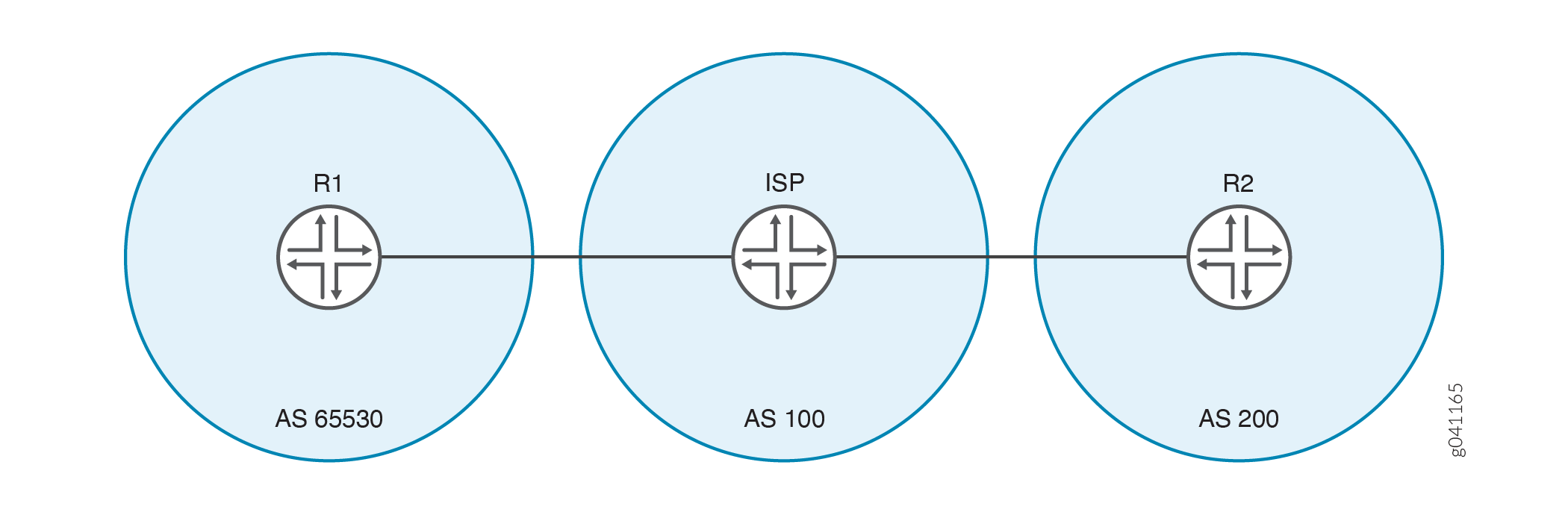 中移除专用 AS 的拓扑
在此示例中,设备 R1 使用专用 AS 编号 65530 连接到其服务提供商。示例显示了在设备 ISP 上配置的 remove-private 语句,以防止将设备 R1 的专用 AS 编号通告给设备 R2。设备 R2 仅看到服务提供商的 AS 编号。
添加或删除 BGP 选项 remove-private 将导致受影响的 BGP 对等会话发生翻动。
配置
CLI 快速配置
要快速配置此示例,请复制以下命令,将其粘贴到文本文件中,删除所有换行符,更改详细信息,以便与网络配置匹配,然后将命令复制并粘贴到层次结构级别的 [edit] CLI 中。
设备 R1
set interfaces fe-1/2/0 unit 1 family inet address 192.168.10.1/24
set interfaces lo0 unit 1 family inet address 10.10.10.1/32
set protocols bgp group ext type external
set protocols bgp group ext export send-direct
set protocols bgp group ext export send-static
set protocols bgp group ext peer-as 100
set protocols bgp group ext neighbor 192.168.10.10
set policy-options policy-statement send-direct term 1 from protocol direct
set policy-options policy-statement send-direct term 1 then accept
set policy-options policy-statement send-static term 1 from protocol static
set policy-options policy-statement send-static term 1 then accept
set routing-options static route 192.168.20.0/24 next-hop 192.168.10.10
set routing-options autonomous-system 65530
设备 ISP
set interfaces fe-1/2/0 unit 2 family inet address 192.168.10.10/24 set interfaces fe-1/2/1 unit 3 family inet address 192.168.20.20/24 set interfaces lo0 unit 2 family inet address 10.10.0.1/32 set protocols bgp group ext type external set protocols bgp group ext neighbor 192.168.10.1 peer-as 65530 set protocols bgp group ext neighbor 192.168.20.1 remove-private set protocols bgp group ext neighbor 192.168.20.1 peer-as 200 set routing-options autonomous-system 100
设备 R2
set interfaces fe-1/2/0 unit 4 family inet address 192.168.20.1/24 set interfaces lo0 unit 3 family inet address 10.10.20.1/32 set protocols bgp group ext type external set protocols bgp group ext export send-direct set protocols bgp group ext export send-static set protocols bgp group ext peer-as 100 set protocols bgp group ext neighbor 192.168.20.20 set policy-options policy-statement send-direct term 1 from protocol direct set policy-options policy-statement send-direct term 1 then accept set policy-options policy-statement send-static term 1 from protocol static set policy-options policy-statement send-static term 1 then accept set routing-options static route 192.168.10.0/24 next-hop 192.168.20.20 set routing-options autonomous-system 200
设备 ISP
分步程序
下面的示例要求您在各个配置层级中进行导航。有关导航CLI的信息,请参阅《Junos OS CLI 用户指南》中的在配置模式下使用CLI编辑器。
要配置设备 ISP:
-
配置接口。
[edit interfaces] user@ISP# set fe-1/2/0 unit 2 family inet address 192.168.10.10/24 user@ISP# set fe-1/2/1 unit 3 family inet address 192.168.20.20/24 user@ISP# set lo0 unit 2 family inet address 10.10.0.1/32
-
配置 EBGP。
[edit protocols bgp group ext] user@ISP# set type external user@ISP# set neighbor 192.168.10.1 peer-as 65530 user@ISP# set neighbor 192.168.20.1 peer-as 200
-
对于自治系统 (AS) 200 中的邻接方(设备 R2),请从播发的 AS 路径中移除专用 AS 编号。
[edit protocols bgp group ext] user@ISP# set neighbor 192.168.20.1 remove-private
-
配置 AS 编号。
[edit routing-options] user@ISP# set autonomous-system 100
结果
在配置模式下,输入 show interfaces、 show protocols和 show routing-options 命令以确认您的配置。如果输出未显示预期的配置,请重复此示例中的说明以更正配置。
user@ISP# show interfaces
fe-1/2/0 {
unit 2 {
family inet {
address 192.168.10.10/24;
}
}
}
fe-1/2/1 {
unit 3 {
family inet {
address 192.168.20.20/24;
}
}
}
lo0 {
unit 2 {
family inet {
address 10.10.0.1/32;
}
}
}
user@ISP# show protocols
bgp {
group ext {
type external;
neighbor 192.168.10.1 {
peer-as 65530;
}
neighbor 192.168.20.1 {
remove-private;
peer-as 200;
}
}
}
user@ISP# show routing-options autonomous-system 100;
如果完成设备配置,请从配置模式输入 commit 。在设备 R1 和设备 R2 上重复配置,根据需要更改接口名称和 IP 地址,然后添加路由策略配置。
验证
确认配置工作正常。
检查邻居状态
目的
确保设备 ISP 在与设备 R2 的邻接方会话中启用了 remove-private 设置。
行动
在操作模式下,输入命令 show bgp neighbor 192.168.20.1 。
user@ISP> show bgp neighbor 192.168.20.1
Peer: 192.168.20.1+179 AS 200 Local: 192.168.20.20+60216 AS 100
Type: External State: Established Flags: <ImportEval Sync>
Last State: OpenConfirm Last Event: RecvKeepAlive
Last Error: None
Options: <Preference RemovePrivateAS PeerAS Refresh>
Holdtime: 90 Preference: 170
Number of flaps: 0
Peer ID: 10.10.20.1 Local ID: 10.10.0.1 Active Holdtime: 90
Keepalive Interval: 30 Peer index: 0
BFD: disabled, down
Local Interface: fe-1/2/1.3
NLRI for restart configured on peer: inet-unicast
NLRI advertised by peer: inet-unicast
NLRI for this session: inet-unicast
Peer supports Refresh capability (2)
Stale routes from peer are kept for: 300
Peer does not support Restarter functionality
NLRI that restart is negotiated for: inet-unicast
NLRI of received end-of-rib markers: inet-unicast
NLRI of all end-of-rib markers sent: inet-unicast
Peer supports 4 byte AS extension (peer-as 200)
Peer does not support Addpath
Table inet.0 Bit: 10001
RIB State: BGP restart is complete
Send state: in sync
Active prefixes: 1
Received prefixes: 3
Accepted prefixes: 2
Suppressed due to damping: 0
Advertised prefixes: 1
Last traffic (seconds): Received 10 Sent 16 Checked 55
Input messages: Total 54 Updates 3 Refreshes 0 Octets 1091
Output messages: Total 54 Updates 1 Refreshes 0 Octets 1118
Output Queue[0]: 0
意义
该 RemovePrivateAS 选项显示设备 ISP 具有预期的设置。
检查路由表
目的
请确保设备具有预期的路由和 AS 路径。
行动
在操作模式下,输入命令 show route protocol bgp 。
user@R1> show route protocol bgp
inet.0: 5 destinations, 5 routes (5 active, 0 holddown, 0 hidden)
+ = Active Route, - = Last Active, * = Both
10.10.20.1/32 *[BGP/170] 00:28:57, localpref 100
AS path: 100 200 I
> to 192.168.10.10 via fe-1/2/0.1
user@ISP> show route protocol bgp
inet.0: 7 destinations, 11 routes (7 active, 0 holddown, 2 hidden)
+ = Active Route, - = Last Active, * = Both
10.10.10.1/32 *[BGP/170] 00:29:40, localpref 100
AS path: 65530 I
> to 192.168.10.1 via fe-1/2/0.2
10.10.20.1/32 *[BGP/170] 00:29:36, localpref 100
AS path: 200 I
> to 192.168.20.1 via fe-1/2/1.3
192.168.10.0/24 [BGP/170] 00:29:40, localpref 100
AS path: 65530 I
> to 192.168.10.1 via fe-1/2/0.2
192.168.20.0/24 [BGP/170] 00:29:36, localpref 100
AS path: 200 I
> to 192.168.20.1 via fe-1/2/1.3
user@R2> show route protocol bgp
inet.0: 5 destinations, 5 routes (5 active, 0 holddown, 0 hidden)
+ = Active Route, - = Last Active, * = Both
10.10.10.1/32 *[BGP/170] 00:29:53, localpref 100
AS path: 100 I
> to 192.168.20.20 via fe-1/2/0.4
意义
设备 ISP 在到设备 R1 的 AS 路径中具有专用 AS 编号 65530。但是,设备 ISP 不会将此专用 AS 编号播发至设备 R2。这如设备 R2 的路由表中所示。设备 R2 到设备 R1 的路径仅包含设备 ISP 的 AS 编号。
当 remove-private 语句停用时,检查 AS 路径
目的
验证不使用语句时 remove-private ,专用 AS 编号是否显示在设备 R2 的路由表中。
行动
在设备 ISP 上的配置模式下,输入命令 deactivate remove-private ,然后重新检查设备 R2 上的路由表。
[protocols bgp group ext neighbor 192.168.20.1] user@ISP# deactivate remove-private user@ISP# commit
user@R2> show route protocol bgp
inet.0: 5 destinations, 5 routes (5 active, 0 holddown, 0 hidden)
+ = Active Route, - = Last Active, * = Both
10.10.10.1/32 *[BGP/170] 00:00:54, localpref 100
AS path: 100 65530 I
> to 192.168.20.20 via fe-1/2/0.4
意义
专用 AS 编号 65530 显示在设备 R2 到设备 R1 的 AS 路径中。
变更历史表
是否支持某项功能取决于您使用的平台和版本。使用 功能资源管理器 确定您的平台是否支持某个功能。