
Configure SAML Authentication (CLI Procedure)
In this configuration, you'll learn to setup Security Assertion Markup Language (SAML) based user authentication in Juniper Secure Connect.
Juniper Secure Connect supports remote user authentication using SAML v2 (SAML 2.0). In this configuration example, the SRX Series Firewall servers as the SAML service provider and authenticates the Juniper Secure Connect users using SAML IdP.
|
Reading Time |
Less than an hour |
|
Configuration Time |
Less than an hour |
Example Prerequisites
Ensure you meet the following prerequisites:
-
Understand the following main components in the example.
-
An active identity provider (IdP) user account. Okta and Microsoft Azure are examples of IdPs.
In this example, we've used Okta as the IdP. For IdP settings, see Functional Overview. The step-by-step SAML 2.0 IdP configuration is out-of-scope of this documentation. The settings depend on your agreement with the IdP.
-
An SRX Series Firewall that acts a service provider (SP).
This topic covers step-by-step configuration of SRX Series Firewall for SAML-based user authentication. See Functional Overview and Step-By-Step Configuration on vSRX
-
Juniper Secure Connect application for Windows that supports SAML-based user authentication.
-
-
Feature support is determined by the platform and release you are using. Use Feature Explorer to determine if a feature is supported on your platform.
-
Ensure that you've an account with your IdP before configuring the service provider. Confirm you've configured all necessary settings in your IdP application. Take a note of the following items on your IdP account:
-
Ensure your Assertion Consumer Service (ACS) URL on the IdP is in the format
https://<domain-name>/saml2/acsto send the SAML assertion from IdP to the service provider. The ACS URL is the Single Sign-On (SSO) URL in Okta and the Reply URL in Microsoft Azure. -
Don't configure Namespace for user-defined attributes in Microsoft Azure IdP settings.
-
Note the IdP entity ID.
-
Note the SSO URL.
-
Note the single logout URL.
-
Download the signing certificate from the IdP and load it to the firewall.
user@vsrx> request security pki ca-certificate load filename /<local-directory-path>/<idp-cert-filename> ca-profile <ca-profile-name>
The example includes EXAMPLE-CA as the ca-profile-name.
-
Ensure you've created users in your IdP application.
-
-
Ensure the firewall, which is the service provider, can reach the IdP SSO and single logout URLs using the Internet-facing interface.
-
Ensure you've created the firewall (server-side) self-signed certificates for web-management and SSL profile. You can also use CA-signed certificates.
-
Ensure you've CA-signed certificate for IKE.
|
Hardware requirements |
|
|
Software requirements |
|
Before You Begin
|
Understand SAML for Juniper Secure Connect |
|
|
Know more |
Learn about Junos configuration statements and CLI commands for SAML. See saml, authentication-order (access-profile), saml (Access Profile), saml-options, show network-access aaa saml assertion-cache, show network-access aaa statistics, request network-access aaa saml load-idp-metadata, request network-access aaa saml export-sp-metadata, clear network-access aaa saml assertion-cache, clear network-access aaa saml idp-metadata, and clear network-access aaa statistics |
Functional Overview
|
Functional Component |
Details |
|---|---|
|
Certificates |
|
|
Self-signed certificate or CA-signed certificate for web-management |
|
|
Self-signed certificate or CA-signed certificate for SSL profile |
|
|
CA-signed certificate for IKE |
|
|
Signed-certificate from IdP |
SAML IdP certificate,
|
|
IKE |
|
|
IKE proposal |
|
|
IKE policy |
|
|
IKE gateway |
|
|
IPsec |
|
|
IPsec proposal |
|
|
IPsec policy |
|
|
SAML Access Profile |
|
|
SAML Authentication Order |
The access profile
|
|
SAML IdP |
|
|
SAML IdP name |
|
|
SAML IdP Entity ID |
|
|
SAML login URL |
|
|
SAML logout URL |
|
|
SAML IdP certificate |
|
|
SAML user attributes |
user1, who is the Principal, requests access. SAML user attributes are name-value pairs that are IdP attributes. These attributes include user information such as firstname, lastname, or email configured on the IdP. The IdP sends this information to the service provider through the SAML assertion. During the firewall configuration, specify whether an attribute related to the Principal is mandatory or optional. |
|
SAML service provider |
|
|
SAML service provider name |
|
|
SAML service provider Entity ID |
Tip: SAML domain names are case-sensitive.
Example.net is different from
example.net in SAML. |
|
Remote Access |
|
|
Profile |
|
|
SSL |
|
|
Termination profile |
|
|
Security Zones |
|
|
trust |
Network segment facing the corporate resources such as the server. |
|
untrust |
Network segment facing the Internet. Note that IdP is reachable through this segment. |
|
VPN |
Network segment with the secure tunnel interface st0.0. |
|
Security Policy |
Allows you to select the type of data traffic.
|
|
Source NAT |
Source NAT to allow traffic from the VPN client to reach the internal server. |
Topology Overview
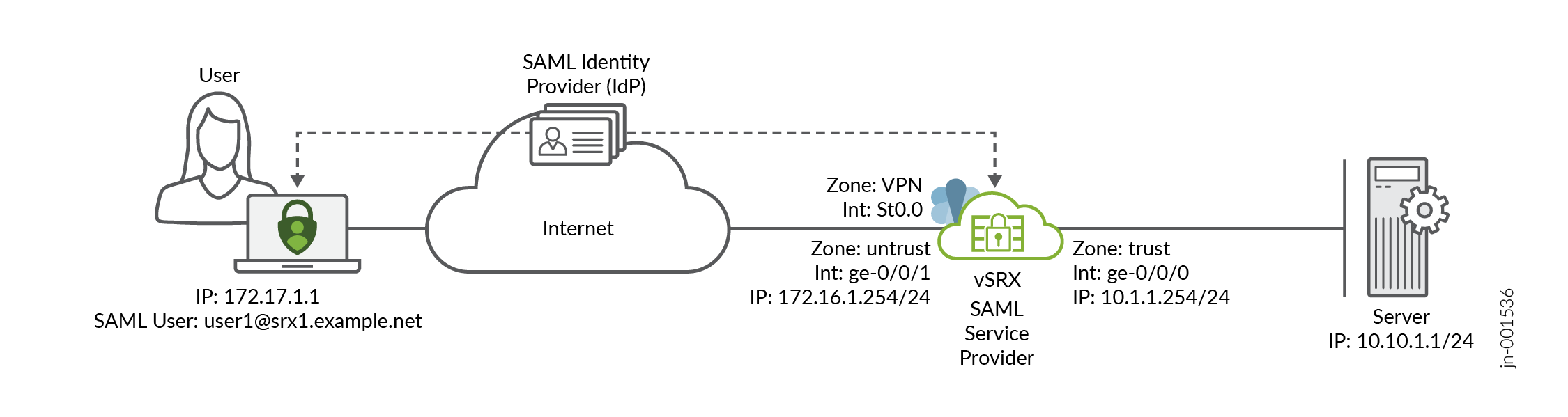
In this example, the Juniper Secure Connect client initiates remote access VPN connection establishment with the firewall, vSRX. The firewall sends SAML authentication request to Juniper Secure Connect which checks with the IdP for the user authentication. Once authentication completes, the firewall confirms the SAML assertion, and establishes remote access VPN tunnel.
|
Hostname |
Role |
Function |
|---|---|---|
|
vsrx |
|
|
|
Client |
Remote access VPN client |
In Juniper Secure Connect, a laptop or computer using the Juniper Secure Connect application initiates a VPN connection with the firewalls. |
|
IdP |
SAML IdP |
In Juniper Secure Connect, the IdP authenticates users and provides identity assertions to the service provider. The IdP generates an authentication assertion to confirm user authentication. Okta serves as the IdP in this example. |
|
Server |
Server in the trust zone |
The Juniper Secure Connect client tries to access the internal corporate server. |
Topology Illustration
Step-By-Step Configuration on vSRX
For complete sample configurations on the DUT, see:
This configuration is applicable for only vSRX. You must make the appropriate device-specific configuration changes.
Verification
This section provides a list of show commands that you can use to verify the feature in this example. .
- Verify SAML-Based User Authentication in Juniper Secure Connect Application
- Verify SAML Assertion Cache Entries
- Verify Subscriber-Specific AAA Statistics
- Verify SAML Authentication Statistics
- Verify IKE SA
- Verify IPsec SA
- Verify IKE Active Peer
Verify SAML-Based User Authentication in Juniper Secure Connect Application
Purpose
Connect Juniper Secure Connect application for remote access VPN using SAML-based user authentication.
Action
Perform the following steps on your client:
Place the CA certificate in the client laptop at
C:\ProgramData\Juniper\SecureConnect\cacerts.Enter the Connection Profile as
https://172.16.1.254/jsc-samlorhttps://srx1.juniper.net/jsc-saml. Then click the Connection toggle button to establish the VPN connection.After the system downloads the configuration, you see a window, User ID for SAML authentication, that prompts you for your SAML user ID. Enter your SAML user ID in the User ID field as
user1@srx1.example.net.The system redirects you to the IdP SSO URL in your default browser. Enter the username
user1@srx1.example.netalong with the correct password.When you successfully complete the user authentication, accept the browser pop-up to launch the Juniper Secure Connect application.
Close the browser while the IKE connection runs in the background.
Observe that the Juniper Secure Connect application establishes the remote access VPN connection.
Meaning
The user, user1@srx1.example.net is
authenticated with SAML-based user authentication method and the remote access VPN
connection established. Notice that the username is in the email format defined in
the IdP's mandatory attribute-mapping.
Verify SAML Assertion Cache Entries
user@vsrx> show network-access aaa saml assertion-cache
  Username            Remaining Validity
  user1@srx1.example.net 6h 52m 40s
Purpose
Run the command to display SAML assertion cache entries.
Action
From operational mode, run the command show network-access aaa saml
assertion-cache on vSRX.
Meaning
Shows SAML authentication assertions cache information with the domain name configured in the access profile IdP settings and the SAML authenticated username.
Verify Subscriber-Specific AAA Statistics
user@vsrx> show network-access aaa subscribers
Username                 Logical system/Routing instance   Client type    Session-ID
user1@srx1.example.net   default:default                   xauth          6
Purpose
Run the command to display subscriber username.
Action
From operational mode, run the command show network-access aaa
subscribers on vSRX.
Meaning
Displays information about active subscriber sessions.
Verify SAML Authentication Statistics
user@vsrx> show network-access aaa statistics saml
SAML Authentication statistics
    Authentication request received        21
    Authentication response sent           21
    Request hit cache                      0
    Request sent to IdP                    6
    Assertion received                     5
    Assertion timeout                      1
    Assertion parse fail                   0
    Assertion sanity fail                  0
    Assertion signature verify fail        0
    Assertion decryption fail              0
    Assertion node missing                 0
    Assertion attributes missing           0
    Assertion username mismatch            0
    Logout request received                0
    Logout response sent                   0
    Logout parse fail                      0
    Logout sanity fail                     0
    Logout signature verify fail           0
    Memory allocation fail                 0
Purpose
Run the command to display SAML authentication statistics.
Action
From operational mode, run the command show network-access aaa statistics
saml on vSRX.
Meaning
Displays SAML authentication statistics.
Verify IKE SA
user@vsrx> show security ike security-associations
Index   State  Initiator cookie  Responder cookie  Mode           Remote Address
1       UP     a5872b7d9c649c0b  3264d25485c6827a  IKEv2          172.17.1.1
Purpose
Run the command to display information about IKE security associations (SA).
Action
From operational mode, run the command show security ike
security-associations on vSRX.
Meaning
Shows the firewall's IKE mode as IKEv2 and has SA with 172.17.1.1 which is the Juniper Secure Connect client.
Verify IPsec SA
user@vsrx> show security ipsec security-associations
  Total active tunnels: 1     Total IPsec sas: 1
  ID      Algorithm       SPI      Life:sec/kb  Mon lsys Port  Gateway
  <500001 ESP:aes-gcm-256/aes256-gcm 0xdb912536 3429/ unlim - root 10954 172.17.1.1
  >500001 ESP:aes-gcm-256/aes256-gcm 0x52a3f7de 3429/ unlim - root 10954 172.17.1.1
Purpose
Run the command to display information about IPsec SA.
Action
From operational mode, run the command show security ipsec
security-associations on vSRX.
Meaning
Shows that the firewall has one active IPsec tunnel SA with 172.17.1.1 which is the Juniper Secure Connect client.
Verify IKE Active Peer
user@vsrx> show security ike active-peer
Remote Address                      Port     Peer IKE-ID                         AAA username                        Assigned IP
172.17.1.1                          10954    ra@example.com                     user1@srx1.example.net              10.1.3.10
Purpose
Run the command to display the connected IKE peers.
Action
From operational mode, run the command show security ike
active-peer on vSRX.
Meaning
Shows that the firewall has one active IKE peer 172.17.1.1 which is the Juniper Secure Connect client. The firewall also displays the peer IKE ID and the authenticated remote username and IP address assigned to the user.
Appendix 1: Troubleshoot Juniper Secure Connect
If you encounter any issue with SAML-based user authentication, follow these steps to troubleshoot the problem:
-
The feature works with the iked process. Ensure you install the junos-ike
package by using the command
request system software add
                     optional://junos-ike.tgz
. -
Enable traceoptions for PKI, IKE, IPsec, and remote access options. For example,
run the command
set security pki traceoptions file pki.logto enable traceoptions on PKI. Check the syslogs and trace logs. - Check whether the SAML assertion cache is disabled. If the SAML assertion cache is disabled, we recommend enabling it to cache SAML assertions from the IdP. See saml-options.
- Ensure that the assertion cache contains a valid entry for the user. The assertion cache must include a valid user entry to support SAML-based user authentication. If the cache does not have a valid entry, perform a manual disconnect and reconnect of the VPN connection in the Juniper Secure Connect application. This action prompts the application to authenticate the user again and repopulate the assertion cache. See show network-access aaa saml assertion-cache.
-
If the syslog reports
AUTHD_SAML_AUTH_FAILEDbecause of an assertion wait timeout, extend the assertion timeout using the commandset access saml service-provider yoursaml assertion-waittime waittime. - To reload IdP metadata, see request network-access aaa saml load-idp-metadata.
- To export service provider metadata, see request network-access aaa saml export-sp-metadata.
-
If you notice that the IKE session times out, extend the session using the
command
set security ike session half-open timeout
                        timeout
.
Appendix 2: Set Commands on vSRX
Set command output on vSRX.
set interfaces ge-0/0/0 unit 0 family inet address 10.1.1.254/24
set interfaces st0 unit 0 family inet
set interfaces ge-0/0/1 unit 0 family inet address 172.16.1.254/24

set security zones security-zone trust host-inbound-traffic system-services all
set security zones security-zone trust host-inbound-traffic protocols all
set security zones security-zone trust interfaces ge-0/0/0.0
set security zones security-zone untrust host-inbound-traffic system-services all
set security zones security-zone untrust host-inbound-traffic protocols all
set security zones security-zone untrust interfaces ge-0/0/1.0
set security zones security-zone VPN interfaces st0.0

set security policies from-zone trust to-zone trust policy default-permit match source-address any
set security policies from-zone trust to-zone trust policy default-permit match destination-address any
set security policies from-zone trust to-zone trust policy default-permit match application any
set security policies from-zone trust to-zone trust policy default-permit then permit
set security policies from-zone trust to-zone untrust policy default-permit match source-address any
set security policies from-zone trust to-zone untrust policy default-permit match destination-address any
set security policies from-zone trust to-zone untrust policy default-permit match application any
set security policies from-zone trust to-zone untrust policy default-permit then permit
set security policies from-zone trust to-zone VPN policy JSC-ALLOW-OUT match source-address any
set security policies from-zone trust to-zone VPN policy JSC-ALLOW-OUT match destination-address any
set security policies from-zone trust to-zone VPN policy JSC-ALLOW-OUT match application any
set security policies from-zone trust to-zone VPN policy JSC-ALLOW-OUT then permit
set security policies from-zone VPN to-zone trust policy JSC-ALLOW-IN match source-address any
set security policies from-zone VPN to-zone trust policy JSC-ALLOW-IN match destination-address any
set security policies from-zone VPN to-zone trust policy JSC-ALLOW-IN match application any
set security policies from-zone VPN to-zone trust policy JSC-ALLOW-IN then permit

set security nat source rule-set jsc from zone VPN
set security nat source rule-set jsc to zone trust
set security nat source rule-set jsc rule 1 match source-address 0.0.0.0/0
set security nat source rule-set jsc rule 1 then source-nat interface

set security ike proposal JSC-IKE-PRO authentication-method rsa-signatures
set security ike proposal JSC-IKE-PRO dh-group group19
set security ike proposal JSC-IKE-PRO authentication-algorithm sha-256
set security ike proposal JSC-IKE-PRO encryption-algorithm aes-256-cbc

set security ike policy JSC-IKE-POL proposals JSC-IKE-PRO
set security ike policy JSC-IKE-POL certificate local-certificate IKE-KEY

set security ike gateway JSC-GW dynamic user-at-hostname "ra@example.com"
set security ike gateway JSC-GW dynamic ike-user-type shared-ike-id
set security ike gateway JSC-GW ike-policy JSC-IKE-POL
user@vsrx# set security ike gateway JSC-GW version v2-only

set security ike gateway JSC-GW external-interface ge-0/0/1
set security ike gateway JSC-GW local-address 172.16.1.254

set security ike gateway JSC-GW dead-peer-detection optimized
set security ike gateway JSC-GW dead-peer-detection interval 10
set security ike gateway JSC-GW dead-peer-detection threshold 5

set security ike gateway JSC-GW aaa access-profile JSC-ACCESS
set security ike gateway JSC-GW tcp-encap-profile JSC-ENCAP

set security ipsec proposal JSC-IPSEC-PRO protocol esp
set security ipsec proposal JSC-IPSEC-PRO encryption-algorithm aes-256-gcm

set security ipsec policy JSC-IPSEC-POL proposals JSC-IPSEC-PRO
set security ipsec policy JSC-IPSEC-POL perfect-forward-secrecy keys group19

set security ipsec vpn JSC-VPN bind-interface st0.0
set security ipsec vpn JSC-VPN df-bit clear
set security ipsec vpn JSC-VPN ike gateway JSC-GW
set security ipsec vpn JSC-VPN ike ipsec-policy JSC-IPSEC-POL
set security ipsec vpn JSC-VPN traffic-selector ts-1 local-ip 10.1.1.1/32
set security ipsec vpn JSC-VPN traffic-selector ts-1 remote-ip 0.0.0.0/0

set security remote-access profile jsc-saml ipsec-vpn JSC-VPN
set security remote-access profile jsc-saml access-profile JSC-ACCESS
set security remote-access profile jsc-saml client-config JSC-CLIENT

set security remote-access client-config JSC-CLIENT connection-mode manual
set security remote-access client-config JSC-CLIENT dead-peer-detection interval 60
set security remote-access client-config JSC-CLIENT dead-peer-detection threshold 5
set security remote-access client-config JSC-CLIENT no-eap-tls

set access profile JSC-ACCESS authentication-order saml
set access profile JSC-ACCESS saml service-provider vsrx-jsc
set access profile JSC-ACCESS saml identity-provider srx1.example.net idp-name example-idp
set access profile JSC-ACCESS saml identity-provider any idp-name example-idp
set access profile JSC-ACCESS address-assignment pool JSC-POOL

set access address-assignment pool JSC-POOL family inet network 10.1.3.0/24
set access address-assignment pool JSC-POOL family inet range JSC-RANGE low 10.1.3.10
set access address-assignment pool JSC-POOL inet range JSC-RANGE high 10.1.3.20
set access address-assignment pool JSC-POOL family inet xauth-attributes primary-dns 8.8.8.8/32

set access firewall-authentication web-authentication default-profile JSC-ACCESS

set services ssl termination profile JSC-SSL-PRO server-certificate jsc

set security tcp-encap profile JSC-ENCAP ssl-profile JSC-SSL-PRO
set security tcp-encap profile JSC-ENCAP log

set access saml service-provider vsrx-jsc entity-id https://srx1.example.net
set access saml service-provider vsrx-jsc assertion-waittime 60
set access saml identity-provider example-idp settings entity-id http://www.example.org/abcd1234
set access saml identity-provider example-idp settings single-signon-url https://5075942.example.org/app/5075942_srx1examplenet_1/abcd1234/sso/saml
set access saml identity-provider example-idp settings single-logout-url https://5075942.example.org
set access saml identity-provider example-idp settings idp-certificate EXAMPLE-CA
set access saml identity-provider example-idp attribute-mapping username mail mandatory
Appendix 3: Show Configuration Output on vSRX
Show command output on vSRX.
From configuration mode, confirm your configuration by entering the following commands. If the output does not display the intended configuration, repeat the configuration instructions in this example to correct it.
[edit]
user@vsrx# show interfaces
ge-0/0/0 {
    unit 0 {
        family inet {
            address 10.1.1.254/24;
        }
    }
}
ge-0/0/1 {
    unit 0 {
        family inet {
            address 172.16.1.254/24;
        }
    }
}
st0 {
    unit 0 {
        family inet;
    }
}[edit]
user@vsrx# show security zones
security-zone trust {
host-inbound-traffic {
system-services {
all;
}
protocols {
all;
}
}
interfaces {
ge-0/0/0.0;
}
}
security-zone untrust {
host-inbound-traffic {
system-services {
all;
}
protocols {
all;
}
}
interfaces {
ge-0/0/1.0;
}
}
security-zone VPN {
interfaces {
st0.0;
}
}[edit]
user@vsrx# show security policies
from-zone trust to-zone trust {
policy default-permit {
match {
source-address any;
destination-address any;
application any;
}
then {
permit;
}
}
}
from-zone trust to-zone untrust {
policy default-permit {
match {
source-address any;
destination-address any;
application any;
}
then {
permit;
}
}
}
from-zone trust to-zone VPN {
policy JSC-ALLOW-OUT {
match {
source-address any;
destination-address any;
application any;
}
then {
permit;
}
}
}
from-zone VPN to-zone trust {
policy JSC-ALLOW-IN {
match {
source-address any;
destination-address any;
application any;
}
then {
permit;
}
}
}[edit]
user@vsrx# show security nat
source {
rule-set JSC-NAT {
from zone VPN;
to zone trust;
rule 1 {
match {
source-address 0.0.0.0/0;
}
then {
source-nat {
interface;
}
}
}
}
}[edit]
user@vsrx# show system services
…
web-management {
https {
pki-local-certificate jsc-web;
}
}[edit]
user@vsrx# show security pki
ca-profile EXAMPLE-CA {
ca-identity EXAMPLE-CA;
revocation-check {
disable;
}
}
ca-profile CERTAUTH {
ca-identity CERTAUTH;
revocation-check {
disable;
}
}[edit]
user@vsrx# show security ike
proposal JSC-IKE-PRO {
authentication-method rsa-signatures;
dh-group group19;
authentication-algorithm sha-256;
encryption-algorithm aes-256-cbc;
}
policy JSC-IKE-POL {
proposals JSC-IKE-PRO;
certificate {
local-certificate IKE-CERT;
}
}
gateway JSC-GW {
ike-policy JSC-IKE-POL;
dynamic {
user-at-hostname "ra@example.com";
ike-user-type shared-ike-id;
}
dead-peer-detection {
optimized;
interval 10;
threshold 5;
}
external-interface ge-0/0/1;
local-address 172.16.1.254;
aaa {
access-profile JSC-ACCESS;
}
version v2-only;
tcp-encap-profile JSC-ENCAP;
}[edit]
user@vsrx# show security ipsec
proposal JSC-IPSEC-PRO {
protocol esp;
encryption-algorithm aes-256-gcm;
}
policy JSC-IPSEC-POL {
perfect-forward-secrecy {
keys group19;
}
proposals JSC-IPSEC-PRO;
}
vpn JSC-VPN {
bind-interface st0.0;
df-bit clear;
ike {
gateway JSC-GW;
ipsec-policy JSC-IPSEC-POL;
}
traffic-selector ts-1 {
local-ip 10.1.1.1/32;
remote-ip 0.0.0.0/0;
}
}[edit]
user@vsrx# show security tcp-encap
profile JSC-ENCAP {
ssl-profile JSC-SSL-PRO;
log;
}[edit]
user@vsrx# show services
ssl {
termination {
profile JSC-SSL-PRO {
server-certificate jsc;
}
}
}[edit]
user@vsrx# show security remote-access
profile jsc-saml {
ipsec-vpn JSC-VPN;
access-profile JSC-ACCESS;
client-config JSC-CLIENT;
}
client-config JSC-CLIENT {
connection-mode manual;
dead-peer-detection {
interval 60;
threshold 5;
}
no-eap-tls;
}[edit]
user@vsrx# show access
profile JSC-ACCESS {
authentication-order saml;
address-assignment {
pool JSC-POOL;
}
saml {
service-provider vsrx-jsc;
identity-provider srx1.example.net {
idp-name example-idp;
}
identity-provider any {
idp-name example-idp;
}
}
}
address-assignment {
pool JSC-POOL {
family inet {
network 10.1.3.0/24;
range jsc-range {
low 10.1.3.10;
high 10.1.3.20;
}
xauth-attributes {
primary-dns 8.8.8.8/32;
}
}
}
}
saml {
service-provider vsrx-jsc {
entity-id https://srx1.example.net;
assertion-waittime 60;
}
identity-provider example-idp {
settings {
entity-id http://www.example.org/abcd1234;
single-signon-url https://5075942.example.org/app/5075942_srx1examplenet_1/abcd1234/sso/saml;
single-logout-url https://5075942.example.org;
idp-certificate EXAMPLE-CA;
}
attribute-mapping {
username mail mandatory;
}
}
}
firewall-authentication {
web-authentication {
default-profile JSC-ACCESS;
}
}