
BGP Deterministic Path Forwarding (DPF) with EVPN-VXLAN Implementation
BGP deterministic path forwarding (DPF) with EVPN-VXLAN enables the segmentation of a physical network into multiple logical fabrics using color-based routing. This enables precise traffic flow control and segregation, while integrating automatic failover mechanisms for resilience.
Overview
You can use BGP deterministic path forwarding (DPF) to segment a physical network into multiple logical fabrics by assigning fabric colors to BGP sessions. This document provides example spine and leaf device configurations for an IP fabric using BGP DPF with EVPN-VXLAN. It includes device configuration and verification steps as well as general BGP DPF configuration guidance.
BGP-DPF implements color-based routing, which enables you to advertise routes across different colored paths. By configuring fabric colors at the global, group, or neighbor levels you can control which routes are advertised over specific paths. Integrating DPF with EVPN-VXLAN enables more precise control of traffic flows by utilizing colored routes as underlays. This enables traffic segregation at the MAC-VRF level, ensuring that virtualized environments can benefit from isolated and efficient traffic flows. This control over path selection ensures that the network can meet diverse requirements, such as latency sensitivity and redundancy. In addition to assigning colors for the primary paths, you can set up backup paths for resilience, which ensures seamless failover if the primary path becomes unavailable.
You can use the protocols bgp fabric-advertise route
destination statement to advertise colored IPv4
and IPv6 routes. This configuration advertises these routes automatically based on
the color configurations without needing an export policy. If a route is configured
with the color option, the route is advertised over the EBGP
neighbors of the same color and the color community is added to the route. Routes
with no color configured are advertised to all EBGP peers.
Configuring a backup color using the backup-color option advertises
the route over the EBGP neighbors of the backup color. It also adds the backup color
community to the route advertised over the backup fabric. When the
backup-color option is configured, an accumulated IGP (AIGP)
metric of 0 is added to the route advertised over the primary colored fabric to
ensure the primary colored fabric is preferred by upstream routers.
You can configure a colored tunnel endpoint for an EVPN MAC-VRF with the
routing-instances name vtep-source-interface inet
                    colored-tunnel-address destination
statement. This
sets the EVPN routes with the colored-tunnel-address as the
protocol next hop (PNH). BGP then advertises these EVPN routes with the specified
PNH. When the ingress PE receives the EVPN route, it uses the PNH to resolve the
route over the desired colored tunnel endpoint. Therefore different colored tunnel
addresses must be configured for MAC-VRFs of different colored fabrics. They cannot
share the same virtual tunnel endpoint (VTEP) address.
You can configure a tenant MAC-VRF or an EVPN Type 5 (RT-5) instance without any colored fabric configurations. In these instances, the routes have no color configuration and are advertised to all EBGP peers. These instances can use all spine devices and dynamic load balancing (DLB) to optimize network performance.
DPF Configuration Guidelines and Caveats
When configuring DPF, keep these guidelines and caveats in mind:
-
You configure the colors for BGP neighbors using BGP extended communities. These configurations must be consistent across the entire physical fabric. For example, if the BGP extended community
color:0:1represents "Blue" on one router, it must represent "Blue" on all other routers in the same physical fabric. -
When you configure
fabric-advertisestatements and an export policy on the same router, the export policy should not modify the color communities that thefabric-advertisestatements specify. Also, the export policy should not originate the AIGP metric for afabric-advertiseroute because color-based routing uses the AIGP metric to indicate the primary color when primary and backup colors are configured. -
BGP advertises all colored routes over uncolored BGP neighbors. When you want to restrict certain routes to specific colors, do not mix uncolored fabrics and colored fabrics.
-
BGP advertises uncolored routes across all colored fabrics. If you want to allow only matching colored routes over a specific colored fabric, you should avoid using uncolored routes, with the exception of those that solely carry light control traffic.
-
A colored BGP receiver will accept uncolored routes and routes matching its color, but routes with a different color are marked as hidden.
-
When deploying EVPN VXLAN with DPF, the overlay multihop EBGP peers between leaf devices remain uncolored. Configure these BGP peers with only
family evpn signaling. Do not enablefamily inetorfamily inet6on these peers because that configuration allows the advertisement of colored routes over uncolored multihop EBGP sessions. Aside from EVPN VXLAN overlay BGP sessions, do not configure any additional uncolored multihop EBGP or IBGP peers with colored fabrics. Otherwise, you risk advertising colored routes over these uncolored multihop EBGP or IBGP peers. -
Egress Link Protection (ELP) and Assisted Replication features are not supported when BGP DPF is used with EVPN-VXLAN.
The following sections explain how to configure spine and leaf devices for a DPF colored fabric. The configurations in this example are focused on configuring BGP DPF. The configuration examples included here do not provide all the configurations necessary to implement an IP fabric underlay. These configurations implement color-based BGP communities and fabric color assignments to enable color-based traffic engineering and service-level path selection. This enables different traffic types to be routed through designated network paths based on their color assignments.
For information about how to configure IP fabric underlays see IP Fabric Underlay Network Design and Implementation.
Topology Requirements
This example uses the following hardware and software components:
-
A QFX5120 that functions as the super spine and route reflector.
-
Two QFX5120s, three QFX5130s and a QFX5700 that function as spine devices.
-
Three QFX5120s and a QFX5130 that functions as leaf devices.
-
All devices are running Junos OS 25.4R1.
-
Please refer to BGP support for deterministic path forwarding (DPF) in a CLOS network for a complete list of the products that support this feature.
Topology
In this example, we have a route reflector connected to six spine devices each configured with one of three different fabric colors. The user can choose to load balance the traffic between leaf devices by using different colored spines. The leaf devices are connected to several server devices as multihomed peers.
This example depicts three colored fabrics, (Blue, Red, and Green), and an uncolored fabric connected to servers S4 and S8. The configuration examples that follow do not include the configurations for the uncolored fabric. Because uncolored routes are advertised to all EBGP peers, the instances on servers S4 and S8 can use all the spines and DLB load balancing.
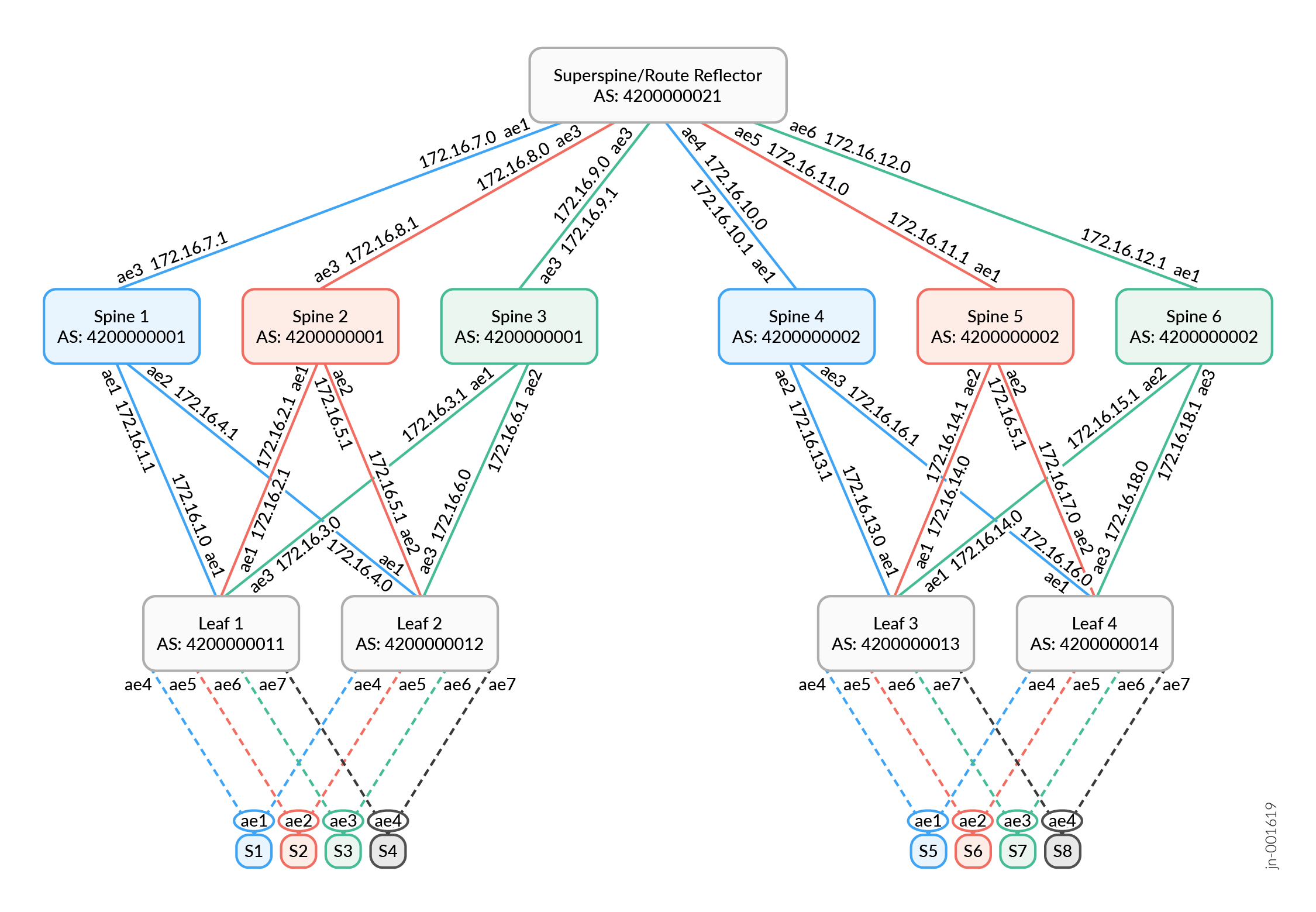
Topology overview:
-
The super spine is connected to six colored spine devices.
-
Each spine is configured with a color (Blue/Red/Green) to divide the physical fabric into multiple logical fabrics.
-
Spine 1, Spine 2, and Spine 3 are connected to Leaf 1 and Leaf 2 via the colored BGP underlay.
-
Spine 4, Spine 5, and Spine 6 are connected to Leaf 3 and Leaf 4 via the colored BGP underlay.
-
Leaf 1 and Leaf 2 are multihomed peers connected to servers S1 through S4.
-
Leaf 3 and Leaf 4 are multihomed peers connected to servers S5 through S8.
In addition to the configurations shown in Figure 1 the leaf devices each have multiple loopback interfaces configured for use with VTEP interfaces.
| Leaf Device | Loopback Address | Purpose |
|---|---|---|
| Leaf 1 | 192.168.0.1 | Primary |
| 192.168.4.1 | ep-type-2 MAC-VRF | |
| 192.168.10.1 | ep-type-5 L3 VRF | |
| Leaf 2 | 192.168.0.2 | Primary |
| 192.168.4.2 | ep-type-2 MAC-VRF | |
| 192.168.10.2 | ep-type-5 L3 VRF | |
| Leaf 3 | 192.168.0.5 | Primary |
| 192.168.4.5 | ep-type-2 MAC-VRF | |
| 192.168.10.5 | ep-type-5 L3 VRF | |
| Leaf 4 | 192.168.0.6 | Primary |
| 192.168.4.6 | ep-type-2 MAC-VRF | |
| 192.168.10.6 | ep-type-5 L3 VRF |
Spine Configuration and Verification
This section provides guidance for configuring and verifying the spine devices for DPF with EVPN-VXLAN to enable color-based routing.
Spine Configuration
Configure the spine devices to implement color-based BGP communities and fabric color assignments.
Configure the BGP extended community using set policy-options
community
color-name members
color:0:<tag> statement. Then assign the
fabric-color at the global, group, or neighbor level to
implement the fabric.
In our examples here we define the colors "Blue", "Red", and "Green" for Spine 1, Spine 2, and Spine 3 respectively, and then assigned the fabric colors at the BGP neighbor level. The configurations for the remaining spine devices are similar.
Spine 1
set policy-options community Blue members color:0:1

set protocols bgp group underlay-bgp neighbor 172.16.7.0 fabric-color Blue
set protocols bgp group underlay-bgp neighbor 172.16.1.0 fabric-color Blue
set protocols bgp group underlay-bgp neighbor 172.16.4.0 fabric-color Blue
Spine 2
set policy-options community Red members color:0:2

set protocols bgp group underlay-bgp neighbor 172.16.8.0 fabric-color Red
set protocols bgp group underlay-bgp neighbor 172.16.2.0 fabric-color Red
set protocols bgp group underlay-bgp neighbor 172.16.5.0 fabric-color Red
Spine 3
set policy-options community Green members color:0:3

set protocols bgp group underlay-bgp neighbor 172.16.9.0 fabric-color Green
set protocols bgp group underlay-bgp neighbor 172.16.3.0 fabric-color Green
set protocols bgp group underlay-bgp neighbor 172.16.6.0 fabric-color Green
Spine Verification
Use the show bgp
summary command with the fabric-color
color-name option to display information
related to BGP neighbors with the specified fabric-color
only.
This example shows the outputs for Spine 1. The outputs for the remaining spine devices are similar.
user@spine1> show bgp summary fabric-color Blue

Threading mode: BGP I/O
Default eBGP mode: advertise - accept, receive - accept
Groups: 2 Peers: 6 Down peers: 0
Table          Tot Paths  Act Paths Suppressed    History Damp State    Pending
bgp.evpn.0
                   33594      31674          0          0          0          0
inet.0
                      36         36          0          0          0          0
Peer                     AS      InPkt     OutPkt    OutQ   Flaps Last Up/Dwn State|#Active/Received/Accepted/Damped...
172.16.1.0       4200000011        741        748       0       0     5:37:03 Establ
  inet.0: 8/8/8/0
172.16.4.0       4200000012        741        748       0       0     5:37:10 Establ
  inet.0: 8/8/8/0
172.16.7.0       4200000021        742        746       0       0     5:38:19 Establ
  inet.0: 20/20/20/0
Leaf Configuration and Verification
This section provides guidance for configuring and verifying the leaf devices for DPF with EVPN-VXLAN to enable color-based routing and automatic failover between colored paths. We are only including the Leaf 1 configurations in this example for brevity. The configurations on Leaf 2, Leaf 3, and Leaf 4 are similar.
Leaf Configurations
These examples include configuring the following:
-
Color community definitions
-
Loopback addresses for colored tunnel endpoints
-
Fabric colors for BGP neighbors
-
Colored tunnel endpoint advertisements with primary and backup paths
-
Service-specific VRF instances for Layer 2 and Layer 3 EVPN services
Configure the BGP extended community using the set policy-options
community
color-name members
color:0:<tag> statement.
We have defined the colors "Blue", "Red", and "Green" because Leaf 1 has connections to all three color fabrics.
set policy-options community Blue members color:0:1
set policy-options community Red members color:0:2
set policy-options community Green members color:0:3
Configure the loopback interface IP addresses. Each VRF in this example uses a different IP address for their individual colored tunnel endpoint.
set interfaces lo0 unit 0 family inet address 192.168.0.1/32 primary
set interfaces lo0 unit 0 family inet address 192.168.0.1/32 preferred
set interfaces lo0 unit 0 family inet address 192.168.4.1/32
set interfaces lo0 unit 0 family inet address 192.168.10.1/32
Configure the fabric-color statement at the neighbor level to assign
the fabric colors to the neighbors of the same color. This example creates three
distinct colored paths through the underlay fabric, Blue, Red, and Green.
set protocols bgp group underlay-bgp neighbor 172.16.1.1 fabric-color Blue
set protocols bgp group underlay-bgp neighbor 172.16.2.1 fabric-color Red
set protocols bgp group underlay-bgp neighbor 172.16.3.1 fabric-color Green
Configure fabric route advertisements using the fabric-advertise statement with primary and backup
color assignments. Configuring a backup-color enables automatic
failover if the primary path becomes unavailable. Configuring a
backup-color also triggers adding an AIGP metric of 0 to
the route advertised over the primary colored fabric.
set protocols bgp fabric-advertise route 192.168.4.1/32 color Red
set protocols bgp fabric-advertise route 192.168.4.1/32 backup-color Blue
set protocols bgp fabric-advertise route 192.168.10.1/32 color Red
set protocols bgp fabric-advertise route 192.168.10.1/32 backup-color Green
Configure a layer 3 VRF instance for EVPN Type-2 services with integrated routing and bridging. This example creates a VRF instance for Type-2 EVPN services and associates IRB interfaces 478-481 for Layer 3 gateway functionality. It also includes a loopback logical interface lo0.301 for VRF specific addressing and sets the route distinguisher 192.168.0.1:301 for route uniqueness.
set routing-instances VRF-ep-type2 instance-type vrf
set routing-instances VRF-ep-type2 interface irb.478
set routing-instances VRF-ep-type2 interface irb.479
set routing-instances VRF-ep-type2 interface irb.480
set routing-instances VRF-ep-type2 interface irb.481
set routing-instances VRF-ep-type2 interface lo0.301
set routing-instances VRF-ep-type2 route-distinguisher 192.168.0.1:301
set routing-instances VRF-ep-type2 vrf-target target:100:301
set routing-instances VRF-ep-type2 vrf-table-label
Configure a layer 3 VRF instance for EVPN Type-5 ip-prefix-routes. This example includes the
colored-tunnel-address statement to associate the VRF
with the colored tunnel endpoint 192.168.10.1.
set routing-instances VRF-ep-type5 instance-type vrf
set routing-instances VRF-ep-type5 routing-options rib VRF-ep-type5.inet6.0 multipath
set routing-instances VRF-ep-type5 routing-options multipath
set routing-instances VRF-ep-type5 protocols evpn ip-prefix-routes advertise direct-nexthop
set routing-instances VRF-ep-type5 protocols evpn ip-prefix-routes encapsulation vxlan
set routing-instances VRF-ep-type5 protocols evpn ip-prefix-routes vni 302060
set routing-instances VRF-ep-type5 protocols evpn ip-prefix-routes export ExportHostRoutes
set routing-instances VRF-ep-type5 protocols evpn colored-tunnel-address inet 192.168.10.1
set routing-instances VRF-ep-type5 vtep-source-interface lo0.0
set routing-instances VRF-ep-type5 interface lo0.2060
set routing-instances VRF-ep-type5 interface irb.2237
set routing-instances VRF-ep-type5 interface irb.2238
set routing-instances VRF-ep-type5 interface irb.2239
set routing-instances VRF-ep-type5 interface irb.2240
set routing-instances VRF-ep-type5 route-distinguisher 192.168.0.1:2060
set routing-instances VRF-ep-type5 vrf-target import target:300:2060
set routing-instances VRF-ep-type5 vrf-target export target:200:2060
Associate a MAC-VRF routing instance with a colored tunnel endpoint by adding the
colored-tunnel-address statement to the configuration.
In this example, adding this statement to an existing MAC VRF associates it with
the colored tunnel endpoint 192.168.4.1, enabling Layer 2 EVPN services to
utilize the Red colored path with Blue backup.
set routing-instances MACVRF-ep-type2 vtep-source-interface lo0.0 inet colored-tunnel-address 192.168.4.1
Leaf Verification
You can verify the configuration using the various show
commands.
Use the show bgp
summary fabric-color color-name
command to display neighbors with the specified fabric color only. This example
shows the neighbor 172.16.1.1 has an established session over the
fabric-color Blue.
user@leaf1> show bgp summary fabric-color Blue

Threading mode: BGP I/O
Default eBGP mode: advertise - accept, receive - accept
Groups: 5 Peers: 10 Down peers: 4
Table          Tot Paths  Act Paths Suppressed    History Damp State    Pending
bgp.evpn.0
                   57610      25196          0          0          0          0
inet.0
                      84         54          0          0          0          0
Peer                     AS      InPkt     OutPkt    OutQ   Flaps Last Up/Dwn State|#Active/Received/Accepted/Damped...
172.16.1.1       4200000001        749        739       0       0     5:36:42 Establ
  inet.0: 14/29/29/0
The show bgp
neighbor fabric-color color-name
command displays BGP neighbors with the specified fabric color only. In this
example you can see the Fabric-color field displays the BGP color community name
Blue and value assigned to the BGP color community.
user@leaf1> show bgp neighbor fabric-color Blue

Peer: 172.16.1.1+179 AS 4200000001        Local: 172.16.1.0+54513 AS 4200000011
  Group: underlay-bgp          Routing-Instance: master
  Forwarding routing-instance: master
  Type: External    State: Established    Flags: <Sync>
  …
  Fabric-color: Blue [color:0:1 ]
The show bgp
fabric-advertise command shows the advertised routes
with the primary and backup colors assigned to them.
user@leaf1> show bgp fabric-advertise

Route                                   Color                       Backup color
192.168.0.1/32                          -                           -
192.168.4.1/32                          Red, color:0:2              Blue, color:0:1
192.168.10.1/32                         Red, color:0:2              Green, color:0:3