
Zero Trust Inline Segmentation Design Considerations
Utilizing the Supported Hardware and Firmware
When planning a ZTIS deployment, review the following design considerations carefully. Contact Juniper if you have any questions.
- For access switches in branch or campus fabric environments, only Juniper Networks® EX4400 and Juniper Networks® EX4100 switches are currently supported. This is because the enforcement function operates internally using VXLAN-based forwarding and blocking, which requires specific hardware capabilities.
- In campus fabric designs, ZTIS-capable switches are always required at the access layer where enforcement is performed. Avoid attaching downstream switches, such as desktop switches, with the expectation that enforcement will occur there. Enforcement can only begin at the point where traffic enters the switching network.
- Older end-of-life APs such as AP-21, AP-41, and AP-61 are not ZTIS-capable and cannot be used in ZTIS deployments.
- The minimum Junos firmware version required for ZTIS on Juniper Networks switches is 24.4R2-S3 or 25.4R1-S1.
- Virtual Switches like vJunos-Switch do not support ZTIS and particularly the enforcement functions.
Zero Trust Inline Segmentation GBP Tag Assignment and Policy Restrictions
- Assigning static GBP tags based on source IPv4 or IPv6 addresses is not supported in ZTIS, as the design only allows Layer 2–based assignment methods. Static GBP tag assignment using source IP addresses is supported only in IP Clos EVPN fabrics. To achieve similar results with ZTIS, consider using policies that match destination IP addresses instead.
- Configuring a GBP default discard policy term is not supported in ZTIS and is available only in IP Clos EVPN fabrics. As an alternative in ZTIS deployments, consider implementing a block policy for internet traffic based on destination IP addresses to provide similar behavior.
- The Destination IP Prefix cannot be combined along with the GBP tag.
Optimize the Number of Policies Created
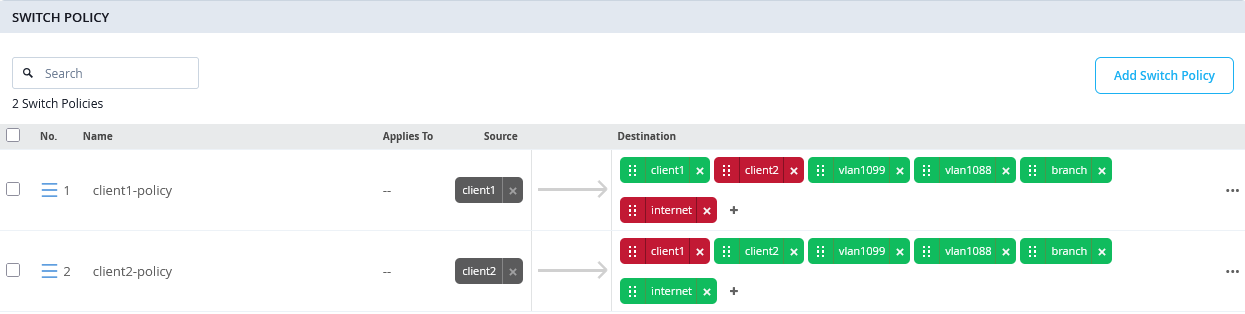
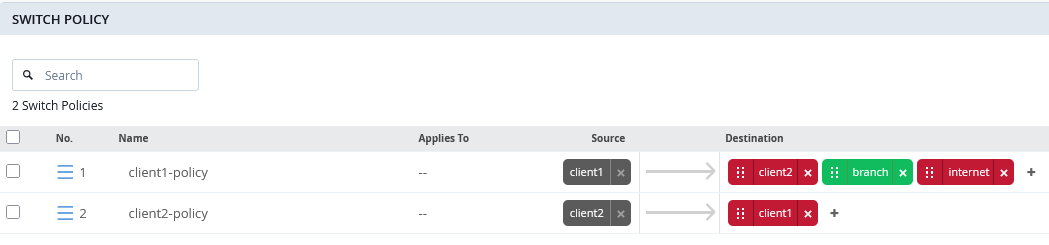
In IP Clos designs, the number of policies is limited to about 250 Rules. Due to using a different profile when using ZTIS, the tested limits of policies on an access switch are higher and about 1,500 rules. Should you create a large set of rules that comes close to this limit consider deleting all GBP destination “allow” policies while keeping the “deny” policies as only those will then be created on the access switches.
When using destination IP addresses, you need to be a bit more careful when implementing rules. To have the same functionally, you may need to keep “allow” rules, but you can delete more specific “allow” with destination IP addresses rules before like in the example below.
See the example below on an unoptimized switch policy set:
Versus the optimized policy set still has the same functionality:
Supported GBP Features and Limits Depending on Deployment Type
Review the table below about available features in each design:
| Feature | ZTIS Branch | IP Clos |
|---|---|---|
| Dynamic GBP tag assignment when using EAP | Yes | Yes |
| Dynamic GBP tag assignment when using MAB | Yes | Yes |
| Static GBP tag assignment via MAC address | Yes | Yes |
| Static GBP tag assignment via VLAN | EX4400 Series only | EX4400 Series only |
| Static source IP prefix GBP tag assignment | No | Yes |
| SRC and DST GBP tag-based policy enforcement inside the same VLAN | Yes | Yes |
| SRC and DST GBP tag-based policy enforcement between different VLANs within the same VRF | No | Yes |
| Destination IP prefix-based policy enforcement | Yes | No |
| Layer 4-based policy enforcement | Yes | Yes (new UI) |
| Ability for default deny policy | No | Yes (manual CLI) |
| Maximum policy rules | 1.500 | 250 |
| GBP tag propagation from ZTIS access point to network | Yes | No |
Known Junos OS Switch Firmware Notes
When configuring GBP on an access switch for the first time, you should plan a maintenance window before activating and using the feature. Junos OS requires a control plane restart for the change to take effect:
- On a standalone switch, restarting the Packet Forwarding Engine (PFE) is sufficient to trigger the required control plane restart for GBP activation.
- On a Virtual Chassis, a full reboot of the entire Virtual Chassis is required to complete the control plane restart needed for GBP activation.
Known Hardware Restrictions
Juniper Networks® EX4100 Switches have the following documented limitations:
- Static GBP tag assignments based on interfaces or ports and VLAN IDs are not supported on the EX4100 switch.
- Static VLAN ID-based GBP tag assignments are not supported on the EX4100 switch.
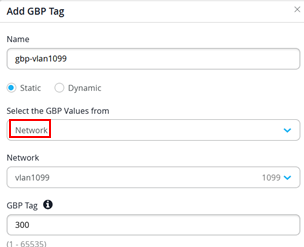
If your deployment includes both EX4400 and EX4100 switches and you use Network to assign GBP tags for a VLAN, the Juniper Mist cloud automatically ensures that unsupported configurations are not applied to EX4100 switches.
Known Juniper Mist Portal Restrictions
The current version of the Juniper Mist portal supports the following static GBP tag and policy assignments:
- Static GBP tag assignment
- Source IPv4 prefix-based static GBP tag assignments called Subnets. Note: This option is not supported by ZTIS and can only be used in IP Clos EVPN fabrics.
- MAC address host-based static GBP tag assignments called MAC Address.
- VLAN ID-based static GBP tag assignments called Network. Note: Can only be used for EX4400 switches.
- Policy creation
- Destination IPv4 Address.
- Destination Port and Protocol.
Currently, you must use additional Junos OS CLI commands if you want to make use of:
- Static source IPv6 address-based GBP tag assignments.
- Destination IPv6 address policies.
- Switch port-based (interface-based) static GBP tag assignments.
- Switch port-based (interface-based) and VLAN ID-based static GBP tag assignments.