
Choose the Right Access Point
Use this topic to compare the features available on HPE Mist Networking Wi-Fi 7 APs.
Choosing the right HPE Mist Networking AP depends on your specific environment, your requirements for performance, antenna type, and deployment location.
General Selection Principles for Wi‑Fi 7 APs
Across all environments, Wi‑Fi 7 AP selection should account for:
-
Radio density and mode flexibility All HPE Mist Networking Wi-Fi 7 APs are tri‑band, meaning the AP can operate on each of the 2.4, 5, and 6 GHz bands simultaneously. The differences start to appear in the number of spatial streams. In terms of spatial streams, APs are designated 2x2 or 4x4. 2x2 APs support 2 receive and 2 transmit streams, while 4x4 APs support 4 receive and 4 transmit streams. Because client devices normally have a maximum of two radios, a 4x4 AP can handle more clients at one time. Higher end APs have a multi-band radio that can operate in any of the three bands, which allows for dual‑5 GHz or dual‑6 GHz operating modes.
-
Antenna pattern suitability—Integrated directional vs omni-directional vs external. See AP Antenna Type
-
Power availability—IEEE 802.3at vs IEEE 802.3bt for full feature enablement. See Table 1
-
Physical environment—Attenuation, ceiling height, racking, wall materials, and so on. See AP Antenna Type
-
Client mix—High‑density user devices vs IoT‑heavy deployments
AP Antenna Type
APs come with either internal omnidirectional antennas, internal directional antennas, or external antennas. Be sure to choose the right AP models for your deployment.
-
Internal Antennas
Internal antennas provide omnidirectional coverage suitable for multi-client areas like schools, hotels, offices, and conference rooms. Use omnidirectional antennas where coverage is the primary goal, client density is low, and roaming behavior is not critical. APs with internal antennas appear clean and neat in the deployed space. With no extra hardware, these APs deploy easily. APs with Internal antennas are sometimes less expensive than APs with external antennas.
-
Internal Directional Antennas
Internal directional antennas, like the 60ºx60º antenna in the AP47D, allow for the same ease of installation and clean finish as APs with omnidirectional internal antennas. These directional antennas are able to target the radio signals in specific directions with known coverage patterns. With a directional internal antenna, you can point the signal in the needed direction by rotating the AP on its mounting hardware. You can identify APs that have internal directional antennas by the D in the AP name, like AP47D. The AP36M also contains a software controllable internal directional antenna.
-
External Antennas
APs that support external antennas come with one or more connectors on the outside of the AP for attaching the antenna hardware. These external antennas allow you to customize the coverage pattern by aiming, or shaping, the radio signals through adjustment of the position and location of the antennas. This aiming capability also helps reduce co-channel interference along the path of the directed signal. Use directional antennas in open office areas that require multiple APs for capacity, where maintaining high MCS rates, predictable roaming, and balanced client distribution are key design objectives. External antennas allow you to place the AP in a protected location while placing the antenna in a harsh-weather location. You can often replace an antenna at a lower cost than replacing the entire AP. External antennas often provide higher adjustable gain than internal antennas. You can identify APs that have external antennas by the E in the AP name, like AP47E. The AP36M can also accept external antennas.
Avoid reducing antenna transmit power as a substitute for cell control. Reducing the transmit power can force clients into lower modulation rates and negate the performance benefits of Wi‑Fi 6 and Wi‑Fi 7.
To see how changing from omnidirectional to directional antennas can affect Wi-Fi coverage and roaming, see: Omni vs Directional
Wi-Fi 7 APs
Wi‑Fi 7 AP selection should be driven less by peak data rates (PDR) and more by antenna flexibility, radio mode options, and environmental fit. Aligning AP form factor and RF characteristics to the physical space delivers better outcomes than defaulting to a single AP model across all environments.
The table below compares the specifications of all the HPE Mist Networking-compatible Wi-Fi 7 APs.
| Feature/AP Model | AP17 | AP27/E | AP36/M | AP37 | AP47/D/E | AP66/D/E | AP-723H |
|---|---|---|---|---|---|---|---|
| Datasheet | AP17 | AP27/E | AP36/M | AP37 | AP47/D/E | AP66/D/E | AP-723H |
| Deployment |
Indoor Wall Jack or Desktop |
Indoor Ceiling |
Indoor Ceiling |
Indoor Ceiling |
Indoor | Indoor - Outdoor |
Indoor Wall Jack or Desktop |
| Radios |
|
|
|
|
|
|
|
| Radio Modes | 2.4 GHz + 5 GHz + 6 GHz | 2.4 GHz + 5 GHz + 6 GHz | 2.4 GHz + 5 GHz + 6 GHz | 2.4 GHz + 5 GHz + 6 GHz | 2.4/5/6 GHz + 5 GHz + 6 GHz | 2.4 GHz + 5 GHz + 6 GHz | 2.4 GHz + 5 GHz + 6 GHz |
| Antenna Type(s) | Internal |
Internal External (AP27E) |
Internal Directional External |
Internal |
Internal Directional (60º x 60º on AP47D) External (AP47E) |
Internal Directional External |
Internal |
| Ultra Wide Band (UWB) | No | No | No | No | Yes | No | No |
| Bluetooth LE | Omni | Omni | Omni | virtual Bluetooth LE | virtual Bluetooth LE | virtual Bluetooth LE | Omni |
| GNSS/GPS | L1/L5 | L1/L5 | L1/L5 | L1/L5 | L1/L5 | L1/L5 | L1/L5 |
| IoT Sensors |
Pressure Temperature Accelerometer |
Pressure Temperature Accelerometer |
Pressure Temperature Accelerometer |
Pressure Temperature Accelerometer |
Pressure Temperature Accelerometer |
Accelerometer |
None |
| Ethernet |
|
|
|
|
Dual 10GbE PoE w/Failover | 10Gbe PoE |
|
| PoE** | 802.3bt PoE | 802.3at PoE | 802.3bt PoE | 802.3bt PoE | 802.3bt PoE | 802.3at PoE | 802.3bt PoE |
| 6 GHz Power Class | LPI | LPI-AP27 SP-AP27E |
LPI-AP36 SP-AP36M |
LPI |
LPI-AP47/D SP-AP47E |
LPI and SP (US and Canada only) LPI only in most regulatory domains |
LPI |
| Performance | Up to 5.8 Gbps | Up to 5.8 Gbps | Up to 11.53 Gbps | Up to 11.53 Gbps | Up to 28.8 Gbps | Up to 9.38 Gbps | Up to 4.7 Gbps |
| Additional Docs | AP17 | AP27 | AP36 | AP37 | AP47 | AP66 | AP-723H Installation Guide |
*The AP-723 H is a dual platform AP. You can manage the AP-723 with Mist or Aruba Central.
**The PoE standards shown represent the power needed for full AP functionality.
Choose the Right Access Point
Access Point Ethernet Connections
As shown above, many Mist APs have multiple Ethernet connections built in. The primary Ethernet (Eth0) interface in all our APs is the PoE-in interface. The Eth0 interface provides power to the AP. From there, the range of options for Ethernet connectivity from and through the APs varies by model.
The AP47 is our most capable, high-performance AP. The dual Ethernet capabilities of the AP47 deserve some special attention.
Ethernet Redundancy and Connecting the AP47 to the Network
The two 10 Gbps Ethernet ports on the AP47 not only provide PoE redundancy but also support redundant Ethernet links to ensure continued operation during infrastructure outages or upgrades in mission critical environments. The AP47 supports single uplink, dual uplink, individual uplink and downlink, and dual downlink connectivity.
Single Uplink
For single uplink we recommend that you connect Eth0 to the network uplink for simplicity and consistency. However, there is no restriction on using Eth1 to connect to the network uplink on an AP47.
If you enforce a MAC limit on your AP switch ports, such as when you tunnel traffic to a Mist Edge, you must configure the MAC limit to two or more.
Dual Uplink
If you leverage dual uplinks, here are a few good things to know:
-
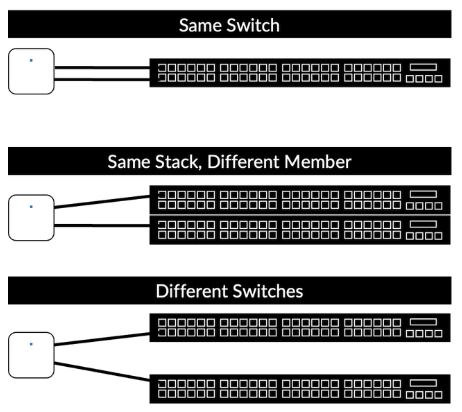
Connecting the AP47 to the network requires no switch configuration. You can connect the AP to the same switch or different switches. Ensure the L2 VLAN is the same on both switch ports so clients don’t need to obtain new IP addresses if a failover occurs.
-
New AP47s arrive configured with dual uplinks in an active-standby configuration.
-
You can configure uplink, downlink and dual downlink (mesh relay) connectivity by manually configuring the port VLANs in the Mist portal.
-
-
The AP47 employs passive failover detection based on link status and activity which results in three to five-second failover.
-
The AP47 is capable of non-traffic-impacting (hitless) PoE failover when you use dual 802.3bt power sources.
-
If you use two 802.3at or mixed 802.3at and 802.3bt power sources, the AP47 combines the received power for full functionality. The AP may brownout or reboot in the event it needs to reduce functionality due to a single power source failure.
AP47 Ethernet MAC Addresses
-
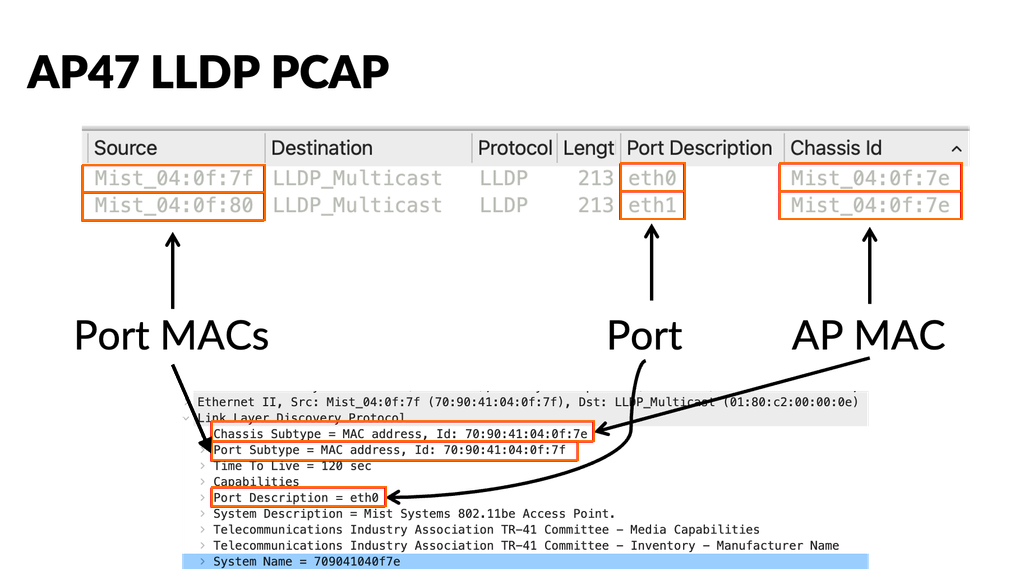
The AP47 uses three MAC addresses for Ethernet, because it supports multiple uplinks. The MAC address for the AP wireless interface is known as the AP MAC address, then each Ethernet port MAC address is incremented by 1. For example:
-
AP MAC Address = 70:90:41:XX:XX:7E
-
AP Eth0 MAC Address = 70:90:41:XX:XX:7F
-
AP Eth1 MAC Address = 70:90:41:XX:XX:80
-
-
The AP47 uses the AP MAC address for switch virtual interfaces (SVIs) and IP communication, such as DHCP, ARP, DNS, NTP, AP Management, L2TPv3, and RADIUS.
-
The AP47 uses the unique Ethernet port MACs for link-local packets, such as LLDP and Dot1x Supplicant.
-
Connected switches use the AP47's multiple MAC addresses primarily when you configure switch-side MAC-based policies. For example:
-
To perform MAC authentication bypass (MAB) authentication against the APs, add both the AP MAC address and the port MAC addresses to your switch's MAB database,
-
If you leverage LLDP, the Chassis ID is the AP MAC address.
-
If you enforce a MAC limit on your AP switch ports, such as when tunneling traffic to a Mist Edge, set the MAC limit to two or more: one for the Ethernet MAC and one for the AP MAC.
-
-
If you leverage 802.1X authentication against the APs with dual uplinks, both ports authenticate to the network independently of each other. Thus, two separate auths appear in your RADIUS server.

Power Options for the AP47
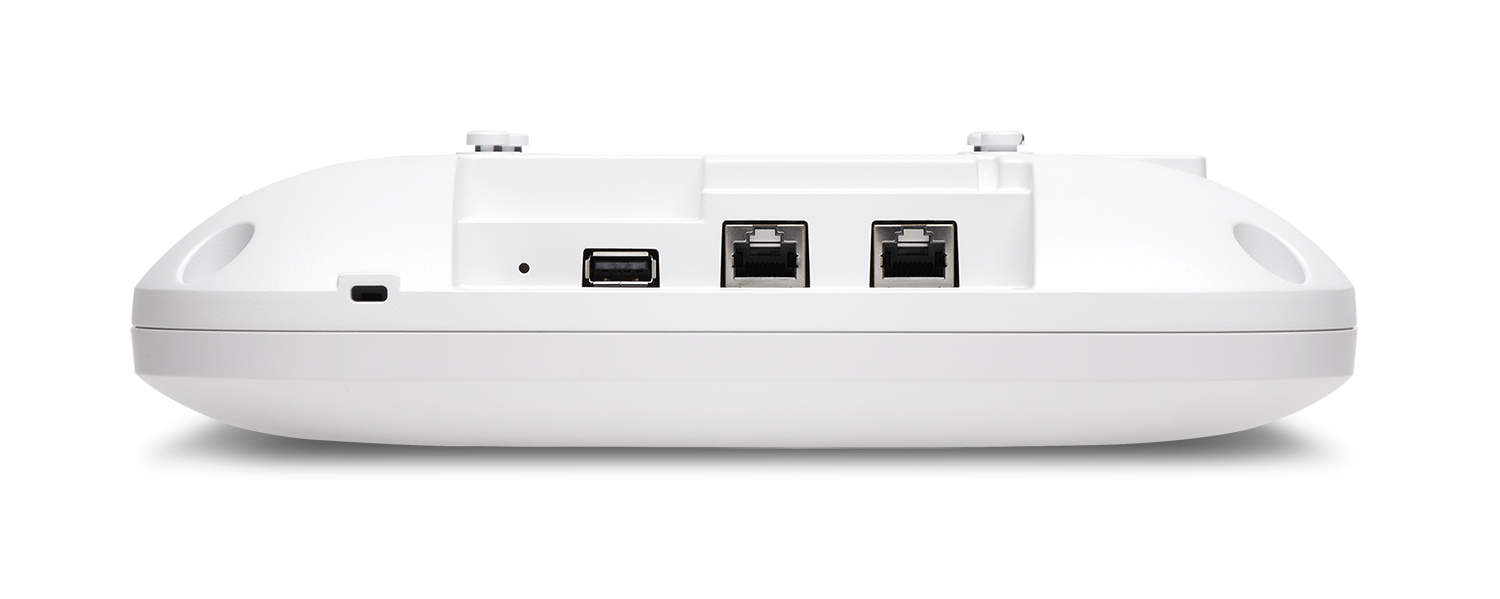
The AP47 has dual 10 GbE multigigabit Ethernet ports, both of which support power over Ethernet (PoE) in.
The AP47 requires 802.3bt power (Class 6 - 60W) for full functionality. It requires approximately 29 Watts of power at the powered device (PD) for full Wi-Fi functionality. When powered by 802.3at power, the AP operates with reduced functionality. The three Wi-Fi radios operate at 2x2:2, or 4x4:4 with any two Wi-Fi radios enabled. The AP47 keeps the scanning radio, and the Bluetooth LE, GPS, and UWB radios active at all times, regardless of the power source.
Either or both of the ports can be used to power the AP using PoE. You can see the functionality differences below:
-
802.3bt Power Source
-
Single 802.3bt in – Full functionality
-
Dual 802.3bt in – Full functionality
-
-
802.3.at Power Source
-
Single 802.3at in – Reduced Wi-Fi functionality – Three 2x2 or Two 4x4
-
Dual 802.3at in – Full functionality
-
-
Mixed Power Source
-
One 802.3bt in and one 802.3at in – Full functionality
-
When two 802.3bt sources power the AP47, the device supports full Ethernet and PoE redundancy. When two 802.3at sources power the AP47, a power-sharing configuration is created, where the AP merges power from both ports to ensure full functionality.
In the power-sharing configuration, the AP maintains full Ethernet redundancy; however, it may experience a brownout or reboot if one power source fails. Internal testing has proven that brownouts or reboots are rare occurrences. To ensure maximum redundancy, use 802.3bt power sources.
Ensure you use 802.3bt or 802.3at compliant PoE switches or injectors to power the AP47.
See PoE Requirements for HPE Mist Networking APs for AP47 power requirements.