
Help us improve your experience.
Let us know what you think.
Do you have time for a two-minute survey?
Help us improve your experience.
Let us know what you think.
Do you have time for a two-minute survey?
Firmware upgrade management is now unified under a single Firmware Upgrades page at the organization level, covering switches and WAN Edges (SRX devices). Below are the key features of the new Firmware Upgrades page (Organization > Firmware Upgrades):
Centralized scheduled upgrades—Schedule firmware upgrades for switches and WAN Edges from one place. Select target sites, firmware versions, rollout strategy, and schedule timing.
Auto-upgrade settings—Configure auto-upgrade policies for switches and WAN Edges at the org level, with the option to override at the site level.
Upgrade status tracking—Get real-time visibility into upgrade progress across device types.
Edit and cancel upgrades—Modify scheduled upgrades or cancel them.
Upcoming upgrade notifications—Device list views and site configuration pages alert administrators to pending upgrades.
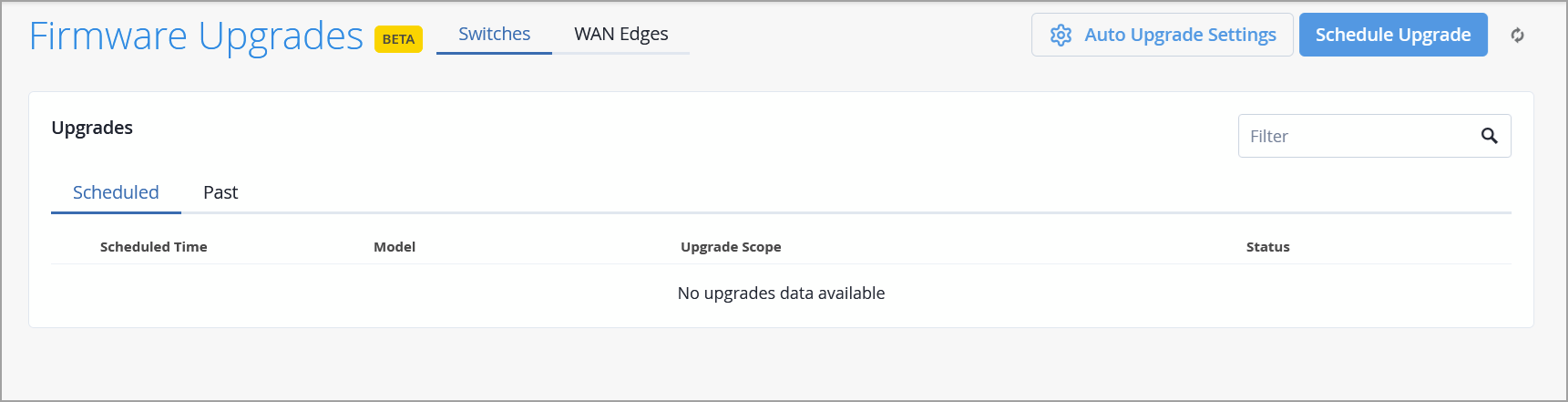
As part of this enhancement, we have removed the Firmware Upgrade section from the Organization > Settings page.
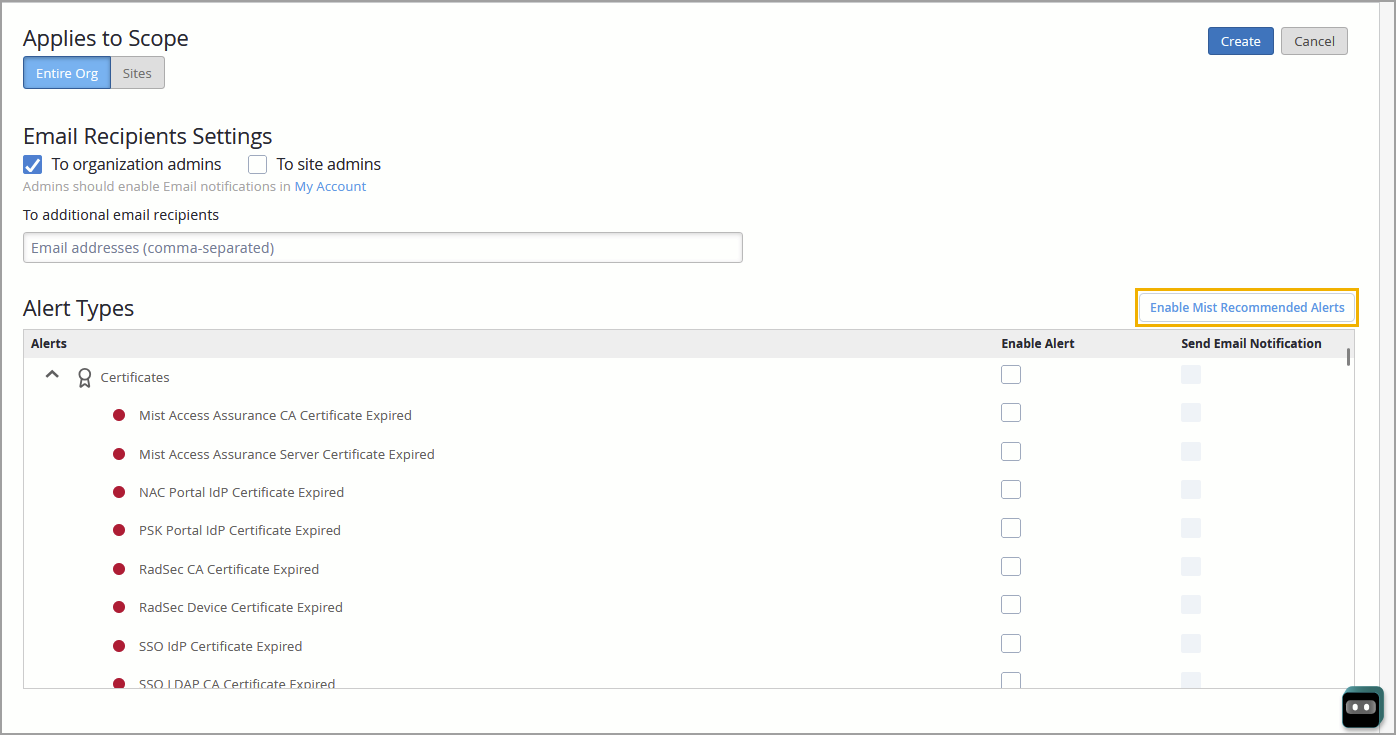
When you create a new organization in Mist, the default alert template automatically includes all critical alerts recommended by Mist, with e-mail notifications to the organization administrator enabled by default. This ensures that every newly created organization has all critical alerts enabled, without requiring any manual configuration.
Similarly, when you create a new alert template within an organization, all critical alerts—along with e-mail notifications to the organization administrator—are enabled by default. The template also includes an Enable Mist Recommended Alerts button. This button remains disabled as long as all critical alerts are already selected. If you deselect one or more critical alerts, the button becomes active, allowing you to re-enable all critical alerts with a single click. You can use this button to quickly apply critical alert settings to existing templates.
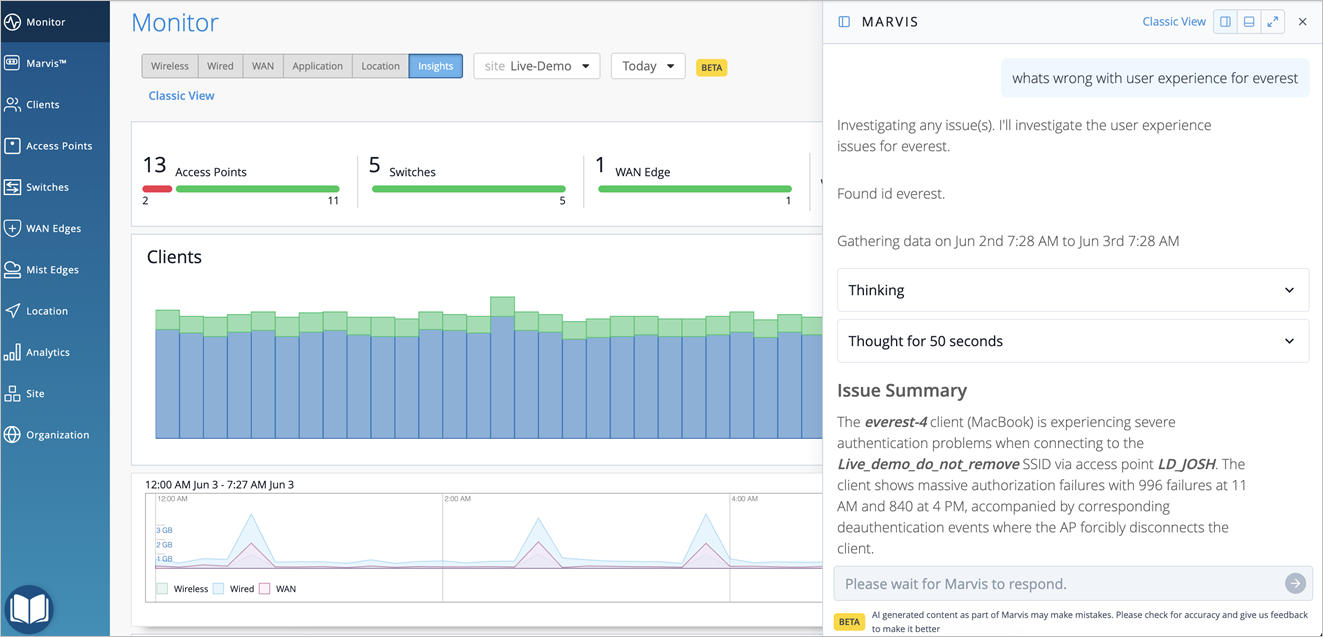
The Marvis Conversational Assistant has been enhanced to deliver intelligent, first‑level troubleshooting through a redesigned interface and advanced agentic AI that orchestrates multiple agents. By combining real‑time network telemetry with large language models (LLMs), Marvis evaluates the outputs of each agent—leveraging their findings to progressively narrow down the root cause and determine the optimal resolution.
By consolidating the full context of the question or issue, root cause analysis, and recommended next steps into a single, unified view, Marvis removes the need to navigate across multiple pages and data sources. The result—reduced troubleshooting time, improved operational efficiency, and an elevated user experience.
For more information, see Marvis Conversational Assistant (Enhanced Version Using Agentic AI)
We are extending Marvis Minis validations to wired networks. By simulating a physically connected client, Marvis Minis assesses whether RADIUS, DHCP, ARP, and DNS services are operational. This eliminates the need to connect a physical client to a switch to troubleshoot VLAN reachability—a process that can be both time-consuming and labor intensive when numerous VLANs are involved.
The validations for wired networks are supported on Juniper EX switches running Junos OS version 25.4R2 and later. Marvis Minis runs hourly validations on every switch within a site. These validations focus on up to 16 VLANs, prioritizing those with the highest levels of client activity. To avoid overlaps, VLANs tested as part of the wireless network validations are excluded from the wired network validations. Management VLANs are not included in the validations. The validations can be triggered by events such as VLAN updates, WLAN template updates, and new switch onboarding.
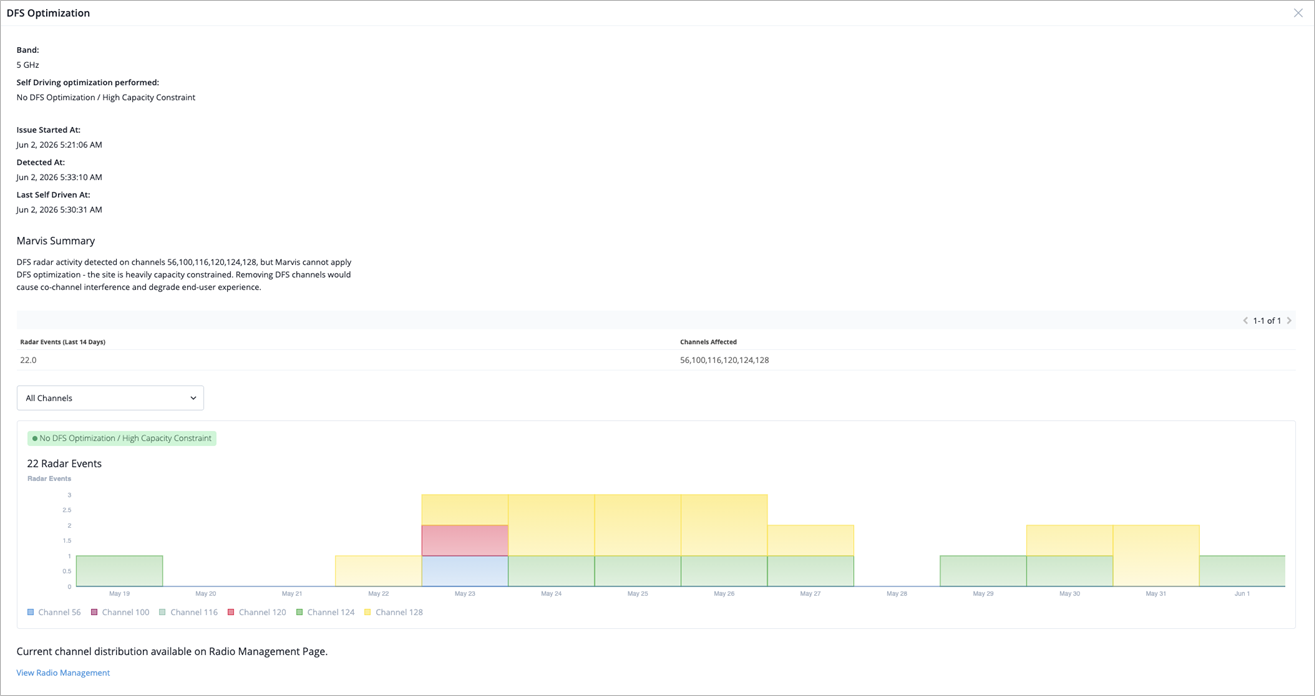
Marvis now classifies DFS optimization based on both radar activity and site capacity constraints, rather than radar events alone. This enhanced classification helps you understand how RRM performs optimization based on the site capacity. If a site has sufficient capacity, RRM deprioritizes the use of channels with repeated DFS radar detections.
The new classifications are as follows:
No DFS Optimization/High Capacity Constraint—RRM detects DFS radar activity, but does not perform optimization because the site is severely capacity-constrained. If a site does not have sufficient spare capacity, RRM has limited options to optimize channel assignments effectively as moving radios off DFS channels would impact performance. Thus, DFS channels remain in the overall site channel plan despite radar exposure. In such cases, optimization can be implemented only after additional capacity, such as 6 GHz is added.
Low DFS Optimization/Medium Capacity Constraint—RRM detects significant DFS radar activity, but moderate site capacity constraints limit how far the RRM can reduce DFS channel usage. RRM avoids the most affected DFS channels while keeping others in service to meet capacity needs. Additional capacity, such as 6 GHz, gives RRM more flexibility to move away from DFS-affected channels.
Medium DFS Optimization/Low Capacity Constraint—RRM detects significant DFS radar activity, and site capacity constraints are low. RRM moves most radios away from the affected DFS channels while retaining a limited number of DFS channels where necessary to support capacity.
Medium DFS Optimization/No Capacity Constraint—RRM detects moderate DFS radar activity, and the site has no capacity constraints. It can move radios from the affected DFS channels to more stable alternatives without affecting performance.
High DFS Optimization/No Capacity Constraint—RRM detects significant DFS radar activity, and the site has no capacity constraints. It moves radios from DFS-affected channels to stable non-DFS channels.

The View More page now shows additional DFS optimization details.
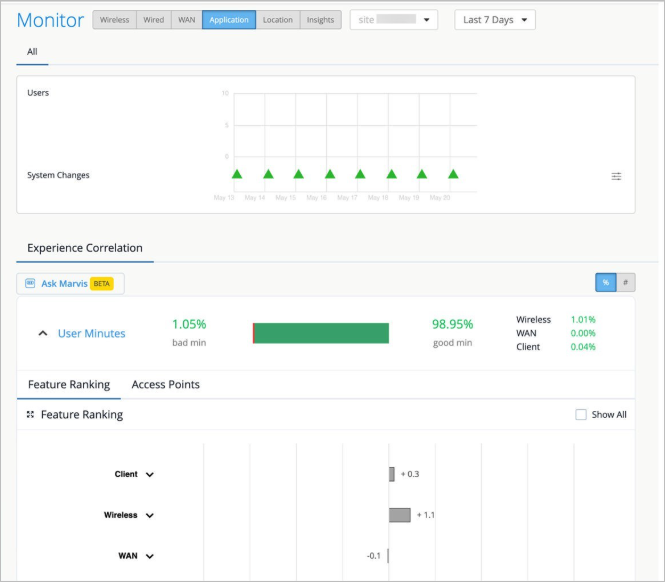
The Marvis Large Experience Model (LEM) is an AI-driven model that predicts bad user experiences and ranks their root causes for collaboration applications such as Microsoft Teams and Zoom across the network. LEM is now available for all organizations even when Microsoft Teams or Zoom is not integrated as a labeled data source. Using a Shapley-based data science model, Marvis LEM processes all available data—such as channel utilization, RSSI, latency to cloud, and more—to highlight feature-level root cause contributions and identify bad user experiences. LEM requires a Marvis for Wireless subscription.
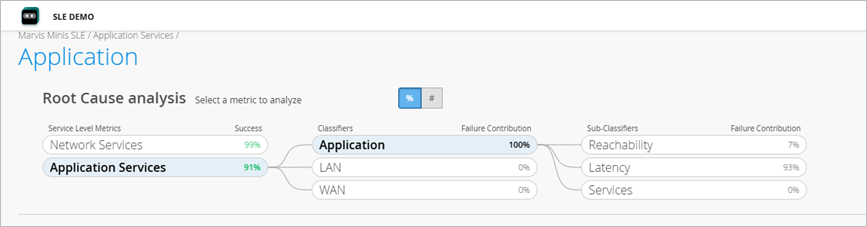
We have updated the Application (now called Application Services) SLE classifiers to improve issue classification and provide more granular visibility across the application, LAN, and WAN domains. The following primary classifiers are now available, each with additional sub-classifiers to help pinpoint the exact nature of an issue:
Application—Indicates that the issue is isolated to a specific application or service, while the network path to the destination remains healthy. This classifier helps distinguish application-level problems from broader network connectivity issues.
LAN—Indicates that the issue is on the local network, specifically between the user’s device and the local gateway. This classifier covers problems related to local connectivity
or switching within the LAN environment.
WAN—Indicates that the issue lies outside of the local network, specifically between the local gateway and the destination. This classifier includes problems related to external connectivity, ISP links, routing across wide-area networks, or upstream network disruptions.
The LAN and WAN classifiers are classified only for APs running firmware version 0.15x and later.
We have also added the following DNS sub-classifiers under the Network Services SLE:
Unresponsive
Lookup Failed
Latency
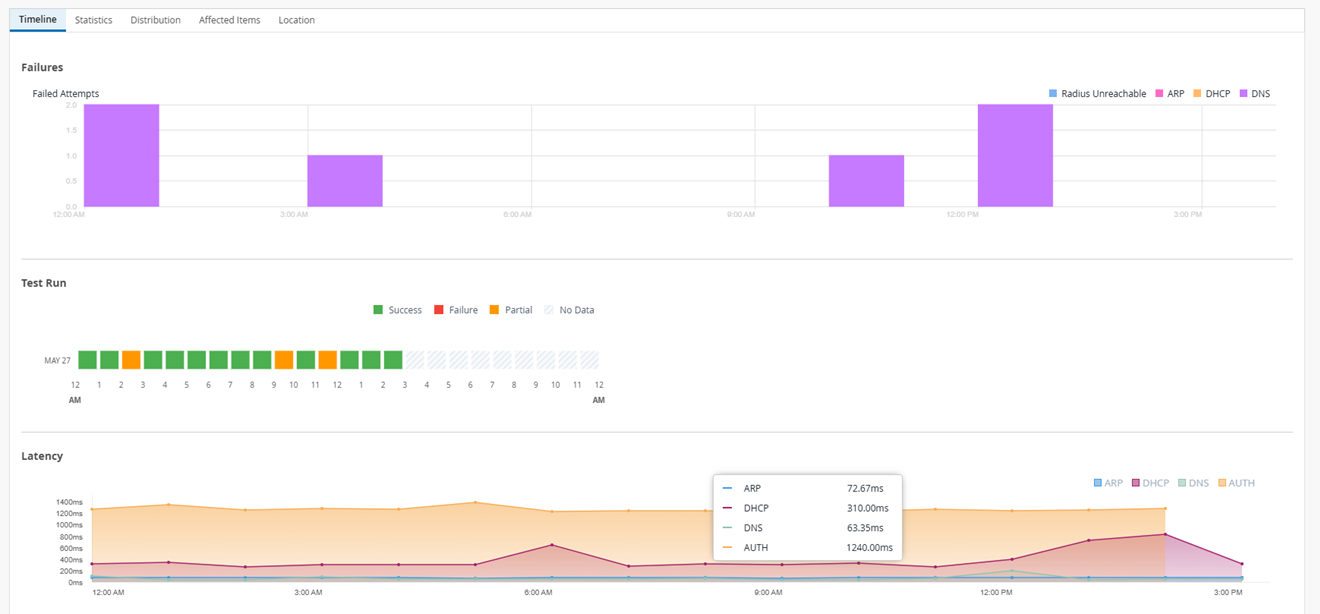
We have introduced a latency graph for the Network Services SLE on the Marvis Minis SLE page. This graph provides time-series visibility into the latency for the four pre-connect network services: DHCP, ARP, DNS, and RADIUS.
Marvis Minis already validates user connectivity by simulating pre-connect steps on active VLANs. With this enhancement, the latency data for each of the pre-connect steps is displayed as a time-series graph, enabling you to monitor network services performance over time.
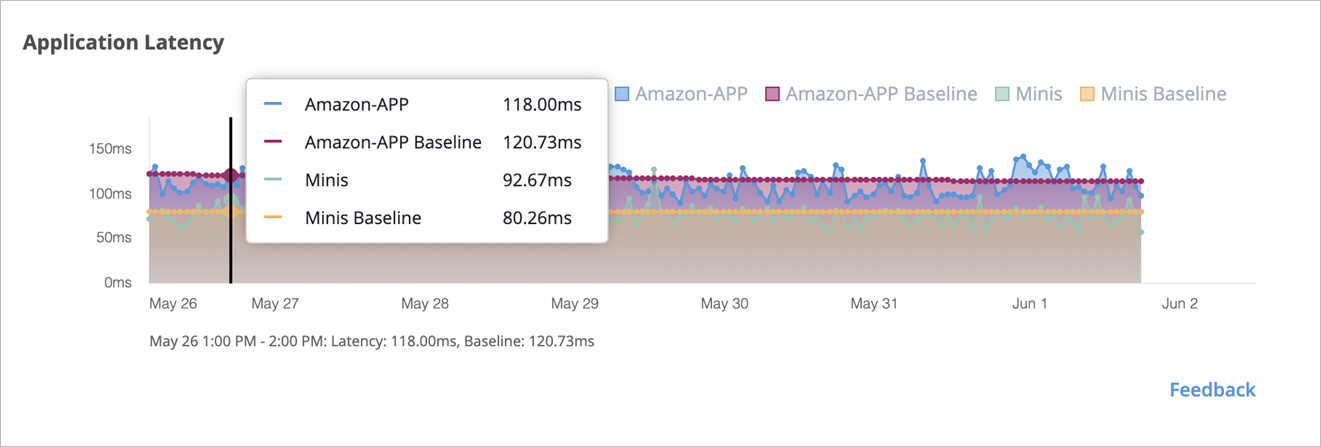
The Marvis Minis application is now live. Marvis Minis running on devices validates application reachability and performance against a globally hosted Minis cloud application, served through a CDN. This enables Minis to measure network metrics as close as possible to your client VLAN's Internet gateways. Ensure that *.mist.com addresses are allowed and reachable through your firewall.
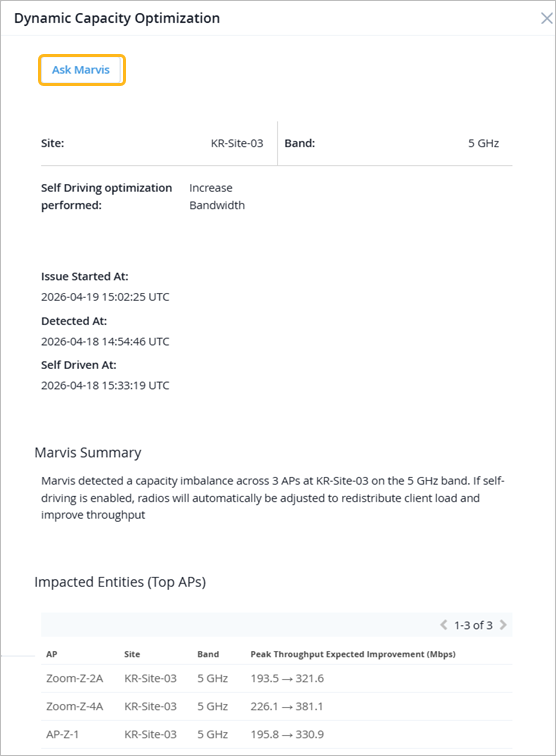
We have added the Ask Marvis option to the View More page for the following Marvis Actions:
Rogue DHCP Server Detected
Missing VLAN
Dynamic Capacity Optimization
When you click the Ask Marvis option, it automatically brings up the Marvis conversational interface and provides a detailed analysis of the issue. This includes a summary of the issue, likely root causes, recommendations, and additional information relevant to that specific Marvis Action. You can also ask follow-up questions to dive deeper into specific aspects.
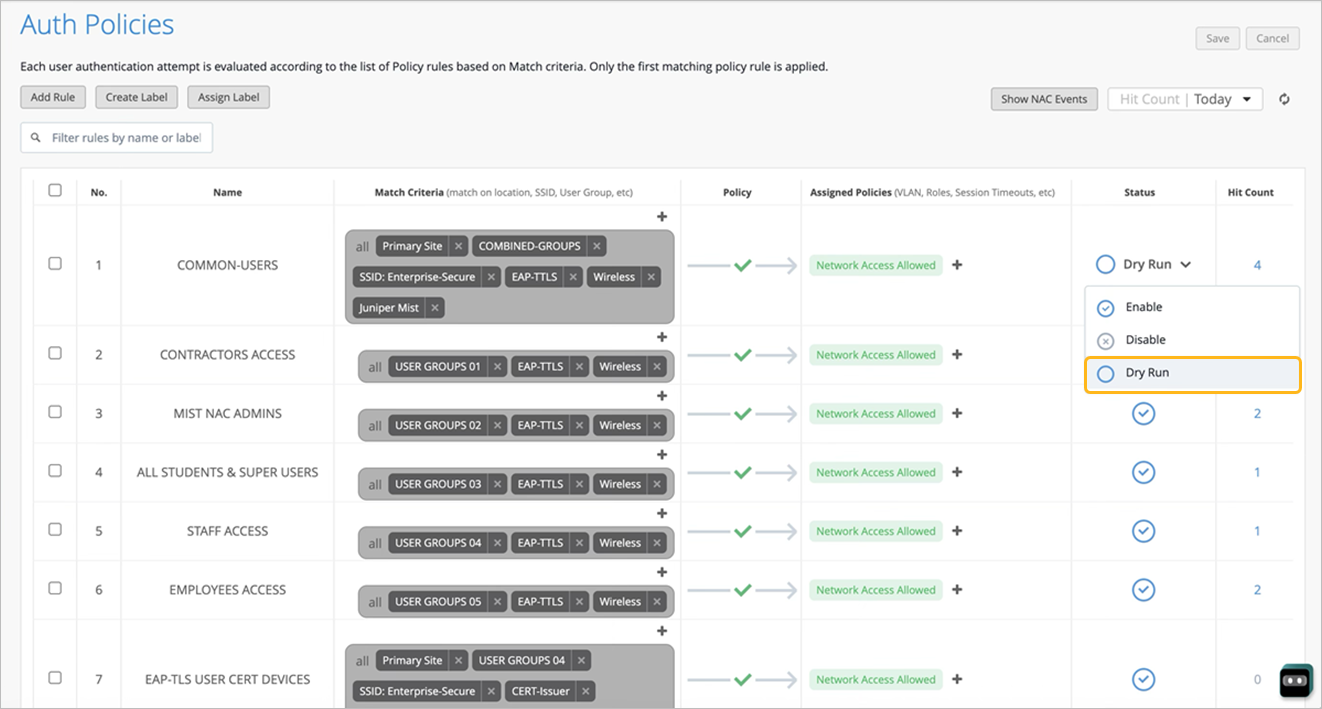
Auth policy rules can now be configured for Dry Run mode, enabling administrators to safely test policy rules in production without affecting client network access.
A rule set to Dry Run mode is evaluated against incoming authentication requests, but no enforcement action is taken if the rule is matched— the request processing continues to the next rule in the policy list as if the Dry Run rule did not exist.
Rules configured for Dry Run mode show a dedicated hit count, displaying how many clients would have matched the rule. This helps you to evaluate the potential impact of a policy change before actually enforcing it in a live environment.
To help enterprises extend high-performance Wi-Fi to 6 GHz without causing interference to existing spectrum users, we have introduced Automated Frequency Coordination (AFC) support for Mist access points (APs) with external antennas and outdoor APs that can operate in 6 GHz band. With AFC integration, Mist APs can operate in the 6 GHz band as per standard power transmission regulations where allowed, ensuring stronger and faster Wi-Fi connections—particularly in outdoor and mixed-use environments.
The following Mist APs now support 6 GHz Standard Power operations in the US Region:
AP45E
AP66
AP66D
When Standard Power is enabled, these APs and associated clients can communicate at higher allowed power levels on the 6 GHz band for enterprise deployments, improving coverage and performance. For this feature to work, APs must be able to determine their location either natively (built-in GPS) or through neighboring peers with GPS capability. AFC enables dynamic frequency and power allocation based on APs' real-time location. Firmware version 0.15 or later is recommended for optimal performance and full feature support.
In Mist, you can view the geolocation or latitude and longitude data for the AFC-enabled APs on the following pages AP list page, AP details page, AP Insights, and Location live view.
Note that the AP64 and AP47E already support 6 GHz operation.
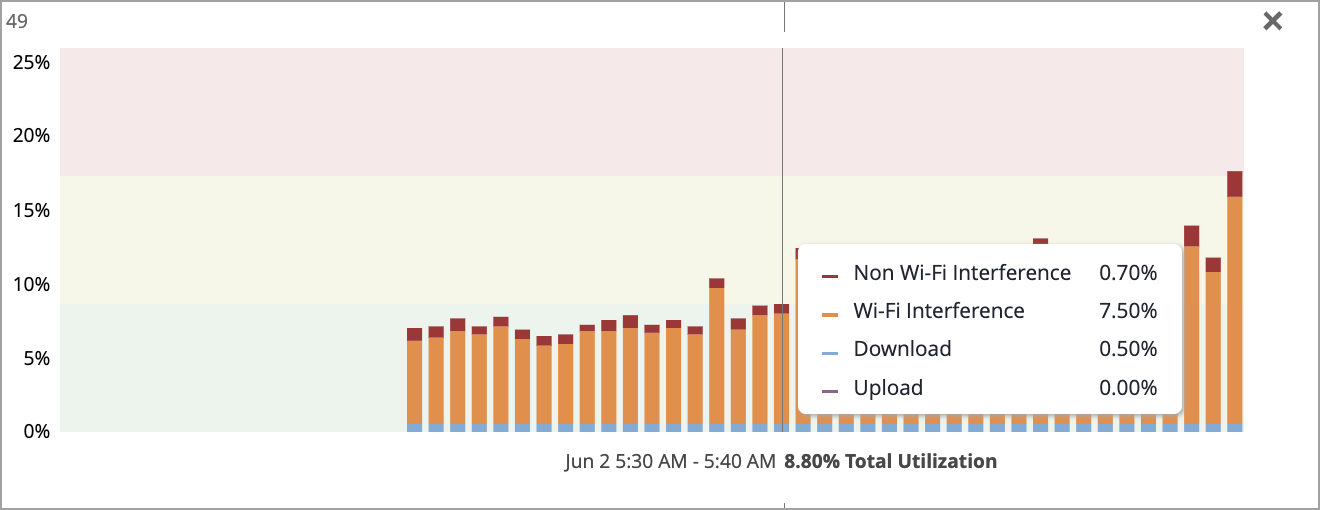
A new Channel Utilization visualization is now available on the AP Insights page and Marvis Query Language (MQL) screens, providing a detailed per-channel, per-radio breakdown of how airtime is being used. This gives network administrators granular visibility into the sources of channel utilization across 2.4 GHz, 5 GHz, and 6 GHz bands, enabling faster identification of interference issues and capacity constraints.
On the AP Insights page, each channel's total utilization is shown as a color-coded bar. Click any channel bar to expand an inline breakdown showing the utilization distribution by source such as upload, download, Wi-Fi interference, and Non-Wi-Fi interference.
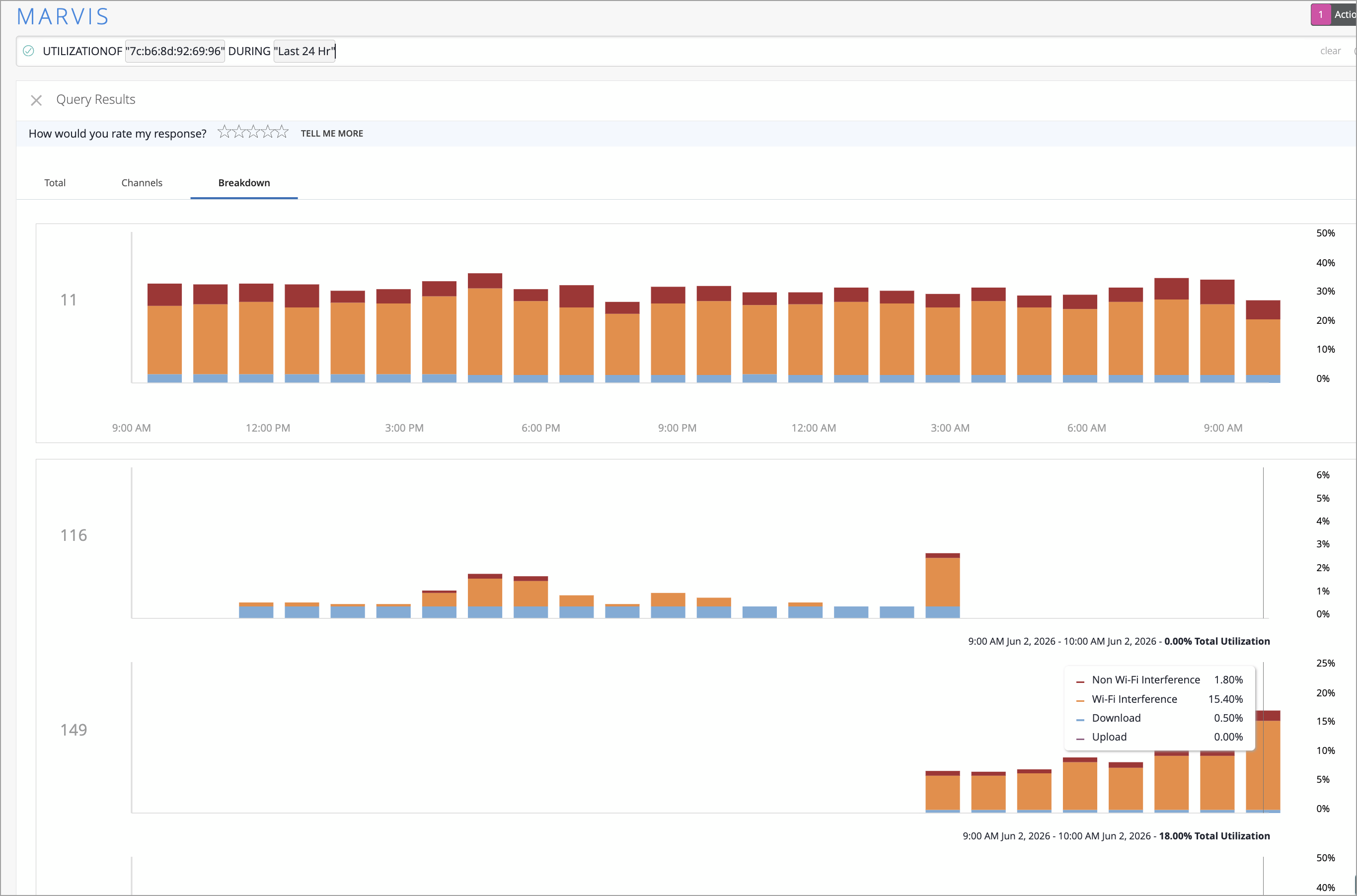
You can also use the Marvis query UTILIZATIONOF <AP MAC> DURING <Time Duration> to get channel utilization insights across the following three tabs:
Total—Aggregated utilization over time for all bands (2.4 GHz, 5 GHz, 6 GHz).
Channels—Per-channel utilization for each band.
Breakdown—Detailed source-level breakdown per channel (upload, download, Wi-Fi interference, and Non-Wi-Fi interference).
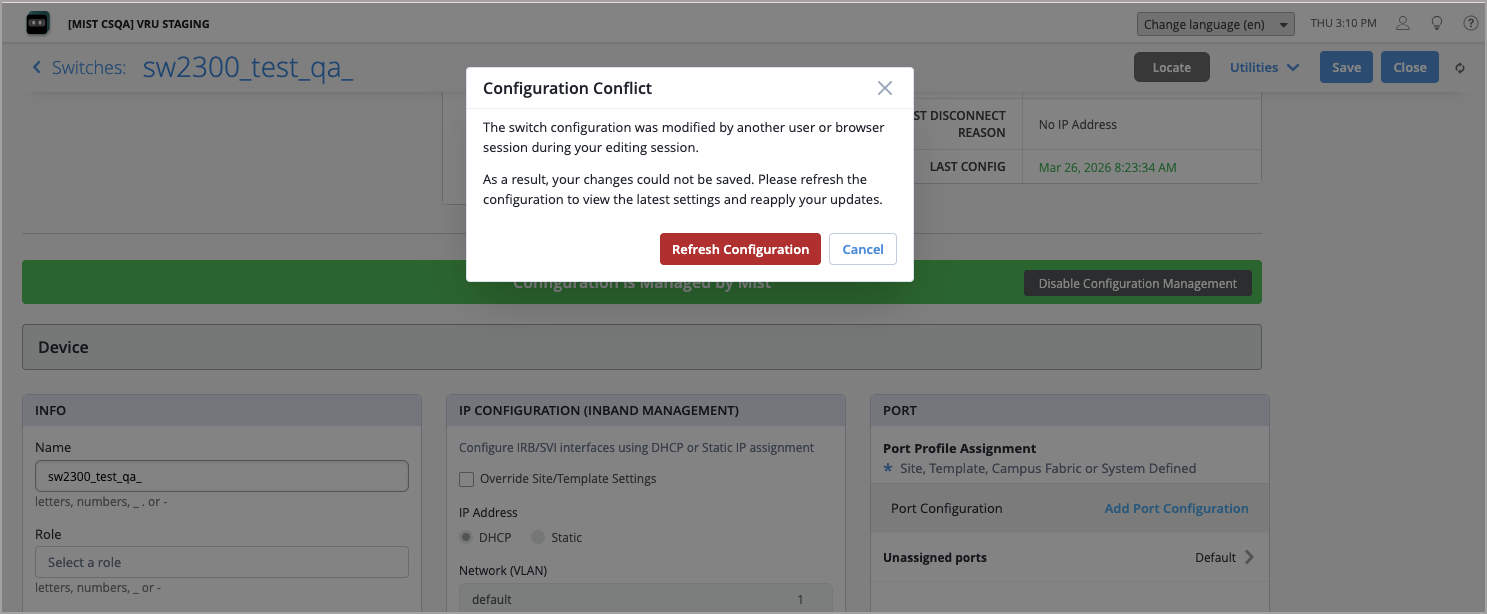
When multiple administrators edit the same switch configuration simultaneously, the system now detects conflicts and prevents one user from inadvertently overwriting another’s changes. If you attempt to save a switch configuration that has been modified by another administrator since you loaded the page, a Configuration Conflict pop-up window appears. This alert informs you that the configuration has changed. You can then refresh the page to load the latest configuration and reapply your changes, ensuring that no work is silently lost.
This feature applies to all configuration fields on the Switch Detail page, including port configuration, network settings, port profiles, static routes, NTP, DNS, routing policies, and more. It works across all administrator roles and browser sessions.
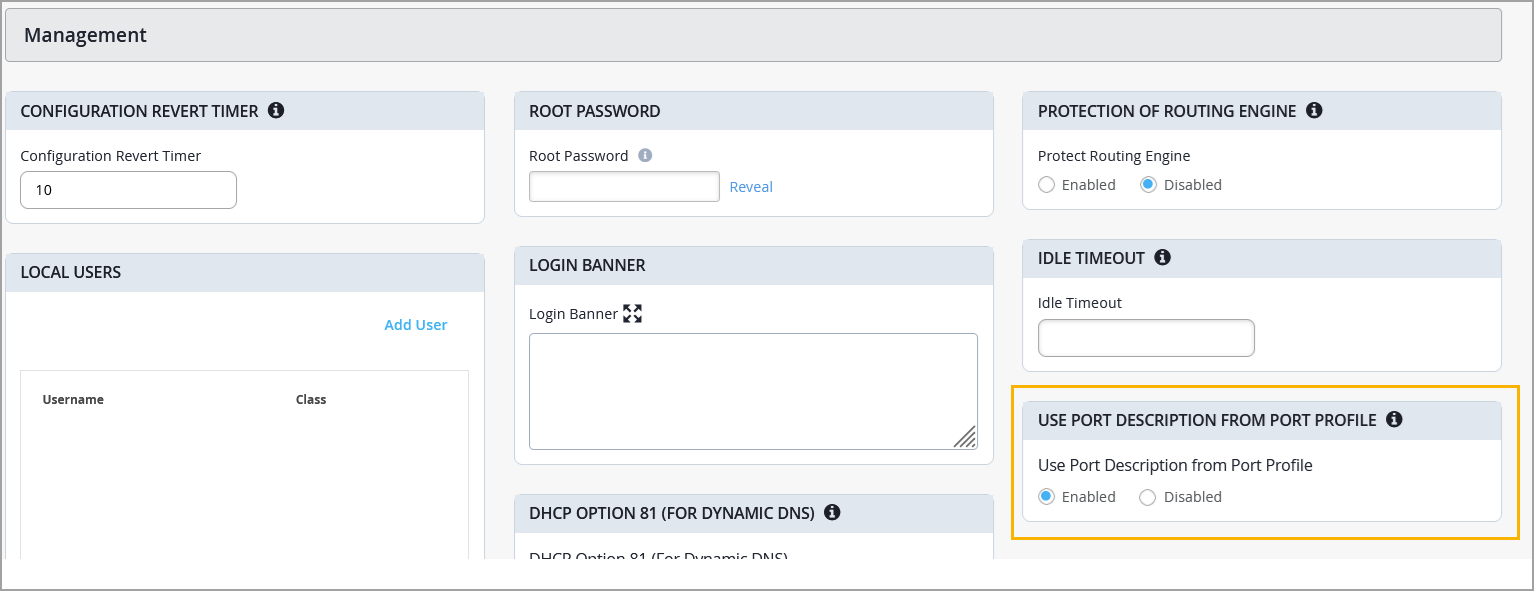
You can now push port descriptions defined in port profiles directly to your switches using the Use Port Description From Port Profile toggle in switch settings. Enable the Use Port Description From Port Profile toggle in the Management section of the switch details page or a switch template to apply the port profile description to the device configuration—making it visible in CLI outputs such as show interfaces descriptions. Previously, port profile descriptions were used only for display purposes in the Mist portal. If a port-level description is also configured for an individual port, it takes precedence over the port profile description.
The ping test utility under Switch Testing Tools now supports IPv6 addresses and VRF (Virtual Routing and Forwarding) input, giving network administrators more flexibility when troubleshooting connectivity from managed switches. You can find Switch Testing tools under Utilities > Testing Tools on the switch details page.

On the WAN Edge device details page, you can see the resolved value for fields configured with site variables by hovering over the field.
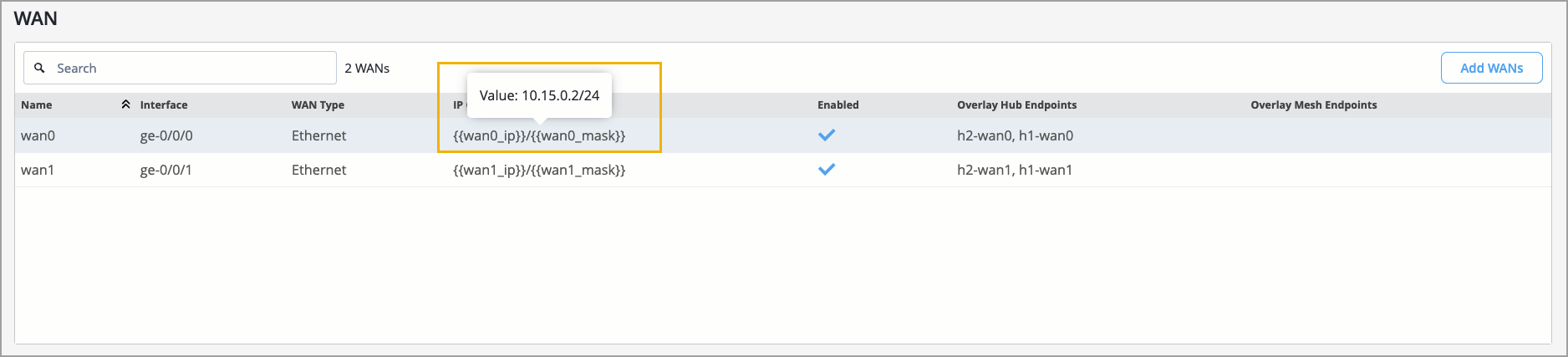
For more information on site variables, refer to Use Site Variables to Streamline Configuration.
Juniper Mist WAN Assurance now supports the SRX4120 as a WAN Edge device.
WAN Assurance simplifies all aspects of WAN Edge device management that include device onboarding, configuration at scale, and monitoring and troubleshooting. With WAN Assurance, you can monitor your WAN in real time and gain full visibility into its health and performance. You can see how your WAN Edge devices are doing, check out service level expectations (SLE) metrics, and even get insights into the end user experiences, among other things.
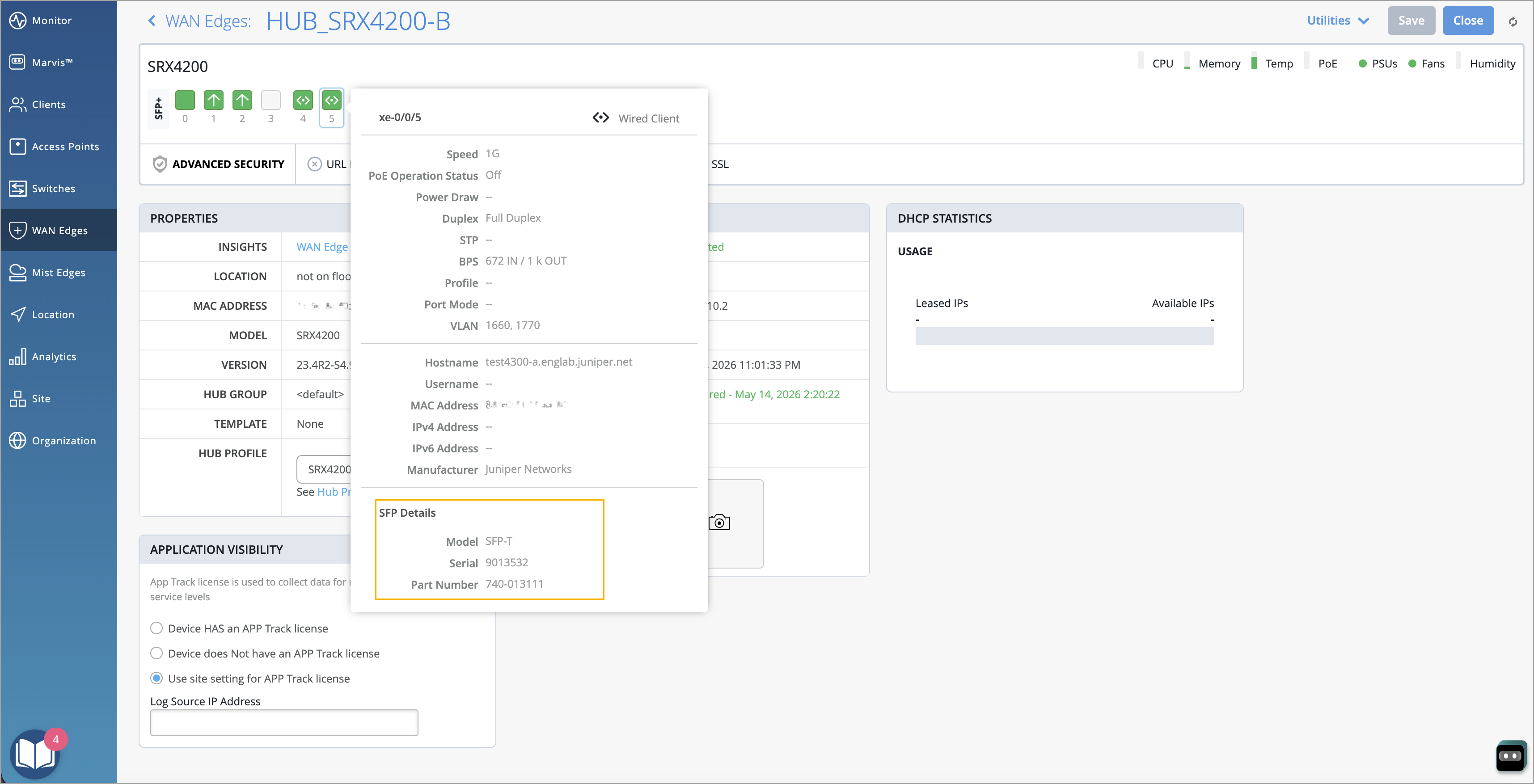
You can now view details of the SFP transceiver connected to your WAN Edge device interfaces directly in the device details page, including the SFP model, part number, and serial number. This information is displayed alongside other interface-level data, eliminating the need to SSH into devices and run CLI commands to identify installed optics. To view SFP transceiver details, navigate to the WAN Edge device details page (WAN Edges > WAN Edges > WAN Edge name) and hover over the port to which the SFP is connected. This feature improves operational efficiency by providing quick access to optics information directly from the Mist portal, reducing troubleshooting time and dependency on CLI access.
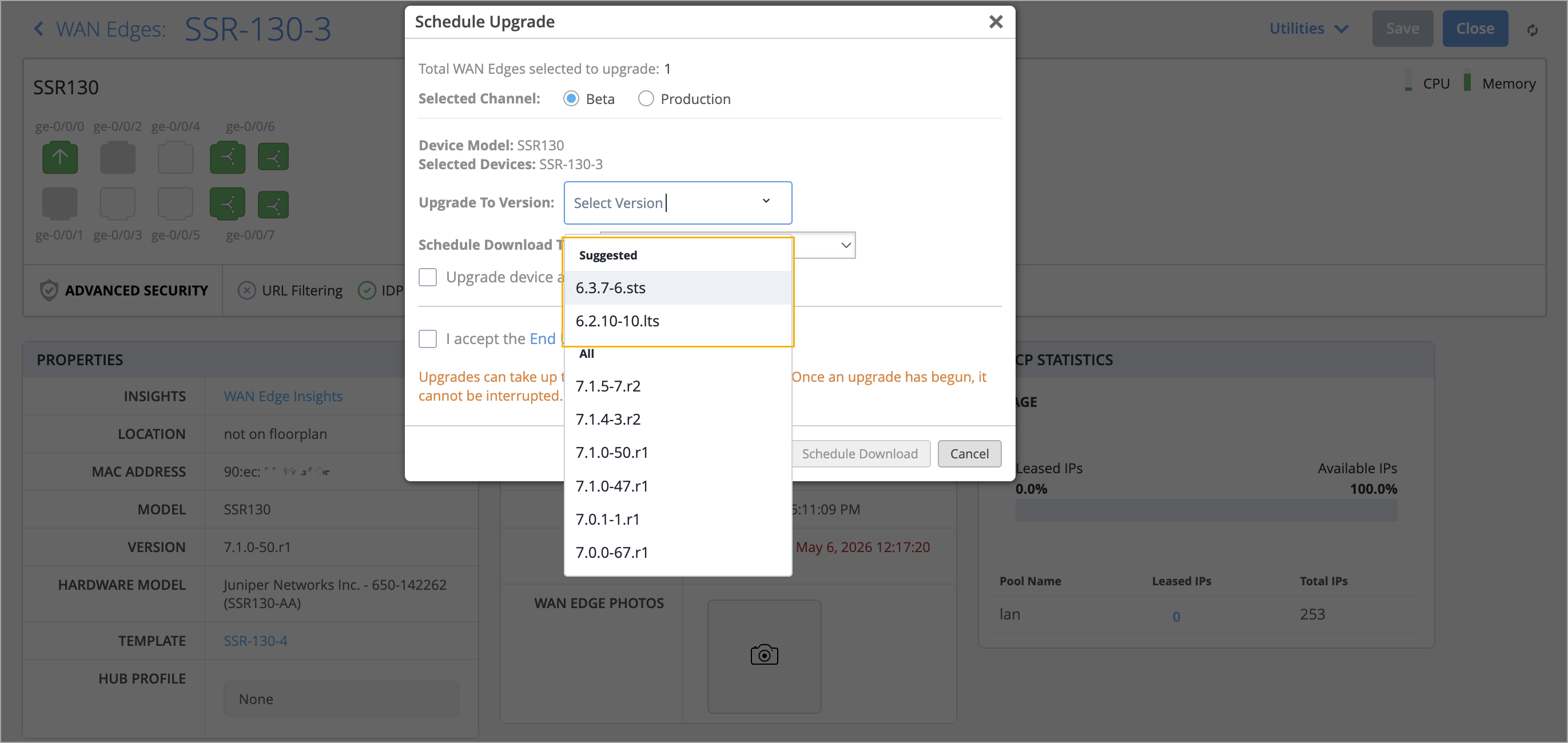
The firmware upgrade page in Mist now highlights Mist-suggested firmware versions for Session Smart Router (SSR) WAN Edge devices, bringing feature parity with the upgrade experience available for SRX gateways and EX switches. These firmware versions have been validated and are considered optimal for production deployments. They are grouped under a Suggested category, which appears at the top of the version selector drop-down list on the upgrade page.
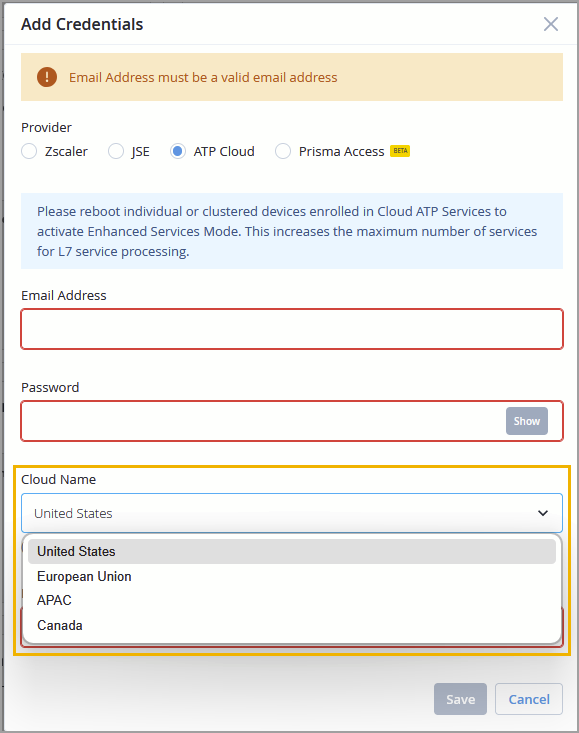
Mist now supports selecting the ATP cloud region as part of Secure WAN Edge integration. You can configure the cloud region using the Cloud Name field on the ATP Cloud integration page
(Org Settings > Secure WAN Edge Integration > Add Credentials > ATP Cloud).
For more information, refer to Unified upgrade orchestration for switches and WAN Edges.
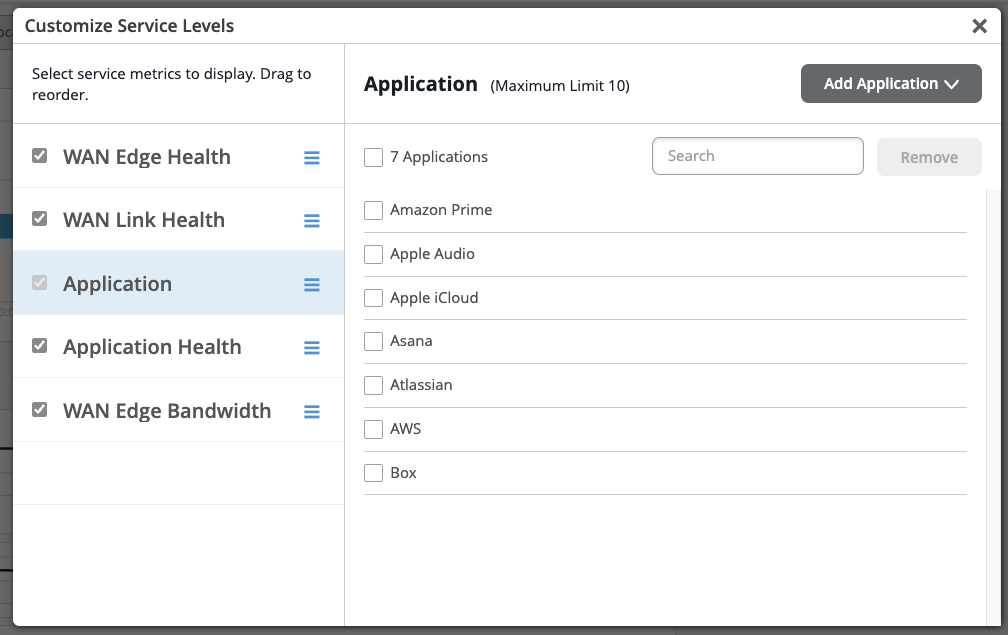
All curated applications that were previously available only on SSR are now fully supported for Application SLEs on SRX, providing feature parity between SSR and SRX for application-level SLE monitoring.
To configure this, go to Monitor > Service Levels, select the WAN tab, and click Settings. In the Settings pop-up, select the Application tab. You’ll see an expanded list of supported applications and an Add Application option that lets you add or customize the applications being tracked.
This enhancement gives you greater flexibility to select and monitor application-level SLE metrics for SRX devices.
We have made several improvements to the Mist Edge upgrade experience in the Mist portal to provide clearer naming, more accurate upgrade notifications, and better model-specific handling. Here are the enhancements:
The Mist Edge OS version labels have been updated to the user-friendly MEOS10, MEOS11, MEOS12 format.
The upgrade notification on the Mist Edge list has been refined to better distinguish between service-only and OS-level upgrades:
The “Firmware upgrade available" message is rephrased to "OS upgrade recommended" and it is displayed when a newer Mist Edge OS version is available, indicating that the upgrade includes a base OS and Mist Edge services update.
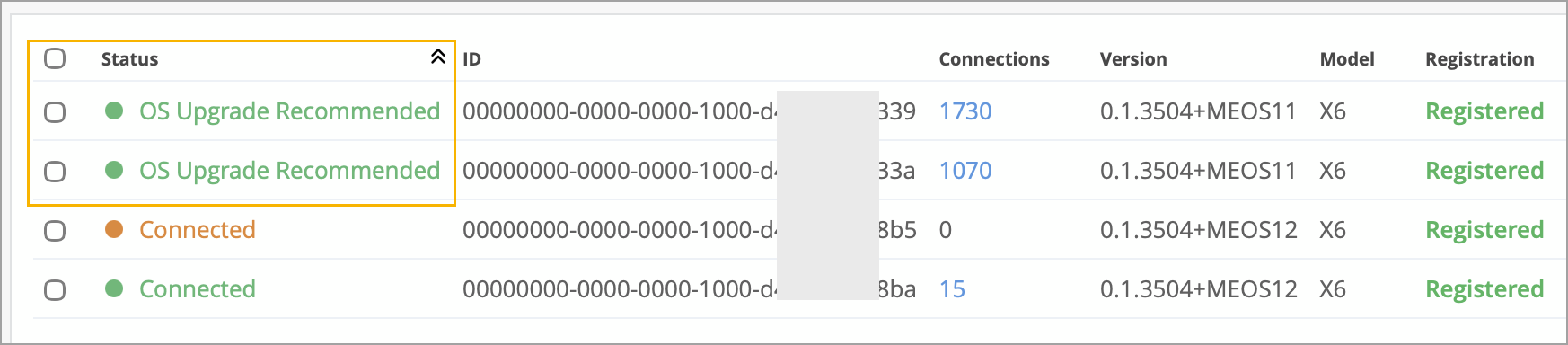
A triangle icon is shown when only a Mist Edge tunnel service (firmware) upgrade is available and no OS upgrade is required.
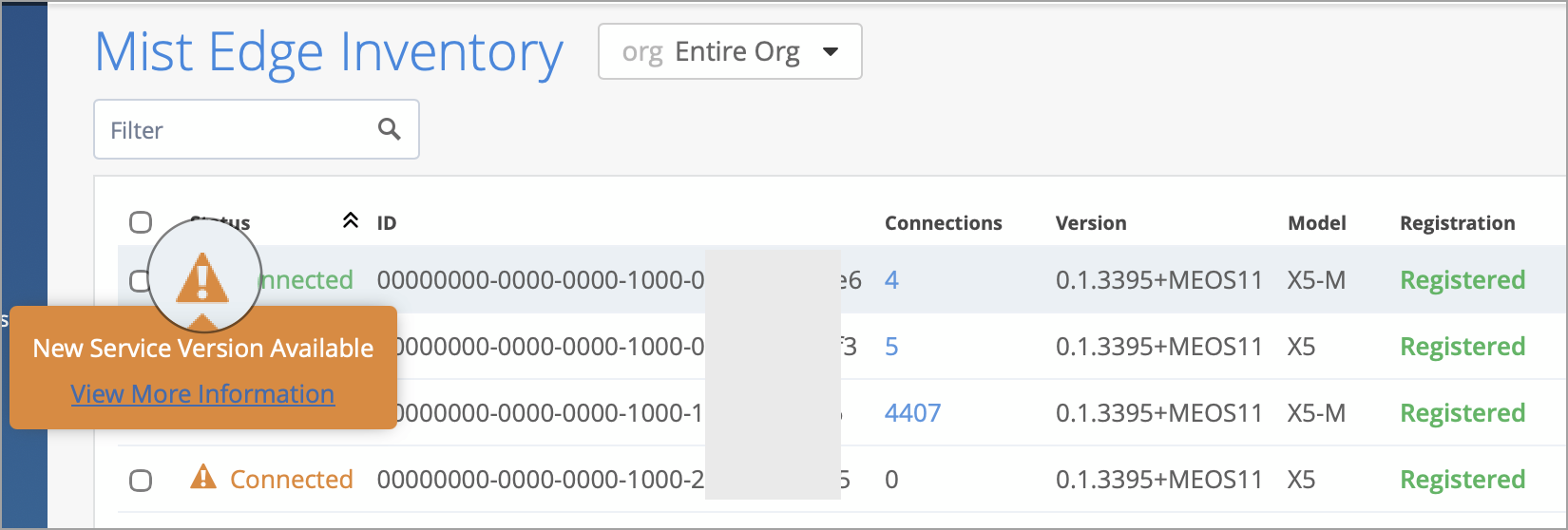
The ME-X5,ME-X5M and ME-X10 models are excluded from OS upgrade prompts, consistent with the existing behavior for ME-X5M and ME-X10.
OS upgrades are currently restricted to Mist Support only. When a user selects "Upgrade OS and Service," the "Confirm & Upgrade" button is disabled, and the following message is displayed: "Contact Mist Support for upgrading the Mist Edge OS." Users who need an OS upgrade should reach out to Mist Support for assisted upgrades.
The Mist dashboard now displays the battery percentage of HPE Aruba BLE asset tags. You can view battery percentage information for Aruba asset tags on the MFG Data tab of the BLE Clients page (Clients > BLE Clients > Named Assets).
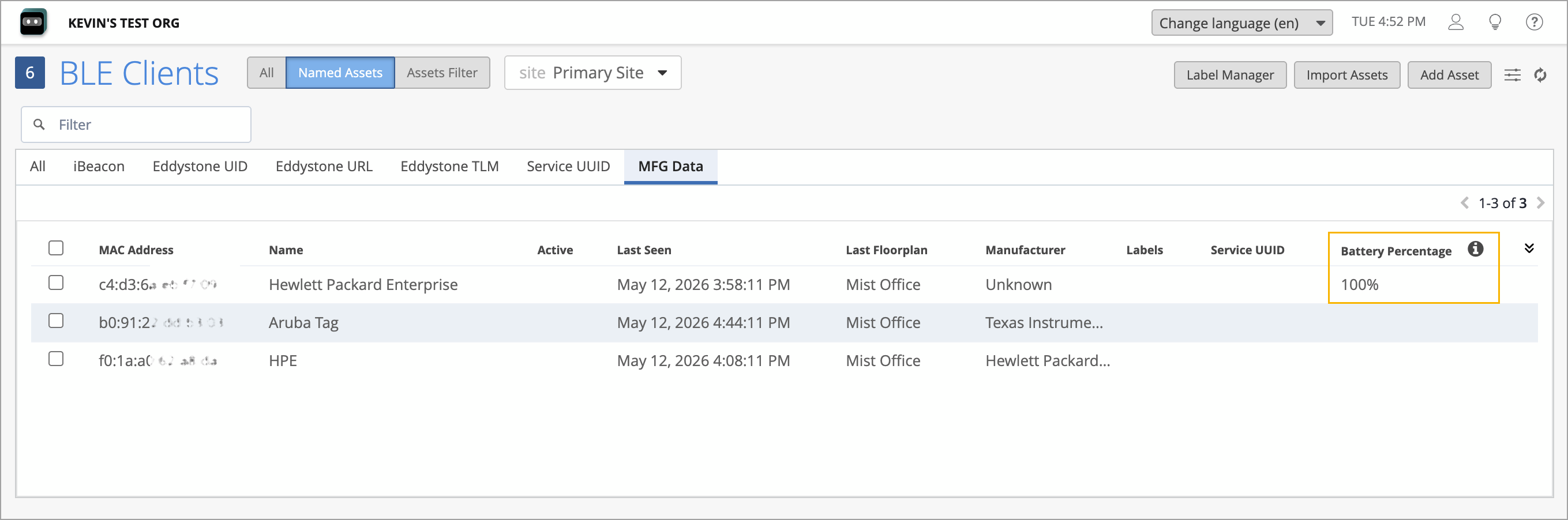
This visibility enables customers to proactively monitor battery levels and plan replacements before tags go offline, helping reduce gaps in asset‑tracking coverage.
This feature applies only to named Aruba asset tags with Vendor ID 0x11B and subtype 0x06.
Premium Analytics is now available to users restricted to specific sites or site groups. When these users open Premium Analytics dashboards on the Mist portal, only their allowed site list is passed to the analytics backend so that dashboards display data solely for sites they are permitted to view.
This improves consistency with existing role‑based access controls:
Org‑level users (Super User, Org Admin, Super Observer, Network Admin with Org Read) see analytics for all sites.
Site‑restricted roles (Network Admin without Org Read, Observer, Helpdesk) now see analytics limited to their assigned sites; If a user’s site assignment is "All sites", dashboards show org‑level analytics.
PMA enforces these restrictions across dashboard displays, data downloads, and scheduled reports.
Note: Site‑based access supports roughly up to 100 sites per user. For users needing access to more than 100 sites, you must grant org‑level access.
Juniper Mist is deprecating the legacy site-level Marvis Insights API endpoint and its corresponding UI view—previously accessible under Monitor > Marvis Actions—in favor of the unified Alerts framework. Customers and integrations currently relying on this endpoint must migrate to the replacement Alerts endpoints before the End-of-Support date.
The following will not be supported after December 2026.
API Endpoint—GET /api/v1/sites/{site_id}/insights/marvis
UI View—Analytics > Events
Customers should migrate to the following alerts API endpoints:
Purpose | Endpoint |
Search site-level alerts | GET /api/v1/sites/{site_id}/alarms/search |
Search org-level alerts | GET /api/v1/orgs/{org_id}/alarms/search |
Retrieve alarm definitions | GET /api/v1/const/alarm_defs |
Manage org-level alarm templates | GET /api/v1/orgs/{org_id}/alarmtemplates |
The UI view corresponding to the site-level Marvis Insights API endpoint will be incorporated under Monitor > Alerts.
Milestone | What to Expect | Target Date |
Deprecation Announcement | Official notice issued; legacy endpoint remains fully functional | June 2026 |
UI Deprecation | The Analytics > Events page removed from the Mist portal | September 2026 |
API End-of-Support (EOS) | Legacy API endpoint removed; all calls will return HTTP 410 (Gone) | December 2026 |
All customers and API integrations using GET /api/v1/sites/{site_id}/insights/marvis must complete the following before December 2026:
Migrate to GET /api/v1/sites/{site_id}/alarms/search (or the org-level equivalent) with equivalent query parameters.
Use GET /api/v1/const/alarm_defs to map legacy Marvis insight types to their corresponding alarm definitions.
For organizations managing alarm policies via API, switch to GET /api/v1/orgs/{org_id}/alarmtemplates for template management.
Test the new endpoint responses against your existing workflows and integrations prior to the end-of-support date.