
Replace a Standalone WAN Edge Device
You can replace a connected or disconnected WAN Edge device with another device of the same model.
You can replace an existing WAN Edge with a new one of the same model. The existing WAN Edge should already be claimed and adopted to the site, and the new WAN Edge should exist in your organization's inventory so it can be adopted into the site.
The configuration from the existing WAN Edge will be cloned to the replacement device, and the replaced device will become unassigned.
To replace a WAN Edge device with another device of the same model:-
On the Replace WAN Edge window, select the new replacement device’s MAC address from
the MAC Address of unassigned WAN Edge drop-down list.
Figure 1: Replace a Standalone WAN Edge device
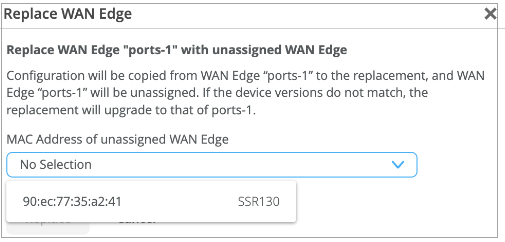
The Juniper Mist portal displays a list of supported models available in the Inventory page in an unassigned state.
After you click Replace, allow about 15 minutes to complete the replacement procedure. Mist copies the configuration of the replaced WAN Edge device to the new device. The device you replaced continues to be part of the site in an unassigned state.
Note: Replacing a device causes minimal impact on network services. Therefore, we recommend that you plan to do this task during a maintenance window.Refresh your browser and check under WAN Edges to find out if your WAN Edge device is available as a part of the inventory.