
Mist Edge Insights
Investigate issues affecting Mist Edges.
Finding the Insights for Mist Edges
Go to the Insights page, click the site menu at the top of the page, then click Mist Edge on the left, and then click the Mist Edge that you want to view.
Mist Edge Events
Click an event to see a summary on the right side of the page.
Use the tabs at the top of this section to show all, good, neutral, or bad events.
Event Types
Events include:
-
AP Tunnel Bounce Success
-
All Tunnel Interface Dropped from LACP
-
All Tunnels Disconnected
-
AP Auto Preemption Skipped
-
AP Tunnel Bounce by User
-
AP Tunnel Bounce Failed
AP Tunnel Bounce Success
-
Configuration Failed
-
Configuration Modified
-
Configuration Modified by User
-
Connected to Mist
-
Disconnected from Mist
-
Distro Upgrade Completed
-
Distro Upgrade Failed
-
Fan Connected
-
Fan Disconnected
-
First Tunnel Connected
-
First Tunnel Interface Joined LACP
-
Inactive Upstream VLAN Detected
-
Last Tunnel Interface dropped from LACP
-
Primary Radius Server Changed
-
Primary Radius Server Unresponsive
-
PSU Inserted
-
PSU Withdrawn
-
Restarted
-
Restarted by User
-
Secondary Power Connected
-
Secondary Power Disconnected
-
Service Failed to Start
-
Service Install Failed
-
Service Installed
-
Service Restarted
-
Service Started
-
Service Uninstalled
-
Service Update Failed
-
Service Version Updated
-
Tunnel Interface Blocked
-
Tunnel Interface Bounce Failed
-
Tunnel Interface Bounce Success
-
Tunnel Interface Bounced by User
-
Tunnel Interface Dropped from LACP
-
Tunnel Interface Forwarding
-
Tunnel Interface Joined LACP
-
Tunnel Interface Link DOWN
-
Tunnel Interface Link UP
-
Tunnel Interface Upstream Monitored Resource Reachable
-
Tunnel Interface Upstream Monitored Resource Unreachable
Port Charts
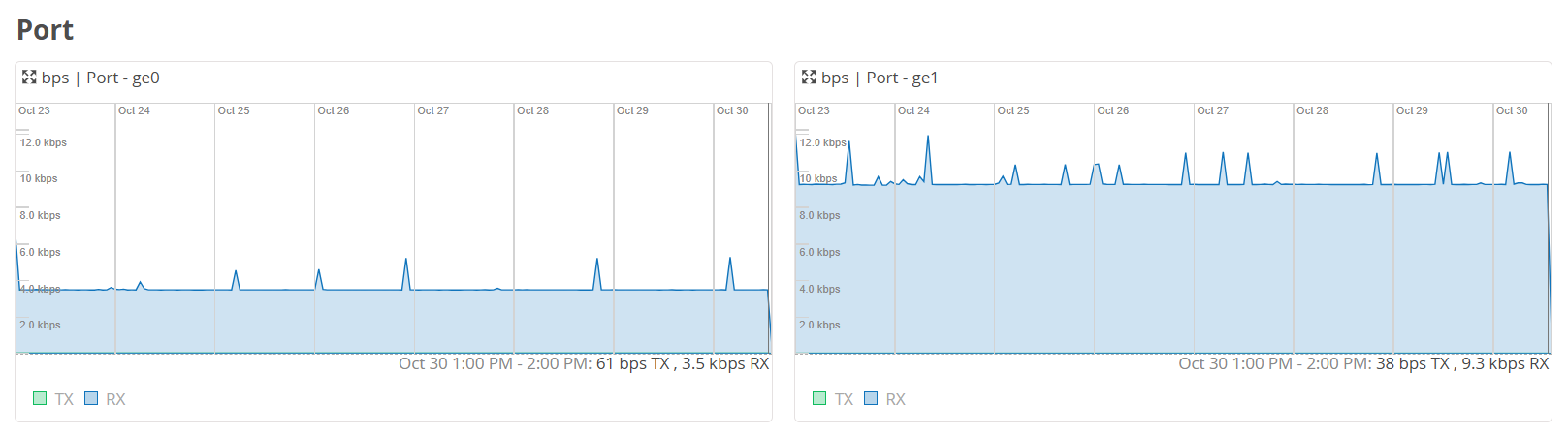
The charts show TX/DX data for each port.
In each chart, hover your mouse pointer over any data point to see the details.
Current Values for Mist Edges
The Current Values section appears toward the bottom of the Insights page. The context at the top of the page determines the information that you'll see here.
The values in this section don't change when you adjust the time range selection at the top of the page.
When you select a Mist Edge as the context, the Current Values section includes:
-
Properties
-
Status
-
LACP Status
-
Port Stats
-
LLDP Stats