
Add Identity Providers
Follow these steps to add your identity providers to your organization to enhance authentication and access control. Understand the various options available in the Identity Provider (IdP) settings.
You can integrate your organization with various Identity Providers (IdPs) to enhance authentication and access control. Identity providers serve as authentication source (in case of EAP-TTLS) and authorization source (by obtaining user group memberships, account state etc) for EAP-TLS or EAP-TTLS.
Here are the supported IdPs:
-
Microsoft Entra ID (formerly known as Azure Active Directory)
-
Okta Workforce Identity
-
Google Workspace
-
HPE Mist Networking Edge Proxy
-
OpenRoaming
HPE Mist Networking Access Assurance uses identity providers (IdPs) to:
- Get additional identity context such as user group memberships and account state of
clients.
This information is available in certificate-based authentication methods such as Extensible Authentication Protocol–Transport Layer Security (EAP-TLS) and Extensible Authentication Protocol–Tunneled TLS (EAP-TTLS).
- Authenticate clients by validating credentials. EAP-TTLS supports credential-based authentication.
Remember that configuring IdPs is optional for EAP-TLS certificate-based authentication, but it is mandatory for credential-based authentication (EAP-TTLS). If you're setting up an IdP, ensure you have the necessary details, such as client ID and client secret, from the identity provider.
HPE Mist Networking Access Assurance uses the following protocols to integrate into any IdP to look up users and get device state information:
- Secure Lightweight Directory Access Protocol (LDAP)
- OAuth 2.0
Configuring IdPs is optional for EAP-TLS certificate-based authentication and mandatory for credential-based authentication (EAP-TTLS).
Prerequisites
-
If you're using Azure, Okta, or similar IdPs, register with the IdP. You can obtain the client ID and client secret details from the IdP after registration.
For help, see:
If you're using HPE Mist Networking Edge Proxy as IdP, claim or register an HPE Mist Networking Edge and create HPE Mist Networking Edge cluster.
You can do these tasks by selecting Mist Edges from the left menu of the HPE Mist management portal. Then use the buttons to Claim Mist Edge, Create Mist Edge, and Create Cluster.
To add identity providers:
-
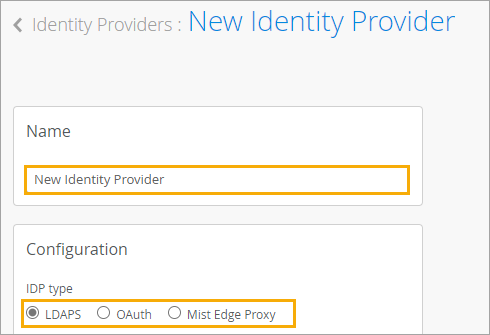
On the New Identity Provider page, enter a Name and select the
IDP type:
-
LDAPS
-
OAuth
-
Mist Edge Proxy
-
OpenRoaming
-