
Stitching Layer 2 VPNs and VPWS
Stitching an Layer 2 VPN (L2VPN) and a Virtual Private Wire Service (VPWS) tunnel enables seamless forwarding of traffic in the network. Configure interwork interfaces to stitch the L2VPN and VPWS tunnel without a physical interface.
When two Layer 2 point-to-point services converge on a device, you can stitch the two services together to move traffic across seamlessly. In a spine-leaf architecture, the spine acts as an aggregation point where southbound traffic from the backbone uses an L2VPN and northbound traffic from the access layer uses VPWS. Stitching allows you to stitch an L2VPN tunnel to a VPWS tunnel seamlessly without dedicating a physical hardware interface to loop packets from the L2VPN to VPWS.
Figure 1 shows a spine-leaf topology where the spines connect to the backbone of a provider’s network and the leaf devices connect to the customer’s access network. The spine is the convergence point for the L2VPN and VPWS.
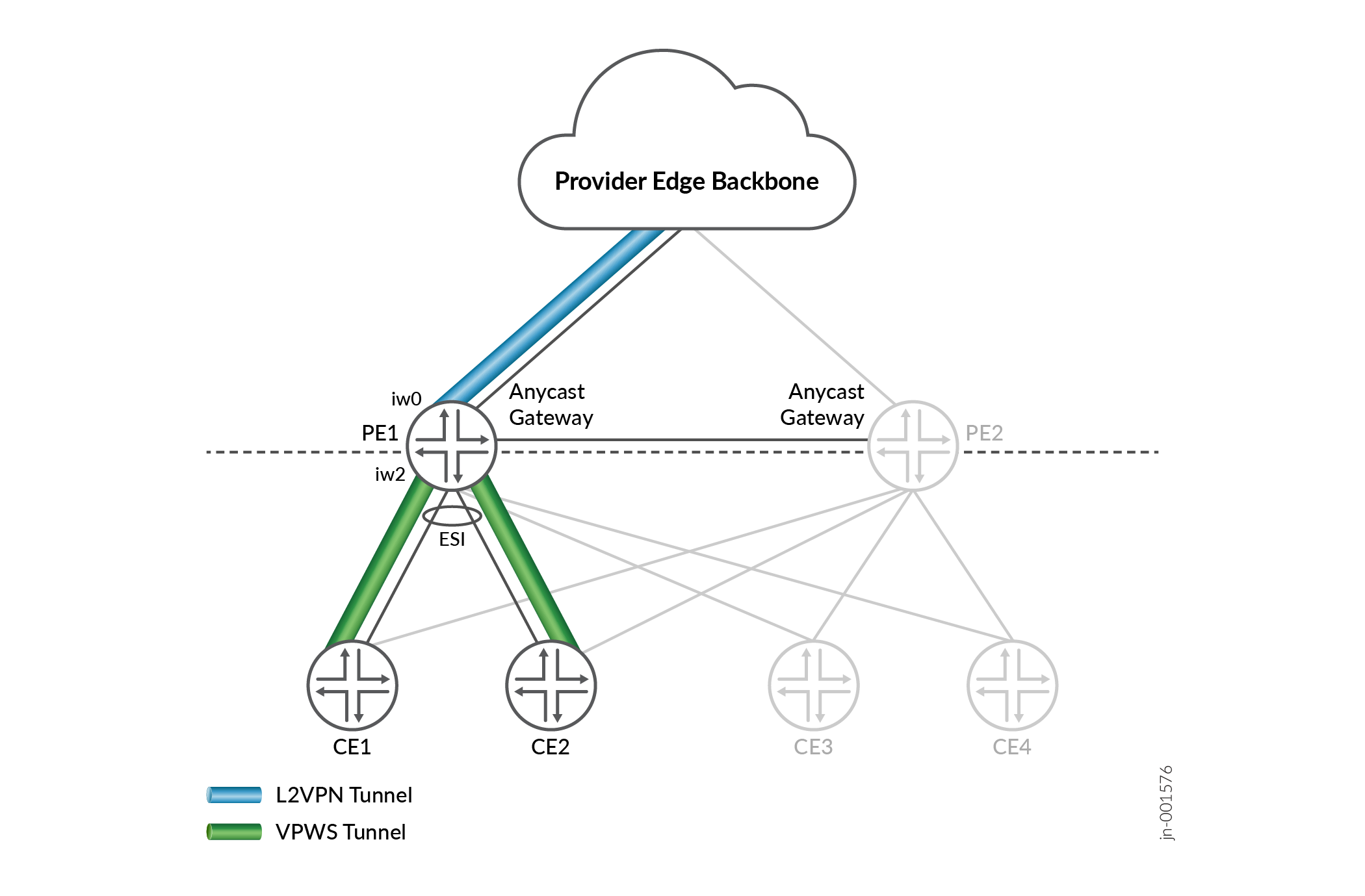
The following sample configuration snippet is for PE1. You must use a similar configuration for PE2.
Enable load balancing on the leaf devices to ensure that the traffic will be distributed across the spines.
set policy-options policy-statement pplb then load-balance per-packet
set routing-options forwarding-table export pplb
Verification
Confirm that the L2VPN and VPWS tunnels are stitched using the following commands:
-
show l2vpn connections
-
show evpn vpws-instance
-
show route table mpls.0
Use the show l2vpn connections command to display the label used in the
VPN connection.
user@pe1>show l2vpn connections
Edge protection: Not-Primary
          Local site: CE1 (10)
             connection-site           Type  St     Time last up          # Up trans
             11                     rmt   Up     May 12 12:11:51 2025           1
             Remote PE: 172.16.7.7, Negotiated control-word: Yes (Null)
           Incoming label: 200, Outgoing label: 100
                 Local interface: iw0.0, Status: Up, Encapsulation: VLAN
                 Flow Label Transmit: No, Flow Label Receive: No
Use the show evpn vpws-instance command to display label used in the
VPWS instance.
user@pe1> show evpn vpws-instance
     Instance: VPWS1, Instance type: EVPN VPWS, Encapsulation type: MPLS, Enhanced convergence: Disabled
     Route Distinguisher: 172.16.1.1:10
     Number of local interfaces: 2 (0 up)
         Interface name  ESI                            Mode          Role       Status     Control-Word    Flow-Label-Tx    Flow-Label-Rx
         iw2.0           00:01:02:03:04:05:06:07:08:09 all-active      Primary    Up         No              No               No
          Local SID: 10 Advertised Label: 300
          Remote SID: 11
          PE addr         ESI                           Label  End.Dx2 SID     Mode           Role     TS                      Status
            172.16.1.4    (LEAF)     00:00:00:00:00:00:00:00:00:00 400                 single-homed   Primary  2025-05-12 12:06:55.598 Resolved
Use the show route table mpls.0 command to verify that packet labels are
being swapped
user@pe1>show route table mpls.0
    200             *[L2IW/6] 00:11:33, metric2 1
                          >  to 4.0.0.1 via et-0/0/3.0, Swap 400.
                         [L2VPN/7] 00:11:33
                          >  via iw2.0, Pop       Offset: 4
   300             *[L2IW/6] 00:11:33, metric2 1
                          >  to 7.0.0.2 via et-0/0/0.0, Swap 100, Push 299776(top)
			[EVPN/7] 00:12:24
		             >  via iw0.0, Pop