
Configure an Anycast Gateway in an L2VPN
Configure a single IP address to function as an anycast gateway across multiple devices within a L2VPN.
Anycast is a networking feature where you can assign the same IP address to multiple devices in a network. Anycast enables the devices to use the same IP address as a default gateway for incoming traffic. The benefits of anycast include redundant connectivity and improved resiliency in the network.
In an MPLS network, PE devices typically assign unique inner VPN labels dynamically to identify the different VPN. The outer label is used to forward the packet across the service provider's core network, while the inner VPN label is used to identify a specific customer VPN. When you have multiple devices sharing an IP address for the gateway, dynamic label allocation can lead to inconsistencies in the VPN label. This causes duplicate entries in the routing table and inefficiencies in the network. Starting in Junos OS Release 25.4R1, we support static labels for each VPN site.
Figure 1 illustrates a topology of a L2VPN with an anycast IP address. The PE devices (PE3 and PE4) have different loopback addresses for the BGP protocol, but share an IP address for the anycast gateway. The sample configuration for configuring anycast address on PE3 is described below. Use a similar configuration for PE4.
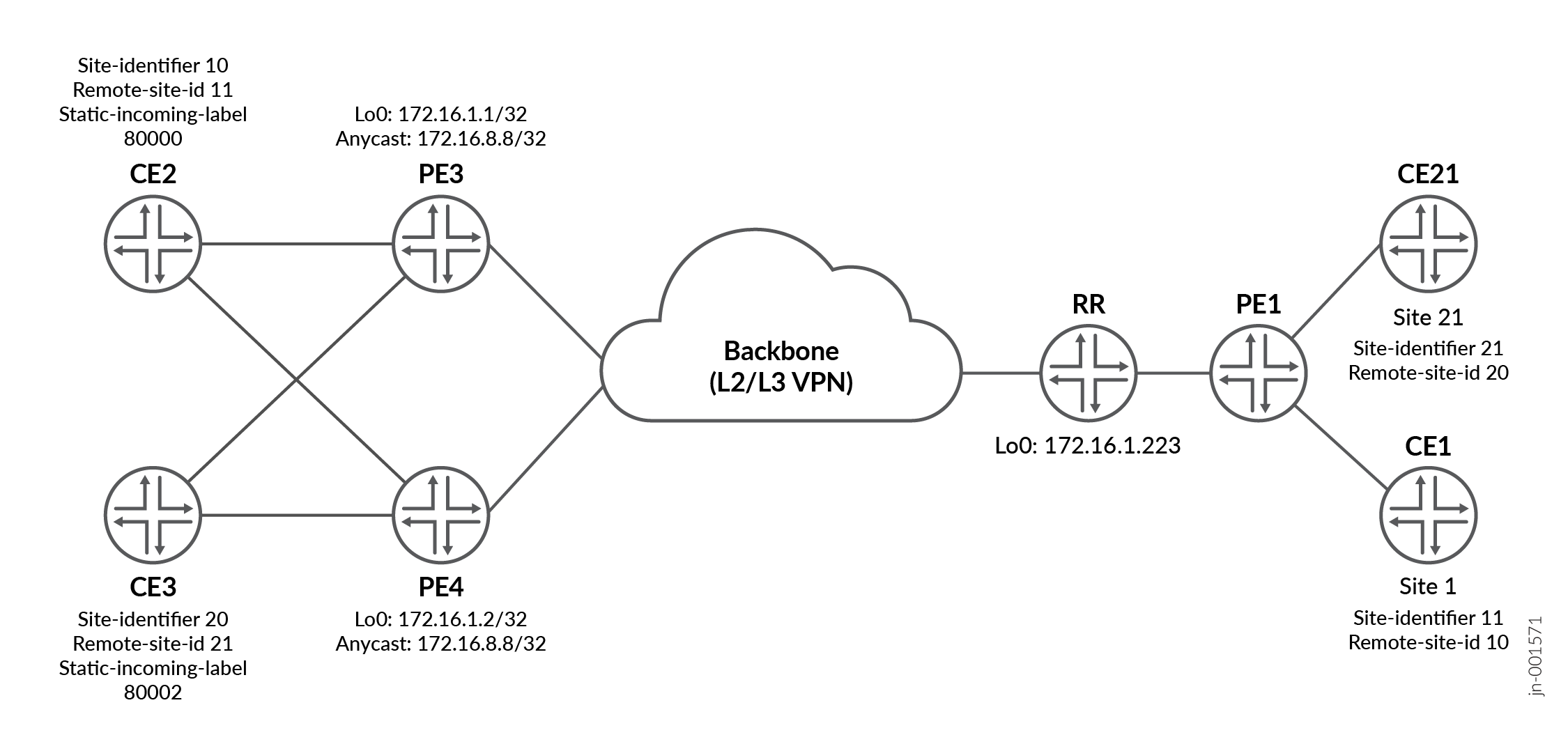
Use the show l2vpn connections command to verify that the labels are being applied.
regress@PE1_re> show l2vpn connections
Instance: L2VPN1
Edge protection: Not-Primary
  Local site: CE2 (10)
connection-site           Type  St     Time last up          # Up trans
11                     rmt   Up     Apr  9 13:51:11 2025           1
      Remote PE: 172.16.7.7, Negotiated control-word: Yes (Null)
      Incoming label: 800000, Outgoing label: 800009
      Local interface: et-0/0/0.1, Status: Up, Encapsulation: VLAN
      Flow Label Transmit: No, Flow Label Receive: No
 regress@PE1_re> show route table mpls.0
mpls.0: 13 destinations, 15 routes (13 active, 0 holddown, 0 hidden)
+ = Active Route, - = Last Active, * = Both
    800000        [L2VPN/7] 23:46:00
                        >  via et-0/0/0.1, Pop       Offset: 4.
et-0/0/0.1     *[L2VPN/7] 23:46:00, metric2 1
                   >  to 2.0.0.1 via et-0/0/0.0, Push 800009, Push 299792(top) Offset: 252